Best Local LLM for Coding, Plus the API and Image Models I Use
In today's post I'm taking a closer look at the best LLM for coding, both local and over an API. Here are the local and API models in my setup, the job each one does and the tests behind it, plus the image models I use.
 Richard Baxter AI Ops & Marketing Engineer
 On this page
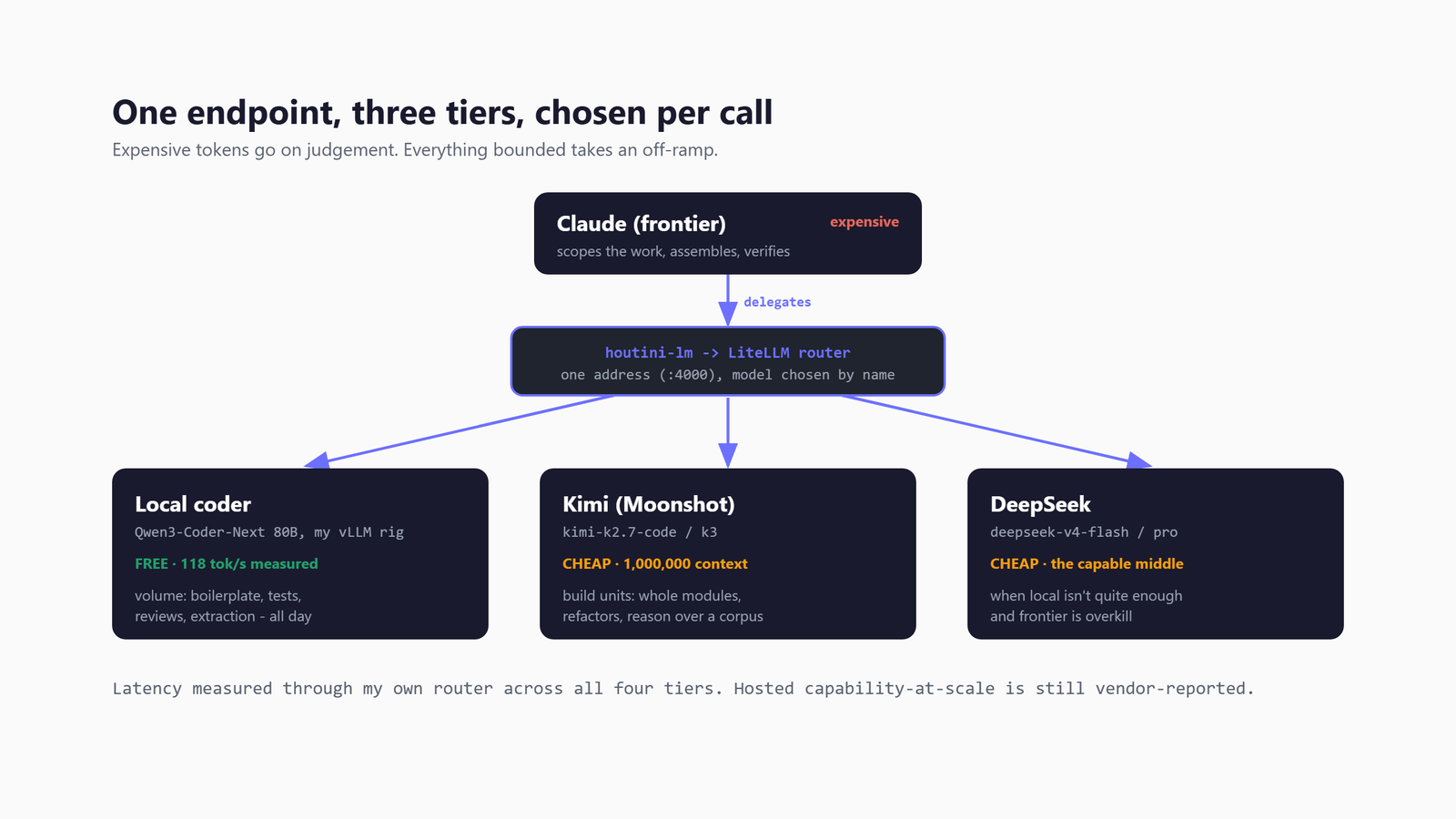
If you're trying to pick a model for coding, here's what runs in my own setup. The best local LLM for coding on my rig is Qwen3.8-27B, a 4-bit AWQ build that runs on one 48GB card. Over an API, DeepSeek V4 Pro does the building, and Claude does the scoping and the assembly. For images, it's Gemini's Nano Banana Pro.
That said, I think "which model" is the wrong question. What got me to a setup I trust was asking which model should do which part of the job. The answer to that isn't a model, it's a routing rule. The expensive model scopes the work and assembles the result, a cheap API model builds the modules, and a model on my own hardware does the volume work (boilerplate, tests, first-pass reviews) for the price of the electricity. Which means the expensive tokens get spent on judgement rather than typing.
Most of what follows comes from tests I've run on my own hardware and on the API models, and where a number is reported rather than measured, I say so. The hardware is two modded 48GB RTX 4090s in my office. If you've never run a local model before, start with LM Studio and come back to this afterwards.
Quick Navigation
Best local LLM |
Qwen Coder and DeepSeek Coder |
Best API model |
The routing |
Other local models |
Image models |
Not proven yet
The best local LLM for coding on my rig
Qwen3.8-27B took over the job on 6 October, and it's a hybrid model. Three of every four layers use linear attention, which keeps a fixed-size summary of what it has read rather than looking back over every earlier token. Every fourth layer is full attention, which does look back over all of them. It reads images as well as text, and its native context (how much text it can work with at once) is 262,144 tokens. Qwen released it on 5 August 2026 under Apache-2.0. I run soyrsoyr's 4-bit AWQ build. AWQ is a quantised format, which means the weights are stored at lower precision so the model fits in less memory. That build is 25.5GB on disk, and it sits on one of the two 48GB cards at 32k of context, because that's how my companion app, Friend, runs it. Since 6 October the router's local slot has pointed at it too. It's free to run and private, because nothing leaves the machine, which makes it the only tier I use for sensitive work.
On 5 October Qwen3.8 went up against Qwen3-Coder-Next 80B. On a document fact-check with 5 planted errors, it caught all 5 in all three runs, although one run came back with a duplicated key in its JSON. Coder-Next caught 4 of the 5, and missed the same one every time. Given search tools and asked to scope an upgrade of vLLM (the engine that serves the models on my cards), Qwen3.8 got the right answer in all three runs, with no factual slips, and took 158 to 187 seconds each time. Where it couldn't verify something, it said so rather than guessing. Asked to commit and push with a failing test, it read the diff every time, tied the failure to the staged change and neither committed nor pushed, then suggested either updating the test or reverting the change. It wrote a complete and accurate commit message for a real 12.5k-token diff in 15.9 seconds. The one job it couldn't take was a whole-repo question. At 86k tokens the prompt doesn't fit in the 32k I run it at, so Coder-Next did that one. The full trials are in my Coder-Next write-up.
Qwen3.8 writes at 35.8 tokens per second (tok/s) on its one-card preset, while Qwen3.6-27B, the model it replaced, managed 47. A preset is the saved set of launch settings I load a model with. vLLM caches a prompt in whole blocks, and on a hybrid like this one the block size follows the linear-attention state. With the KV cache (the memory where the model keeps what it has already read) in FP8, a block came out at 1,568 tokens, so my 1,850-token system prompt never cached and the first token took 0.78 to 1.0s. Keeping the KV cache and that state at 16-bit brings the block down to 400 tokens, and the same prompt gets its first token in 0.31s. So on this model I keep both at 16-bit, even though FP8 would save memory. The weights ship with MTP heads, which let the model draft tokens ahead and check them, but I've left MTP off. On the Qwen3.6 preset, vLLM 0.26.0 could deadlock on a long cold prefill, which means it froze while reading a long prompt with nothing cached yet. MTP was half the trigger for that deadlock.
| Local model | What I use it for | Tokens per second | Status |
|---|---|---|---|
| Qwen3.8-27B (AWQ, one card) | The local slot: reviews, tests, boilerplate, sensitive work | 35.8 tok/s | Daily driver; also runs Friend |
| Qwen3.6-27B (AWQ, one card) | Delegated prompts over 32k | 47 tok/s, or 63.5 with MTP | Daily driver 27 July to 6 October |
| Qwen3.6-35B-A3B (MoE) | Bounded code generation | 118.5 tok/s at 330W | Kept out of reviews |
| Gemma 4 31B QAT | General; passed my 6/6 capability check | 40.7 tok/s | Won't load at its recorded settings on vLLM 0.26.0 |
| Gemma 4 26B-A4B (MoE) | Challenger; best TypeScript of three on 2 August | about 150 tok/s | Not promoted |
| fable-coder-12b | Small, quick TypeScript | about 33 tok/s | Kept for small jobs |
| Qwen3-VL-32B | Reading screenshots for UI checks | 42-45 tok/s | Vision |
| Qwen3-Coder-Next 80B (both cards) | Whole-repo questions, at 192k | 101.6 tok/s at 131k and 330W; about 91 at 192k | Default until 26 July; back for big-context jobs |
Before Qwen3.8, Qwen3.6-27B had the job. I made it my everyday coding model on 27 July, and two tests backed that choice up. The first was a review-prompt experiment on about 9,000 tokens of code. My own 183-word review prompt found 4 real bugs and no false findings, while an "exhaustive expert" prompt came back with about 12 false ones. The second came a day after the switch, when I put it against Qwen3.6-35B-A3B. That's a mixture-of-experts model (MoE), where only part of the model runs for each token. Both wrote code that passed 12 of 12 cases. On review, Qwen3.6-27B gave 5 calibrated findings in 397 tokens. By calibrated I mean real issues, each given a sensible severity. The MoE ran on for about 19,000 tokens and made up line references.
Both 27Bs fall short on a hard review. Each has reviewed the same file from one of my own projects, a 142-line cross-process lock with 2 known bugs. On 14 August Qwen3.6-27B made three review passes over it, with a reference answer written first. It made no fabrications and raised two real points Claude had missed, but it found neither bug. On 5 October Qwen3.8-27B found 0 of the 2 across three runs, and Coder-Next found none either. Qwen3.8 gave 1 to 3 findings a run, six in all, and one of them was false: it said synchronous I/O is unsafe in an exit handler, when an exit handler can only run synchronous code. So both 27Bs are first-pass reviewers, not reviewers, and neither gets the final say on whether code goes in.
What about Qwen Coder and DeepSeek Coder?
The short answer on Qwen Coder and DeepSeek Coder is that neither is my everyday coder at the moment.
I did run a Qwen Coder model. Qwen3-Coder-Next 80B, at AWQ 8-bit and split across both cards, was my everyday default until 26 July. There were two reasons I demoted it. GPU 1 sits on a PCIe x4 link, which means it gets a quarter of the lanes of a full x16 slot, and that slows down any model split across two cards. And the one-card general models reviewed code as well as it did. There's no official Coder variant in the Qwen3.6 or Qwen3.8 lines either, and the big one, Qwen3-Coder-480B, doesn't fit in 96GB of VRAM.
I've since brought Coder-Next back for the jobs that mean reading a lot of code at once. It now runs at 192k of context, up from 131k, and takes both cards, so nothing else shares the rig with it. My Qwen3-Coder-Next write-up has the settings and how it did on six jobs, from code review to whole-repo questions.
| Coder model | On my rig | Why |
|---|---|---|
| Qwen3-Coder-Next 80B | Everyday default until 26 July; back for big-context jobs | Split across both cards, it paid the PCIe x4 tax; one-card models reviewed as well |
| Qwen3-Coder-480B | Not tested | Doesn't fit in 96GB of VRAM |
| DeepSeek V4 (open weights) | Used over the API instead | The weights are 865GB |
| DeepSeek Coder | Not tested | V4 over the API does the job |
With DeepSeek, I use V4 over the API for coding rather than a DeepSeek Coder model. The V4 open weights (the model files you'd download to run it yourself) are 865GB, far more than the 96GB across my two cards can hold.
I haven't tested DeepSeek Coder or Qwen3-Coder-480B, so I can't tell you how either would do on my work. What I can say is that a model with "Coder" in the name isn't automatically the better pick. The general Qwen3.8-27B has the job here because it fits on one card, and in the October trials it was the one that wouldn't commit on a failing test. Coder-Next did, in two runs out of three.
The best LLM for coding over an API
Over an API, DeepSeek V4 Pro is my build model. It writes the code to a spec, including the substantial modules, and it takes the long documents and the big blocks of source or text pasted into one prompt. It has that job because it codes well when the spec is self-contained, it's cheap, and it copes with a big paste. It's only ever given work that isn't sensitive.
It took that job in late July. Before then, Moonshot's Kimi models did the building, until one of them hung for more than 300 seconds on a real review of around 10,000 tokens. DeepSeek V4 returned the same request in about 80 seconds, so Kimi came out of the setup.
The evidence for DeepSeek is thinner than I'd like. DeepSeek reports 80.6% on SWE-bench Verified (a public benchmark built from real GitHub issues), and I haven't measured that myself. My own measurement is a smoke test, a 12-case parse_duration task that every model I was routing to passed at the time, plus that 80-second review.
| API model | Its job | What I have measured |
|---|---|---|
| DeepSeek V4 Pro | Builds code to a spec | 12/12 smoke test, a real review in about 80 seconds; 80.6% SWE-bench Verified is reported |
| DeepSeek V4 Flash | Bulk text, non-sensitive | 12/12 smoke test |
| GPT-6 Astra | Second-opinion code review | Three real bugs in the houtini-lm 3.3.0 diff |
| Claude | Scopes, splits, assembles, verifies | Not measured; it runs the rest of this pipeline |
DeepSeek V4 Flash is the bulk option, for high-volume text when the local card is busy, and again only for non-sensitive work.
For a second opinion on code I use GPT-6 Astra, through OpenAI. I had it review the 14,000-token diff for houtini-lm 3.3.0, and it found three real bugs, all fixed before the release went out.
Claude sits above all of them. It scopes, splits, assembles and verifies, because it has tools and can reason across files, and that's the part of the job where being wrong is expensive.
How the routing works
The rule is that Claude scopes, DeepSeek builds, Qwen evaluates and Claude assembles. In practice, I hand Claude a task, and it works out the shape and writes the spec. The spec goes to DeepSeek V4 Pro to build. What comes back goes to the local Qwen to review against the spec and to write the tests from it. Then Claude takes the pieces, assembles them into the codebase and checks the result with its own tools.
Two pieces of software make it work. LiteLLM is a router. It gives me one endpoint with several models behind it, and each request picks its model by an alias (a short name such as local). houtini-lm is my own MCP server. MCP is the Model Context Protocol, the way Claude talks to outside tools. houtini-lm hands bounded work to any of the models behind the router. Bounded means a job with a clear spec and a clear end. Its code_task_files tool reads files on the server side, so the source code never enters Claude's context and you don't pay tokens for it. Across the four tasks I benchmarked it on, mostly code reviews, the token saving averaged about 93%.
| Router alias | Model | Where it runs | Its job |
|---|---|---|---|
local | Qwen3.8-27B | My rig, one card (shared with Friend) | Reviews, tests, anything sensitive |
deepseek-v4-pro | DeepSeek V4 Pro | DeepSeek API | Builds to a spec |
deepseek-v4-flash | DeepSeek V4 Flash | DeepSeek API | Bulk text when the local card is busy |
astra | GPT-6 Astra | OpenAI API | Second-opinion code review |
gemma-a / gemma-b | Gemma 4 31B | My rig, one per card | One generates, the other judges. Offline while the 31B won't load |
The local alias is a slot, not a fixed model. It now points at Qwen3.8-27B, served under Friend's model name, friend-70b. The name dates from the Llama 3.3 70B that ran Friend until 19 September, and I kept it so the router alias didn't have to change: vLLM checks that name, and the router won't follow a swap on its own. houtini-lm 3.3 reads LiteLLM's /model/info to learn which real model sits behind each alias. At 32k, a delegated prompt has to stay under about 30k tokens. Anything longer goes to the Qwen3.6-27B preset at 131k, which means loading it and repointing the alias. And when Qwen3-Coder-Next takes both cards, the slot is down.
Scoping is the real work here. The delegated models have no tools, so they can't open a file or run a test for themselves, which means every unit of work has to be buildable from the prompt alone.
Other local models I've tested for coding
Gemma 4 31B passed my capability check on 26 July: 6 of 6 tasks, around 119 assertions, no failures, and its code review found all three defects I'd planted. It was promoted to my default that day. It no longer loads at its recorded settings on vLLM 0.26.0, though, so treat that result as history until it runs again. Its smaller sibling, Gemma 4 26B-A4B, wrote the best TypeScript of the three models I tried on 2 August and made no false findings across two review probes, but that's only three tests, so it hasn't been promoted.
Qwen3.6-35B-A3B is the fast one, at 118.5 tok/s with the cards capped at 330W. I use it for bounded code generation only. It ran away on a review in July, and although a re-test on 2 August didn't reproduce that, it stays out of reviews.
fable-coder-12b is small and quick at TypeScript. It wrote a correct, compiling MCP handler in 12.3 seconds against Qwen3.6-27B's 55. Qwen3-VL-32B reads images. It's the model I load for screenshot and UI checks, and I've checked that it reads the text in an image accurately.
The best image generation model, for what I do
For images I use Google's Gemini models through my Gemini MCP. Both generate_image and edit_image default to Nano Banana Pro (gemini-3-pro-image), and nothing in my Claude configs changes that, so it's what runs. Nano Banana 2 (gemini-3.1-flash-image) is the faster option for when speed matters more. I haven't measured either one against the other, or against anything else, so I can't rank them for you.
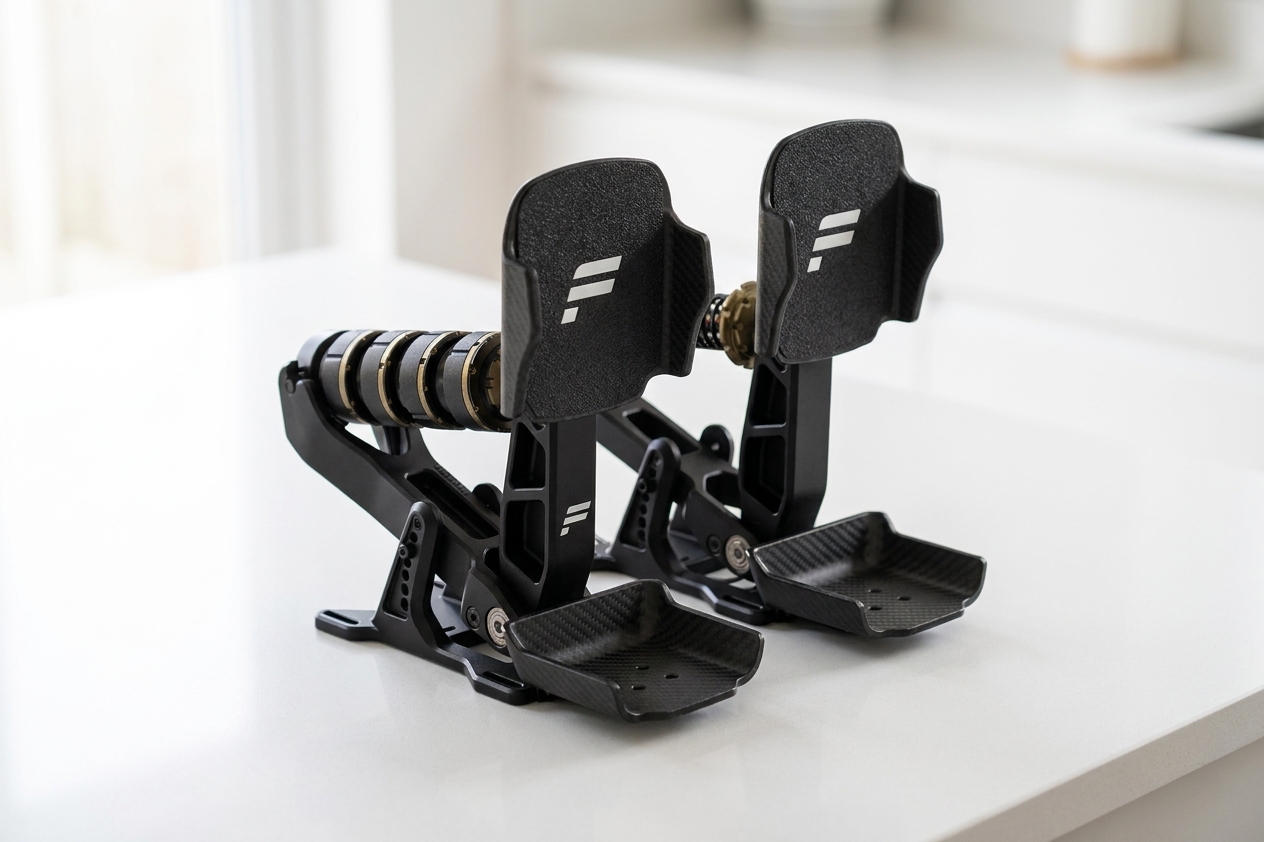
Most of what I use them for is editing rather than generating from nothing. For SimRacingCockpit, edit_image composites a product shot onto my white kitchen worktop. It works until the product has a lot of text on it, and then the text comes back garbled. On one appliance's control panel, a button label came out reading "Mutigram". On Houtini I use it for crops and annotation, and describe_image checks the results.
Diagrams are a different job. I draw them in code, with an SVG generator rendered to PNG, because image models are for illustration, not explanation.
Local image generation is where I have the least to show. I built a local image server with FLUX.2-klein-4B as the default and Qwen-Image-2.1 parked beside it. Qwen-Image-2.1 is non-commercial, under the Qwen Research License. The server has never been run. On 22 September I shelved it, because GPU 0 is already shared between as many models as it can handle and my power supply won't run a third card.
So if you want local image generation, I have no numbers of my own to give you, and any speeds you find for these models are published figures.
What I haven't proven yet
There are three things here I haven't proven:
- DeepSeek's build role rests on a smoke test, an 80-second review and the vendor's reported scores. A 12-case parser doesn't go near a whole module, which is what I send it, so that part of the choice is reported, not measured.
- The choice of Qwen3.8 over Qwen3.6 and Gemma for the
localslot has no scored head-to-head behind it. The October trials were against Coder-Next, and the only file both 27Bs have reviewed is the lock file, where each of them missed both of its known bugs. - And local image generation is unmeasured on this rig, because the server has never run.
If you're starting out, you don't need the rig. Point houtini-lm at a single cheap model, a hosted one is fine, and send it the coding jobs you could describe in a sentence. Add the router when one model stops being enough.
From there, the model testing hub has the method and the live results, the benchmark runbook has the numbers for these two cards, and the inference optimisation piece covers MTP and splitting a model across cards. When you're ready to wire it up, the houtini-lm walkthrough and the vLLM setup guide cover the setup, step by step.
Continue reading.
- Local AIvLLM settings for a pair of RTX 4090s: the flags I run for twelve local models, and why
- Local AIKV Cache Explained: Why a Local LLM Won't Load on Your GPU
- Local AILLM Inference Optimization: What Made Two RTX 4090s Faster
- Local AIMuse Glimmer 30B vs qwen: my day-one local benchmark on a dual RTX 4090 rig
- AI at WorkAI isn't taking the jobs, it's taking the boring bits
- How-to GuidesHow to Connect Claude to Shopify with MCP (Dev MCP and Storefront Catalog)