KV Cache Explained: Why a Local LLM Won't Load on Your GPU
In today's post I'm taking a closer look at the KV cache, the memory a model keeps of the conversation so far, and why 'does it fit in VRAM?' is the wrong question when a local LLM won't load. It's what refused a 70B model its own 131k context on my 48GB card, and I'll show you how to size it, the vLLM settings that control it, and the kilobyte of GPU shared memory that stopped a 16GB model outright.
 Richard Baxter AI Ops & Marketing Engineer
 On this page
Say you've got a 48GB card and a 16GB model. There's thirty-odd gigabytes of headroom, so you point the server at it, hit go, and it dies on load. So what's going on?
The weights aren't the only thing that has to fit, because the card also has to hold the KV cache at the context length you run. The KV cache is the memory a model keeps of the conversation so far, and it grows with every token. On top of that, the kernels (the small programs the GPU runs to do the maths) have memory limits of their own, and those aren't on any spec sheet. So "does it fit in VRAM?" is the wrong question to be asking.
I learned that the hard way in August, over five days benchmarking twelve open-weight models on a pair of modded 48GB RTX 4090s. Four of the first eight models failed on the first attempt, each for a different reason, and none of them was the model's fault. If you haven't run a local model at all yet, LM Studio will get your first one running in an afternoon, and you can come back to this afterwards. The KV cache works the same way whichever engine you use, but the settings and error messages below come from vLLM (the open-source serving engine I run), so it helps if you're already serving with vLLM.
Quick Navigation
What is the KV cache? |
How big is it? |
vLLM settings |
GPU shared memory |
Quant labels |
Ask the engine |
Checklist
What is the KV cache?
When a model reads your prompt and writes its reply, every layer works out a query, a key and a value for each token. Attention (the step where each new token looks back over the earlier ones) compares the new token's query against those keys to decide which earlier tokens are relevant, then pulls in their values. Once a token has been processed, its key and value never change, so rather than recompute them for the whole conversation on every new token, the model stores them.
That store is the KV cache. It's kept per layer, because attention runs separately in each layer, and each new token's keys and values are appended to it as they're worked out.
The saving on compute is the whole point of it, but it's paid for in memory. The cache grows with every token of context, and it grows again with every request running at the same time; NVIDIA describes it as growing linearly with both. It also has to sit on the GPU next to the weights, which means it's competing for the same VRAM. That's the part the usual "will it fit" sum leaves out. You look at the size of the weights, you see a smaller number than your card, and you call it done. But the weights are only half of what has to live on there.
How big is the KV cache?
You can work out how big the cache will be before you load anything. For every token, it holds a key and a value in every layer. Attention is split into heads (parallel copies of the attention step, each looking for different patterns), and each head stores its own key and value, a list of numbers as long as the head dimension. Some models share those keys and values between heads, which I'll come to below, so the count you want is the KV heads, the ones that store them. Multiply all of that by the bytes your precision uses for each number and you have the cost of one token. As a line:
bytes per token = 2 x layers x KV heads x head dimension x bytes per valueThe 2 is the key and the value. The formula comes from NVIDIA, who wrote it for models where every attention head keeps its own keys and values. Llama-3.3-70B, the model I'll use as the example, uses grouped-query attention instead. That's where several query heads share one set of keys and values, so there are fewer KV heads to store, and in the 70B's case the cache is an eighth of the size it would otherwise be.
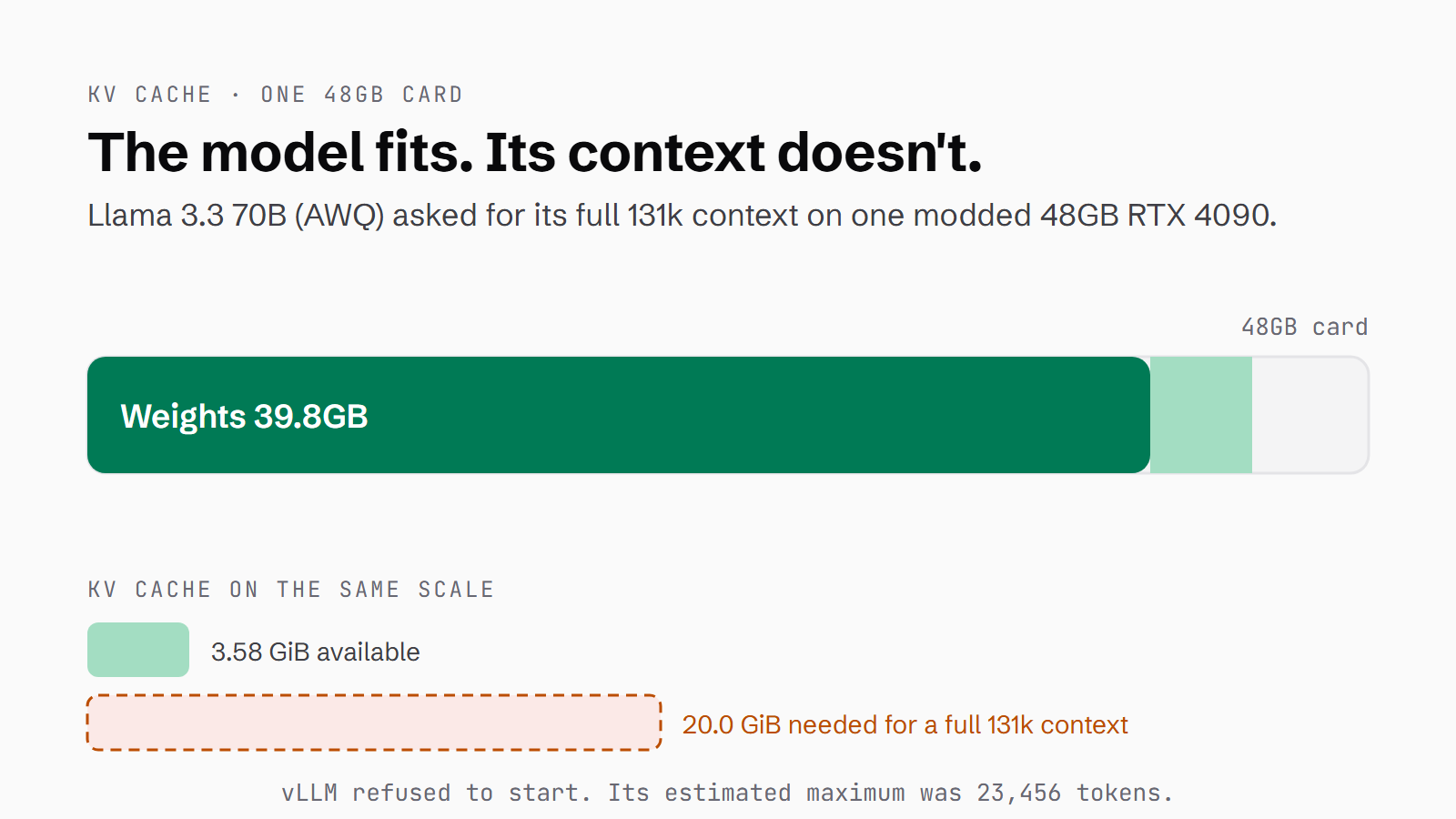
The model's config has 80 layers, 8 KV heads shared between 64 query heads, and a head dimension of 128. That's 2 x 80 x 8 x 128 = 163,840 values per token, which comes to 160 KiB per token with an FP8 cache (one byte per number) and 320 KiB at FP16 (two bytes). The model advertises a context of 131,072 tokens. Fill it, and the cache needs 20.0 GiB at FP8, or 40.0 GiB at FP16.
I ran the AWQ build of Llama-3.3-70B, a quantised build with the weights compressed to about four bits each. It's 39.8GB, and I loaded it on a single 48GB card and asked for the full context. Once the weights were loaded, vLLM had 3.58 GiB left for the cache, so it refused to start and told me why:
20.0 GiB KV cache is needed, which is larger than the available KV cache
memory (3.58 GiB) ... estimated maximum model length is 23456.
That 20.0 GiB is the arithmetic above, to the decimal point. The config I verified on one card runs it at 21,110 tokens, not 131k. So the model fits, and it still won't serve the context its own model card promises - for that it needs both cards.
The vLLM settings that size the KV cache
There are three vLLM settings that decide how much room the cache gets, all of them flags you set when you start the server:
--gpu-memory-utilizationis the share of the card vLLM is allowed to claim, as a fraction between 0 and 1. vLLM loads the weights, profiles how much memory the model needs at its peak, and whatever is left inside that share becomes the KV cache. Raise the share and the cache gets more room. My configs run it at 0.92.--max-model-lencaps the context length. Leave it unset and vLLM takes the context from the model's own config, which is how you end up asking for 131k tokens on a card with room for about 23,000. Set it to what the cache can hold.--kv-cache-dtypesets the precision the cache is stored at.automatches the model's own precision;fp8stores each value in one byte instead of two, which halves the cache. For the 70B, that's the difference between 20.0 GiB and 40.0 GiB at full context.
And a fit isn't always permanent. gemma4-31b-qat had been loading on my rig for a fortnight, then it started failing by 0.72 GiB. The serving engine had moved from 0.25.1 to 0.26.0 on its own. My compose file pointed at the latest image and every model swap recreated the container, so a newer build came down overnight and nobody chose it.
Raising --gpu-memory-utilization forced the model back in, but prefill, the speed it reads your prompt at, dropped from 1,384 to 938 tokens per second (tok/s). So I pin the engine by digest now (the image's exact fingerprint rather than the latest tag), which means the version only changes when I decide it should.
What is GPU shared memory?
A GPU does its work in streaming multiprocessors, or SMs. An SM is one of the GPU's basic compute units, and each one has its own shared memory. That's a small, very fast scratchpad: a kernel loads a tile of data into it, the threads in a block (a group of threads the kernel runs together on one SM) all work on that tile, and then the result is written back.
I had to learn all of that because of GLM-4.7-Flash-GPTQ, another quantised build. It's 16.6GB of weights going onto a 48GB card, and it still fell over at KV cache initialisation:
triton.runtime.errors.OutOfResources: out of resource: shared memory,
Required: 102400, Hardware limit: 101376
It wanted 102,400 bytes and the hardware had 101,376, which is 1,024 bytes short. One kilobyte. And the memory it ran out of was shared memory, not VRAM.
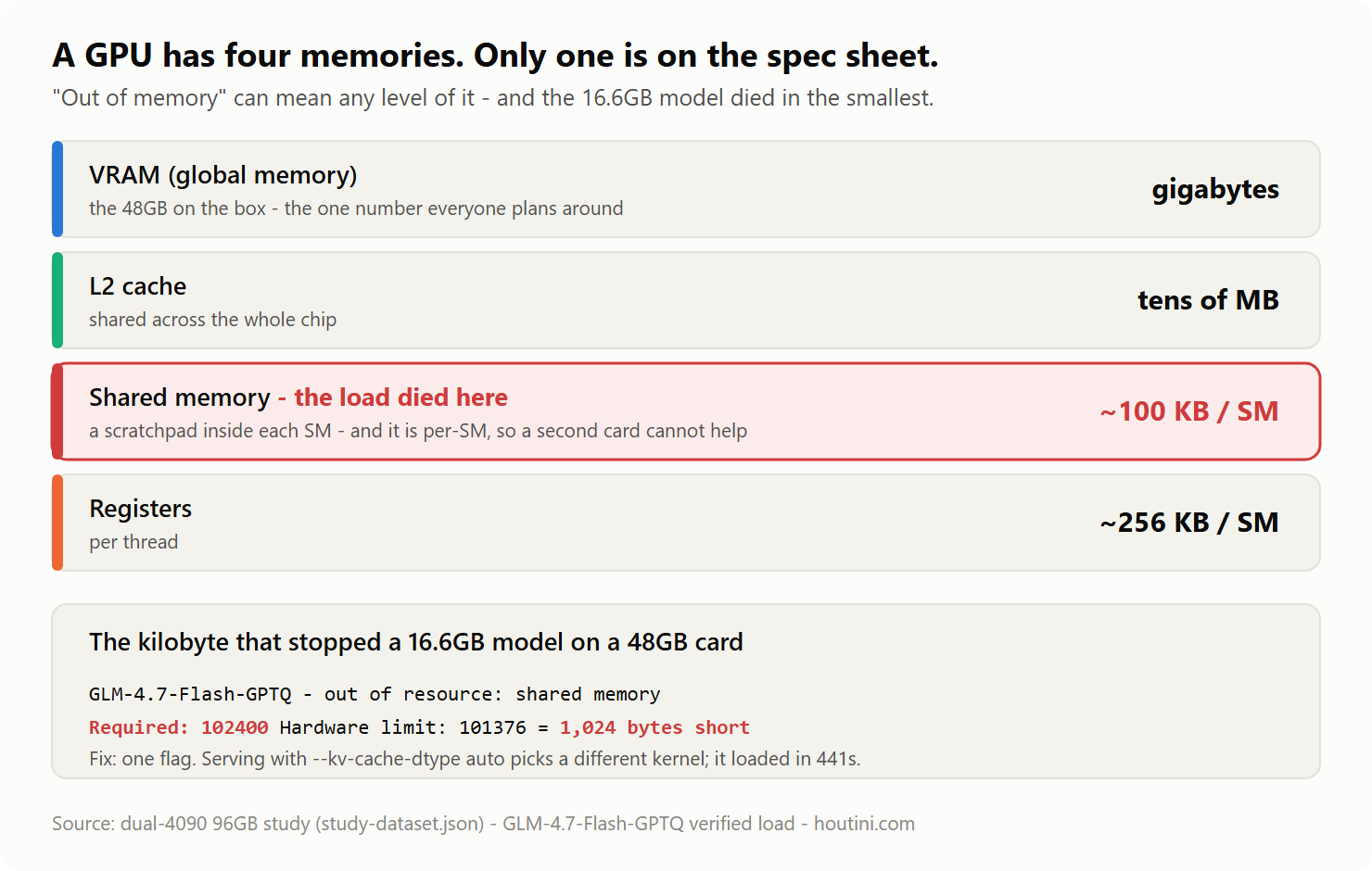
The catch is that a kernel reserves its shared memory up front, at launch. If the SM can't provide that much, the kernel doesn't run. There's no fallback and no slower mode, which is why the model died on arrival. And because the limit is per SM, a second card doesn't help. Ten cards each short by a kilobyte are still short by a kilobyte.
So why did the kernel ask for 100 KB? Bigger tiles are faster, because each trip out to VRAM does more work. Whoever writes the kernel picks the largest tile the hardware they're aiming at can hold, and datacentre parts have a lot more room:
| part | max shared memory per block |
|---|---|
| RTX 3090 / 4090 (consumer Ampere, Ada) | 101,376 bytes = 99 KB - measured on the 4090s here, straight off the error (the 3090 is documented at the same figure) |
| A100 | ~163 KB (documented, not verified on this rig) |
| H100 | ~227 KB (documented, not verified on this rig) |
102,400 bytes is exactly 100 KB, which looks like a round number somebody typed. The kernel was almost certainly tuned against a 163 KB or 227 KB budget, where it fits comfortably. On my Ada cards (the RTX 40-series generation) it's a kilobyte over.
The line runs between consumer and datacentre, not old and new. A 3090 has the same 99 KB per block as a 4090, and NVIDIA documents consumer Blackwell (the RTX 50-series) at 99 KB too. A newer consumer card doesn't obviously fix this, although I haven't measured one.
The fix was one flag. The 100 KB request had come from the FP8 KV cache kernel, so I served the model with --kv-cache-dtype auto instead. That's the same flag from the vLLM settings section, and switching it moved the model onto a different kernel:
# GLM-4.7-Flash-GPTQ: the FP8 KV-cache kernel wanted 100 KB of shared memory.
# Take the KV cache off FP8 and vLLM drops onto a different kernel entirely.
--kv-cache-dtype auto        # was fp8 - loaded in 441s and served clean
So is a 48GB 4090 on its way to e-waste? No, but there is a maintenance tax. As more kernel work targets datacentre hardware, consumer configurations get less attention, and the occasional model-plus-flag combination will fail on arrival and cost you an evening if you don't know this failure exists. Your card isn't obsolete. Some kernels just haven't been tuned for it yet.
Parameter count and "4-bit" don't tell you the size
Parameter count stopped being a guide to memory a while ago. OpenAI's gpt-oss-120b in its native MXFP4 format is 65.2GB, and Llama-3.3-70B in FP8 is 72.7GB, so the 120B model is the lighter of the two. The difference is the format: MXFP4 stores most of the weights at about four bits each, where FP8 uses eight. That breaks the old rule of thumb that more parameters means more memory, and I still catch myself reaching for it out of habit. gpt-oss-120b is also a mixture-of-experts model, or MoE, built from many expert sub-networks with only a few firing for any given token. That makes it quick, but every expert has to sit in VRAM all the same.
The quant label isn't much better. A 27B model at four bits a weight should come to about 13.5GB, but Qwen3.8-27B in AWQ lands at 27.7GB. "4-bit" only ever describes some of the model. In this model the linear-attention layers, the lm_head (the last layer, which scores every possible next token) and the vision tower that reads images all stay in BF16, at 16 bits a weight. So the real footprint is the compressed weights plus everything the quantiser left alone.
And sometimes the label is simply false. I pulled a community "4-bit" build of gpt-oss-120b and it ran out of memory on load. When I opened its metadata on Hugging Face, the MoE experts, which are the bulk of the model, had never been quantised at all. Every one of them was F16. I dropped it for OpenAI's own MXFP4 release, which later served across both cards' 96GB at 153 tok/s. Plenty of community quants are excellent. The name is a claim, though, and only the file tells you what's in it.
Ask the engine, not the spec sheet
Some of what decides whether a model loads is only written down inside the engine. For weeks my own notes said Ada had no kernels for formats like MXFP4 and NVFP4 (vLLM files NVFP4 under modelopt_fp4), and I'd been rejecting models on that basis. Then I stopped guessing and asked. vLLM carries a minimum compute capability (NVIDIA's version number for a GPU generation's features) for every quantisation method it supports, and my script, quant-support.py, reads it back for the card it's running on:
$ python quant-support.py          # ask the engine; my cards report capability 89
mxfp4          min capability 80  ->  supported
modelopt_fp4   min capability 75  ->  supported
fp8_per_block  min capability 75  ->  supported
awq            min capability 75  ->  supported
vLLM writes Ada's compute capability of 8.9 as 89, and every format I'd written off is permitted on it. Permitted isn't the same as fast, though. The probe proves there's a code path; it doesn't promise a good one, and only a benchmark tells you that.
The engine is also the only thing that knows whether it's heard of your model. MuseGlimmer, a Meta release six days old when I tried it, was missing from the pinned engine's registry (the list of model architectures the engine has code for), and it only ever loaded on a custom development image. A supported architecture can still refuse to serve, too. Kimi-Linear-48B is native to vLLM, but its tokenizer (the part that splits text into tokens) ships as a raw tiktoken.model and some custom Python, with no tokenizer.json for the fast-tokenizer fallback. The only way to load it was to run that shipped code, which I don't allow, so I dropped it. None of this is on a spec sheet or a model card, and the only way I found out was by trying.
How to check a model will fit
Each of the habits below cost me a failed load before I learned it, and I'm sharing them so you don't have to go through the same thing:
- Size the model as weights plus KV cache at the context you'll run, never weights against VRAM. The cache is the part that grows, and the formula in the sizing section gives you its cost per token.
- Set
--max-model-lento what the cache can hold, and pin the engine by digest so a fit you've verified stays verified. - Read the required-versus-limit numbers in the error. 102,400 against 101,376 tells you straight away that it's a tuning overrun, not a capacity problem.
- Trust the file, not the label. Parameter count doesn't predict footprint, "4-bit" isn't four bits across the whole model, and a quant's name is a claim its metadata may not keep.
- Ask the engine the things only it knows: kernel support, whether your model is in its registry, and whether the tokenizer will load.
- Try the adjacent flag before you decide a model is incompatible. The kilobyte failure was one server option away from a clean load.
- Before you buy a newer consumer card to get past a shared-memory error, check its per-block limit. A 3090, a 4090 and consumer Blackwell all sit at 99 KB, and an H100 wouldn't have blinked.
If you want to run the weights-plus-KV sum for your own card, the fit calculator on the benchmark hub does it, and the dataset is there to download if you fancy checking my working. The vLLM setup guide walks through these flags on the same cards, and the GPU buying guide covers why 48GB consumer cards earn their place anyway.
If you've hit a fit failure that a VRAM figure never warned you about, the kilobyte kind, the context kind or the mislabelled-file kind, I'd like to hear about it. If it reproduces on 96GB of Ada, it goes on the list.
Continue reading.
- Local AIvLLM settings for a pair of RTX 4090s: the flags I run for twelve local models, and why
- Local AILLM Inference Optimization: What Made Two RTX 4090s Faster
- Local AIMuse Glimmer 30B vs qwen: my day-one local benchmark on a dual RTX 4090 rig
- Local AIBest Local LLM for Coding, Plus the API and Image Models I Use
- Local AIHow to set up vLLM in Docker on Windows (WSL2): serve an open-weight model on your own GPU
- How-to GuidesHow to run houtini-lm on vLLM