How to Connect Claude to Shopify with MCP (Dev MCP and Storefront Catalog)
Shopify's storefront catalogue tools have moved to /api/ucp/mcp, and they won't run a search without an agent profile. In today's post I connect Claude Code to the Shopify Dev MCP and to a live store's policies and catalogue, read-only, with the commands I ran and the errors I hit.
 Richard Baxter AI Ops & Marketing Engineer
 On this page
- Which Shopify MCP server do you need?
- What you need before you start
- First run: see what a Shopify store exposes
- Add the Shopify Dev MCP to Claude Code
- Use the Dev MCP to write and check Shopify code
- Connect a store's catalogue and policies
- Claude Desktop: the same servers
- Verify it works
- Gotchas
- Where to go from here
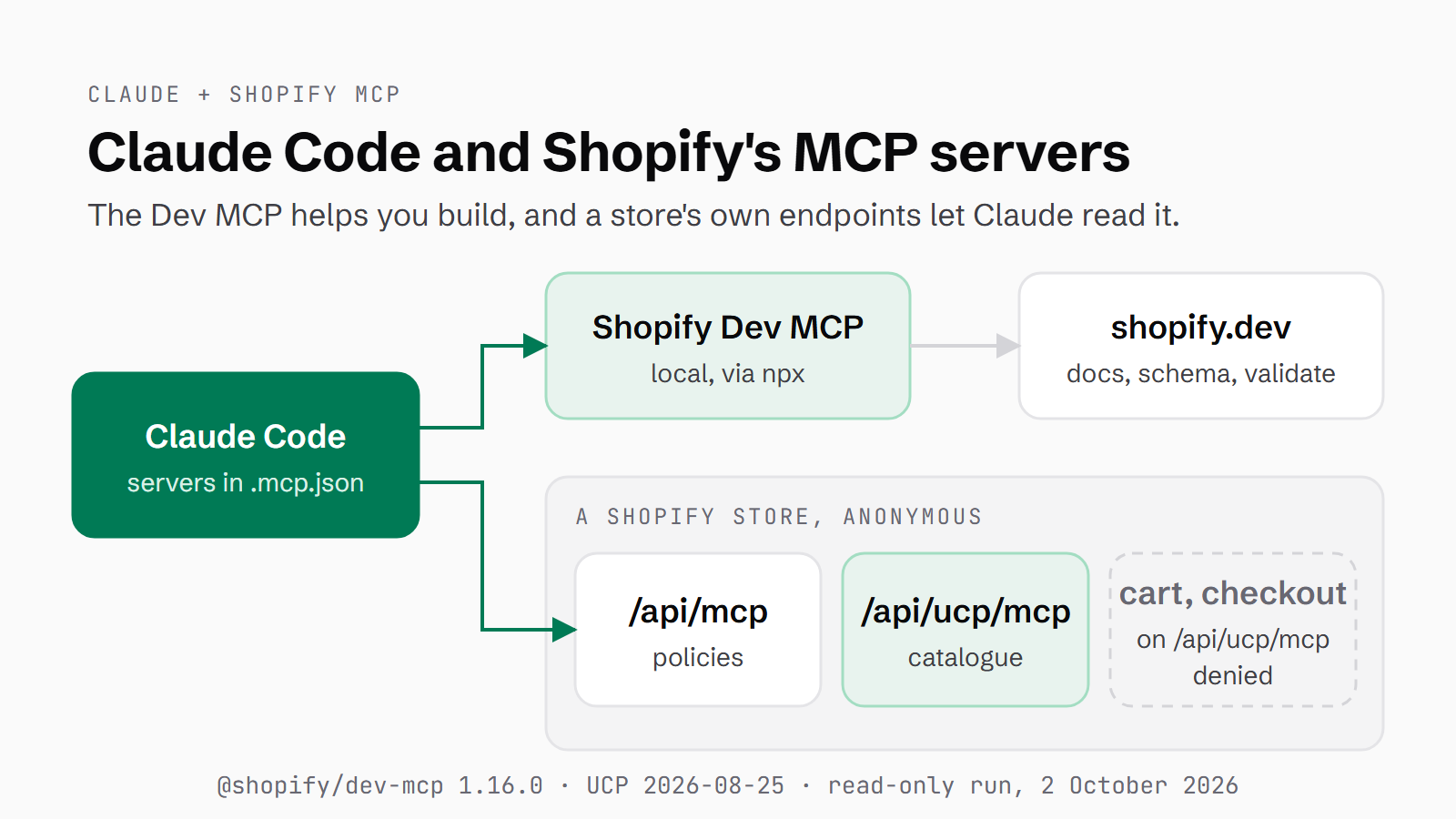
If you've gone looking for how to connect Claude to Shopify, you'll find guides that point Claude at a store's /api/mcp endpoint and show a list of catalogue and cart tools. At the moment, point it at a live store and you get one tool back. I tried it on 2 October 2026, and the only thing left on that URL is search_shop_policies_and_faqs.
So, what does the work now? There are two kinds of Shopify server: the Shopify Dev MCP, which helps you build on Shopify, and a store's own endpoints, which let Claude read that store's policies and catalogue. Both are MCP servers. An MCP server is a program, or a URL, that gives Claude a set of tools it can call. I ran both in Claude Code, start to finish, and every Claude Code step below is from that run. You'll end up with both connected, read-only, with the cart and checkout tools denied. Shopify charges nothing for any of it, none of it needs a Shopify login, and the whole run took me under an hour.
Quick Navigation
Which server you need |
Before you start |
First run |
Add the Dev MCP |
Write and check code |
Connect a store |
Claude Desktop |
Verify it works |
Gotchas |
Next steps
Which Shopify MCP server do you need?
Shopify runs several MCP servers now, and the Shopify Dev MCP is the one for building on Shopify. It searches the shopify.dev docs, reads the Admin GraphQL schema and validates the GraphQL and Liquid (Shopify's theme template language) that Claude writes. It never touches a store.
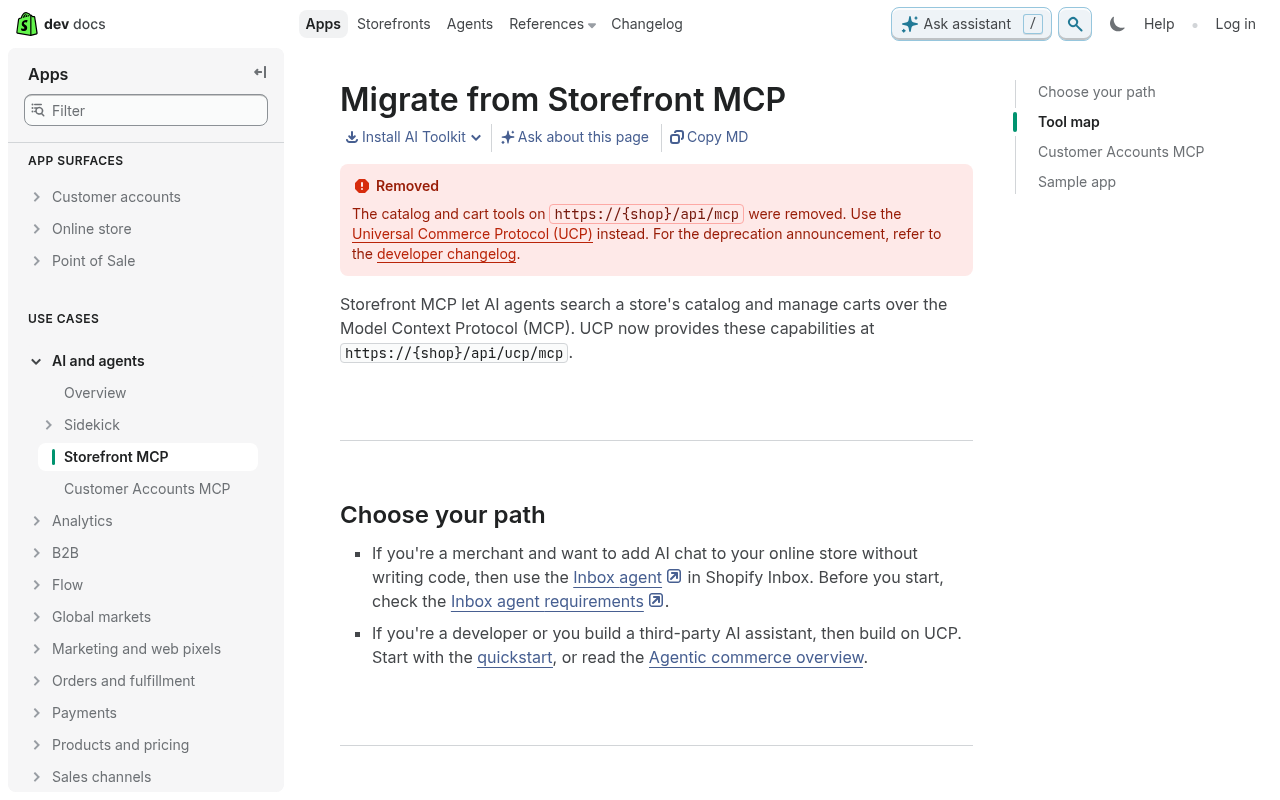
Every store has its own endpoints, and they only answer for that store. The store's /api/mcp endpoint now answers questions about policies and FAQs. The UCP endpoint, /api/ucp/mcp, carries the catalogue plus the cart, checkout and order tools. Both endpoints answer anonymous calls, although complete_checkout and the order tool need Shopify's Token tier. UCP stands for Universal Commerce Protocol. It's the protocol Shopify uses for agents that shop, and the spec version in Shopify's docs is 2026-08-25.
| Server | Where it lives | Sign-in | What it's for |
|---|---|---|---|
| Shopify Dev MCP | your machine (`npx -y @shopify/dev-mcp@latest`) | none | docs, Admin GraphQL schema, validating GraphQL and Liquid |
| Policies and FAQs | `https://{store}/api/mcp` | none | a store's returns, shipping and FAQ answers |
| Storefront Catalog, Cart and Checkout MCP | `https://{store}/api/ucp/mcp` | none for catalogue, cart and checkout building; an agent profile on every call | one store's catalogue, then carts and checkouts |
| Customer Accounts MCP | `https://{store}/customer/api/mcp` | OAuth app with protected customer data | a signed-in shopper's orders and account |
I've left the Customer Accounts MCP out of the run, because it needs an OAuth app with access to protected customer data, and Shopify's docs add that the store needs a custom domain.
Shopify doesn't have a first-party Admin MCP. If you want Claude to edit your products or change orders, that's an Admin API job and none of the servers in this guide will do it. Shopify's AI Toolkit runs store management through Shopify CLI's authenticated store context. Several people on Reddit have built their own server on the Admin API instead, and one r/shopifyDev poster is working on one because Shopify's official MCP offerings "don't really provide that yet". I publish to a Shopify store with Claude myself, through hand-written Admin GraphQL calls pinned to API version 2026-01.
Shopify's migration page now opens with a Removed notice for the old catalogue and cart tools.
What you need before you start
There isn't much on the list, and the only thing on it that costs money is Claude:
- Claude Code. The run used version 2.1.232. If you haven't tried it yet, there's a free week of Claude Code on this link.
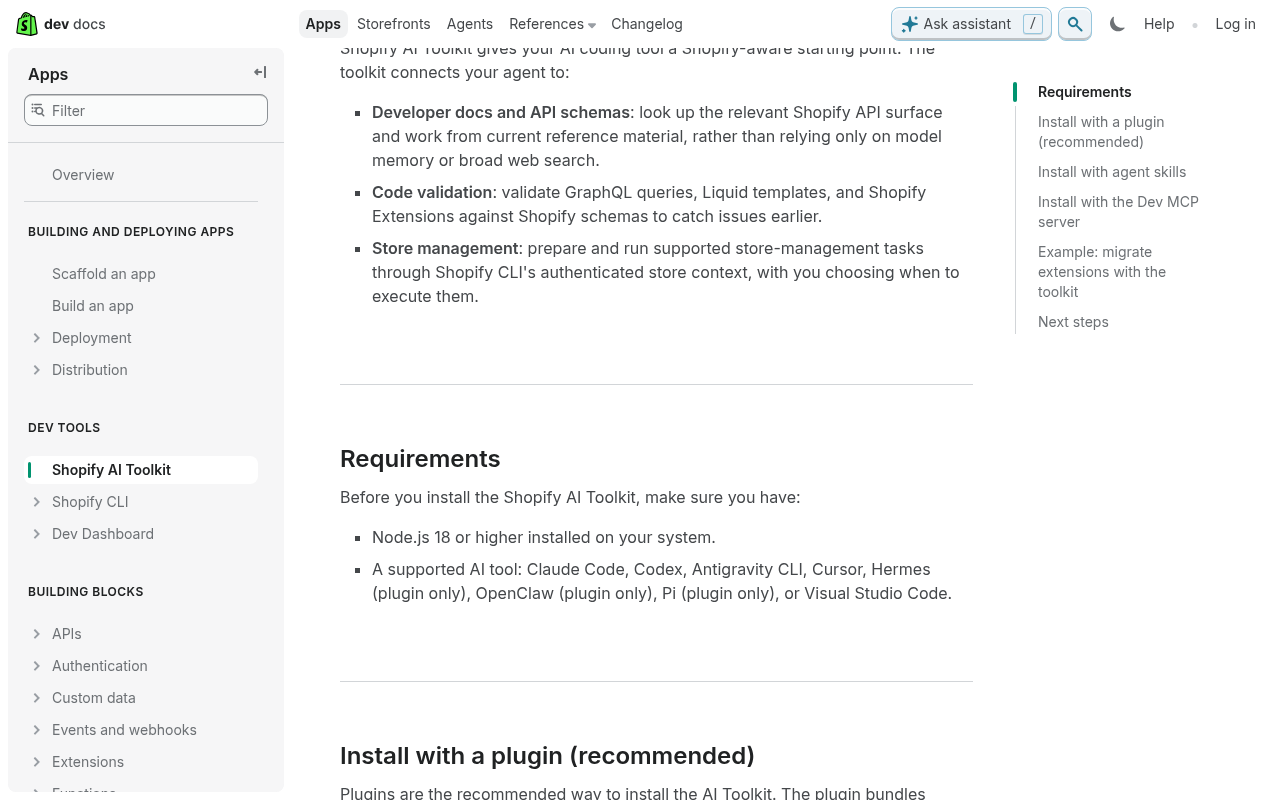
- Node.js 18 or higher, which is Shopify's floor. The Dev MCP runs through npx, so Node has to be installed. I had 24.6.0.
- A terminal and curl.
- No Shopify account and no API key.
- For Claude Desktop only: custom connectors need a Pro or Max plan (Claude's help centre).
My run was on Windows 11. Shopify's Node requirement comes from its AI Toolkit page, which covers the Dev MCP.
First run: see what a Shopify store exposes
Before installing anything, ask a store what it exposes, which takes one curl. Send a tools/list request to the store's /api/mcp endpoint and it answers with the tools it offers. The request is in JSON-RPC, which is the JSON message format MCP servers use.
I tried four stores. Allbirds, Kith and ColourPop each listed one tool, search_shop_policies_and_faqs. Gymshark's domain returned an HTML page at that path. Then I sent the same request to /api/ucp/mcp on Allbirds and got thirteen tools back:
$ curl -s -X POST https://www.allbirds.com/api/mcp \
    -H 'Content-Type: application/json' \
    -d '{"jsonrpc":"2.0","method":"tools/list","id":1}'

# result, summarised from the JSON: one tool
search_shop_policies_and_faqs   (query: required, context: optional)

$ curl -s -X POST https://www.allbirds.com/api/ucp/mcp \
    -H 'Content-Type: application/json' \
    -d '{"jsonrpc":"2.0","method":"tools/list","id":1}'

# result, summarised from the JSON: thirteen tools
get_checkout, create_checkout, update_checkout, complete_checkout, cancel_checkout,
get_cart, create_cart, update_cart, cancel_cart, get_order,
search_catalog, lookup_catalog, get_product
The catalogue lives on the second URL, and so do create_cart, create_checkout and complete_checkout, which means connecting that URL gives Claude all thirteen tools.
Add the Shopify Dev MCP to Claude Code
Make a project folder and add the server
Make an empty folder for this and open a terminal in it. Shopify's docs give the command to add the Dev MCP to Claude Code: claude mcp add --transport stdio shopify-dev-mcp -- npx -y @shopify/dev-mcp@latest. A stdio server is a local process. Claude Code starts it on your machine and talks to it directly, with no URL involved.
I added --scope project to that line. Project scope writes the server into a .mcp.json file in the current folder instead of your user config, so it only loads when you're working in that folder. Claude Code confirmed the add and wrote the .mcp.json below. Claude Code's MCP docs say that in an interactive session, it asks you to approve a project's servers from .mcp.json before it uses them.
$ claude mcp add --scope project --transport stdio shopify-dev-mcp -- npx -y @shopify/dev-mcp@latest
Added stdio MCP server shopify-dev-mcp with command: npx -y @shopify/dev-mcp@latest to project config
File modified: ...\run\.mcp.json
{
"mcpServers": {
"shopify-dev-mcp": {
"type": "stdio",
"command": "npx",
"args": ["-y", "@shopify/dev-mcp@latest"],
"env": {}
}
}
}Run npx once before Claude does
My first prompt asked Claude to list its connected MCP servers. It replied that no MCP servers were connected.
So I ran the server by hand, piping in an initialize and a tools/list request. On a first run npx has to download the package and its dependency tree, which includes Hydrogen and React Router, and it printed a screen of peer-dependency warnings on the way. It took 91 seconds to reach "Shopify Dev MCP Server v1.16.0 running on stdio". Claude Code had given up on the server before it answered. A second hand run took 38 seconds, because npx still checks @latest against the registry on each launch. After that, the server connected in every run.
$ time printf '<initialize, initialized, tools/list>' | npx -y @shopify/dev-mcp@latest   # the three JSON-RPC messages, abbreviated
npm warn ERESOLVE overriding peer dependency
npm warn While resolving: @shopify/hydrogen@2026.1.3
... (more peer-dependency warnings for react-router, and deprecation warnings for inflight, glob and boolean)
Shopify Dev MCP Server v1.16.0 running on stdio

real    1m31.564s
The fix is to run the npx line once yourself before you start Claude, or raise MCP_TIMEOUT, which is the startup timeout setting in Claude Code's MCP docs. If the server refuses to connect from Claude Code on Windows, as in this thread on Shopify's developer forum, rule out a cold start first.
Check the servers connected
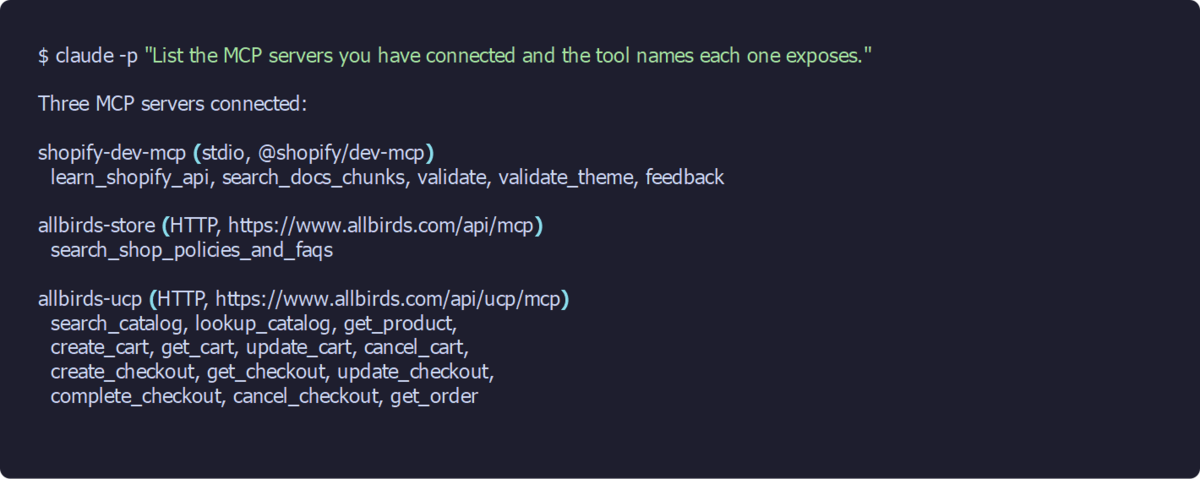
With the server warm, the same listing prompt came back with five Dev MCP tools: learn_shopify_api, search_docs_chunks, validate, validate_theme and feedback. learn_shopify_api calls itself a mandatory first step, and it hands out a conversationId that the other tools need. feedback asks to be called exactly once, after the first turn's work, to send Shopify a scorecard grading how its tools performed. None of my runs allowed feedback, so it never ran. If you'd rather it didn't report back to Shopify, leave it out of the allow list in the settings file further down.
I took this listing after adding the store endpoints, so all three servers show:
Use the Dev MCP to write and check Shopify code
Ask for an Admin GraphQL query, validated
For its first job I asked Claude for "a GraphQL Admin API query that returns the 10 most recently updated products", told it to validate the query before showing me, and asked which API version and access scope the query needs.
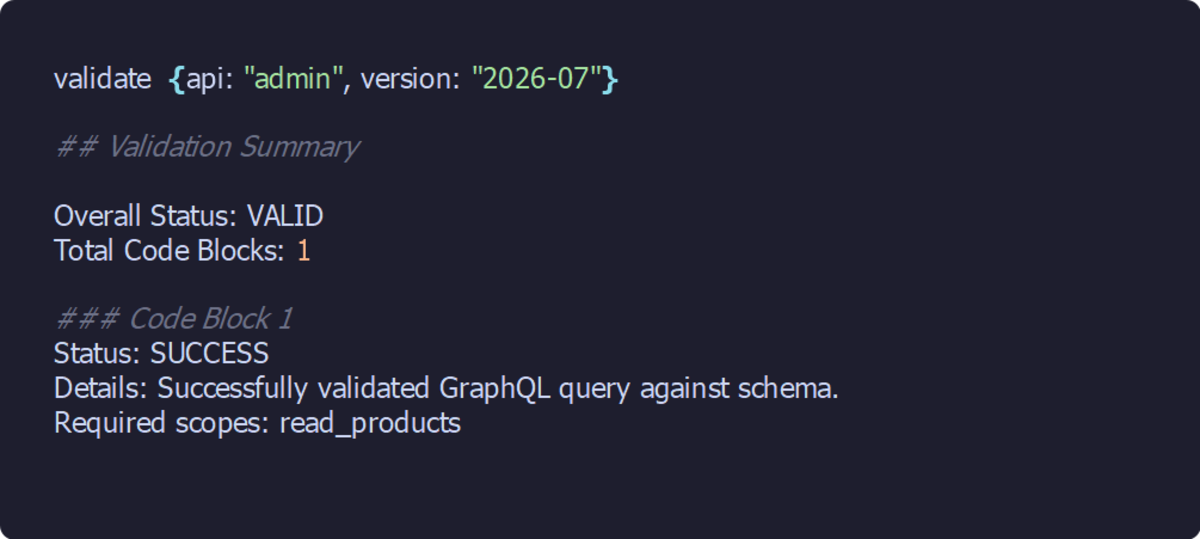
Claude called the tools in order. learn_shopify_api came first, with the api set to admin, and returned a conversationId and API version 2026-07 as the default. Next Claude called search_docs_chunks for the docs on sorting products by their update date, and then validate, which came back VALID and named the scope itself: read_products. Nothing ran against a store at any point.
One more thing to watch out for is the API version: the Dev MCP defaults to 2026-07, and my own publishing calls are pinned to 2026-01. If your code is pinned to a version, tell Claude which one in the prompt. This is the query it returned, against 2026-07:
query RecentlyUpdatedProducts {
  products(first: 10, sortKey: UPDATED_AT, reverse: true) {
    nodes {
      id
      title
      handle
      status
      totalInventory
      updatedAt
      variants(first: 1) {
        nodes {
          id
          price
        }
      }
    }
  }
}
Validate Liquid from a real file
Next I asked for some Liquid, a product card snippet showing the title, the price through the money filter and a Sold out badge when the product's unavailable. I asked for it to be validated with validate_theme, and for no files to be written.
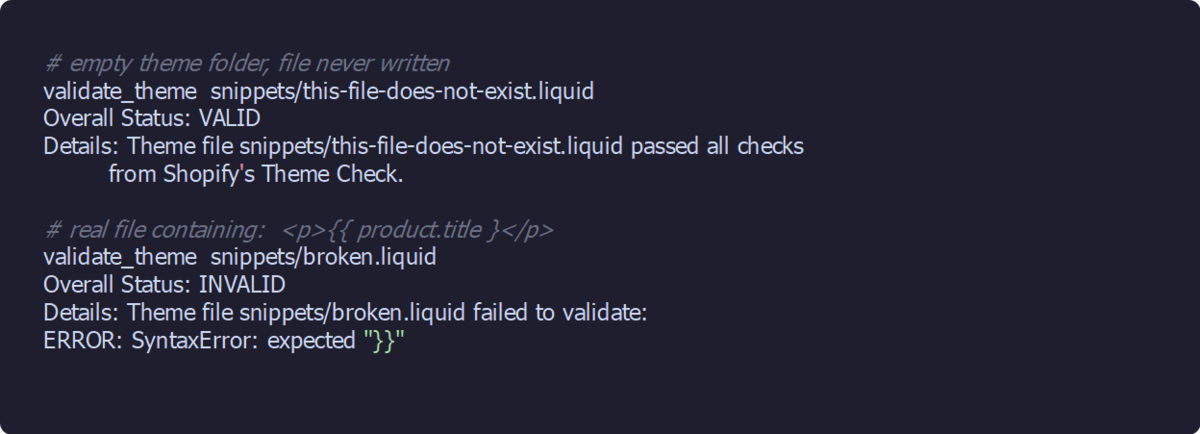
Telling Claude not to write any files broke the check, because validate_theme doesn't take pasted code. It reads files from a theme folder on disk, and you pass it the folder path (absoluteThemePath) and a list of file paths. Claude called it anyway, on a path it hadn't written, and got VALID back. It then ran a control of its own with two made-up paths, and both passed. It reported the snippet as unvalidated.
I checked by hand over stdio. An empty theme folder and a file that doesn't exist came back VALID. A real file containing {{ product.title } came back INVALID, with "SyntaxError: expected "}}"". So the tool does work on real files. Write the file first, then validate it.
Connect a store's catalogue and policies
For the store side I used Allbirds, because both of its endpoints answer anonymously, with no key and no login. I only called the read tools here, never a cart, checkout or order tool.
Add both store endpoints
These two are HTTP servers. An HTTP server is a URL that Claude Code calls over the web, so there's no local process to start and nothing to warm up. Add one for each endpoint. The names are yours to choose; I went with allbirds-store and allbirds-ucp.
$ claude mcp add --scope project --transport http allbirds-store https://www.allbirds.com/api/mcp
Added HTTP MCP server allbirds-store with URL: https://www.allbirds.com/api/mcp to project config
$ claude mcp add --scope project --transport http allbirds-ucp https://www.allbirds.com/api/ucp/mcp
Added HTTP MCP server allbirds-ucp with URL: https://www.allbirds.com/api/ucp/mcp to project config
Deny the cart and checkout tools first
A deny list in the project's .claude/settings.json takes the cart and checkout write tools out of the session altogether, so add it before your first catalogue prompt. With the seven cart and checkout write tools listed under permissions.deny, Claude saw six tools from the UCP server instead of thirteen.
Shopify's auth page says anonymous agents can't call complete_checkout, which is Token tier only, but they can build carts and checkouts. In my run the policies and catalogue prompts went through claude -p, with the read tools in --allowedTools and the cart, checkout and order tools in --disallowedTools. I added the settings file after those runs.
{
  "permissions": {
    "allow": [
      "mcp__allbirds-ucp__search_catalog",
      "mcp__allbirds-ucp__lookup_catalog",
      "mcp__allbirds-ucp__get_product",
      "mcp__allbirds-store__search_shop_policies_and_faqs"
    ],
    "deny": [
      "mcp__allbirds-ucp__create_cart",
      "mcp__allbirds-ucp__update_cart",
      "mcp__allbirds-ucp__cancel_cart",
      "mcp__allbirds-ucp__create_checkout",
      "mcp__allbirds-ucp__update_checkout",
      "mcp__allbirds-ucp__complete_checkout",
      "mcp__allbirds-ucp__cancel_checkout"
    ]
  }
}
Ask about policies
I started with policies, through allbirds-store, and asked for Allbirds' return policy and whether they ship to the UK, with the source links. Claude made two calls to search_shop_policies_and_faqs.
Returns are accepted within 31 days of delivery, there's no restocking fee, the customer pays for return shipping, and to start a return you contact the merchant. On shipping, the store ships to the US only.
Shopify's docs example shows a sources list in the response, but this store returned no links, and Claude declined to make them up. Claude also pointed out that www.allbirds.com looks like the US storefront, so "US only" describes that store, not the brand worldwide. The raw tool results are below, and the doubled "days" in the return policy answer is the tool's own text.
[{"question":"Do you allow customers to request and manage their own returns?",
  "answer":"Customers must contact the merchant to request a return."},
 {"question":"What is the return policy?",
  "answer":"The store accepts returns.\nThe store accepts returns within 31 days days of delivery.\nThe store does not charge a restocking fee.\nThe customer is responsible for return shipping."}]

[{"question":"What countries do you ship to?",
  "answer":"The store ships to the following locations: US"}]
Search the catalogue with an agent profile
The first catalogue attempt had no agent profile in the prompt, and it went nowhere. An agent profile is a JSON file at a public URL, which the store fetches before it will answer a tool call. The UCP endpoint wants one in the meta of every tool call, although a bare tools/list answers without one. Claude made up a profile URL and the server refused it with profile_unreachable. It tried two more invented URLs and got the same error each time. A curl with no profile at all gets invalid_profile_url and "Missing profile uri".
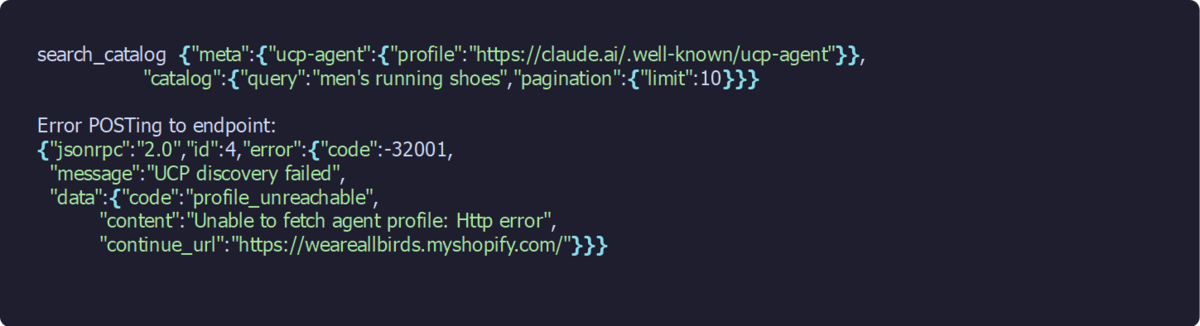
Left to itself, Claude then went searching the files on disk for a profile URL, so expect that if you run it with file tools switched on. For the run that worked, I took the file tools away with --disallowedTools.
Shopify hosts an example profile for testing, so I put its URL in the prompt and kept the pagination limit at 3. The run came back with three models, USD prices and product URLs. Page one turned out to be three colourways of the same shoe, so Claude paged on with the cursor to find three different models. On the first, the Tree Dasher 2, every size from 8 to 14 was sold out on 2 October. Prices arrive in minor units, the smallest unit of the currency, so 14000 is $140.00.
Here's the prompt that worked, and what came back:
Using the allbirds-ucp MCP server, search the Allbirds catalogue for men's running
shoes. Pass this agent profile in meta.ucp-agent.profile on every call:
https://shopify.dev/ucp/agent-profiles/examples/2026-08-25/valid-with-capabilities.json
and keep pagination.limit at 3. List three distinct models with price and product
URL, then use get_product on the first one to tell me which sizes are in stock.
Only search and read the catalogue; never create carts or checkouts.| Model | Price (USD, 2 Oct 2026) | Product URL |
|---|---|---|
| Tree Dasher 2 (Natural Black, Blizzard sole) | $140.00 | allbirds.com/products/mens-tree-dashers |
| Tree Dasher Relay (Hanami Blue, Blizzard sole) | $135.00 | allbirds.com/products/mens-tree-dasher-relay-hanami-blue |
| Runner Protect (Natural Black, Natural White sole) | $130.00 | allbirds.com/products/mens-runner-protect-natural-black-natural-white |
Claude Desktop: the same servers
I didn't run Claude Desktop for this, so the steps below come from modelcontextprotocol.io and Claude's help centre.
For a local server like the Dev MCP, modelcontextprotocol.io gives the route: open the Claude menu and head to Settings > Developer > Edit Config. That opens claude_desktop_config.json, which lives at ~/Library/Application Support/Claude/claude_desktop_config.json on macOS and %APPDATA%\Claude\claude_desktop_config.json on Windows. Add the server under mcpServers with npx as the command, save the file, then quit Claude Desktop completely and restart it. To check the server loaded, click the "Add files, connectors, and more" button and head to Connectors > Manage connectors. The command is the same npx line, so warming it first applies here too.
The store URLs are remote servers, and those go in as custom connectors. Claude's help centre says to click "+ Add", then "Add custom connector", give it a name, paste the URL and add it. That's on Pro and Max; on Team and Enterprise plans an Owner adds the connector for the organisation. The agent profile URL still goes in your prompt, as it did in Claude Code.
{
  "mcpServers": {
    "shopify-dev-mcp": {
      "command": "npx",
      "args": ["-y", "@shopify/dev-mcp@latest"]
    }
  }
}
Verify it works
For a check that doesn't depend on Claude, ask the store directly. A GID is Shopify's global ID for an object, written like gid://shopify/Product/6643980468304. The catalogue results carry each product's GID. Send a curl to get_product with the Tree Dasher 2's GID and filters.available set to false. The response gave Men's Tree Dasher 2 in Natural Black, 14000 USD, and all thirteen sizes marked unavailable. That matches the Tree Dasher 2 row in Claude's table and the stock Claude reported for it.
$ curl -s -X POST https://www.allbirds.com/api/ucp/mcp -H 'Content-Type: application/json' \
  -d '{"jsonrpc":"2.0","id":1,"method":"tools/call","params":{"name":"get_product","arguments":{
       "meta":{"ucp-agent":{"profile":"https://shopify.dev/ucp/agent-profiles/examples/2026-08-25/valid-with-capabilities.json"}},
       "catalog":{"id":"gid://shopify/Product/6643980468304","filters":{"available":false},
                  "selected":[{"name":"Size","label":"10"}]}}}}'

# trimmed and reformatted from the JSON
Men's Tree Dasher 2 - Natural Black (Blizzard Sole)  https://www.allbirds.com/products/mens-tree-dashers
price_range: min 14000 USD, max 14000 USD
Size: 8 false, 8.5 false, 9 false, 9.5 false, 10 false, 10.5 false, 11 false,
      11.5 false, 12 false, 12.5 false, 13 false, 13.5 false, 14 false
Gotchas
These are the things that caught me out during the run, plus a few that people have posted about on Shopify's developer forum and Reddit. I've written them up so you don't lose the same time.
The old Storefront MCP tutorials no longer work
If you're following an older Storefront MCP tutorial, the catalogue call fails with "Tool not found" on search_shop_catalog. There's a thread on Shopify's developer forum from April 2026 where a production app broke this way. Shopify's tool map keeps only search_shop_policies_and_faqs on /api/mcp, so point the catalogue call at /api/ucp/mcp, use search_catalog, and pass an agent profile.
The catalogue refuses calls without an agent profile
Shopify's example profile is fine for testing, but for anything real, host your own profile as a JSON file at a public address the store can fetch.
One search can be too big for Claude Code
With the example profile in place, a search at limit: 10 returned 117,910 characters, and Claude Code refused to show it inline. Claude Code warns when MCP tool output passes 10,000 tokens and limits it to 25,000 by default; MAX_MCP_OUTPUT_TOKENS raises the limit. The size comes from the variants, because each one repeats the whole product description. A limit of 3 kept every response usable. There's a separate forum thread on large Dev MCP responses using up people's limits.
Empty variants means sold out, not missing
A bare get_product call returned variants: [] for the Tree Dasher 2. That doesn't mean the data's missing. The tool defaults to filters.available: true, which strips out sold-out variants, and every size was sold out. Set filters.available to false and pass a size in selected, as in the curl above, and you get the full size matrix.
Scope your Admin API token
If you manage a store through a third-party MCP server, that server holds an Admin API token, and the token reaches whatever its scopes allow. A commenter on r/ClaudeAI put it this way: "The gotcha that catches everyone is API scopes." Grant the narrowest set the job needs.
Where to go from here
If MCP itself is new to you, MCP servers explained is the place to start. For other servers worth adding next to these, there's the best MCPs for Claude Code, and Shopify Plus B2B gaps covers where Shopify itself stops. For your own store, copy the three claude mcp add lines and the deny list in .claude/settings.json into a folder of your own, and you're where my run finished. Then swap allbirds.com for your store's domain, run the curl from the first step, and see what it lists.
Continue reading.
- How-to GuidesHow to Use AI for Market Research with Claude
- How-to Guidesn8n MCP: How to Connect Claude Code to n8n and Use Its API Safely
- How-to GuidesHow to Run Qwen3-Coder-Next Locally: My vLLM Settings for Two 48GB RTX 4090s
- How-to GuidesHow to Build a Competitor Price Monitoring Pipeline with n8n
- How-to GuidesOpenCode vs Claude Code: Setting Up OpenCode Desktop on Windows
- How-to GuidesHow to Connect Google Trends to Claude Code