What is n8n? A Beginner's Guide to Workflows, Pricing and Self-Hosting
In today's guide I'm taking a closer look at n8n, the workflow automation tool behind the price data on simracingcockpit.gg, and at the choice a beginner faces with it: pay for n8n Cloud, or host it yourself for free and look after the server. There's a first workflow built step by step, too, and a comparison with Zapier and Make.
 Richard Baxter AI Ops & Marketing Engineer
 On this page
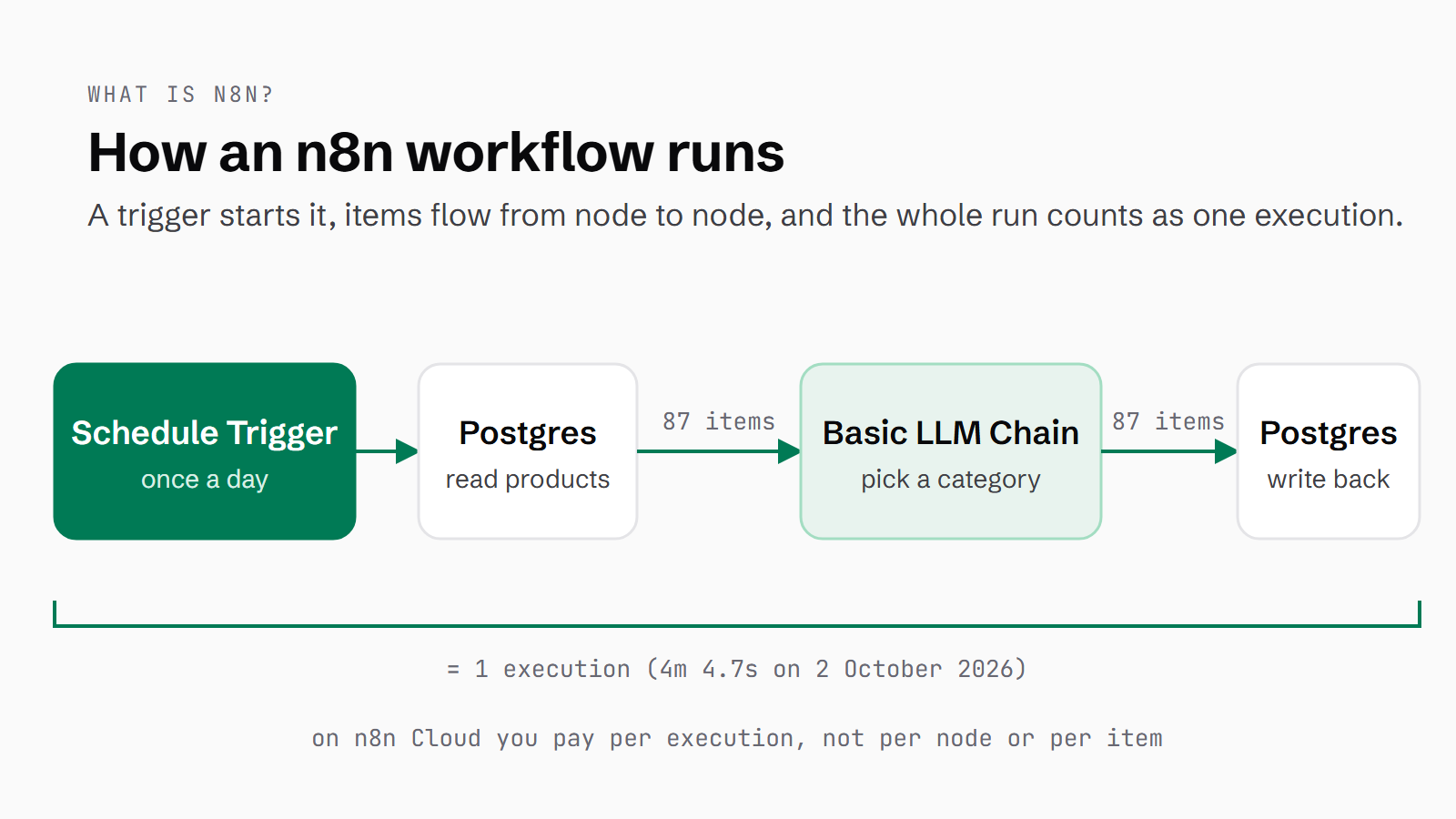
n8n is a workflow automation tool. You connect apps and steps together on a canvas, something starts the chain off (a schedule, a form, a call from another app), and the steps run in order, either on n8n's own cloud or on a server you run yourself. If you've heard the name from a colleague, a YouTube video about AI agents or a Zapier bill that keeps creeping up, and you want to know what you'd be getting into, start here.
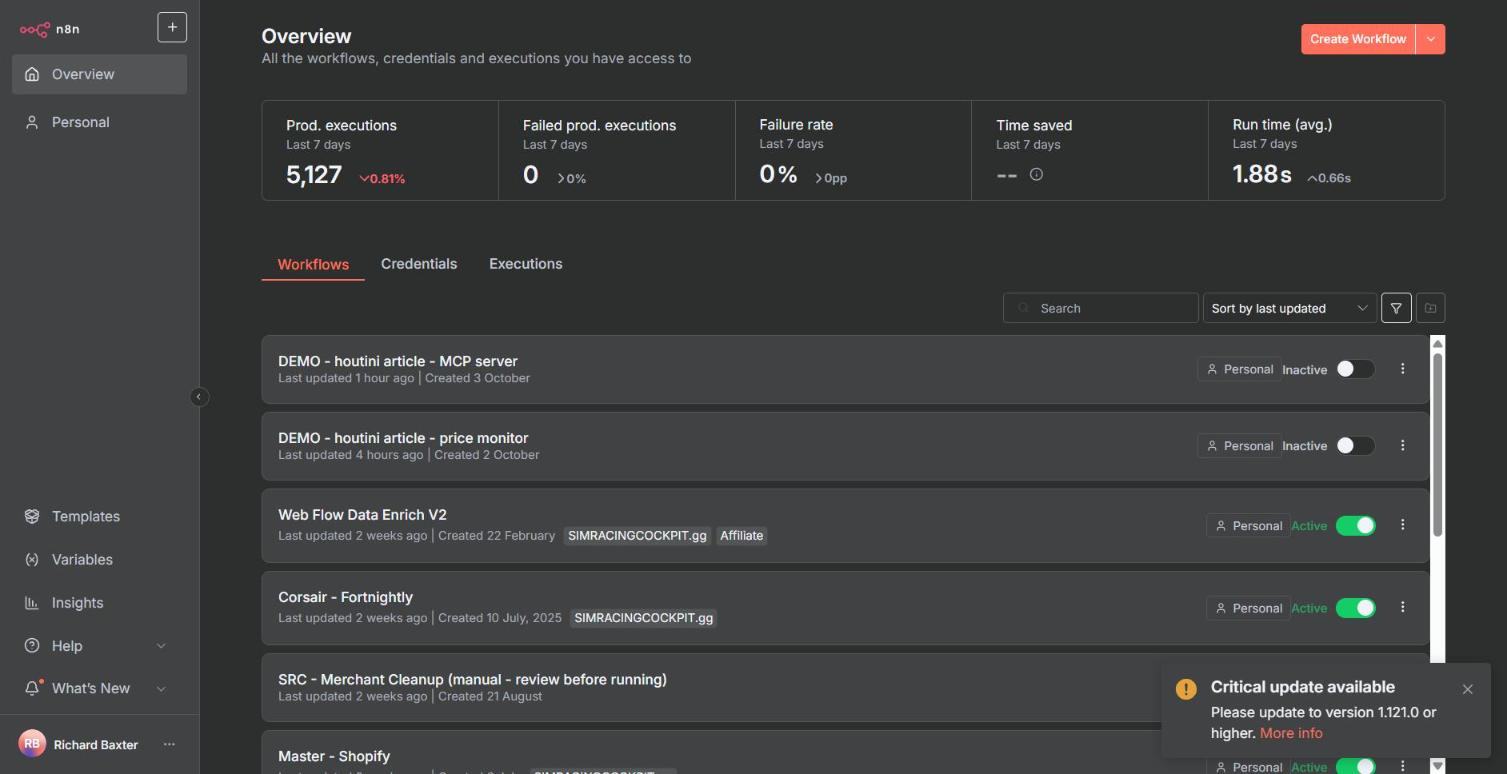
The first workflow below is three nodes, and it took me about eight minutes on my own instance, including the screenshots. The screens and usage numbers come from my self-hosted n8n, which I've run since May 2025. It has 57 workflows, 8 of them live, and it produces the price data behind simracingcockpit.gg. In the seven days to 3 October 2026 it ran 5,127 production executions, and none of them failed.
Quick Navigation
What is n8n? |
Is n8n free? |
n8n vs Zapier vs Make |
Your first workflow |
Workflow examples |
Self-hosting |
Cloud or self-hosted |
Keeping it safe |
Where next
What is n8n?
Each workflow is a chain of "when this happens, do that, then do this". n8n's docs describe a workflow as "a collection of nodes that automate a process". A node is a single step. It might fetch some data, change its shape, send it somewhere or decide which way it goes next. The docs also say that "All production workflows need at least one trigger", and the trigger is the node that starts everything off.
Where the ready-made nodes stop, there's a Code node that runs JavaScript or Python, and an HTTP Request node that can call any API (an API is a web address that returns data for software to read, rather than a page for people). There are AI nodes too, including an AI Agent node, LLM chains (LLM stands for large language model, the kind of AI behind ChatGPT and Claude) and MCP, a standard way for an AI assistant to use outside tools.
Triggers, nodes and items
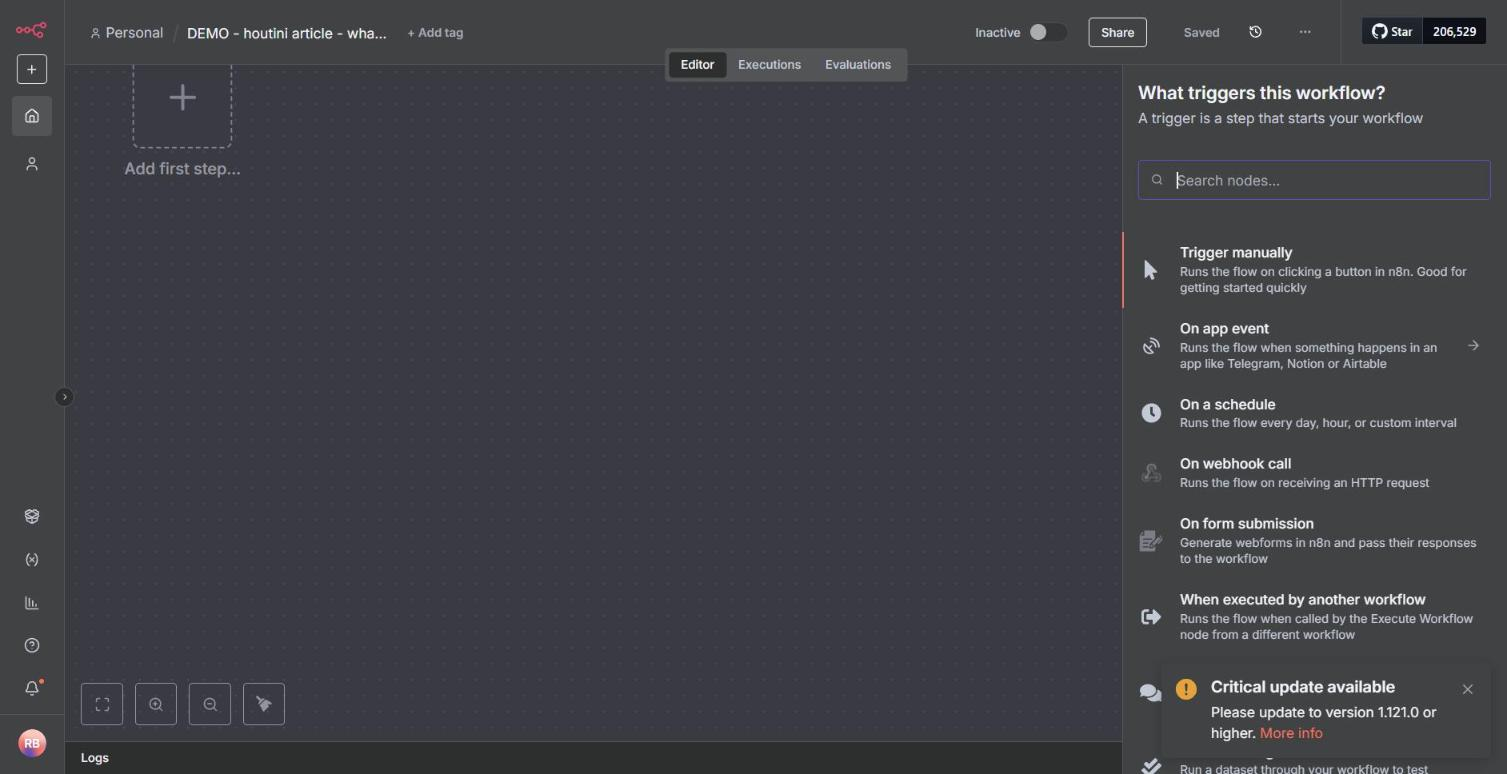
When you add the first step, n8n asks what should start the workflow: you can trigger it by hand, on a schedule, when its webhook (a web address that belongs to the workflow) is called, when someone submits a form, when something happens in another app, when another workflow calls it, or when a chat message arrives.
After the trigger, data moves along the connections between nodes as items. An item is one row of data - one product, one email, one answer from an API. You can watch this happen on the canvas: when 87 items come in, the connection is labelled "87 items", and the node works through all 87.
Here's a production workflow from my instance, the Product Categoriser. A Schedule Trigger starts it once a day. A Postgres node (Postgres is a database) reads the products that still need a category. Then a loop sends them through a two-second Wait to a Basic LLM Chain, which picks a category for each product using an OpenAI chat model. A second Postgres node writes the category back, and a separate branch cleans out stale products.
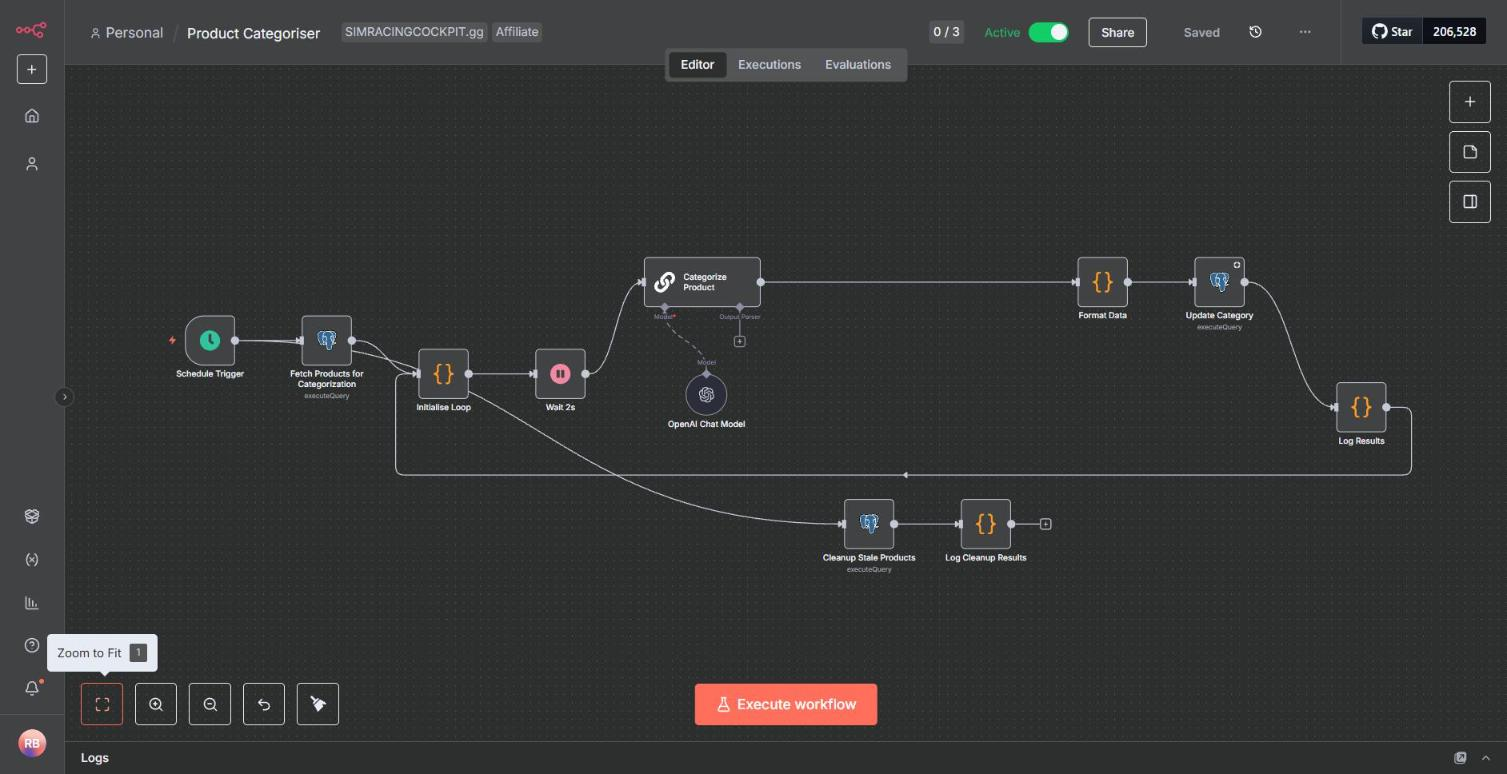
Executions: one run of the whole workflow
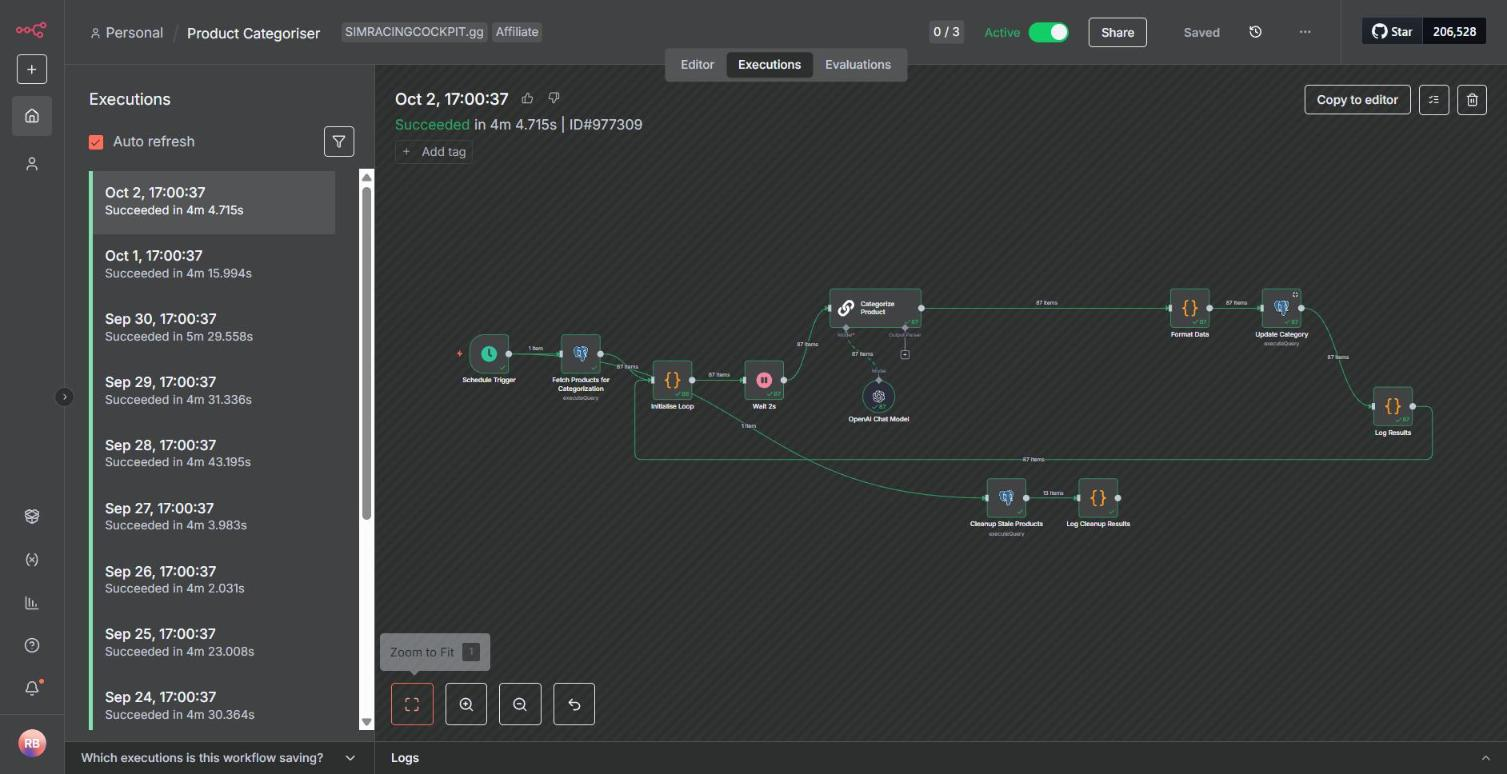
An execution is one run of the whole workflow, from the trigger through to the last node. n8n's pricing FAQ says: "It doesn't matter how many steps are in the workflow or how much data it processes. It's still a single execution."
So my categoriser is one execution a day. It runs at 17:00 by the editor's clock, and on 2 October it took 4 minutes 4.7 seconds and passed 87 items through the AI step. Each run is listed in the Executions tab, shown below, and you can open any of them to see what each node received and what it passed on.
On n8n Cloud, executions are what you pay for, and each plan caps how long one can run: five minutes on Starter, 40 on Pro. My categoriser's run on 30 September took 5 minutes 29 seconds, which is longer than Starter allows.
What does n8n stand for?
The name is short for "nodemation", and it's pronounced n-eight-n. Jan Oberhauser, n8n's founder, explains in the GitHub README that the "node" part comes from the node view and from Node.js, the "mation" part from automation, and he shortened it because the full word was long to type in the command line.
Is n8n free? What it costs
It's free if you host the Community edition yourself, and n8n Cloud is a paid subscription once its 14-day trial ends. If you only want to try it tonight, either take the Cloud trial (no card needed, 1,000 executions) or run it on your own computer in Docker (an app that runs software in a self-contained package called a container). Self-hosting costs nothing in licence fees. What it does cost is a server to run it on and your time looking after it.
n8n Cloud plans
These are the n8n Cloud plans as n8n's pricing page showed them on 3 October 2026:
- Starter: $20 a month billed annually, 2,500 executions, 5 concurrent executions.
- Pro: $50 a month billed annually, 10,000 executions.
- Business: $800 a month billed annually, 40,000 executions, and currently self-hosted only.
- Enterprise: priced on request.
The page doesn't show monthly-billing prices. Hosted plans store your data in Frankfurt, and the trial doesn't include the n8n public API, which is what a script would use to drive it.
n8n's own FAQ says a workflow on a daily schedule uses 30 or 31 executions a month, and one that runs every five minutes uses about 8,600 to 8,900. My instance ran 5,127 production executions in seven days, which works out at roughly 22,000 a month, over Pro's 10,000. Nearly all of it is one webhook, which answers product lookups from the SimRacingCockpit price tables.
The free self-hosted Community edition
The self-hosted Community edition is, in n8n's docs, "Free with almost the complete feature set". If you register your email (Settings > Usage and plan > Unlock) you also get folders, debug in editor and custom execution data, and it's still free. The features you'd pay for on a self-hosted install are mostly the team ones: SSO, Git version control, environments, projects, workflow and credential sharing, external secrets and log streaming.
Out of the box, n8n keeps your workflows, credentials and past executions in SQLite, a small database that lives in a single file. It also supports Postgres, which is what I use. If you do buy a licence key for a paid edition, it pings n8n's licence server daily. n8n also collects telemetry by default, and you can switch that off.
The licence: fair-code, not open source
n8n is distributed under the Sustainable Use License, which n8n created in 2022. Until 17 March 2022 it was Apache 2.0 with the Commons Clause. n8n describes its model as "fair-code", which means the source is available and it's free to use, with commercial restrictions on top, and it says outright that "we do not call ourselves open source".
According to n8n's licence FAQ, you can use it to run your business and for personal projects. You can build automations for clients on your own instance as long as they can't create or edit the workflows, and you can charge for building, setup and consultancy. What you can't do is host n8n as a service where clients build their own workflows, let outside users build or configure workflows (through the UI, the API, MCP or an AI agent), fork it into your own automation product, or white-label it. None of this is legal advice, and for an edge case the FAQ says to email license@n8n.io.
n8n vs Zapier vs Make
Zapier, Make and n8n all let you build a workflow by connecting steps visually. For a beginner, they differ in what you're billed for, whether you can host it yourself, and how many ready-made app connectors you get.
| n8n | Zapier | Make | |
|---|---|---|---|
| What you pay for | Executions: one per run of the whole workflow | Tasks: one per successful action step | Credits: one per module action (most actions) |
| Free option | Self-hosted Community edition; 14-day Cloud trial | Free plan, 100 tasks a month, two-step Zaps | Free plan, 1,000 credits a month, 2 active scenarios |
| Cheapest paid plan | Starter, $20 a month billed annually, 2,500 executions | Professional, from $19.99 a month | Core, $12 a month for 10,000 credits |
| Where it runs | n8n Cloud, or your own server (Docker, npm) | Zapier's own service | Make's own service, on AWS in the EU or North America |
| Apps it connects to | 1,500+ integrations (n8n's README) | 9,000+ apps | 3,000+ apps |
| Code inside a workflow | JavaScript or Python Code node | Code by Zapier step | Code app (2 credits per second of run time) |
Prices as each vendor's pricing page showed them on 3 October 2026, in US dollars; Zapier and Make prices are the monthly-billing figures (n8n's page shows annual billing only).
n8n vs Zapier
Zapier bills in tasks, and a Zap is Zapier's name for a workflow. Its pricing FAQ says "Each successful action in a Zap counts as a separate task", while triggers and polling don't use tasks, and nor do built-in steps such as Filter, Formatter and Paths. On the Free plan, Zapier checks for new data every 15 minutes.
My categoriser is one n8n execution a day, even though 87 items went through the AI step on 2 October. On per-task billing, every action for every item counts.
n8n vs Make
Make bills in credits. A scenario is Make's word for a workflow, and a module is one step in it. Most module actions count as one credit each, and Make's FAQ says a scenario "can perform anywhere from two credits to thousands of credits in a single run". A Free-plan scenario can't run more often than once every 15 minutes.
How to use n8n: build your first workflow
The workflow below asks GitHub's public API about the n8n repository and keeps two fields from the answer: the repository's name and its star count. I picked it because there's no account to sign up for, no credential to set up and nothing you can break, and in three steps it shows you a trigger, nodes, items and an execution.
I built it on 3 October 2026, on my own instance, which runs n8n 1.107.3. Newer versions look slightly different in places, and n8n's docs are written for 2.x, which says "publish" where my 1.x says "activate".
Pick a trigger
Start by creating a workflow, either with Create Workflow on the Overview page or the + in the sidebar, and give it a name. Click "Add first step" and a panel opens asking "What triggers this workflow?". Choose "Trigger manually". That runs the workflow when you click a button, which is what you want while you're building. The node appears on the canvas as "When clicking 'Execute workflow'".
Fetch some data with the HTTP Request node
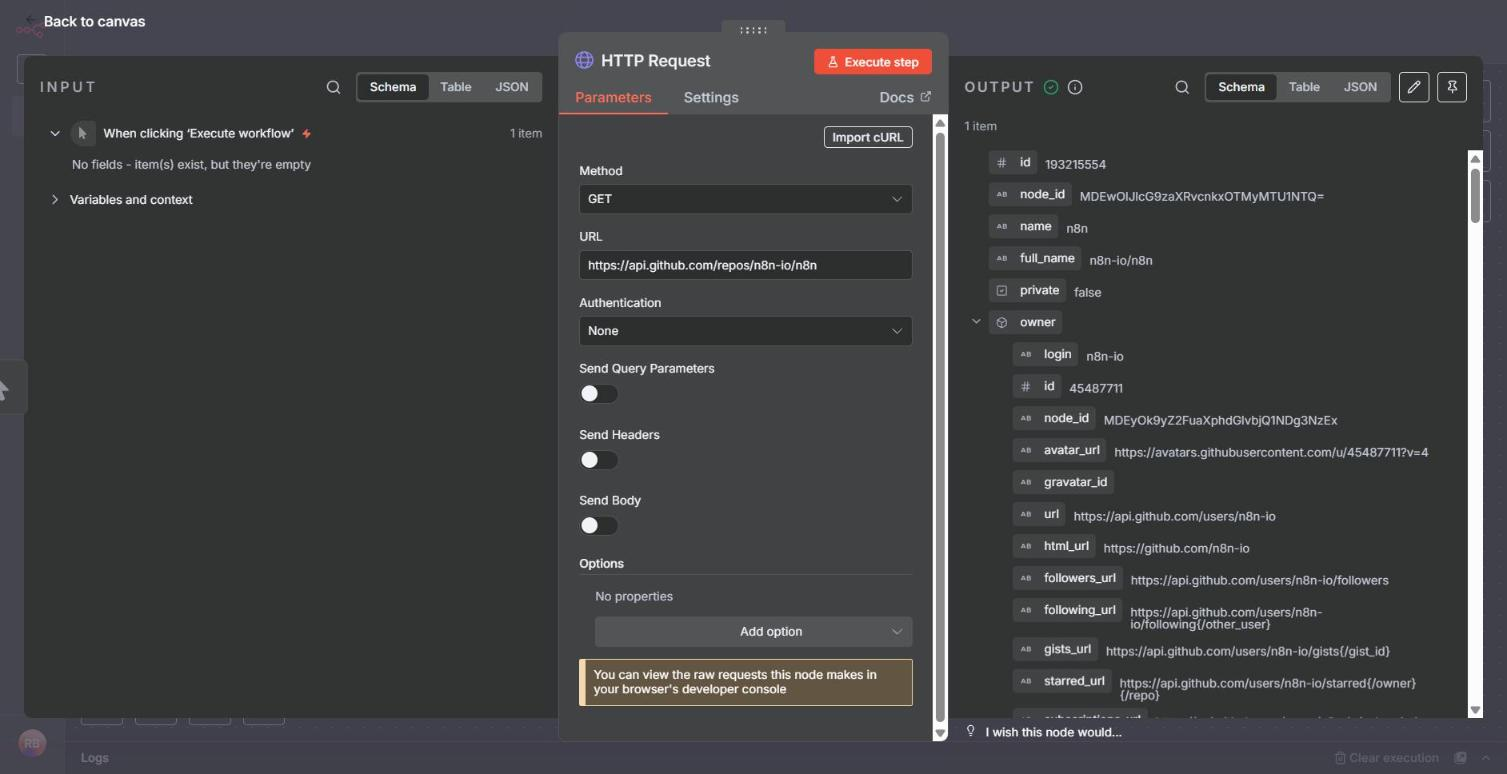
Click the + on the right-hand side of the trigger, search for "HTTP Request" and add it. Set Method to GET, paste https://api.github.com/repos/n8n-io/n8n into URL and leave Authentication on None.
Click "Execute step". The OUTPUT panel shows 1 item, which is GitHub's description of the repository: id, name (n8n), full_name (n8n-io/n8n), private (false), owner and dozens more fields after that. You can flip between Schema, Table and JSON views of the same item.
Keep the fields you want with Edit Fields
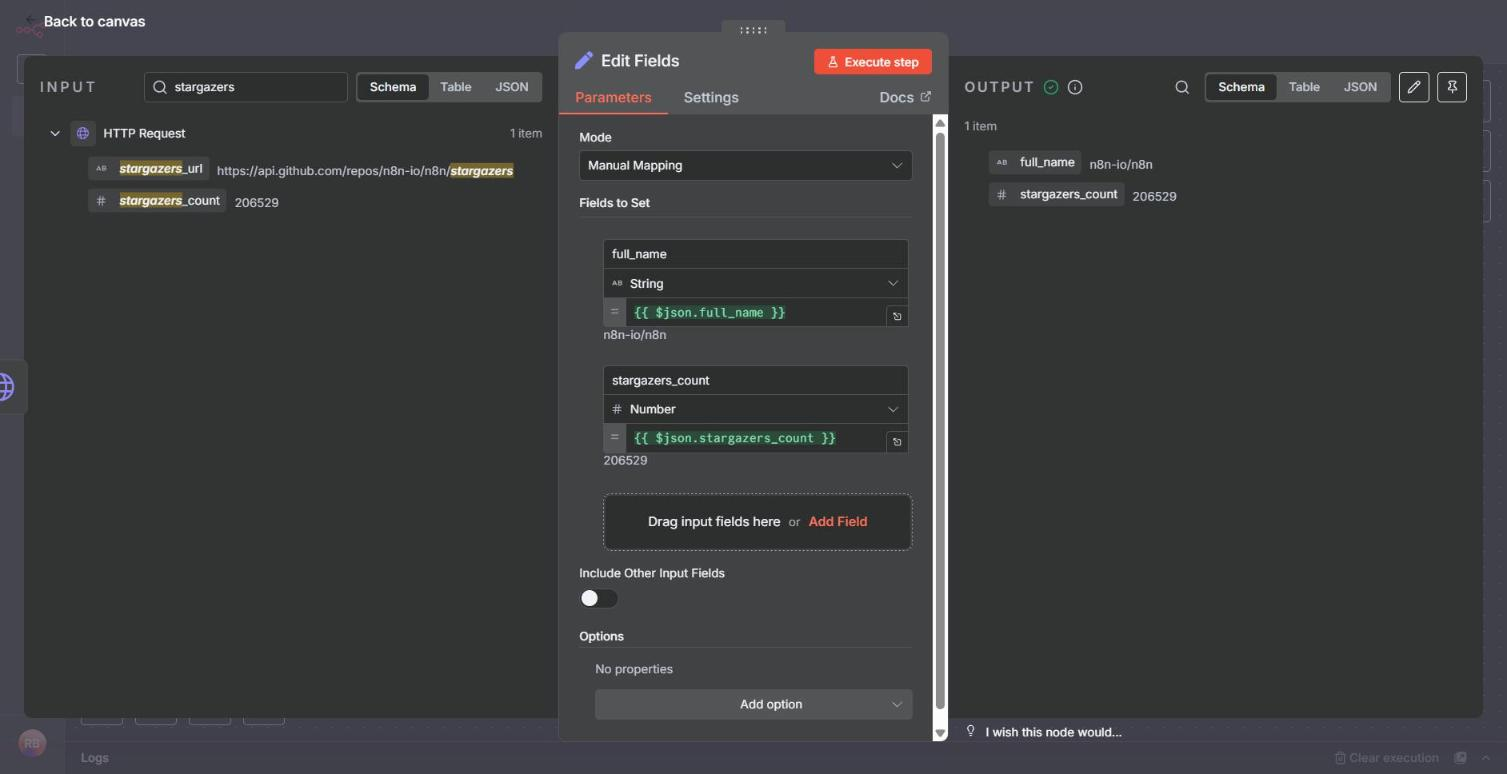
Now cut that down to the two fields you want. Click the + after HTTP Request and add "Edit Fields", with the mode left on Manual Mapping. Drag full_name from the INPUT panel into "Fields to Set". Then search the input for "stargazers" and drag stargazers_count across as well.
n8n writes the expressions for you: {{ $json.full_name }} and {{ $json.stargazers_count }}. An expression is a small formula that pulls a value out of the item coming in. n8n types them too, as a String and a Number. Click "Execute step" again and the OUTPUT is 1 item with just the two fields: n8n-io/n8n, and 206,529 stars when I ran it.
Run it, then put it on a schedule
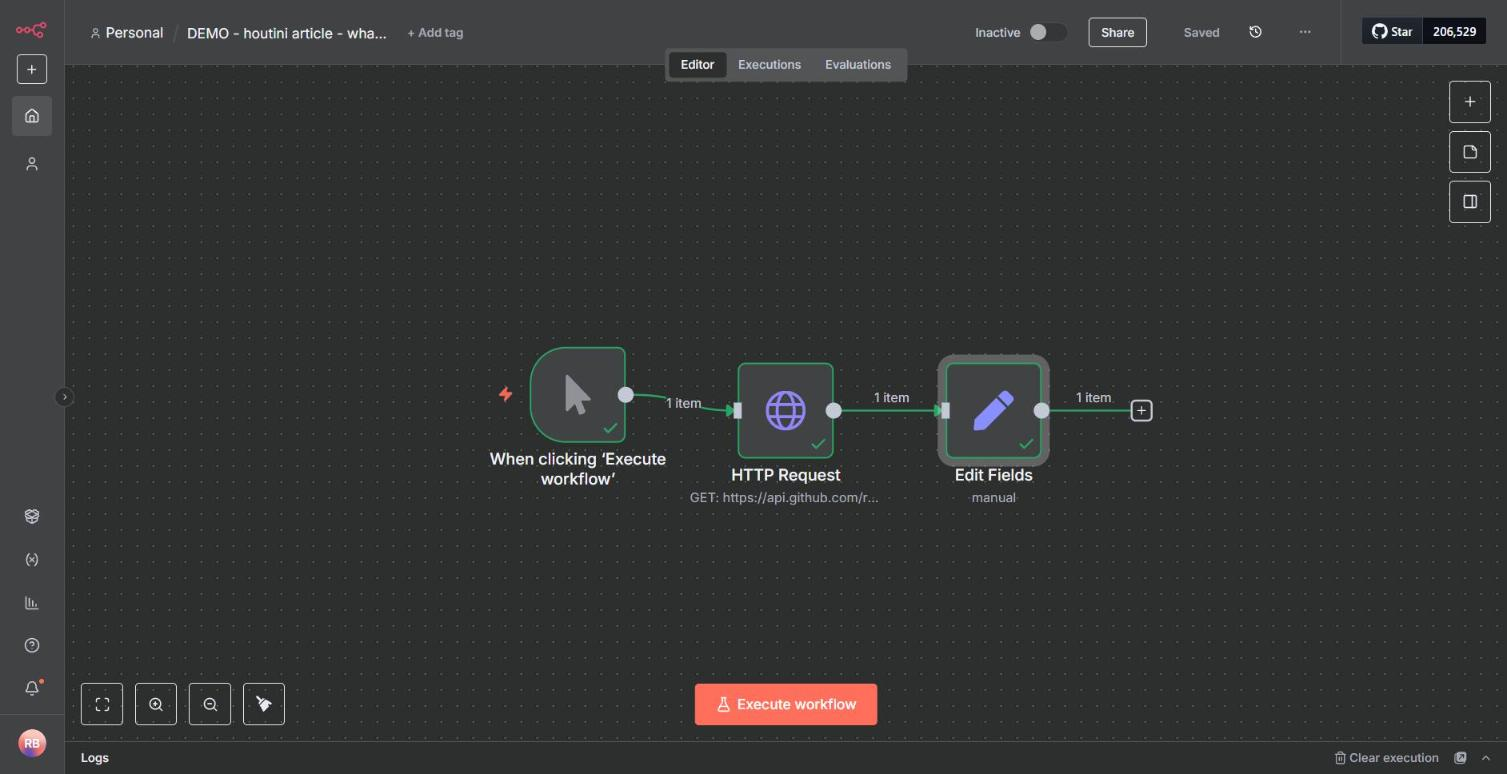
Go back to the canvas and press Ctrl+S to save. Each connection now shows "1 item", and "Execute workflow" runs the whole thing from the trigger onwards. The workflow stays Inactive, though, so nothing happens unless you click the button.
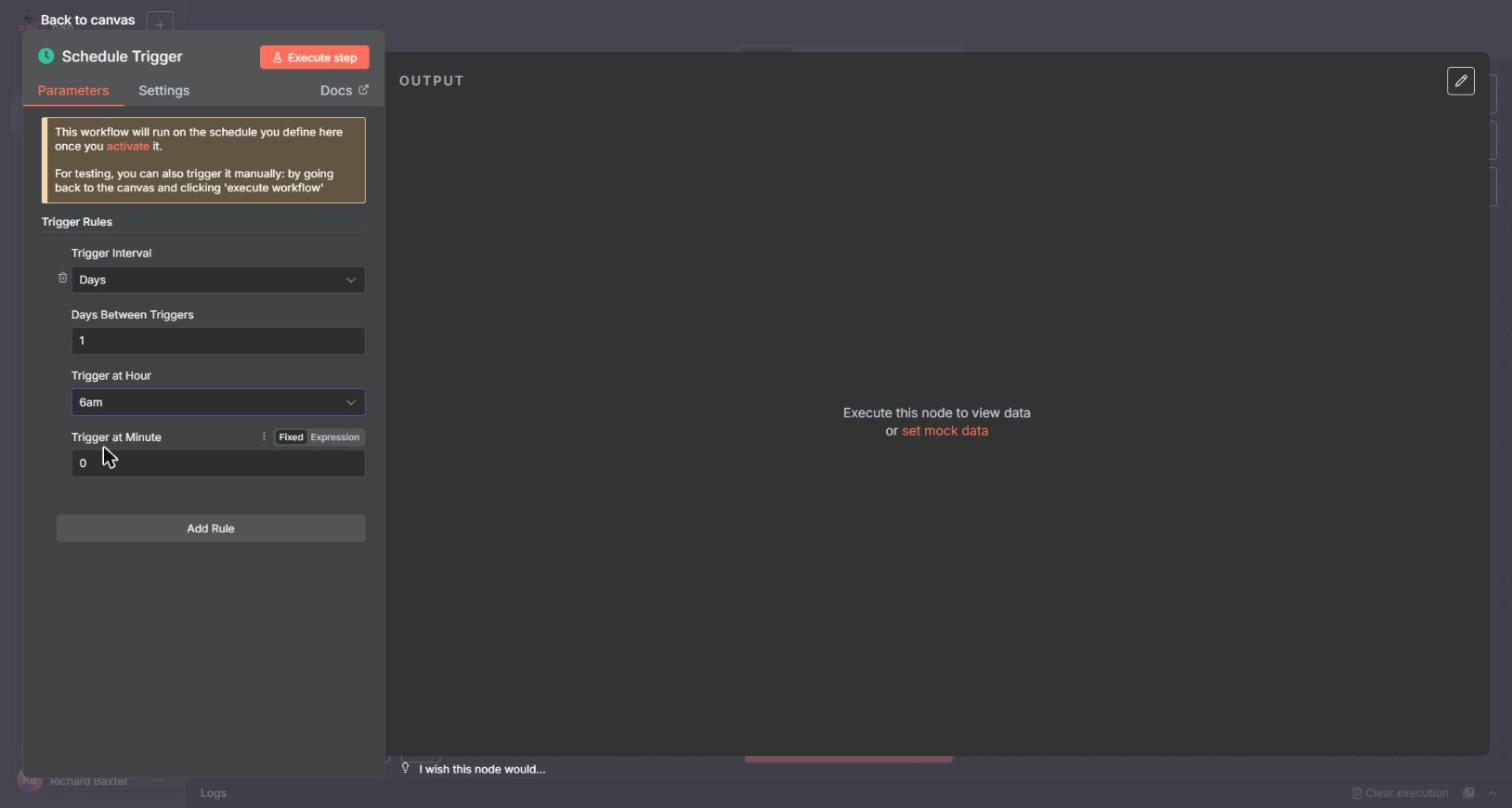
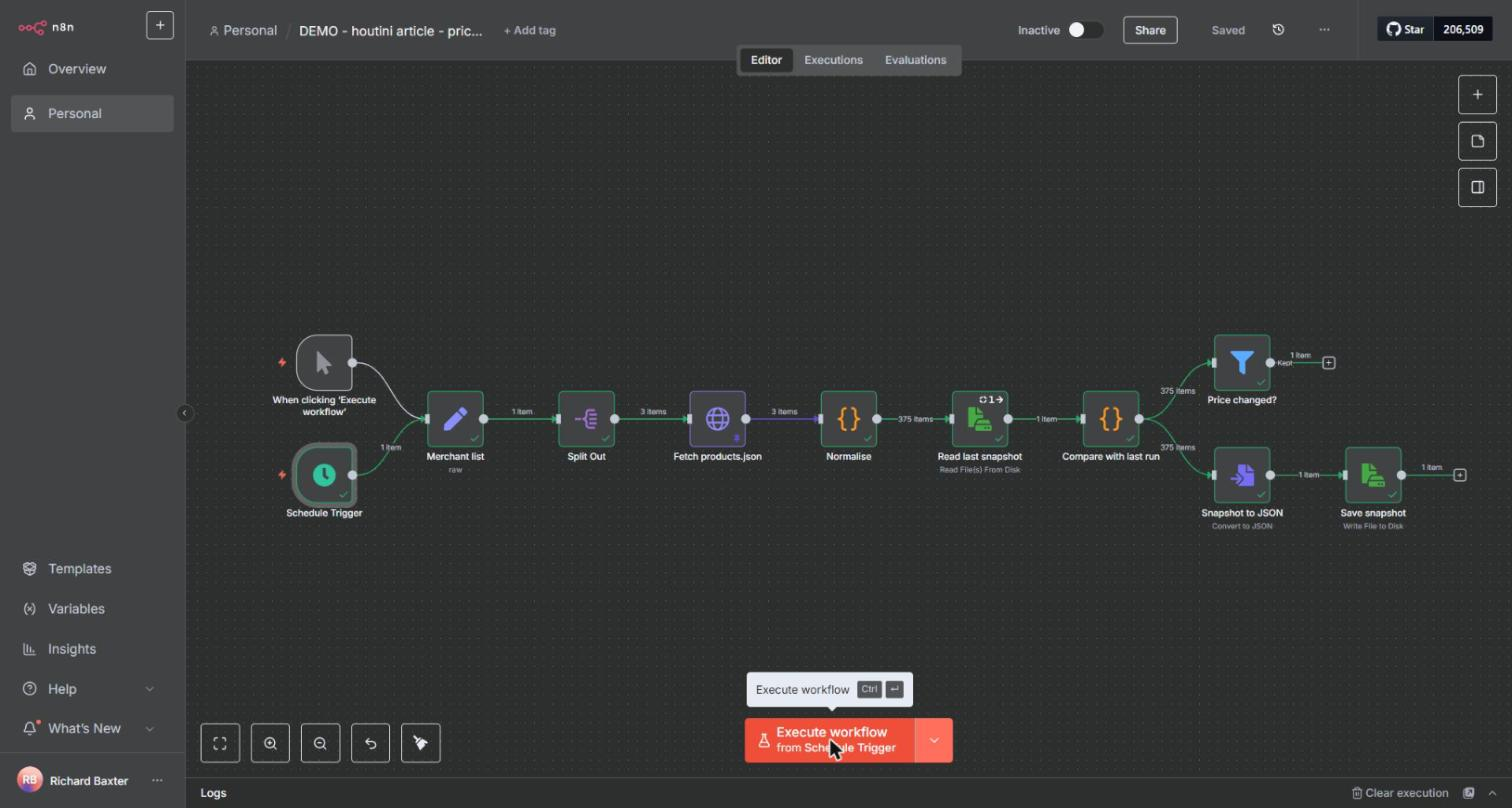
To make it run on its own, swap the manual trigger for a Schedule Trigger ("On a schedule") and switch the workflow to Active. The Schedule Trigger panel says as much itself: it runs on the schedule only once you activate the workflow. The second image below is from my price-monitor build. One thing to check on a self-hosted install is the timezone, which is America/New_York unless you set your own.
After that, add a destination: a row in Google Sheets, an email, a Slack message or a write to a database. That's where credentials come in. A credential is a stored login or API key that n8n uses to talk to another app on your behalf.
n8n workflow examples from my own instance
So what does a real instance look like after a while? On 3 October 2026 mine had 57 workflows, the oldest created in May 2025. Eight are active and 48 are archived, most of them old scrapers I retired in July. Over the seven days to 3 October, the instance's average production run took 1.88 seconds.
Counted by how many workflows use them, the most common nodes are Code in 56, Postgres in 50, Schedule Trigger in 49, HTTP Request in 44, Read/Write Files in 43, Wait in 42 and Edit Fields in 40, with LLM chains in 10. It's mostly scheduled jobs that fetch data, reshape it in code and store it.
Price scrapers on a schedule
The biggest jobs are two master scrapers, one for Shopify stores (through each store's /products.json) and one for WooCommerce (through its Store API). In July 2026 they replaced about 20 per-merchant flows, where each flow did the same job for a single shop. The copies had drifted, too: some cloned flows still carried another merchant's affiliate ID or domain. Now a config lists the merchants, and one flow per platform works through them all. On 2 October, Master - Shopify covered 13 merchants, fetched 2,920 products in 26.1 seconds and saved 2,889, and the run took 3 minutes 53 seconds. Both run daily.
The data is there for affiliate pricing: I serve it to sites like simracingcockpit.gg, where it's embedded in articles as a shortcode. If you want to build something along the same lines, there's a step-by-step build of a smaller version, and the price monitor from that build is below. For a business that wants the same idea done for it, there's the competitor price monitoring work.
An AI step that categorises products
The categoriser's LLM step picks one of 55 canonical categories for each new product, using gpt-4.1-mini through the OpenAI Chat Model node, and on 2 October it worked through 87 products. Other workflows on the instance use Gemini and Anthropic models as well. OpenAI chat models appear in 7 workflows, Gemini in 4 and Anthropic in 2. On Cloud, the pricing page lists "AI models without API keys" on Starter.
A webhook that answers thousands of requests a week
The busiest workflow by a long way is Product Search API v4. It's built on a Webhook node and answers product lookups from the SimRacingCockpit price tables and from an MCP server. Between 26 September and 3 October it accounted for 5,117 of the 5,156 executions the API counted, and the overview's 5,127 leaves out test runs.
Cloudflare sits in front of simracingcockpit.gg, where those price tables live, and counted about 275,000 requests a day to the site between 25 September and 1 October 2026. The n8n box behind the price data isn't on Cloudflare at all. It's a plain VPS (a rented virtual server in a datacentre).
Claude calling n8n
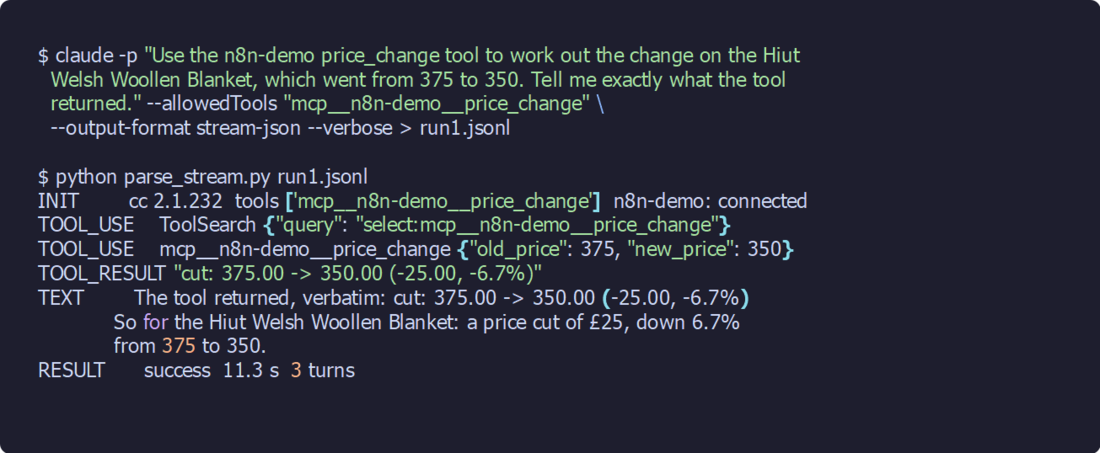
Claude Code manages my n8n through n8n's public API, and has done since July 2026. It reads workflow definitions, deploys changes, and reads executions when something needs debugging. It can also call tools I build in n8n through the MCP Server Trigger (MCP is short for Model Context Protocol). I tested that on a demo workflow with a price_change tool: given a price moving from 375 to 350, it came back with "-25.00, -6.7%", and the whole Claude Code run took 11.3 seconds over three turns. The set-up is in the n8n MCP article.
Should you self-host n8n?
Self-hosting means running n8n on a machine you control. That could be your own PC, a server at home or a rented VPS. n8n's own docs say who it suits: "n8n recommends self-hosting for expert users. Mistakes can lead to data loss, security issues, and downtime." If you aren't experienced at managing servers, n8n recommends Cloud instead.
Self-hosting n8n with Docker
For most self-hosting, n8n recommends Docker, which means you don't have to install n8n's dependencies yourself. The two commands below come from n8n's README. The first creates a storage volume and the second starts n8n. Once it's running, open http://localhost:5678 in your browser and create the owner account.
The volume, n8n_data, is where your workflows and credentials are kept between restarts. Lose it and you lose them. The README also offers a one-line installer, curl -fsSL https://get.n8n.io | sh. Bear in mind that on a laptop n8n only runs while the laptop is awake, so anything on a schedule needs a machine that's always on.
docker volume create n8n_data
docker run -it --rm --name n8n -p 5678:5678 -v n8n_data:/home/node/.n8n docker.n8n.io/n8nio/n8n
What my own n8n runs on
Mine is n8n in Docker with Postgres, on a VPS. Claude Code talks to it through the API, with the key kept out of the repository.
Part of the reason I self-host is that n8n's source is public, which gives me some insight into how it's interacting with the server. I also enjoy owning the metal it runs on. And with my own VPS I can run other things on it, or keep developing it.
I hate to say it, but it's also a bit of a technical flex. I set up an Ubuntu VPS, installed the n8n Docker image (which is usually out of date) and put Traefik in front of it. Traefik is a reverse proxy, and it's what serves everything over HTTPS. That's non-trivial, and self-hosting n8n feels like an achievement. I'm not committed to n8n's whims when it changes the product, or to paying any increase in the subscription fee. It's cheaper for me, and I'm not sharing a machine with a bunch of other people. There isn't much about it I don't like.
The Product Search API webhook averages about 730 runs a day, so on its own it would use up Cloud Pro's 10,000 executions a month in under a fortnight. The data the workflows read and write already lives in Postgres on the same box. And the public API comes with every self-hosted edition, the free one included.
Updates are your job now
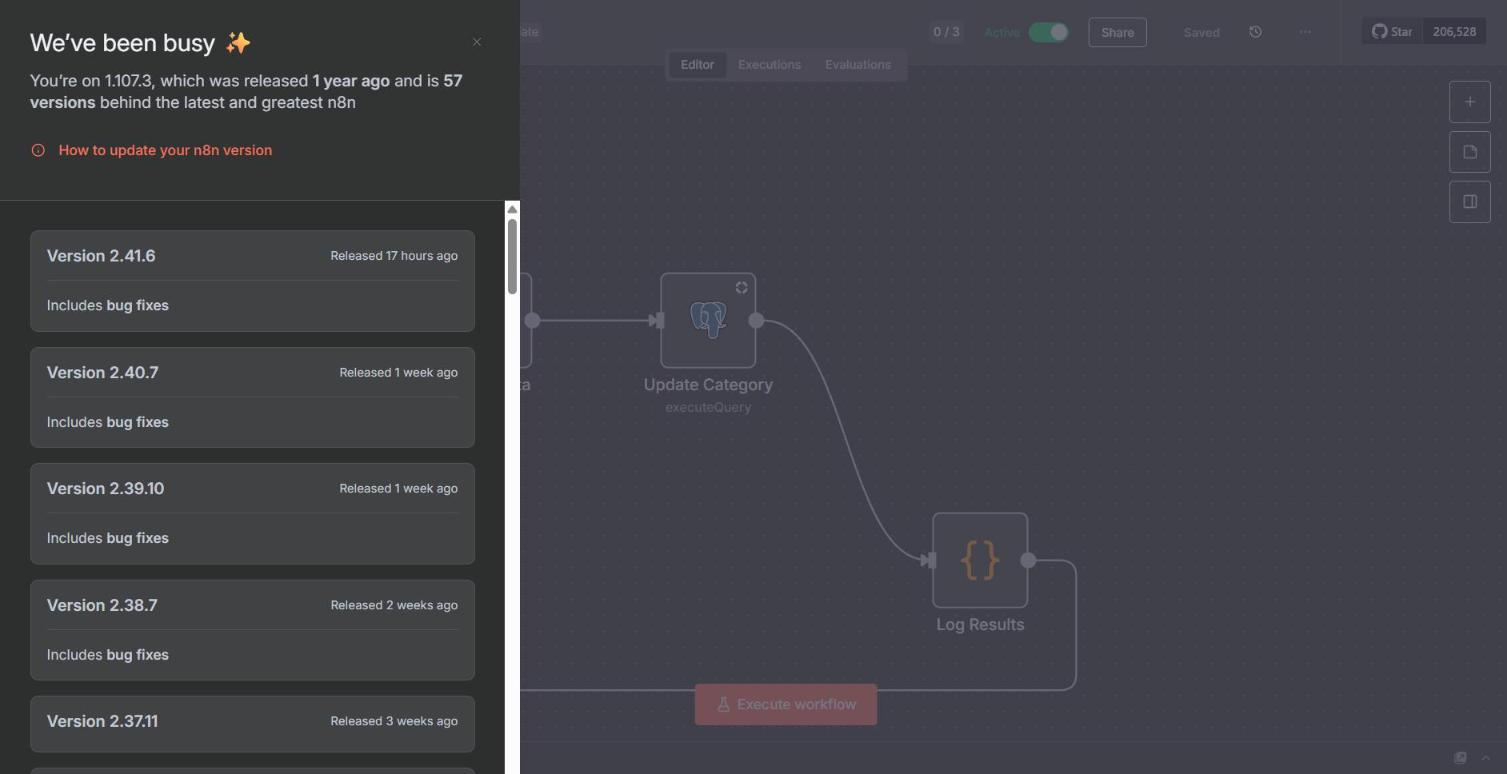
n8n "releases a new minor version most weeks", according to its docs, and on a self-hosted install keeping up with them is down to you. Mine hasn't kept up. It's on 1.107.3, and n8n's own panel tells me it was "released 1 year ago and is 57 versions behind the latest". The newest version in that panel was 2.41.6, released 17 hours earlier, and a "Critical update available" toast asks me to move to 1.121.0 or higher.
So I don't have Data Tables (which arrived in 1.113) or instance-level MCP (1.121.0). On Cloud, n8n handles updates for you. Self-hosted, an upgrade means taking a backup first and reading the breaking changes before you move, and for 2.0 those include publish replacing activate and file access being restricted by default.
A server's IP address isn't your home connection
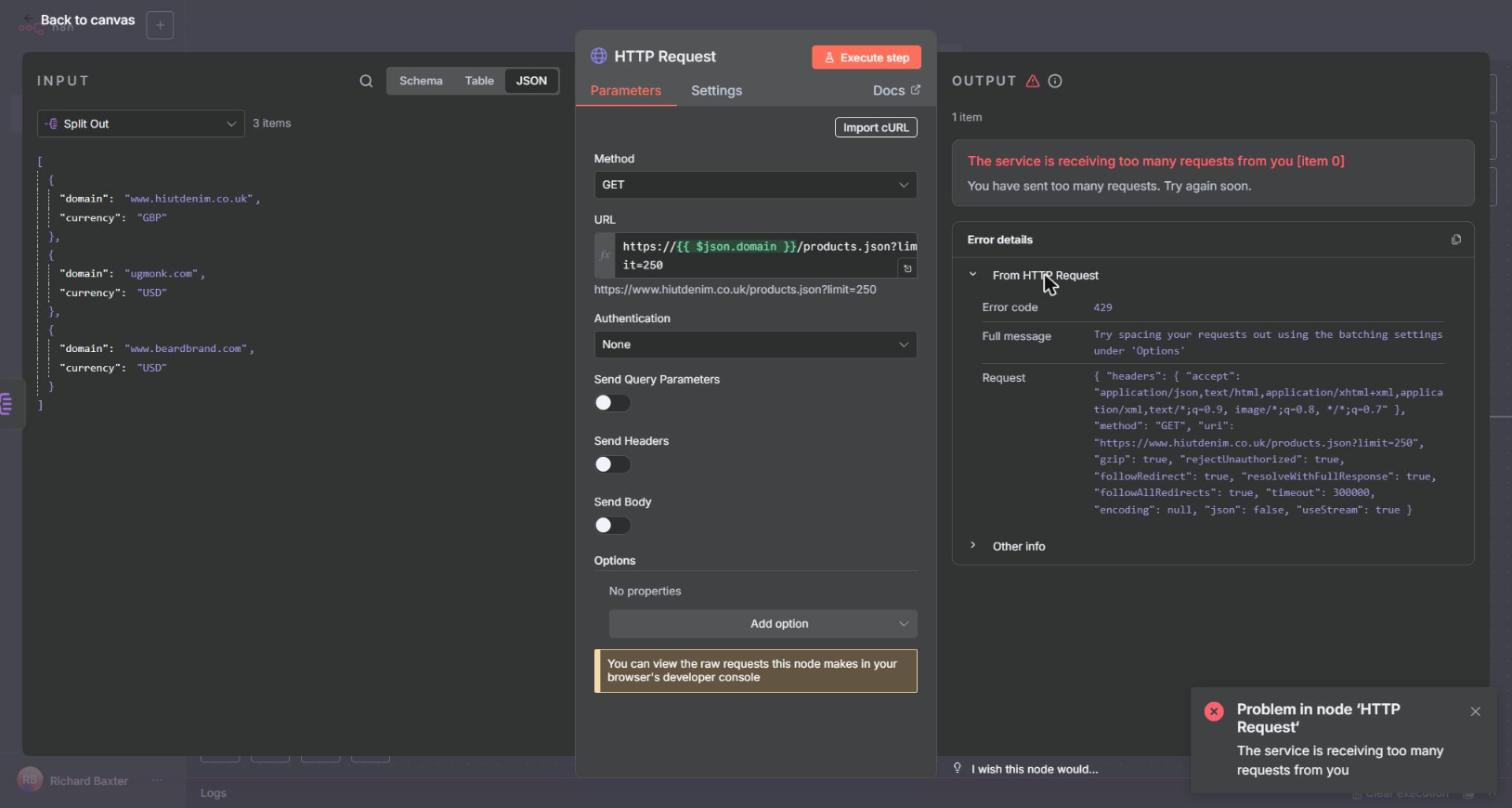
A VPS also has a datacentre IP address, and some stores treat requests from it differently. When I built the price monitor on 2 October, three Shopify stores answered the very first request from my VPS with HTTP 429 ("The service is receiving too many requests from you"), while the same URLs worked from a home connection. n8n's error hint suggests spacing the requests out with the batching settings, which can't help when the very first request is refused. In production, my Shopify fetches now go through Firecrawl, a scraping service, and its residential proxies.
Cloud or self-hosted?
If you're learning, or you've got one or two small workflows in mind, the Cloud trial and Docker on your own computer both cost nothing.
For something that has to keep running, n8n's docs recommend self-hosting for expert users, and Cloud if you aren't experienced at managing servers.
The docs describe Pro as the plan for "power users and small teams", and Cloud plans cap executions per month.
Keeping it safe in your first week
Test runs aren't live runs
"Execute workflow" in the editor is a test run. Schedules and webhooks only fire when the workflow is Active (published, on 2.x), and the insights on the Overview page count production executions, not your test runs. A couple of things behave differently between the two as well: static data isn't saved in test runs, and pinned data (a node's output frozen while you build) isn't used in production.
Keep keys in the credential store
Keep API keys and logins in n8n's credential store. It holds them encrypted, and your nodes reference them rather than containing them. Don't paste a key into a Code node or an expression, because anyone who opens or copies the workflow can read it there.
Check the execution before you theorise
When something does go wrong, open the execution before you start theorising. I learned that in July 2026, after the scraper rebuild, when data appeared to have vanished from the database. My first theory was that duplicate SKUs were breaking the database write. That was wrong. The execution showed the Save step had written 1,049 of 1,049 rows without an error. The cause was a clean-up workflow that was meant to run once, before the new flows started. It had been run after each scrape instead, and each time it deleted the products of the merchants being moved over, 960 rows and then 1,171. So a one-off clean-up now runs before a new flow's first run, never after it.
In the same rebuild, a validation pattern tripped over the difference between "/product/" and "/products/" in one merchant's URLs, and it dropped all 98 of that merchant's rows without raising anything.
Stay inside the licence
Under the licence, building workflows for a client on your own instance is fine, but giving outside users a workflow builder on top of n8n isn't.
Where to go next
If you've built the three-node workflow, the next practical step is the price monitor build, which takes the same trigger and HTTP Request pieces and turns them into something that runs on a schedule. After that, connecting Claude to n8n lets you call your workflows as tools. If Claude is new to you, the Claude Desktop beginners guide is the place to start. And if you'd rather have the work done for you, that's the competitor price monitoring work. Otherwise, open n8n, click "Add first step" and choose "Trigger manually".
Continue reading.
- How-to GuidesHow to Use AI for Market Research with Claude
- How-to Guidesn8n MCP: How to Connect Claude Code to n8n and Use Its API Safely
- How-to GuidesHow to Run Qwen3-Coder-Next Locally: My vLLM Settings for Two 48GB RTX 4090s
- How-to GuidesHow to Build a Competitor Price Monitoring Pipeline with n8n
- AI WorkflowsAI Fact Checking: How I Check My Content Reliably With Agents
- How-to GuidesOpenCode vs Claude Code: Setting Up OpenCode Desktop on Windows