RTX 4090 48GB: A vLLM Benchmark on Two Modded Cards
I built a local AI server at home from two modded 48GB RTX 4090 cards, £6,200 for the pair, and then spent about five days benchmarking them on vLLM, changing one thing at a time. These are the results, and the received wisdom about these cards that the numbers overturned.
 Richard Baxter AI Ops & Marketing Engineer
 On this page
- The rig: two RTX 4090 48GB cards
- vLLM benchmark results: twelve models, three contexts
- Will it fit?
- Power and clock: what does decode cost?
- Splitting a model: one card, two cards, or a pipeline?
- Quantisation: the format is the speed
- Five assumptions the numbers overturned
- Method and provenance
- Open questions
- Reproducing these numbers
I wanted to squeeze the most inference I could out of a reasonably powerful PC, running the newest open-weight models, and I wanted to do it at the lowest cost I could get away with.
A friend of mine sells PC components, and he found me a reliable supplier of the 4090D. That's the Chinese-market version of the RTX 4090, and these ones are modded to carry 48GB of memory on each card. At £3,100 each they were a bargain by comparison with the card most people reach for when they want 96GB on a single board, Nvidia's Blackwell RTX PRO 6000, which costs around £14,000. So the sums were tempting from the start. A 48GB card at that price is a real budget alternative to an "AI-ready" mini PC, or to the RTX PRO 6000 itself.
There is a catch, though. The 4090D is Ada architecture, not Blackwell - which means it sits a generation behind, and a lot of what is written about Ada says these cards cannot run the newest compressed model formats properly. But my determination to eke out as much performance as possible has, after about five days of heavy tweaking and comparison, yielded some exciting results.
Quick Navigation
The rig | vLLM benchmark results | Will it fit? | Power and clock | Splitting a model | Quantisation | Five assumptions overturned | Method | Open questions | Reproducing these numbers
Download the raw dataset (JSON)
The rig: two RTX 4090 48GB cards
The hardware is two modded RTX 4090D cards, 48GB of VRAM (the graphics card's own memory) on each. That's two cards giving me 96GB in total, for roughly £3,100 a card - about £6,200 for the compute. The single-card way to reach the same 96GB is the RTX PRO 6000 Blackwell, which sells in the UK at £14,259.96 at Scan as of 25 September 2026. So it is two consumer cards, or one professional one at more than twice the money.
The two cards sit on different PCIe links. GPU 0 runs on a full x16 slot and drives the displays. GPU 1 runs on x4 - which means it gets a quarter of the lanes, and a quarter of the bandwidth back to the system. Around them is 128GB of system RAM, Windows 11, and Docker Desktop running on WSL2 (that's Windows' built-in Linux layer). The inference engine is vLLM 0.26.0, pinned to an exact image digest so the version cannot move under me while I am testing.

In production the cards do not run flat out. I cap power at 330W and lock the core clock to a 0 to 2200MHz range. That started life as a stability requirement on the rebuilt cards rather than a performance choice - and, as the power section shows further down, it costs nothing on speed.
The price of going with two cards instead of one is paid in complexity rather than money. Two cards means tensor-parallelism, which is splitting a single model across both GPUs so they work on it together. It also needs a power policy to keep the two predictable, and it means living with that slower x4 link on the second card.
vLLM benchmark results: twelve models, three contexts
I tested twelve open-weight models end to end, all of them verified between the 15th and 19th of August. They span US, Chinese and European labs, and they run from 1.2 billion parameters up to 120 billion. Some are dense models, where every parameter fires on every token. Others are MoE, or mixture-of-experts - which means only a slice of the parameters activate for each token, so a very large model can write its answer at close to a small model's speed. Between them the twelve use five different quantisation formats. Quantisation is compressing a model's weights to fewer bits - INT4 or FP8, for example - so the model needs less memory and less bandwidth to run.
The headline measure is decode speed, in tokens per second (tok/s - a token is a word or part of a word, so this is roughly how fast the model writes once it is going). The table below gives that decode speed at three context depths, with each model's size, load time and settings alongside.
Single-stream decode in tokens/second, measured on 2x RTX 4090 48GB, vLLM 0.26.0. Click any column to sort. Footprint is on-disk weights, not serving VRAM.
Download the raw dataset (JSON)| Model | Footprint GB | 0 ctx | 4k ctx | 16k ctx | Load s | TP | Native ctx | MoE |
|---|---|---|---|---|---|---|---|---|
| LFM2.5-1.2B-Instruct | 2.3 | 308.3 | 303.5 | — | 122 | 1 | 128k | dense |
| Nemotron-3.5-Lightning-30B-FP8 | 32.3 | 158.4 | 158.5 | 156.8 | 1002 | 1 | 262k | 6 |
| gpt-oss-120b-officialhero | 65.2 | 153.4 | 149.1 | 140.7 | 1334 | 2 | 131k | 4 |
| GLM-4.7-Flash-GPTQ | 16.6 | 134.5 | 127.8 | — | 441 | 1 | 203k | 4 |
| NVIDIA-Nemotron-3-Super-120B-A12B-AWQ-4bit | 80.7 | 63.9 | 64 | 63.6 | 1816 | 2 | 262k | 22 |
| Devstral-Small-2-24B-AWQ | 32.1 | 60.6 | 59.2 | 55.8 | 699 | 1 | 393k | dense |
| Llama-4-Scout-INT4 | 64.9 | 53.7 | 53 | 52 | 1291 | 2 | 10.5M | 1 |
| Ternary-Bonsai-27B-AWQ | 18.7 | 50.7 | 50.2 | 49.1 | 608 | 1 | 262k | dense |
| Qwen3.8-27B-AWQ | 27.7 | 35.8 | 35.3 | 34.3 | 1470 | 1 | 262k | dense |
| Llama-3.3-70B-AWQ | 39.8 | 23.2 | 22.2 | — | 940 | 1 | 131k | dense |
| Llama-3.3-70B-FP8 | 72.7 | 19.1 | 19 | 18.6 | 1536 | 2 | 131k | dense |
| Qwen3.8-27B-FP8 | 30.9 | 16.6 | 16.5 | 16.4 | 1522 | 1 | 262k | dense |
Empty 16k cells are honest gaps: GLM-4.7 returns no tokens at ~16k, and Llama-3.3-70B-AWQ and LFM2.5 hit an HTTP 400 at that length. Serving VRAM is not shown: at 0.92 utilisation vLLM fills ~45GB per card by design regardless of model size, so it measures the setting, not the model. gpt-oss-120b's 92.7GB is kept elsewhere only as the MXFP4 existence proof.

Some cells at the deepest context are empty, and each one has a reason. GLM-4.7-Flash returns no tokens at around 16k context. LFM2.5 and the Llama-3.3-70B AWQ build are blank there too, but those two were down to my harness, not the models: the prompt builder overshot to about 30k tokens, past both context windows. On a corrected rerun on 23 August both completed at 16k, LFM2.5 at 299.4 tok/s and the Llama at 21.7.
If you watch VRAM while a model is serving, don't read that figure as the size of the model. At the memory-utilisation setting I run (0.92, meaning vLLM may take 92% of each card's memory), vLLM claims about 45GB per card regardless of how big the model is - so that figure measures my setting, not the model.
As for the extremes: the fastest of the twelve was a tiny one, LFM2.5-1.2B at 308 tok/s, with Nemotron-3.5-Lightning-30B at 158 and gpt-oss-120b at 153. The slowest were Qwen3.8-27B-FP8 at 16.6 and Llama-3.3-70B-FP8 at 19.1.
Will it fit?
Before you download anything, you want to know whether a given model will fit on a given card at the context length you want.
The calculator below adds up three things. First the weights - the model's on-disk size, and here I use the measured footprints from the twelve-model run rather than the advertised ones. Then the KV cache, which is the running memory of everything the model has read so far, held on the GPU so it does not have to be recomputed on each step. The KV cache grows as the context gets longer, and it is easy to under-budget for. Then a fixed overhead - activations, CUDA graphs and the like - which comes to roughly 2GB. Add the three together, check the total against the VRAM you can actually use at 0.92 utilisation, and you have your answer.
Your setup
The model
KV cache needs three numbers from the model's config.json (probe, don't assume):
Weights are this model's measured value. The layers / KV-heads / head-dim are still the worked-example defaults - swap in this model's own numbers from its config.json for an accurate KV figure.
Will it fit?
- Weights
- —
- KV cache at this context
- —
- Overhead (activations, graphs)
- —
- Total needed
- —
- Usable VRAM (0.92 util)
- —
Largest context that fits on this setup: —
The 12 measured models (weights + the context each served on our rig)
| Model | Weights GB | Served ctx | Cards | KV |
|---|---|---|---|---|
| LFM2.5-1.2B-Instruct | 2.3 | 33k | 1 | fp8 |
| GLM-4.7-Flash-GPTQ | 16.6 | 33k | 1 | auto |
| Ternary-Bonsai-27B-AWQ | 18.7 | 33k | 1 | fp8 |
| Qwen3.8-27B-AWQ | 27.7 | 33k | 1 | fp8 |
| Qwen3.8-27B-FP8 | 30.9 | 33k | 1 | fp8 |
| Devstral-Small-2-24B-AWQ | 32.1 | 33k | 1 | fp8 |
| Nemotron-3.5-Lightning-30B-FP8 | 32.3 | 33k | 1 | fp8 |
| Llama-3.3-70B-AWQ | 39.8 | 21k | 1 | fp8 |
| Llama-4-Scout-INT4 | 64.9 | 33k | 2 | fp8 |
| gpt-oss-120b-official | 65.2 | 131k | 2 | fp8 |
| Llama-3.3-70B-FP8 | 72.7 | 33k | 2 | fp8 |
| NVIDIA-Nemotron-3-Super-120B-A12B-AWQ-4bit | 80.7 | 33k | 2 | fp8 |
Weights are measured on our own rig (2x modded RTX 4090 48GB, vLLM 0.26.0). KV cache is computed from the architecture you enter - the number no spec sheet prints - so the calculator is only as right as those three fields; read them from the model's config.json. A 2GB overhead margin and the 0.92 utilisation we serve at are both applied.
Power and clock: what does decode cost?
I carried the instinct to cap power and lock clocks over from Ethereum mining, where you learn quickly that the last few percent of clock speed costs far more in watts than it ever returns in work. I wanted to know whether that instinct held here too, so I tested it directly.
There were three configurations. A is production: the 330W cap, clocks locked. B lifts the cap to 450W. C keeps the 330W cap but unlocks the clocks. I ran three models, six repeats each, though one pass of the tiny LFM2.5 was taken while eight downloads saturated the disk, so the two bigger models carry the result.
Decode speed did not move. Qwen3.8-27B ran 35.1, 35.1 and 35.5 tok/s across the three; Llama-3.3-70B, spread over both cards, ran 34.9, 35.2 and 35.1. Power moved a great deal. Unlocking the clocks pushed Qwen's mean draw from 279.8W to 327.3W - that is 17% more power for a 1% change in decode. On the 70B it added around 90W, from 561.9 to 652.4, for under 1%.

One thing I could not close during the campaign was whether the lock holds at all. Nvidia's own command-line tool, nvidia-smi, accepts it and reports success, but on the 70B runs GPU 0 read 2640MHz and above, well past where the lock should hold. You cannot check a clock lock by query, only by watching clocks under load, so that is what I did on 23 August: both cards peaked at exactly 2190MHz, the nearest step below the 2200MHz ceiling, with draw topping out at 321.4W against the 330W cap.
Splitting a model: one card, two cards, or a pipeline?

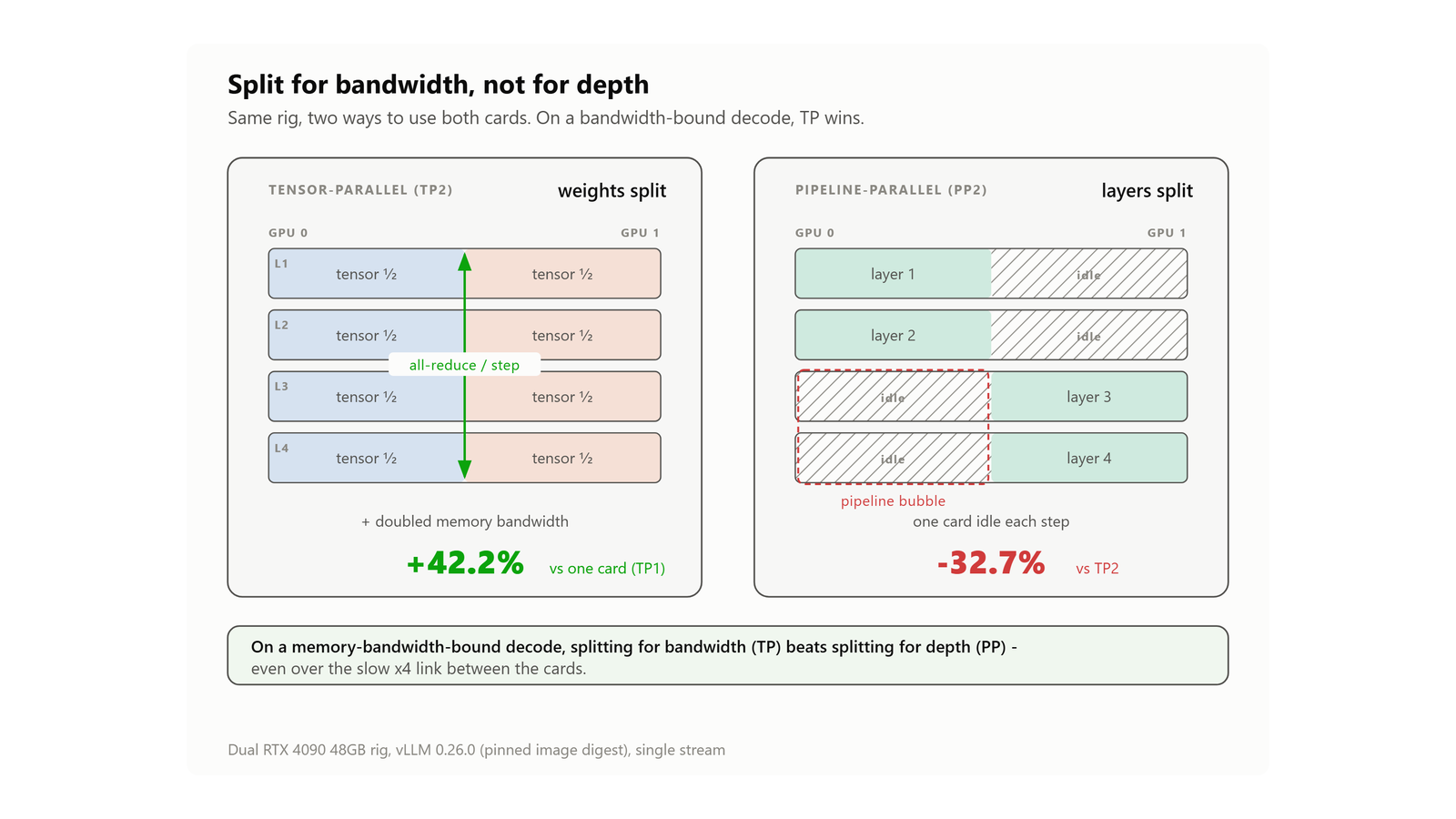
The standing doctrine, and I held it myself, is that you should never tensor-parallelise a model that already fits on one card. The reasoning sounds solid. Splitting a model across two cards means every single decode step ends with an all-reduce - the two cards stopping to combine their partial results before either can go on - and on my rig that all-reduce runs over the slow x4 link. So it ought to be a tax you only pay when you have no choice.
I measured it on Qwen3.8-27B, which fits comfortably on one 48GB card. On one card (TP1), with a 29k-token prompt, it decoded at 34.4 tok/s. Split across both (TP2) it ran 48.9 - a 42.2% gain from splitting a model that did not need splitting. The doubled memory bandwidth of two cards beats the x4 tax, and it is not close. Pipeline parallelism - the other way to split, where each card runs a different set of layers rather than sharing every one - came in at 32.9, slower than just leaving the model where it was. On Llama-3.3-70B at short context the same shape held: TP2 at 35.3, pipeline at 21.8. Back on the Qwen, splitting it across both cards also cut the load time, from 14.6 minutes on one card to 9.2.
I will mark the scope, because it is narrow. This is one model, at one context length, on a single stream. I have not yet tested it under several requests at the same time, and that is what I most need to know before I move production onto it.

Quantisation: the format is the speed
The same model - Qwen3.8-27B again - decodes at 35.8 tok/s as an AWQ-INT4 build and 16.6 as FP8-dynamic. That is roughly double, and the only thing that changed is which file I downloaded. On Llama-3.3-70B the gap is smaller, 23.2 against 19.1, and that is with the FP8 build spread across both cards because it is too big for one.
Decode is memory-bandwidth-bound. What limits the speed is not how many parameters the model has, it is how many bytes the card has to read for every token it produces. So the format that touches fewer bytes per token wins, almost regardless of anything else. That is also why the speed order in the table looks nothing like the size order - a bigger model in a leaner format can out-decode a smaller one in a heavier format.

Five assumptions the numbers overturned
Five pieces of received wisdom about running these cards went into the campaign, and each one came back out broken, with a number attached.
"Never split a model that fits on one card"
It didn't hold. TP2 beat TP1 by 42.2%, and pipeline parallelism was 32.7% slower than TP2.
"Ada has no kernels for the new low-bit formats"
A kernel is the low-level GPU code that does the maths for a given format, and instead of trusting the docs I asked the pinned engine directly, on this card, which formats it allows. Its capability table permits block-FP8, NVFP4 and MXFP4 at compute capability 8.9, which is what these cards report. That proves the code path exists, not that it is fast. The speed shows up in gpt-oss-120b, below.
"MXFP4 gets upconverted to BF16 on Ada"
If it did, the 4-bit weights would be unpacked and held in memory at 16-bit, and the newest formats would be pointless here. It doesn't. gpt-oss-120b is a 117-billion-parameter MoE model that ships natively in MXFP4, and it serves its full 131,072-token context in 92.7GB total. Held as BF16 the weights alone would be around 234GB - impossible in 96GB - so it plainly is not upconverting. And it decodes at 153.4 tok/s while it does it.
"The 9P bind mount doesn't affect load time"
9P is how WSL2 shares a Windows folder into a Linux container. I could test this one cleanly, with the mount as the only variable. On the WSL2 bind mount a model loaded in 763 and 762 seconds; on a proper ext4 Docker volume (storage that lives inside Linux itself), 203 and 204. That is 3.75 times faster for changing nothing but where the files sit.
"The cards must run flat out"
The power section above settled this one: decode stayed flat, and on the 70B the lock saved around 90W.

Method and provenance
I used Claude to design the test methodology - the harness, the variables held fixed, the order the runs went in - and then I ran it myself, over several days, changing one thing at a time.
Every model was loaded on its own first, before any timing run, with its errors captured and its settings corrected - four of the first eight failed on their first load, so this was not optional. The engine is pinned to an exact image digest, because an earlier compose file said "latest" and the stack quietly upgraded from 0.25.1 to 0.26.0 mid-week, which ruined the comparability of everything run before it. Context is measured, not requested - every figure uses the API's own count of the prompt tokens, because the early rounds asked for a length and were handed about 1.9 times that. And only ever one model sat in VRAM at a time. Sampling settings came from each model's own generation_config.json, not a house default.
The exclusions are on the record too. Kimi-Linear-48B is out on policy, because its tokenizer (the part that turns text into tokens) only runs by executing Python shipped with the weights, and I never pass --trust-remote-code. Muse-Glimmer-30B uses an architecture that is not in the pinned 0.26.0 at all. A community gpt-oss AWQ build turned out to have experts that were never quantised. And seventeen instrument failures are logged verbatim, because they taught the two rules I trust most out of the whole exercise: suspect the instrument before you suspect the subject, and read the number, not the verdict.
Open questions
There are a few things this campaign did not settle. The GLM-4.7-Flash blank at 16k is real: it came back again on the corrected 23 August rerun, and I have not diagnosed why. Nemotron-3.5-Lightning came in at 158.4 tok/s, 3.4 times the speed of my production daily driver at the time, and on 24 August it passed the gauntlet, my standing test for a production job: identical tool calls, 8 out of 8 on extraction, and code on a par with the incumbent. Whether it takes the job is a decision I have not made yet.
MTP, or multi-token prediction (a speculative-decoding trick where the model guesses several tokens ahead and then checks them), refused to hold still: neutral on 19 August, 34% faster on 23 August, and one early "negative" that turned out to be my harness counting chunks instead of tokens. So I cannot call it either way. It stays off in production for a separate reason: on 0.26.0 it can deadlock a long, cold prefill (prefill is the model reading the prompt before it writes anything).
And the biggest open question before any of this moves into production is what TP2 does under four concurrent streams, because every number I have measured so far is single-stream, and that is the next test I'll run.
Reproducing these numbers
If you want to run this yourself, the starting point is the vLLM setup guide - that is the on-ramp, and the first tuning pass on these particular cards predates this campaign. From there, the frozen dataset carries everything: every per-run row, every launch config, the exclusions and the full catalogue of instrument failures. You can download it here.
If you are running comparable hardware and you get a number that disagrees with mine, I would like to know. Get in touch, tell me what you measured and how you measured it, and we will work out where the two rigs part ways.
Continue reading.
- AI WorkflowsAI Fact Checking: How I Check My Content Reliably With Agents
- How-to GuidesOpenCode vs Claude Code: Setting Up OpenCode Desktop on Windows
- How-to GuidesHow to Connect Google Trends to Claude Code
- ExplainerClaude Code Skills: What They Do and Which Ones to Use
- How-to GuidesCLAUDE.md: How to Write One That Stays Lean
- How-to GuidesHow to Make a PDF Report with Claude