n8n MCP: How to Connect Claude Code to n8n and Use Its API Safely
In today's post I'm connecting Claude Code to n8n two ways: calling a tool you build behind an MCP Server Trigger, and managing the workflows themselves through n8n's public API. I ran both against my own self-hosted n8n, and tested two API calls that n8n lets through without a warning: one PUT deleted a node's credential, and another put a change live.
 Richard Baxter AI Ops & Marketing Engineer
 On this page
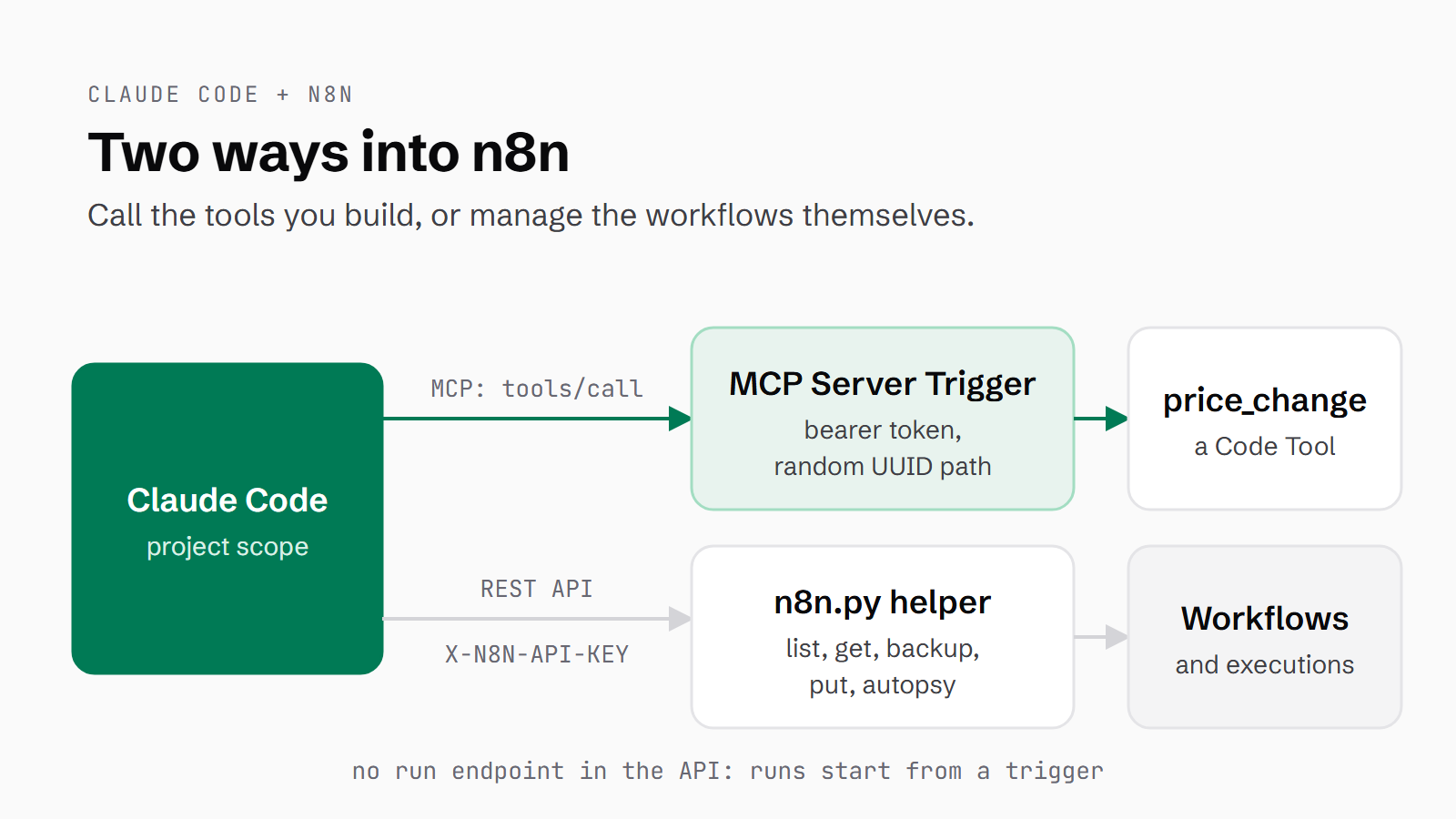
There are two ways to get Claude Code working with n8n. The first is to build a tool inside n8n and let Claude call it, through a workflow that starts with an MCP Server Trigger. MCP (Model Context Protocol) is the standard Claude uses to talk to outside tools; this explainer covers it in more depth. The second is the n8n public API, which lets Claude list, read, back up, change and debug your workflows. You'll end up with both: Claude Code calling a tool on your own n8n, protected by a bearer token, and a small helper script that lets Claude manage your workflows, with a backup before every write and a guard on your production flows.
I ran all of this on my own n8n, self-hosted on version 1.107.3, which is the same instance that runs my price scrapers. It took me about an hour and fifty minutes from the first API call to the clean-up, and that includes reading the docs. Following the steps below, you should be done in under an hour. The tool call worked, and the whole headless test run took 11 seconds and cost $0.43 on Opus. On the API side, n8n gave no warning at all in two places: a PUT that leaves out a node's credentials quietly deletes them, and a PUT to an active workflow goes live with no publish step. Self-hosted n8n has the API on every edition; on n8n Cloud you'll need a paid plan.
Quick Navigation
MCP or the API? |
What you need |
Check your version |
Build the MCP server |
Connect Claude Code |
The API set-up |
Verify it works |
Built-in MCP (newer n8n) |
Gotchas |
Where next
Which route do you need: MCP or the API?
The MCP Server Trigger has been in n8n since 1.88.0, released in April 2025. It turns a workflow into an MCP server, so the tools you attach to it become tools Claude can call. A tool, in n8n's sense, is a node an AI can hand some inputs to and get an answer back from. The API does a different job: Claude uses it to manage n8n rather than to use what's in it. On version 1 the API can't start a run, which means the trigger is also how Claude kicks off work in n8n.
Newer n8n also has an instance-level MCP server, with its own section further down. If you're on 2.x and only want Claude to run workflows you already have, start with that instead: n8n's docs say its execute_workflow tool runs the ones you opt in directly, with no MCP Server Trigger to build. The MCP Client Tool node goes the other way, with n8n's own AI agent calling an outside MCP server. It needs an AI Agent node with its own model credential, so it's a separate build from this one.
What you need before you start
You won't need any hardware beyond the machine n8n already runs on, but there are six things to have in place first:
- n8n 1.88 or later for the MCP Server Trigger. I used 1.107.3.
- Access to the n8n public API, which any self-hosted n8n has and the n8n Cloud free trial doesn't.
- An n8n API key, created under Settings > n8n API with a label and an expiry date.
- Claude Code. I ran version 2.1.232. If you don't have it yet, this link gets you a free week of Claude Code.
- curl, for checking the endpoint by hand.
- Python 3 for the helper script. It only uses the standard library, so there's nothing to install.
Check your n8n version first
Your n8n version decides which routes exist, so check it first. The /rest/settings endpoint answers without an API key, and its versionCli field holds the version. Mine came back as 1.107.3. Then send a POST to /mcp-server/http, which is where the instance-level MCP server would live. On 1.107.3 the answer is an HTML error page saying "Cannot POST", which means there's no built-in server here and the MCP Server Trigger is the route to take.
curl -s https://<your-n8n-host>/rest/settings | python -c "import json,sys; print(json.load(sys.stdin)['data']['versionCli'])"
1.107.3

curl -s -X POST https://<your-n8n-host>/mcp-server/http
...<pre>Cannot POST /mcp-server/http</pre>...
Build an MCP server in n8n
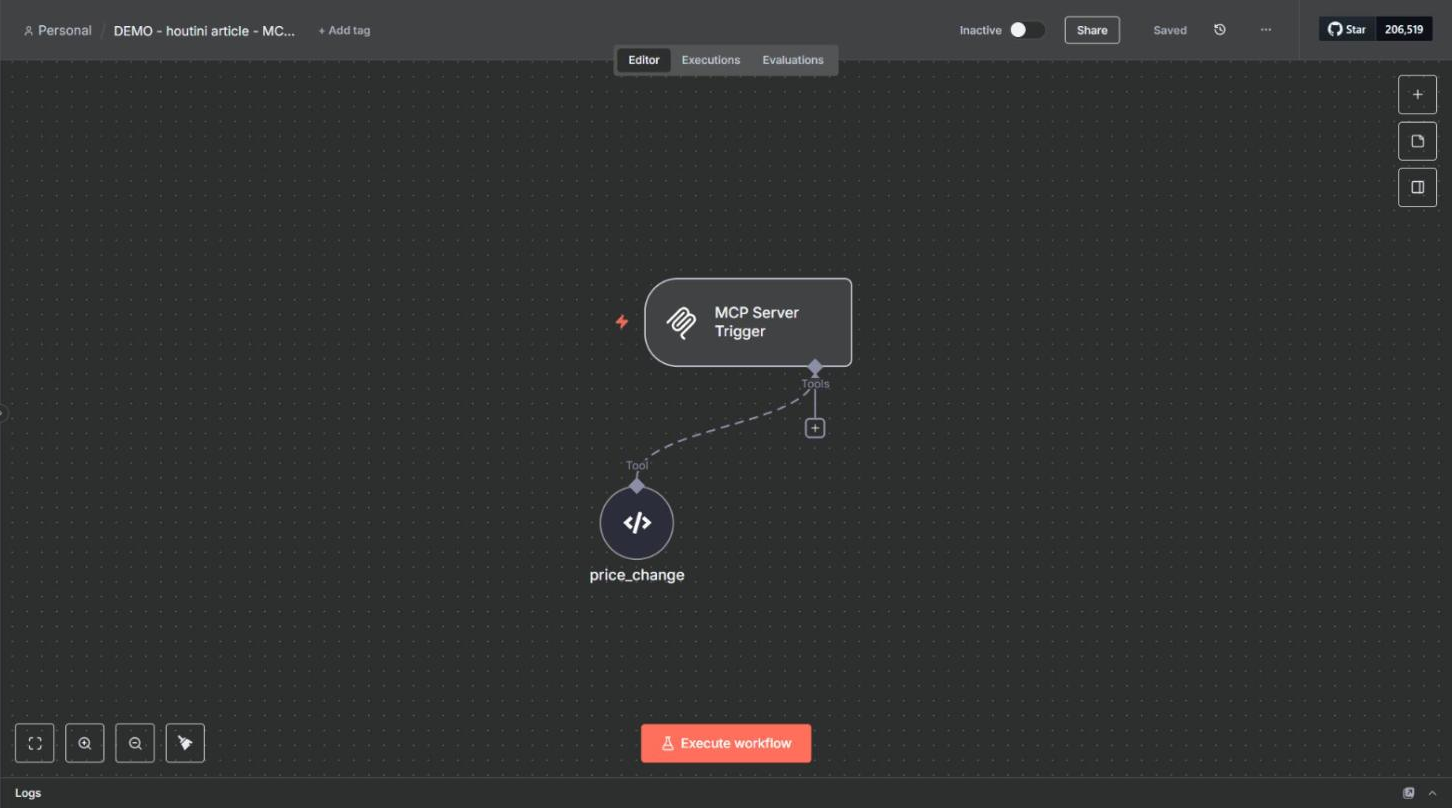
The demo is one workflow, called "DEMO - houtini article - MCP server". It has the trigger and a single tool, price_change, which takes an old price and a new price and returns the direction, the difference and the percentage. That's the sum a price monitor does every time a price moves. Claude Code built the workflow and its credential through the API, and I opened it in the editor afterwards for the screenshots. You can set every field below in the editor instead.
Create a bearer credential
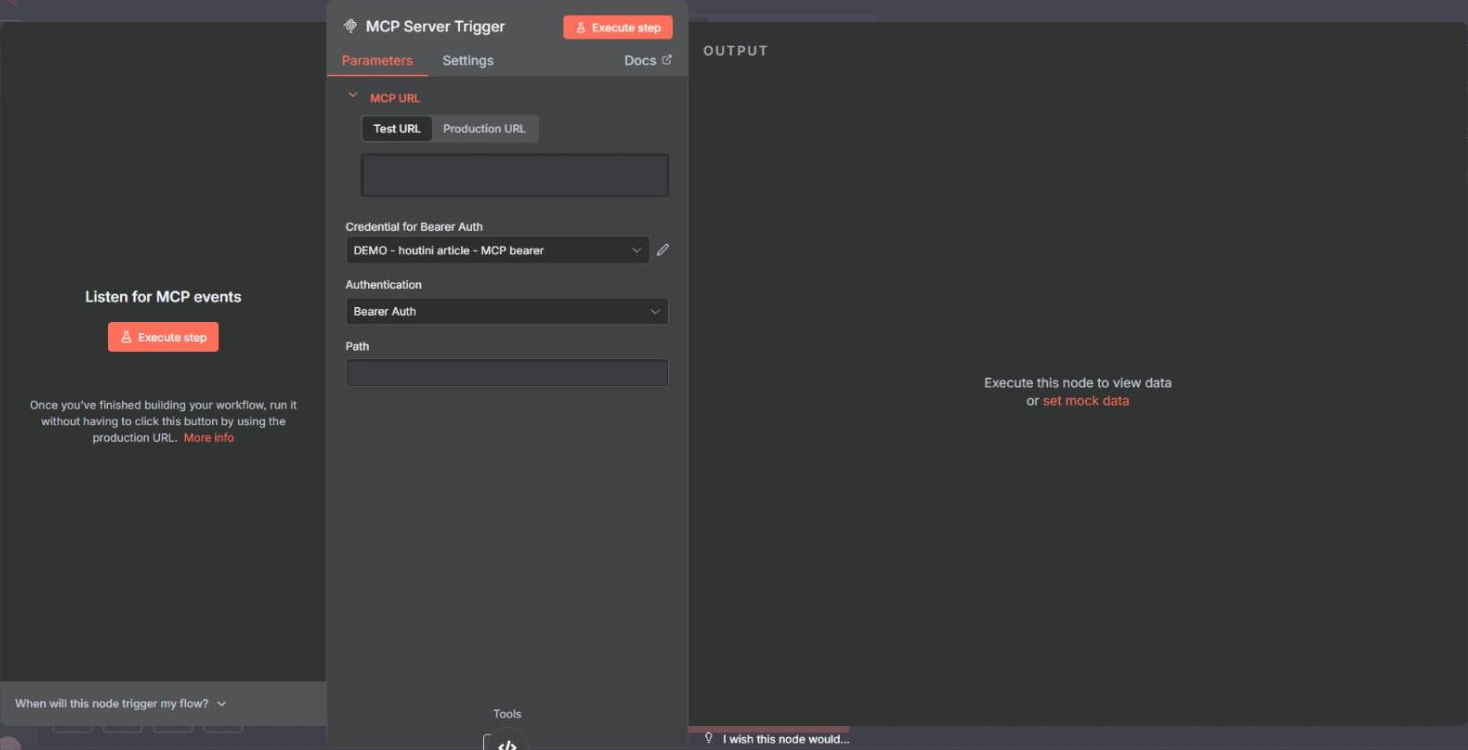
The trigger uses bearer auth, so knowing the URL isn't enough to use it. A bearer token is a secret string the client sends in an Authorization header with every request. In n8n it's a credential of type httpBearerAuth with one field, token. Claude got the schema from GET /credentials/schema/httpBearerAuth and created the credential with POST /credentials. In the editor, you'd pick or create it from the "Credential for Bearer Auth" dropdown on the trigger. Make the token long and random, and keep it outside your repo.
GET /api/v1/credentials/schema/httpBearerAuth
-> 200 {"additionalProperties":false,"type":"object","properties":{"token":{"type":"string"},"useCustomAuth":{"type":"notice"}},"required":[]}

POST /api/v1/credentials
{
  "name": "DEMO - houtini article - MCP bearer",
  "type": "httpBearerAuth",
  "data": { "token": "<a long random string>" }
}
-> 200 {"name":"DEMO - houtini article - MCP bearer","type":"httpBearerAuth","id":"LF0YnVduuRCMTcRQ", ...}
Add the MCP Server Trigger
Add the MCP Server Trigger node (version 2), set Authentication to Bearer Auth and choose the credential you just made. The Path field fills itself with a random UUID. Keep it, because it's one more thing anyone would have to guess before they could reach your tools. The panel then shows two addresses: the Test URL ends in /mcp-test/<path> and the Production URL in /mcp/<path>. On this version neither one has /sse on the end, which older versions did.
Attach a tool
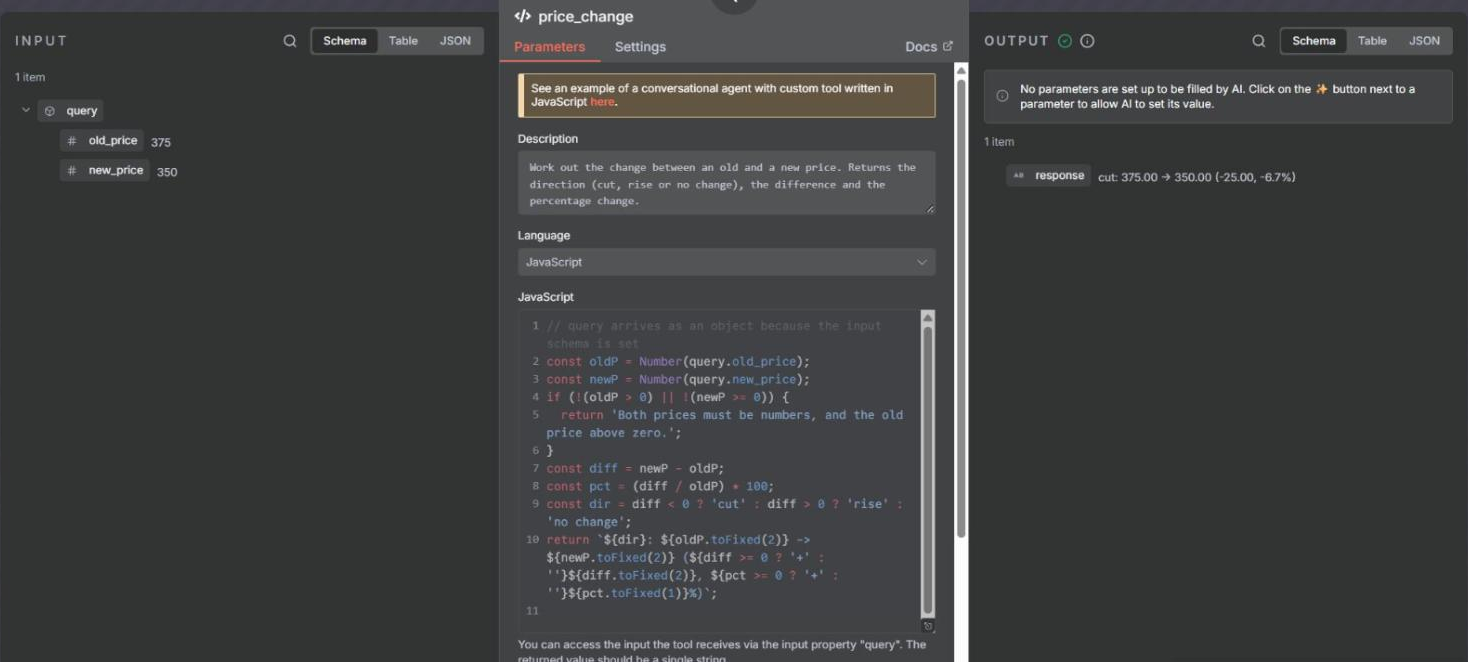
The tool is a Code Tool node attached to the trigger's Tools connector. Name the node carefully, because on Code Tool 1.2 and later the node name is the tool name Claude sees. Mine is called price_change. The Description field is what Claude reads when it decides whether to call the tool, so say plainly what it does and when it's useful. Turn on Specify Input Schema and build the schema from a JSON example. That gives Claude two typed fields to fill, old_price and new_price, rather than one loose string to guess at. The code returns a single line of text.
// query arrives as an object because the input schema is set
const oldP = Number(query.old_price);
const newP = Number(query.new_price);
if (!(oldP > 0) || !(newP >= 0)) {
  return 'Both prices must be numbers, and the old price above zero.';
}
const diff = newP - oldP;
const pct = (diff / oldP) * 100;
const dir = diff < 0 ? 'cut' : diff > 0 ? 'rise' : 'no change';
return `${dir}: ${oldP.toFixed(2)} -> ${newP.toFixed(2)} (${diff >= 0 ? '+' : ''}${diff.toFixed(2)}, ${pct >= 0 ? '+' : ''}${pct.toFixed(1)}%)`;
// Specify Input Schema: on, Schema Type: from a JSON example
{
"old_price": 375,
"new_price": 350
}
Activate the workflow
The production URL only registers while the workflow is active. The test URL does register when you click Execute workflow, but it serves exactly one request, and an MCP client makes at least three before its first tool call: initialize, initialized, then tools/list. When I tried it, initialize came back with a 200 and the very next request got a 404 "not registered". So activate the DEMO workflow, use the production URL, and deactivate it when you're done. On version 1 that's POST /workflows/{id}/activate through the API, or the Inactive toggle in the editor.
Then prove it's alive with curl. With no token I got a 403 and "Authorization data is wrong!", and with the token a 200, a session id and the server name MCP_Server_Trigger.
# no token
curl -s -X POST https://<your-n8n-host>/mcp/<path> \
  -H "Content-Type: application/json" -H "Accept: application/json, text/event-stream" \
  -d '{"jsonrpc":"2.0","id":1,"method":"initialize","params":{"protocolVersion":"2025-03-26","capabilities":{},"clientInfo":{"name":"curl-probe","version":"0"}}}'
Authorization data is wrong!          (HTTP 403)

# with -H "Authorization: Bearer $N8N_MCP_TOKEN"
HTTP/1.1 200 OK
Content-Type: text/event-stream
Mcp-Session-Id: df96f9f6-3d0e-4d50-87b4-7bf76e991f9f

event: message
data: {"result":{"protocolVersion":"2025-03-26","capabilities":{"tools":{}},"serverInfo":{"name":"MCP_Server_Trigger","version":"0.1.0"}},"jsonrpc":"2.0","id":1}
Connect Claude Code to the n8n MCP server
Add the server at project scope
Project scope means the server is saved in a .mcp.json file in the project folder rather than in your global Claude Code config, so it only exists for that project (more on how a Claude Code project is laid out). Run claude mcp add with --scope project from inside the project folder; I ran it in a scratch folder. Keep the single quotes around the header: they stop your shell expanding ${N8N_MCP_TOKEN}, so the file holds the variable name, and Claude Code fills in the token from your environment when it connects. The URL and its random path do land in the file, though, so only commit .mcp.json to a private repo. Claude Code's own output masks the header as [REDACTED].
claude mcp add --scope project --transport http n8n-demo \
  "https://<your-n8n-host>/mcp/<path>" \
  --header 'Authorization: Bearer ${N8N_MCP_TOKEN}'

Added HTTP MCP server n8n-demo with URL: https://<your-n8n-host>/mcp/<path> to project config
Headers: {
  "Authorization": "[REDACTED]"
}
// .mcp.json
{
"mcpServers": {
"n8n-demo": {
"type": "http",
"url": "https://<your-n8n-host>/mcp/<path>",
"headers": {
"Authorization": "Bearer ${N8N_MCP_TOKEN}"
}
}
}
}Approve it, then check the connection
Run claude mcp list and you'll see "Pending approval". Claude Code won't use a server from .mcp.json until you approve it. Either run claude in that folder and accept the prompt, or list the server under enabledMcpjsonServers in .claude/settings.local.json, which is what I did in the scratch folder. Anthropic's docs say Claude Code only applies that file in a folder you've trusted, and since v2.1.196 it ignores approvals in a committed .claude/settings.json until you do. If you turn the prompt down by mistake, claude mcp reset-project-choices resets your answers. Once it's approved, claude mcp get reports Connected.
claude mcp list
n8n-demo: https://<your-n8n-host>/mcp/<path> (HTTP) - ⏸ Pending approval (run `claude` to approve)
// .claude/settings.local.json
{
"enabledMcpjsonServers": ["n8n-demo"]
}claude mcp get n8n-demo
n8n-demo:
Scope: Project config (shared via .mcp.json)
Status: ✔ Connected
Type: http
URL: https://<your-n8n-host>/mcp/<path>
Headers:
Authorization: Bearer ${N8N_MCP_TOKEN}Call the tool from Claude Code
I asked Claude to work out the change on the Hiut Welsh Woollen Blanket, going from £375 to £350. The product and the £375 come from my price-monitor run; the cut is a test value. This was a headless run with claude -p, and --allowedTools pre-approves just the one tool, so nothing stops to ask for permission. Claude loaded the tool, called it with old_price 375 and new_price 350, got back cut: 375.00 -> 350.00 (-25.00, -6.7%) and quoted it word for word. It took 11.3 seconds and three turns. The run itself also had --output-format stream-json --verbose on the end, writing a log that I parsed for the tool-call lines in the screenshot; you can leave both flags off.
claude -p "Use the n8n-demo price_change tool to work out the change on the Hiut Welsh Woollen Blanket, which went from 375 to 350. Tell me exactly what the tool returned." --allowedTools "mcp__n8n-demo__price_change"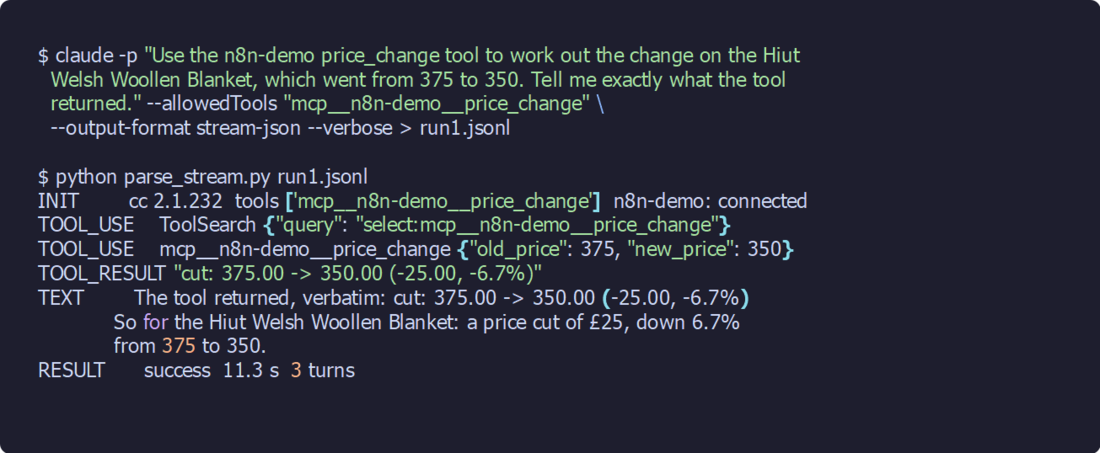
A good n8n API set-up for Claude
Claude Code has driven my n8n through the public API since July 2026. It deploys changes with a PUT. To debug, it reads executions, n8n's records of each run. Rather than calling a workflow, Claude edits it, which makes the API the half of the connection that can do more damage.
Three of the points below go back to then: the four-field PUT, keeping the server's credentials, and the execution autopsy. The helper script and its write guard came out of this run, and I re-tested those three alongside them, on the DEMO workflow and, read-only, on a production one.
Keep the API key out of the repo
Create the key under Settings > n8n API > Create an API key, and give it a label and an expiration. Every request sends it in the X-N8N-API-KEY header. Scopes are Enterprise-only, according to n8n's API docs, so on any other edition the key can do everything your account can. Keep it in a gitignored secrets file or a password manager, have the helper read it in-process, and never print it, because anything printed goes into Claude Code's context. Mine was issued on 6 July with a 90-day expiry. Write the expiry date down next to the key, so the rotation doesn't catch you out.
Give Claude a helper script, not raw curl
A plain GET /workflows on my instance returned 11 MB for 58 workflows, because a list call brings back the full node definitions of every workflow. One production execution with its data came to 72 MB. Pasted into a conversation, either of those is millions of tokens.
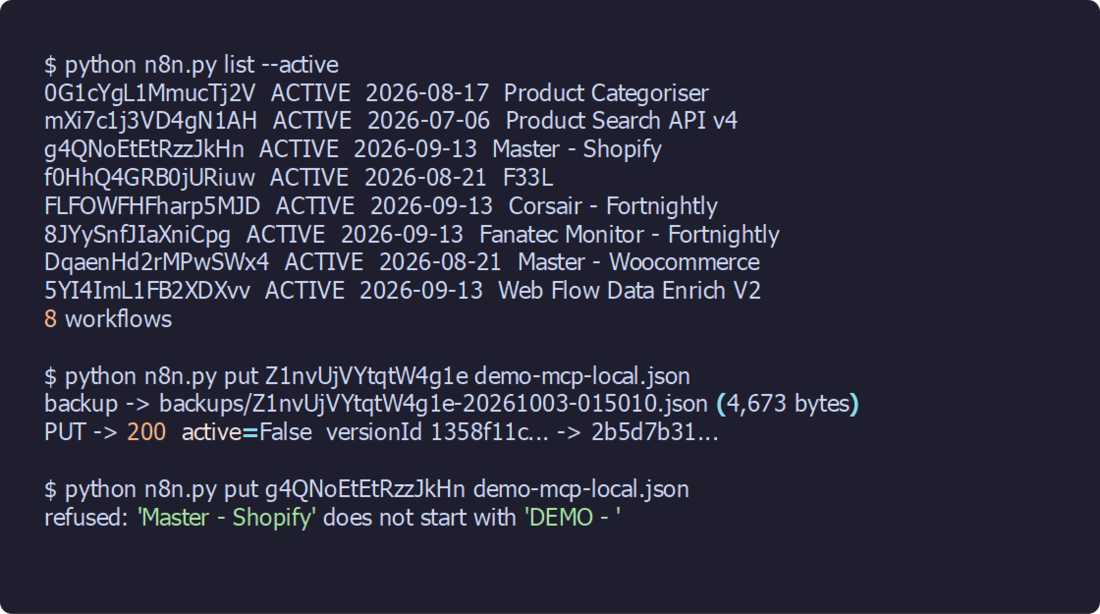
Instead, Claude calls a small Python helper that prints one line per workflow or per node. It's about 130 lines and uses only the standard library. Running list --active gave me the 8 active workflows in 6 seconds, one line each.
python n8n.py list [--active]          id / active / updated / name, one line each
python n8n.py get <id>                 node names + types, no parameters
python n8n.py backup <id>              full definition -> backups/<id>-<timestamp>.json
python n8n.py put <id> <file.json>     PUT only name/nodes/connections/settings, after a fresh backup;
                                       refuses unless the server-side name starts with N8N_WRITE_PREFIX
python n8n.py executions <id> [n]      last n executions: id / status / mode / start / duration
python n8n.py autopsy <executionId>    per-node items out, time, errors
# n8n.py
"""n8n public-API helper for Claude Code. Small outputs only - never dumps raw JSON into the context.
Key: read from N8N_API_KEY + N8N_API_URL, or from a gitignored secrets file (N8N_SECRETS, default
.secrets/n8n-api.json, shape {"n8n": {"api_url": ".../api/v1", "api_key": "..."}}). The key is never printed.
python n8n.py list [--active] id / active / updated / name, one line each
python n8n.py get <id> node names + types, no parameters
python n8n.py backup <id> full definition -> backups/<id>-<timestamp>.json
python n8n.py put <id> <file.json> PUT only name/nodes/connections/settings, after a fresh backup;
refuses unless the server-side name starts with N8N_WRITE_PREFIX
python n8n.py executions <id> [n] last n executions: id / status / mode / start / duration
python n8n.py autopsy <executionId> per-node items out, time, errors
"""
import json, os, sys, urllib.request, urllib.error
from datetime import datetime
ALLOW_PREFIX = os.environ.get("N8N_WRITE_PREFIX", "DEMO - ")
HERE = os.path.dirname(os.path.abspath(__file__))
def config():
key = os.environ.get("N8N_API_KEY")
url = os.environ.get("N8N_API_URL")
if not (key and url):
path = os.environ.get("N8N_SECRETS", os.path.join(os.getcwd(), ".secrets", "n8n-api.json"))
c = json.load(open(path, encoding="utf-8-sig"))["n8n"]
key, url = key or c["api_key"], url or c["api_url"]
return url.rstrip("/"), key
BASE, KEY = config()
def call(method, path, body=None):
req = urllib.request.Request(
BASE + path, method=method,
data=None if body is None else json.dumps(body).encode(),
headers={"X-N8N-API-KEY": KEY, "Accept": "application/json",
"Content-Type": "application/json", "User-Agent": "n8n.py"})
try:
with urllib.request.urlopen(req, timeout=120) as r:
return r.status, json.loads(r.read() or b"{}")
except urllib.error.HTTPError as e:
return e.code, json.loads(e.read() or b"{}")
def cmd_list(args):
q = "?limit=250&excludePinnedData=true" + ("&active=true" if "--active" in args else "")
out, cursor = [], None
while True:
st, d = call("GET", "/workflows" + q + (f"&cursor={cursor}" if cursor else ""))
out += d["data"]
cursor = d.get("nextCursor")
if not cursor:
break
for w in out:
print(f"{w['id']} {'ACTIVE' if w['active'] else ' '} {w['updatedAt'][:10]} {w['name']}")
print(f"{len(out)} workflows")
def cmd_get(args):
st, w = call("GET", f"/workflows/{args[0]}")
print(f"{w['id']} {w['name']} active={w['active']} versionId={w.get('versionId')} updated={w['updatedAt']}")
for n in w["nodes"]:
print(f" - {n['name']} ({n['type']} v{n.get('typeVersion')})" + (" [credentials]" if n.get("credentials") else ""))
def backup(wid, refuse_unless_prefix=False):
st, w = call("GET", f"/workflows/{wid}")
if st != 200:
sys.exit(f"GET {wid} -> {st} {w}")
if refuse_unless_prefix and not w["name"].startswith(ALLOW_PREFIX):
sys.exit(f"refused: '{w['name']}' does not start with '{ALLOW_PREFIX}'")
os.makedirs(os.path.join(HERE, "backups"), exist_ok=True)
p = os.path.join(HERE, "backups", f"{wid}-{datetime.now():%Y%m%d-%H%M%S}.json")
json.dump(w, open(p, "w", encoding="utf-8"), indent=2)
print(f"backup -> backups/{os.path.basename(p)} ({os.path.getsize(p):,} bytes)")
return w
def cmd_backup(args):
backup(args[0])
def cmd_put(args):
wid, f = args
server = backup(wid, refuse_unless_prefix=True)
local = json.load(open(f, encoding="utf-8"))
body = {k: local[k] for k in ("name", "nodes", "connections", "settings")}
# keep the server's credentials on any node the local copy left them off
creds = {n["name"]: n["credentials"] for n in server["nodes"] if n.get("credentials")}
for n in body["nodes"]:
if n["name"] in creds and not n.get("credentials"):
n["credentials"] = creds[n["name"]]
st, d = call("PUT", f"/workflows/{wid}", body)
if st == 200:
print(f"PUT -> 200 active={d['active']} versionId {str(server.get('versionId'))[:8]}... -> {str(d.get('versionId'))[:8]}...")
else:
print(f"PUT -> {st} {json.dumps(d)}")
def cmd_executions(args):
n = args[1] if len(args) > 1 else "5"
st, d = call("GET", f"/executions?workflowId={args[0]}&limit={n}")
for e in d["data"]:
s, t = e["startedAt"], e.get("stoppedAt")
dur = None
if t:
dur = (datetime.fromisoformat(t.replace("Z", "+00:00")) - datetime.fromisoformat(s.replace("Z", "+00:00"))).total_seconds()
print(f"{e['id']} {e.get('status') or ('finished' if e['finished'] else 'unfinished'):9} {e['mode']:8} {s} {dur}s")
def cmd_autopsy(args):
st, d = call("GET", f"/executions/{args[0]}?includeData=true")
print(f"execution {d['id']} status={d.get('status')} mode={d['mode']} {d['startedAt']} -> {d['stoppedAt']}")
rd = d["data"]["resultData"]
for node, runs in rd["runData"].items():
for r in runs:
items = sum(len(b or []) for v in (r.get("data") or {}).values() for b in v)
err = (r.get("error") or {}).get("message", "")
print(f" {node:30.30} items={items:>6} {r.get('executionTime', 0):>8} ms {err}")
if rd.get("error"):
print(" RUN ERROR:", rd["error"].get("message"))
if __name__ == "__main__":
{"list": cmd_list, "get": cmd_get, "backup": cmd_backup, "put": cmd_put,
"executions": cmd_executions, "autopsy": cmd_autopsy}[sys.argv[1]](sys.argv[2:])Read the live workflow before every write
Before any change, GET the live definition, because the server copy is the truth: it holds the credentials, the trigger parameters and the webhook ids, and your local copy may not have all of them. A copy you keep in git shouldn't hold credentials at all, which means it's always missing something the server needs to keep.
Back up, then PUT only four fields
Back up before every PUT, which the helper does for you with a timestamped file. The PUT body takes exactly four fields: name, nodes, connections and settings. Send the GET response straight back and you get a 400, "request/body must NOT have additional properties". A user on the n8n community forum hit the same wall, added staticData and shared to the four fields, and it still failed. My four-field PUT returned a 200 and a new versionId. On newer n8n, a September 2026 issue on the n8n-autopilot project reports that a binary-mode key inside the GET's settings bounces too, with "request/body/settings must NOT have additional properties". If your PUT fails that way, take the extra key out of settings and send it again.
Keep the backups out of git. Production Code nodes can carry third-party API keys, and a backup is a full copy of everything in them.
PUT /api/v1/workflows/Z1nvUjVYtqtW4g1e   (the GET response, sent straight back)
-> 400 {"message":"request/body must NOT have additional properties"}

PUT /api/v1/workflows/Z1nvUjVYtqtW4g1e   ({name, nodes, connections, settings} only)
-> 200   active: true   versionId 1f4317f2... -> 1358f11c...
Guard the production workflows
The helper refuses to PUT to any workflow whose name on the server doesn't start with "DEMO - ". The prefix lives in an environment variable, N8N_WRITE_PREFIX, so changing it is something you do on purpose. I tested it against Master - Shopify, one of my production flows. It refused, and nothing was written to n8n.
The first version took the backup before it checked the name, which put a 66 KB copy of a production definition on disk, with a third-party key sitting in its Code nodes. I deleted it within a minute and moved the check in front of the backup. Name everything Claude creates "DEMO - ..." and leave it inactive.
Expect no run endpoint
There's no API endpoint that starts a run. POST /workflows/{id}/run and /execute both returned a 404, and POST /executions returned a 405, when I probed them on a DEMO workflow on 2 October. The first two gave the same 404s when I tried them in July. Runs come from a trigger: a schedule, a webhook, the editor, or an MCP Server Trigger.
Read the execution before you theorise
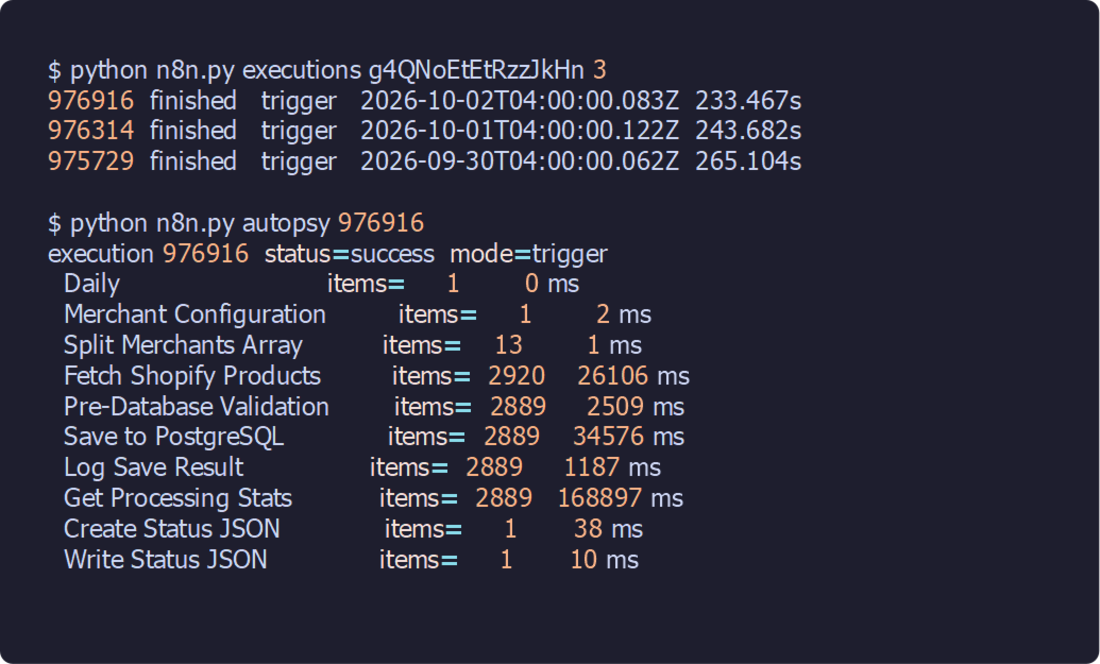
The debugging loop is an execution autopsy. Get the workflow's recent executions, then fetch one with includeData=true, which returns every item each node passed on, and have the helper boil it down to one line per node. On Master - Shopify, the run at 04:00 UTC on 2 October covered 13 merchants: 2,920 products fetched, and 2,889 past validation and saved. Get Processing Stats took 169 of the run's 233 seconds. The helper took 26.8 seconds to pull and summarise all 72 MB.
I've debugged this way since July, when I had a "data vanished" report and the first theory was duplicate SKUs on the upsert. That was wrong: the execution showed the Save node had written 1,049 of 1,049 rows, and a one-time cleanup DELETE, run after the scrape, had removed them.
Verify it works
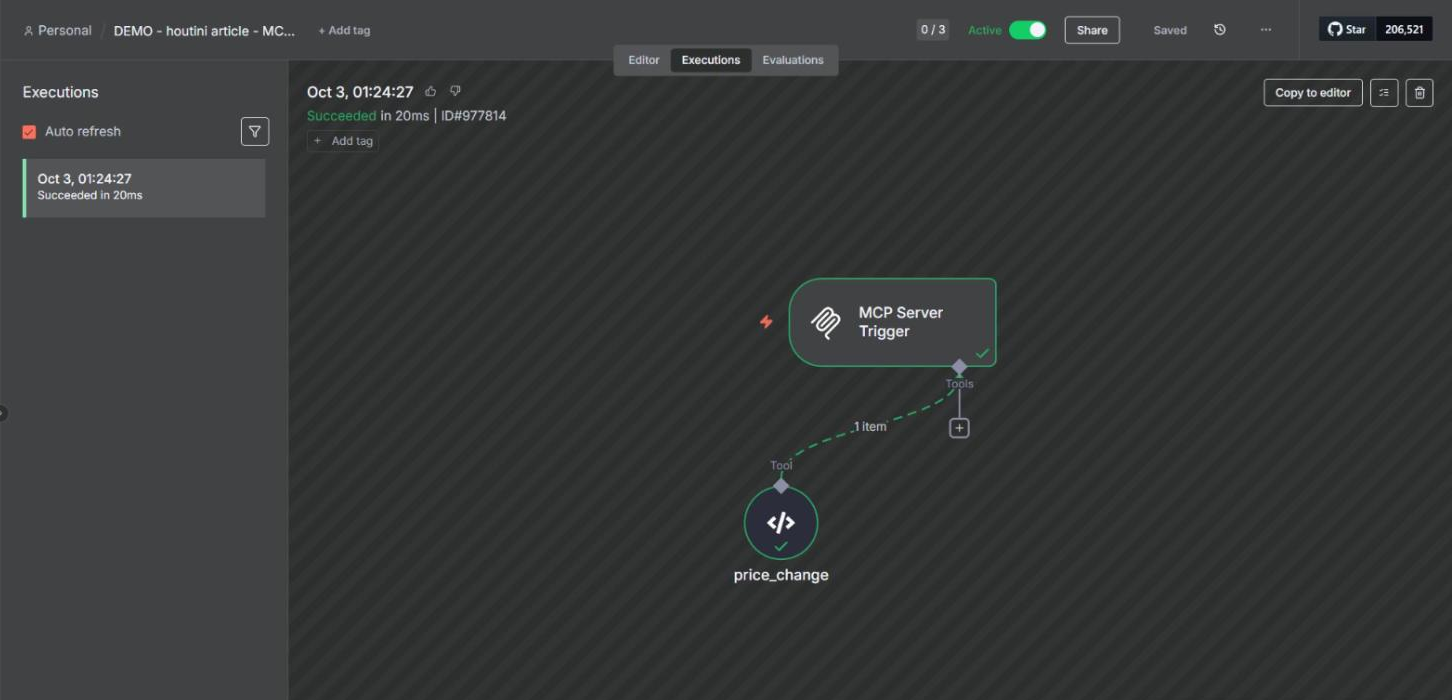
Check both ends: Claude Code shows you the tool result, and n8n's Executions tab lists execution 977814, a webhook-mode run that succeeded in 20 ms. Open the price_change node inside it to see the input Claude sent and the string it got back. Only tool calls create an execution. Connecting and listing the tools leave nothing behind, so an empty Executions list after claude mcp get is normal.
n8n's built-in MCP server on newer versions
Since 1.121.0, released on 18 November 2025, n8n has had one MCP server for the whole instance, launched as a beta. According to n8n's docs, an owner or admin turns it on under Settings > Instance-level MCP > Enable MCP access, and the server URL ends in /mcp-server/http. Clients sign in with OAuth or a personal access token. Each workflow is opted in on its own ("Available in MCP"), and only published workflows with a webhook, form, schedule or chat trigger qualify. Every connected client sees every enabled workflow. The server's execute_workflow tool runs the published version by default, and from 2.13.0 Claude can build and edit workflows through it as well. For Claude Code, the docs give claude mcp add --transport http n8n https://<your-n8n-domain>/mcp-server/http, then /mcp to sign in.
None of this exists on 1.107.3, where every page of the editor carries a banner reading "Critical update available - Please update to version 1.121.0 or higher." n8n's API docs list two changes on 2.x that touch the set-up above: activate and deactivate become publish and unpublish, and a PUT to a published workflow re-publishes it unless you pass publishIfActive=false.
Gotchas
Most of these came out of the run, and I'm sharing them so you don't run into them yourself. The other three come from n8n's docs, Anthropic's docs and the n8n community forum.
The test URL answers once
If initialize returns a 200 and the next request gets a 404, "The requested webhook ... is not registered", with the hint "In test mode, the webhook only works for one call after you click this button", you're on the test URL. Activate a throwaway workflow and use its production URL instead.
A PUT can drop your credentials
A PUT replaces the node list wholesale. Send a node without its credentials block and n8n returns a 200, with no error or warning, and the credential is gone. I tested this on the DEMO at 01:51, and the trigger came back with credentials: None. I restored it from the backup taken a minute earlier. The helper copies the server's credentials onto any node in your local copy that lacks them, which it can only do because it reads the live workflow before every write.
A PUT to an active workflow is live
On 1.107.3, a PUT to an active workflow is a live deploy. There's no separate publish step, and the new tool description showed up in tools/list on the production URL straight away. n8n's docs say 2.x does the same to a published workflow, so on either version assume a PUT is live the moment it returns.
The /sse suffix went away
A thread on the n8n community forum describes an MCP Server Trigger URL that ended in /sse on 1.94.1 and lost it after an upgrade to 1.100.1, and the poster's client, still pointing at /sse, stopped working. Version 2 of the node serves SSE and streamable HTTP on one path. Use the URL the panel shows you.
Claude Code blanks some variable names
Anthropic's docs say that in a remote server's url and headers, Claude Code reads certain credential variables as empty, among them ANTHROPIC_API_KEY, ANTHROPIC_AUTH_TOKEN, AWS_BEARER_TOKEN_BEDROCK and NPM_TOKEN. Give your token a name of your own; N8N_MCP_TOKEN worked on my run.
Reverse proxies and buffering
If n8n sits behind nginx, n8n's docs say to turn proxy buffering off for /mcp, along with gzip and chunked encoding, and to set Connection ''. A user on the n8n forum who couldn't get Claude Desktop to connect to an MCP Server Trigger suspected Caddy. In queue mode with several webhook replicas, route /mcp* to just one of them.
An open MCP endpoint runs your tools for anyone
An MCP Server Trigger with Authentication set to None, on an active workflow, lets anyone with the URL run your tools. Use Bearer or Header auth, keep the random path, and deactivate test workflows when you're finished with them. My DEMO went inactive at 01:35 and its production URL now returns a 404.
Where to go from here
With the demo working, wire the trigger to a real workflow. The price monitoring build is the obvious place to start, with a tool that reads your tracked prices rather than one that does sums on numbers you typed in. Copy the helper, set your own prefix in N8N_WRITE_PREFIX, and make list --active the first command Claude runs. If you're on 1.121.0 or later, try the instance-level server as well. And if you'd like Claude to build the workflows for you, the community n8n-mcp project on GitHub describes itself as an MCP that does exactly that, and on 3 October it had 23,031 stars and a last push two days earlier.
Continue reading.
- How-to GuidesHow to Run Qwen3-Coder-Next Locally: My vLLM Settings for Two 48GB RTX 4090s
- How-to GuidesHow to Build a Competitor Price Monitoring Pipeline with n8n
- How-to GuidesOpenCode vs Claude Code: Setting Up OpenCode Desktop on Windows
- How-to GuidesHow to Connect Google Trends to Claude Code
- How-to GuidesCLAUDE.md: How to Write One That Stays Lean
- How-to GuidesHow to Make a PDF Report with Claude