How to Run Qwen3-Coder-Next Locally: My vLLM Settings for Two 48GB RTX 4090s
I loaded Qwen3-Coder-Next across my two modded 48GB RTX 4090s with vLLM, and today's post covers the vLLM settings for 192k of context, and how it did on the jobs I use AI for. It answered questions on a whole 86k-token repo in 26 seconds, where Qwen3.8-27B on its 32k one-card preset couldn't take the prompt at all, and it scoped an upgrade in under 30 seconds against about 3 minutes for the 27B. But it got facts wrong, and given git tools it committed on a failing test in 2 of 3 runs.
 Richard Baxter AI Ops & Marketing Engineer
 On this page
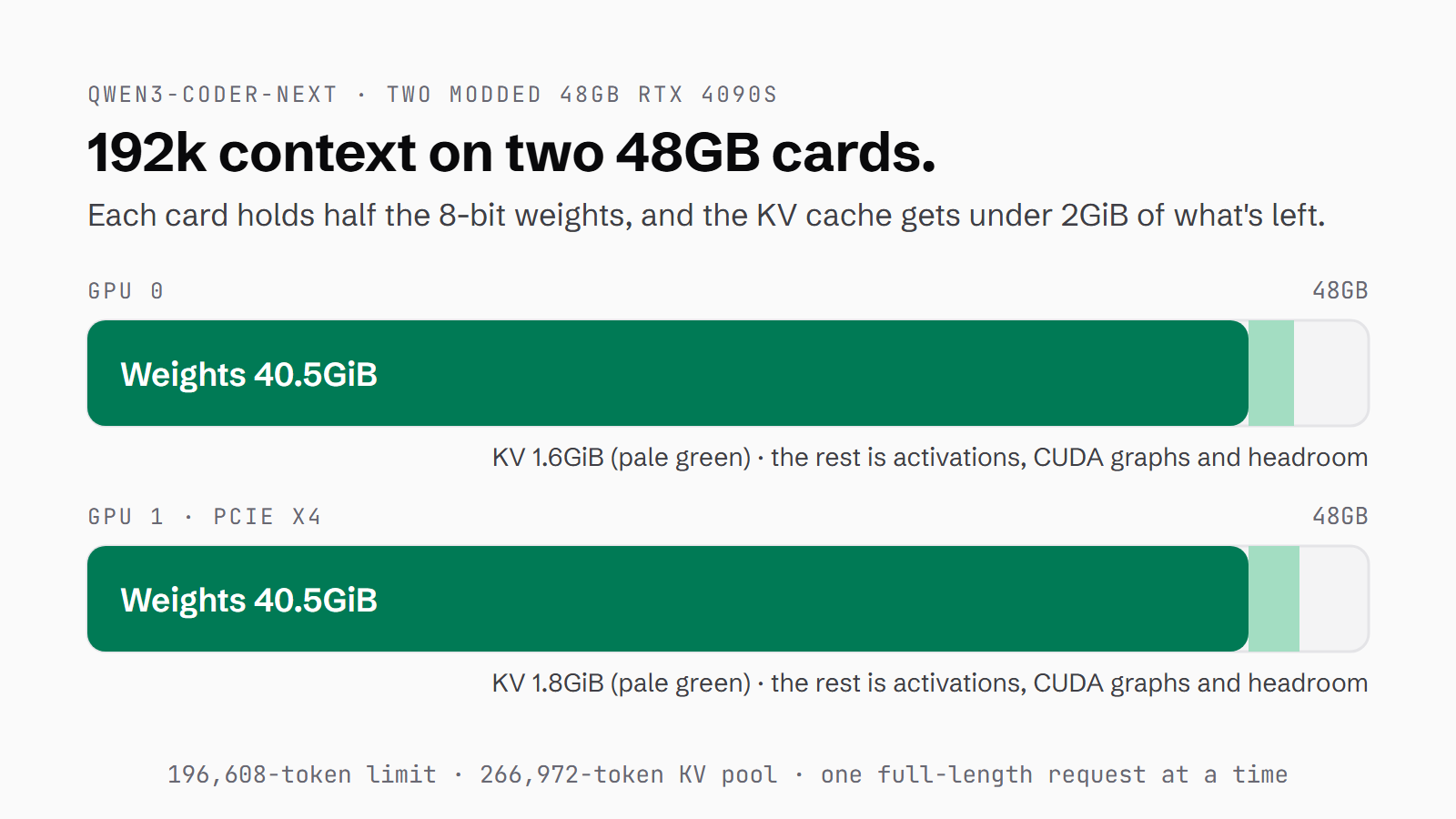
The model card for Qwen3-Coder-Next says 262,144 tokens of context, or 256k. It's an Apache-2.0 mixture-of-experts (MoE) model released on 30 January 2026, with 80 billion parameters and about 3 billion active per token. My rig has two modded 48GB RTX 4090s that the rest of my local stack shares, and Coder-Next needs both of them to itself. Does it fit, at what context, and is it worth both cards for code review, doc review, commit and push, scoping with search tools and whole-repo questions?
On vLLM 0.26.0 it loads at 192k of context. It answered questions on a whole 86k-token repo in 26 seconds, a prompt Qwen3.8-27B on its one-card 32k preset couldn't take at all. And it scoped an upgrade with search tools in about 28 seconds, where the 27B took 158 to 187 seconds. It also got facts wrong in those scoping reports, and given git tools it committed on a failing test in 2 of 3 runs.
Quick Navigation
Is it worth it for you? |
What you need before you start |
The vLLM settings that fit 192k context |
Serving it, step by step |
Verify it works |
How it did on the jobs I use AI for |
Gotchas |
Where to go from here
Is it worth it for you?
It needs both cards, which means everything else on those GPUs comes down while it runs. On my rig that's Bub, which has to stop for as long as Coder-Next is loaded. Bub is my companion stack, and it runs voice, a Qwen3.8 model and an image service on those cards. So you load it for a heavy session and put the usual stack back afterwards. If you have a single 48GB card, Qwen3.8-27B fits on it, and in my trials it was the more careful of the two: 5 of 5 on the doc check, no slips I could find on the scoping task and no commit on a failing test. My local coding setup covers that route. Below 96GB of VRAM this build won't fit at all, because the AWQ 8-bit weights are 86.9GB on disk.
What you need before you start
My vLLM setup guide covers getting vLLM running in Docker, and this is what I had in place for this run:
- Two 48GB GPUs, 96GB of VRAM between them (mine are modded RTX 4090s)
- vLLM in Docker with GPU access - this run was on vLLM 0.26.0, and the model card asks for 0.15.0 or later
- About 87GB of disk for the weights, in a Hugging Face cache volume the container can reuse
- Nothing else holding either card while it loads
The vLLM settings that fit 192k context
These are the flags it loaded with on the rig on 5 October, and the full compose block is in the serve section.
192k of context
The model card says the native context is 262,144 and suggests dropping to 32,768 if the server won't start. An attempt at 256k earlier the same day ran out of memory while vLLM was starting up, which is when memory is tightest: the profiling pass and CUDA-graph capture allocate temporary buffers that grow with --max-model-len, and they run before the KV cache gets its share. That attempt also ran with --gpu-memory-utilization at 0.95 rather than the 0.92 in the compose file below, so two settings changed at once, and 256k at 0.92 hasn't been tried yet. At the other end, 32k would leave most of the KV cache empty. 192k loaded, which is 50% more than the 128k the rig's preset used before.
In the load log, each card holds 40.54 GiB of weights, 1.05 GiB of peak activation and 0.63 GiB of CUDA graphs. Then there's the KV cache, which is the memory vLLM keeps for the tokens it has already processed, so it doesn't work them out again on each step. It got 1.58 GiB on one card and 1.79 on the other. That sounds far too small for 192k of context, but the pool still holds 266,972 tokens because of the model's layout. Only every fourth layer is a full attention layer: three Gated DeltaNet layers then one Gated Attention layer, repeated 12 times, with 2 KV heads. The other layers are Gated DeltaNet, a linear-attention design that keeps a fixed-size state instead of a cache that grows with the prompt. vLLM reported 1.36x concurrency at 196,608, which in practice means one full-length request at a time.
cyankiwi's AWQ 8-bit build
The weights are cyankiwi's AWQ 8-bit build, cyankiwi/Qwen3-Coder-Next-AWQ-8bit. It's a quantised copy, which means the weights are stored at lower precision to save memory. Here they're 8-bit integers, quantised symmetrically in groups of 32 and packed in the compressed-tensors format. The linear-attention projections, the router gates and the shared experts are left unquantised. The whole thing is 86.9GB across 18 files. Qwen also publishes its own FP8 build and a GGUF, but every Coder-Next run here, the July benches included, was on cyankiwi's build.
Tensor parallel across both cards
The model is split across both cards with --tensor-parallel-size 2. Tensor parallel means each layer is divided between the GPUs, and at TP=2 the two cards work on every token together. Splitting the model means an all-reduce, the two cards swapping their partial results, on every token. The compose file sets NCCL_P2P_DISABLE=1, because direct card-to-card transfers can hang silently on consumer boards, and passes --disable-custom-all-reduce, because vLLM's own kernels for the all-reduce assume NVLink, which the 4090 doesn't have. The catch on my rig is that GPU 1 sits on a PCIe x4 link, and the all-reduce over x4 caps prefill at around 5.9k tokens per second (tok/s). That's why Coder-Next was demoted from the rig's default coder on 26 July.
It's still quick once it's going. Measured on the rig at 128k with the KV cache in FP8, it decoded at 101.6 tok/s with the cards capped at 330W, and at 118.4 tok/s in an earlier bench. At 192k it decodes at 91 tok/s, and prefill ran at 3,944 tok/s on a 180k-token prompt. In the rig's 24 July test set it got 12 of 12 answers correct at 125.9 tok/s with 1.9 seconds wall-clock, the quickest of the five models in that run. The other four were hosted APIs, two DeepSeek V4 models and two from Kimi, and they got 12 of 12 as well. How the rig measures covers the method behind those numbers.
The tool parser: qwen3_xml
Qwen's model card serves it with --tool-call-parser qwen3_coder. I use qwen3_xml. The tool-call parser is the part of vLLM that reads the model's text and turns it into structured tool calls, so it decides whether your agent gets calls it can use. vLLM's own tool-calling docs list qwen3_xml for the Qwen3-Coder models, though they name the 480B and the 30B rather than Coder-Next.
On the model's Hugging Face discussion #17, user Aubreyii reported that the qwen3_coder parser produced 'an infinite stream of "!!!!!!!!!!!!!!"' on long inputs with a tool call, and that switching to qwen3_xml made the problem go away. Another user, lightenup, pointed to the vLLM pull request that calls qwen3_xml the more advanced parser.
Leave thinking and sampling alone
The model card says Coder-Next supports only non-thinking mode, with no <think> blocks, and that setting enable_thinking=False "is no longer required". My requests sent it anyway in chat_template_kwargs, but the model never thinks, so there's nothing for it to switch off and you can drop it. Sampling needs nothing from you either: the card recommends temperature 1.0, topp 0.95 and topk 40, and those values ship in the model's generation_config.json, which vLLM applies by default. So the client sends no sampling parameters at all.
Prefix caching
The last flag is --enable-prefix-caching, and prefix caching means vLLM keeps the processed start of a prompt and reuses it when the next prompt starts the same way. On the whole-repo test, an 86,276-token prompt came back in 26.1 seconds cold. Sending the same prompt again took 5.9 seconds. Most of that drop is the cache skipping the 86k-token read, and the rest is a shorter answer, 627 tokens against 966. That's what you want when you ask several questions of one repo, because every prompt starts with the same source.
Serving it, step by step
Free both cards
Coder-Next at TP=2 won't start while anything else holds the cards, so the rig's other GPU services had to stop first: the Qwen3.8 model on GPU 1, and voice, embeddings, the extractor and the image service on GPU 0. Before the stop, GPU 0 had 35,937 MiB in use and GPU 1 had 45,839 MiB. After it they were down to 1,309 and 23 MiB. The Qwen3.8 model is set not to restart on its own, so after this run I loaded its preset again and started the other services by hand.
docker stop vllm friend-image vllm-extract chatterbox-turbo faster-whisper embeddings
nvidia-smi --query-gpu=index,memory.used --format=csv,noheader
0, 1309 MiB
1, 23 MiBStart the container
Then start the container with the compose service below. With the weights already in the Hugging Face cache volume, it took about 4 minutes from start to healthy. A good part of that is the engine init, which took 96.5 seconds, 33 of them compiling.
services:
  vllm:
    image: vllm/vllm-openai@sha256:ffb2d59b1c059a5bd8d781320c9f5189de8293693b7d95da54befddaa54abf52  # vLLM 0.26.0
    container_name: vllm
    ipc: host
    shm_size: 16g
    ulimits:
      memlock: -1
      stack: 67108864
    ports:
      - "127.0.0.1:8000:8000"   # my rig publishes "8000:8000"; bind to localhost unless something else needs it
    volumes:
      - hf-cache:/root/.cache/huggingface
    environment:
      - VLLM_USE_V2_MODEL_RUNNER=0
      - NCCL_P2P_DISABLE=1
      - CUDA_VISIBLE_DEVICES=0,1
    deploy:
      resources:
        reservations:
          devices:
            - driver: nvidia
              count: all
              capabilities: [gpu]
    command: >
      --model cyankiwi/Qwen3-Coder-Next-AWQ-8bit
      --served-model-name coder-next
      --max-model-len 196608
      --kv-cache-dtype fp8
      --gpu-memory-utilization 0.92
      --tensor-parallel-size 2
      --enable-auto-tool-choice
      --tool-call-parser qwen3_xml
      --reasoning-parser qwen3
      --enable-prefix-caching
      --max-num-batched-tokens 8192
      --max-num-seqs 16
      --disable-custom-all-reduce

volumes:
  hf-cache:
docker compose -f docker-compose.yml up -d --force-recreateCheck what loaded
Once the health check passes, /v1/models should report coder-next with a max length of 196608. Then grep the container log for the KV cache size and the concurrency line, which on my 5 October load read:
for i in $(seq 1 60); do curl -sf -m 3 http://127.0.0.1:8000/health >/dev/null && break; sleep 10; done
curl -s http://127.0.0.1:8000/v1/models
docker logs vllm 2>&1 | grep -iE "KV cache|maximum concurrency"
GPU KV cache size: 266,972 tokens
Maximum concurrency for 196,608 tokens per request: 1.36xVerify it works
The proof that it works is a tool call coming back in the tool_calls field as JSON, not as text in the message. In the trials every call did, across the git task and the search task, with zero malformed arguments. The excerpt below is the first call from the search task.
{
  "content": null,
  "tool_calls": [
    {
      "id": "chatcmpl-tool-aefa8e94c4b91ff5",
      "type": "function",
      "function": {
        "name": "web_search",
        "arguments": "{\"query\": \"vLLM latest release version and date\"}"
      }
    }
  ]
}
How it did on the jobs I use AI for
To see what it's good for, I set six tasks drawn from the way I use AI day to day: code review, doc review, commit messages, commit and push, scoping with tools, and questions about a whole repo. Most of the material came from my own work, including houtini-lm's source and one of its commit diffs, and the scoping task ran on vLLM's GitHub release and issue data fetched on 5 October. v0.31.0 came out that morning, so neither model could have known it from training. The answers were fixed before any model ran. The same tasks went to Qwen3.8-27B on its one-card, 32k Bub preset for comparison, with thinking off on both and no client sampling.
| Job | Qwen3-Coder-Next (both cards, 192k) | Qwen3.8-27B (one card, 32k) |
|---|---|---|
| Whole-repo questions (86k tokens) | 6 of 6; 26s cold, 6s warm | Doesn't fit in 32k |
| Scoping an upgrade with search tools | Right answer in about 28s, 1 to 3 slips; once never finished | Right answer, no slips found; about 3 minutes |
| Commit message from a diff | Accurate, terse | Accurate, complete |
| Commit and push with a failing test | Never pushed; committed on red in 2 of 3 runs | Never committed or pushed; explained the failure |
| Doc fact-check (5 planted errors) | 4 of 5, every run | 5 of 5, every run |
| Tricky code review (2 real bugs) | 0 of 2; up to 12 findings | 0 of 2; 1 to 3 findings |
Questions about a whole repo
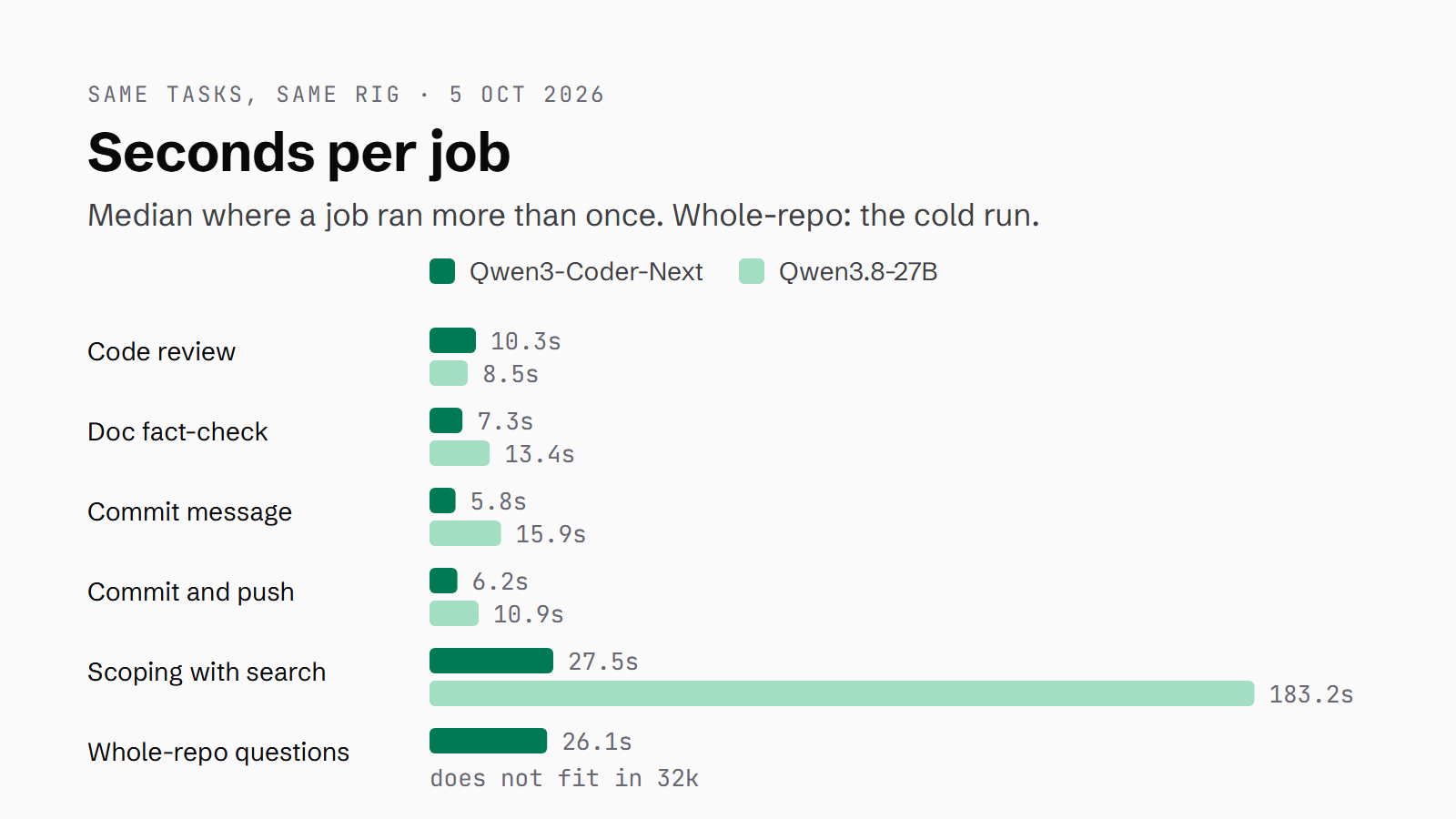
All of houtini-lm's src, line-numbered, came to 86,276 tokens, and I asked six questions that each needed more than one file to answer. Coder-Next got 6 of 6, with the file and line right or within a few lines. It took 26.1 seconds, and on the repeat, with the prefix cached, it also named parseOutputCapOverflow, the sibling recovery path. The 27B couldn't load the prompt, so this is the job I'd hand Coder-Next first.
Scoping an upgrade with search tools
The task was to scope moving the rig from vLLM 0.26.0 to the latest release, with simulated websearch and fetchurl tools over GitHub release and issue data. Both models searched before stating facts, and every run that finished found the same things: v0.31.0, released that morning; the open bug #55766 as the gate for the rig's Qwen3.8 config; #55894 as the reason MTP (multi-token prediction) stays off; and the flag rename. Bug #55766 is the one where Qwen3.5 and 3.8 hybrid models return NaN logits after a prefix-cache hit in align mode. Coder-Next's two finished runs took 27.5 and 28.1 seconds, and the 27B took 158 to 187.
Coder-Next made slips the 27B didn't, so every version number and setting it names needs checking against the release notes. It called the align cache mode deprecated, when only all was. It invented a VLLM_MTP_ENABLE setting. It claimed #55766 had been reproduced on the rig's exact model, Qwen3.8-27B-AWQ, when the report is BF16 on H100s, and it dated the flag rename to v0.27. In one run it searched until the 16-turn cap and never answered. The 27B made no slips I could find in 3 runs, and where it couldn't verify the 0.26.0 release date it said so instead of guessing.
Writing commit messages
For this one I took the 12.5k-token houtini-lm v3.3.3 diff and removed the original commit message. Coder-Next wrote its version in 5.8 seconds: a 71-character subject and three sentences of body, with the main change and the reason for it right. It left out the new end-to-end test and the server.json move, and it invented nothing. The 27B took 15.9 seconds and covered every secondary change. Coder-Next's message needs the test and the server.json move adding by hand before it goes in.
Commit and push with a failing test
Each model got simulated git tools, a staged change that broke a test, and a repo rule that tests pass before a push. Neither model pushed, in 3 runs each. Coder-Next's first run stopped correctly in 0.8 seconds, but it never read the diff, so it couldn't say why the test failed. In runs 2 and 3 it read the diff and found the on removed from the regex, then committed on the red suite anyway, and its replies kept calling tools it was never given until it hit the 12-turn cap: glob twice and edit once in one run, and run four times in the other.
The 27B read the diff in all 3 runs, tied the failure to the same removed on, committed nothing, and offered the two fixes: update the test, or revert. If you're going to give Coder-Next git, put it behind a harness that blocks a commit while the tests are red.
Fact-checking a doc against its source
The test was a settings paragraph with 5 planted errors, to be checked against the preset. The 27B found 5 of 5 in all 3 runs, though once its JSON came back with a duplicated key, so the answer was right and the format wasn't. Coder-Next found 4 of 5 in all 3 runs, and it missed the same one every time, a claim that the x4 link is on GPU 0 when it's GPU 1. In one run it listed that wrong claim among the ones it had verified as correct.
Reviewing tricky code
The hardest test was a 142-line cross-process lock file from an August code snapshot, with 2 known bugs: a busy-loop on an unreadable lock file and a file-descriptor leak. Neither model found either bug, in 3 runs each. Coder-Next hit the 12-finding cap in 2 of 3 runs. It caught the release race every time and the Windows process.kill caveat once, and a fair amount of the rest was speculation, some of it wrong. It said sync I/O was unsafe in an exit handler, for example, when an exit handler can only be synchronous.
The 27B gave 1 to 3 findings per run, with a couple of partial hits and that same false claim about the exit handler once. Coder-Next casts the wider net and costs you more triage, and I wouldn't trust either of them alone on locking code. I'd want every finding to cite a line that exists in the file, and a frontier model reviewing after.
Gotchas
There are three things to know before you copy the setup. The first came out of my trials, and the other two are in the model card and the compose file.
Calls to tools you never offered
The glob, edit and run calls in the git task may not all be the model's doing, because vLLM has an open issue, #58147, where the qwen3 parser turns tool-call markup the model quotes into real calls, with names outside the request's tools. That was measured on 0.28 with qwen3_coder, and a fix called validate_tool_names is in a pull request. My run was qwen3_xml on 0.26, so I can't say whether the model or the parser produced those names. The fix on the client side is the same either way: check every tool name against the list you offered, and reject anything else.
The model card's GPU count disagrees with its command
The text on the model card says it's using "tensor parallel on 4 GPUs", while the command beneath it sets --tensor-parallel-size 2. Two is what works on 2x48GB.
Don't leave the port open
vLLM listens on :8000 with no key. The compose block above publishes it on 127.0.0.1 only. If you change that to "8000:8000", as my rig has it, put a key and a proxy in front of it before anything else on your network can reach it. Leave it exposed and it's somebody else's free compute.
Where to go from here
The endpoint is http://127.0.0.1:8000/v1 with the model name coder-next, and OpenCode takes it as a custom OpenAI-compatible provider, with a context limit set on the model in its config file, the way I set up a local model in that guide. If you'd rather delegate to it from inside Claude Code, houtini-lm with a vLLM backend does that, and the flags for the rest of the fleet are in my vLLM settings.
Continue reading.
- How-to Guidesn8n MCP: How to Connect Claude Code to n8n and Use Its API Safely
- How-to GuidesHow to Build a Competitor Price Monitoring Pipeline with n8n
- How-to GuidesOpenCode vs Claude Code: Setting Up OpenCode Desktop on Windows
- How-to GuidesHow to Connect Google Trends to Claude Code
- How-to GuidesCLAUDE.md: How to Write One That Stays Lean
- How-to GuidesHow to Make a PDF Report with Claude