Muse Glimmer 30B vs qwen: my day-one local benchmark on a dual RTX 4090 rig
Meta dropped Muse Glimmer 30B and I spent the day trying to unseat my qwen daily driver on the dual-4090 rig. Four apparent hangs, one day-one bug, and a same-harness bench later, I had my answer - and it wasn't the coronation I'd half expected. So, is it better than my daily driver?
 Richard Baxter Marketing engineer
 On this page
So, is it better than my daily driver? That was the whole question when Meta dropped Muse Glimmer 30B this weekend, and I gave up a day of the rig's time to answer it. The reflex when a new open-weights model lands (Apache 2.0, 30B, multimodal, from Meta of all people) is to swap the crown immediately. The reflex is wrong, and this article is the story of why: day one doesn't just mean the model is new, it means the serving stack isn't ready for it, and the gap between those two things ate most of my afternoon.
If you're a leader wondering whether the shiny new model is worth your team switching to, the short version is that "better" turned out to be the wrong question, and by the end you'll see why the answer is a split decision rather than a winner. If you're the one who'd have to pull the weights and serve the thing, the article continues, and I'll show you the four hangs (two of them imaginary), the one real bug, and the numbers from a properly matched bench.
Quick Navigation
Jump to what you need:
The daily driver | Day-one stack gap | Four hangs | The first real error | The bench | The verdict
The daily driver, and why I bothered
My daily driver is qwen3.6-27b-awq, served through vLLM on the dual RTX 4090 rig (two modded 48GB cards, the pair capped at 330W each - the full tuning story is in the vLLM tuning article ). It decodes at 56-60 tokens per second (tok/s), which is quick enough that delegated coding tasks come back before I've finished reading the previous one, and it's the model the houtini-lm fleet leans on all day.
The bit that matters for this story: that 56-60 tok/s doesn't come from the 27B being small. It comes from MTP - multi-token prediction, a built-in speculative drafter (a small head guesses the next few tokens and the full model verifies them in one pass). Hold that thought, because it's the punchline of the whole comparison, and I didn't clock how load-bearing it was until the numbers came back.
So when Meta shipped Muse Glimmer 30B on the 8th, similar size, newer, multimodal, permissively licensed, I wanted to know within the day whether my delegation setup should switch. A 30B that beat the qwen on the same silicon would be worth a weekend of migration. That was the temptation, anyway.
Day one means the stack isn't ready
The first wall wasn't the model, it was versions. Muse Glimmer needs vLLM 0.27, which doesn't exist yet as a stable release. My rig runs 0.25.1; :latest on Docker Hub is 0.26.0, one version short. What Meta and the vLLM team ship instead on day one is a preview image, vllm/vllm-openai:muse-glimmer, and if you inspect it, the version string inside is 0.1.dev19075+gd89ec6d6a - a mainline development build, not a release. This is vLLM's standard day-one pattern, and it's worth knowing before you commit hardware time to a launch-day model: you are volunteering to run pre-release serving code.
Before pulling a 30GB image and 38.7GB of weights, I checked the architecture registry inside the preview image, which took two minutes and paid for itself twice over. MuseGlimmerForConditionalGeneration was there, so the model would at least be recognised. But sitting next to it was a second entry I hadn't expected: MuseGlimmerAssistantModel, which is almost certainly an official speculative-decode drafter - the exact mechanism that gives my qwen its 56 tok/s, spotted in the registry before I'd generated a single token. Nothing in the launch material mentioned it. File that one away; it comes back in the verdict.
The plumbing itself was small and reversible: a compose variable for the image tag and a muse-glimmer-30b-fp8 preset. The FP8 build, for what it's worth, is quantised in 128x128 scaling blocks (per the RedHatAI model card), with the vision tower, embeddings and output head left at original precision - which is why it's 38.7GB on disk rather than the ~28GB a clean FP8 of a 30B would suggest. I noticed the size discrepancy before I found the stated cause, and for ten minutes I assumed I'd pulled the wrong repo.
Four hangs, two of them imaginary
Here's where the day went. I'm sharing the whole sequence because each of these cost me real time, and two of them turned out not to be hangs at all.
The 40-minute "hang" that was a download
I started the container, watched Docker report it "unhealthy", and sat there for the best part of 40 minutes convinced the dev build had wedged on startup. It hadn't. It was downloading weights at 26MB/s over an anonymous Hugging Face connection - day-one CDN load plus the unauthenticated rate limit (the logs even say "set HFTOKEN for faster downloads", which I'd scrolled past). The "unhealthy" status was the healthcheck's 600-second startperiod expiring mid-download. Cosmetic, but it looks exactly like a crash if you're primed to expect one.
The real hang
Download complete, 28.4GB cached, and then the loader went silent. Twenty-five minutes, no log output, no error, GPUs idle at 23W - which on this rig means nothing whatsoever is happening. I restarted the container and reproduced it exactly. My hypothesis is that the loader was asleep inside an anonymous huggingface_hub 429 backoff (there was no token anywhere on the rig), retrying politely into a rate limiter with no visible sign of life. I should say plainly: I never proved that. The fix I chose removed the hub from the equation entirely rather than confirming the diagnosis, so the backoff theory is still just the theory that fits.
The fix that is also the diagnostic
Rather than fight the hub from inside the container, I downloaded the weights host-side and served from a local path, which removes every hub call from the load sequence. Even this had a snag: the official hf.co/cli/install.sh assumes a POSIX venv layout (venv/bin/python) and falls over on a Windows Git Bash where Python puts things in Scripts\, so I used huggingface_hub.snapshot_download from my system Python instead. With a token supplied, the authenticated resume ran at roughly twice the anonymous speed. Then I bind-mounted ../models:/models:ro and pointed the preset at the path.
One catch from this step that's worth a standing rule: my bench script had been capturing the whole .env (including the new HF token) into the committed results file. I caught it pre-commit and patched the script to exclude HF_TOKEN and anything matching *_KEY or *_SECRET. If your logging captures environment state, it will eventually capture a secret.
The second imaginary hang
Serving from the local path, the loader went quiet again, and I wrote "SILENTSTALLAGAIN" in my notes with some feeling. Wrong again. The load was fine, just slow, for two compounding reasons: the bind mount crosses WSL2's 9P filesystem, which tops out around 33MB/s for this kind of sequential read, and the loader's progress bar only ticks once per shard - two shards, about ten minutes each. Shard 1 of 2 completed at 09:59 and the bar moved for the first time. A coarse progress bar over a slow filesystem is indistinguishable from a dead process until you know the shard boundary, and these stalls are a different animal from the earlier hub stalls, which never reached shard loading at all. (The fast path, for the record, is a named Docker volume on ext4 inside WSL rather than a Windows bind mount.)
Four hangs. Two misdiagnosed by me, one real, one that was a download. Not my sharpest afternoon.
The first real error was progress
After 729 seconds of shard loading, 32.39 GiB of weights landed on the GPUs and the engine init promptly died with an error I was almost pleased to see: ValueError: The number of video placeholders does not match videos. A real stack trace, from a real bug, in the preview image's video-profiler path - the multimodal memory profiling chokes before serving starts. Pre-release code doing pre-release things.
The workaround is to serve text-only: --limit-mm-per-prompt.video 0 --limit-mm-per-prompt.image 0. That means vision goes unscored in everything below - I'll re-test when a fixed image ships, and today's question was text throughput anyway.
The smoke tests were encouraging. Code generation came back correct and clean. Tool calls were flawless: right function, clean JSON arguments, nothing leaked into the text channel, finish_reason=tool_calls every time. The catch arrived in the token accounting: one smoke test burned roughly 700 hidden reasoning tokens to produce a 216-character answer (939 completion tokens billed in total), and reasoning_content came back empty - the parser strips the reasoning channel rather than exposing it. So Muse thinks, at length, invisibly, and you can't read the thinking or (as far as I found on day one) switch it off. Budget max_tokens generously or you'll truncate the answer, not the think - the same lesson qwen's enable_thinking taught me months ago.
The bench, and the answer
The comparability contract matters more than the bench itself, so here it is: same harness (bench.ps1), same 330W power cap, same locked 2200 MHz clocks, same rig, and the qwen and gemma rows were measured the day before under identical conditions. I also wrote down three predictions before any bench ran, because a prediction recorded before the numbers exist is the only kind you can't retrofit. The setup underneath all of this is the vLLM install plus the bench-harness lineage , on hardware I covered in the local-LLM GPU guide .
| Metric | muse-glimmer-30b-fp8 | qwen3.6-27b-awq + MTP | gemma4-31b-qat |
|---|---|---|---|
| Decode tok/s | **16.3** | **56.0** (peak 60.4) | 40.3 |
| TTFT, 16k cold | **4.71s** | 9.04s | 15.1s |
| TTFT, 16k warm repeat | 0.09s | 1.33s | 0.12s |
| Prefill tok/s | **3550** | 2045 | 1384 |
| Decode @ 16k context | 16.3 | 19.4 | 33.8 |
| Concurrent x4, aggregate | 72.3 | 144.3 | 127.3 |
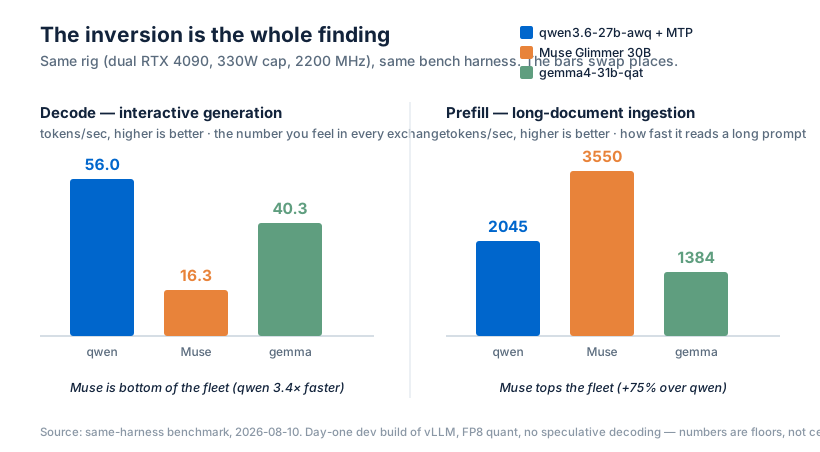
The shape of that table is an inversion, and it's the whole finding. On decode - the number you feel in every interactive exchange - Muse loses to qwen decisively: 16.3 vs 56.0 tok/s, bottom of my fleet. On prefill - how fast it ingests a long prompt - Muse wins clearly: 3550 vs 2045 tok/s, +75%, and its cold time-to-first-token on a 16k prompt is 4.71s against qwen's 9.04s, roughly twice as fast. Concurrency goes to qwen (144.3 vs 72.3 aggregate). Tool-calling was a tie on correctness. Reasoning economy goes to qwen, because Muse's hidden ~700-token burn has no off-switch I could find.
My predictions scorecard, since I pre-registered them:
| Prediction | Result |
|---|---|
| Decode loses to qwen, lands near qwen's FP8 fallback (~36 tok/s) | Right direction, too generous - real number 16.3 |
| Prefill could win (FP8-block + FlashInfer vs Marlin's cold-prefill weakness) | Confirmed |
| A noisy reasoning channel burns budget | Confirmed, with a twist - the burn is hidden, not noisy |
Two and a half out of three, and the miss is the informative one: I expected slow decode, not bottom-of-fleet decode. The explanation isn't a mystery, though. qwen's speed is MTP - the speculative drafter. Muse has no drafter wired up today. Same mechanism, one model has it, one doesn't, and that IS the decode gap. Which is exactly why that MuseGlimmerAssistantModel entry in the architecture registry matters: the official drafter appears to exist, it just isn't in the day-one serving path yet.
So, is it better than my daily driver?
For the work I do all day - interactive delegation, code tasks, taking load off the Claude Code bill - no. 16.3 tok/s decode plus an invisible reasoning burn is the wrong shape for that job, and qwen keeps the crown without much of an argument.
But writing Muse off would be daft, because for one specific job it already wins on my hardware, today, running pre-release code: bulk document ingestion. If your workload is summarise-heavy batch work - long documents in, short answers out - Muse prefills 75% faster than my daily driver and starts answering a 16k-token prompt in half the time. That's not a consolation prize, it's a specialisation.
And these are floor numbers, not ceilings. This is a dev build of vLLM serving a day-one FP8 quant with no speculative decoding. I'll re-run the bench when any of three things happens: a community AWQ-INT4 quant appears, vLLM 0.27 ships stable (which should fix the vision bug and likely brings kernel maturity with it), or someone wires up that MuseGlimmerAssistantModel drafter - the exact lever that gives qwen its 56 tok/s. Any one of those could move the answer. The drafter could rewrite it.
Everything you'd need to run the same test is documented - the vLLM setup , the tuning, the presets, the harness - so when 0.27 lands you can bench it on your own hardware the same afternoon. And if the delegation angle is what brought you here (a local model handling the bulk work while Claude does the reasoning), you can start with a free week of Claude Code and see what's worth offloading before you buy any hardware at all.
So: is it better than my daily driver? For my day, no. For the one job it's built for, it already is. I walked in asking which model wins and walked out with a prefill specialist and a to-do item for vLLM 0.27 - "better" was the wrong question, and 3550 tok/s is the number that proved it.
Continue reading.
- Local AIvLLM settings for a pair of RTX 4090s: the flags I run for twelve local models, and why
- Local AIThe VRAM traps: why a 16GB model wouldn't load on a 48GB card
- Local AIThe broken rules of local LLM inference
- Local AIThe best local coding setup isn't one model: how I route across Claude, Kimi and my own rig
- Local AIHow to set up vLLM in Docker on Windows (WSL2): serve an open-weight model on your own GPU
- Local AIMoving houtini-lm to vLLM: What I learned