How I Cut My Claude Code Token Spend with Houtini LM (Architect, Drafter, QA)
I left Claude Code running overnight a few months back and winced at the token bill - most of it spent on work any competent model could handle. So I built Houtini LM: Claude stays the architect and the QA, a cheap local model does the drafting, and the bill drops as a side-effect. In today's post I'm showing how I run it on my own rig, what I delegate, and where it falls down.
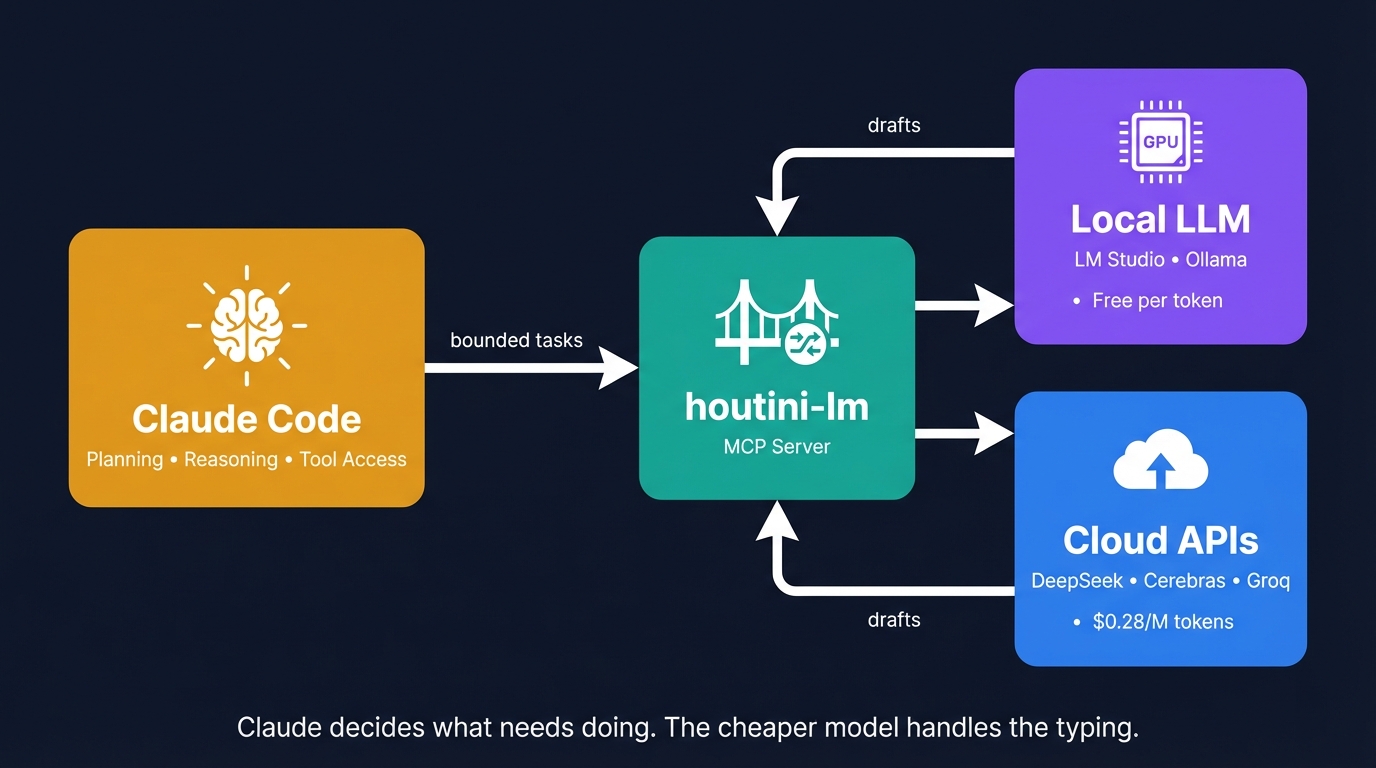
I left Claude Code running overnight on a refactor a few months back, walked into the kitchen the next morning with a coffee, and watched the token counter tick over to a figure I would rather not put in print. The work itself had landed cleanly enough. The bill was the problem. Most of the spend, when I went back through the session log, had gone on the kind of work any competent coding model handles fine: test stubs, commit messages, walk-throughs of a function I had not seen before, format conversions, code review on files that were never going to push the architecture in a useful direction.
The interesting question was not "should I stop using Claude" - it was "what can I take off Claude's plate without losing the thing I pay for?" Claude's reasoning. The multi-file orchestration. The ability to call tools, plan a change across six files, run the tests, and tell me which ones failed and why. That part is worth every token. The "draft me twenty test stubs" part is not.
So I built Houtini LM. It's an MCP server that lets Claude delegate the boring work to a cheap or local model, keeps the planning and the QA on Claude, and shows you the running tally of tokens you would have spent had Claude done it itself. I have been running it daily on my own rig for several months and I am offloading somewhere between 20,000 and 50,000 tokens on a heavy day. Here is how I use it, what I would recommend for endpoints in 2026, and where it falls down.
Quick Navigation
Why I built it | The architect, the drafter, and the QA | What's in the box | The endpoints I'd recommend in 2026 | What I delegate (and what I keep on Claude) | The numbers on my own rig | Getting started | Where it falls down | Where to go from here
Why I built it
There is a whole genre of dev YouTube right now telling you to ditch Claude entirely and run Qwen Coder or Gemma on your own box. Some of those videos have huge view counts, and they are not technically wrong - you can get code out the other end of a 20-billion-parameter local model. The catch shows up when the reviewer's own test cases start to fail. The same video that demos a 120B model writing clean Python often demos the 20B version of the same family botching it. You can swap Claude out for a local model. What you cannot do is swap Claude out for a local model without losing the reasoning that makes Claude Code worth paying for.
I wanted the cost relief without the cliff edge. The architect/drafter/QA frame is what fell out of that. Claude stays in the planning and review seat. The cheap model does the typing. The typing, it turns out, is where most of the token use goes.
I have been running Qwen Coder Next on a local box that lives in the cupboard under the stairs. It is an 80-billion-parameter mixture-of-experts model, decent context window, and absolutely brilliant at bounded work. Ask it to reason across three files at once and the wheels come off. Ask it to write tests for a function, draft a commit message from a diff, or explain what a piece of legacy code is doing, and it is faster than I am at typing.
Houtini LM is the bridge. Claude Code (or Claude Desktop) talks to it via MCP. It speaks any OpenAI-compatible endpoint - LM Studio on your local network, OpenRouter for cloud access to 300+ models, DeepSeek and Groq and Cerebras for cheap fast inference, vLLM if you are self-hosting. The architecture is the same regardless of where you point it.
The architect, the drafter, and the QA
The mental model I hold is three roles, one workflow.
Claude is the architect. It reads the brief, plans the work, decides which files need to change, calls the tools, runs the tests, and judges whether the result is correct. I keep the reasoning on the frontier model because that is what the frontier model is for.
The cheap or local model is the drafter. It takes a bounded task with all the context bundled into one message - "here is a function, write me tests for it", "here is a diff, draft a commit message" - and returns the output. It does not see the filesystem, the previous conversation, or anything except what Claude sends in the message. That isolation was a deliberate design call on my part - partly because it keeps the architecture dead simple, and partly because I was not thrilled about giving a random model free rein over my filesystem.
Claude is the QA. It reads the draft back, decides whether to ship it, ask for a revision, or rewrite the section itself. Wrong output from the drafter costs me nothing on the way through - Claude catches it, sends a sharper prompt, moves on. The QA pass is what makes the architecture safe to use on real work rather than just on demos.
The test I run when deciding whether to delegate: would I trust this task to a competent junior developer working from a clear spec, with me reviewing the output before it ships? If yes, off it goes. If the task is "decide whether to break this 600-line file into three or four modules", no - I want the architect's brain on that one, not the drafter's.
What's in the box
I kept Houtini LM intentionally small. There are eight MCP tools and one MCP resource. The full surface area fits on one screen.
chat- send a single task, get an answer back. My workhorse. Supports an optionalmodelparameter if you want to pin a specific model id for this call only (useful on OpenRouter, where 343 models report as "loaded" and the router will otherwise pick essentially at random).custom_prompt- structured three-part prompt: system message, context, instruction. Outperformschatfor anything where you care about the model staying focused on a specific kind of task. I tested this properly one weekend - took the same batch of review tasks and ran them both ways, once as a single wall of text and once split into system/context/instruction. The three-part shape won every round. On the 14B Qwen model the difference was almost comical: fed it one long unstructured message once and it started reviewing a completely different function to the one I had asked about.code_task- code-specific. Pre-configured system prompt, per-family temperature and output constraints. Qwen Coder runs at 0.1 here, GLM at a slightly different setting, etc.code_task_files- reads files server-side instead of through the MCP client's context window. You passpaths, the server concatenates and processes them. There is a pre-flight token estimator that refuses obviously-over-budget inputs early using an ordinary-least-squares regression on the model's measured prefill rate, rather than letting them silently hang for two minutes before timing out.embed- OpenAI-compatible/v1/embeddingsfor RAG. Use whatever embedding model your endpoint exposes.discover- health check plus measured speed. Surfaces TTFT (time to first token) and tok/s for the active model, averaged across the session and the lifetime of the workstation. The first measured call on each model emits a one-line benchmark - no synthetic warmup, real task numbers.list_models- the full catalogue with HuggingFace metadata enrichment.stats- a compact markdown dump of session and lifetime totals, per-model performance, reasoning-token overhead. Cheap to call repeatedly to watch the savings counter climb.
The MCP resource is houtini://metrics/session, which exposes the same numbers as stats in JSON for any client that wants to surface them in its own UI.
The piece I want to point at specifically is the savings counter. Every tool response includes a footer line that reads 💰 Claude quota saved - this session: X tokens / Y calls · lifetime: Z tokens / W calls. The lifetime number persists across sessions in a SQLite database at ~/.houtini-lm/model-cache.db on my workstation. It is the closest thing I have to honest accounting on what this whole thing is doing for me.
The endpoints I'd recommend in 2026
Houtini LM speaks any OpenAI-compatible endpoint, so the question is which ones to run it against. My recommendations have firmed up over the last few months.
LM Studio is what I recommend if you have local hardware. Well-tested, well-behaved, and an easy default to start with. If you have a GPU box on your network with a model loaded, point Houtini LM at it and start delegating. I have written a separate guide to setting up LM Studio if you have not done it before.
OpenRouter is the primary recommendation if you do not have local hardware (or you want cloud reach alongside it). One API key, 300+ models, automatic routing. Houtini LM detects OpenRouter from the URL and switches behaviour: attribution headers go out per request, the reasoning-exclude flag fires correctly on thinking models, and the retry-with-backoff on 429/5xx kicks in automatically. You do not have to configure any of that - point it at https://openrouter.ai/api/v1, set the key, and it works.
DeepSeek, Groq, Cerebras, Fireworks, vLLM - all work through the generic OpenAI-compatible path. Pick whichever combination of price and speed suits your workload. Cerebras at 3,000 tokens per second is ridiculous for bounded tasks - I have watched it return a 400-token code review before the status bar in my terminal finished redrawing. DeepSeek V3.2 is the cheapest competent code model I have used at the time of writing.
Ollama is supported, but I do not recommend it. Houtini LM works with Ollama (v2.12.0 fixed three Ollama-specific bugs to get there: delta.reasoning capture on the right field, Qwen3 thinking-detection that the Ollama Jinja template hardcodes on, and an auto-injected model field because Ollama returns HTTP 400 without it where LM Studio accepts the default). It works. It is just consistently more fragile in practice than LM Studio. If you can run LM Studio instead - and on Windows, macOS and Linux you can - run LM Studio instead. The "local model" SERP is full of Ollama tutorials and I understand why the recommendation propagates, but the months I have spent debugging Ollama-specific edge cases have not changed my position on this.
What I delegate (and what I keep on Claude)
My delegation matrix has settled into something simple. The test I run is whether the task has a clear bounded input and a clear bounded output, and whether I can QA the draft in a few seconds when Claude reads it back to me.
What I send to Houtini LM:
- Test stubs from a function signature
- Commit messages from a diff
- Code reviews on a file or a small set of files (I pass the full source via
code_task_files, not snippets - the cheap model botches reviews of half-files) - "What does this function do?" walk-throughs of legacy code I have just opened for the first time
- Format conversion - JSON to YAML, snake_case to camelCase, types from a JSON schema
- Structured JSON output where the model is the only sensible source (I pass a
json_schemaparameter and get grammar-constrained output that validates first try) - Brainstorming - drafting a few candidate names, candidate copy variants, candidate framings
- Text embeddings for RAG indexing
Stays on Claude:
- Anything that needs to call other tools (read files, write files, run the test suite, parse the failure)
- Multi-file refactoring plans - the cheap model botches it
- Architectural decisions where missing one edge case ruins the whole design
- Anything where the success criterion is "did the test suite go green afterwards" - Claude can run the tests, the local model cannot
- Anything where the draft is hard to QA in a few seconds (long-form prose where you do not have a clear ground truth to check against)
The framing that has stuck for me is that Claude does the work that requires reading other people's minds (the user's intent, the test suite's verdict, the other files' contracts), and Houtini LM does the work that requires producing well-formed output to a clean spec.
The numbers on my own rig
The hardware matters here because it sets a floor on what is honest to claim. I run a pair of modded RTX 4090s - 96GB of VRAM between them - with models served through vLLM in Docker. Qwen Coder Next loads at AWQ 8-bit across the two cards. The 256K context window is generous for the kind of delegation work Houtini LM does, and the active-parameter count means inference is fast enough that the round-trip is not a usability problem.
On a typical heavy day, the savings counter looks roughly like this:
💰 Claude quota saved - this session: 4,283 tokens / 7 calls · lifetime: 147,432 tokens / 213 callsThat is not a benchmark, it is what my actual stats output reads on the morning I wrote this section. The per-call footer is more informative when you are tuning:
Model: qwen/qwen3-coder-next | 279→303 tokens (12 reasoning / 291 visible) | TTFT: 485ms, 58.0 tok/s, 5.2sThe TTFT number (time to first token) is the one I keep an eye on. It is dominated by prefill cost - the model reading the prompt before it starts generating - and on long inputs it can dwarf the generation time. Houtini LM tracks it per model and uses an ordinary-least-squares regression on (prompt_tokens, TTFT_ms) samples to predict prefill cost for new inputs. On my measured data, Qwen Coder Next fits α=668ms, β=1.49ms/token, R²=0.999 - which is to say the model has 668ms of fixed per-request overhead and adds 1.49ms per token of input. That lets the pre-flight estimator refuse a 7,000-token input early with an honest "this will take 11.1 seconds, you might want to think about it" rather than starting and hanging.
The other reason the numbers matter is that they are the answer to the opener. The wince at the token count went away because the counter on the local box was climbing instead. Not all of it - Claude is still doing the architecture and the orchestration and the QA passes - but enough of it that the Anthropic bill went back to something I do not mind looking at.
If you do not have local hardware, the cheap cloud endpoints (DeepSeek, Groq, Cerebras) will replicate the architecture at a small fraction of the Anthropic per-token cost. The maths still favours the offload. The difference is that with local hardware the marginal cost is the electricity and with cloud it is per-token to a cheaper provider.
I have written a full guide to picking hardware for local AI if you are working out what to build or buy.
Getting started
One command, if you have Claude Code installed:
claude mcp add houtini-lm -- npx -y @houtini/lmIf you have LM Studio running on localhost:1234 (the default) with a model loaded, Claude can start delegating straight away. No environment variables, no config file, nothing to fiddle with.
Running the LLM on a different machine? Point Houtini LM at the IP:
claude mcp add houtini-lm -e HOUTINI_LM_ENDPOINT_URL=http://192.168.1.50:1234 -- npx -y @houtini/lmThe env var namespace is HOUTINI_LM_*. The full set:
HOUTINI_LM_ENDPOINT_URL- the endpoint URL (defaults tohttp://localhost:1234)HOUTINI_LM_API_KEY- bearer auth for remote endpointsHOUTINI_LM_MODEL- pins a specific model id, overrides routingHOUTINI_LM_PROVIDER- forces provider detection (rarely needed; URL detection usually works)HOUTINI_LM_CONTEXT_WINDOW- manual context window override
The legacy LM_STUDIO_* names still work indefinitely. If you have an existing config from an earlier version, you do not need to migrate.
For OpenRouter:
claude mcp add houtini-lm \
  -e HOUTINI_LM_ENDPOINT_URL=https://openrouter.ai/api/v1 \
  -e HOUTINI_LM_API_KEY=sk-or-... \
  -e HOUTINI_LM_MODEL=qwen/qwen3-coder-next \
  -- npx -y @houtini/lm
For Claude Desktop, the same env vars go into the claude_desktop_config.json block. The Claude Desktop MCP installation guide covers the JSON shape.
New to Claude Code? You can sign up here for a free week of Claude Code and try this whole architecture without committing to a subscription.
Where it falls down
In rough order of how often they bite:
Concurrent delegation queues at the endpoint. Most LLM servers process one request at a time. If Claude fires three delegation calls in parallel - and it will, especially on long sessions where it has worked out that delegation is cheap - they serialise at the endpoint and the timeouts compound. Houtini LM has a per-provider semaphore that gates local backends to single-flight (so the queue is honest), while remote providers like OpenRouter bypass the lock because they have native parallel capacity. The tool descriptions warn Claude about the trade-off; in practice it behaves most of the time.
The MCP client's 60-second request timeout. The MCP SDK on the client side will give up on a single request after roughly 60 seconds. Big prompt + cold model + slow prefill used to mean perfectly good responses vanished. Houtini LM defends against this in three places: a pre-fetch progress heartbeat starts firing the moment a tool call is acknowledged, a 10-second keep-alive runs while waiting for upstream response headers, and progress notifications continue during streamed generation. Clients that honour resetTimeoutOnProgress (Claude Desktop does) now survive multi-minute prefills cleanly. Clients that do not, you will still see the occasional timeout on a big input.
The local model never touches your filesystem. This is a deliberate design call, not a bug, but it is worth flagging because it shapes how you delegate. The drafter only sees what Claude sends in the message. It cannot read your project, browse your config, or look at the file next to the one you are asking about. The architecture is dead simple as a result, and I am not nervous about a model with filesystem access doing something I did not intend, but it means Claude has to bundle the relevant context into every delegation call. On big code reviews this gets verbose. code_task_files mitigates the worst of it by reading server-side, so the source itself never passes through the MCP client's context window - but you still pay tokens at Claude's side to write the paths.
Local model output quality scales with the model. Running Qwen Coder Next on 96GB of VRAM is a different experience from squeezing a 7B model into 16GB on an old GPU. The quality gap is real and the tier you can afford is going to constrain what tasks land cleanly. On the smaller tiers, be more conservative about what you delegate. Test stubs and commit messages still work fine. Multi-file code reviews do not.
Prompt discipline matters more than it does with Claude. Local and cheap-cloud models need clearer instructions than frontier models do. I have baked guidance into the MCP tool descriptions ("send complete code, never truncate", "be explicit about output format", "set a specific persona") and Claude picks most of it up, but if you are getting mediocre output, nine times out of ten it is the prompt shape rather than the model.
Where to go from here
If you have Claude Code installed, you are about ten seconds from cutting your token spend on bounded work:
claude mcp add houtini-lm -- npx -y @houtini/lmThe package is on npm as `@houtini/lm` . The source is on GitHub if you want to read how the routing works. Companion pieces:
- The LM Studio setup guide if you are configuring the recommended local endpoint.
- The MCP server installation guide for Claude Desktop if you are wiring this into Desktop rather than Code.
- The hardware guide for local AI if you are working out what kind of box to put the model on.
- The beginners guide to Claude if you are new to Claude Code or Desktop and want the lay of the land.
Point it at whatever you have running - Qwen on the box in the cupboard, DeepSeek over the wire, Cerebras if you want absurd speed - and let the savings counter run for a week. The number it climbs to is the answer to the wince I had at the kitchen counter six months ago.
Related Articles
Continue reading.
- How-to GuidesHow to Stop MCP Servers Eating Your PC: One Docker Gateway for Every Claude Client15 Aug 2026
- How-to GuidesHow to Use the Gemini API (and Why I Run It Next to Claude)15 Aug 2026
- AI ToolsHow to Do a Technical SEO Audit with Claude20 Jul 2026
- ExplainerWhat is a Marketing Engineer (and do you need one)?31 Aug 2026
- AI WorkflowsDynamically updating infographics and content (so you don't have to)28 Aug 2026
- Case StudiesThe parts Shopify Plus B2B doesn't do (and how we built them)28 Aug 2026