What Are AI Agents? The Plain-English Explanation
You can write a good prompt, and you've maybe wired up an MCP or two - but nothing runs unless you kick it off. Today's post gets you to the next stage: what an AI agent is in plain English, where it sits relative to chat and MCPs, and the simplest first agent you can build inside Claude Code this afternoon.
You've brought yourself up to speed on some aspects of AI tool use. You can write a good prompt. You've switched to Claude. Perhaps you've even got an MCP tool or two installed and you're creating files and documents.
If you're following along and haven't settled on a tool yet, most of what's here runs on Claude. New accounts get a free week of Claude Code to start with.
But there's no automation, no QA, no follow-up procedures.
Your AI control surface is fully dependent on you deciding what you'd like to do next. And if you decide to repeat your process, you have to start from scratch via a newly written prompt.
Today's piece, I hope, should get you to the next stage of your AI journey. Writing and saving prompts ready to execute, and building a simple agentic process so you can see what an AI agent is.
If you want the strategic-deck version of agentic AI, the /agentic-ai page on Houtini is the longer read (lifecycle, connector layer, where the consultancy work lives). This article is the practical companion.
Quick Navigation
What is an AI agent? |
Agents vs MCP |
The agent loop |
Workflows vs agents |
Saved prompts |
The tool layer |
Routines and dispatch |
When NOT to |
Homework
So, What is an AI agent? The shortest plain-English version
An AI agent is the same large language model you already use in Claude or ChatGPT, just wrapped in a loop, and given a goal and some tools. The model decides what to do next, uses a tool, looks at what came back, then decides what to do next again. It keeps doing that until the goal is met or it gets stuck and needs you to step in.
That's the whole thing, mechanically. Same brain, different loop. In a chat the loop is "you, then the model, then you, then the model." In an agent the loop is "the model, then a tool, then the model, then a tool, then maybe you." You've stepped out.
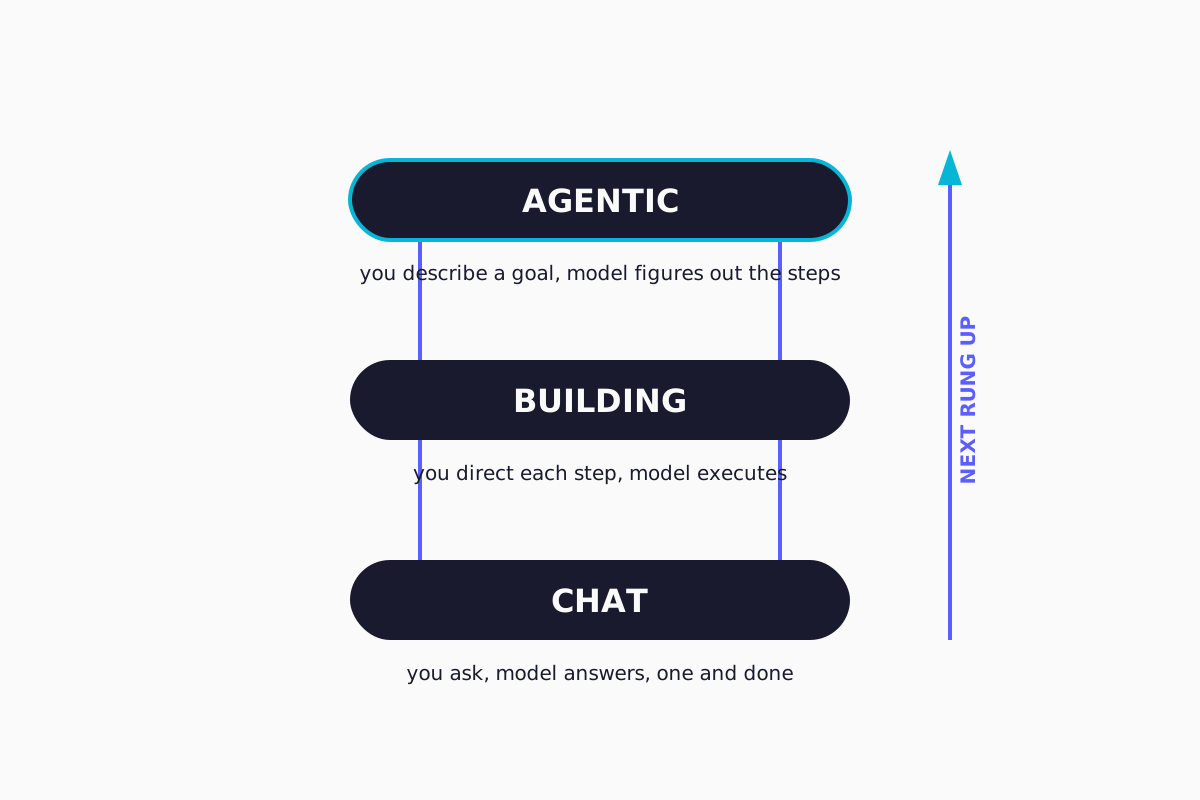
There's a useful framing in a Jamie at Teachers Tech YouTube video I watched recently. He breaks it into three levels. Level one is chat: you ask, the model answers, one and done. Level two is building: you tell the model what to make, you direct each step, the model writes the code (or the document, or the spreadsheet, whatever the artefact is). Level three is agentic: you describe a goal, the model figures out the steps. Jamie's comparison: chat is micromanaging a brand-new employee, agentic is delegating to an experienced one.
I think that's about right - my definition is broadly similar although I take great pains to emphasise that ultimately an agent is defined by the prompt - and many of my workflows are hardcoded prompts that direct procedures (upload and download from WordPress with an edit procedure in between being a very good example of a basic content agent).
Where does this sit relative to MCP?
If you've installed an MCP server in Claude Desktop or Claude Code, you've already done most of the hard work. You just might not realise what you've built.
An MCP server is the tool layer of an agent. Anthropic's own write-up on agents makes the same point: "Workflows are systems where LLMs and tools are orchestrated through predefined code paths." The tools are the bit that let the model do something other than generate text in a chat window. Without tools, you've got a clever conversation partner. With tool use, you've got something that can do work.
Most MCP servers expose a small handful of tools. The Gemini MCP we publish, for example, gives Claude image generation, grounded web search, and a few other things (we use it ourselves on this site). On its own it's just a tool. But point Claude at it with a goal like "watch the news for new posts on agentic AI from Anthropic, Simon Willison, and Hamel Husain - bring me a weekly digest, with the original URLs" and you've got an agent. The Gemini MCP is the eyes. Claude is the brain. The saved prompt is the rule book. What you've described, in plain English, is "a junior researcher who reads the internet for me and writes me a Monday morning briefing."
That's an agent. If you've already got Gemini MCP installed, you're a saved prompt and a routine away from running it. This is also, I suspect, part of why some of the big software-as-a-service companies - the ones whose value sat in a unique UI and a nice website - have seen their valuations come under real pressure over the last few months.
The agent loop, kept simple
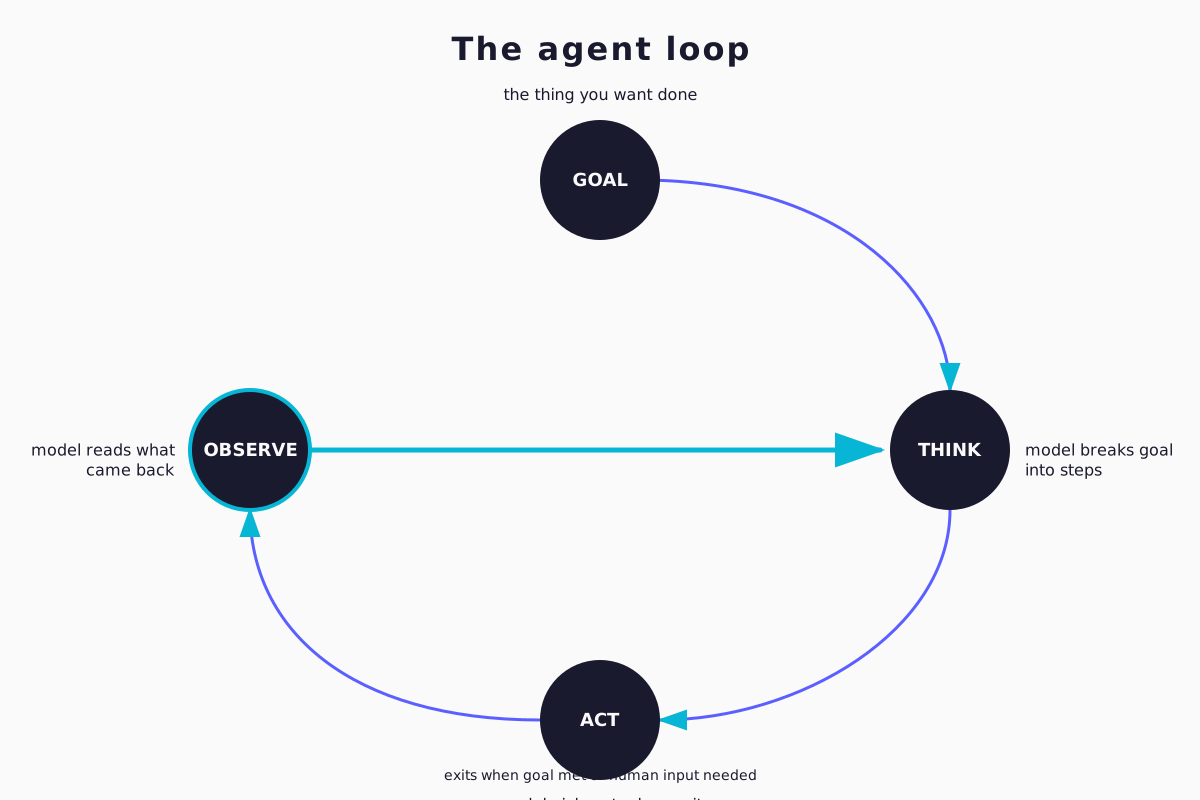
There's a longer version of this loop on /agentic-ai with five steps. Perceive, reason, plan, act, reflect. For the beginner's view, four words is enough.
Goal
The thing you want done. "Find the five most-cited articles on agentic AI from October to December and pull the key claims into a side-by-side table."
Think
The model breaks the goal into steps. It writes its working out before it acts. Practitioners call this chain-of-thought reasoning. You'll see it in your Claude Code window as text the model produces before it does anything.
Act.
The model picks a tool and uses it. Web search. File read. Database query. Whatever you've given it.
Observe.
The tool returns something. The model reads what came back, checks it against the goal, and decides whether to try the next step or course-correct.
Then it loops. Goal still not met? Think again. Try another tool. Read another result. The loop runs until the goal is met, or the model decides it needs to ask you something, or it hits a stopping condition you've set ("don't run more than fifteen tool calls").
That's the architecture. It’s mechanically very simple. The clever bit is that the model is the thing deciding what to do next, not you. Of course there are limits to how well that works in practice, which I'll come back to - but the principles of “agentic AI” are ludicrously simple at a foundational level.
Workflows vs agents
Most useful "agentic" work isn't a fully autonomous agent. It's a workflow, which is the same building blocks used in a more constrained way. Anthropic's own engineering blog calls this distinction out plainly: workflows are the predictable predefined-path version where the LLM and the tools are wired together in code. Agents are the version where the model is making the routing decisions itself.
For most of what you'll build in your first few weeks, workflows are the right answer. They’re cheap to set up, failure conditions are more predictable and they’re easy to fix and iterate on. You can read what they did when something goes wrong, use the LLM to give feedback so that it edits a prompt in your workflow, and iterate. It doesn't take long to start having wild ideas about what could be possible once you're past this point.
The more autonomous agent flavour earns its keep when the task is more open-ended. Coding tasks with unknown numbers of files to touch. Research where the right next step depends on what the previous step turned up. Multi-source debugging where the trail goes wherever the trail goes (and you can't predict the path in advance). Those tasks justify the cost of handing the steering wheel over to an LLM. A daily content update probably doesn't.
I find the workflow-versus-agent distinction is one of the most useful sanity-checks when reading other people's writing on this topic. If someone is describing a workflow but calling it an agent because the marketing reads better, that's worth noticing.
Saved prompts are how you start. Your skill is already an agent.
Let’s look at a content agent I use to help me look after my various web projects.
The prompt you've been writing into Claude Code, the long one with the steps, the rules, the "don't do this, do that" instructions, the bit at the end where you tell it to ask clarifying questions, that's the spec for an agent. Save it as a markdown file. Name it something useful. The simplest version: drop it into .claude/commands/ and Claude Code lets you invoke it as /your-command-name. That's a slash command, the lightweight end of the spectrum.
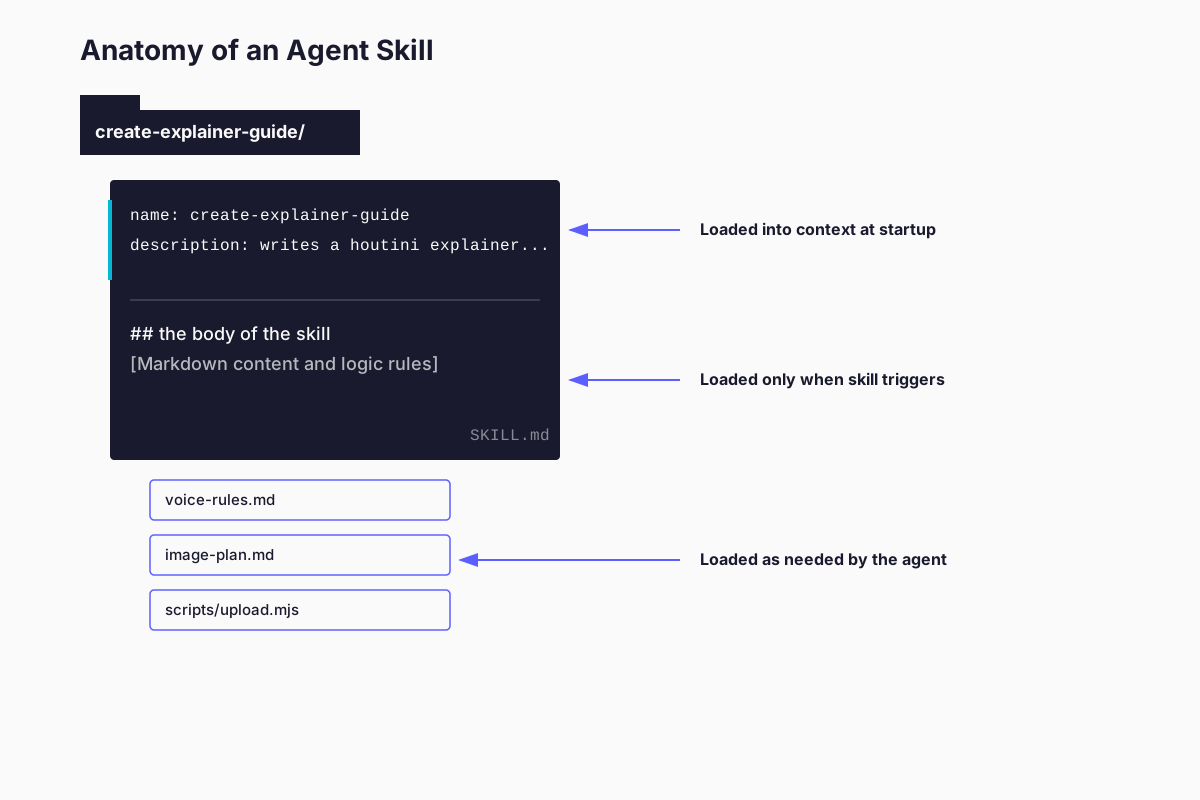
The richer pattern is what Anthropic now calls an Agent Skill (Oct 2025). A skill is a folder containing a SKILL.md file with a small bit of YAML frontmatter (a name and a description) plus any extra files the agent should reach for as needed. Anthropic's pitch for the YAML bit is that the agent loads only the description into its system prompt at startup, and reads the body of the skill in only when it decides the skill is relevant to the task. Anthropic published Agent Skills as an open standard in December 2025, so it isn't Anthropic-only any more. The older Microsoft Semantic Kernel "skill" terminology lines up with it. The Greg Isenberg / Remy Gaskell podcast calls the same shape SOPs (standard operating procedures, like a real company has). Jamie's video calls them workflow files. The vocabulary is wobbly. The pattern is the same.
As an aside, our Voice Analyser MCP analyses your writing style via an XML sitemap and generates a skill.md for your agent to write in your tone of voice.
One of my saved prompts is called create-explainer-guide.md. It's a long markdown file with research steps, voice rules, image planning, an edit pass, AI detection gates, and an upload pipeline. When I run it on a topic, Claude works through the steps. It does research, it writes a draft, it edits itself against a voice rubric, it captures images, it preps the upload to the site. It pauses when it needs me to confirm something. It then carries on. That is, in plain English, a content-production agent. And the only "code" involved is the markdown file.
Naturally I write the narrative guidance, the introduction, the “who is this for” and, after many months of refinement, my agents for content management work reliably, on a schedule and let me concentrate on the client work.
You can build the same shape for whatever process you do repeatedly. Email triage. Customer-support response drafting. Weekly research digests. Monthly invoice reconciliation. Financial performance updates. The shape is always the same: a saved prompt, a small set of tools the model can use, and a clear goal.
The boring discipline is the bit most people skip. They want the agentic upgrade by installing some new tool. The actual upgrade is "write down what you do, with explicit rules, in a markdown file." For now, the boring thing is 80% of the value.
Tools: the connector layer that makes agents, agents
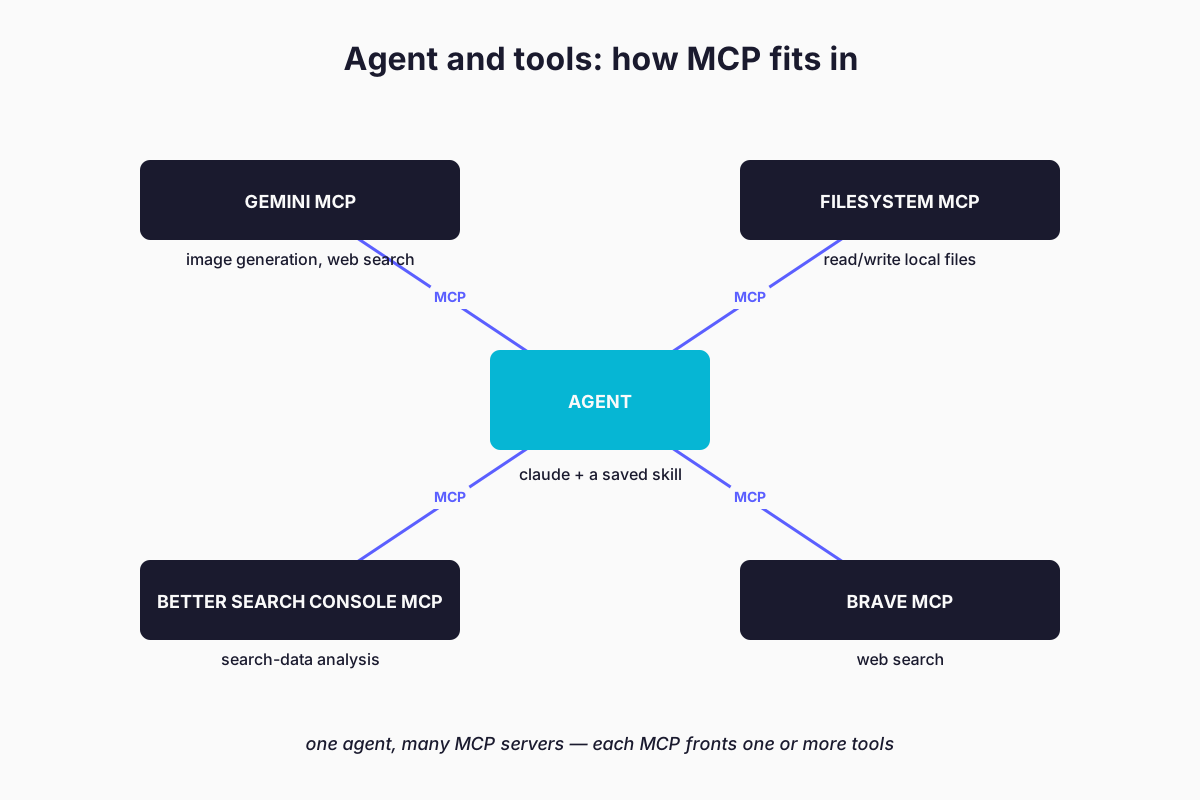
An agent without tools is a chatbot. The whole point of agents is that they can reach into real systems and do things. The connector layer that makes this possible, in the Claude / Anthropic ecosystem, is Model Context Protocol . MCP is the standard. It's the “USB-C of agent tools”, if I'm allowed to use that analogy.
Practically: each MCP server fronts one or more tools. You install the MCP, configure Claude to talk to it (we've got a walkthrough on adding MCP servers in Claude Desktop ) and now those tools are available to your agent. Filesystem MCP gives the agent the ability to read and write local files. Brave Search MCP gives it web search. The Gemini MCP gives it grounded research and image generation. The seo-audit MCP gives it search-data analysis. Pick the ones you need and start building.
For the absolute beginner, the bare minimum to build a useful agent is:
- Filesystem access (Claude Code has this built in; Claude Desktop needs an MCP)
- Web search (Claude has this built in too but I also lean heavily on Brave or Firecrawl MCP)
- One specific tool for the job you're trying to do, e.g. Gemini MCP for research-and-summary, seo-audit MCP for SEO, DataForSEO MCP for keyword work, Brevo MCP for email template management and campaigns.
Three tools is plenty for a first agent, and at this point you’re mostly only constrained by your own imagination and knowledge of the available tools.
Routines and dispatch: from "I run it" to "it runs itself"
Once you've got a saved skill that works, the next rung is having it run on a schedule, or in response to an event, without you typing the slash command yourself.
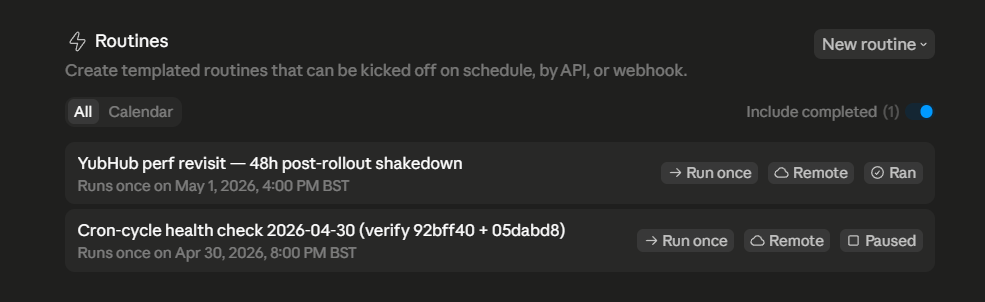
Claude Code's routines feature is the first version of this. You define a recurring task, you point it at a saved skill, it runs at the cadence you set, on Anthropic-managed infrastructure even when your laptop is off. There's also scheduled tasks (lighter, for one-off prompts) and Message Dispatch, which lets you trigger a Claude Code session from your phone. For the beginner reader the routine is the practical entry point. Schedule your weekly content-digest skill to run every Monday at 7am. Wake up to the digest in your output folder.
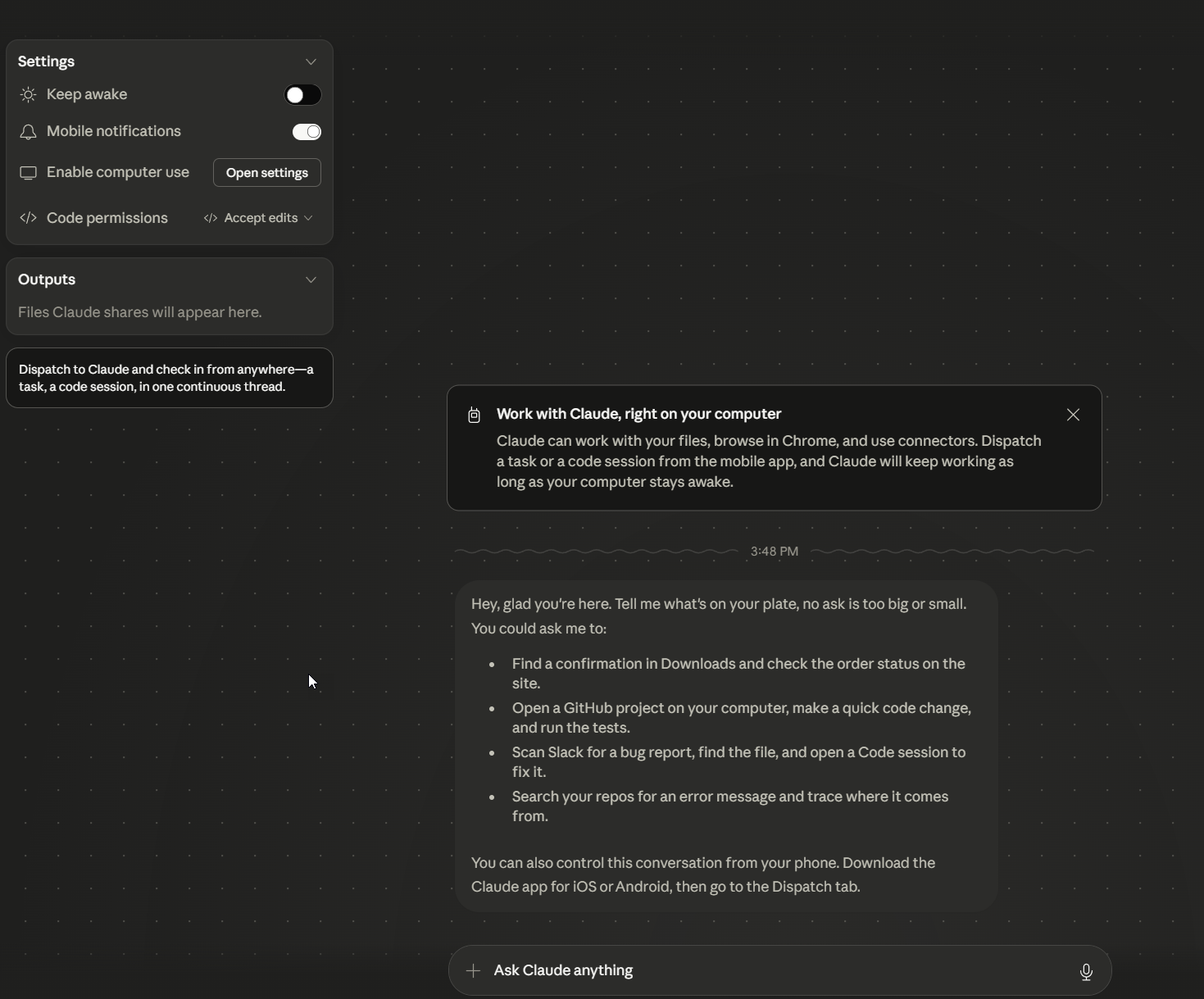
That's prototype-grade automation. It's not production-grade. The agent might fail, the run might error, you should still glance at the output before treating it as gospel. But it's the first version of "the work is happening without me kicking it off." And it's available right now, in the tools you already have, without writing any code.
For now, for most readers, "I run my saved skill when I need to" is the right place to be. Routines are the next rung. The rung after that, where you'd start using dispatch and webhooks and the broader Agent SDK, is developer-ladder territory and out of scope for today.
When agentic AI is NOT the right answer
I'm copying this almost verbatim from our /agentic-ai article because it's the most important sanity-check in the article and it gets skipped a lot.
If the work is fully predictable, repeats the same way every time (deterministic), and the cost of a wrong answer is high, classic automation is cheaper, faster, and more reliable than an agent.
Bash scripts, Power Automate, Zapier, n8n, all of them. The signal that you need an agent is, in my experience, when you find yourself writing endless if statements to handle exceptions and edge cases. That's the moment a model with reasoning starts to earn its keep.
Agentic AI works best on top of clean inputs. If your data is bad and your integrations are flaky and your goal is fuzzy, an agent will not save you. It will just produce a more eloquent failure than a Python script would have.
Agents fail more often than the demos suggest. The best models, on real-world coding tasks, succeed less often than you'd hope on benchmarks like SWE-bench. That's a lot better than nothing, but it's not "fire your dev team" territory. Build review steps into your workflows. Don't trust the agent's output without a glance. Don't run autonomous agents against production systems without explicit guardrails. I might build in an output evaluation and “sense checks” with Brave Search, a 2nd opinion from Gemini depending on the project.
Of course, nobody puts that on the box. I must say it's the most useful thing for a beginner to internalise.
Homework: The first thing to build
If I had to pick the single most useful first agent for a Claude Code reader, it would be a saved research-and-summary skill, wired up to the Gemini MCP for web search.
Here's the shape:
- Install the Gemini MCP (we've got a setup guide if you haven't got it yet).
- Write a saved prompt that does the following: ask the user what they want researched, ask three clarifying questions before starting, search the web with the Gemini MCP, read the top results, write a structured summary to a
research/folder, cite all sources, finish with three "what I'd do next" recommendations. - Save it as a skill: .claude/skills/research-topic/SKILL.md with a one-line description in the frontmatter (the older .claude/commands/research-topic.md path still works too).
- Run it.
/research-topic [your topic]. Watch the loop run and see what happens!
That's your first agent. It's a workflow under Anthropic's stricter definition because the steps are predefined, but it's agentic in the way the word is most commonly used. It uses tools. It makes decisions. It asks before it assumes. It's repeatable.
If you do nothing else after reading this article, do that. Enjoy!
Continue reading.
- ExplainerWhat is a Marketing Engineer (and do you need one)?31 Aug 2026
- ExplainerAI for the CFO: variable cost, vendor sprawl, and the playbook that ends the surprise bill31 May 2026
- ExplainerAI hallucination, and the boring discipline that stops it being a problem31 May 2026
- ExplainerWhat is RAG, and what could it do in your company?31 May 2026
- ExplainerThe Bitcoin Spiral: How I Built a Live AI-Narrated Dashboard on GitHub Pages31 May 2026
- AI WorkflowsDynamically updating infographics and content (so you don't have to)28 Aug 2026