How to do an SEO audit with Claude
SEO Audit Console is a free, open-source MCP server that pulls your crawl and your Search Console data into a database on your own PC, and Claude runs the audit from it. In today's guide we're taking a closer look at what an SEO audit covers and how the fixes get ranked and written, run for real on houtini.com with no Semrush or Screaming Frog.
 Richard Baxter AI Ops & Marketing Engineer
 On this page
This is a bit of a passion project for me. Having owned an agency, our biggest cost was data collection, and then the time it took to analyse it all. These days that shouldn't be a thing. In today's post I'm going to walk you through what's now possible with no Semrush and no Screaming Frog. It's pure, open-source software to speed up your data collection, your analysis and, hopefully, your recommendations and SEO strategy. But that bit's on you - you still have to think!
Basically, an SEO audit checks how your site is crawled, how it's indexed and how it performs in search, and then works out which fixes are worth doing first. A crawl is a program visiting every page on your site the way a search engine would, and recording what it finds. Google Search Console is Google's own free record of how your site does in its results: the queries, the impressions, the clicks and the pages it has indexed.
All of this runs on SEO Audit Console, a free, open-source MCP server (a small program that gives Claude a set of tools it can call) for Claude Desktop and Claude Code. Performing the data collection for a good SEO audit is a simple matter of installing it and telling it to sync to your Google Search Console account.
Quick Navigation
How it works |
What an audit covers |
Run the audit |
Daily crawl checks |
Finding to fix |
The dashboard |
Content opportunities |
DataForSEO and Majestic |
What it replaces |
Agency or in-house |
Questions |
Where to start
How SEO Audit Console works
SEO Audit is a Node app, wrapped in the MCP SDK so that Claude can use it as a tool to fetch data and write it into a SQLite database, for you to analyse on your own PC. SQLite is a database that lives in a single file on your machine, with no server to look after.
The data comes from four places. There's the tool's own crawl of your site, and there's Search Console, including URL Inspection, which is Google's verdict on how it indexed a given page. Then, if you add the keys, there's DataForSEO and Majestic.
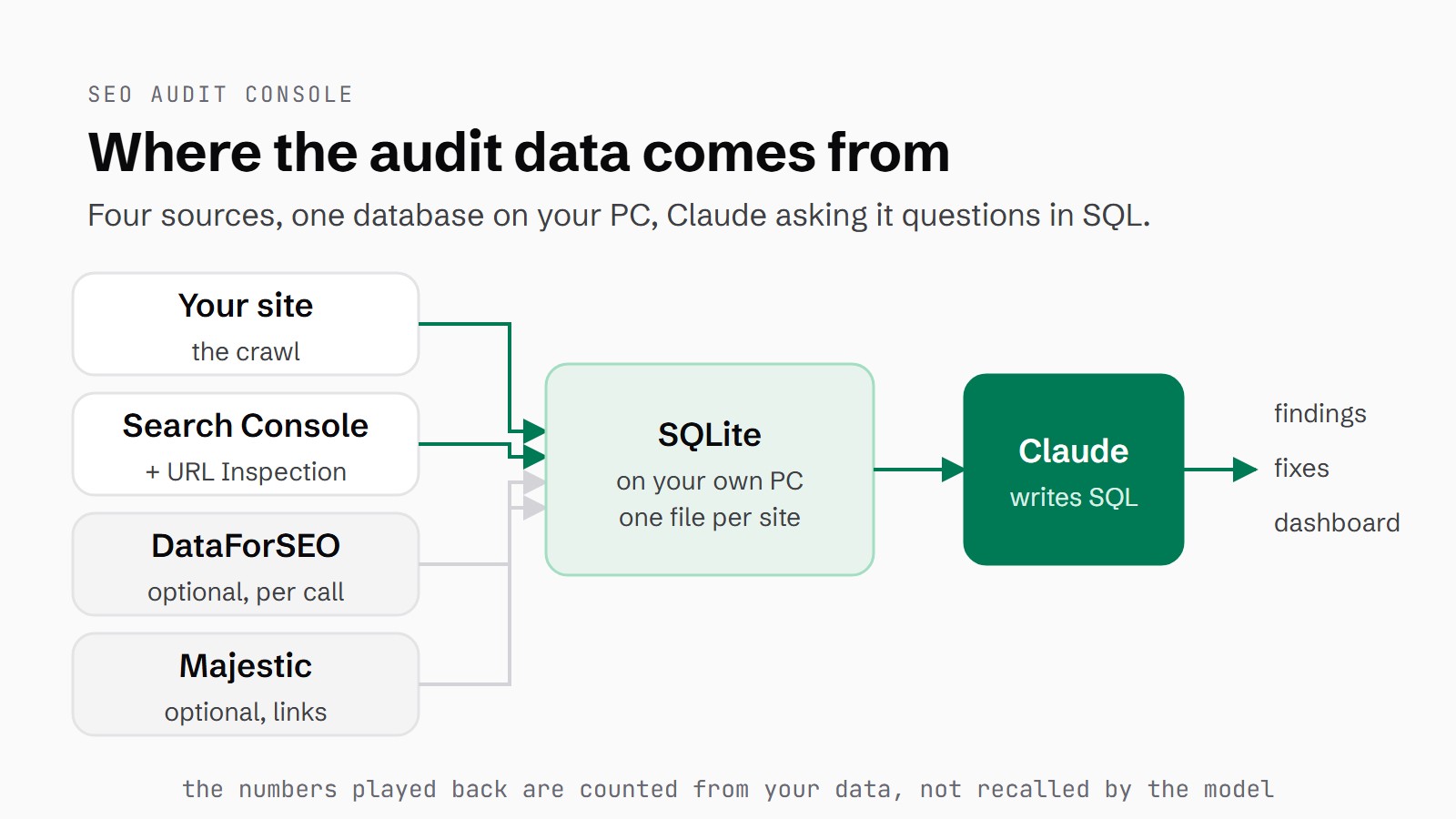
Where the audit data comes from, and where it lives.
The data is filtered by Claude's ability to write SQL queries, so the data played back is fact. SQL (Structured Query Language) is how you ask a database a question. Claude writes the query and the database does the counting, which means the numbers in front of you come from your own data.
In the README I wrote: "Almost every technical SEO audit I've been handed in twenty years is a crawler's opinion, and a crawler only ever sees half the picture. It tells you what your site says. It has nothing to say about what Google did about it."
The install and the Search Console sync are covered step by step in the setup guide.
What an SEO audit covers
There are 99 checks in the registry, split across eight categories: crawlability, indexation, on-page, content, schema, security, performance, and a merged set. The merged set is 23 checks that only work when Search Console and the crawl are joined together. That's where you find striking distance, a query ranking on page two, where a small push could get it onto page one. It also finds pages with a CTR below what their position should earn. CTR is click-through rate, the share of impressions that turn into a click. And it finds keyword cannibalisation, where two of your own pages compete for the same query, plus traffic decay and orphan pages that still earn impressions. An orphan page is one your own site barely links to, if at all.
Each check is one of three types. D is deterministic, read straight from the crawl or the data. G is Google's own data, from Search Console or URL Inspection. N is judgement, a heuristic. The judgement checks are off by default, on the basis that a wrong finding is worse than no finding. If you want them, ask Claude to "include the judgement findings".
| Category | Checks | What it looks for (examples) |
|---|---|---|
| Crawlability | 14 | Broken internal links, redirect chains, orphan pages, sitemap orphans, deep pages |
| Indexation | 16 | Google choosing a different canonical, broken canonical targets, indexable pages missing from the sitemap, index bloat, soft 404s |
| On-page | 20 | Title and meta description length, H1s, heading order, images without dimensions or alt text, missing Open Graph tags, Discover article pages missing og:image or max-image-preview:large |
| Content | 5 | Thin pages, long copy with no headings, sections that never name their subject, very long unbroken sections, statistical tells of generic AI text |
| Schema | 12 | No JSON-LD, JSON-LD that doesn't parse, missing required fields, articles with no author or no image, rich-result issues Google reports |
| Security | 3 | Pages served over HTTP, mixed content on HTTPS pages, no HSTS header |
| Performance | 6 | Slow server response, large or uncompressed HTML, pages that earn clicks but fail lab Core Web Vitals |
| Merged (crawl + Search Console) | 23 | Ghost pages Google ranks but the crawl can't reach, page-1 rankings slipping, traffic still landing on dead URLs, the top query missing from the title |
Run the audit
When the first refresh is done (the Search Console sync, the crawl and URL Inspection, run as one job), ask Claude to run an SEO audit of your site and it calls run_audit.
Findings are ranked by expected clicks per developer-hour: how many clicks a fix is likely to win, divided by how long it takes to do. The sum is the traffic at stake, multiplied by the expected yield of the fix and the certainty of the finding, divided by the effort in hours. Yield is set per category, with indexation at 0.8, crawlability at 0.7 and on-page down at 0.2, and then adjusted by severity.
Semrush's guide and Ahrefs' Site Audit sort issues by severity, as errors, warnings and notices, and Moz's checklist runs in checklist order. Ranking by your own Search Console clicks per developer-hour isn't something any of them does.
# SEO audit - houtini.com (run_audit, condensed)
652 findings · 0 critical · 54 high · 260 medium · 338 low
Audit computed in 0.2s.
On houtini.com the refresh pulled 82,337 rows of Search Console data, one per date, query and page. The crawl covered 208 pages in about three minutes, recording 13,297 internal links.
Top of the list was /articles/claude-code-system-requirements, with impressions rising but clicks flat, and a CTR far below what its position should earn: 9 clicks from 8,745 impressions. Its page-one ranking is slipping, too, for "claude code system requirements mac windows linux", a query with 6,887 impressions. Behind it came the LM Studio setup guide, with 58 clicks from 5,695 impressions, a CTR below what its position should earn and a slow server response.
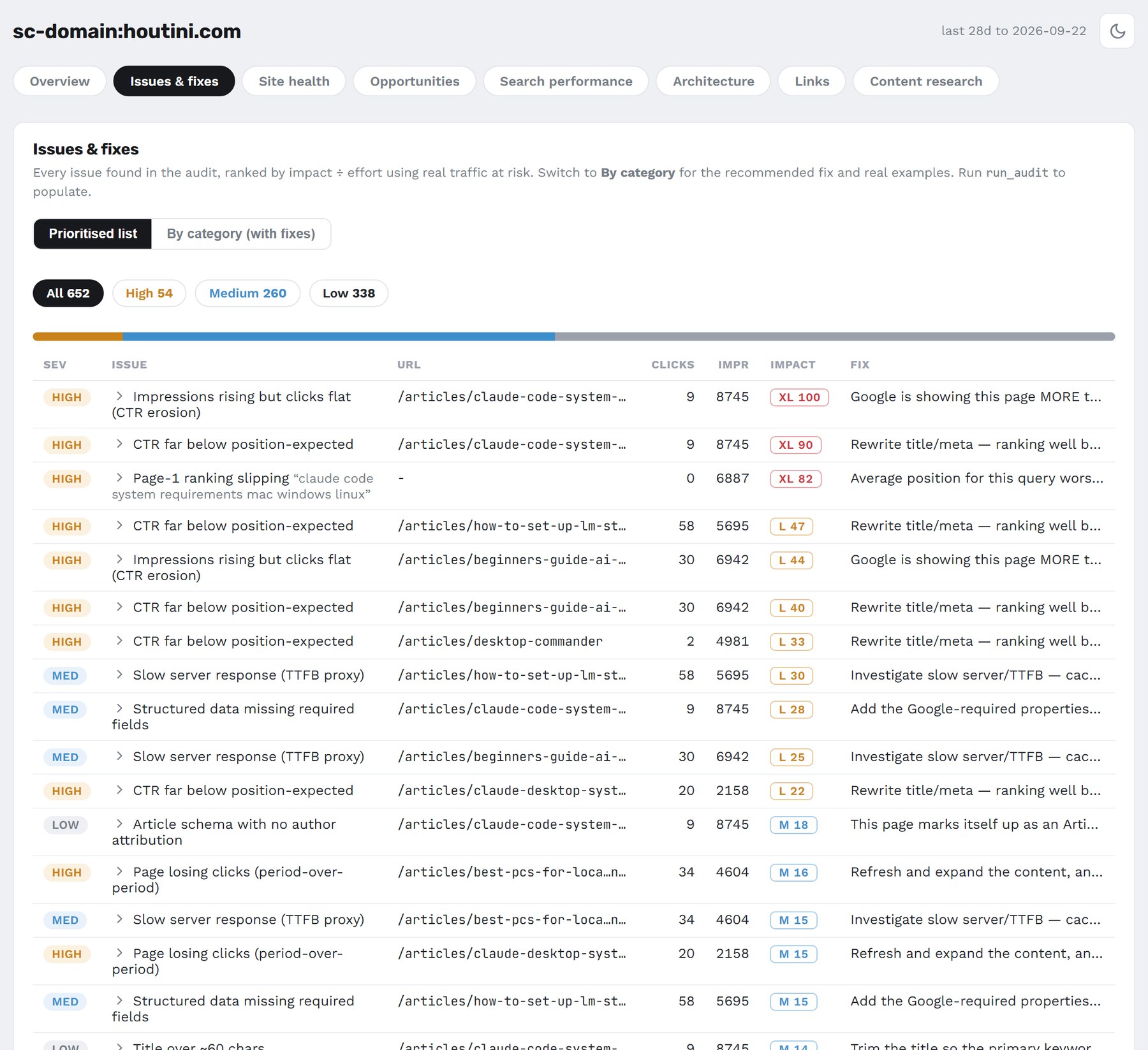
The Issues & fixes tab: every finding ranked by expected clicks per developer-hour, with the fix beside it.
The crawl checks I run every day
I do quite a bit of SEO crawling to find broken links and mismatched canonicals, and recently we've used it to find non-compliant Discover Open Graph preview images. A canonical is the tag that tells Google which version of a page is the real one. Discover is the feed of articles Google shows on phones. For an article to get a large preview there, the page needs an og:image, which is its Open Graph image tag, and the max-image-preview:large setting.
I use it on the daily, to measure and monitor the performance of all of my own properties.
broken-internal-links: showing 0-0 of 0 findings
broken-canonical-target: showing 0-0 of 0 findings
discover-missing-og: showing 0-0 of 0 findings
discover-max-image-preview: showing 0-0 of 0 findings
orphan-with-impressions: showing 1-2 of 2 findings
On houtini.com the crawl found 0 broken internal links and 0 broken canonical targets. No article page was missing its og:image or max-image-preview.
Two orphans did turn up, and both still earn impressions: /yubhub and /tools/voice-analyser. They're retired tools that the site hardly links to any more, but Google is still showing them in its results, which is something only the Search Console side of the data can tell you.
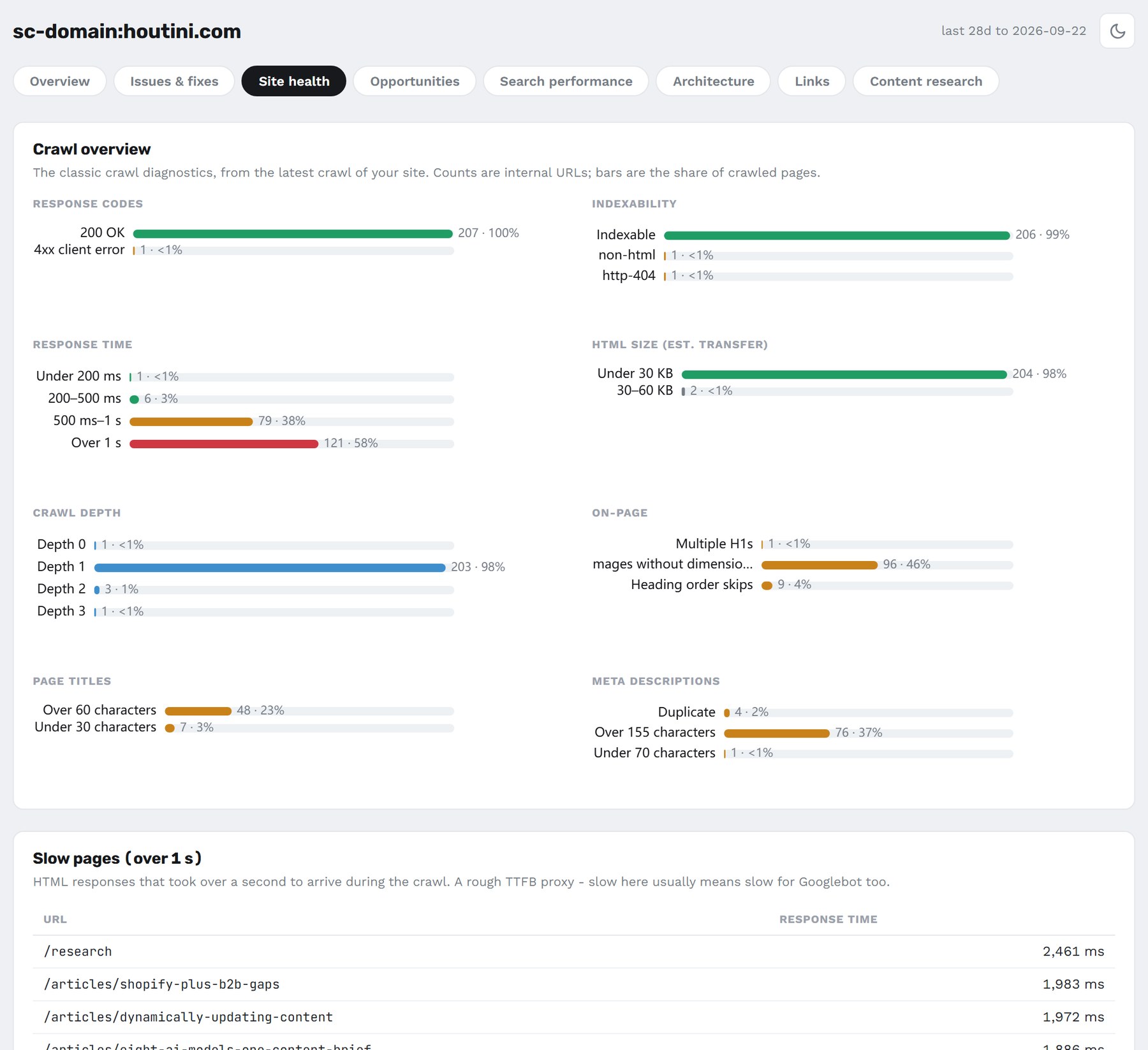
Site health for houtini.com: response codes, indexability, response times, crawl depth, titles and metas.
From finding to fix
Ask for the fix on any finding and fix_finding writes it. For the voice-analyser orphan, it ranked the pages best placed to link to it by internal PageRank. Internal PageRank is a measure of how much link weight each page holds within your own site. /tools/ came first at 94, with 636 inlinks, then /tools/gemini-mcp/ at 47 and /tools/seo-audit/ at 46, and it suggested the anchor text "Voice Analyser MCP".
Other findings get other kinds of fix. A redirect finding gets a 301 rule for .htaccess, nginx or Next.js, using the destination the crawler recorded, and a redirect chain gets collapsed to a single hop. A schema finding gets a full JSON-LD block. JSON-LD is the format for structured data, the code that tells search engines what a page is and who wrote it.
It never writes to your site. In the README I called that a line I won't cross. It hands you the fix, and you ship it.
The dashboard
There are a myriad of functions and reports, including a dashboard with eight tabs.
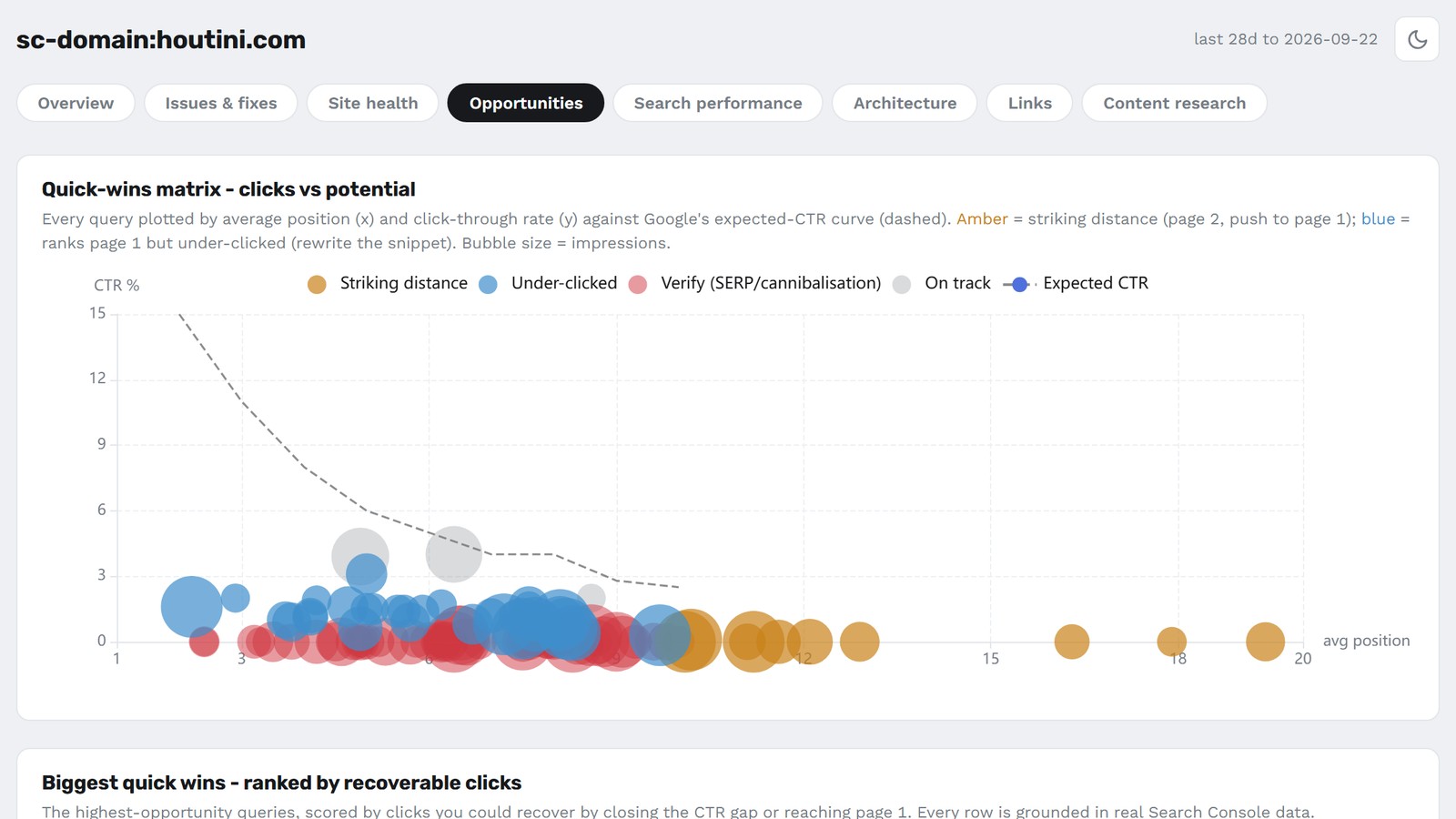
Overview is a plain-language summary with the top fixes. Issues & fixes is every finding, ranked by priority or grouped by category. Site health covers status codes, indexability, response times, depth, titles and metas. Opportunities plots every query by position and CTR against the expected-CTR curve, and ranks the biggest quick wins by recoverable clicks. Search performance has clicks, impressions, CTR and position, branded against non-branded, over time. Architecture compares internal link equity with organic traffic by template, and maps the link flows from folder to folder. Links and Content research need DataForSEO.
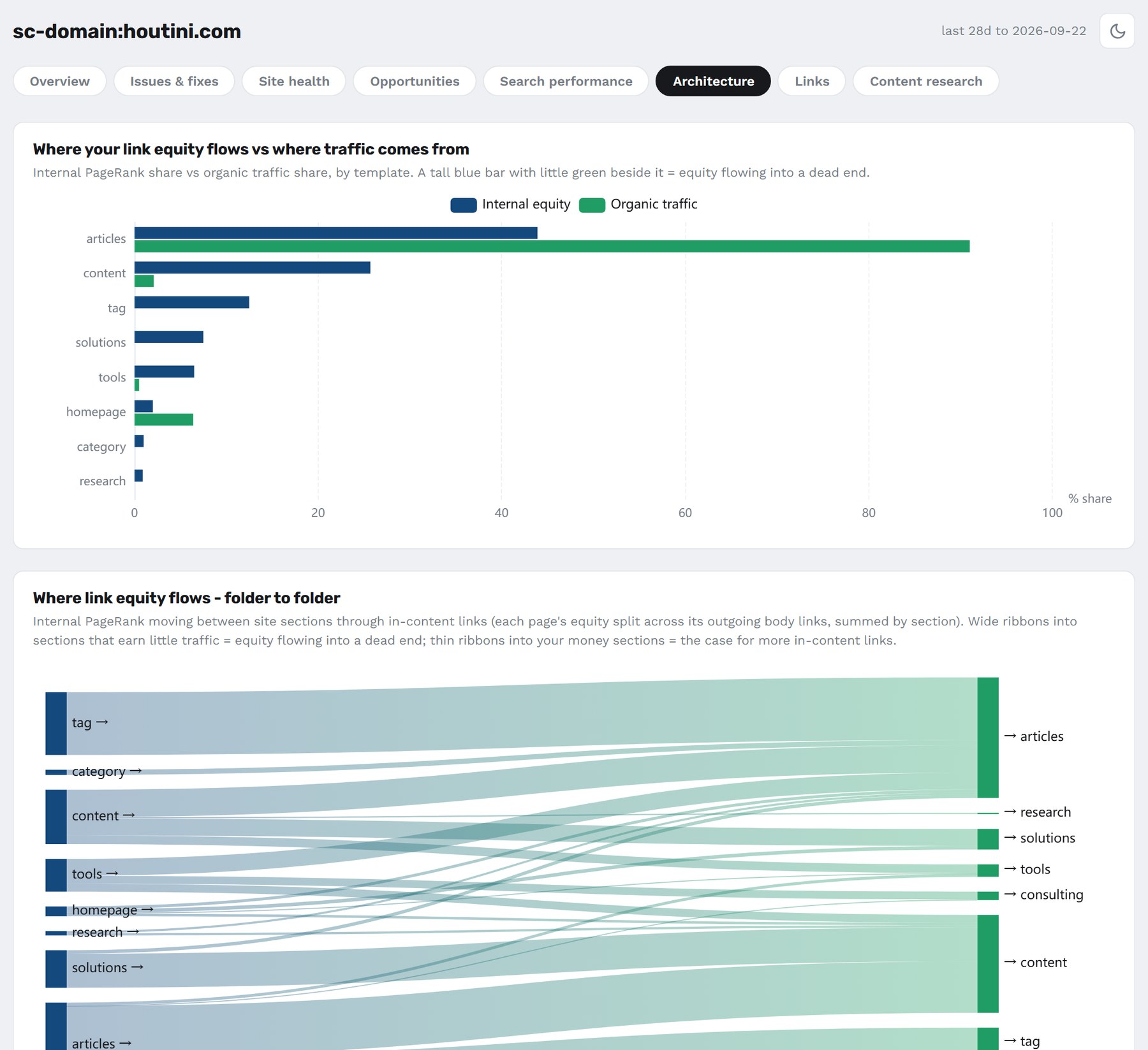
Architecture for houtini.com: the articles folder holds under half the internal link equity and earns most of the organic traffic.
get_dashboard renders it in the chat. serve_dashboard runs it on a web server that only your own machine can reach, with live data and CSV downloads. export_report writes one self-contained HTML file you can email to a client.
For the 28 days to 22 September, houtini.com had 188 clicks and 42K impressions, with clicks down 52% on the previous 28 days and an average position of 11.0. The Overview counted 7 under-clicked pages, 40 queries in striking distance, 6 cannibalised queries, 54 high-severity issues and 415 clicks recoverable.
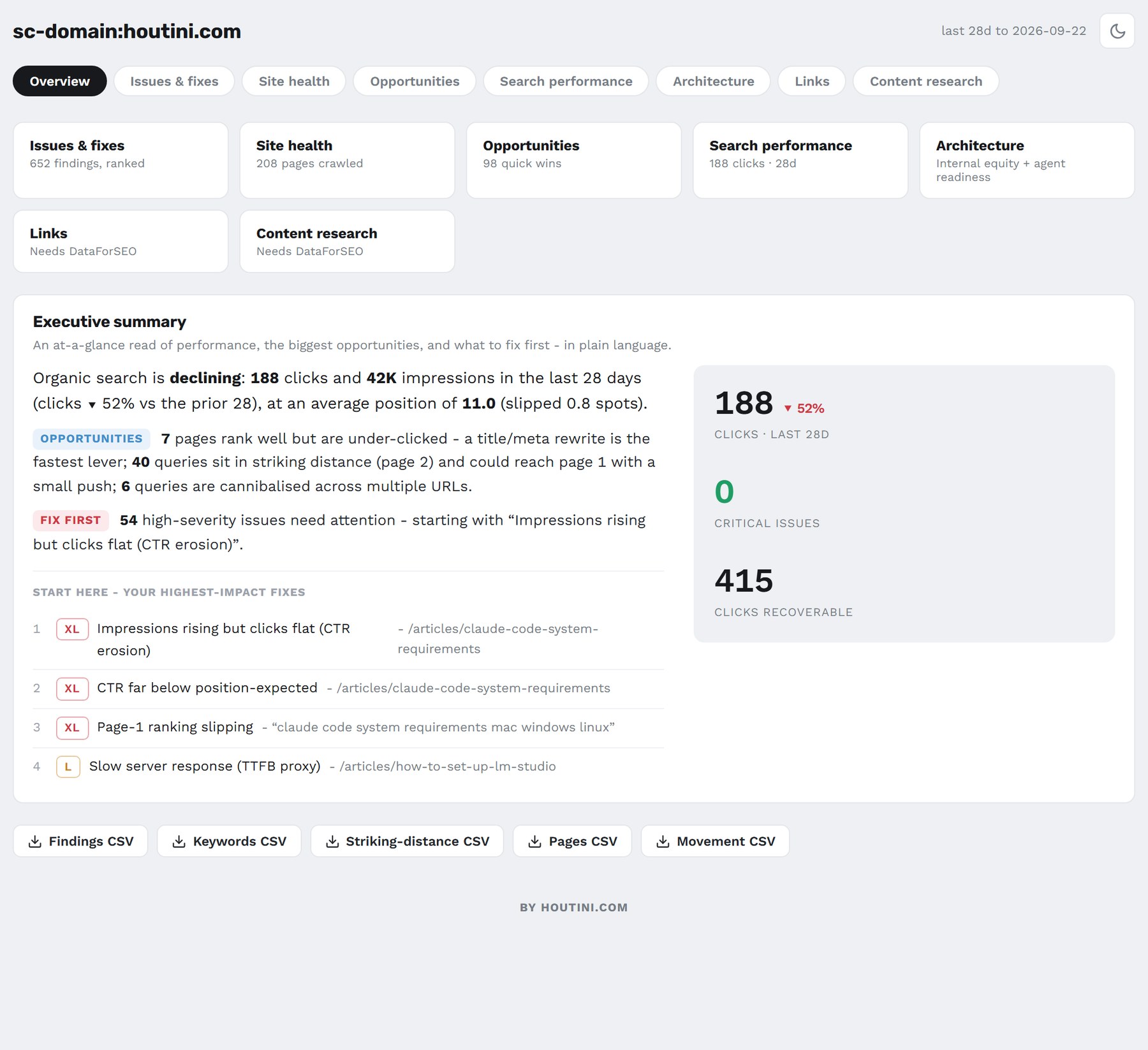
The Overview tab for houtini.com, 28 days to 22 September.
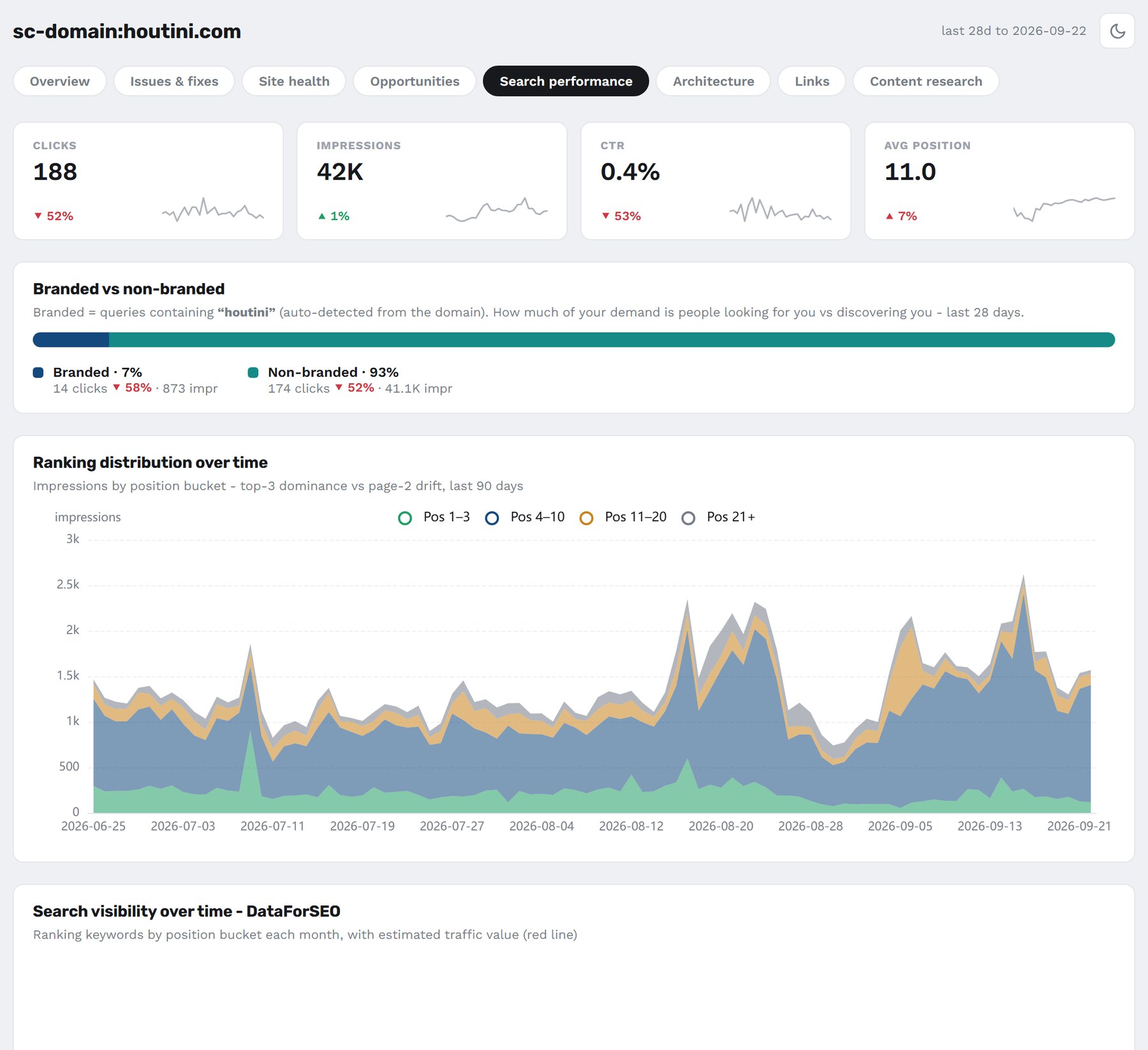
Search performance for houtini.com: 93% of the clicks and impressions are non-branded.
Content opportunities from your own data
content_opportunities works entirely from the data you've already stored, so it makes no paid calls, and on houtini.com it found something in all four of its groups.
Refresh now flagged the best PCs for local AI guide, at 34 clicks against 196 in the prior period, which is down 83%.
Rewrite snippets picked out "houtini", sitting at position 2.2 with a 1.6% CTR where about 15% would be expected. A snippet is the title and description Google shows for your page in its results, so that's a rewrite rather than a ranking problem.
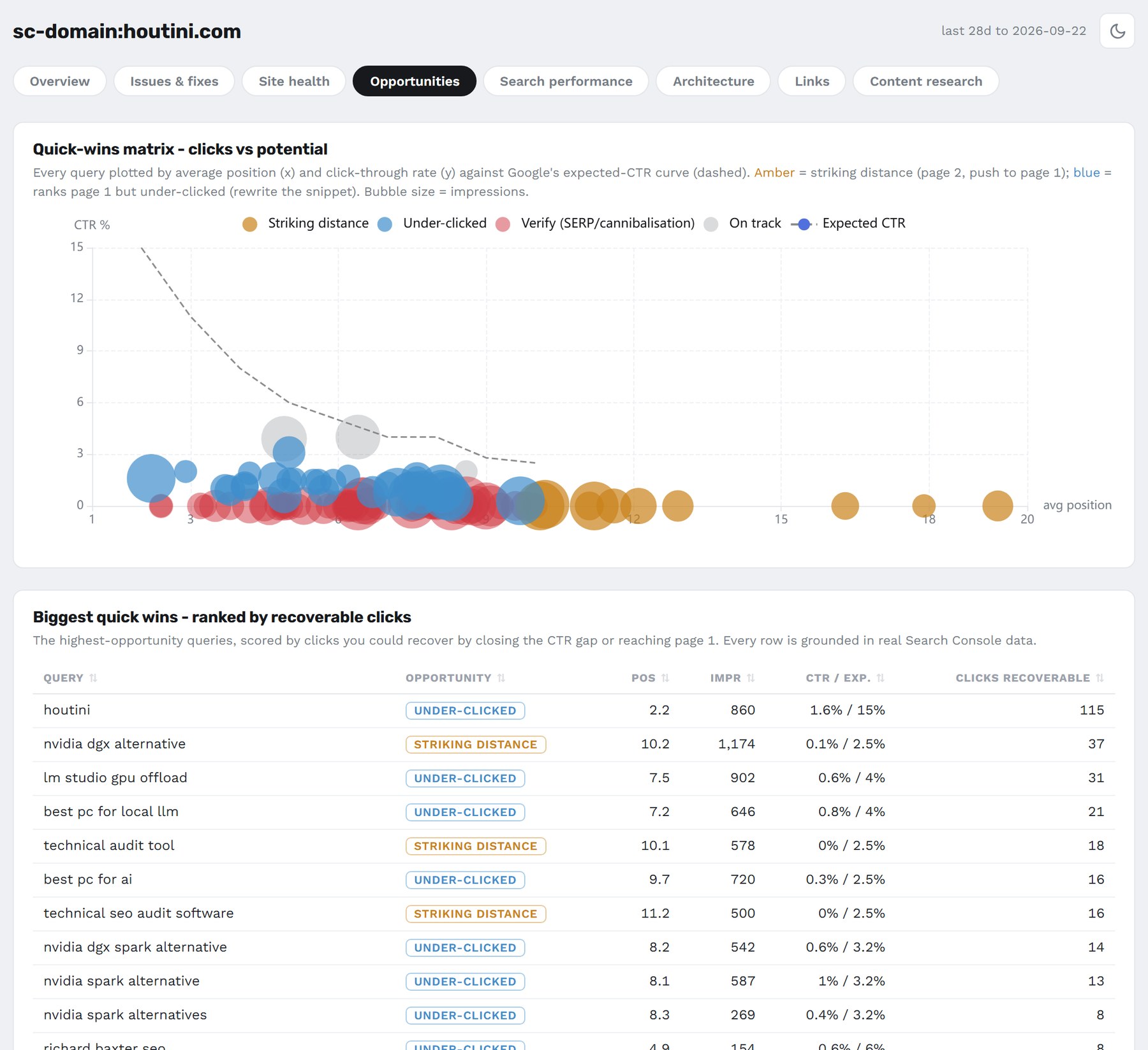
Opportunities for houtini.com, led by the query "houtini" with 115 clicks recoverable.
Strengthen pointed at the "dgx spark alternative" cluster: 42 keywords, 9,359 impressions and a best position of 5.4.
Write next suggested "best local ai server", with 499 impressions at position 61.
DataForSEO and Majestic
Competitor and results-page work needs DataForSEO, a pay-as-you-go API for search data, and optionally Majestic. You pay per call rather than a monthly subscription, the results are cached locally for 7 days, and nothing runs unless you ask for it. The link tools need DataForSEO's separate Backlinks subscription on top.
It adds keyword volume, related terms and search intent. competitors_domain tells you who you really compete with and page_intersection finds the content gap, and domain_visibility and top_pages work on any domain, yours or a competitor's. ranked_keywords includes which of your keywords show an AI Overview, which is the AI-written answer Google puts above the results. market_sizing gives total demand and share of voice for you and up to four competitors, and link_intersect finds the links your competitors have that you don't.
One serp_features call on houtini.com found AI Overviews on 67% of the site's keyword volume: 37,760 of 56,360 searches, across 152 of 175 sampled keywords. People Also Ask showed on 91.6%. houtini.com ranks on page one for 2 of those AI Overview keywords.
| SERP feature | Share of sampled keyword volume (175 keywords) | houtini.com on page 1 |
|---|---|---|
| People Also Ask | 91.6% | 2 keywords |
| Video | 71.1% | 2 keywords |
| AI Overview | 67% | 2 keywords |
| Discussions and forums | 8.7% | 2 keywords |
Majestic is optional too. With a key, it adds Trust Flow and Topical Trust Flow to link_intersect. Those are Majestic's scores for how trusted a site's links are, overall and by topic. It then re-sorts the list by editorial authority, which pushes the directories down.
What it replaces, and what it costs
As of September 2026, Semrush costs $139, $199, $299 or $549 a month. Ahrefs includes Site Audit from its $129 plan, with $249, $449 and $1,499 plans above it. A Screaming Frog SEO Spider licence is £199 a year ($279, or €245).
SEO Audit Console is free and open source, under the Apache-2.0 licence, and Search Console is free. DataForSEO and Majestic are the pay-as-you-go extras, and you only need them for competitor and link work. If you grew up on Screaming Frog or Sitebulb, the Site health tab will feel like home, and the DataForSEO tools are what the README calls the Semrush-replacement layer: visibility, top pages, content gap and market sizing.
There are other ways to do SEO with Claude. claude-seo is a set of Claude Code skills, Screaming Frog added its own MCP server in version 24, and Semrush has an MCP server as well. None of them joins your Search Console clicks to a stored crawl of your site and ranks the fixes by clicks per developer-hour.
Agency or in-house
If I still ran an SEO agency, this is the work I'd be doing in house to make things more efficient. If I was an in-house SEO, I'd be doing much the same, so I could challenge my agency to deliver what can't be done in house.
It works, it's powerful and it's saving me days of data collection, so I can get on with the analysis.
Refresh weekly, and run detect changes straight after. That diffs the two latest crawls, so it catches a page that's picked up a new noindex (the tag asking Google to leave a page out of its index), or a 200 that's become a 404. Run the full audit monthly, and re-run it after a fix ships.
Questions people ask
Is SEO Audit Console free?
Yes, under the Apache-2.0 licence. The only money you'd spend is on the optional DataForSEO and Majestic calls.
Does Claude make up the numbers?
No. Claude writes the SQL, and the SQLite database on your own PC does the counting.
Do I still need Screaming Frog or Semrush?
Not for anything on this page: the audit, the fixes and the dashboard above all ran without them. The competitor and market data comes from DataForSEO instead, paid per call.
How often should I run an SEO audit?
Weekly for the refresh and detect changes, and monthly for the full audit.
Can I audit a site I don't own?
Partly. The DataForSEO tools, domain_visibility and top_pages among them, work on any domain. Search Console data only comes from properties you have access to, so the full audit, with its merged checks and its ranking by clicks, needs a site you own or manage.
Where to start
Install SEO Audit Console and tell it to sync your Search Console account. Once the first refresh and crawl have finished, ask Claude to run the audit, then take whatever sits at the top of the list and ask for the fix. Get that one shipped this week, and re-run the audit after it goes live.
Continue reading.
- How-to GuidesHow to Connect Claude to Shopify with MCP (Dev MCP and Storefront Catalog)
- How-to GuidesHow to Use AI for Market Research with Claude
- How-to Guidesn8n MCP: How to Connect Claude Code to n8n and Use Its API Safely
- How-to GuidesHow to Run Qwen3-Coder-Next Locally: My vLLM Settings for Two 48GB RTX 4090s
- How-to GuidesHow to Build a Competitor Price Monitoring Pipeline with n8n
- How-to GuidesOpenCode vs Claude Code: Setting Up OpenCode Desktop on Windows