Claude Code System Requirements (2026): Specs, Setup, Gotchas
In today's guide, we're setting up Claude Code on Mac, Windows and Linux in the forms it now ships in: the terminal CLI, the Code tab in the Claude Desktop app, and the VS Code and Cursor extension. The published spec, the install routes Anthropic recommends, Fable 5.1 on every paid plan, and why the machine matters less than the way you work.
 Richard Baxter AI Ops & Marketing Engineer
 On this page
- What Claude Code is (and what it is not)
- The Desktop route: Claude Code with a window
- Official requirements (Anthropic's published spec)
- What you need
- Install path on each OS
- Authentication: claude auth login
- claude doctor, the diagnostic tool
- Where setup falls over
- A practical first-ten-minutes checklist after install
- Looking for something else?
- Running Claude Code with a local LLM (and cutting the bill)
- Where to go from here
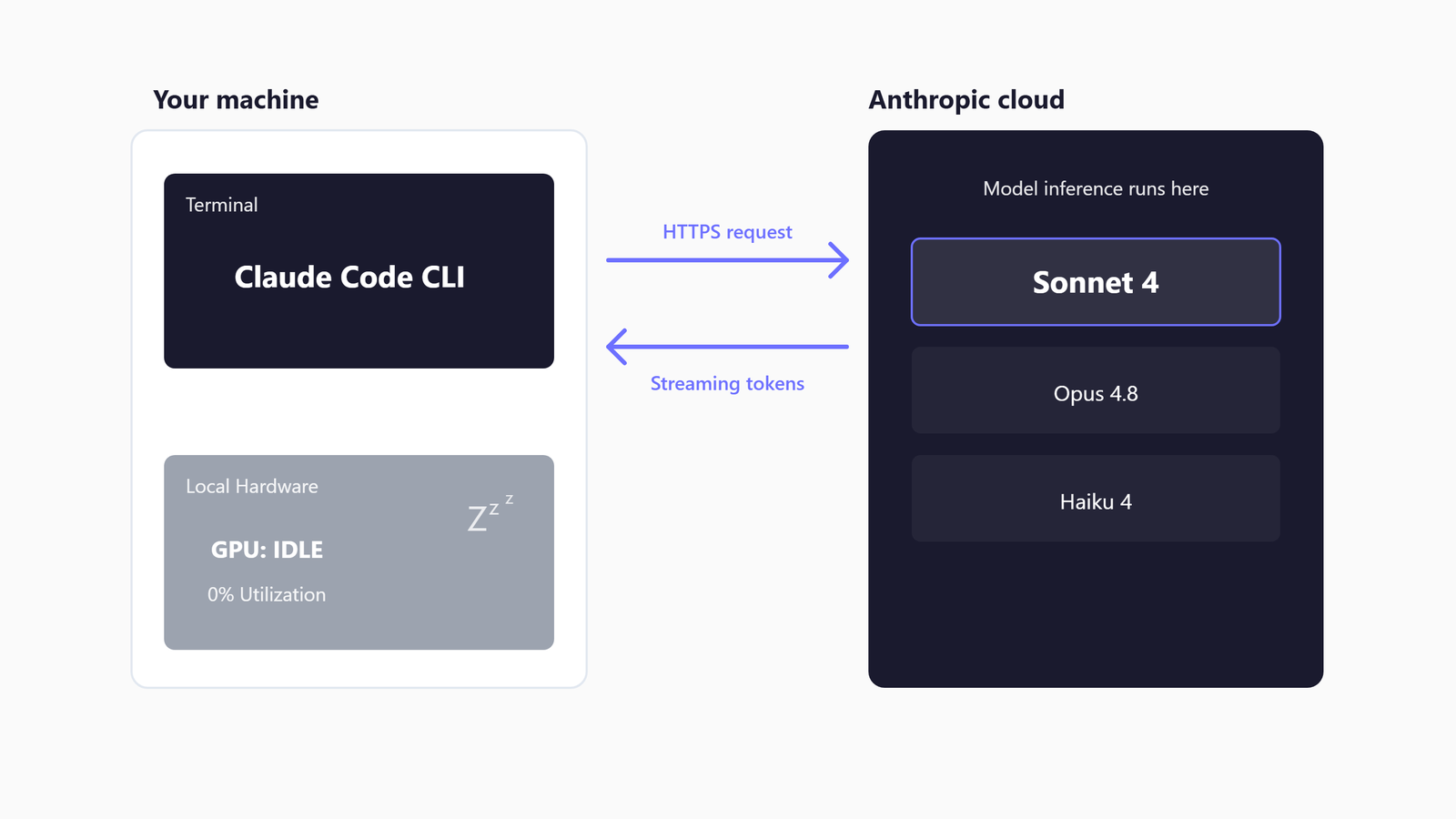
Heads up before you read on: this guide covers the system requirements for Claude Code, Anthropic's coding agent, in the three forms it now ships in - the terminal CLI, the Code tab inside the Claude Desktop app, and Anthropic's Claude Code extension for VS Code and Cursor - all of them the same engine. It is not about the Desktop app's Chat tab (that is the Claude Desktop guide), and it is not Cursor's own agent or any other editor's built-in AI, which several of the top-ranked guides for this query confuse it with.
When Claude Code came out it was sort of like magic, because all of a sudden it was so much easier to stand up a properly organised repo that Claude mostly understood. In the early days it was still hard to hold context, and you could find yourself a long way down the wrong path - I remember refactoring whole modules to get back. In its maturity it has done something bigger than fix that: it has commoditised the idea of software. The value isn't in the code any more. It's in the utility, or in the audience if you have one for your SaaS, and a reasonably technical person can now do what developers do. I run it every working day, mostly as the Code tab in the Desktop app because switching between threads and repos there is so much easier, with the terminal there when I want it, on a Windows machine with a local-LLM rig alongside (a pair of modded 48GB RTX 4090s serving open-weight models through vLLM, which Claude Code occasionally hands its bulk work to).
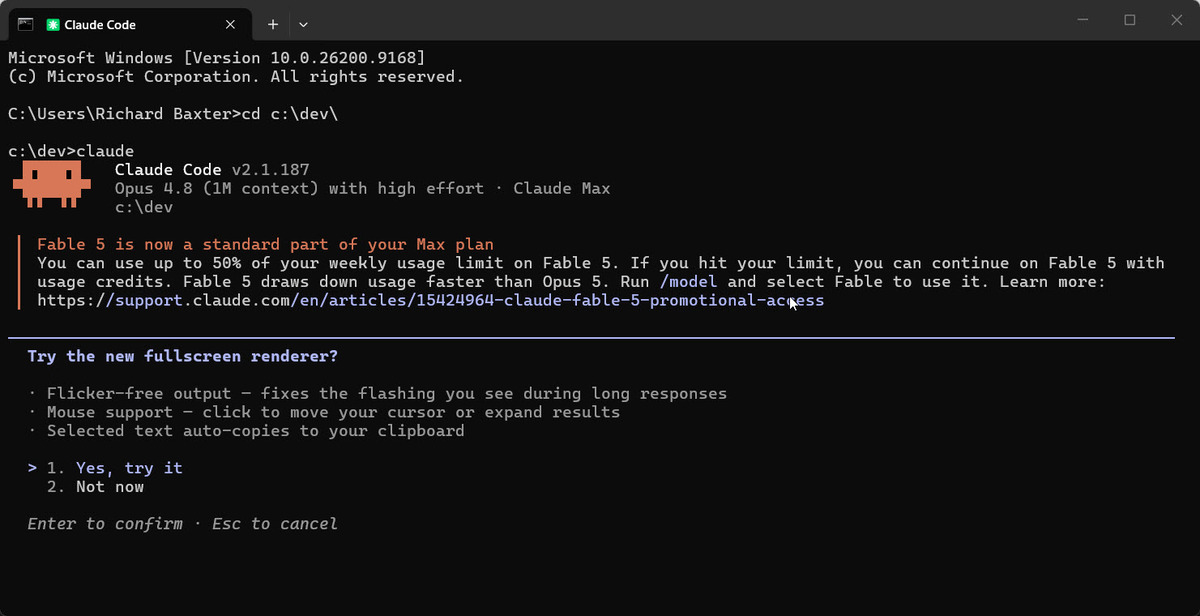
So the hardware bar is low - the model runs in Anthropic's cloud, not on your machine - and the real cost of a Claude Code install lands somewhere else: the install route, the Node version if you take the npm path, the terminal, the network policy, and the orchestration overhead when half a dozen sub-agents are running against your codebase. Underneath all of that is the requirement no spec sheet lists, which is a way of working, and I come to that after the tables. In 2026 there are so many guides and so many CLAUDE.md examples that the set-up itself is the easy part, especially with Fable 5.1 out this week.
Quick Navigation
What it is (and isn't) | The Desktop route |
Official requirements |
What you need |
Install per OS |
Authentication |
claude doctor |
Where setup falls over |
First ten minutes | Something else? |
Local LLM delegation |
Where to go
What Claude Code is (and what it is not)
At its core Claude Code is a command-line interface (CLI - a tool you run in a terminal) that wraps the Anthropic API and adds an agentic loop on top. You run claude in a project directory. Claude reads your files, plans a change, executes it, runs tests, and iterates. The model itself - Opus 5.5 by default, Sonnet 5.5 for lighter work, and since 1 September the Mythos-class Fable 5.1 on Pro, Max, Team and Enterprise (Anthropic ships new versions every few weeks, so check the banner that prints when you launch claude) - runs on Anthropic's servers. Your machine's job is to host the CLI process, run the dev tools Claude calls, and stream tokens back and forth.
Tech With Tim's beginner tutorial put the disambiguation plainly when he recorded it: "Claude Code is not a desktop application. It actually runs directly inside of your shell or your terminal." That was true then and is half-true now - the Code tab has put a window on it - but the confusion he was answering hasn't moved: beginners still arrive at Claude Code searches expecting the chat client, and bounce when they find either a terminal or a tab they have to pay for.
Three things Claude Code is NOT:
- Not the Desktop app's Chat tab. Claude Desktop is the Electron app with Chat, Cowork and Code tabs. The Chat tab has no file access and is not Claude Code; the Code tab is Claude Code, the same engine as the CLI with a window on it, and it needs neither Node nor the CLI installed. They share CLAUDE.md files, MCP servers, hooks, skills and settings, and you can run both on the same project at the same time.
- Not the editor's own AI. Cursor, Windsurf and VS Code each have a built-in assistant, and Claude Code is separate from all of them. Anthropic's Claude Code extension for VS Code and Cursor is Claude Code itself, surfaced inside the editor with the same CLI underneath - a third form alongside the terminal and the Desktop Code tab, not a competitor to it.
- Not a local LLM. Claude Code does not run a model on your hardware. There is no GPU requirement. You do not need a 3090 or a 4090. If you have seen otherwise, that article was probably thinking of a local-LLM runner like Ollama or LM Studio - different category of tool entirely.
One product does blur the line: Cursor's own agent is built on Claude models, but it is Cursor's, and it is not Claude Code. Anthropic's extension is - the CLI surfaced in your editor - and the Desktop route is the same substrate with a GUI round it, which is why it gets its own section next.
The Desktop route: Claude Code with a window
This is how I use it most days. The Desktop app's Code tab runs Claude Code with a sidebar of sessions, a drag-and-drop layout with a terminal and a file editor, a diff view, a live preview of your app, pull-request monitoring and scheduled tasks, and no terminal required. What makes it easier than the CLI for me is the switching: threads and repos sit in the sidebar and you move between them with a click, each session in its own Git worktree so parallel work does not collide.
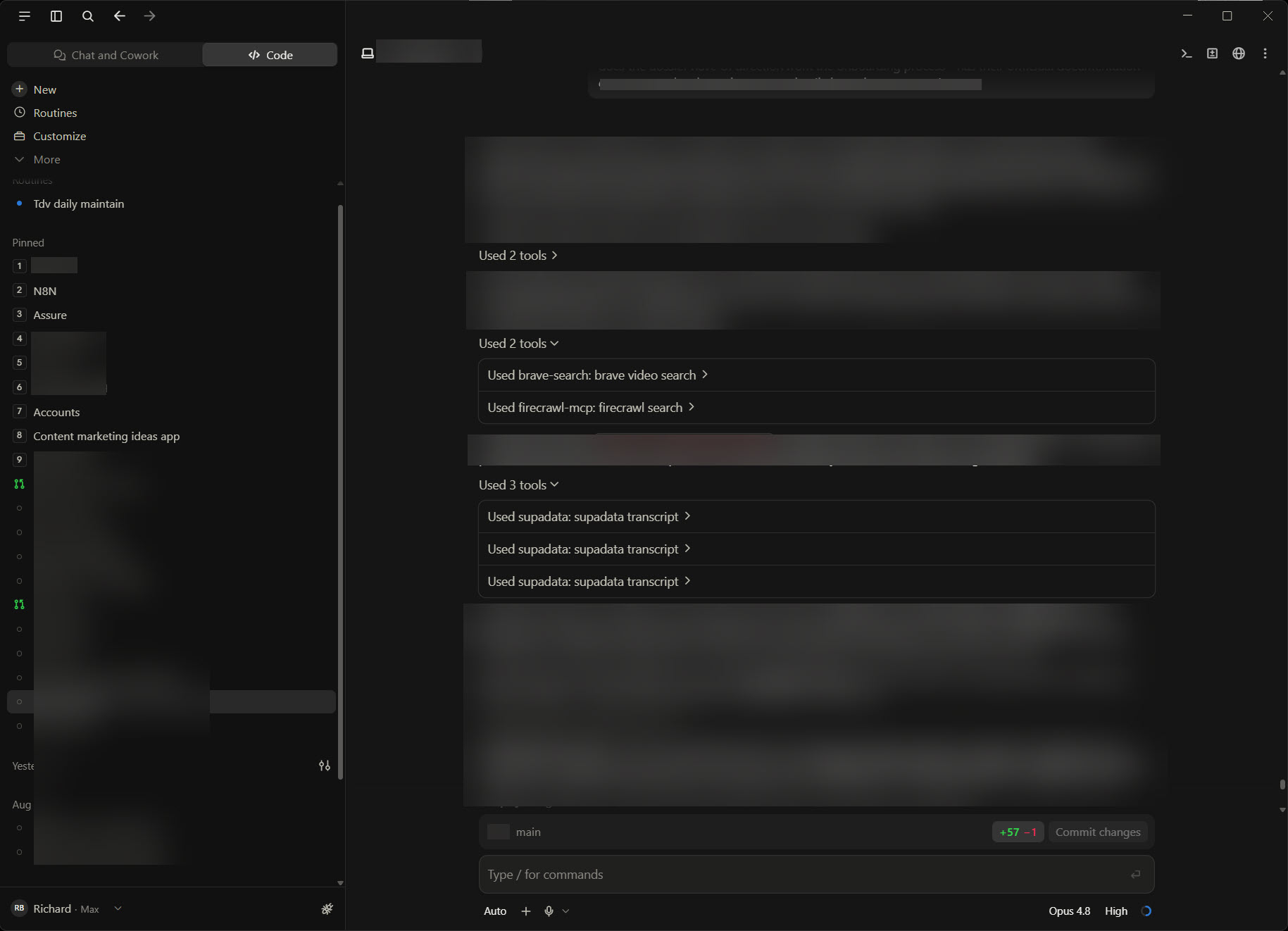
The requirements are the Desktop app's, not the CLI's: macOS (a universal build for Intel and Apple Silicon), Windows x64 or ARM64, or the Linux beta on Ubuntu 22.04 or Debian 12 and newer (apt or a .deb; Fedora and RHEL are CLI-only for now). A paid plan - Pro, Max, Team or Enterprise - is required; the free tier gets the Chat tab and an upgrade prompt when it clicks Code. On Windows, Git must be installed for sessions that run in their own worktree. Nothing else: no Node, no separate install, and if you later want claude in a terminal you install the CLI alongside and the two share configuration.
A session can run in four places: Local, on your machine with direct access to your files; Cloud, on Anthropic's infrastructure so it carries on after you close the app; SSH, on a server or dev container of yours, with Claude Code installed there automatically on first connect; or WSL on Windows, with tools and git executing on the Linux side. The permission mode sits next to the send button - Auto, where a classifier blocks the risky actions instead of asking you; Manual, where every change waits for your approval; Accept edits; and Plan, which proposes an approach without touching a file. Plan is where I spend a surprising amount of my time, and I come back to why below.
Official requirements (Anthropic's published spec)
From Anthropic's setup docs as of September 2026:
| OS | Minimum | Shell |
|---|---|---|
| macOS | 13.0 Ventura or newer | Bash, Zsh |
| Windows | 10 1809+, Windows 11, or Windows Server 2019+ (x64 and arm64) | PowerShell, CMD, WSL |
| Linux | Ubuntu 20.04+, Debian 10+, Alpine 3.19+ (RHEL and Fedora via the dnf repo) | Bash, Zsh |
| Resource | Minimum | What real setups end up using |
|---|---|---|
| RAM | 4GB | 8GB+ |
| Disk | a few hundred MB for the CLI (Anthropic publishes no figure) | 2GB if you go the npm fallback route with full Node tooling |
| Network | Outbound HTTPS to `api.anthropic.com` | Same, plus OAuth callback on `localhost` during `claude auth login` |
| Node.js | Required only for the npm install path | Node 22+ (the npm package downloads a native binary, so an older Node only triggers a warning) |
After install, claude --version should return something like this (2.1.287 is current as of 1 October):
2.1.287 (Claude Code)The native installers (the curl-piped install script on Mac and Linux, the PowerShell irm command on Windows) bundle the runtime. The npm fallback (npm install -g @anthropic-ai/claude-code) needs Node.js pre-installed and adds the most common install failures - more on that below.
And note where the install paths have settled, because they moved twice this year: the native installer is the recommended route (and the only one that auto-updates out of the box - Homebrew and WinGet can be told to with CLAUDE_CODE_PACKAGE_MANAGER_AUTO_UPDATE=1; the apt, dnf and apk repos stay manual because they need elevated rights), but Homebrew is back as a first-class option - brew install --cask claude-code, with a claude-code@latest cask if you want every release the day it ships - and Windows gets winget install Anthropic.ClaudeCode. There are signed apt, dnf and apk repositories for the Linux package-manager people, too. Leon van Zyl's setup walkthrough still has the priority right: "these native installs are recommended." The articles leading with npm install -g are mostly pre-2026 content that hasn't refreshed.
What you need
Anthropic's 4GB RAM minimum is technically true and operationally misleading. Claude Code's own footprint is small. The CLI process holds your conversation context in memory and streams tokens to and from the API. Memory pressure comes from what Claude Code does on your behalf.
Claude Code orchestrates sub-agents that spawn parallel processes against your codebase. It runs your test suite, boots a dev server, launches a Docker container for an integration test, and opens a browser for the end-to-end checks. By the time a five-step agentic plan is mid-execution you have the CLI plus several spawned processes plus your existing editor session plus the dev tools competing for RAM.
A realistic picture:
- 8GB RAM runs Claude Code fine for small projects (a Next.js app, a CLI tool, a small Go service) when Claude is doing one thing at a time.
- 16GB RAM is the floor for serious development. Claude Code plus VS Code plus a running dev server plus the test runner plus a Docker container sits around 10-12GB used.
- 32GB RAM is what I'd recommend if you run Claude Code against a large monorepo or with multiple sub-agents working in parallel work-trees.
A Reddit r/ClaudeCode thread titles itself "Why does running Claude Code often use 20-40GB of RAM?" - the answer in the comments turned out to be a misbehaving custom audio hook the user had attached to the agent's completion cycle, not Claude Code itself. The CLI process at idle holds your conversation context in memory and otherwise stays modest. If you see 20GB+ in Task Manager, look at your hooks before you blame the CLI.
The thing that has bogged my own Windows machine down has not been Claude Code either. It is the node.exe processes MCP servers leave behind: neither Claude Code nor the Desktop app is particularly good at killing them once it is finished, and after a long day with a big MCP library and several threads open I have found ten or twenty of them sitting in Task Manager. If the machine feels slow at five o'clock, look there before you look at the CLI.
- GPU: not needed. There is no local inference. Your dGPU sits at idle while Claude Code runs unless your dev tools (Docker GPU passthrough, ML training jobs, browser-based 3D testing) happen to use it. The "do I need a 3090" question that comes up on Reddit confuses Claude Code with local-LLM hosting; they are different problems.
- Disk: Anthropic publishes no figure, so here is mine: each native version is about 250MB and the installer keeps the last three, 752MB on my machine, while the .claude state directory (sessions, transcripts, project memory) has grown to 2.2GB over a few months - that, not the binary, is the disk story. The npm fallback pulls in Node and a small dependency graph, taking the install closer to 500MB-1GB. The real disk pressure comes from Claude Code creating work-tree branches when sub-agents run in parallel - each sub-agent gets a cloned working directory. A monorepo with five parallel sub-agents needs five copies of your repo on disk for the duration of the session.
- CPU: Claude Code is CPU-light at idle and CPU-bursty when sub-agents spawn. Any 8th-gen Intel or M1 Apple Silicon or equivalent is enough.
Anthropic's documentation is technically correct on the "4GB RAM" minimum for the CLI alone. It just stops being true the moment Claude Code does anything useful with it.
What you need that isn't hardware
Boris Cherny, who built Claude Code, published a ladder of AI adoption in July, and it is now what I reach for when a client asks what machine they need. At the first rung - one engineer and one agent, a fast pair programmer - the bottleneck is not the laptop, it is your attention: you read every change because you don't yet trust the loop. At the second rung, five to ten agents each in its own worktree, the bottleneck becomes reviewing what they produced. Nowhere on that ladder does RAM appear. What moves you up it is a self-verification loop you trust (tests, build, lint, an end-to-end check in a real environment), auto mode so permission prompts stop blocking you, and automated code review.
So what I would tell a client is the way of working, and mine is unglamorous. I spec the thing first and spend a lot of time talking in plan mode before anything executes. I lean on a second opinion - Gemini, through my own Gemini MCP, going back and forth on the spec and the architecture before we begin. I give Claude Context7 for the docs, so it can drive an API or a CLI within minutes of being handed a key. And I evaluate rather than assume. Anthropic's own material covers the rest, and Karpathy's guidance on prompt structure and repo architecture is the other thing I would hand over. Get that loop right on an 8GB laptop and you are further along than a 64GB workstation with no plan.
Install path on each OS
macOS
The native installer is now the canonical route:
curl -fsSL https://claude.ai/install.sh | bash
claude --version
Successful install output looks like:
Downloading Claude Code installer...
Detected: macOS 14.5 (Apple Silicon)
Installing to ~/.local/bin/claude...
Adding to PATH in ~/.zshrc...
Done. Restart your shell or run: source ~/.zshrc
The script installs a native binary, sets your PATH, and registers the auto-updater. No Node.js needed. Prefer Homebrew? brew install --cask claude-code is a first-class route again - it just doesn't auto-update, so brew upgrade claude-code becomes your job.
After install, run claude from any project directory. The first run prompts for authentication. See the next section.
Windows
Two valid routes depending on your terminal:
For native Windows, from PowerShell (the built-in Windows PowerShell is fine) or, if that is your home, CMD:
irm https://claude.ai/install.ps1 | iex
claude --version
Successful install output:
Downloading Claude Code installer...
Detected: Windows 11 (x64)
Installing to %USERPROFILE%\.local\bin\claude.exe...
Adding to PATH...
Done. Open a new PowerShell window.
For WSL2 / Ubuntu under Windows, use the Mac/Linux curl command above instead - inside WSL, Claude Code behaves the same as on native Linux.
Many Windows developers prefer the WSL route because the agentic file-system operations behave more predictably against a Linux filesystem than against Windows paths with spaces. Either route is viable; neither is faster. Pick the one matching your existing dev shell - with one exception: if sandboxed command execution matters to you, it's supported under WSL2 and not on native Windows.
Three Windows notes from the current docs:
- The installer itself doesn't need admin rights.
- There's a CMD install route too (see the setup docs) if PowerShell isn't your home.
- Git for Windows is the one extra I'd install, because with it Claude Code gets a proper Bash tool - without it, shell commands fall back to PowerShell.
One real gotcha, from Tech With Tim's walkthrough: when Claude Code itself tries to install a dependency (Git, in his case), PowerShell often refuses with a permissions error and you have to close, right-click the PowerShell icon, and "Run as administrator" before the next attempt works. The installer itself doesn't need admin - this is about what Claude installs mid-session. The fix is unglamorous: if you see a permissions error 30 seconds in, relaunch the shell as admin and retry - your Claude Code session resumes fine.
If you are on corporate-managed Windows: the native installer sometimes fails silently because group policy blocks the publisher. Get IT to whitelist Anthropic's publisher certificate, or use the npm fallback inside WSL.
Linux
curl -fsSL https://claude.ai/install.sh | bash
claude --version
Successful install output:
Downloading Claude Code installer...
Detected: Ubuntu 22.04 LTS (x64)
Installing to ~/.local/bin/claude...
Adding to PATH in ~/.bashrc...
Done. Restart your shell or run: source ~/.bashrc
The script supports Ubuntu, Debian, RHEL, Fedora, and most derivatives. If you are on a long-term-support distro that ships an older Node (Ubuntu 20.04 ships Node 10), the native installer handles its own runtime - you do not need to install Node first for this route.
The npm fallback works on every distro with Node 22 or newer installed. If you specifically need the npm route (e.g. you want pinned versions or you're inside a constrained container without curl), install Node from NodeSource first:
curl -fsSL https://deb.nodesource.com/setup_22.x | sudo -E bash -
sudo apt install nodejs
npm install -g @anthropic-ai/claude-code
ripgrep (the fast codebase search Claude Code leans on) ships bundled inside the CLI these days - you only need your distro's package if search misbehaves, or if you set USE_BUILTIN_RIPGREP=0 to prefer your own build. There are also signed apt, dnf and apk repositories if you'd rather your package manager own the whole install - the setup docs carry the key-verification steps. And if you'd rather skip the terminal entirely, the Claude Desktop Linux beta bundles Claude Code on Ubuntu 22.04 and Debian 12 or newer (the Desktop route above) - covered in the Desktop guide.
Authentication: claude auth login
After install, the first claude invocation triggers OAuth. Claude Code opens a browser, logs you into your Claude account (or your Anthropic Console account, if you take the API-key route), and stores a token at ~/.claude/.credentials.json - and on macOS it prefers your Keychain, falling back to the file only where the Keychain refuses the write.
claude auth loginThe first launch opens your browser, walks you through the Anthropic sign-in, and stores the token. To check it worked, run claude auth status --text. It prints your login method (the type of account you're signed in with), your organisation and your email.
Anthropic's official setup docs carry the canonical step-by-step if anything has changed since this article.
Subscription or API key?
Two 2026 walkthroughs I cross-checked frame the auth choice the same way: Claude Pro / Max / Teams / Enterprise subscriptions and pay-as-you-go API keys both work, and the trade-off is real. Subscriptions cap your spend (the rate limits reset every few hours; you can't blow through your monthly cap) - as Leon van Zyl puts it, "you will never exceed your monthly subscription fee." API keys are pay-as-you-go and uncapped - Leon's flat warning is that "these API costs can get really expensive very quickly."
If you're running Claude Code on a personal project budget, take the subscription. If you're running it inside an org with metered cost tracking, the API key gives you a cleaner per-token bill. The Anthropic Console requires a $5 minimum credit top-up if you take the API-key route.
Three common gotchas:
- Corporate proxies. If your network blocks outbound connections to
platform.claude.com, the OAuth flow stalls. SetHTTPS_PROXYandHTTP_PROXYenvironment variables before runningclaude auth login, or use an API key directly (export ANTHROPIC_API_KEY=sk-ant-...). - Free-tier Claude.ai accounts. Free-tier accounts work for the chat app but not for the CLI's API path. Add a payment method to your Console workspace or pick a paid subscription before you wonder why
claudekeeps returning 401. - Per-user OAuth state. Claude Code stores its token per user. If you
sudo claude, you're a different user with no token. Runclaude auth loginas the user who'll run the CLI.
If you want to skip OAuth entirely and use an API key, export ANTHROPIC_API_KEY in your shell profile. The CLI checks the env var before triggering the browser flow.
claude doctor, the diagnostic tool
When Claude Code launches, it runs lightweight self-checks immediately and surfaces any unresolved problem in the welcome banner. The status line prompts you to run the full diagnostic. Here's an actual session - this guide was written from inside Claude Code itself - showing the pattern in action:
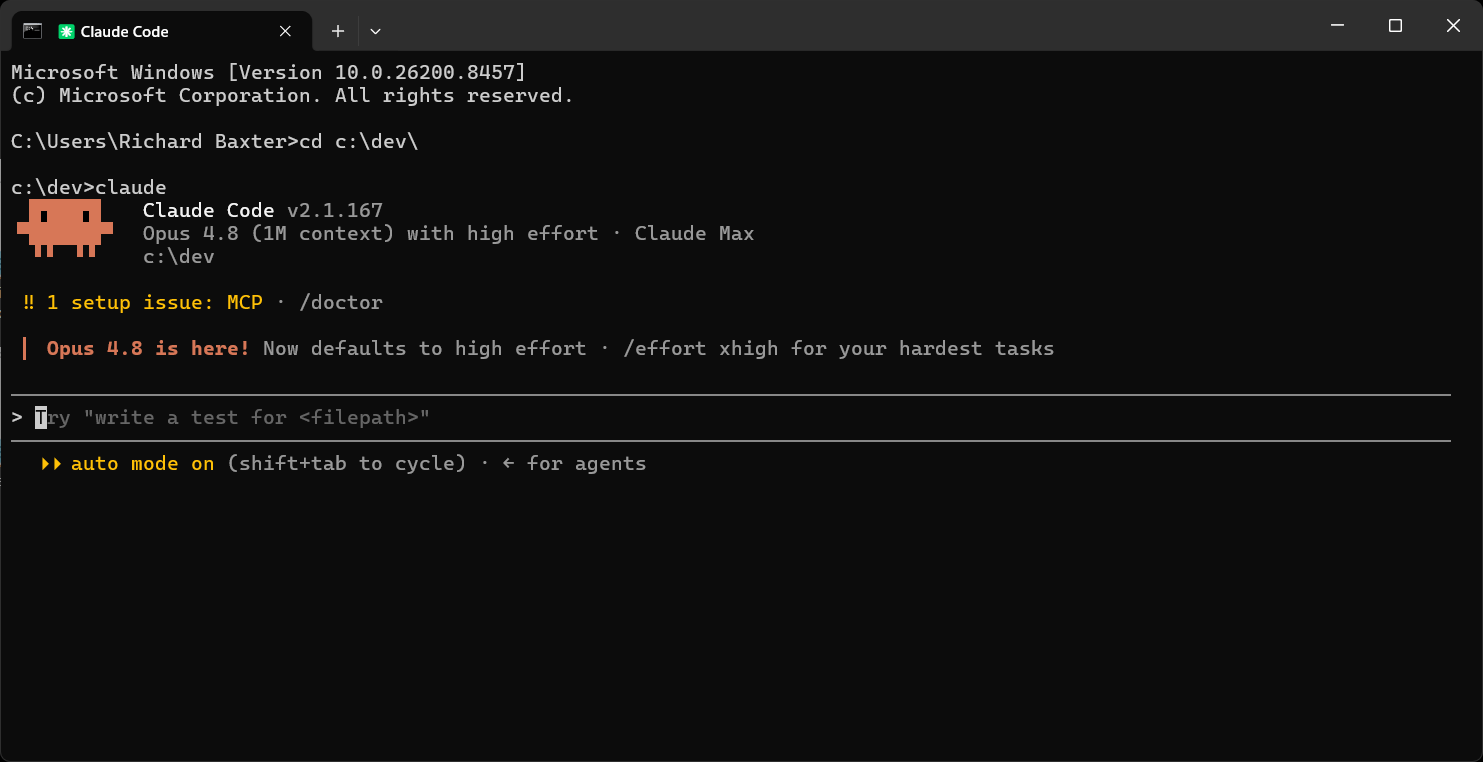
The 1 setup issue: MCP · /doctor line is the surface; claude doctor is the depth.
claude doctorRunning /doctor (or claude doctor from the command line) prints the actual diagnostic inline in your session:
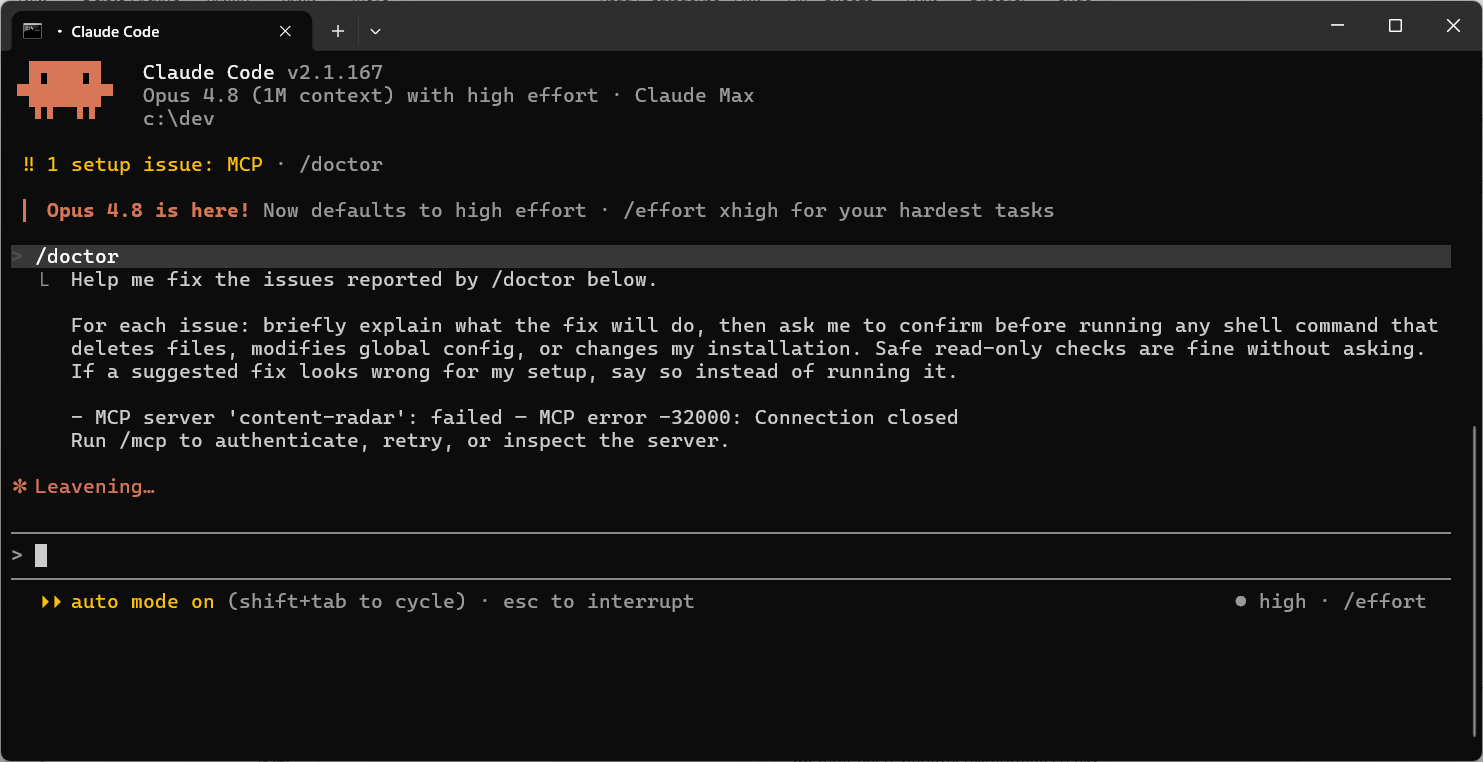
claude doctor walks the install: Node version, ripgrep presence, network access to the API, authentication state, config file integrity. The output flags exactly what is broken. Most install issues I see on community forums - "claude command not found", "auth keeps failing", "agent never completes" - are diagnosed by claude doctor in one command.
The odd thing is that the most popular 2026 Claude Code tutorials don't demonstrate this command at all. Three videos with a combined audience of well over a million viewers and not one of them runs claude doctor on screen. The diagnostic exists, Anthropic's docs cover it, and it's the single most useful first-line tool when something is wrong. The tutorials skipping it is itself a failure mode worth noting. Read the doctor output before you read the Reddit thread.
Where setup falls over
I have walked through enough Claude Code installs to have a strong opinion on what breaks. Four failure modes, in order of frequency.
PATH not set after install
The native installers register Claude Code on PATH for new shells, not the shell you ran the install in. Open a fresh terminal session or run source ~/.zshrc (or your equivalent) before trying claude --version. The "command not found" error 30 seconds after a successful install is almost always this.
Node version too old when using the npm fallback
The npm package now wants Node 22 or newer. On an older Node the install prints an EBADENGINE warning and usually still runs - the package downloads a native binary that doesn't use your Node at runtime - but save yourself the ambiguity: use the native installer, or put a current Node in place via NodeSource or nvm first. And when you upgrade later, use npm install -g @anthropic-ai/claude-code@latest rather than npm update -g, which can leave you pinned to the old release.
PowerShell refuses to install dependencies
Tim's tutorial hit this live: when Claude Code asked PowerShell to install Git, the shell threw a permissions error. The fix is to relaunch PowerShell as administrator - right-click, "Run as administrator" - and retry. Your Claude Code conversation state survives the shell restart.
There is also a less obvious version of this: if your machine sleeps mid-session or if you've changed your network (e.g. switched VPNs), Claude Code can drop its keep-alive against the API. The recovery is normally just retyping your prompt; if the agent never responds, exit with /exit and relaunch claude. Your conversation history is gone but your project files are untouched.
Authentication state lost between sessions
Claude Code stores its OAuth token at ~/.claude/.credentials.json (or the macOS Keychain). If you run Claude Code as a different user (sudo, a CI runner, a different shell profile) the token is not there. The agent silently fails to authenticate and behaves as if you never logged in. Run claude auth login as the user who will run the CLI. If you are running in CI, use an API key in an environment variable, not OAuth.
And a fifth, the corporate one: firewalls that block outbound HTTPS to api.anthropic.com or that man-in-the-middle the TLS connection with a corporate certificate. Both produce confusing errors. If you are on a managed machine and nothing else is working, this is probably it. Check with your IT team.
A practical first-ten-minutes checklist after install
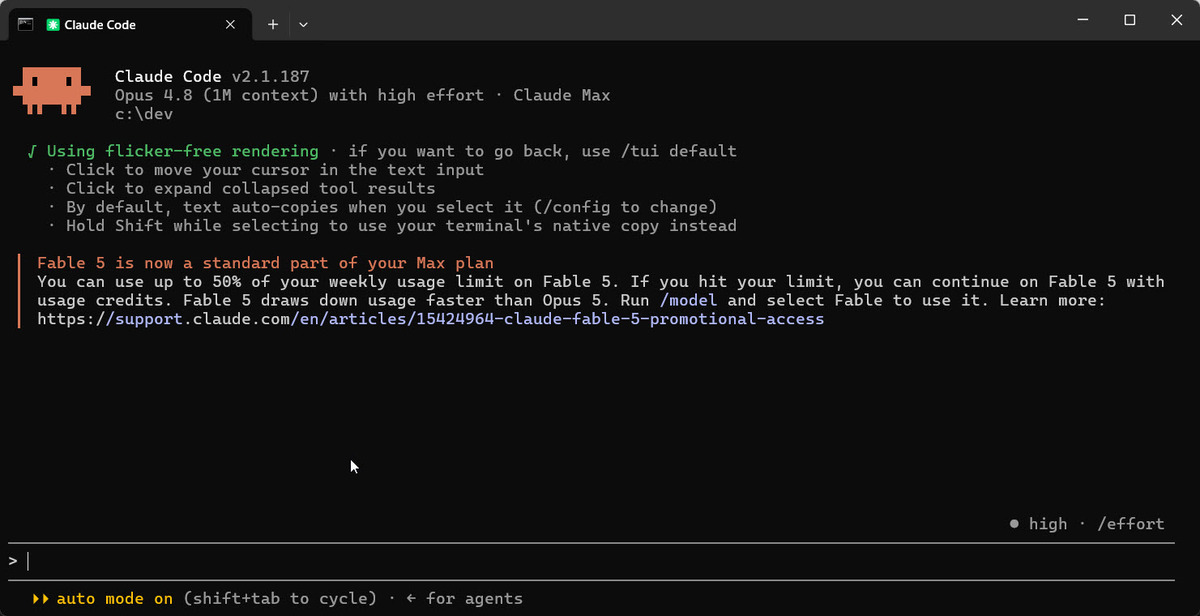
Once claude --version returns something sane, run through this. Each item is something the 2026 practitioner videos flag as a beginner stumble.
- Run
claude doctor. Confirms install health, network access to the API, auth state and config integrity. Catches almost every install issue before it costs you a Reddit thread. - Run
/terminal-setupinsideclaude. Out of the box, Enter submits the prompt; a backslash followed by Enter (or Ctrl+J) gets you a newline, but/terminal-setupconfigures the shift+Enter you expect. Leon van Zyl's setup walkthrough flags this as the first ten-minute gotcha most people hit. - Check
/context. Shows your token usage against the conversation budget - the current top three models all carry a 1M-token window, so check what your session was given rather than assuming 200k. You'll be surprised how fast a long agentic session burns it. Use/clearbetween unrelated tasks rather than letting Claude Code auto-compact.
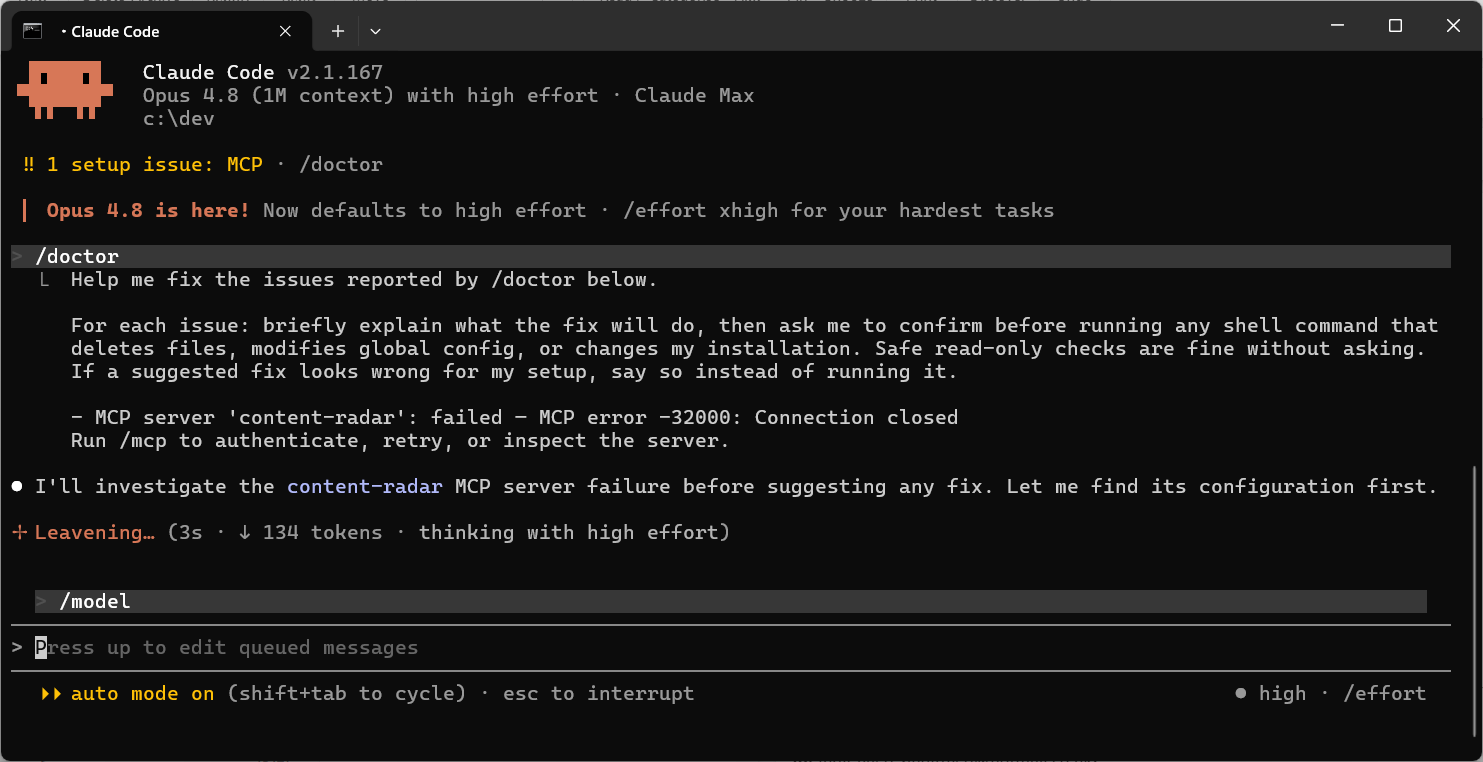
Decide your model with /model. Four tiers now: Fable 5.1 at the top (released 1 September, on every paid plan including Pro, and the default Fable model from Claude Code 2.1.257), Opus 5.5 as the default for most work, Sonnet 5.5 when speed matters more, Haiku 4.5 for short cheap tasks. Don't leave the top tier on for everything; the cost adds up, and one note for corporate readers: Fable requires 30-day data retention by default for safety monitoring, so clear it with whoever owns your compliance before you switch a team onto it.
- Mind the
.claudefolder. Claude Code writes per-project state into.claude/in your working directory the moment it starts editing files. Add credentials files to your project gitignore if any appear there. The.claude/settings.jsonfile (per-project permissions) is fine to commit.
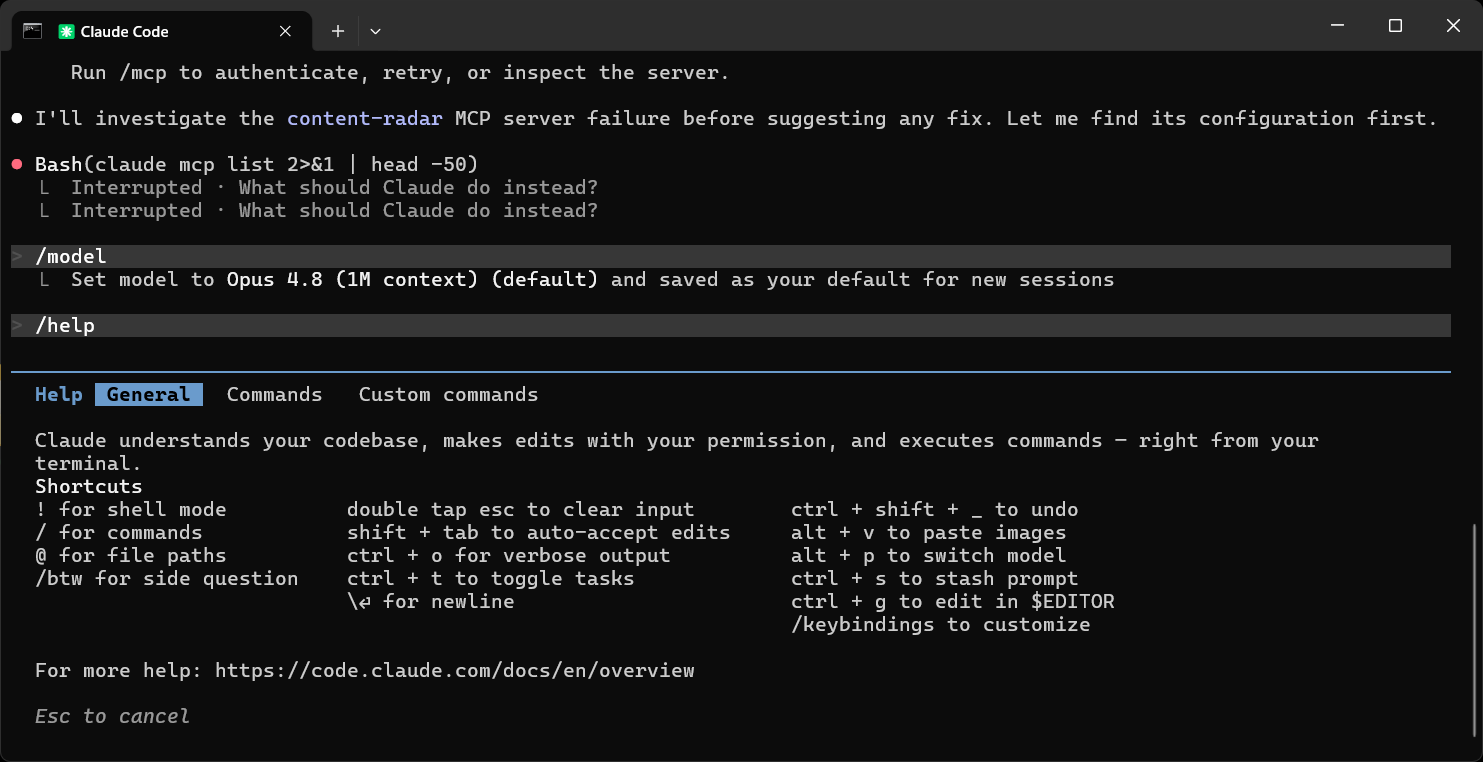
Beyond the checklist, the full slash-command reference is one keystroke away - type /help from any Claude Code session and the full command list scrolls in:
Looking for something else?
If you are setting up the Claude Desktop Electron app, see claude-desktop-system-requirements. If you want a guide to MCP servers that extend Claude Code, see the best MCPs for Claude Code. If you want the hooks and sub-agents walkthrough, see the Claude Code hooks guide.
If you searched for "Claude Code" expecting an IDE-native AI feature, Cursor's built-in agent or the Code tab in the Claude Desktop app (above) are the easier on-ramps for non-CLI users.
Running Claude Code with a local LLM (and cutting the bill)
Claude Code's hardware bar is low because the model runs in Anthropic's cloud - but that also means every token is metered, and left running on a big overnight refactor the bill mounts. The fix isn't to swap Claude for a local model; you'd lose the reasoning that makes it worth using. It's to let Claude keep orchestrating and hand the bulk, bounded work - boilerplate, a first-pass code review, an extraction, a test stub - to a model running on your own hardware. That's what houtini-lm does: an MCP server that gives Claude Code a local endpoint to delegate to, and prints the running token saving in the footer of every response.
The local endpoint can be either of two things, and we've written up both. If you've got the GPU for it, vLLM serves an open-weight model through an OpenAI-compatible endpoint on your own card, and the backend write-up covers wiring it to Claude - it's the arrangement I run, the local model doing the volume and Claude the judgement. If you'd rather not touch a compose file, LM Studio is the gentle path: a desktop app that runs a model and exposes the same OpenAI-compatible endpoint in a couple of clicks.
Either way the split is the same - Claude reasons, the local model executes - and the measured runs show which local models earn their place. If the Claude Code bill is what brought you here, the full case for delegating is where to start.
Where to go from here
Get the install clean, run claude doctor, pick your model, and you are done with the setup phase. Then spend the first hour in plan mode on a spec rather than on the spec sheet, because the interesting parts of Claude Code - sub-agents, hooks, skills, the worktree branching that makes parallel work possible - all assume the loop is yours before the agents multiply.
Within a day you could build something you couldn't imagine being able to do a year ago. The machine you already own will do it.
Continue reading.
- Beginner's GuidesWhat is n8n? A Beginner's Guide to Workflows, Pricing and Self-Hosting
- AI at WorkAI isn't taking the jobs, it's taking the boring bits
- How-to GuidesHow to Connect Claude to Shopify with MCP (Dev MCP and Storefront Catalog)
- How-to GuidesHow to Use AI for Market Research with Claude
- How-to Guidesn8n MCP: How to Connect Claude Code to n8n and Use Its API Safely
- How-to GuidesHow to Run Qwen3-Coder-Next Locally: My vLLM Settings for Two 48GB RTX 4090s