WebMCP explained: what the agent-ready web means for marketers
WebMCP lets a web page hand an AI agent a set of tools to call, from product search to checkout, and Shopify has already switched it on for its storefronts. Here's what it means for marketers, and how a brand implements and tests it.
 Richard Baxter AI Ops & Marketing Engineer
 On this page
What will life be like when you can ask your personal AI assistant to Deliveroo your favourite wine while you're cooking - without you ever touching a screen?
What will that look like for the marketing engineer?
Part of the answer is already switched on. Since August 2026 every Shopify Liquid storefront (Shopify's standard, theme-based store) has exposed a set of WebMCP tools that an AI agent can call, and there is nothing for the merchant to install. In the ChatGPT desktop app's built-in browser, the agent already discovers and uses tools like these where a site offers them. The web is starting to be read as a set of functions an agent calls, as well as a set of pages a person reads.
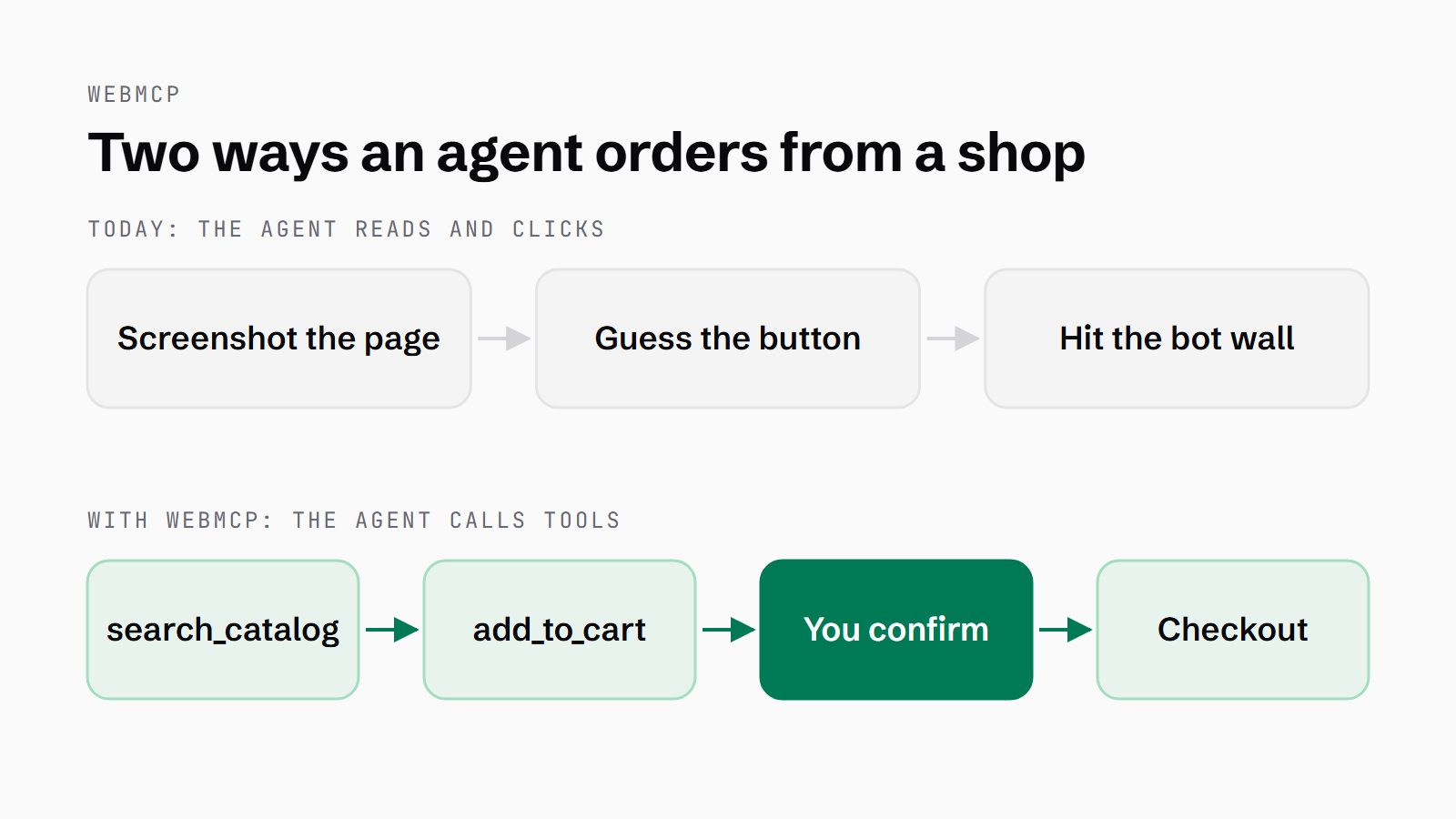
Deliveroo, on what's published, has nothing a shopper's assistant can call. Its engineering blog describes an agent platform for its own engineers, and anythingmcp, a third-party guide to connecting Deliveroo to ChatGPT, says there is no MCP connector. A wine shop on Shopify Liquid, though, already has search, cart and checkout tools an agent can call. So let's take the wine order and follow it through what WebMCP is, who runs it, what it does to your traffic and revenue, and how a brand implements and tests it. There are two ways an agent can get that wine into a basket, and the diagram below shows both.
How do AI agents use websites today?
Today an agent (a piece of software that takes a goal and works through the steps itself) uses your website the way a person does. Anthropic's own description of Claude in Chrome is that it "sees what's on the page and can act on it, reading, clicking, typing, navigating, and filling forms". Claude in Chrome has been on every paid Claude plan since 26 August 2026, and it no longer needs your approval for every action it takes. Gemini in Chrome's auto browse arrived on 28 January 2026 and fills in forms for you. There's a longer explanation of what AI agents are if you want one.
Andrew Nolan of Microsoft, who co-wrote the original WebMCP explainer, says in his W3C talk that agents work from the DOM, the accessibility tree or screenshots, and that screenshots are by far the most used. Shopify puts it plainly: without tools "the agent has to read your page's code and simulate clicks on buttons and links, which is slow and error-prone". The screenshot route costs tokens too. A community quickstart from the WebMCP-org project measured one small task at 3,801 tokens by screenshot against 433 with a tool call. An independent on/off test by one developer found a smaller token reduction: 35.6%, 26.1% and 22.7% across three models.
That reading and clicking is hostile to the host server. Cloudflare has accused Perplexity of changing its user agent, IPs and networks to hide its crawling. The answer the industry is building is identity: Web Bot Auth (a proposal that bots and agents cryptographically sign their requests), and Cloudflare's signed agents programme, which validates those signatures.
What is WebMCP?
WebMCP lets a page hand an agent the list of things it can be asked to do. Instead of the agent working out which button adds to the cart, the page gives it a function called add to cart and says what it needs. The spec's own abstract puts it as "the WebMCP API enables web applications to provide JavaScript-based tools to AI agents". It is a W3C Community Group draft, dated 20 October 2026, and says of itself that "it is not a W3C Standard nor is it on the W3C Standards Track". The editors are from Microsoft and Google. A tool here is a named function with a description and a typed input, which the agent asks the page to run.
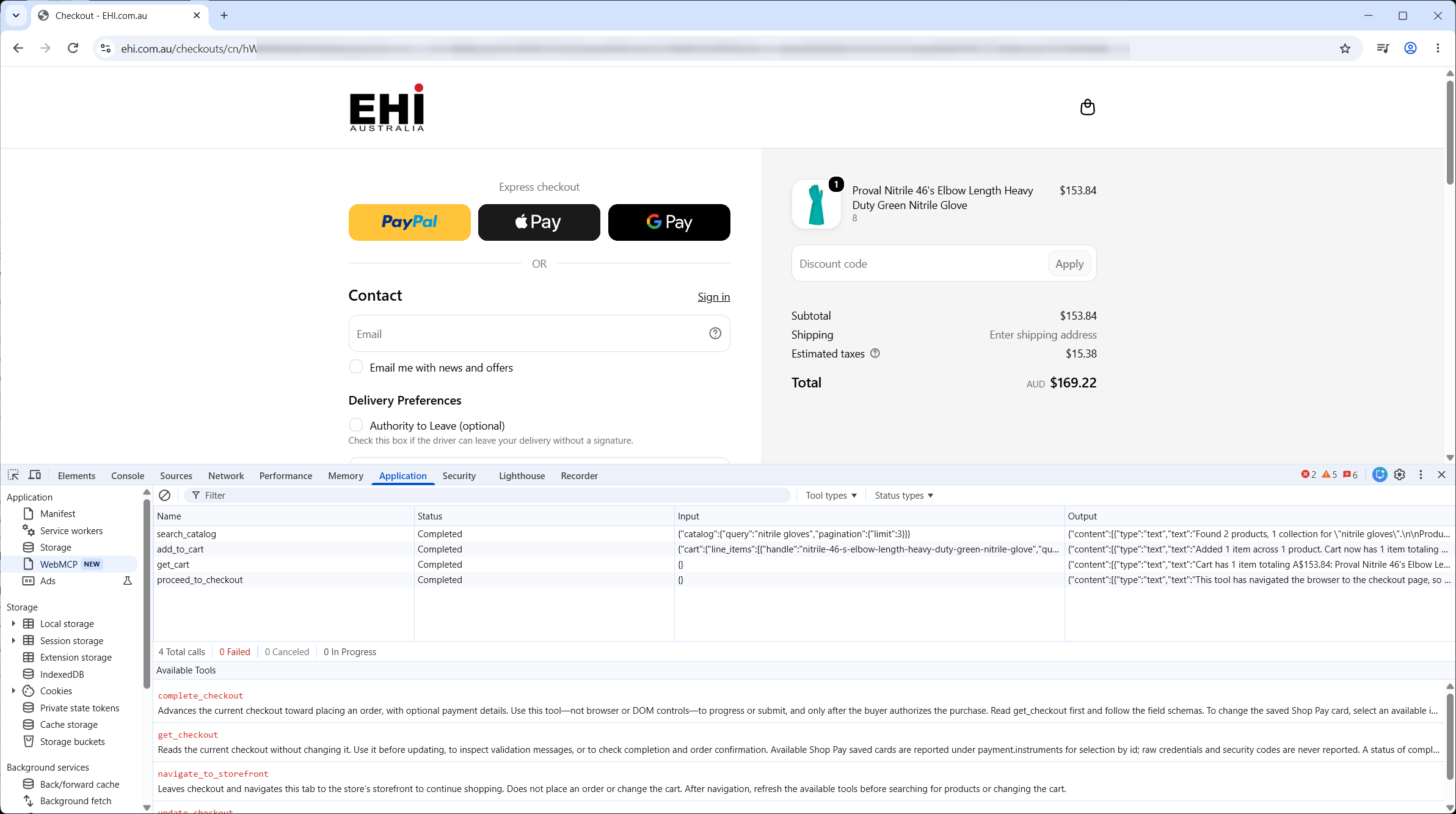
Shopify is the live example. Every Liquid storefront registers tools such as search_catalog, add_to_cart and proceed_to_checkout. At the checkout the tools change. After proceed_to_checkout, an eligible checkout swaps the storefront set for get_checkout, update_checkout, complete_checkout and navigate_to_storefront, which Shopify added on 28 September 2026. Outside Shopify, target.com registers search_products on its homepage, described as "Search for products on Target.com. Use this when the user wants to find products by keyword". That description is written for a model to read.
The technical bit is one call: the page runs document.modelContext.registerTool() with a name, a description, an input schema and the function to execute. The spec's own framing is that pages using WebMCP "can be thought of as Model Context Protocol servers that implement tools in client-side script instead of on the backend". The details are in "How to add WebMCP to your site" below.
WebMCP vs MCP
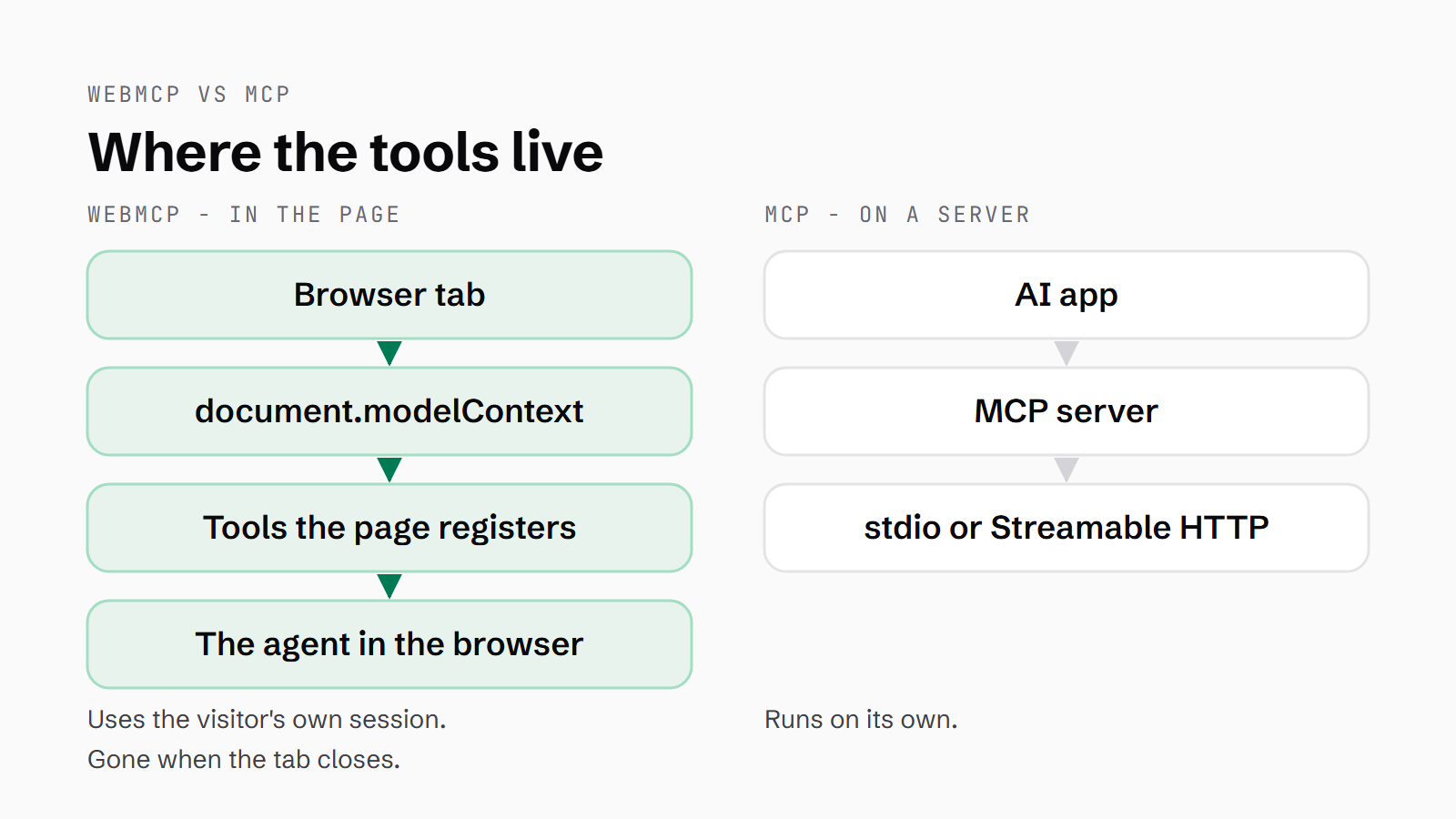
MCP (the Model Context Protocol) is the server-side sibling, and the two names get confused. An MCP server is a separate process or service an AI application connects to, speaking JSON-RPC 2.0 over one of two transports: stdio, or Streamable HTTP. The older standalone HTTP+SSE transport has been deprecated since the 2025-03-26 revision of the spec. I build and publish MCP servers myself, and the fuller explainer on MCP servers covers that side.
WebMCP has no server and no network transport of its own. The tools are registered on the page during the user's visit. They run with the visitor's own session, which means a tool can do whatever the signed-in user can do. Chrome's phrasing is that "instead of your application being a guest within an agent, the agent is a guest on your platform", and WebMCP "is not an extension or a replacement of MCP".
Shopify runs both. WebMCP is on the storefront for an agent already in the shopper's browser; for an agent working from its own server, Shopify recommends its server-side Checkout MCP and says to use Checkout WebMCP "only when your agent is already operating in the buyer's browser". Chrome calls WebMCP MCP-inspired, built for the browser and without the concepts only a server needs. Nolan's point is that a backend MCP server needs a server and back-end skills, and sign-in and state get hard away from the page, so the browser takes the server's role.
Who supports WebMCP today?
As of late October 2026, Chrome has WebMCP in an origin trial running from Chrome 149 to 162. An origin trial is a time-limited programme that lets a site switch on an experimental browser feature for its visitors and report back. Chrome extended the trial from 156 because, in its words, feedback "has suggested improvements to the API, which we are implementing". Edge has its own origin trial live in Edge 150.
Since 31 August 2026 ChatGPT Work and Codex "can now use tools that supported websites provide directly in the desktop app's built-in browser", and ChatGPT calls them site tools. Google said at I/O in May 2026 that "Gemini in Chrome will soon support WebMCP APIs". webmcp.com is a directory of WebMCP sites, run by nekuda, which also publishes a browser-agent benchmark there. WebKit, the Safari engine team, opposes it, and Mozilla is neutral.
| Browser or agent | Status | Date |
|---|---|---|
| Chrome | Origin trial, Chrome 149 to 162 (extended from 156) | Trial announced 9 Jun 2026 |
| Edge | Origin trial, Edge 150 | Listed 12 Aug 2026 |
| ChatGPT desktop app (Work, Codex) | Calls site tools in its built-in browser | 31 Aug 2026 |
| Gemini in Chrome | Announced as "soon" | Announced 19 May 2026 |
| Brave (Leo) | Experimental support | Listed 12 Aug 2026 |
| Safari (WebKit) | Formally opposed | Issue updated 17 Jun 2026 |
| Firefox (Mozilla) | Neutral | Issue updated 26 Aug 2026 |
Three platforms switch it on without a line of your code. Shopify Liquid stores have it already, Hydrogen (Shopify's headless framework, where the storefront is built separately from the commerce backend) has it on by default, and Cloudflare runs a developer preview.
Some brands have written their own tools into their live pages. Netgear registers search, add-to-cart and get-cart tools, and a proceed-to-checkout tool that takes the shopper to the checkout page to finish the order by hand. ASUS has seven tools covering product search, filters, FAQ, news and price; Vercel registers five. If you go searching for it, webmcp.dev is an older open-source library.
What happens to the page, the ads and the up-sell?
If the assistant orders the wine through a tool, nobody looks at the page. Nobody sees the ads, the "customers also bought" rail or the case discount. The shop keeps the sale and loses the up-sell. A business whose revenue is the page itself loses the ad impressions, which are the income, and a tool call carries none of them.
We already have a preview of what it does to clicks, because AI summaries in search got there first. Pew tracked the browsing of 900 US adults in March 2025 and found that when an AI summary appeared, people clicked a traditional result on 8% of visits, against 15% when it didn't. Seer Interactive measured organic click-through on queries with an AI summary falling from June 2024 to September 2025. A model built on its Q4 2025 data predicted the fall would carry on into 2026. Its 2026 update instead reports organic click-through on queries with an AI Overview (Google's generated answer at the top of a results page) rebounding 85% in two months. Zero-click (a search that ends without a visit to any site) is the direction of travel, but not a straight line.
| Study | Finding | Date |
|---|---|---|
| Pew Research Center (900 US adults, March 2025) | Clicked a traditional result on 8% of visits with an AI summary, 15% without | 22 Jul 2025 |
| Pew Research Center | Clicked a source cited inside the summary on 1% of visits | 22 Jul 2025 |
| Pew Research Center | Browsing ended on 26% of pages with an AI summary, 16% without | 22 Jul 2025 |
| Ahrefs (300,000 informational keywords) | Position-1 click-through 34.5% lower with an AI Overview | 17 Apr 2025 |
| Ahrefs update (Dec 2023 vs Dec 2025) | Position-1 click-through about 58% lower with an AI Overview | 4 Feb 2026 |
| Seer Interactive (3,119 informational queries) | Organic click-through on AI Overview queries down 61%, 1.76% to 0.61% | 4 Nov 2025 |
| Seer Interactive, 2026 update | Organic click-through on AI Overview queries rebounded 85% in two months | Apr 2026 |
Cloudflare, on the publisher's side, set new defaults from 15 September 2026: for new domains, the Agent and Training categories are blocked on pages that display ads, while Search stays allowed. Its definition of Agent traffic includes "browser-use agents (e.g., Gemini or Claude driving Chrome)".
A Shopify merchant sees sales, orders and sessions from an AI channel under Sales channels > Agentic, but those are its catalogue channels such as ChatGPT and Gemini, not WebMCP tool calls.
Will agents favour sites with tools?
My argument is that early WebMCP adoption is the new SEO. When the agent in the browser is deciding how to carry out "get me that wine", I think it goes to the vendor it can act on cleanly over the one it has to scrape, which is why registering tools early matters. I also think in-browser Gemini, or Gemini Nano, will power exactly this, as a system where you speak or type what you want and the model in the browser will navigate and perform actions on the site.
The tool-selection studies measure less than that. They compare tools an agent already has in front of it. WebMCP tools only reach an agent once it is on your page, which means none of them shows an agent picking a vendor for having them. ChatGPT's docs say that without a suitable tool the agent "may still be able to use its regular browser capabilities". An ICLR 2026 paper across seven models found "semantic alignment between user queries and tool metadata is the strongest driver of selection" and that "small perturbations to tool descriptions can significantly shift choices". An EMNLP 2025 paper found some description edits gave a tool up to 10x more usage, concluding a description "is decoupled from its actual functionality, making it an unreliable basis for tool selection". The tool name and description are the copy an agent reads.
The counterweight comes from Wes Bos on the Syntax podcast: every platform once had a free API, and then Reddit, Twitter and Instagram closed theirs because they wanted you on the platform where they could sell to you. I don't think they're wrong about the history. I think the difference this time is that the platform owners are the ones shipping it.
If you run the business, you have the picture now. From here on I'm writing for the people who will build it, taking the limits first, then what has to be in place, then adding it and testing it.
What WebMCP can't do yet
It is a community draft, not a standard
Chrome's status page lists its security and privacy reviews as pending. WebKit has formally opposed it, citing duplication, privacy, security and API design among its concerns. Playwright, a browser-automation tool used for testing websites, notes in its docs that WebKit does not implement it, so nothing you register runs for anyone on Safari.
Agents can't find your tools on their own
Chrome lists it as a limitation: "Clients and browsers must visit a site directly to know if it has callable tools". Microsoft's Andrew Nolan says the API puts discoverability out of scope. There is no .well-known file for WebMCP. A .well-known file is a fixed address on a domain where software can look up what the site offers. Shopify storefronts publish one at /.well-known/ucp, and MCP has an optional one at /.well-known/ai-catalog.json. The agent has to be on your page first, which means the traffic still has to come from somewhere.
Tools only exist while the tab is open
In Chrome's words, "WebMCP tools are ephemeral. They exist only when your page is open". ChatGPT's docs say that closing or moving away from a page can make its tools unavailable. Anything that needs to run when nobody has your site open is a job for a server-side MCP, which is why Shopify recommends one for checkout.
Descriptions can be gamed
If a small edit to a description shifts what gets chosen, a description can be written to win. The spec says agents "cannot rely solely on site-asserted tool descriptions or annotations for security" and names tool poisoning and misrepresentation of intent among the threats. ChatGPT already treats "website-provided tool definitions and results" as untrusted content.
Nobody pays for a WebMCP tool call yet
Cloudflare's pay-per-crawl, which is in closed beta, answers a crawler with an HTTP 402 and a price, and it covers page fetches rather than tool calls. If your revenue is the page, WebMCP gives you a cheaper way to be used and no way to be paid for it.
What has to be in place first?
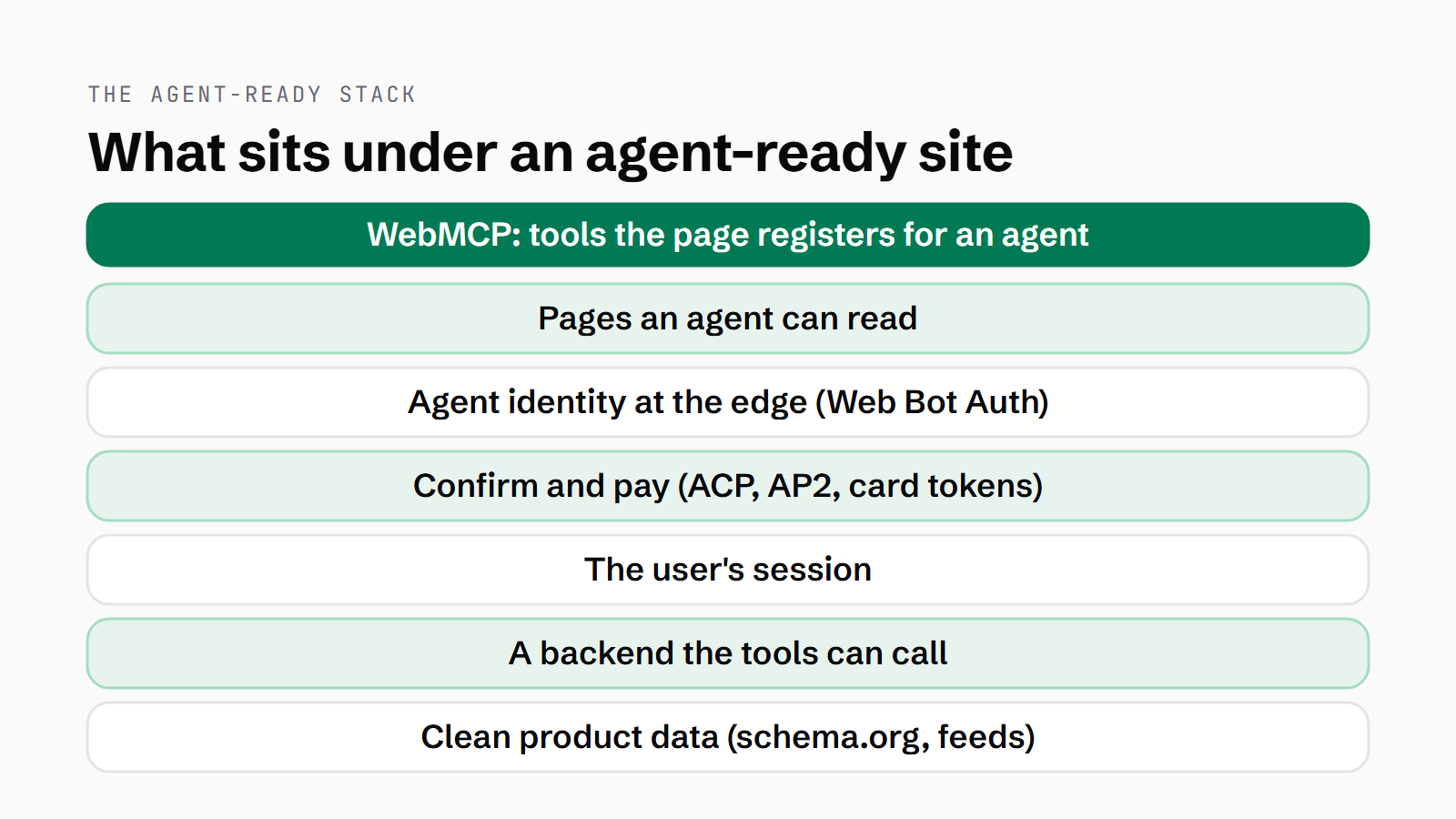
I've spent about twenty years on structured data, from Microformats through to JSON-LD, and WebMCP feels like a logical step forward from there. It sits on top of that work, and it only does its job if the layers underneath it are already right.
Clean product data
Google's merchant listings need schema.org Product with a nested Offer on the page. Google's checkout eligibility for agents is a feed attribute, native_commerce(checkout_eligibility), and a product missing it is not eligible. The Agentic Commerce Protocol (ACP, an open standard from Stripe, OpenAI and Meta for an agent buying from a merchant), in OpenAI's developer docs, starts the same way: "Start your ACP integration by sharing a structured product feed". The tools return whatever your data says.
A backend the tools can call
A tool is a function, and the function has to call something. Shopify's Storefront API provides "commerce primitives to build custom, scalable, and performant shopping experiences" on any platform. Swell is headless by design, and "all platform features and functionality we build use this API, and you have the same access". If your store logic lives only in the theme, there is nothing for a tool to call.
The user's session and a confirm step
The spec says the agent "carries the user's logged-in credentials and session state", so your authentication, authorisation and validation have to hold. Spending needs a confirm step. consequentialHint marks a tool whose action is significant, real-world or hard to reverse, such as paying, so the agent or browser can ask the user first. Shopify's rule for complete_checkout is to show the buyer the order and the total and get their permission, and to ask again if the total changes. Under that sits payment: ACP and Google's AP2 (an open protocol for an agent paying on a person's behalf). Visa issues agent-specific tokens with a passkey, and Mastercard's Agent Pay is a tokenisation programme.
Agent identity at the edge
Web Bot Auth is still an IETF draft, not yet ratified. Under it an agent signs each request and adds a Signature-Agent header that points to its key directory, so the site can check the signature. Shopify requires it of browser agents on checkout, and says that without it "bot detection might deprioritize or block your requests". On Cloudflare's Enterprise plan, a site with Bot Management can match a signed agent on the rule field cf.bot_management.signed_agent and let it through.
Pages an agent can read
Chrome's agent-ready toolkit says "a well-formed accessibility tree is the primary way AI agents understand your page", audits layout stability so elements don't move and cause misclicks, and checks for an llms.txt file (a plain-text summary of the site at the domain root). Lighthouse bundles those three checks into its Agentic Browsing category alongside the WebMCP audits. ChatGPT's documentation says its agent, finding no suitable tool, may still use its regular browser capabilities. On that path, by Chrome's account, the agent relies on the accessibility tree and a stable layout keeps it from misclicking.
How to add WebMCP to your site
Check the platform first. On Shopify Liquid it is on already, so your job is to read the tool names and descriptions Shopify registers on your store. On Hydrogen the webMcp flag defaults to true and can be turned off. On Cloudflare the toggle is at Agent Readiness > WebMCP in the dashboard. Cloudflare then adds two packs of its own, both on by default: Content Credentials, which reads an image's provenance data, and Site MCP Server, which talks to your own MCP server from the page. Neither of them sells anything, so your search, cart and checkout tools are still yours to write. curl -s https://your-site.example | grep webmcp confirms it is live. Otherwise, register for the origin trial and serve the token as <meta http-equiv="origin-trial" content="TOKEN"> or as an Origin-Trial header. Before the page registers a tool, check the browser supports WebMCP at all, with typeof document.modelContext?.registerTool === "function", and keep the normal interface as it is for people and for browsers that don't.
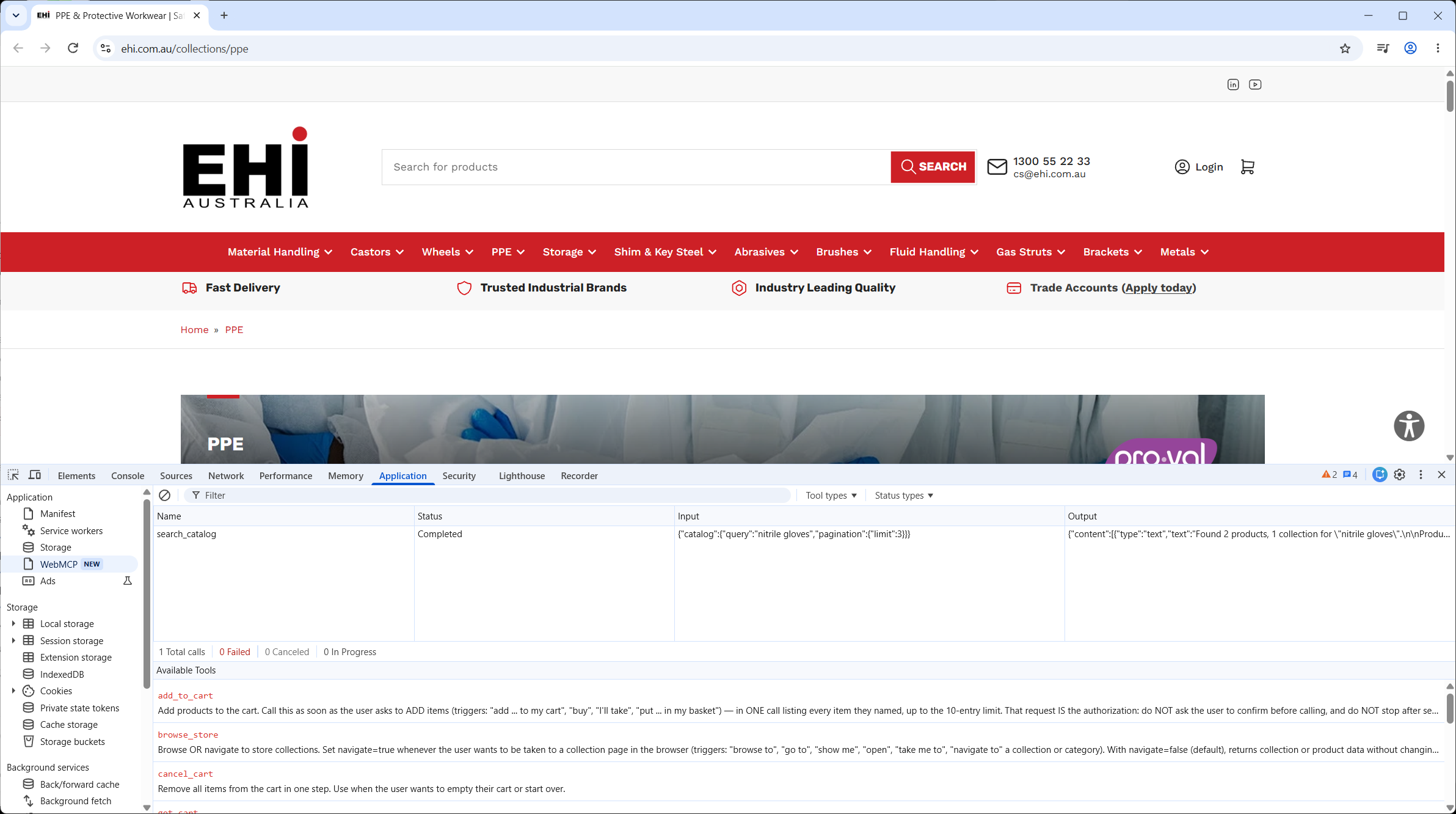
Start with read-only tools, like search and get product, with readOnlyHint: true, then add tools that change things with consequentialHint: true so the agent can ask first. Keep the set small, since each tool takes up context and overlapping tools make the pick harder. Name with an exact verb, so that create-event creates the event there and then while start-event-creation-process sends the user to a form. Describe what the tool does and when to use it. Accept raw user input in natural language, such as shipping="Express" rather than shipping_id=1. Validate strictly in code, loosely in the schema, and return descriptive errors so the model can correct itself.
Register tools when the page state makes them useful, and remove them with an AbortSignal passed in the options. There is no unregister call. On YubHub I register yubhub_current_job only on job pages, which is the pattern Chrome describes. Put them on the top-level page, because ChatGPT does not discover tools registered inside an iframe (a page embedded inside another page). Nor does it use declarative tools. Those are Chrome's way of turning an ordinary HTML form into a tool by adding attributes to it, and they left the spec on 8 October 2026. The snippet below is the minimal shape, with a read-only tool and the guard around it.
// Load this in a module script (<script type="module">) so the top-level await works
// Register one read-only tool, only where the browser supports WebMCP
if (typeof document.modelContext?.registerTool === "function") {
  const controller = new AbortController();
  await document.modelContext.registerTool({
    name: "search_products",
    description: "Search the catalogue by keyword. Use it when the shopper wants to find a product. Returns product names, prices and page URLs.",
    inputSchema: {
      type: "object",
      properties: {
        query: { type: "string", description: "What the shopper is looking for" }
      },
      required: ["query"],
      additionalProperties: false
    },
    annotations: { readOnlyHint: true },
    execute: async ({ query }) => {
      // your own search endpoint goes here
      const res = await fetch(`/search.json?q=${encodeURIComponent(query)}`);
      return res.json();
    }
  }, { signal: controller.signal });
  // call controller.abort() to unregister the tool when the page state changes
}
How to test it
Locally, enable chrome://flags/#enable-webmcp-testing. Then open DevTools, go to the Application panel and select the WebMCP pane. It shows a live list of the tools on the tab and a log of each invocation with its input and output, and you can enter parameters and click Run tool to bypass the agent and test the function on its own. That is your first test: does each tool do what its description says?
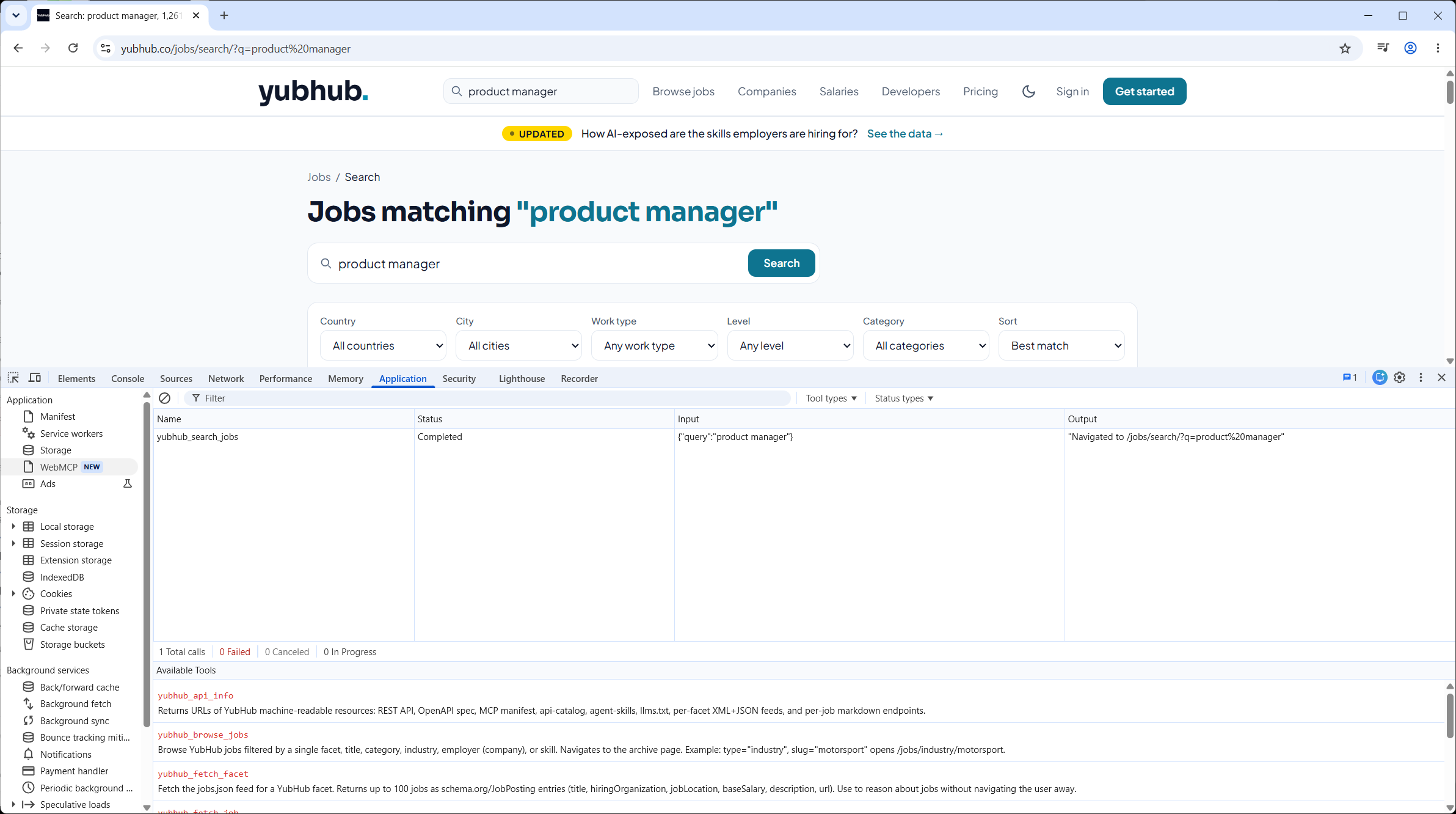
The second question is whether a model picks the right one. Install the Model Context Tool Inspector extension. It lists and runs tools without a key; to have Gemini call them you give it an API key. Type the request a customer would type and watch which tool it chooses with which parameters.
| Tool | What it checks | Where |
|---|---|---|
| DevTools WebMCP pane | Lists the tab's tools, logs each call with input and output, runs a tool by hand | Chrome DevTools > Application > WebMCP |
| Model Context Tool Inspector | Lists and runs tools; with a Gemini API key, whether a model picks the right tool | Chrome extension |
| Lighthouse Agentic Browsing | Registered tools, schema validity, forms missing tools, accessibility, layout stability | Chrome 150+; WebMCP audits need the origin trial |
Playwright page.webmcp | Lists a frame's tools and calls them | Chromium launched with --enable-features=WebMCP |
Puppeteer page.webmcp.tools() | Lists the page's tools; execute calls one | Chrome launched with --enable-features=WebMCP |
| Chrome DevTools MCP | list_webmcp_tools, execute_webmcp_tool for a coding agent | Behind the --categoryExperimentalWebmcp flag |
| ChatGPT desktop app | Whether a real consumer finds and calls your tools | Address bar > Site tools > Available site tools |
Lighthouse is the one to put in your build checks, the automated tests that run each time the site is built, because its runs are reproducible. For scripted regression, Playwright and Puppeteer both expose the page's tools to a test script. If you drive Chrome from a coding agent, the DevTools MCP I wrote up in Chrome DevTools MCP for website debugging can now list a page's tools and run them.
Chrome's evals guidance splits testing into two steps. Deterministic tests come first and involve no model at all: they check the tool's own logic and that its dependencies were called correctly. Probabilistic tests, which Chrome calls evals, check that the model understands the query and picks the right tool with the right parameters. Whole user journeys sit under a separate end-to-end section.
The consumer to test against is the ChatGPT desktop app's built-in browser. ChatGPT Work and Codex discover the tools when they visit a page, and in the address bar you choose Site tools, then Available site tools, to inspect them. Use GPT-5.6 Sol or GPT-6 Sol for this, since GPT-5.6 Luna has WebMCP switched off. Each call gets a safety review, and purchases still trigger confirmation. Measuring is the weak spot. Shopify's Agentic report, from earlier, tracks its AI catalogue channels, and its help page covers sales, orders, sessions and conversion, not WebMCP tool calls. execute is your own JavaScript, though, so you can fire an analytics event of your own inside it.
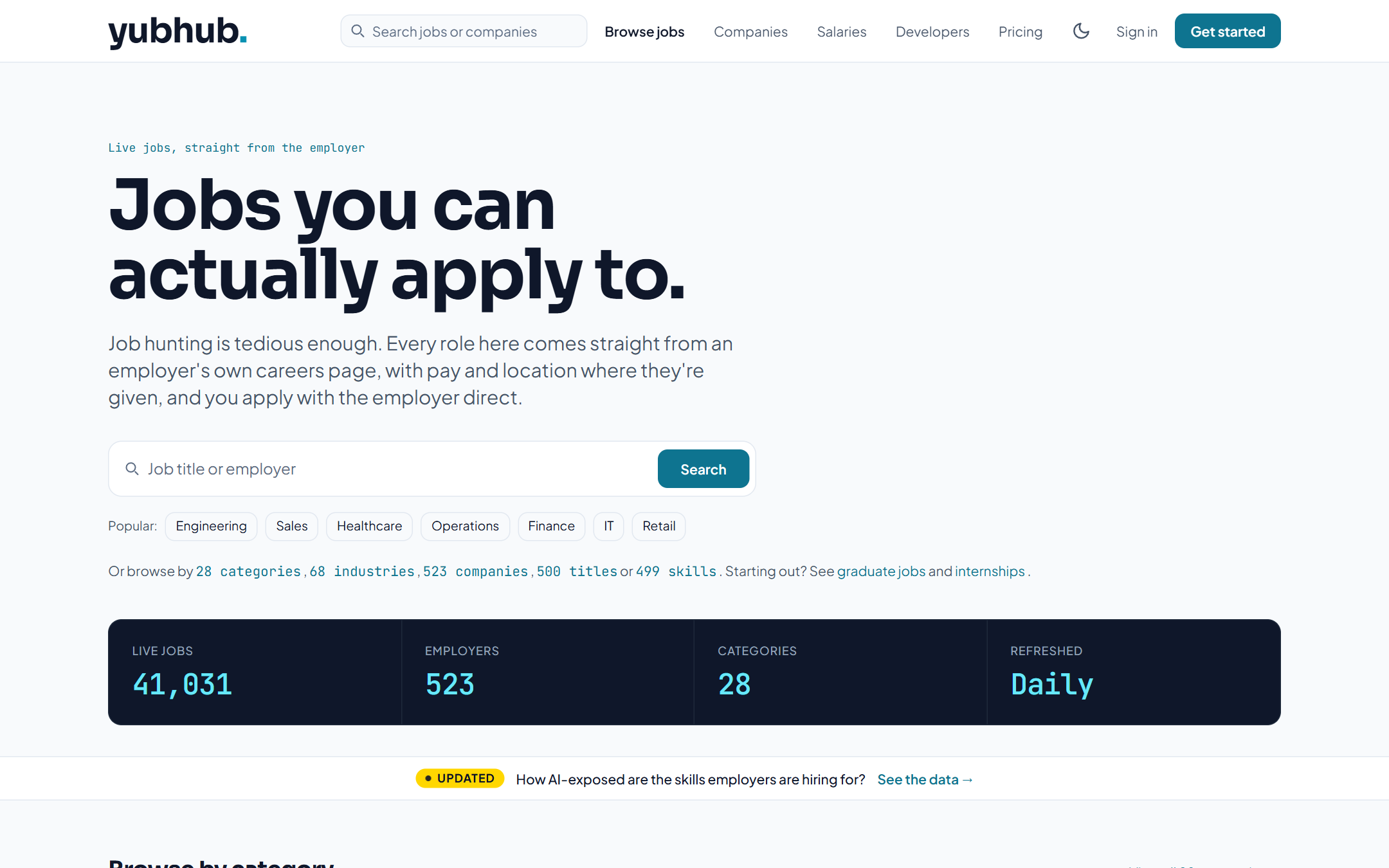
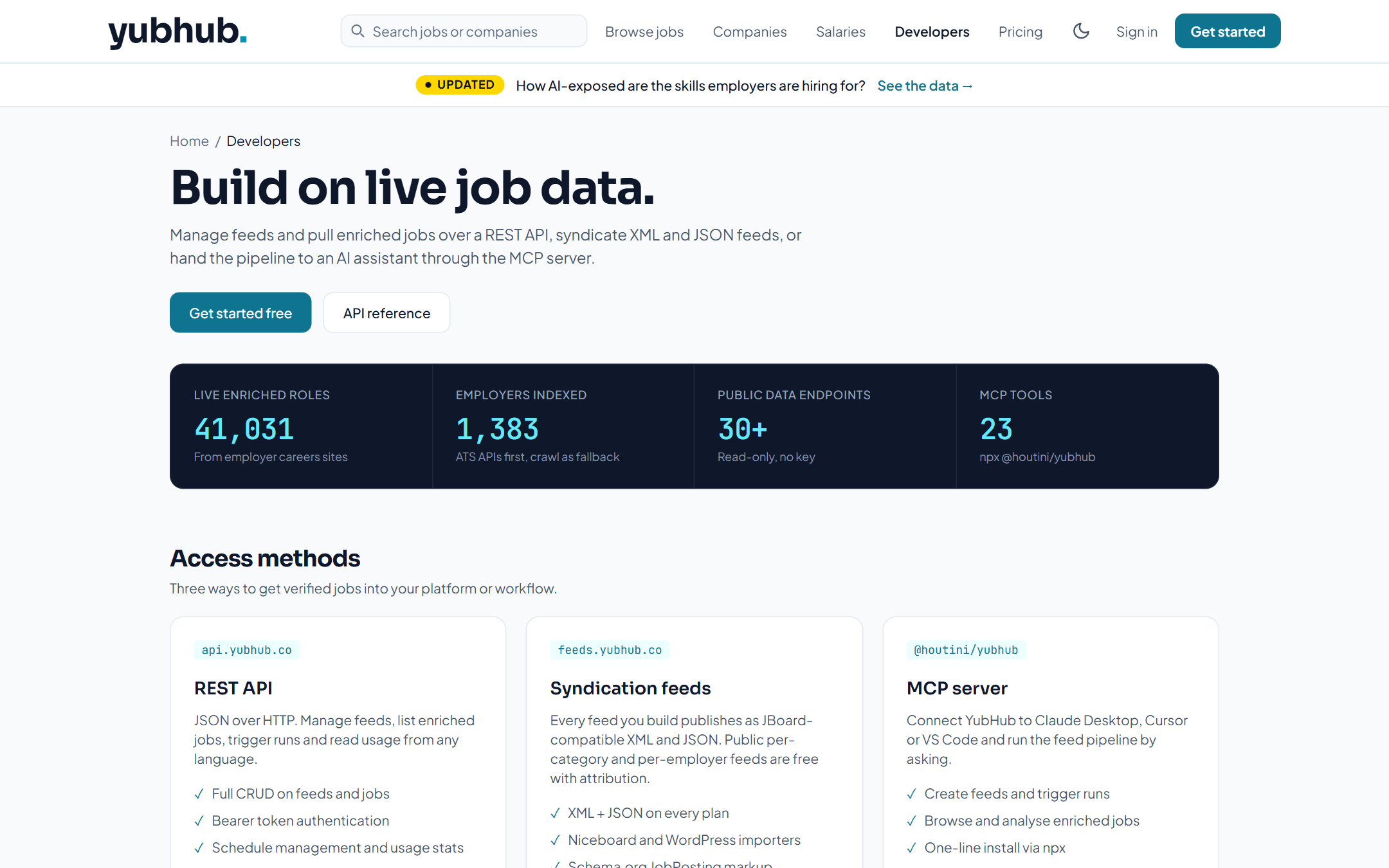
YubHub, my recruitment board, is where I tried the flag and the Inspector myself. On its search pages it registers tools such as yubhub_search_jobs, yubhub_fetch_job and yubhub_shortlist. I built it with the testing flag on and the Model Context Tool Inspector open, and drove the Inspector by hand to compare a tool's schema with what the agent was told, which is the fastest way I found to catch a bad description. yubhub_fetch_facet returns up to 100 schema.org JobPosting entries, so the agent gets structured data back in one call.
Where to start
What will it look like for the marketing engineer? Your shop becomes a product feed and a set of functions, with descriptions a model reads before it decides. The wine order, when it comes, still shows you the basket and the total, and asks before it pays.
Find out what your platform already exposes. If you're on Shopify Liquid the tools are live on your store now, so switch on chrome://flags/#enable-webmcp-testing, open DevTools on your own product page, go to Application > WebMCP and read the list. Check every tool name and description against what you would want a customer's agent to do with it. If nothing is there, add one read-only tool with the guard around it. Search is the obvious one. Then test it in the Inspector before anyone else's agent does.
The YubHub build is in WebMCP on a recruitment website, and the server-side half, for agents outside a browser, is in MCP servers explained. If your shop is on Shopify, I've done the server side there too, when I connected Claude to a store.
Continue reading.
- How-to GuidesHow to Connect Claude to Shopify with MCP (Dev MCP and Storefront Catalog)
- AI at WorkAI isn't taking the jobs, it's taking the boring bits
- Beginner's GuidesWhat is n8n? A Beginner's Guide to Workflows, Pricing and Self-Hosting
- How-to GuidesHow to Use AI for Market Research with Claude
- How-to Guidesn8n MCP: How to Connect Claude Code to n8n and Use Its API Safely
- How-to GuidesHow to Run Qwen3-Coder-Next Locally: My vLLM Settings for Two 48GB RTX 4090s