How to Use the Gemini API (and Why I Run It Next to Claude)
Get a Gemini API key, make your first call in curl and Python, dodge the thinking-token trap that returns an empty answer, and see why running Gemini next to Claude is the real unlock. Written from production - and the bills.
 Richard Baxter AI Ops & Marketing Engineer
 On this page
You can have a Gemini API key and a real answer coming back from Google's servers in about two minutes. I know, because I timed it this week - key already in hand, no SDK installed, just curl and one header, and there it was: a full sentence generated by gemini-3.7-flash, HTTP 200, done. That's the on-ramp, and it's that short. The rest of this guide is everything the two-minute version doesn't tell you: what the API can do, the one trap that makes it look broken when it isn't, what it costs once you're running it in anger, and why I keep it wired up right next to Claude rather than instead of it.
So, if you're a lead trying to work out whether this is a line item worth having: the Gemini API is free to start and stays free for a lot of real work (the Flash models have a no-card free tier), and it turns into a proper bill only when you scale up or reach for the top-end Pro models. The thing that quietly runs the meter isn't the model you pick - it's thinking tokens, which I'll show you costing 357 tokens for a one-sentence answer that should have cost 39. Know that lever and the bill behaves. Miss it and you'll wonder where the money went.
Operators, the rest is for you. Everything below I ran first-hand on my own machine this week, against a live key, so the numbers are real and the code is the code I ran.
Quick Navigation
Is the API the part you need?
What the Gemini API gives you
Get an API key
Your first call
The thinking-token trap
Two ways to call it: generateContent and Interactions
Why you'd run two models at once
What it costs
Gotchas the quickstart skips
Where to go from here
Is the API the part you need?
Quick gut-check before you spend the evening, because there are two different Geminis and people set up the wrong one all the time. If what you want is to chat with Gemini - ask it things, paste a document, get an answer in a nice interface - you don't need any of this. Open the Gemini app at gemini.google.com, sign in, done. No key, no code, no bill.
The API is the other thing. It's for when you want to call Gemini from your own code: a script, a backend, an automation, a tool that runs a hundred times an hour without you sitting there. That's where the key comes in, that's where the request/response shape starts to matter, and that's the whole subject of this guide. Essentially, if you're building or automating, you're in the right place. If you just want to talk to it, close the tab and go to the app - I'd rather send you there than have you wiring up billing you didn't need.
Still here? Right. Let's talk about what you're getting.
What the Gemini API gives you
The headline number is the context window: 1,048,576 input tokens, which is the ~1M everyone quotes, and it's standard across the current line rather than a top-tier perk. Output caps at 65,536 tokens. In plain terms that means you can throw a whole codebase, a long PDF, or hours of transcript at a single call and it'll hold the lot in one go. That one property changes what's worth building - a lot of the "chunk it up and stitch it back together" plumbing other stacks need just goes away.
On top of the long context you get the usual capable-model payload: text generation, multimodal input (image, video, audio and PDF all go in as parts of the same request), structured JSON output when you hand it a response schema, streaming for token-by-token responses, function calling so the model can ask your code to do things, and thinking - the model reasoning before it answers. Note that last one. It's the most useful feature, and the commonest way the bill and the behaviour surprise you - it gets its own section below.
Here's the bit most explanations skip, though: the model list isn't something you should trust a blog for, including this one. It changes often. The authoritative move is to ask your own key what it can see. I did exactly that - a plain GET against the models endpoint - and got back 38 models that support generateContent on the day I ran it. The ones you'll reach for:
| Model ID | Input | Output | Note |
|---|---|---|---|
| `gemini-flash-latest` | 1,048,576 | 65,536 | stable alias - resolved to `gemini-3.7-flash` for me |
| `gemini-pro-latest` | 1,048,576 | 65,536 | stable alias for the current Pro |
| `gemini-flash-lite-latest` | 1,048,576 | 65,536 | cheapest and fastest |
| `gemini-3.7-flash` | 1,048,576 | 65,536 | current flash, pinned |
| `gemini-3.1-pro-preview` | 1,048,576 | 65,536 | preview Pro, deepest reasoning |
| `gemini-2.5-flash` / `gemini-2.5-pro` | 1,048,576 | 65,536 | last generation, still live |
Two things worth knowing from that list. The -latest aliases hot-swap to whatever's newest, which is handy for staying current and a liability if you want reproducible output, so pin an exact version (gemini-3.7-flash) in production and use -latest when you're just exploring. And if you've arrived here from a tutorial that told you to use gemini-1.5-flash or gemini-1.5-pro, stop - those are gone, off the current pricing page entirely, and a call to them won't do what you expect. This family churns fast. Ask your own key, take the list it gives you, and move on.
Get an API key
The key lives at aistudio.google.com/apikey. Sign in with a Google account, click through, and Google auto-creates a project and a key for you the first time. Every Gemini API key is tied to a Google Cloud project - that's where your quota and billing live, not on the key itself, which is a distinction that bites people later (more on that in the gotchas). You do not need a credit card to start. The Flash models have a real free tier and you can send real traffic on it.
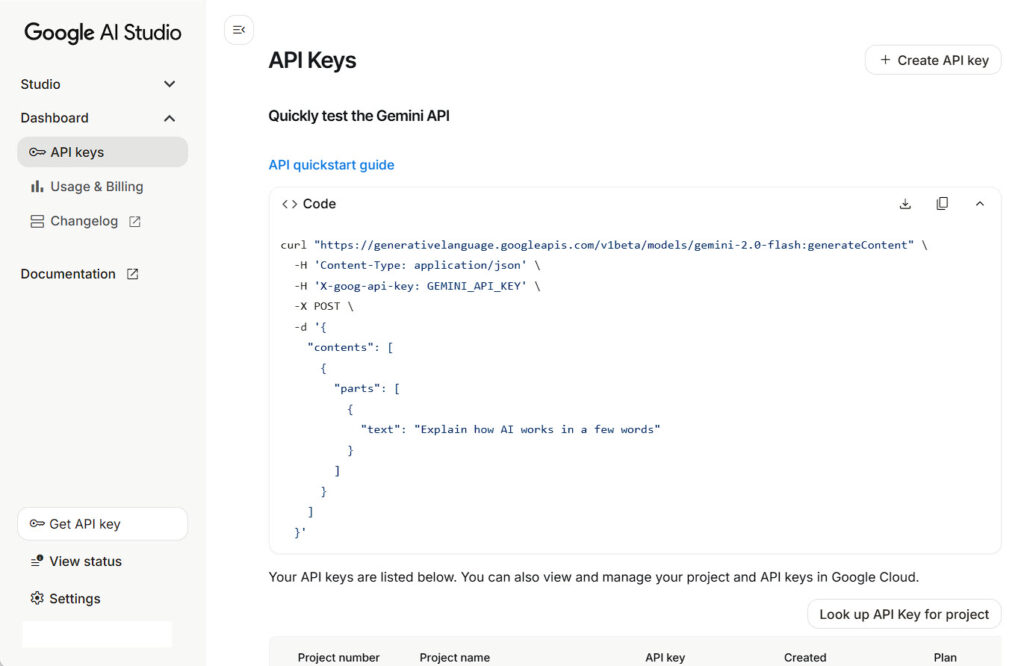
One current wrinkle worth a line: Google is mid-transition on key types, and newly created keys now default to a stricter "auth key" bound to a service account, with the older unrestricted standard keys being phased out through 2026. For getting started this changes nothing you'll notice - the key you're handed works. Just don't be surprised if an old, long-dormant standard key stops authenticating one day; that's the migration, not you.
I'm keeping this section deliberately short, because I've already written the full click-by-click version with screenshots. If you want the hand-holding walkthrough - where each button is, what the screen looks like, where the key string appears - it's in the Gemini MCP guide. Grab it there, then come back here for the part it doesn't cover: calling it.
Your first call
Here's the instant win. This is the call I ran first, straight from the terminal with nothing installed - just curl and your key in an environment variable:
curl "https://generativelanguage.googleapis.com/v1beta/models/gemini-flash-latest:generateContent" \
  -H "x-goog-api-key: $GEMINI_API_KEY" \
  -H "Content-Type: application/json" \
  -d '{
    "contents": [
      {"role": "user", "parts": [{"text": "In one sentence, what is the Gemini API?"}]}
    ],
    "generationConfig": {"temperature": 0.2, "maxOutputTokens": 800}
  }'
That's the whole thing. The auth is one header - x-goog-api-key - and the key alone authenticates. No OAuth, no Cloud project dance, no service-account JSON for the standard Developer API. (You'll see ?key=YOUR_KEY on the URL in older examples; it works, but it leaks your key into logs and browser history, so use the header.)
The request shape is worth internalising because everything else is a variation on it. contents is an array of turns; each turn has a role (user or model) and a parts array - text here, but a part can just as easily be an inline image or a file reference, which is how multimodal works. generationConfig is the dials: temperature, maxOutputTokens, and - the one that'll matter in a minute - thinkingConfig.
What comes back, trimmed to the bits you read:
{
  "candidates": [
    {"content": {"parts": [{"text": "The Gemini API is a cloud-based interface that…"}], "role": "model"},
     "finishReason": "STOP", "index": 0}
  ],
  "usageMetadata": {
    "promptTokenCount": 11, "candidatesTokenCount": 27, "thoughtsTokenCount": 319,
    "totalTokenCount": 357, "serviceTier": "standard"
  },
  "modelVersion": "gemini-3.7-flash"
}
Your answer is at candidates[0].content.parts[0].text. It's a mouthful of a path and yes, you get used to it. finishReason: "STOP" means it finished cleanly. modelVersion tells you which model the -latest alias resolved to - here, gemini-3.7-flash. And usageMetadata is how you cost the call. Look closely at it, because it's about to matter enormously: the prompt was 11 tokens, the visible answer was 27 tokens, and there's this third number, thoughtsTokenCount: 319, sitting quietly in the middle. Three hundred and nineteen tokens of thinking, for a one-sentence reply. Hold that thought.
If you'd rather work in Python, the current SDK is google-genai, and I want to be clear about the package name because it's the thing people most often get wrong:
from google import genai

client = genai.Client()          # reads GEMINI_API_KEY from the environment
r = client.models.generate_content(
    model="gemini-flash-latest",
    contents="In one sentence, what is the Gemini API?",
)
print(r.text)                    # the answer, no candidates[0].content.parts dance
print(r.usage_metadata)          # thoughts_token_count=362, total_token_count=398
Install it with pip install google-genai. Not google-generativeai - that's the old package, the one every ranking tutorial still shows, and it's superseded. The import is from google import genai, the client auto-reads GEMINI_API_KEY from your environment (old tutorials set GOOGLE_API_KEY; both are read, but GEMINI_API_KEY is what Google standardises on now), and r.text hands you the answer directly without the JSON path-walking. You'll see one harmless line on stderr about "AFC" the first time - that's the SDK's automatic function-calling notice, not an error. Ignore it.
That's a working call, two ways. Now the trap.
The thinking-token trap
This is the one that cost other people an afternoon and nearly cost me one, so I'm going to lay it out with the actual numbers.
Gemini 3.x Flash and Pro are thinking models. Before they answer, they reason - and that reasoning burns tokens, hidden ones, which you never see in the response text but which count against your maxOutputTokens. That last part is the whole problem. Your output budget isn't a budget for the answer. It's a budget the thinking spends first, and the answer gets whatever's left.
I ran the same prompt three times against gemini-3.7-flash, changing only the config, and captured what came back:
| Config | Thinking tokens | Answer tokens | finishReason | Visible answer |
|---|---|---|---|---|
| `maxOutputTokens: 200` | 197 | 0 | `MAX_TOKENS` | `''` (empty!) |
| `maxOutputTokens: 800` | 319 | 27 | `STOP` | full sentence |
| `maxOutputTokens: 200` + `thinkingBudget: 0` | 0 | 28 | `STOP` | full sentence, 39 tokens total |
Look at the top row. A 200-token budget, and the model spent 197 of them thinking, ran out, and returned an empty string with finishReason: MAX_TOKENS. No error. No exception. HTTP 200. A completely successful request that handed back nothing. If you were building against that and testing with a small budget to save money - which is the sensible instinct - you'd swear the API was broken. It isn't. Thinking ate the budget before the answer got a word in.
finishReason MAX_TOKENS with an empty answer
The tell is right there in the response: finishReason: "MAX_TOKENS" paired with an empty parts text. Whenever you see that combination, the model didn't fail to answer - it never got to the answer, because the thinking hit the ceiling first. Check finishReason on every call and treat MAX_TOKENS on a short reply as "give it more room", not "the model's confused".
The two fixes
Give it headroom, or turn thinking off. Row two is headroom: 800 tokens was enough for 319 of thinking plus a 27-token answer, clean STOP. Row three is the off switch - thinkingConfig with thinkingBudget: 0 - and this is the one I reach for constantly. Zero thinking, a full correct answer, and 39 tokens total against 357 for the thinking version. For anything that doesn't need reasoning - a reformat, an extraction, a classification, a quick rewrite - turning thinking off is faster, cheaper by roughly nine times on that little example, and returns exactly what you wanted. In the Python SDK it's config=types.GenerateContentConfig(thinking_config=types.ThinkingConfig(thinking_budget=0)). Keep it on when you want the model to reason its way through something hard; switch it off the rest of the time.
This is the most valuable thing this guide teaches, and it's the thing Google's quickstart glosses right over. It matches a lesson we learned the expensive way on our own tooling: never cap the token budget on a thinking model and expect the old behaviour, because the cap lands on the thinking, not the answer.
Two ways to call it: generateContent and Interactions
There's a fork in the road here that most current tutorials haven't caught up with, so it's worth thirty seconds. Everything above uses generateContent - the endpoint that's been the workhorse for years and that basically every SDK example, third-party integration and tutorial on the internet is written against. It's fully live and it's what I'd still reach for today. But Google has quietly added a second surface.
Open the text-generation docs now and the first thing you read is that the Interactions API is now generally available, and Google recommends it "for access to all the latest features and models". Same SDK, different method. I ran it too:
r = client.interactions.create(
    model="gemini-flash-latest",
    input="In one sentence, what is the Gemini API?",
)
print(r.output_text)     # the answer, directly
The difference you feel immediately is the ergonomics. input= a plain string instead of the contents=[{parts: […]}] nesting; output_text instead of candidates[0].content.parts[0].text. Under the hood it also keeps conversation state server-side - you pass a previous_interaction_id rather than resending the whole history every turn, and there's a background mode for long jobs. My call cost 451 tokens total (401 of them thinking, same trap, so the last section still applies), and it just worked.
So which do you use? Both, for now. generateContent is what works everywhere today and what your existing code and every example you'll find online already speak; the Interactions API is where Google is steering and it's a nicer one-method call. Don't rush to rewrite working code, and don't pretend the new surface doesn't exist. I've built against generateContent and I'm watching Interactions. Turns out that's a comfortable place to stand.
Why you'd run two models at once
Right, this is the part that's mine rather than Google's, and it's the reason I bothered writing all of the above.
A single model is a single opinion. It's a confident one, it's usually a good one, but it's one - and when I'm writing code, one opinion delivered with total confidence is exactly the thing that ships a subtle bug past me. Running two models past each other changes that. Claude drafts, Gemini critiques, or the other way round, and the disagreement between them is where the real review happens. Running ideas past a second model has been the single biggest unlock for fast, reliable, clean code for me - more than any prompt trick, any framework, any clever bit of context engineering. Two models arguing is a review process you didn't have to hire for.
And this isn't just a feeling I talked myself into. The idea that groups of models outperform a single one is a real, published finding. Du et al. (2023) - the multi-agent debate paper, arXiv 2305.14325 - had multiple model instances generate answers, then read and critique each other's over several rounds, and measured better reasoning and fewer false facts than one model answering alone. Wang et al. (2024), "Mixture-of-Agents", arXiv 2406.04692, is the one with the hard number: a structured ensemble of open-source models scored 65.1% on AlpacaEval 2.0, beating GPT-4 Omni's 57.5%. Weaker models, structured to build on each other, beat the single strongest frontier model of the moment. That's the thesis in one line.
I'll flag one thing plainly, because I don't want to dress an opinion up as a result. Those papers measure factuality, reasoning accuracy, and benchmark win-rate. They do not measure creativity. When I say work comes out more creative in groups, that's my own read from using them this way every day - not something Du or Wang demonstrated. Take the accuracy claim as cited and the creativity claim as mine.
This idea got me interested enough to build one of our most popular MCPs - gemini MCP, which puts Gemini's grounded search, image generation and analysis inside Claude as tools, so the second opinion is one tool call away instead of a browser-tab context-switch. Thirteen tools, one npx command to install. And here's where knowing the raw API pays off, because the MCP makes a lot more sense once you've seen what's underneath it: it authenticates with the exact same GEMINI_API_KEY and the exact same x-goog-api-key header you just used in curl. Nothing new. The one place the two layers pull against each other is size - the Gemini API will happily take a 100MB request and hand you back a 2-5MB image, but the MCP protocol between Claude and the server has roughly a 1MB message cap. That mismatch is the whole reason the MCP resizes preview images down to fit the transport while quietly saving the full-resolution file to disk. Once you understand the API's limits, the MCP's design stops looking arbitrary and starts looking obvious. That's the payoff of learning the layer underneath.
What it costs
I'll date this hard: these are the numbers as of August 2026, and Google's pricing page carries explicit step-ups for 1 January 2027, so check the live pricing page before you budget anything real. Pricing pages rot; that's exactly why every competitor's cost article is stale within weeks, and it's why I'm putting a date on mine.
Per 1M tokens, paid tier, roughly:
- Gemini 3.7 / 3.6 Flash: about $0.75 in / $3.75 out - rising to $1.50 / $7.50 on 1 January 2027.
- Gemini 3.1 Pro: about $2 in / $12 out for prompts up to 200k tokens, $4 / $18 above that. Paid only, no free tier.
- Gemini 2.5 Pro: about $1.25 in / $10 out. 2.5 Flash: $0.30 / $2.50. The Flash-Lite models are cheaper still.
- Batch API knocks 50% off if you can tolerate async. Google Search grounding is 5,000 requests a month free, then $14 per 1,000.
The free tier is real, and worth being precise about: the Flash line is free of charge to use, with the catch that Google trains on your free-tier inputs (the paid tier does not). Two things people get wrong here: the Pro models are paid-only, and the $300 Google Cloud free trial does not cover Gemini API usage - it's been excluded since early 2026, so don't plan around it.
But the published per-token rates aren't where the surprise lives. The surprise is thinking tokens, and this is the part I can only tell you because we pay these bills in production. Remember that one-sentence answer? It cost 357 tokens on generateContent, 451 on the Interactions call - versus 39 with thinking switched off. That's not a rounding error, that's a multiplier, and it's applied silently to every reasoning call you make. Output pricing includes thinking tokens. So a workload you costed on visible output can run several times over budget purely because the model is thinking hard on calls that never needed it. The fix is the same as the trap: thinkingBudget: 0 on everything that doesn't need reasoning. Left unmanaged, thinking is where the money quietly goes.
One more moving part: Google no longer publishes a static rate-limit table in the docs. Limits vary by tier and model, they attach to the project rather than the key, and you now read your own live numbers at aistudio.google.com/rate-limit. Check yours there rather than trusting any figure a tutorial quotes, this one included.
Gotchas the quickstart skips
These are the errors people hit, pulled from the Gemini developer forums, r/GeminiAI, r/Bard and the Google support threads - reported, not all reproduced by me, so I'll attribute rather than pretend. I'm listing them so you don't lose the afternoon someone else already lost.
429 RESOURCE_EXHAUSTED, sometimes with "limit: 0"
You start making calls and get 429 Too Many Requests / RESOURCE_EXHAUSTED, sometimes after only twenty or thirty requests, sometimes with error text reading limit: 0 for a specific model. The limit: 0 is the tell: that model simply isn't free for you - several models have been pulled from the free tier, and preview models carry much tighter caps than stable ones. The fix reporters converge on is to attach a real billing account; quotas jump substantially once billing is linked even if you stay near-free. Back off with exponential delay plus jitter rather than hammering, and keep preview models out of anything latency-sensitive.
"User location is not supported for the API use"
A 400 FAILED_PRECONDITION with that message, and it's a nasty one because it can hit a key that worked for months. The cause is request-origin geography: Google gates the free tier on where the request comes from, not where your account is registered. It bites hardest when you call from a Cloudflare Worker, Colab notebook or cloud VM whose egress IP lands in a blocked region - even if you're sitting in a supported country. That's directly relevant if you're deploying anything serverless. The remedy is the same billing account (the paid tier is available in far more regions), or pinning your egress to a supported region.
"API key not valid. Please pass a valid API key."
A 400 API_KEY_INVALID on a key you're certain is fine, sometimes even with billing active. In order of how often it's the culprit: the Generative Language API isn't enabled on the key's Cloud project (enable it in the Cloud Console under APIs & Services), the key got copied with a stray space or quote, the environment variable isn't loaded (print its length, not its value, to check), or the key belongs to a different project than the one you think. Work through those four before you regenerate anything.
"Is it really free?" - billing and project confusion
Not an error, but the thing that confuses the most people, so it's worth stating flat. Quotas belong to the project, not the key. You can create a key and send real traffic with no credit card on the free-tier Flash models. Add billing when you need higher quota, EU/UK reliability, or privacy (no training on your data). And when prepaid credits hit zero the project does not silently drop back to free tier - service stops until you top up. Don't get caught by that mid-production.
Request too large - reach for the File API
Send a big image, PDF, audio or video as inline base64 and past a certain size the request just fails. The current inline ceiling is around 100MB total request size (50MB for PDFs) - note that number, because half the internet still quotes the old 20MB cap. Above the ceiling you upload through the File API (client.files.upload(...)) and pass the returned file handle instead of base64. One thing that surprises people: File API uploads expire after 48 hours, so don't build anything that assumes they persist. Per-file max is 2GB, per-project storage 20GB.
Safety filters block a benign prompt
An empty response or an outright block on something perfectly innocent, with a finishReason or blockReason of SAFETY. The API's safety filtering is stricter and separate from the consumer Gemini app, and some core-harm categories can't be disabled at all. Read promptFeedback.blockReason and each candidate's finishReason and safetyRatings to see which category fired - don't treat a safety block as a network error. For the adjustable categories you can set explicit thresholds; for a benign prompt that's been misclassified, rephrasing or splitting it usually clears it.
Where to go from here
You've got a key, a working call in two languages, and the one piece of knowledge - thinking tokens count against your output budget - that separates "this API is broken" from "I know exactly what it's doing". That's the whole on-ramp. Here's the one line to keep:
from google import genai
client = genai.Client()
print(client.models.generate_content(model="gemini-flash-latest", contents="Hello").text)
The next step, if the two-model idea landed, is to stop switching browser tabs and put Gemini inside Claude where you're already working. That's what gemini MCP does - one npx install and the second opinion is a tool call away. The full walkthrough is here, and if you want to see the two-model loop running, making images with Claude and Gemini shows it end to end.
And if Claude is the half of that loop you don't have yet: new accounts can start with a free week of Claude Code before committing to anything. Get both running, point them at the same problem, and let them argue. That's the setup that changed how I write code - not a faster model, but a second one.
Continue reading.
- How-to GuidesHow to Connect Google Trends to Claude Code
- How-to GuidesCLAUDE.md: How to Write One That Stays Lean
- How-to GuidesHow to Make a PDF Report with Claude
- How-to GuidesHow to Make a Presentation with Claude
- How-to GuidesHow to Benchmark vLLM: Find the Best Model, Quant and Settings for Your GPU
- How-to GuidesClaude Code Memory: How to Keep It Useful