Claude Code Memory: How to Keep It Useful
In today's post I'm going through Claude Code memory: how CLAUDE.md and auto memory work, why they go stale, and the lint and retire-don't-delete prune that keep mine useful, plus my designs for a scheduled skill and a small knowledge graph keyed to Wikidata.
 Richard Baxter AI Ops & Marketing Engineer
 On this page
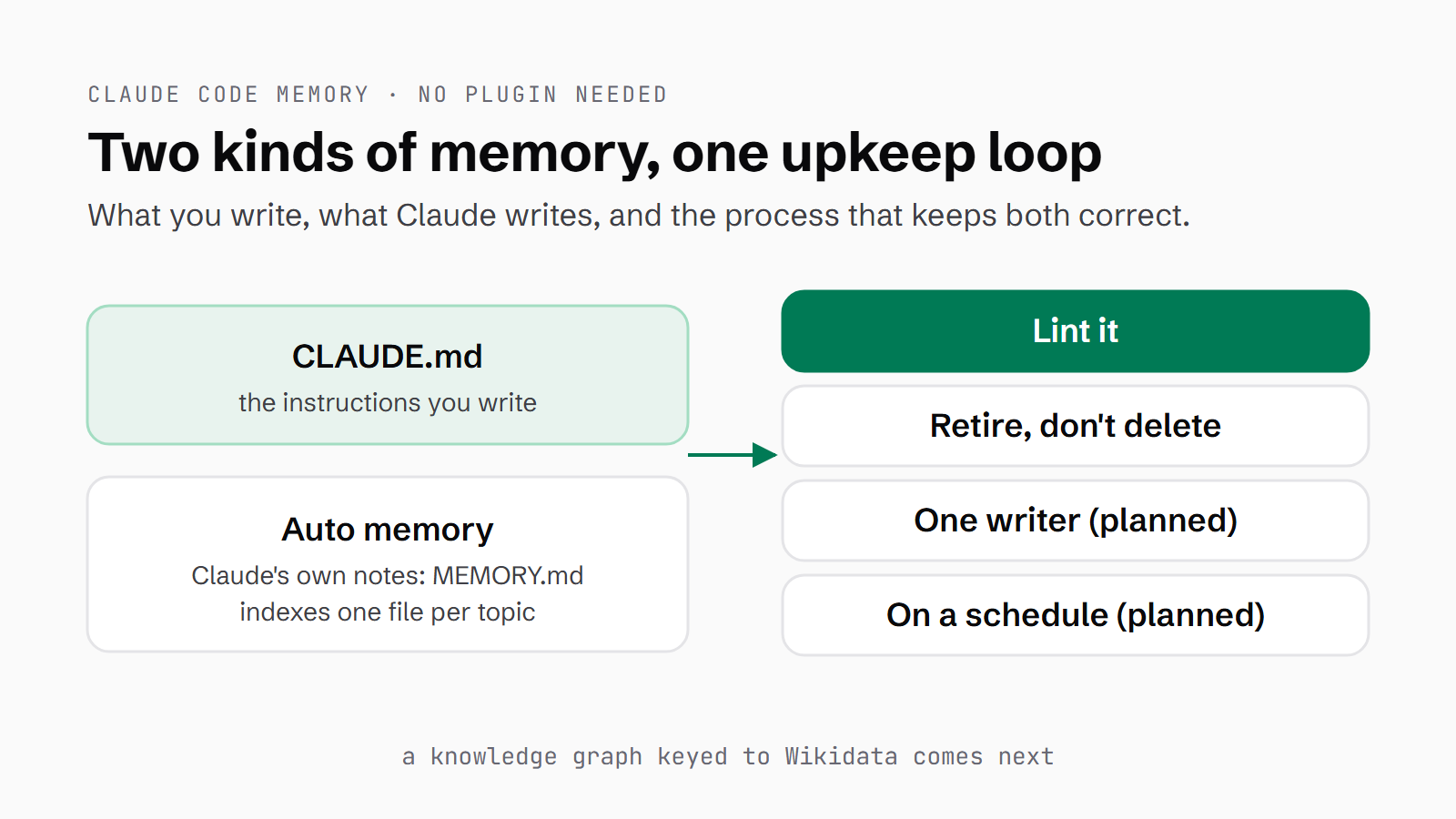
If you've used Claude Code for more than a few weeks, you'll have noticed it remembers things between sessions. Some of those things you told it to keep, and some it decided to keep on its own. That's Claude Code memory, and it comes in two kinds: the CLAUDE.md files you write yourself, and the auto memory Claude writes for itself in a folder on your machine.
Both kinds go stale. Usually that's not because the facts get old. It's because your setup moves on and the notes stay where they were. The memory folder for my content work has 129 files in it, and the ones that went bad were the ones describing procedures I'd since rebuilt.
You don't need to install anything to fix that. The fix is process: a small lint that checks the folder and a prune that retires stale files rather than deleting them. Then there are three designs I haven't built yet: a hook that runs the lint, one writer at a time, and a skill that runs the lot on a schedule. After that there's the next thing I'd like to build, which is a small knowledge graph keyed to Wikidata.
Quick Navigation
How Claude Code memory works |
Why Claude's memory goes stale |
Check it: a memory lint |
Prune it: retire, don't delete |
Enforce it: hooks, one writer, a scheduled skill |
Claude memory in the app |
Next: a knowledge graph keyed to Wikidata |
Where to start
How Claude Code memory works
CLAUDE.md is a plain markdown file of instructions that Claude reads when a session starts, and there are several levels of it. Your user file lives at ~/.claude/CLAUDE.md and applies everywhere. A project file sits at ./CLAUDE.md or ./.claude/CLAUDE.md in the repo, and CLAUDE.local.md is the same thing for notes you keep out of git. Above those, an organisation can set a managed policy file. You can pull other files in with @path/to/file, although imported files load at launch too, so they help you organise rather than save space. Anthropic's guidance is to keep each one under 200 lines. I've covered where each file goes in my CLAUDE.md and project setup guide.
Auto memory is the other half, and it's on by default. Claude writes its notes to ~/.claude/projects/<project>/memory/, one topic per file, and each file opens with frontmatter (a short block of fields at the top). Mine carry a name, a one-line description and a type, which is one of user, feedback, project or reference. MEMORY.md is the index, one line per memory. Only the first 200 lines or 25KB of MEMORY.md load at the start of a session, whichever comes first. The topic files don't load at all until Claude decides it needs one and reads it. Type /memory and you'll see every CLAUDE.md and memory location in play, with a toggle for auto memory and a shortcut to open the folder. If you say "remember X", it goes to auto memory, and "add this to CLAUDE.md" goes to CLAUDE.md.
One more thing to watch out for: CLAUDE.md is context, not enforcement. It's delivered as a message after the system prompt (the standing instructions Claude gets before your conversation starts), which means Claude can still drift from it. For anything that has to happen every time, the docs point you to hooks.
| CLAUDE.md | Auto memory | |
|---|---|---|
| Who writes it | You | Claude |
| Where it lives | ~/.claude/CLAUDE.md, ./CLAUDE.md in the repo, CLAUDE.local.md | ~/.claude/projects/<project>/memory/ |
| What loads at the start | The whole file (keep it under 200 lines) | The first 200 lines or 25KB of MEMORY.md; topic files only when needed |
| How to edit it | Any editor, or "add this to CLAUDE.md" | /memory, or "remember X" |
Why Claude's memory goes stale
I asked for a prune of my own folder because I'd noticed the mess. The request was to remove the early, stale references that no longer applied to the way we work now. The memories that had gone bad were pointing at things that had moved. One named a prompt file that no longer exists. Another described a writing-voice procedure I'd deleted, and a third an old five-file setup I've since rebuilt. A lot of my project memory repeats rules that now live in the prompt files themselves (the instruction files my content workflows run from), which means every time a prompt changes, the memory lags behind it.
The index can go wrong too. I split mine in two back in August, so MEMORY.md holds the notes for one site and a second index holds the other. Only MEMORY.md loads automatically. The second index is reached through a pointer line asking Claude to read it, which works if Claude follows the pointer. A link from the index into the repo also broke, because it was written as a relative path (one counted from where the index sits), and I had to change it to an absolute one.
Then on 25 Sep two Claude sessions pruned the same memory folder at the same time. One rewrote 39 files. The other updated 26 and then backed off, retiring nothing. Nobody owned the folder, so nothing stopped them.
Check it: a memory lint
A lint here is a small read-only script that walks the memory folder and reports what looks wrong. It never edits anything. Mine makes seven checks:
- Index links: every line in the index points at a file that exists.
- Orphans: every memory file is listed in an index.
- Frontmatter: each file carries its name, description and type.
[[links]]: the double-bracket links between memories point at a real memory. Claude Code doesn't resolve these; Claude follows them by hand, so a broken one fails quietly.- Named paths: the Windows paths and repo paths a memory mentions still exist on disk. This is the check that catches memories pointing at things that have moved.
- Age: files untouched for more than 60 days.
- Index budget: how many lines
MEMORY.mduses against the 200-line load cap.
I ran it against the folder on 26 Sep. The first run found no broken index links, no orphans and no bad frontmatter. It found 5 broken [[links]]. Four of those were links to the index file itself, which is a fair thing for a memory to link to, so I changed the lint to accept them. The fifth was a memory written that same morning with the wrong link name.
It also flagged 6 missing paths. Two were real, both down to a script path that had moved. The rest were false positives, mostly on paths with spaces in them, and I changed the lint to handle most of those. After the fixes it reported 0 broken links, 2 flagged paths (both false positives) and 12 files over 60 days old, with MEMORY.md at 80 lines. The old files aren't errors. They're a prompt to go and re-check what they say.
# two lint runs on 26 Sep, condensed from the script's JSON summary
first run:   files 129 | index links 0 broken | orphans 0 | frontmatter 0 bad
             [[links]] 5 broken | named paths 6 missing | older than 60 days 12
after fixes: [[links]] 0 broken | named paths 2 (both false positives) | older than 60 days 12
MEMORY.md:   80 of 200 lines
This is the part of the script that checks the [[links]] and the named paths, including the fix for Windows paths with spaces in them.
    index_names = {i.stem for i in INDEXES}
    for link in re.findall(r'\[\[([^\]]+)\]\]', t):
        if link not in names and link not in index_names and f'{link}.md' not in {x.name for x in files}:
            res['broken_wiki_links'].append(f'{f.name}: [[{link}]]')
    for p in set(path_re.findall(t)):
        p = p.rstrip('.').rstrip(':')
        if '<' in p or '*' in p or '{' in p or p.endswith('>'):
            continue
        if re.match(r'^[A-Z]:[\\/]', p):
            # Windows paths can contain spaces ("C:\Program Files\..."): extend with the words that follow in the text
            ok = Path(p).exists()
            if not ok:
                tail = t[t.find(p) + len(p):t.find(p) + len(p) + 200].split('\n')[0]
                ext = p
                for word in re.split(r'(?<= )', tail)[:8]:
                    ext += word
                    probe = re.split(r'[`\'")\]|,;*]', ext)[0].rstrip('. ')
                    if Path(probe).exists():
                        ok = True; break
            if not ok:
                res['missing_paths'].append(f'{f.name}: {p}')
            continue
        if not (Path(p).expanduser() if p.startswith('~/') else Path(a.repo) / p).exists():
res['missing_paths'].append(f'{f.name}: {p}')Prune it: retire, don't delete
On 26 Sep I ran the prune. Five files came out. None of them was deleted. They were moved into a folder called _retired-2026-09-25/, with a REPORT.md alongside them, and their lines were removed from the index. Any other memory that linked to one had the link rewritten to plain text marked "(retired)", so nothing points into a hole.
Each retirement gets a one-line reason in the report. The ones that came up were a memory teaching a practice I've since banned, one superseded by a newer procedure, one naming a prompt file that no longer exists, and a project memory where every item was marked done. The report also keeps a short "kept but unsure" list, four files this time, such as a memory of launch facts where the launch date has now passed.
So why not delete them? A stale memory can still be right about part of what it says, and a later session reading the report can see why it went and what replaced it. If I got one wrong, it's a move back. I keep the unsure list because some of those calls need a person to make them.
Enforce it: hooks, one writer, a scheduled skill
I've run the lint and the retire flow, but the three pieces below are designs and aren't running on my machine yet.
The first is a SessionStart hook (a script Claude Code runs every time a session starts or resumes) that runs the lint. Whatever the hook prints to standard output is added to Claude's context, so the script should print only problems and stay silent when there are none. Silence costs nothing. It needs to be a command hook, because SessionStart fires before any MCP servers (the add-on tool servers Claude Code can connect to) are available.
{
  "hooks": {
    "SessionStart": [
      {
        "hooks": [
          {
            "type": "command",
            "command": "python ~/.claude/scripts/memory_lint.py ~/.claude/projects/<project>/memory --quiet"
          }
        ]
      }
    ]
  }
}
The second is a one-writer lock, and the 25 Sep collision is the reason for it. A maintenance run would create a .lock directory inside the memory folder with its session ID in it. Creating a directory is atomic, which means two sessions can't both win. A PreToolUse hook (one that runs right before Claude uses a tool, and can stop it) would then block any Edit or Write under the memory folder from a different session, and a lock older than two hours would be treated as abandoned. I haven't tested whether Claude Code's own auto memory saves go through those tools, so I wouldn't promise the lock catches everything.
The third is a maintenance skill (a SKILL.md file of instructions Claude follows when it's run), and its steps would be: take the lock, run the lint, fix paths where the new location is obvious, propose retirements, merge duplicates, rebuild the index lines, write the report, release the lock. Never delete.
Which scheduler you use decides whether the job can see the memory folder. A Desktop scheduled task runs locally and keeps its prompt on disk as a SKILL.md, although it only runs while the app is open and the machine is awake. I already run eight for other jobs. /loop reruns a prompt or skill on an interval, but it's tied to the session and expires after 7 days, which is fine for a trial week. Cloud routines get a fresh copy of the repo, so they can't see ~/.claude memory at all.
Claude memory in the app
If you mostly chat on claude.ai or in the Desktop app, Claude's memory there is a separate system. It's on by default for Free, Pro and Max, and off for Team and Enterprise until an owner turns it on. It's stored as individual topics and saved as you go, and "remember this" saves something straight away. Each project gets its own separate memory space and project summary. Head to Settings > Memory to view, edit or delete it. Incognito chats skip it. Anthropic doesn't publish a size limit.
The difference is where it lives: app memory sits on Anthropic's side and you edit it through a settings screen. Claude Code memory is plain markdown files on your own disk, which is what lets you script it, check it and schedule it.
Next: a knowledge graph keyed to Wikidata
This is my idea for what comes next, and I haven't built it yet. Wikidata is a free, open knowledge base of things and the facts about them. Every entity in it has an ID called a QID. A knowledge graph stores facts as triples (subject, predicate, object), such as "Claude Code, developer, Anthropic".
I checked Wikidata live on 26 Sep. Claude is Q118876059, Claude Code is Q138457287, and CLAUDE.md has its own entry, Q140169835. The search, entity and SPARQL endpoints (SPARQL is the query language Wikidata uses) all answered with no API key. The first QID in my research notes for Claude, Q108287930, turned out to be a Greek Orthodox Metropolitan of Baghdad and Kuwait. That's why every ID gets checked live before it goes in a file.
In my design it all stays in files, with a _kg/ folder inside the memory folder holding one markdown file per entity. Each fact is a triple carrying its source and the date it was verified. A flat INDEX.md lists the entities, so Claude opens only the one it needs. That's retrieval in the RAG sense (fetching the relevant piece before answering), without a vector database. A weekly job would compare each entity's Wikidata revision number and mark facts stale when it's changed.
---
name: claude-code
label: Claude Code
qid: Q138457287
type: software
aliases: [claude code cli]
wikidata_rev: <lastrevid at sync>
synced: 2026-09-26
---
## Facts (subject | predicate | object | source | verified)
- claude-code | developer | [[anthropic]] (Q116758847) | wikidata:Q138457287 P178 | 2026-09-26
- claude-code | loads-at-start | MEMORY.md first 200 lines or 25KB | code.claude.com/docs/en/memory | 2026-09-26
- claude-code | memory-dir | ~/.claude/projects/<project>/memory/ | code.claude.com/docs/en/memory | 2026-09-26
- claude-code | reads-instructions-from | [[claude-md]] (Q140169835) | code.claude.com/docs/en/memory | 2026-09-26
- claude-code | scheduled-task-store | ~/.claude/scheduled-tasks/<name>/SKILL.md | code.claude.com/docs/en/desktop-scheduled-tasks | 2026-09-26

## Relations
- part_of [[claude]] (Q118876059)
- uses [[model-context-protocol]] (Q133436854)

## Review
- review_after: 2026-12-26   # docs change fast; re-verify loading limits quarterly
There's already a knowledge-graph option in Anthropic's reference memory MCP server, and its data model is worth copying. I'd still rather keep plain files. The server stores its graph as JSONL (one JSON record per line), needs to be running, and doesn't record a source or a date against each fact. Markdown triples diff cleanly in git (each changed fact shows up as its own line), and a lint like mine could check them. I've compared memory MCPs in more depth in Memory MCP for Claude Code: Why I Built Metacog.
Where to start
If your memory folder is a mess, three steps will get you most of the way:
- Type
/memory, open the folder and readMEMORY.mdfrom top to bottom. Look for lines pointing at files, prompts or procedures you've since changed. - Check before you prune. Run the full lint script below against your folder, and it will tell you where the rot is.
- Retire, don't delete, and give the job to one session at a time. Once that works by hand, put it on a schedule.
For the CLAUDE.md side, my CLAUDE.md and project setup guide goes further into CLAUDE.local.md, rules and project layout. The Claude Code hooks guide covers the hook mechanics behind the SessionStart check and the lock. If you're earlier on, How to Use Claude Code walks through the setup step by step, and you can start with a free week of Claude Code.
My own next job is the 12 files the lint says haven't been touched in 60 days.
The full lint script
# -*- coding: utf-8 -*-
"""memory_lint.py - read-only health check for a Claude Code auto-memory folder (one fact per file + index files).

Checks:
  1. index links    every (file.md) link in the index files resolves to a file
  2. orphans        every memory file is listed by at least one index
  3. frontmatter    each file has name, description and metadata.type
  4. wiki links     every [[name]] resolves to a memory whose frontmatter name matches
  5. named paths    Windows paths (C:\\...), home paths (~/...) and repo-relative prompts/, scripts/, templates/ paths
                    a memory names still exist (edit path_re for your own repo's folders)
  6. age            files not modified in N days (a prompt to re-verify, not an error)
  7. index budget   MEMORY.md line count against Claude Code's 200-line load cap

Usage: python memory_lint.py <memory_dir> [--repo <project root>] [--days 60] [--json] [--quiet]
Exit code 1 if any hard failure (1-5); with --quiet it always exits 0 and prints one line only when something is wrong."""
import argparse, json, os, re, sys, time
from pathlib import Path

ap = argparse.ArgumentParser()
ap.add_argument('memdir')
ap.add_argument('--repo', default='.', help='project root that relative paths in memories resolve against')
ap.add_argument('--days', type=int, default=60)
ap.add_argument('--json', action='store_true')
ap.add_argument('--quiet', action='store_true', help='print nothing when clean (for a SessionStart hook)')
a = ap.parse_args()
M = Path(a.memdir)
INDEXES = sorted(p for p in M.glob('*.md') if p.name == 'MEMORY.md' or p.stem.endswith('-index'))
files = sorted(p for p in M.glob('*.md') if p not in INDEXES)
res = {k: [] for k in ('broken_index_links', 'orphans', 'bad_frontmatter', 'broken_wiki_links', 'missing_paths', 'old_files')}

# 1 + 2
listed = set()
for ix in INDEXES:
    for target in re.findall(r'\]\(([^)#]+\.md)\)', ix.read_text(encoding='utf-8')):
        name = Path(target).name
        if '/' in target and not target.startswith('_'):
            if not (M / target).exists() and not Path(target).exists():
                res['broken_index_links'].append(f'{ix.name}: {target}')
            continue
        listed.add(name)
        if not (M / name).exists():
            res['broken_index_links'].append(f'{ix.name}: {target}')
res['orphans'] = [f.name for f in files if f.name not in listed]

# 3 + collect names
names = {}
for f in files:
    t = f.read_text(encoding='utf-8')
    fm = re.match(r'^---\n(.*?)\n---\n', t, re.S)
    body = fm.group(1) if fm else ''
    nm = re.search(r'^name:\s*(.+)$', body, re.M)
    ok = fm and nm and re.search(r'^description:\s*\S', body, re.M) and re.search(r'^\s*type:\s*(user|feedback|project|reference)\b', body, re.M)
    if not ok:
        res['bad_frontmatter'].append(f.name)
    if nm:
        names[nm.group(1).strip()] = f.name

# 4 + 5 + 6
now = time.time()
path_re = re.compile(r'(?<![\w/])((?:[A-Z]:\\|C:/)[^\s`\'")\]|,;*]+|~/[\w./-]+|(?:prompts|scripts|templates)/[\w./-]+\.\w+)')
for f in files:
    t = f.read_text(encoding='utf-8')
    index_names = {i.stem for i in INDEXES}
    for link in re.findall(r'\[\[([^\]]+)\]\]', t):
        if link not in names and link not in index_names and f'{link}.md' not in {x.name for x in files}:
            res['broken_wiki_links'].append(f'{f.name}: [[{link}]]')
    for p in set(path_re.findall(t)):
        p = p.rstrip('.').rstrip(':')
        if '<' in p or '*' in p or '{' in p or p.endswith('>'):
            continue
        if re.match(r'^[A-Z]:[\\/]', p):
            # Windows paths can contain spaces ("C:\Program Files\..."): extend with the words that follow in the text
            ok = Path(p).exists()
            if not ok:
                tail = t[t.find(p) + len(p):t.find(p) + len(p) + 200].split('\n')[0]
                ext = p
                for word in re.split(r'(?<= )', tail)[:8]:
                    ext += word
                    probe = re.split(r'[`\'")\]|,;*]', ext)[0].rstrip('. ')
                    if Path(probe).exists():
                        ok = True; break
            if not ok:
                res['missing_paths'].append(f'{f.name}: {p}')
            continue
        if not (Path(p).expanduser() if p.startswith('~/') else Path(a.repo) / p).exists():
            res['missing_paths'].append(f'{f.name}: {p}')
    age = (now - f.stat().st_mtime) / 86400
    if age > a.days:
        res['old_files'].append(f'{f.name} ({age:.0f} days)')

mem_lines = len((M / 'MEMORY.md').read_text(encoding='utf-8').splitlines()) if (M / 'MEMORY.md').exists() else 0
summary = {'files': len(files), 'indexes': [i.name for i in INDEXES], 'memory_md_lines': mem_lines, 'load_cap': 200,
           **{k: len(v) for k, v in res.items()}}
hard = any(res[k] for k in ('broken_index_links', 'orphans', 'bad_frontmatter', 'broken_wiki_links', 'missing_paths'))
if a.quiet:
    # SessionStart-hook mode: stdout lands in Claude's context, so stay silent when clean
    if hard:
        print('MEMORY LINT:', ', '.join(f'{k}={len(v)}' for k, v in res.items() if v and k != 'old_files'),
              '- run memory_lint.py for detail')
elif a.json:
    print(json.dumps({'summary': summary, 'detail': res}, indent=1))
else:
    print('SUMMARY', json.dumps(summary))
    for k, v in res.items():
        if v:
            print(f'\n{k} ({len(v)})')
            for x in v[:40]:
                print('  ', x)
# --quiet exits 0 either way: a SessionStart hook's stdout only reaches Claude's context on exit 0
sys.exit(1 if hard and not a.quiet else 0)Continue reading.
- How-to GuidesHow to set up an MCP gateway with Docker
- How-to GuidesHow to Use the Gemini API (and Why I Run It Next to Claude)
- AI ToolsHow to do an SEO audit with Claude
- How-to GuidesClaude Code API Key Security with 1Password: A Guide to Token Hygiene
- ExplainerWhat is a Marketing Engineer (and do you need one)?
- AI WorkflowsInfographics and articles that update themselves, built on free APIs