How to Use Claude Code: From a PRD to a Deployed App
In today's post I'm going through how to use Claude Code properly, from the PRD I write by hand to a deployed app, with the real repos, tests, git flow and mistakes from the things I've built with it.
 Richard Baxter AI Ops & Marketing Engineer
 On this page
- Before you start
- Step 1: write the PRD yourself
- Step 2: agree an execution plan, with evidence
- Step 3: set up the repo and CLAUDE.md
- Step 4: keep the keys out of the repo
- Step 5: commit locally, then push to GitHub
- Step 6: set up the host on Cloudflare Workers
- Step 7: prototype and look at the real output
- Which model gets which job
- Step 8: test it properly
- Step 9: deploy, then check every route
- Going further: MCP servers in Docker and several sessions at the same time
- What goes wrong
- Claude Code best practices that haven't changed
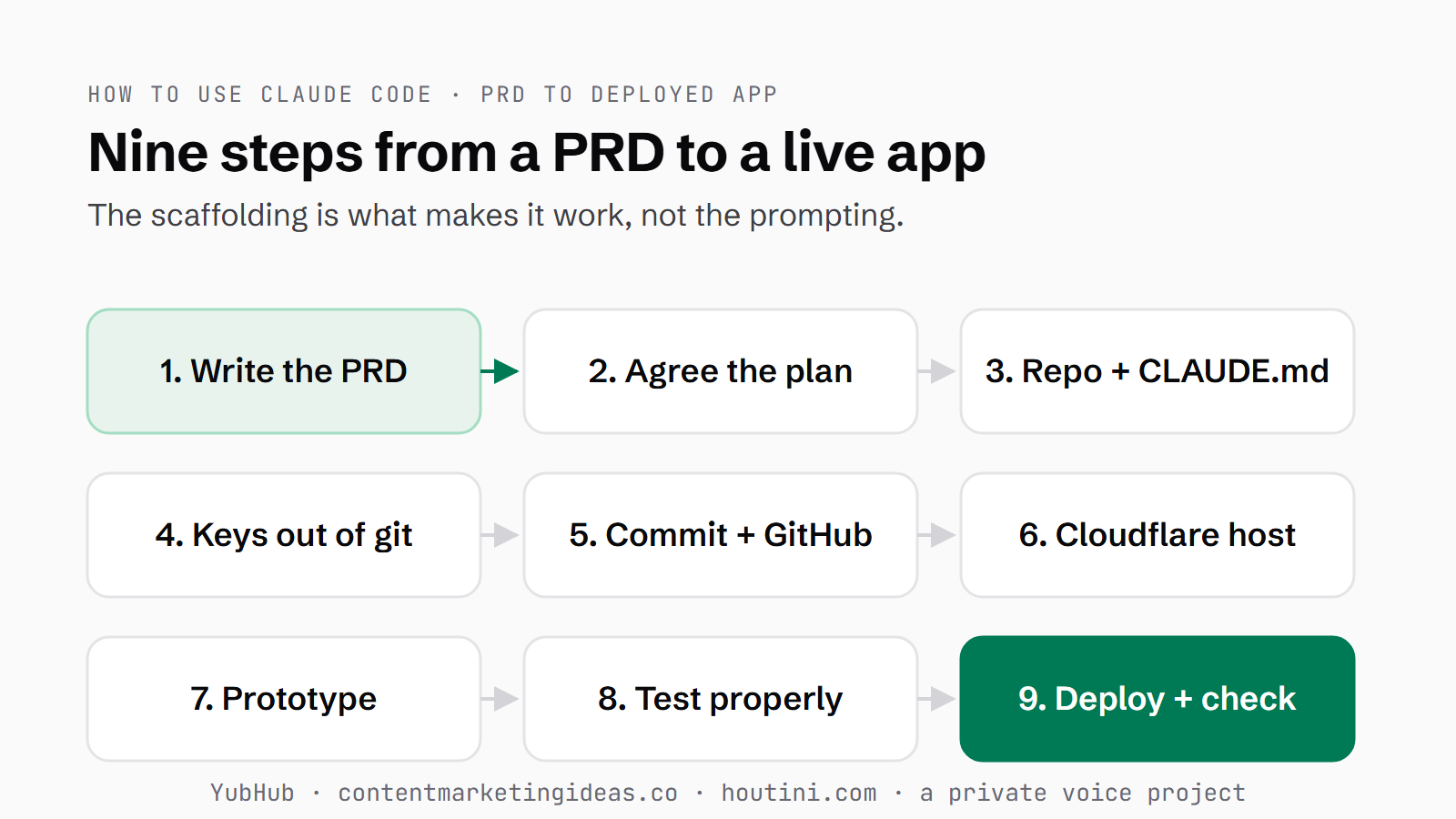
I write a PRD (a product requirements document), hand it over to Claude Code, and go and make a coffee. When I come back there's work to look at, and the reason that works has almost nothing to do with clever prompting. It's the scaffolding around it: a spec I wrote myself, a plan we agreed out loud, keys parked somewhere they can't leak, and a way of checking the work that doesn't rely on the agent's own opinion of how it went. That is most of what I know about how to use Claude Code properly, and it's the opposite of vibe coding (asking for code and taking whatever comes back without checking it).
So, this is the whole route from an idea to a real, deployed app, step by step, told through the things I've shipped this way: YubHub, a job-feed pipeline that runs on eight Cloudflare Workers; contentmarketingideas.co; houtini.com itself; and a private voice-assistant project running on my local models.
If you've never opened a terminal (the text window where you type commands), you're still in the right place. You don't need to be a programmer to start, because your job here is judgement, not syntax. Your first plan can be three sentences long.
Quick Navigation
Before you start |
1. The PRD |
2. The plan |
3. Repo and CLAUDE.md |
4. Keys |
5. Git and GitHub |
6. Cloudflare |
7. Prototype |
Which model |
8. Test |
9. Deploy |
Going further |
What goes wrong |
Best practices
Before you start
There are a few things to install before any of this works. Claude Code is Anthropic's coding agent: it reads the files in your project, edits them and runs commands, and it asks before doing anything you haven't allowed. Install it from Anthropic's get-started page and sign in. I work in the Claude Code desktop app, and you can also start it from a terminal by typing claude inside your project folder. On Windows, you can install Git for Windows as well, because with it Claude Code uses Git Bash as its shell (the command line); without it, Claude Code runs commands through PowerShell. Git itself keeps a history of every change to your project. Then install the GitHub CLI, which gives you the gh command for GitHub, where your code lives online, and run gh auth login once to connect it to your account. The JavaScript projects also need Node, which runs JavaScript on your machine, and pnpm, which installs the packages it needs.
If you're brand new, write your first plan before you open anything. It's three sentences in a note: one small, real thing you want built; what "done" looks like, in a form you can check with your own eyes; and what it does NOT need to do. That last one feels odd, and it's the one that keeps the build small.
There are two safety nets I'd get to know on day one. Plan mode is read-only: Claude Code researches and proposes without touching a file, so you can see its thinking before it acts. And if a conversation wanders off, start a fresh one. You lose nothing but a confused thread. Claude Code will get something wrong in your first hour. Tell it plainly what you see.
Step 1: write the PRD yourself
This is the bit everyone wants to hand to the model, and it's the one bit you can't. I write the PRD by hand. It's a short file that says what you're building, why, and how you'll know it's finished.
If I can't write what "done" looks like, the model can't hit it either. The test I use is simple: could someone who wasn't in my head pick it up, build it, and know when they'd finished? Here's the shape I use:
# PRD: [what this is]

## The outcome
One sentence. What exists at the end that doesn't exist now.

## Why
The problem this solves. If I can't write this, I stop.

## Scope
IN:  [what this build includes]
OUT: [what it explicitly does not - this is the useful list]

## Definition of done
- [ ] A testable statement, not a feeling
- [ ] How I'll know it works: [the command, the URL, the check]

## Constraints
Environment, versions, anything already load-bearing that must not move.

## Open questions
What I don't know yet. Left visible, not guessed.
The two sections people delete first are OUT and open questions, and they're the two that earn their place. Scope creep is the default failure of an agentic build, because the model is agreeable to a fault and will keep adding things you didn't ask for. An OUT list is the cheapest brake there is. Open questions are there so "I don't know yet" stays visible, rather than a confident guess getting baked in.
contentmarketingideas.co started this way. The first thing saved to git, on 22 March, was nine research documents and no code at all: the product concept, the tech stack, the UI scope. One of those documents was a critique. I asked Gemini to review the concept across six dimensions, and it came back saying personalisation was a feature, not a moat, and that the real threat was a creator pasting tweets into Claude. So I wrote a revised concept, saved that too, and the first code went in the same evening.
Write it, have a second model attack it, revise it, then build.
Step 2: agree an execution plan, with evidence
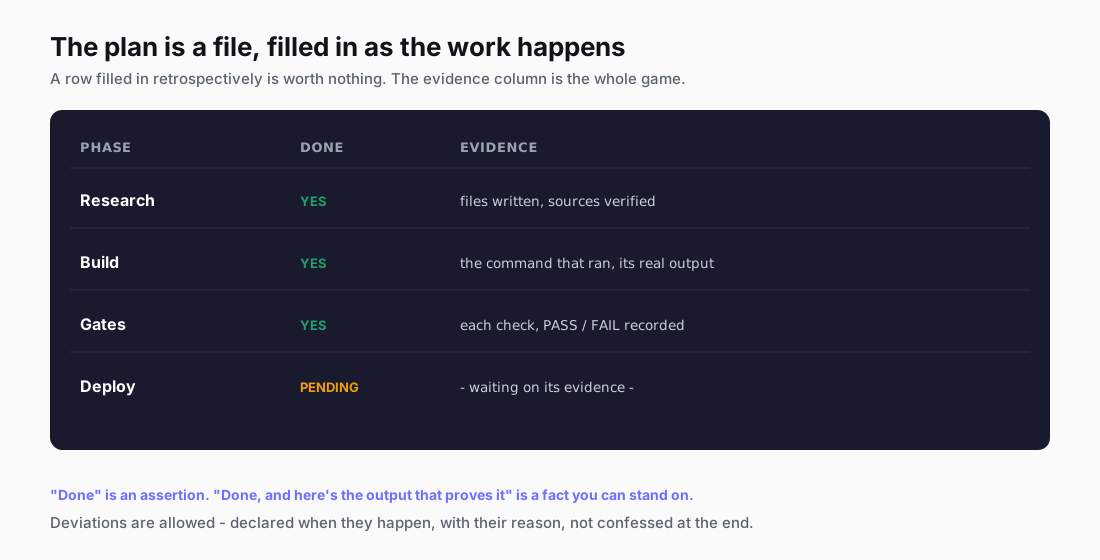
The PRD says what you're building, and the execution plan says how, and in what order. It's the first thing Claude and I do together. It lives as a file in the repo (the project's folder, which git keeps a history of), and it gets filled in as the work happens, not written up afterwards as a tidy summary.
| Phase | Done | Evidence |
|---|---|---|
| Research | YES | files written, sources verified |
| Build | YES | the command that ran, its real output |
| Gates | YES | each check, PASS/FAIL recorded |
| Deploy | PENDING | |

**Deviations (declared when they happen, with why):**
- [none / list]
The evidence column is there because "Done" on its own is an assertion, and a long agent session is full of those. "Done, and here's the output" is a fact you can stand on. A row filled in at the end, once everyone's decided it went well, is worth nothing.
Deviations are allowed, because the build always turns up things nobody knew when the plan was written. The one rule is that a deviation gets declared when it happens, with its reason, which means you can see where the build left the plan and why.
The best plan I've written started with a code review instead of a feature list. It was for an SEO audit server, and the review found the crawler ran synchronously: it held the tool call open until the whole crawl had finished. So any large crawl would blow straight through the tool-call ceiling (the time limit on a single tool call). Everything else in the plan queued up behind that one fix. Finding it before I'd built anything meant the fix went in first, before anything was stacked on top of it.
Ask for the plan as a file, with an evidence column, before any code is written.
Step 3: set up the repo and CLAUDE.md
I start every new repo from a template. Mine is a folder I copy, and the README says it plainly: copy it, and a new repo is ready from commit one. It holds a short CLAUDE.md, a .gitignore that blocks secrets from its very first line, a .claude/settings.json file and an example MCP config, .mcp.json.example. The real .mcp.json is gitignored (listed in .gitignore, so git never saves it). On houtini.com, the settings file carries a deny list, so Claude can't read .env files, .dev.vars, anything under .secrets/, *.pem files or the .wrangler folder, and it can't write to the first three either. Its own comment calls that file "the seatbelt".
A CLAUDE.md is the environment's rulebook. Claude Code loads it at the start of every session, so it's where a lesson gets learned once. They layer, too: there's one at the top of C:\dev for the whole machine, one in each project, and some in sub-folders, like the one in YubHub's tests folder.
What goes in one? The template's opening comment says it best: "Keep it short: only what Claude can't infer from the code." That means what the project is, the stack, the test command, how to run it, and the non-obvious rules.
# <PROJECT NAME>

<!-- Keep it short: only what Claude can't infer from the code. -->

## What this is
<One paragraph: what the project does, who it's for, the current state.>

## Conventions
- <Language/stack, test command, how to run it locally.>
- <Any non-obvious rule: "never commit to main", "stage files explicitly", etc.>

## Security
- Secrets live in .env / .secrets (gitignored). Never commit them, never paste
  them into an external model.
The rules are usually scar tissue. The first of these two, on houtini.com, cost me an afternoon of blaming everything except the real culprit:
- **Never build/deploy while a dev server is running against this checkout.**
  Concurrent Vite writers corrupt the bundle: deploys ship with routes randomly
  missing (302 to /404, 500s). Kill `astro dev` processes first.
- **After every deploy, run the 13-route health check** - all must return 200
  before declaring success.
You can also give a project its own slash commands, which are shortcuts you type into Claude Code, starting with a /. YubHub has /deploy-worker, /deploy-frontend, /db, /tail, /health, /pipeline-status and /test-feed, and its CLAUDE.md says to use those instead of typing the raw commands. Each one is a short markdown file with the steps written down, which means the deploy happens the same way every time.
Copy a template, keep the CLAUDE.md short, and add a rule every time something bites.
Step 4: keep the keys out of the repo
Keys are the secret strings your code uses to log in to other services. They never live in a tracked file, meaning any file git is saving. Ever. So sort that out first. The .gitignore goes in on the first commit, before the secrets folder holds anything, because the moment you're deep in a prototype you will want a key in a hurry. The template's .gitignore opens like this:
# Secrets - NEVER commit
.env
.env.*
!.env.example
.secrets
*.pem
*.key
When your code runs, it reads secrets from the environment, meaning settings the platform hands to it, rather than from a file in the repo. The rule in the houtini.com CLAUDE.md is to reference them by name only, env.BREVO_API_KEY for example, and let the runtime resolve them. On Cloudflare you set a secret from your own terminal, using the wrangler tool: npx wrangler secret put NAME. That way the value never passes through Claude. For local development they sit in a gitignored .dev.vars file.
One more thing to watch out for: when you approve a command that has a key written into it, Claude Code can save that exact command, key included, as an allow rule (a command it may run again without asking) in your local settings file. So keep keys out of commands altogether, use an environment variable or a secrets file, and check your settings files now and then.
Rotate anything that's been pasted somewhere it shouldn't have been, which means cancelling the key and issuing a new one. Assume it's burnt the moment it's exposed. And check your screenshots before you publish them. The graveyard is full of test keys.
Step 5: commit locally, then push to GitHub
Git is the undo button, and it works best when you press it often. A commit is a saved snapshot of the project.
On the private voice project, every build that passes npm test (the command that runs its tests) gets its own commit. That's why it has 395 commits in 11 days, 49 of them on the first day. YubHub's commit messages use a type(scope): what shape, like feat(worker):, fix(worker): or docs:. 884 of its 1,076 commits follow it, so the history reads like a changelog.
Always commit before you deploy. That commit is your rollback point, the version you can go back to if the deploy breaks something. YubHub's /deploy-worker command checks for a recent commit before it deploys anything.
git init -b main
git add -A && git commit -m "feat(worker): add the feed endpoint"   # commit after every passing change
gh repo create --private --source . --push                          # a private GitHub repo, pushed
git checkout -b feat/my-change                                      # once there's CI: branch...
gh pr create --fill                                                 # ...open a pull request, let the tests run
git checkout main && git pull --ff-only                             # ...then come back up to date after the merge
When a project needs a home on GitHub, Claude Code can create it for you with gh repo create --private --source . --push. Private first. A push sends your commits up to GitHub. On the voice project the rule is to push only when I ask, and a secrets scan of the whole history comes before any push. On houtini.com I commit many times and push in batches. On 25 September that was 15 commits and a single push.
Once there's CI (continuous integration, where tests run automatically on every proposed change), work through a branch and a pull request. A branch is a separate line of work, and a pull request, or PR, is a proposed change that gets checked before it's merged into the main line. YubHub has had 52 of them. I branch off staging, open a PR, the CI runs the offline tests, it merges, and a second job runs a smoke test, a quick set of checks against the live site. On 24 September two PRs went through that loop inside about twenty minutes.
Commit after every change that passes its tests, and never deploy anything that isn't committed.
Step 6: set up the host on Cloudflare Workers
YubHub, contentmarketingideas.co and houtini.com all run on Cloudflare Workers. A Worker is your code running on Cloudflare's network, and wrangler is the command-line tool that deploys it. You describe the whole thing in one small config file, and one command puts it live.
contentmarketingideas.co is the simplest example, so start there.
# contentmarketingideas.co - one-page content idea generator.
# DEEPSEEK_API_KEY is a secret: npx wrangler secret put DEEPSEEK_API_KEY
name = "contentmarketingideas"
main = "src/index.ts"
compatibility_date = "2026-03-15"

[assets]
directory = "public"

[[routes]]
pattern = "contentmarketingideas.co/*"
zone_name = "contentmarketingideas.co"

[[routes]]
pattern = "www.contentmarketingideas.co/*"
zone_name = "contentmarketingideas.co"

[[kv_namespaces]]
binding = "RATE"          # per-visitor daily rate limit
id = "<your KV namespace id>"

[ai]
binding = "AI"            # Workers AI
Line by line:
nameis the Worker's name.mainis the file that runs.compatibility_datepins the runtime behaviour to a date, so a platform change doesn't move under you.[assets]serves the static files in thepublicfolder.- The two
[[routes]]blocks send the domain and the www version to this Worker. [[kv_namespaces]]binds a small key-value store asRATE, and[ai]binds Workers AI asAI. Bindings are how the code reaches those services, by name.- The one key it needs, a DeepSeek API key, isn't in the file at all. The header comment says how it gets there:
npx wrangler secret put DEEPSEEK_API_KEY.
houtini.com is one Worker too, with a D1 database and R2 file storage (Cloudflare's own database and file store) bound in the same way. It's set to run near the database, because when I measured it on 20 July, the round trips to the database took up most of the wait before a page started to arrive.
Deploys go through wrangler's own browser login these days, but when the site deployed with an API token, that token was scoped narrowly on purpose: it could edit Workers scripts and Workers routes, and nothing else. DNS, the firewall and redirect rules all came back with a 403 (access refused). That's also why each old domain's redirects run as their own small Worker, so a redirect breakage on one of them can't take down the main site.
Start with one wrangler.toml that names the Worker, its route and its bindings, and keep secrets out of it.
Step 7: prototype and look at the real output
The prototype's job is to be run, not admired. I want the real output in front of me: the response, the error or the file it wrote, and not the model's summary of its own success.
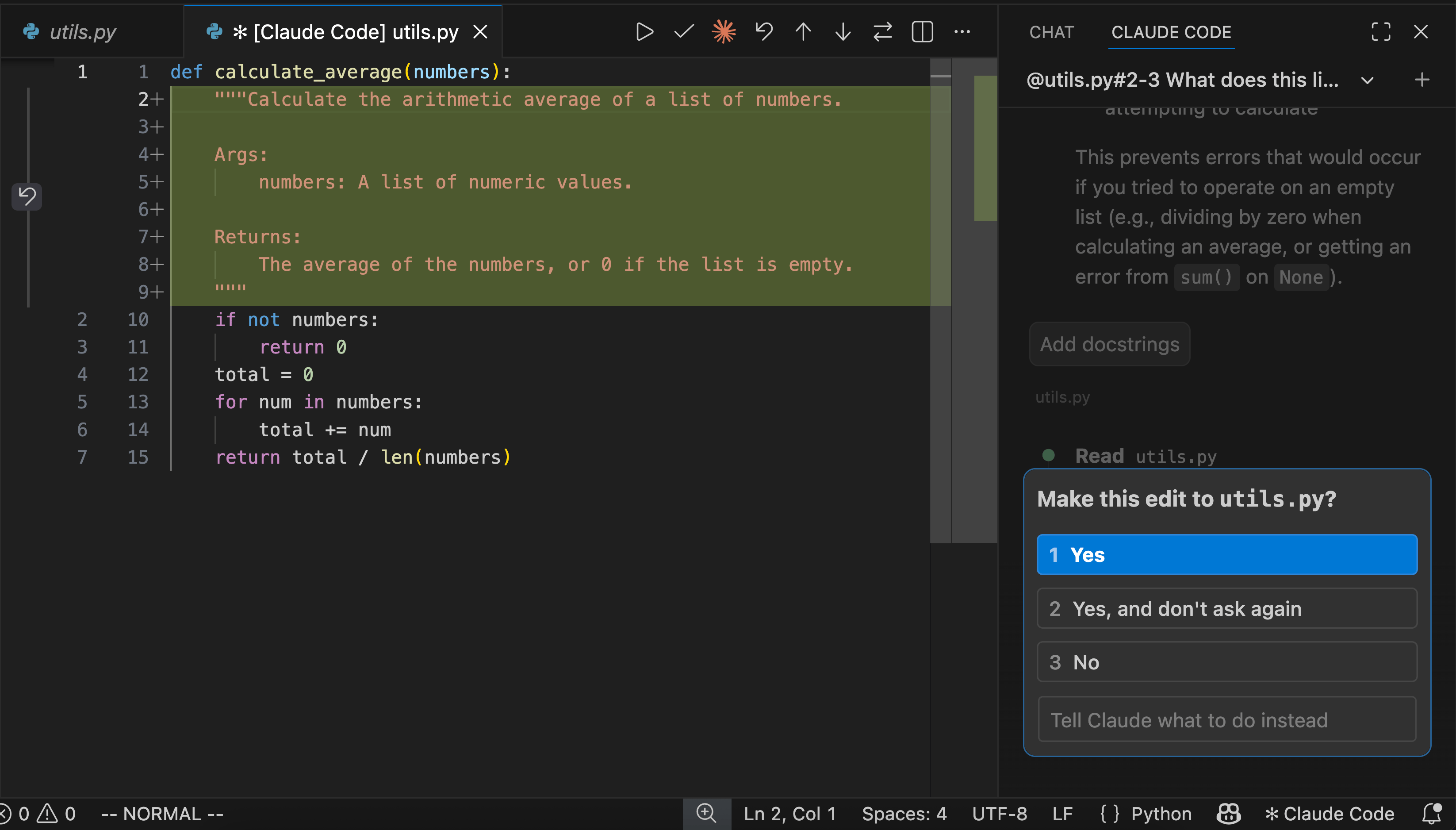
The build loop on the voice project is written into its CLAUDE.md: run npm test, which takes about 40 seconds, commit, stop the running processes, restart with npm run dev, then check the log to confirm the new build came up. As the file puts it, a build that is tested but not restarted is invisible to me. Edit, test, commit, restart, look.
The other habit is a second opinion from another model on anything architectural. On the voice project the plan went through a Gemini review that fixed the loop design, the memory and the stack before any wiring. houtini.com's homepage was reworked for a buyer-first audience after a Gemini critique on the first day of the build. The rule in the voice project's CLAUDE.md is to check library specifics against current docs and sanity-check the architecture with Gemini before committing to a wiring change. It costs a few minutes, which is a lot cheaper than days spent building on the wrong foundation.
Which model gets which job
I don't run everything through the most capable model. The expensive model does the reasoning, the workhorse does the volume.
Inside Claude Code you switch with /model, mid-session, whenever the shape of the work changes. An architecture call or a cross-file refactor is worth the premium. Implementing an agreed plan against a clear spec usually isn't.
Bounded work (a job with a clear spec and a clear finish line) goes further than that, off the Claude bill altogether. houtini-lm is an MCP server I built for this. An MCP (Model Context Protocol) server is a small program that gives Claude extra tools. houtini-lm points at a router I run locally, and the router sends each job to whatever suits it: DeepSeek's API writes code to a spec, and a local Qwen model checks for bugs. The local model is also the only tier for anything sensitive.
| The job | Who does it |
|---|---|
| Scoping, architecture, anything that's expensive if it's wrong | Claude, on the expensive model |
| Implementing an agreed plan against a clear spec | Claude on a cheaper model, switched with /model |
| Writing a module to a spec | DeepSeek V4 Pro, through houtini-lm |
| Reviews, tests from a spec, boilerplate, anything sensitive | A local Qwen model on my own cards |
It turns out knowing the rule isn't enough. I counted 202 houtini-lm calls, and only 4 of them had gone to the local coding model. A nudge at the start of a session doesn't survive the middle of it, so now a hook, a small script Claude Code runs before one of its own actions, holds the first write of any large new file and asks where the work should go. Retry the same file and it goes through.
It's per-project policy, too. The voice project builds directly, and none of that build work goes to an outside model.
If you want the models and the measurements, the best local LLM for coding article has them. The point here is routing, not crowning a favourite.
Step 8: test it properly
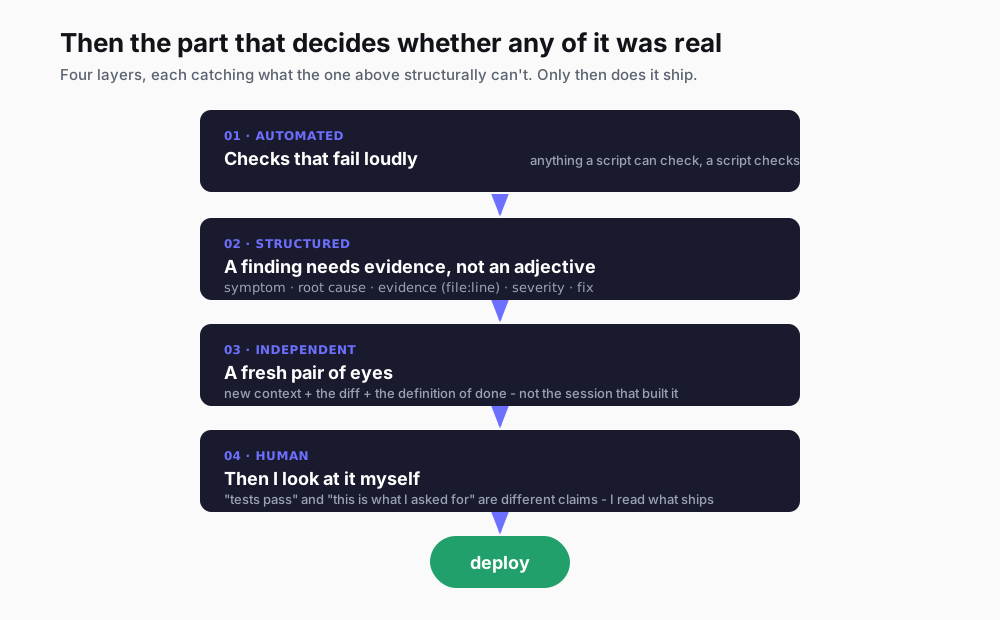
Anything a script can check, a script checks, and the check should fail loudly.
The voice project has three tiers. The first is npm test, which runs fifteen unit suites (small tests of one piece of code at a time), each in its own process. It takes about 40 seconds and needs no model and no network. Run it before every commit. The second is the soak tests. A soak test runs the real code against the live local model over a long set of cases, to catch what only shows up over a long run. The harness has no test framework on purpose: each suite builds the real request, calls the real code and stops with an error code on a hard failure. Some cases are written ahead of the fix, so they fail red until the fix lands.
The third tier is a render check. It draws every figure through the real page in a headless browser (a browser with no window, driven by a script) and fails if raw LaTeX (the markup behind maths formulas), JSON, [object Object] or NaN leaks onto the screen. It exists because on 23 September a card on screen showed raw LaTeX while the automated quality tests all passed. Those tests score what the code asks to draw, never what ends up on the screen.
| Project | Test | How long | When it runs |
|---|---|---|---|
| Voice project | Unit suites, no model, no network | about 40 seconds | Before every commit |
| Voice project | Soak tests against the live local model | longer | After changes that matter |
| Voice project | Render check in a headless browser | longer | Before trusting anything visual |
| YubHub | 557 vitest cases, mostly offline | a few seconds offline | On every pull request |
| YubHub | Live smoke run, about 60 assertions | 60-90 seconds | After any infrastructure or API change |
| houtini.com | Route health check | seconds | After every deploy |
YubHub uses vitest, a JavaScript test runner: 557 cases, 449 of which pass offline in a few seconds, and 106 that only run live. After every infrastructure or API change it also gets a live smoke run of around 60 assertions against the real site, because "the tests pass" and "the deployment works" are two different claims. Some of those tests were born from bugs, like the one added after a July bug sent every long-lived job page into a redirect loop.
houtini.com has no automated tests. Its check is the route sweep after every deploy, in Step 9.
When something's wrong, I want it written down in a fixed shape: symptom, root cause, evidence, severity, fix sketch. Then it's reviewed in a fresh context (a new session that hasn't watched the build), because a session that has been building for two hours believes it succeeded. Then I read what ships. All of it.
If you only set up one of these, make it the fast no-network run, and add a test each time a bug gets through.
Step 9: deploy, then check every route
Deploy with one command, from a clean, committed checkout. On houtini.com that's npm run deploy, which runs a snapshot step, then astro build, then wrangler deploy. Wrangler logs in through your browser (npx wrangler login the first time), and a token left in the environment overrides that login, so a stale one fails every wrangler call. That's why I clear any stray CLOUDFLARE_API_TOKEN from the shell first, with unset CLOUDFLARE_API_TOKEN in Git Bash. If you use pnpm, type pnpm run deploy in full, because plain pnpm deploy is a different pnpm command, and it errors.
Before you deploy, stop the dev server, which is the local preview of the site you run while you build. That's the first rule in the Step 3 block, and it exists because deploys on 20 July shipped with routes randomly missing, redirects to the 404 page and 500 errors (the server failing outright). I blamed the new edge-caching code at first. A cookie A/B test seemed to confirm it. That was a coincidence.
npm run deploy                       # snapshot step, astro build, then wrangler deploy
for p in / /articles/ /about/ /contact/ /sitemap.xml; do
  curl -s -o /dev/null -w "%{http_code} $p\n" https://houtini.com$p
done                                 # every line has to say 200
Claude Code deploys houtini.com only when I explicitly say so. After every deploy it runs a health check across the important routes (the homepage, the articles index, the research pages, about, contact and the sitemap), and every one has to come back 200, the code for OK.
Know the version you'd roll back to. When the v4 redesign shipped on 23 September, the rollback version was written down before it went live, ready for wrangler rollback. It was deployed from a separate git worktree, because another session was running the dev server on the main checkout. A worktree is a second working copy of the same repo, in its own folder, so the two don't collide.
Going further: MCP servers in Docker and several sessions at the same time
Once you have a few MCP servers, they start to cost you. Every MCP is spawned when Claude starts, and when you restart Claude there's a good chance those node.exe processes keep running until you shut the PC down. By mid-afternoon I'd have dozens of orphaned node processes and tens of GB of RAM gone.
So they run in Docker now. Docker runs each program in its own container, a sealed box with everything it needs. One gateway sits on localhost (your own machine), and one small router per server sits beside it on its own port, so each server keeps the tool names Claude already knew it by. Everything listens on 127.0.0.1, which is localhost's address, so nothing outside the machine can reach it. The keys live in one gitignored secrets file, never in the repo. Claude Code just points at the URLs.
x-gw: &gw
  image: docker/mcp-gateway:latest
  restart: unless-stopped
  volumes:
    - /var/run/docker.sock:/var/run/docker.sock
    - ~/.docker/mcp:/root/.docker/mcp
    - ~/.docker/mcp/gateway-secrets.env:/.env:ro       # every key in one gitignored file

services:
  mcp-brave:                                            # one small router per MCP server
    <<: *gw
    ports: ["127.0.0.1:8904:8904"]                      # localhost only
    command: ["--port=8904", "--transport=streaming", "--host=0.0.0.0", "--allow-unauthenticated", "--secrets=/.env", "--servers=brave"]
It wasn't a smooth start: the day after I set it up, a --long-lived flag left an extra container running for every session, and 23 of them piled up in one day. The flag came out.
The other thing that changed how I work is running several sessions at the same time. Each workstream gets its own named, pinned session, like Houtini SEO, YubHub SEO, Docker MCP Gateway, or vLLM config for my local model server. When a thread gets too mixed, I split it, and the handover goes in a markdown file rather than in chat, because another session can read a file straight off disk.
Two sessions building in the same folder will tread on each other, so any session that must build while another is running gets its own git worktree. In the desktop app each session also has a short name that other sessions can use to message it. So give each workstream its own named session, and write the handover file before you split one.
What goes wrong
Plenty goes wrong, and everything below cost me something on one of these projects. I'm sharing them, with the rule each one left behind, so you don't have to go through the same thing.
The ones that hurt most were silent. YubHub's scheduled rebuild relied on a login that ran out, and the failure marker went unnoticed for four days while around 5,500 jobs expired under a stale snapshot. The houtini.com newsletter handler returned a success message while failing, for about a month. The biggest was a scope mistake: the full contentmarketingideas.co app, eight Workers with sign-in and payments, was retired on 22 August as too expensive to run. At the moment it's a one-page idea generator on a single Worker.
| What went wrong | Where | The rule it left behind |
|---|---|---|
| Deploys shipped with routes randomly missing | houtini.com | Kill the dev server before any build; health-check every route after |
| A scheduled rebuild silently stopped for four days when a login expired | YubHub | Use a token file for scheduled jobs, and alert on failure |
| An upstream AI model was retired and enrichment broke for about two and a half weeks | YubHub | Keep model names in config, and check the live model list |
| A staleness bug redirected every long-lived job page | YubHub | A test that pins the fix, so the next refactor breaks loudly |
| A newsletter sign-up failed quietly for about a month while reporting success | houtini.com | A handler reports failure as failure; test the live endpoint |
| The full app cost too much to run | contentmarketingideas.co | Retired to a one-page Worker; the old app kept on a branch |
| MCP servers left dozens of node processes eating RAM | this machine | Run MCP servers in Docker behind one gateway |
| Tests passed but the page rendered raw code | the private voice project | A headless-browser render check alongside the quality tests |
| Docs drifted from reality | several repos | A doc sweep as its own commit, every session |
Most of them became a rule in a CLAUDE.md or a new test, because otherwise the same mistake comes back in the next session.
Claude Code best practices that haven't changed
The tools underneath all of this keep changing. A few things haven't. Your feedback loops are the ceiling: if the work can't be checked quickly and unambiguously, no prompt rescues it. So verify, don't trust. A self-report isn't evidence, which is why the plan has an evidence column and review happens in a fresh context. And write it down, or you'll learn it twice. Session memory ends when the session does, and a lesson in a CLAUDE.md gets handed to the next session for free.
Delegate the bulk and keep the judgement. Bounded work goes to the cheapest thing that can do it properly, and the calls where being wrong is expensive stay with the good model, and with me. Scope is a brake, which makes the OUT list the most useful line in the whole workflow. And secrets never touch a tracked file, not even "just for now". I'm still not settled, though, on where the line sits between what I check by hand and what a script checks. Some of what I check by hand could probably be scripted, and some of what I've already scripted I end up reading anyway.
If you're starting from nothing, write one PRD by hand for something small, with the OUT list first. And if Claude Code is new to you, you can start with a free week and hand it that PRD as its first job.
Continue reading.
- AI WorkflowsAI Fact Checking: How I Check My Content Reliably With Agents
- AI WorkflowsInfographics and articles that update themselves, built on free APIs
- AI WorkflowsHow to Write a PRD an AI Can Build From (with a template)
- AI at WorkAI isn't taking the jobs, it's taking the boring bits
- How-to GuidesHow to Connect Claude to Shopify with MCP (Dev MCP and Storefront Catalog)
- Beginner's GuidesWhat is n8n? A Beginner's Guide to Workflows, Pricing and Self-Hosting