A beginner's guide to Claude hooks
Claude Code hooks are small scripts that fire automatically at specific moments in a coding session. They give you deterministic control where CLAUDE.md instructions only get probabilistic compliance. This beginner's guide covers what hooks do, the five events you need to know, the exit-code gotcha that catches almost everyone, and the community projects worth installing before you write your own.
 Richard Baxter AI Ops & Marketing Engineer
 On this page
- What happens when a hook fires?
- The five events worth knowing
- One settings.json, three levels of nesting
- The bit that can trip you up
- How does an MCP server fit into all this? Does it?
- The hooks users install first
- Don't write your own from scratch
- The security bit nobody mentions until something goes wrong
- Where to start
This guide covers what Claude Code hooks do, how to install them, and why (and when) they can be useful.
This all assumes you already have Claude Code running. If you don't yet, new accounts get a free week of Claude Code to start with.
A Claude Code hook is a small script (or HTTP endpoint, or LLM prompt) that fires automatically at specific moments in a Claude Code session. The model decides what to do next, takes the action, observes the result, decides again - an agentic loop. Hooks slot in at named points in that loop and let you intervene without being there.
The reason hooks matter is the difference between rules you ask Claude to follow and rules that always run. You can tell Claude in your CLAUDE.md to run Prettier after every file edit, and most of the time it will. But "most of the time" isn't always. A hook makes it happen every time, with no exception. Anthropic's own framing in their three-minute walkthrough is the one to internalise: "If something needs to happen every time without fail, don't put it in a prompt. Put it in a hook."
Quick Navigation
When a hook fires |
The five events |
settings.json |
The exit-code trap |
Hooks vs MCP |
Install these first |
Community projects |
Security |
Where to start
What happens when a hook fires?
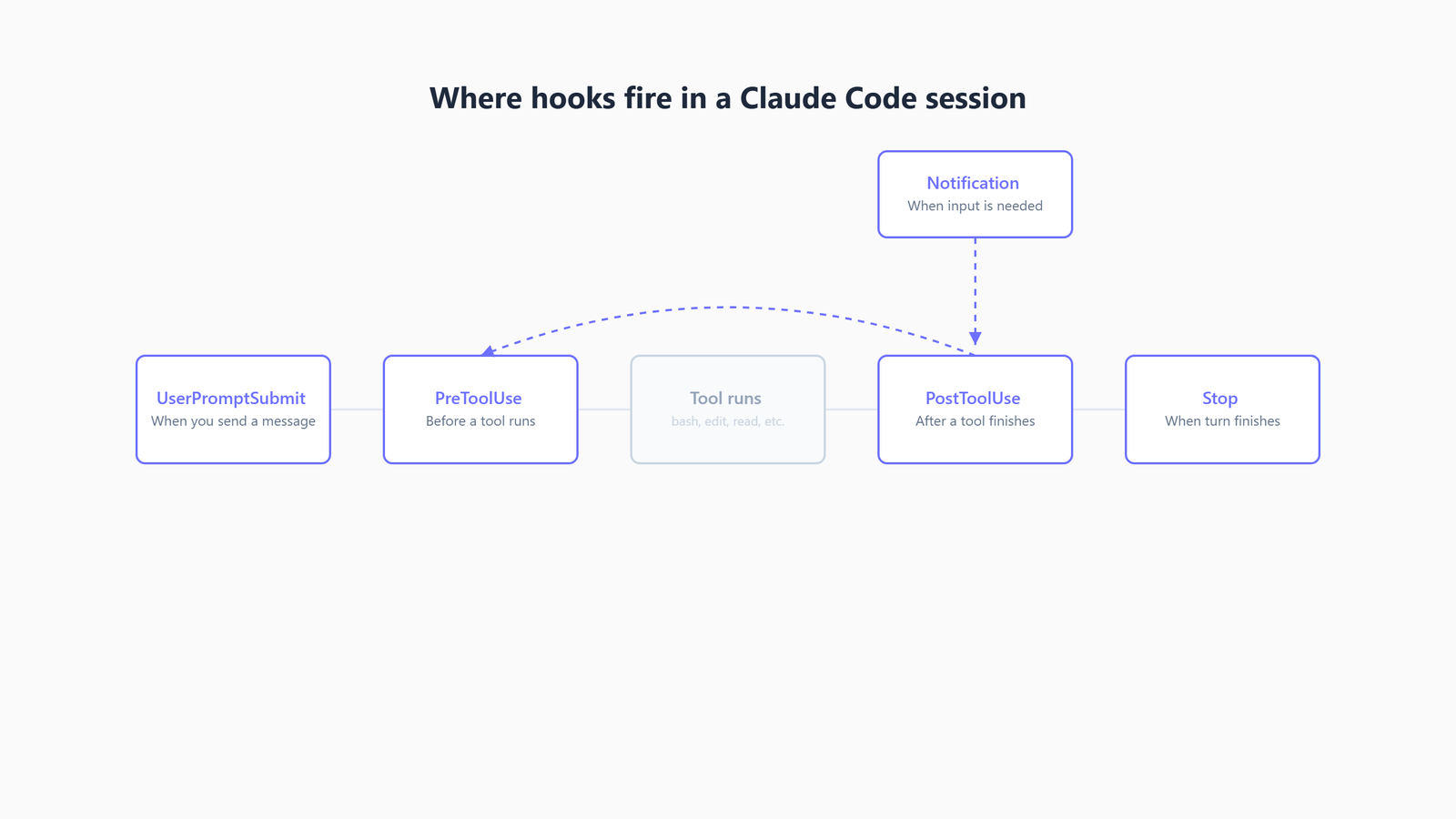
The mental model is really quite straightforward. Claude Code emits an event ("I'm about to run a bash command", "I just finished editing a file", "I'm done responding to you", etc). Your hook is a script that listens for one of those events and runs whatever shell command, HTTP endpoint, or small AI prompt you've wired up. The script gets the event details as JSON on standard input. It can do whatever it wants with that information - log it, transform it, block the action, or fire off a notification - then signal back to Claude with an exit code.
That's the whole feature. Everything else is which event you hook into, what your script does, and how it talks back to Claude. Put simply - do a thing when this thing is done.
There are thirty-three events available in Anthropic's reference, so far. Here’s the best 5:
The five events worth knowing
- `UserPromptSubmit` fires the moment you hit Enter (and you probably never knew), before Claude reads your message. Useful for silently appending the current state of your repo (git branch, last few commits) so each turn starts with the right context.
- `PreToolUse` fires after Claude has decided to use a tool but before the tool runs. This is the safety layer - block the action, rewrite its arguments, or feed a warning into Claude's context.
- `PostToolUse` fires after the tool finishes. The standard home for formatters, linters, test runners - anything that reacts to what Claude just did and needs to pursue a follow up course of action (like eval, QA).
- `Notification` fires when Claude wants your input (a permission to approve, a question to answer). Useful for catching the moments you've stepped away, although I have a habit of forgetting I’ve stepped away and 2 hours later we’re no further forward.
- `Stop` fires when Claude finishes its turn. The right place for completion notifications, cost logs, or anything you want at the end.
The rest cover highly specific needs - context truncation, sub-agent lifecycle, file watching, session bootstrap. Reach for them, as a more intermediate to advanced user for when you hit a problem they happen to solve. For the first few weeks of using hooks, the five above are plenty enough.
One settings.json, three levels of nesting
Hooks live in your settings.json file. The configuration shape is event > matcher (what to filter on) > handler (what to run). Here's the canonical Anthropic example, a PreToolUse hook that blocks rm commands:
{
  "hooks": {
    "PreToolUse": [
      {
        "matcher": "Bash",
        "hooks": [
          {
            "type": "command",
            "if": "Bash(rm *)",
            "command": "${CLAUDE_PROJECT_DIR}/.claude/hooks/block-rm.sh",
            "args": []
          }
        ]
      }
    ]
  }
}
Settings.json lives in three scopes. ~/.claude/settings.json is your personal global config. .claude/settings.json inside a repo is the team config, committed to git so everyone working on the project gets the same hooks. .claude/settings.local.json is the gitignored personal override for one project. Use $CLAUDE_PROJECT_DIR (an environment variable Claude Code exposes) when referencing scripts stored in your repo - it works regardless of which working directory Claude happens to be in. The Claude Code project setup guide covers the whole .claude/ folder shape if you've not wired up a repo this way before.
The bit that can trip you up
A shell-command hook signals back to Claude through its exit status. Exit 0 means success. Exit 2 means a blocking error: Claude stops, and your stderr text is fed back as a system message so the model knows why. Any other non-zero exit (the standard exit 1, a failed grep, a parse error) is treated as a non-blocking error. The action goes ahead anyway and Claude doesn't see your message.
The trap: exit 1 does not block. Only exit 2 blocks. Most developers reach for exit 1 because that's what feels natural in Unix. If your rm -rf guard is exiting 1, the guard isn't working. Test every blocking hook.
The structured alternative, for hooks that need finer control, is JSON output. Exit 0, print a JSON object to stdout, and you can return things exit codes can't: rewrite the tool's arguments before it runs, return a permissionDecision of allow / deny / ask, or inject additional context Claude sees on the next request. The basic exit-code path covers most starter use cases, though.
How does an MCP server fit into all this? Does it?
Claude Code has several customisation layers. They're easy to confuse, so it's worth being explicit:
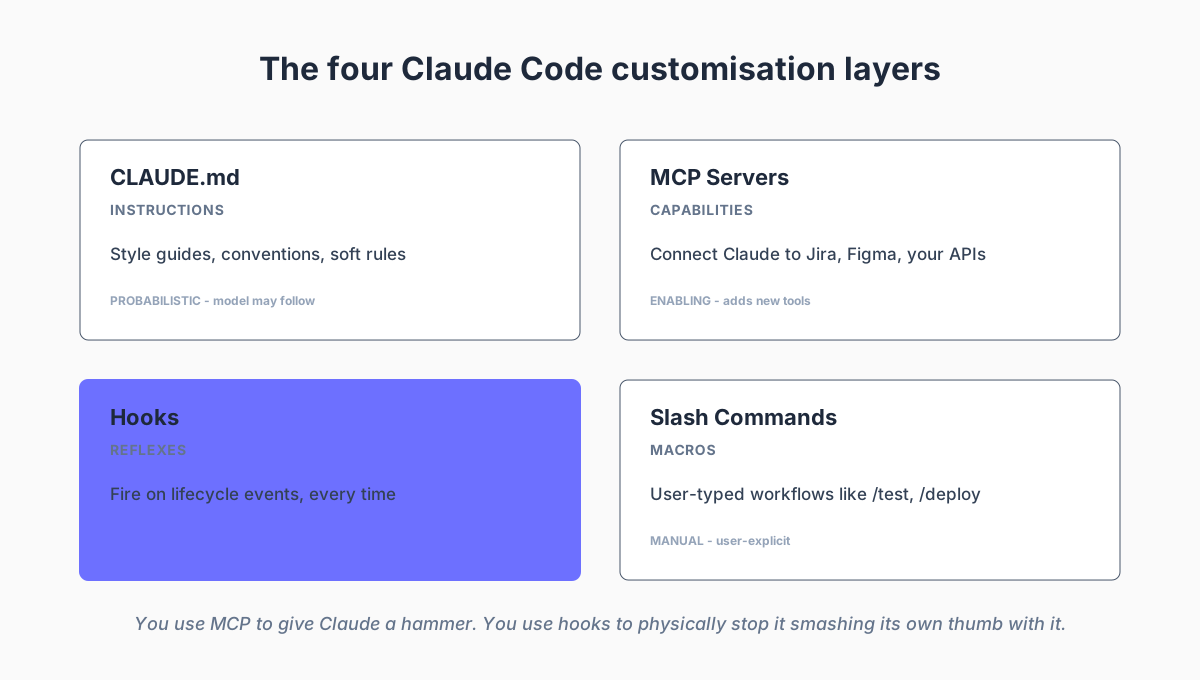
- `CLAUDE.md` holds your style guides and project conventions. The model usually follows them. Usually.
- MCP servers give Claude capabilities it doesn't otherwise have - querying Jira, reading Figma, hitting your internal APIs. They add new tools to the toolbox.
- Slash commands are workflows you trigger explicitly by typing
/testor/deploy. User-initiated macros. - Hooks are automatic, deterministic, event-driven. They fire whether the user or the model asks for them or not. That's the point.
The community one-liner: you use MCP to give Claude a hammer; you use hooks to physically stop Claude from smashing its own thumb with it. The short answer is no; different tools for different types of job.
The hooks users install first
You can write hooks from scratch in any language that runs on your machine. You probably shouldn't start there unless you’re a developer. The community has built and shared a lot of this work already - here's what to reach for first.
Auto-formatter on PostToolUse(Edit|Write)
The universal first hook. Anthropic's own video calls it "the most common hook"; every community guide agrees. Wire your project's formatter (Prettier, Black, Ruff, gofmt, rustfmt) to fire whenever Claude touches a file. About ten lines of config in settings.json. The payoff lands the moment Claude makes its first edit: no more review nits about indentation or weird syntax, no more pre-commit hook complaining at you, and perhaps even a right-first-time compile.
The dangerous-bash blocker
In October 2025 a developer watched Claude Code run rm -rf on their home directory (GitHub issue #10077, since referenced by half the community write-ups). A PreToolUse handler that pattern-matches the bash command, exits 2 on anything in your "absolutely not" list, and explains why in stderr would have stopped it. Baseline patterns to consider: rm -rf on directories you care about, git push --force to main, edits to anything under .secrets/ or .env*, and curl | sh.
Dippy from Lily Dayton is the most thoughtful build of this pattern in the community: AST-based parsing to auto-approve safe bash commands while prompting you for destructive ones. Solves permission fatigue without disabling safety entirely. If you find yourself wanting to bypass permissions because the approval prompts are constant, install Dippy instead.
As an aside I have never had anything like this kind of issue - I work in a local repo, claude needs permission to access external files of any sort - to me these are horror stories where the user has decided the model is quite ready to do all of their work for them.
Completion notifier on Stop
Useful for long agentic runs where you'd rather step away than babysit the terminal. CC Notify is the polished community build: desktop notifications, one-click jumps back to VS Code, task duration tracking. Or build your own with three lines of config plus notify-send (Linux), osascript (macOS), or a Slack webhook (cross-platform).
Claudio goes the other direction: OS-native sounds via hooks. Greg Baugues at haihai.ai/hooks does the same thing with a more theatrical Star Trek bridge soundscape - bleeps for tool calls, a British voice actor saying "creating pull request", a sad cat meow on Stop. Greg's opening line is the most useful one-sentence introduction to hooks anyone has written: "I'm going to use this to make Claude meow. I've always wanted a cat, but I'm allergic."
Run his setup for a week and your terminal turns into the bridge of the USS Enterprise. The point isn't the sounds - it's that hearing the event stream teaches you faster than any reference page. You learn how often PreToolUse fires for bash commands (a lot), which events are rare, and when Claude is doing work versus waiting on you. After that week, the intuition for where to put a real productivity hook is built in.
Related-tests runner on PostToolUse(Edit|Write)
If your test suite has a "related to this file" mode (vitest related, jest --findRelatedTests, pytest --picked), wire it in. Claude makes a change, the test fails, Claude notices and tries again in the same turn while you're still reading the explanation. One thing to watch out for: this only works if your test suite is fast and well-isolated. A thirty-second hook on every file edit drags the session to a crawl, so gate it on file path and bail early if the related-test set is empty.
TDD Guard from Nizar Selander goes one step further - monitors file operations in real-time and blocks changes that violate TDD principles. One for teams serious about test-first.
Code-style enforcement
TypeScript Quality Hooks wires TypeScript compilation, ESLint auto-fixing, and Prettier formatting into the post-tool-use event with SHA256 config caching for sub-five-second runs. The fcakyon collection at fcakyon/claude-codex-settings is broader - a curated set of hooks for code quality and tool-usage regulation (forcing Tavily over WebFetch, for example).
For Houtini-relevant edge cases like keeping output in British English even when the model defaults to American spellings, Britfix is worth installing. Niche, but the kind of "small thing that compounds" hook that's hard to write from scratch.
Don't write your own from scratch
The single best resource for "what hooks exist that I might want to install" is awesome-claude-code - 54,000+ stars, a curated CSV of skills, hooks, slash commands, status lines, and developer tooling. The Hooks section lists a dozen-plus named projects (most of the ones above came from there). The list updates frequently as the community ships new things.
A few specific entries from the awesome list worth knowing about as a beginner, beyond the categories already covered:
- cchooks by GowayLee - a lightweight Python SDK for writing hooks. If your hook logic gets beyond ten lines of bash, this is the next step up. Good docs.
- claude-hooks by John Lindquist - TypeScript equivalent, same idea.
- parry by Dmytro Onypko - a prompt-injection scanner for hook inputs and outputs. Worth knowing about if your hooks process untrusted text.
- Plannotator by backnotprop - intercepts
ExitPlanModeand gives you a visual plan-review UI so you can edit Claude's plan before it executes. The kind of thing you'd never write yourself but is great once you see it.
Plus the broader collections worth bookmarking:
- Anthropic's hooks reference and the companion Get started walkthrough - the source of truth for events, JSON schema, and exit-code semantics.
- disler/claude-code-hooks-mastery - the deepest community reference, with opinionated implementations and advanced patterns (chained hooks, hooks that talk to MCP servers).
- karanb192/claude-code-hooks - the closest thing to a dotfiles collection.
The security bit nobody mentions until something goes wrong
Hooks run with your user's full shell access. They execute whatever command you put in settings.json, or worse, whatever command someone else put in a config you pasted from the internet. Earlier this year a set of malicious npm packages were caught backdooring Claude Code sessions by hijacking the SessionStart event. Five packages, typosquatted on real names, with hidden binaries that fired on every session start.
Three rules that fix the obvious failure modes:
- Read the hook command before you paste it into settings. If you can't understand what it does, don't run it.
- Pin the version of any npm package you install (
some-hook-package@1.4.2, notsome-hook-package). Stops the supply-chain attack where the malicious version ships as the next patch release. - Treat hook packages the same way you'd treat any other code that runs as you on your machine. If you wouldn't run a random script from the internet, don't paste it into your hooks config.
The npm incident is the kind of thing you only worry about after it happens to someone else. Worth five minutes of caution now to avoid being the someone-else.
Where to start
Pick one of these and install it before lunch:
- The auto-formatter if your team has style nits about Claude-written code. Ten minutes, eliminates an entire category of review noise.
- CC Notify or Claudio if you're running long agentic tasks and want to step away from the terminal. Twenty minutes to set up, immediately useful.
- Dippy if you've been bypassing permission prompts because they're constant. Most people end up in YOLO mode because of friction; Dippy removes the friction without removing the safety.
Whichever you pick, run it for a week before adding a second. Hooks compound: each one teaches you something about how Claude moves through the loop, which makes the next one easier to write. The point of hooks isn't to assemble the perfect setup on day one - it's to give Claude Code a few automatic reflexes for the things you'd otherwise do manually, then forget they exist until they earn their keep.
Continue reading.
- Beginner's GuidesClaude Desktop System Requirements (2026): Minimum & Recommended Specs
- Beginner's GuidesClaude Code System Requirements (2026): Specs, Setup, Gotchas
- How-to GuidesOpenCode vs Claude Code: Setting Up OpenCode Desktop on Windows
- How-to GuidesHow to Connect Google Trends to Claude Code
- ExplainerClaude Code Skills: What They Do and Which Ones to Use
- How-to GuidesCLAUDE.md: How to Write One That Stays Lean