Best GPU for Local LLMs in 2026: What I'd Buy and Why
In today's post I'm going through the best GPU for running LLMs locally, and why memory bandwidth and VRAM decide it. I start with the cheapest VRAM you can buy and the cheapest 32GB cards, then the modded 48GB RTX 4090s I run, and finish on when an RTX PRO 6000 or a DGX Spark makes more sense.
 Richard Baxter AI Ops & Marketing Engineer
 On this page
- Why memory bandwidth decides the best GPU for LLMs
- Check the quant format before you buy
- How much VRAM you need
- Will your model fit your card?
- The cheapest VRAM for local LLMs: a used RTX 3090
- Modded RTX 4090 48GB: the one I bought, twice
- The cheapest 32GB GPU for LLMs: Arc Pro B70, then the RTX 5090
- High budget: RTX PRO 6000 Blackwell
- DGX Spark: bigger, slower, one box
- What I'd buy
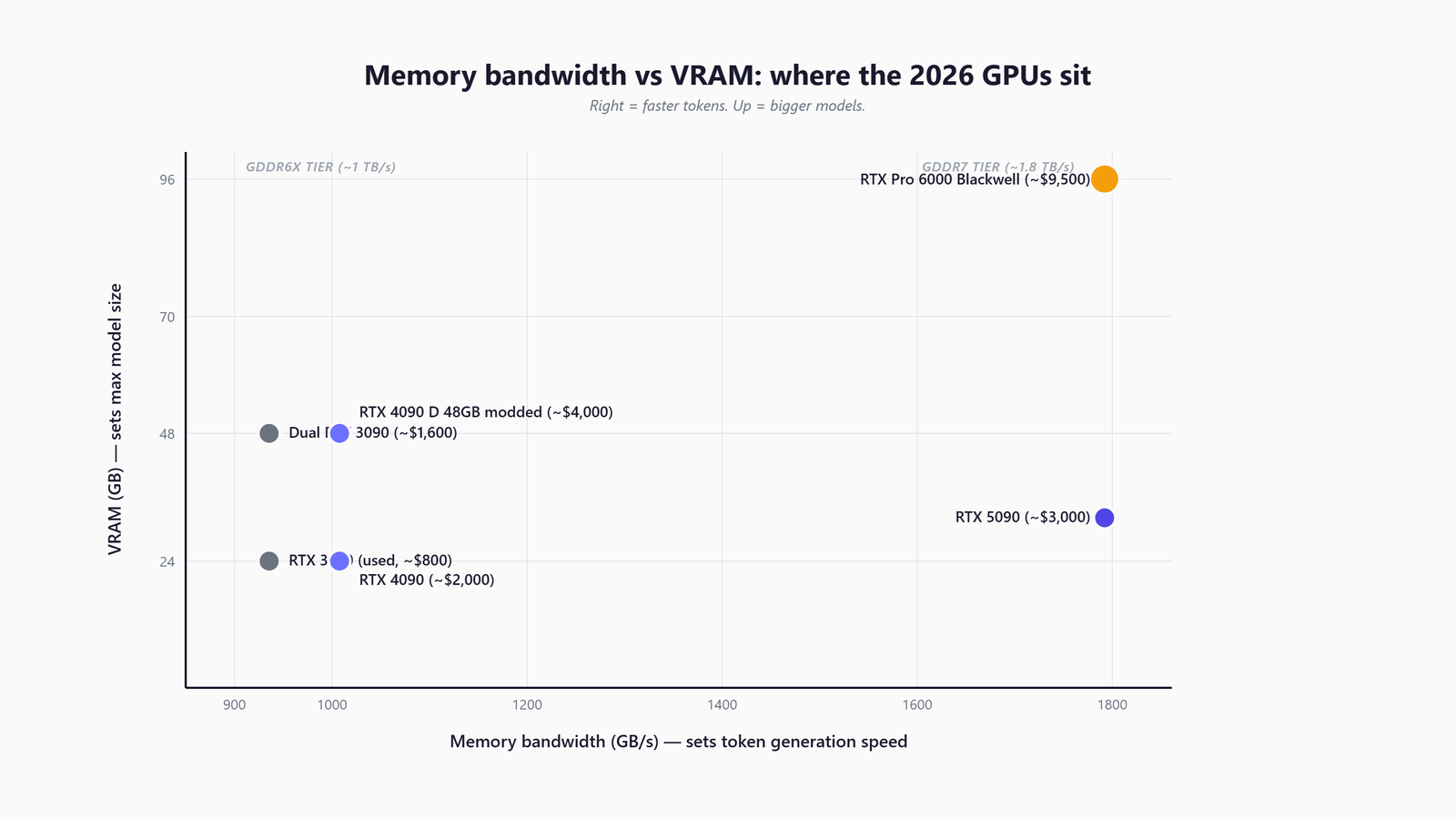
Which GPU should you buy to run LLMs locally? If you're just getting started, the answer comes down to two numbers on the spec sheet, and which card is newest counts for a lot less.
The best GPU for local LLMs has at least 24GB of VRAM, and a used RTX 3090 is where I'd start learning. A modded 48GB RTX 4090 is the minimum I'd call a serious local-LLM card, and it's what I run. If the budget is high, buy an RTX PRO 6000 Blackwell. If you'd rather have a bigger memory pool and can live with slower output, a DGX Spark does that in one box. And if you want a whole machine rather than a card, my AI PC guide covers the builds.
I've run local models on a lot of GPUs: the RTX 30-series through the mining years, a Threadripper workstation with several RTX 4500 Ada cards, a 3090 in my development machine for years, and since July, a pair of modded 48GB RTX 4090s. There are two specs that decide the purchase. Memory bandwidth is how fast the card reads its own memory, measured in GB/s, and it sets how fast tokens come out. VRAM is the memory on the card, and it sets how big a model fits.
Quick Navigation
Bandwidth |
Quant format |
How much VRAM |
Fit calculator |
Cheapest VRAM |
Modded 4090 48GB |
Cheapest 32GB |
RTX PRO 6000 |
DGX Spark |
What I'd buy
Why memory bandwidth decides the best GPU for LLMs
A model writes its answer one token at a time, and a token is a word or a piece of a word. That writing phase is called decode. The weights are the billions of numbers a model is made of, and for every token the card reads them out of VRAM. So the speed ceiling is simple arithmetic: bandwidth divided by the bytes read per token.
A dense 70B model (dense means it reads every one of its weights for every token) is about 40GB of weights quantised to 4-bit. My modded 4090 reads its memory at 1,008 GB/s, which gives a ceiling of about 25 tokens per second (tok/s). I measured 23.2 tok/s on Llama-3.3-70B, about 92% of what the bandwidth allows. A card with more TFLOPS (raw compute) and the same bandwidth would barely move that number.
| GPU | VRAM | Memory bandwidth | Power |
|---|---|---|---|
| RTX 3090 (used) | 24GB GDDR6X | 936 GB/s | 350W |
| RTX 4090 | 24GB GDDR6X | 1,008 GB/s | 450W |
| Modded RTX 4090 48GB | 48GB GDDR6X | 1,008 GB/s | 450W |
| Intel Arc Pro B70 | 32GB GDDR6 | 608 GB/s | 230W |
| RTX 5090 | 32GB GDDR7 | 1,792 GB/s | 575W |
| RTX PRO 5000 Blackwell | 48GB GDDR7 | 1,344 GB/s | 300W |
| RTX PRO 6000 Blackwell | 96GB GDDR7 | 1,792 GB/s | 600W |
| DGX Spark (for contrast) | 128GB unified | 273 GB/s | 140W chip |
The exception is prefill, the step before the first token comes back, when the model reads your whole prompt. Prefill leans on compute rather than bandwidth. On a short chat prompt you won't notice it. On a long document, or an agent that re-sends a big context on every turn, you will. My own models show the trade. The 4-bit builds I run decode far faster than 8-bit ones, but on a long prompt the model hasn't seen before, their prefill drops to about 1.8k tok/s, against 3.9k for the 8-bit builds.
I first learned how much bandwidth counts on workstation cards. The RTX 4500 Ada cards in my old Threadripper rig ran at 432 GB/s each, less than half a 3090's 936 GB/s, and you felt the bandwidth ceiling on every long generation.
Check the quant format before you buy
The model file you download matters as much as the card. On the same GPU, the quantisation format (how the weights are compressed into fewer bits) can roughly double decode speed. AWQ is a 4-bit integer format. FP8 stores each weight in 8 bits.
On my 48GB 4090, Qwen3.8-27B ran at 35.8 tok/s as AWQ and 16.5 tok/s as FP8. Llama-3.3-70B in AWQ did 23.2 tok/s on one card, and the FP8 build managed 19.2 split across two.
That isn't because Ada (the RTX 40-series generation) can't run the newer formats. I probed it in August, and the engine I serve my models with, vLLM, permits the newer 8-bit and 4-bit formats on these cards: block-FP8, NVFP4 and MXFP4. Permitted doesn't mean fast, though, and the speed varies from one format to the next. MXFP4 is one that runs well: gpt-oss-120b ships in it and runs natively on my pair at 153 tok/s. So check the format of the models you plan to run, and look for a measured number on your card, before you buy. Every measurement is in the runbook's quantisation section.
How much VRAM you need
VRAM decides what fits, and what fits is more than the weights. You need room for the weights plus the KV cache, which is the memory the model keeps of the conversation so far, and it grows with the context length you ask for. I've written up how the KV cache works separately, including how to size it.
If you put a 70B on one 48GB card, the weights fit at about 40GB, but that leaves room for only around 20-23k tokens of context. And the parameter count won't tell you how big a model is. gpt-oss-120b is 65.2GB of weights, while the "4-bit" Qwen3.8-27B is 27.7GB, about double what 4 bits a weight would give.
Qwen3.6-27B, the model I run every day, needs far less room for context. It keeps a full KV cache on only one in four of its layers, which is how its whole 262k context fits in about 8.6GB on my card.
| VRAM | What fits (4-bit weights plus a working context) | Cards |
|---|---|---|
| 24GB | 7B to 32B models at 4-bit, with tight context on the bigger ones | Used RTX 3090, RTX 4090 |
| 32GB | 32B-class models with longer context | Arc Pro B70, RTX 5090 |
| 48GB | A 70B at 4-bit on one card, but only about 20k tokens of context | Modded RTX 4090 48GB, RTX PRO 5000 |
| 96GB | gpt-oss-120b with its full 131k context (92.7GB); 70B with long context | Two modded 48GB cards, RTX PRO 6000 |
Will your model fit your card?
Before you buy a card for a particular model, check that it fits. The calculator below adds the weights to the KV cache at the context you want and sets the total against the card. The presets are models I've measured on my own rig, and the layer, head and dimension fields come from a model's config.json if you want to try your own. It's also on the benchmark runbook.
Your setup
The model
KV cache needs three numbers from the model's config.json (probe, don't assume):
Weights are this model's measured value. The layers / KV-heads / head-dim are still the worked-example defaults - swap in this model's own numbers from its config.json for an accurate KV figure.
Will it fit?
- Weights
- —
- KV cache at this context
- —
- Overhead (activations, graphs)
- —
- Total needed
- —
- Usable VRAM (0.92 util)
- —
Largest context that fits on this setup: —
The 12 measured models (weights + the context each served on our rig)
| Model | Weights GB | Served ctx | Cards | KV |
|---|---|---|---|---|
| LFM2.5-1.2B-Instruct | 2.3 | 33k | 1 | fp8 |
| GLM-4.7-Flash-GPTQ | 16.6 | 33k | 1 | auto |
| Ternary-Bonsai-27B-AWQ | 18.7 | 33k | 1 | fp8 |
| Qwen3.8-27B-AWQ | 27.7 | 33k | 1 | fp8 |
| Qwen3.8-27B-FP8 | 30.9 | 33k | 1 | fp8 |
| Devstral-Small-2-24B-AWQ | 32.1 | 33k | 1 | fp8 |
| Nemotron-3.5-Lightning-30B-FP8 | 32.3 | 33k | 1 | fp8 |
| Llama-3.3-70B-AWQ | 39.8 | 21k | 1 | fp8 |
| Llama-4-Scout-INT4 | 64.9 | 33k | 2 | fp8 |
| gpt-oss-120b-official | 65.2 | 131k | 2 | fp8 |
| Llama-3.3-70B-FP8 | 72.7 | 33k | 2 | fp8 |
| NVIDIA-Nemotron-3-Super-120B-A12B-AWQ-4bit | 80.7 | 33k | 2 | fp8 |
Weights are measured on our own rig (2x modded RTX 4090 48GB, vLLM 0.26.0). KV cache is computed from the architecture you enter - the number no spec sheet prints - so the calculator is only as right as those three fields; read them from the model's config.json. A 2GB overhead margin and the 0.92 utilisation we serve at are both applied.
The cheapest VRAM for local LLMs: a used RTX 3090
The cheapest way into 24GB is still a used RTX 3090. It has 24GB of GDDR6X at 936 GB/s, which is why it's worth buying a card from 2020.
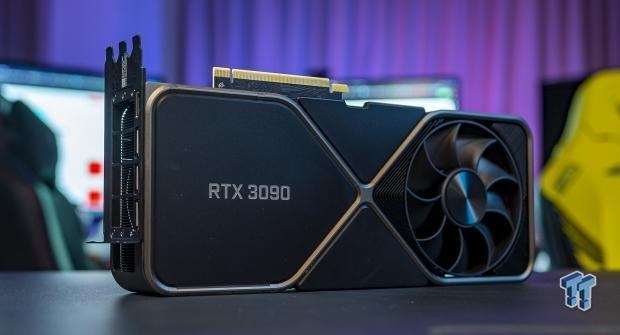
Prices have gone up, though. At the time of writing, late September 2026, a used 3090 costs about £750-925 in the UK. In the US it's roughly $1,050-1,680, and the average of $1,343 is up 11% in 90 days, so it's no longer an under-$1,000 card there. In the UK it's still the cheapest VRAM you can buy, at around £31-39 per GB.
I know these cards well. I mined on three of them, replaced the thermal pads on more 3090-class cards than I care to remember, and ran one in my development machine for years for DeBERTa scoring, Granite embeddings and models in the 7B-13B range. They run hot and draw 350W, so cap the power with nvidia-smi, the command-line tool that comes with NVIDIA's driver. In a controlled test on my 4090s, capping the power made no measurable difference to decode speed on dense models. I'd expect the same on a 3090, though I haven't measured it.
A used 24GB RTX 4090 is about £2,100 in the UK and $2,500-3,000 in the US, and it's reached the end of the line as a new card. It's 1,008 GB/s rather than 936, but at that money, buy the 48GB version instead. The AMD RX 7900 XTX is another 24GB option, at about $930-1,130 new in the US. I haven't run one.
Modded RTX 4090 48GB: the one I bought, twice
The modded RTX 4090 48GB is a 4090 rebuilt with double the memory. The memory chips go on both sides of the board, the card gets a blower cooler, and it runs standard NVIDIA drivers. It keeps the 4090's 1,008 GB/s, so it's the same speed as a 4090 with twice the VRAM. I call mine 4090Ds; nvidia-smi reports them as an RTX 4090.
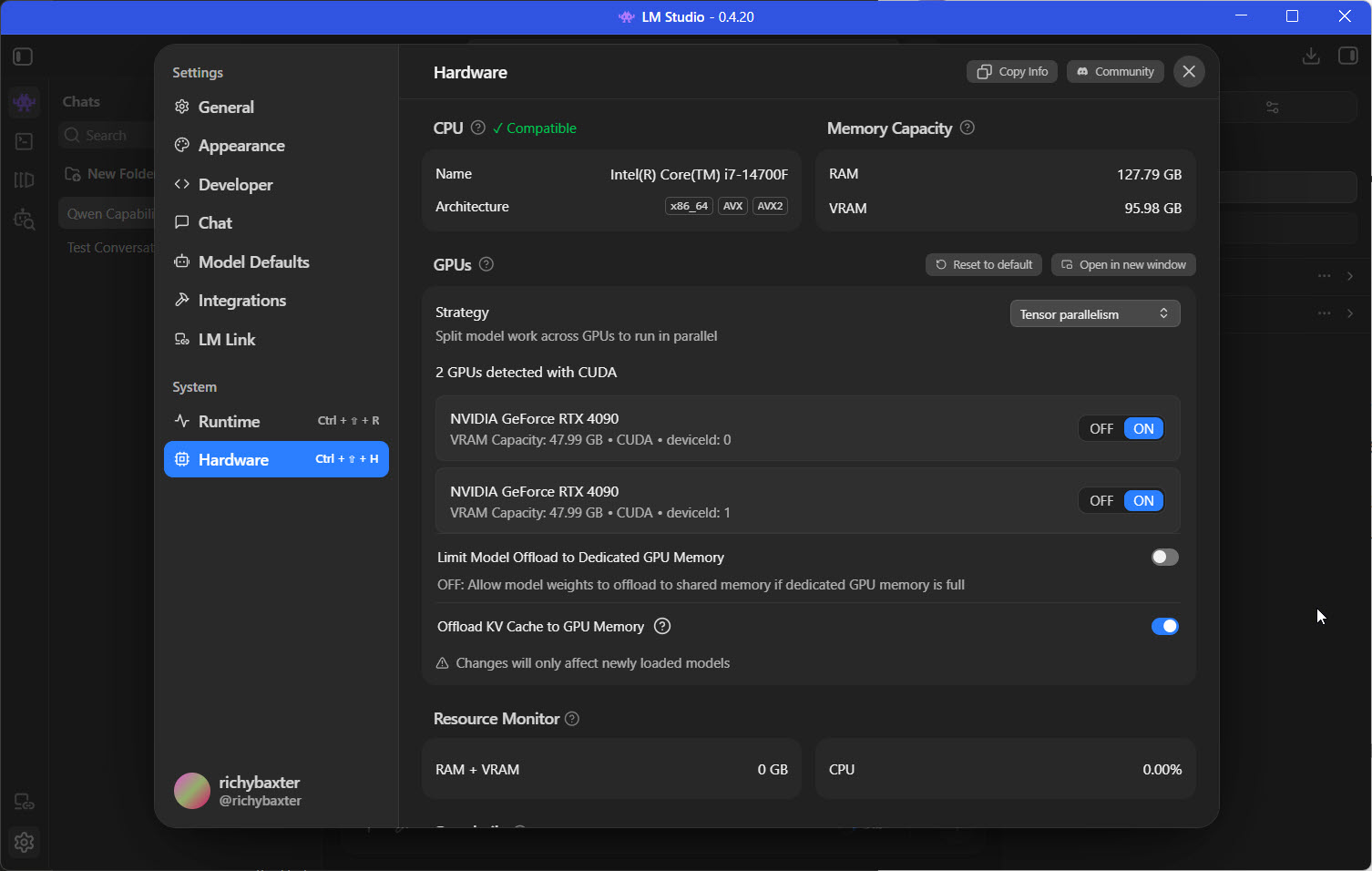
I skipped the stock 4090 entirely. By the time I outgrew 24GB, the 48GB versions existed, and doubling the VRAM for similar money was the obvious move. I paid about £3,100 a card, £6,200 for 96GB across two, which works out at roughly £65 per GB. Set that against anything carrying a warranty at that capacity and it's absurd value. A current Hong Kong listing is about $3,960 before import costs.
Some sellers offer a different "4090D 48GB", with GDDR6 on a 256-bit bus (a narrower path to the memory). It looks like my card, but the memory is slower and the bandwidth isn't published, so decode will be slower. Mine are GDDR6X on a 384-bit bus.
Both cards run capped at 330W with the core clock locked, and this is what they do at that cap:
- Qwen3.6-27B, my daily model, runs at 47 tok/s.
- A 35B MoE does 118.5 tok/s. MoE is short for mixture of experts, and a model built that way reads only part of its weights for each token.
- gpt-oss-120b runs across both cards at 153 tok/s, with its full 131k context in 92.7GB.
The risk is that these cards are built on refurbished GPU chips and carry no NVIDIA warranty, so you rely on the modder's reputation instead. I did my homework, accepted the risk profile, and would do it again - but I would not recommend it to anyone who needs a warranty.
Two cards also retired one of my own rules. I used to say never split a model across two cards if it fits on one. Then I measured it: tensor parallelism, which splits each layer across both cards, took a 27B from 34.4 to 48.9 tok/s, 42% faster with one request at a time. I haven't tested it with several requests running together yet. My second card sits on a PCIe x4 slot, which means it gets a quarter of the lanes of a full slot. On my rig that makes no difference to single-card inference, and the AI PC guide covers what it means for a build.
The cheapest 32GB GPU for LLMs: Arc Pro B70, then the RTX 5090
If 32GB is your target, the cheapest new card is Intel's Arc Pro B70 at about £1,290. It has 32GB of GDDR6 with ECC (error-correcting memory) and draws 230W. The catch is bandwidth. At 608 GB/s it's about a third slower than a 3090, which means it buys capacity rather than speed. I'm going on Intel's spec sheet for all of that, since the B70 hasn't been on my bench.
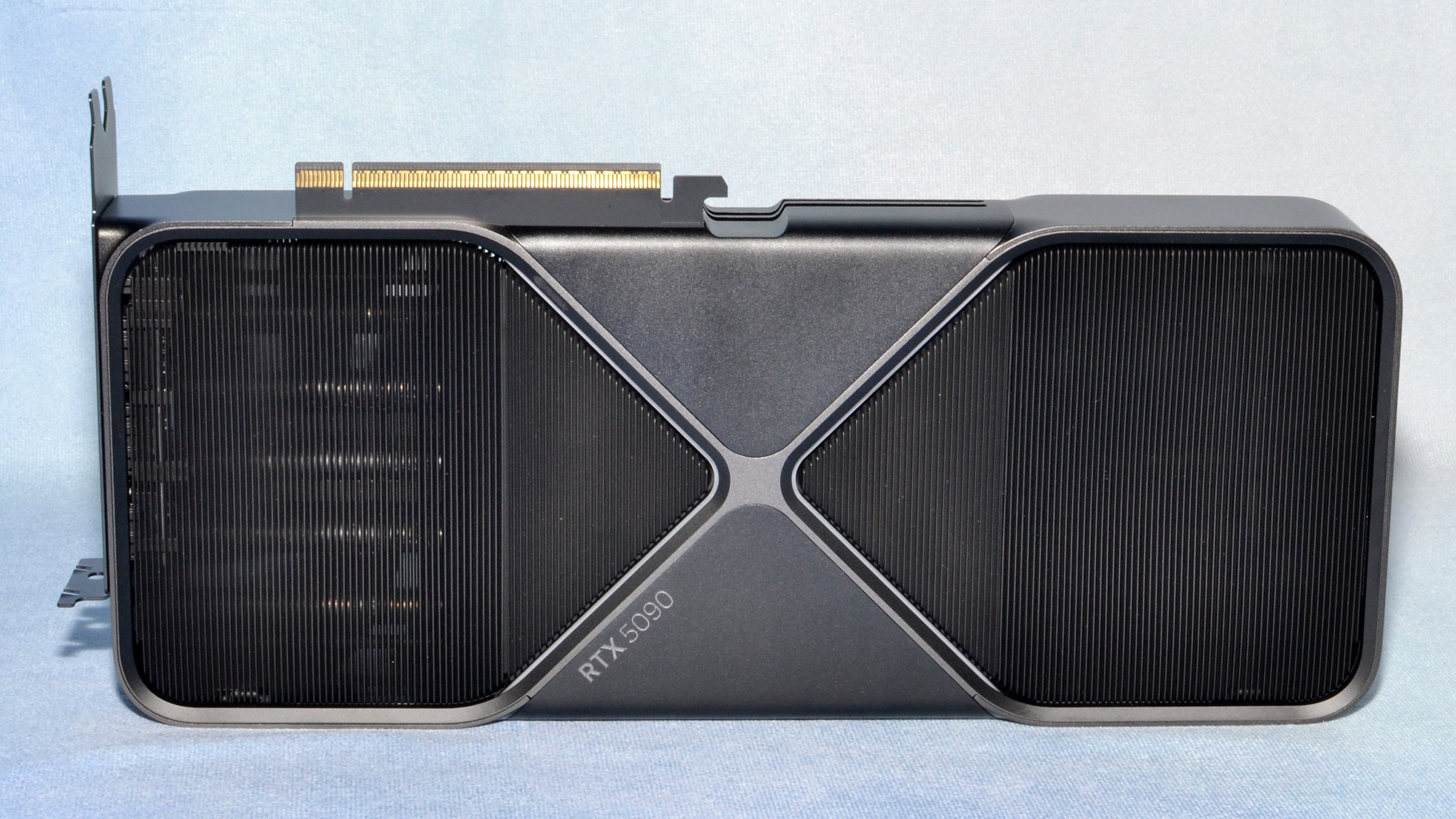
The RTX 5090 is the fast 32GB option. It has 32GB of GDDR7 at 1,792 GB/s, 78% more bandwidth than a 4090, and draws 575W. Its launch price of £1,799 ($1,999) is long gone. At the moment, the cheapest in-stock card at Scan is £4,299.98, and the cheapest in the US is $4,999. That's about £134 per GB of VRAM.
I looked hard at the 5090 and bought the modded 4090 instead. By July it had already climbed from about £3,000 towards £4,000, and for AI inference I think it's a bad call. It's a huge, power-hungry card with only 32GB, so you're heading towards Blackwell PRO money for two-thirds of the VRAM of a 48GB card. If your daily model fits in 32GB and single-user speed is all you want, it's the fastest consumer card you can buy. For anything bigger, the modded card is the better buy. I took capacity.
High budget: RTX PRO 6000 Blackwell
The card I'd love to own is the RTX PRO 6000 Blackwell. It puts 96GB of GDDR7 with ECC on one card, with the same 1,792 GB/s as a 5090, and draws 600W. It's also very expensive. Scan currently lists it at £14,259.96, and NVIDIA's US list price is $16,000, up from $8,565 at launch.
Next to it, my two modded 48GB cards at £6,200 give the same 96GB for about 43% of the price of one PRO 6000. That's why I run the pair, and it's the better buy as long as you can live with two cards, no warranty and no ECC.
| Setup | VRAM | Cost, late September 2026 |
|---|---|---|
| Two modded RTX 4090 48GB (what I run) | 96GB | £6,200 when I bought |
| One RTX PRO 6000 Blackwell | 96GB | about £14,260 |
| Two RTX 5090 | 64GB | about £8,600 |
| Two RTX PRO 6000 Blackwell | 192GB | about £28,500 |
For speed, LMSYS measured the PRO 6000 at 215 tok/s on gpt-oss-20b in their DGX Spark review, against 49.7 on the Spark itself.
If you want 48GB with a warranty, look at the RTX PRO 5000 Blackwell. It has 48GB of GDDR7 at 1,344 GB/s and draws 300W, but at £8,240 it costs about 2.7 times what I paid for a modded card.
DGX Spark: bigger, slower, one box
The DGX Spark goes the other way. It's a small computer with 128GB of unified memory (memory the CPU and GPU share) for £4,699, or $4,699 in the US. That's more memory than my pair, in one box that runs on a 140W chip. The Spark pays for that in bandwidth: it reads its memory at 273 GB/s, and one 4090 has about 3.7 times that.
In decode, LMSYS measured the Spark at 2.7 tok/s on Llama 3.1 70B in FP8. My single card does 23.2 tok/s on Llama-3.3-70B in AWQ, although the format accounts for part of that gap. On gpt-oss-120b the Spark manages about 35-60 tok/s on llama.cpp, and NVIDIA quotes 55; my pair does 153 on vLLM. Those are different engines, so it isn't a like-for-like comparison, but my pair still comes out about 2.5 to 4.4 times faster.
The Spark wins on capacity, power and price. For £4,699 you get a whole computer, where my two cards cost £6,200 before you've bought the PC to put them in. If you want a bigger model on the desk and can wait for the tokens, it makes sense. I cover it in more depth in my DGX Spark guide, and Apple and Strix Halo are in the AI PC guide.
What I'd buy
| If you want | What I'd buy | Price, late September 2026 |
|---|---|---|
| The cheapest VRAM to start with | A used RTX 3090 (24GB) | £750-925 used |
| The cheapest 32GB | Intel Arc Pro B70 | about £1,290 |
| The fastest 32GB | RTX 5090 | from £4,300 |
| A serious local-LLM card | Modded RTX 4090 48GB (what I run, two of them) | about £3,100 a card when I bought |
| 48GB with a warranty | RTX PRO 5000 Blackwell | about £8,240 |
| 96GB on one card | RTX PRO 6000 Blackwell | about £14,260 |
| Bigger and slower, in one box | DGX Spark (128GB) | £4,699 |
There are three mistakes I'd steer you away from. Buying on TFLOPS is the first, because the GB/s column is what sets decode speed. Downloading the wrong quant format can lose you half the speed of the card you paid for. And running at full power wastes electricity, since on dense models a cap costs decode nothing. On my cards the cap and the clock lock (nvidia-smi -lgc 0,2200) go in a logon task, because a reboot quietly undoes both.
Should you rent instead? If you only need a big model occasionally, for a monthly fine-tune or the odd batch job, renting a cloud GPU by the hour beats owning one. A card earns its keep when the model runs every day, which is how I use mine. If that's not your pattern yet, rent first, and buy when the meter tells you to.
When you're ready to go further, the benchmark runbook has every number from my rig, the KV cache explainer covers sizing your context, the AI PC guide covers the rest of the machine, and LM Studio is the easiest way to get your first model running.
Continue reading.
- MCPWebMCP explained: what the agent-ready web means for marketers
- AI at WorkAI isn't taking the jobs, it's taking the boring bits
- How-to GuidesHow to Connect Claude to Shopify with MCP (Dev MCP and Storefront Catalog)
- Beginner's GuidesWhat is n8n? A Beginner's Guide to Workflows, Pricing and Self-Hosting
- How-to GuidesHow to Use AI for Market Research with Claude
- How-to Guidesn8n MCP: How to Connect Claude Code to n8n and Use Its API Safely