What is an MCP server? The Model Context Protocol explained
An MCP server gives an AI assistant like Claude tools and data from outside itself, through one open standard. In today's guide we're taking a closer look at how it works, using the MCP servers we build and use every day at Houtini as the examples, and at what changed in the July 2026 spec.
 Richard Baxter AI Ops & Marketing Engineer
 On this page
When we first started working with AI, it was a heavily text-only experience. And it was just so limiting. Then all of a sudden we got Claude Desktop, and with it we got MCP compatibility. Overnight, we started to realise that our chat sessions could actually interact in the real world, with the software as a service applications we use every day. We could pull data from whatever services we were using. The adoption, I think, picked up really quickly, and within six to twelve months pretty much everybody had an MCP.
So much of what I do at Houtini depends on MCPs now, including the ones that belong to us. houtini-lm and Gemini MCP are probably our two biggest and most important.
So, what is an MCP server? An MCP server is a small program that gives an AI assistant tools and data from outside itself, through one open standard. That standard is the Model Context Protocol, which is where the MCP comes from. Claude asks the server to do something, the server does the work (reads your Search Console data, makes an image, hands a task to another model), and the result comes back into your chat. Anthropic introduced MCP in November 2024. The idea was that you'd build a connection to a service once, as a server, and any application that speaks MCP could use it.
Quick Navigation
What an MCP server is |
MCP or the command line |
Local and remote servers |
More than a connector |
MCP Apps |
Who has adopted MCP |
What changed in 2026 |
Is it safe? |
How to start |
Questions people ask
What an MCP server is
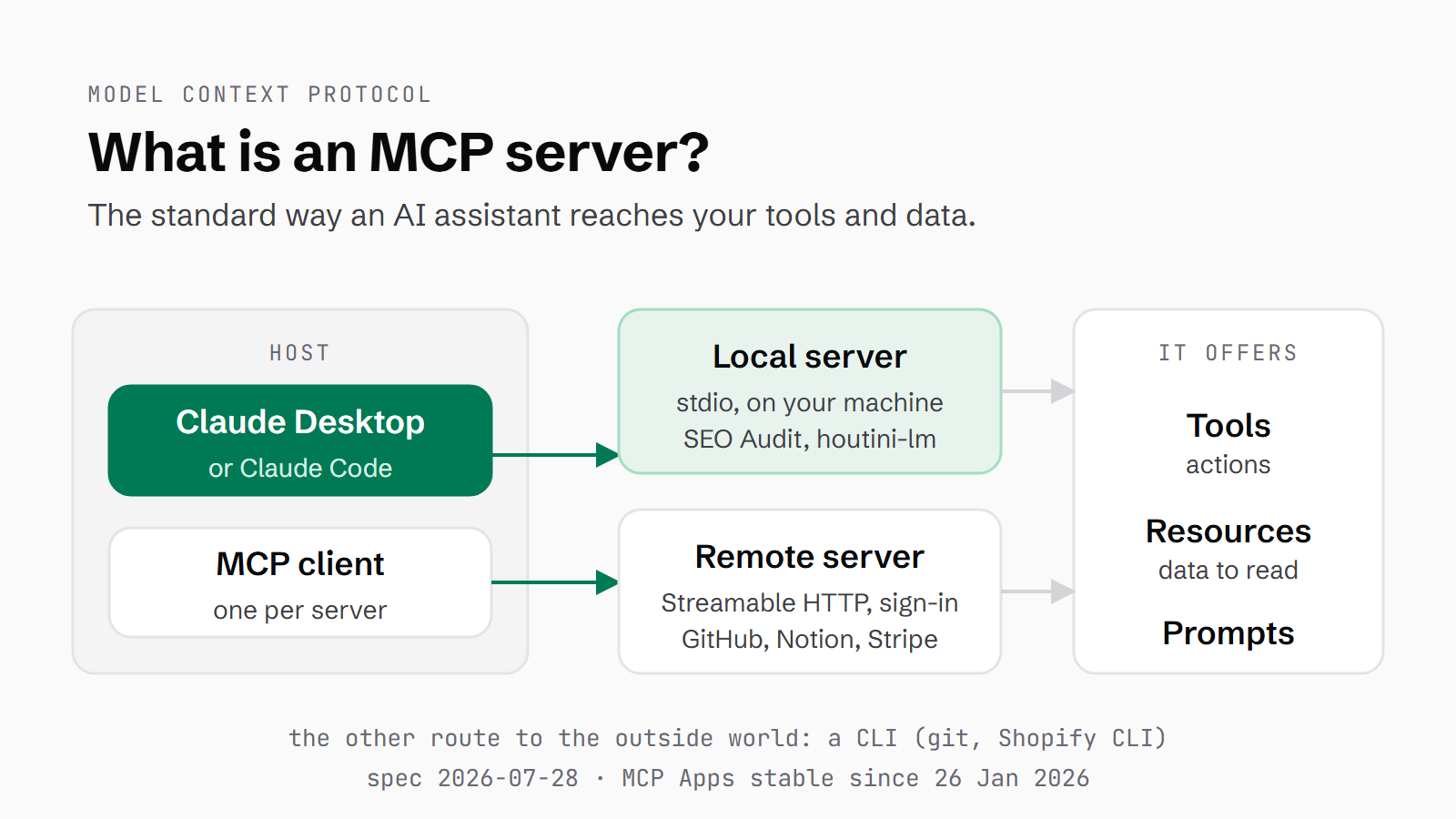
There are three parts to it. The host is the AI application you're working in, like Claude Desktop or Claude Code. Inside the host sits an MCP client, which looks after the connection to a server. And the server is the program on the other end that does the work.
A server can offer three kinds of thing. Tools are actions the model can take. For example, Gemini MCP has a tool called generate_image that takes your prompt and hands back an image made by Google's Gemini. Resources are data the model can read without taking an action. houtini-lm has one: a small set of session metrics showing how much work has been handed off so far. It also has a stats tool that returns much the same numbers, but as an action.
Prompts are templates the server offers up, ready-made instructions you can pick from in the client. Neither Gemini MCP nor houtini-lm offers any, as it happens. Gemini MCP does have a prompt assistant, but that's built as a tool, not an MCP prompt.
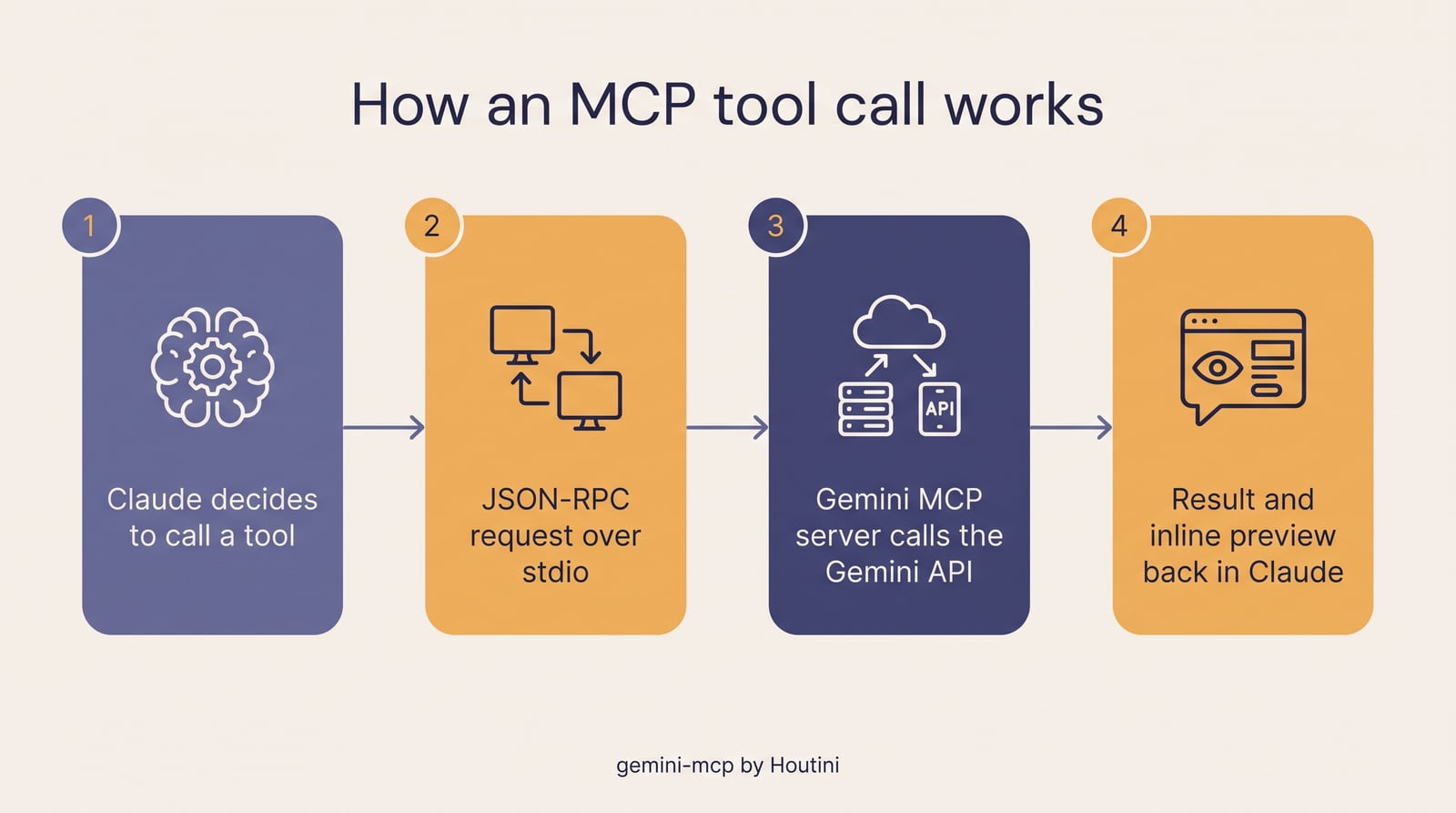
How an MCP tool call works, in four steps, made with Gemini MCP's generate_image tool (Nano Banana Pro, Google's Gemini image model).
MCP or the command line
The important ground truth underneath all of this is that your agent can interact with the outside world in one of two ways: via MCP, which is what this article is about, or by running a CLI. A CLI is a command line interface. It's the text commands you'd otherwise type into a terminal yourself. I use the Shopify CLI very heavily and, of course, git commits, git pulls and git clones are all done via the CLI.
I think MCPs were an important precursor to people realising just how powerful a model could be when it has access, at a read level at least, to pull in data for analysis.
An MCP server describes its tools to the model up front, so the model knows what it can call before you ask anything, and those descriptions take up room in its context. A CLI command only comes into the conversation when the model runs it. So for the things you'd script anyway, like git, the CLI is often the better route. MCP is the better fit for pulling data out of a service and working with it in a conversation.
Local and remote servers
There are two ways a server can connect, which the spec calls transports. The first is stdio, short for standard input and output. The server runs as a local program on your own machine, started by the host, and the two talk to each other directly. Both of mine work this way.
The second is Streamable HTTP. Here the server lives on the web, run by whoever built it, and your client connects to it over the internet. GitHub, Atlassian, Notion, HubSpot and Stripe all run remote MCP servers like this. For you, the practical difference is signing in. Since the June 2025 spec, remote servers use OAuth, the sign-in-and-approve step you'll have seen whenever you connect one app to another account. So you log in to the service and approve what the server can reach, instead of handing over a key. Docker's MCP Gateway can wrap a local stdio server and serve it over Streamable HTTP. houtini-lm's manual walks through it, and then recommends against it for houtini-lm, because the gateway drops the progress updates that keep a slow local model's calls alive, so they time out at about 60 seconds.
Plenty of older guides, and Google's AI Overview, still describe the remote transport as SSE (server-sent events), which is out of date. Streamable HTTP replaced HTTP+SSE in the March 2025 spec, and the 2026-07-28 spec formally deprecated it.
More than a connector
MCP isn't just about being able to connect to a remote server. It's a protocol, with an SDK that supports all kinds of features. An SDK is a software development kit. It's the code library you build a server with. Most of mine have a SQLite feature in some way, for caching and for data storage. SQLite is a small database that lives in a single file on your machine.
SEO Audit Console, for example, crawls and pulls all of your data from Google Search Console into a local SQLite database, and that does two things. First, it's a backup, and a store that Claude can execute queries on. Second, it means we avoid context bloat. The context window is everything the model can hold in view at once. Rather than filling up Claude's million-token context window with a half-a-million-row CSV export, it's all done from the database. Optimised properly, an MCP picks at only the data you actually need, rather than getting Claude to wade through hundreds of thousands of lines of data.
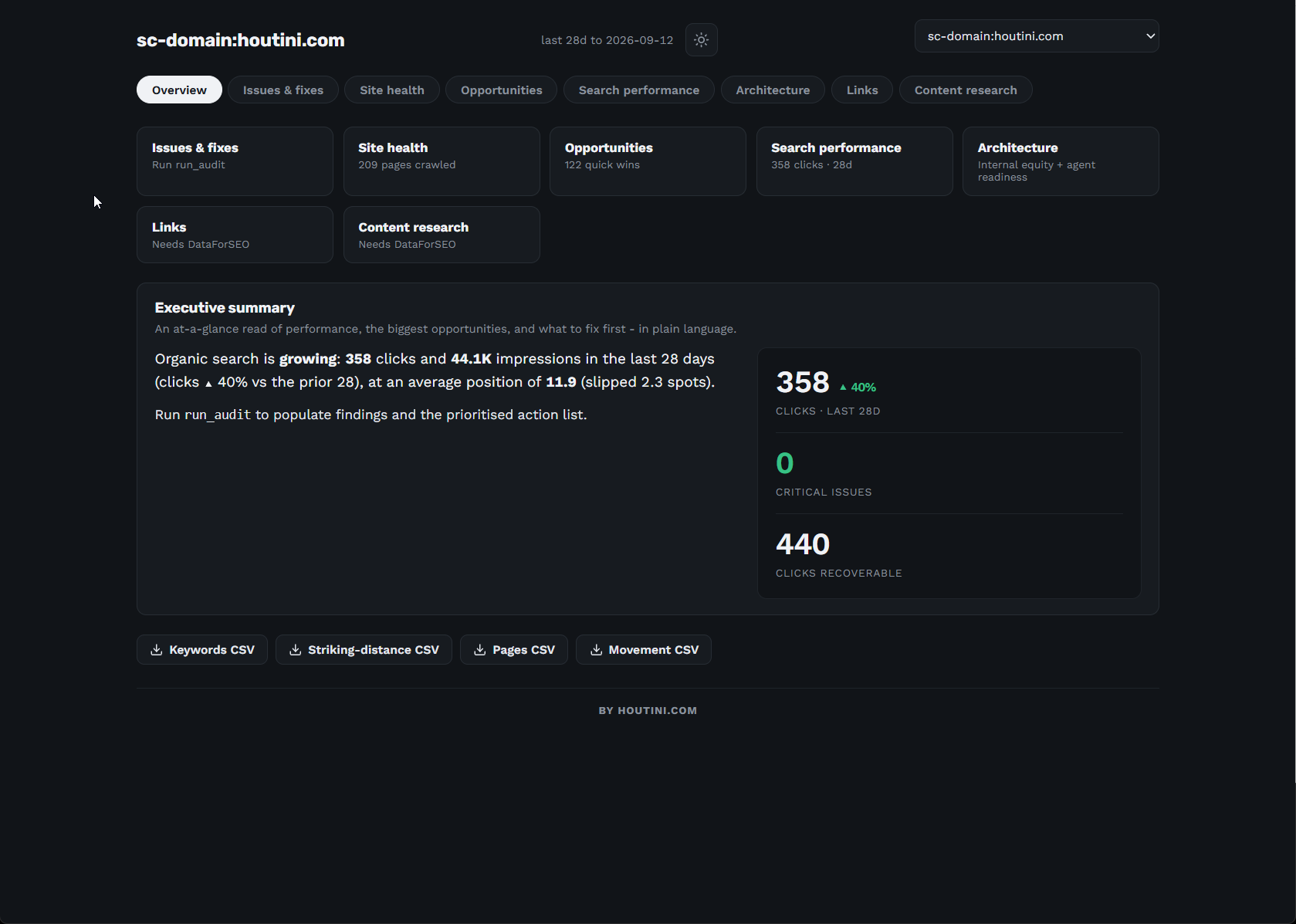
SEO Audit Console's dashboard for houtini.com, built from the Search Console data in its local SQLite database.
Another feature is structured output: a tool can return its result as typed data with a declared shape, called an output schema, as well as plain text. Six of Gemini MCP's tools declare one. houtini-lm 3.3.0 added a structured block to its results, and Claude Code turned out to show the model only that block, which meant that for three releases the model got token counts and timings and never the answer. 3.3.3 made structured output opt-in. So it's off by default now, and you turn it on by setting HOUTINILMSTRUCTURED=1 in the server's settings, which is only worth doing when you drive houtini-lm from your own scripts.
Elicitation arrived in the June 2025 spec. It lets a server stop partway through a call and ask you for something, a missing detail or a confirmation, before it carries on. Neither of our servers uses it.
MCP Apps: results you can see in the chat
MCP Apps let a server show you a result inside the chat, rather than describe it in text. The server sends an interactive HTML page, which the spec calls a ui:// resource, and the client renders it in the conversation. The extension was proposed in November 2025 and went stable on 26 January 2026, which made it the first official MCP extension.
Gemini MCP uses MCP Apps. Five of its fourteen tools are MCP Apps: generateimage, editimage, generatevideo (on Veo 3.1), generatesvg and generatelandingpage. Ask for an image and a viewer opens inline in Claude, with zoom, fit, copy-path and the prompt that made it.
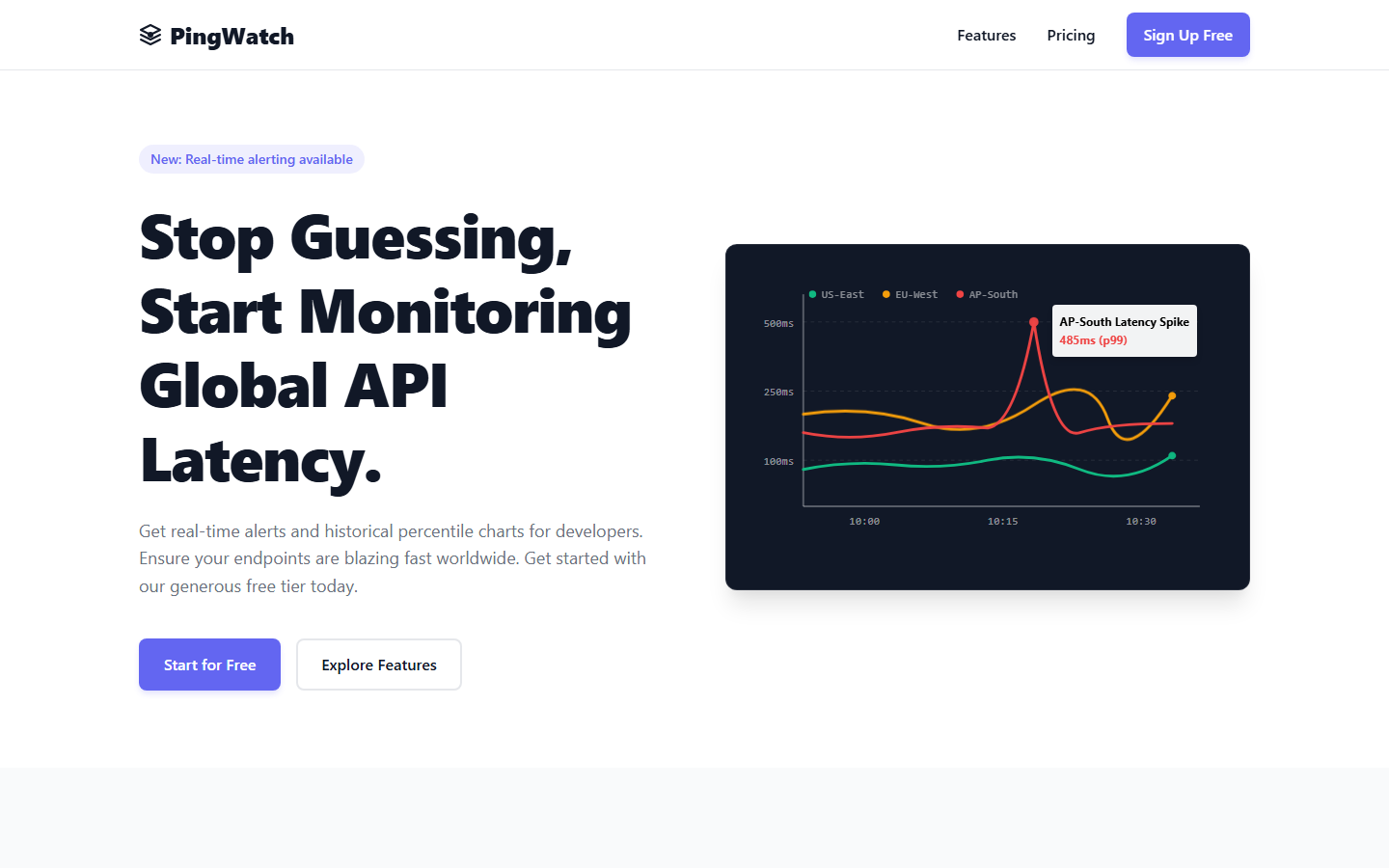
A landing page from Gemini MCP's generatelandingpage tool, opened in a browser. In Claude, it opens in an inline viewer.
SEO Audit Console gives you its results three ways. Inside the chat, getdashboard renders a dashboard widget, and refreshproperty shows a sync-progress view while your data comes in. Outside it, servedashboard spins up a local dashboard server on your own machine at 127.0.0.1. It only listens locally, and it checks the Host header to guard against DNS rebinding, a trick that lets a malicious website reach services running on your computer. And exportreport writes the whole thing out as a shareable HTML file.
As for clients, the official list names Claude (web and Desktop), VS Code GitHub Copilot, Microsoft 365 Copilot, Goose, Postman, MCPJam and Archestra.AI. That list changes as clients add support, so check that your own client supports MCP Apps before you build anything around it.
Who has adopted MCP
Block shipped goose with MCP in January 2025, two months after Anthropic introduced it, and Microsoft followed from March, across Copilot Studio, VS Code's agent mode and Windows 11. OpenAI added MCP to its Agents SDK the same month and remote MCP servers to its Responses API in May, then built its Apps SDK on MCP in October 2025. Salesforce put a native MCP client into Agentforce 3 in June 2025. Google shipped Gemini CLI that month too, and managed MCP servers for Google Cloud in December.
| Company | What they shipped | Role | First date |
|---|---|---|---|
| Block | goose, an open-source agent built on MCP (launch partner) | Client and server | Jan 2025 |
| Microsoft | MCP in Copilot Studio (GA May 2025), VS Code agent mode, Windows 11 | Client and server | Mar 2025 |
| Cloudflare | Build and host remote MCP servers | Platform | Mar 2025 |
| OpenAI | Agents SDK, remote MCP in the Responses API, Apps SDK built on MCP | Client | Mar 2025 |
| Shopify | Shopify.dev MCP server, later Storefront MCP | Server | Mar 2025 |
| AWS | Open-source AWS MCP servers, Bedrock AgentCore Gateway | Client and server | Apr 2025 |
| GitHub | Official GitHub MCP server (remote GA Sep 2025) | Server | Apr 2025 |
| Zapier | 30,000+ actions across around 8,000 apps | Server | Apr 2025 |
| Atlassian | Remote MCP server for Jira and Confluence | Server | May 2025 |
| Docker | MCP Catalog and Toolkit | Platform | May 2025 |
| Figma | Dev Mode MCP server | Server | Jun 2025 |
| Salesforce | Native MCP client in Agentforce 3, MCP servers on AgentExchange | Client and marketplace | Jun 2025 |
| Gemini CLI support, managed MCP servers for Google Cloud | Client and server | Jun 2025 | |
| Stripe | Stripe MCP server (mcp.stripe.com) | Server | By Jun 2025 |
| Notion | Hosted Notion MCP server | Server | Jul 2025 |
| HubSpot | Remote HubSpot MCP server | Server | GA Apr 2026 |
First dates from each company's own announcement or documentation. Stripe's comes from Salesforce naming it as an MCP partner in June 2025.
On 9 December 2025, Anthropic donated MCP to the Agentic AI Foundation, part of the Linux Foundation. The platinum members are AWS, Anthropic, Block, Bloomberg, Cloudflare, Google, Microsoft and OpenAI. The maintainers kept technical control, and the Linux Foundation has said it won't dictate MCP's direction.
When the new spec launched in July 2026, the official post put the SDKs at "close to half-a-billion downloads a month".
What changed in 2026
The current spec is dated 2026-07-28 and has been stable since 28 July 2026. The biggest change is that MCP went stateless. The initialize handshake, the opening exchange where client and server agreed terms, has gone, and so has the Mcp-Session-Id header. Each request now carries what the server needs to know, which means any request can land on any copy of a server behind a load balancer, which spreads requests across several copies of the server.
A new server/discover call lets a server advertise what it supports, and a multi-round-trip pattern replaces the requests servers used to send back to clients. Several older features, including the old HTTP+SSE transport, are deprecated, with at least 12 months before anything is removed. Tasks, for long-running work, moved out of the core and into an extension. I haven't seen Anthropic say yet whether Claude's own apps speak the new version.
Version 2 of the TypeScript SDK is split into three packages, @modelcontextprotocol/server, /client and /core (2.0.0 on 27 July, 2.1.0 on 23 September 2026), while the old @modelcontextprotocol/sdk sits at 1.30.1 and gets fixes only. Ours are still on that v1 SDK. Python's mcp package reached 2.0.0 on 28 July and 2.2.0 on 7 September, and FastMCP is now called MCPServer. The MCP Registry at registry.modelcontextprotocol.io has been in preview since 8 September 2025, with its API at v0.1 and no general release. Ours are listed as io.github.houtini-ai/lm, io.github.houtini-ai/gemini and io.github.houtini-ai/seo-audit-console.
Is it safe, and when not to use it
A local server runs with your user permissions. A lot of setup guides start a server with npx -y, which downloads the package and runs it in one go. So whatever you can read, write or send from your account, the server can too.
People have already exploited that. In September 2025, postmark-mcp, a fake MCP package, BCC'd every email it sent to an attacker. In February 2026, an npm worm called SANDWORM_MODE installed a hidden MCP server into people's Claude configs. So check who publishes a server before you install it.
One answer is to run servers in containers. Our Docker MCP gateway guide walks through setting that up, with each server running in its own container.
What it costs
There's a cost to connecting lots of servers, too. Every connected server's tool definitions sit in the model's context, so with many servers attached, a chunk of the context window is used up before you've asked anything. It's also why git and the Shopify CLI stay on the command line for me: anything I'd script anyway doesn't need a server sitting in the context.
The other cost is money: the servers themselves are mostly free, but the APIs they call, and any hosting, aren't.
How to start
MCPs are really, really powerful. They're a conduit to the external environment. So pick one server that touches data you use every day, like your Search Console property, your repo or your store, and connect it. Then ask Claude the question you'd normally answer with an export, a spreadsheet and most of an afternoon.
Our guide to adding an MCP server to Claude Desktop walks through the install step by step. The MCP Registry is the official catalogue. It's still in preview, but it's a good place to see what exists before you install anything.
Or try ours. Gemini MCP gives Claude image, video and SVG generation, with the results shown inline. SEO Audit Console puts your Search Console data in a local database Claude can query. houtini-lm lets Claude hand bounded work to a local model or a cheaper one, and our article on cutting your Claude Code bill with houtini-lm shows how that plays out.
Questions people ask
Does ChatGPT use MCP?
Yes. ChatGPT can connect to MCP servers through its developer mode, and the apps that run inside ChatGPT are built on MCP, through OpenAI's Apps SDK (October 2025). ChatGPT is on the MCP Apps support list too.
Is MCP the same as an API?
No. An API is how software talks to one particular service, and every service's API is different. MCP is one standard way for an AI application to find and call tools, and an MCP server often sits in front of an API and does the calling for it.
Can I write my own, and in what language?
Yes. The official SDKs cover TypeScript, Python, Go and C# as the top tier, plus Java, Kotlin, Swift, Rust, Ruby and PHP. Ours are written in TypeScript.
Do MCP servers make things up?
A server that reads data, like SEO Audit Console, returns the real rows from your database or the real response from an API. One that hands work to another model, like houtini-lm or Gemini MCP, returns that model's output, which can be wrong in the usual ways. Either way, Claude can still misread or over-summarise what comes back, so check anything that matters against the source.
Are MCP servers free?
Mostly, yes. Our three are free to install, but Gemini MCP runs on your own Gemini API key, so Google bills you for what it generates, and a remote server needs hosting somewhere.
Continue reading.
- How-to GuidesHow to Connect Claude to Shopify with MCP (Dev MCP and Storefront Catalog)
- Beginner's GuidesWhat is n8n? A Beginner's Guide to Workflows, Pricing and Self-Hosting
- How-to GuidesHow to Use AI for Market Research with Claude
- How-to Guidesn8n MCP: How to Connect Claude Code to n8n and Use Its API Safely
- How-to GuidesHow to Run Qwen3-Coder-Next Locally: My vLLM Settings for Two 48GB RTX 4090s
- How-to GuidesHow to Build a Competitor Price Monitoring Pipeline with n8n