Best GPUs for Running Local LLMs (2026): VRAM, Bandwidth & Picks
In today's guide, we're picking the best GPUs for running local LLMs - why memory bandwidth beats FLOPS, why VRAM decides everything, what I'd buy at each budget from the used RTX 3090 to my own pair of modded 48GB 4090s, the PCIe lanes a second card needs on a gaming board, and a calculator to check whether your model fits.
I have run local models on more GPUs than I can sensibly list: every flavour of the RTX 30-series through the mining years, multi-GPU rigs on risers, a Threadripper workstation stacked with RTX 4500 Ada cards, and - since July - a pair of modded 48GB RTX 4090s, one of which I have benchmarked half to death . This guide is what all of that taught me about spending money on inference hardware.
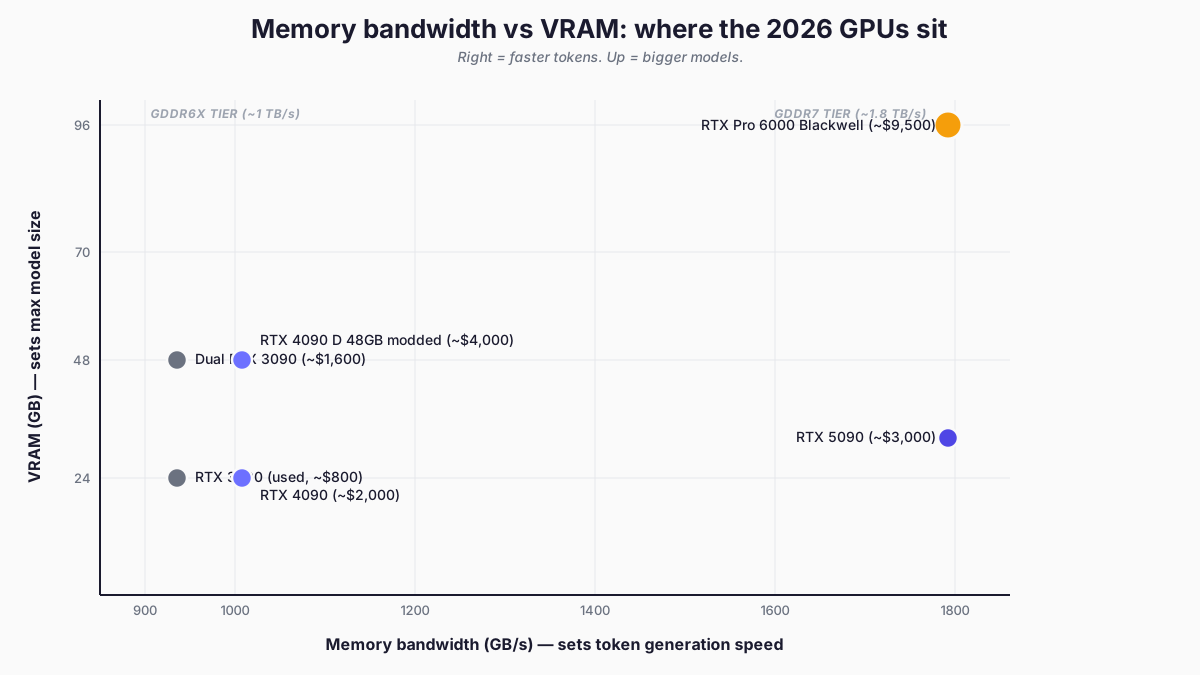
There are two specs that decide a local-LLM GPU purchase: memory bandwidth (GB/s) and VRAM capacity (GB). Bandwidth governs how fast tokens come out. VRAM governs how big a model fits. Three years ago the answer was simpler - buy the most VRAM you could afford and live with whatever else came with it. The market as I update this in September 2026 is under a lot of demand-side pressure: prices have detached from MSRPs, the most interesting 48GB card comes from an unofficial supply chain (there's an 84GB RTX 6000D for the China market too; a very interesting proposition, but roughly triple the price of a 4090), and a third spec has quietly joined the first two - whether your card's architecture has fast kernels for the quantisation format you plan to run. And the age of the card, its generation, is most of what sets the bandwidth, which is why a 2020 card is still on this list and several 2024 mid-range cards are not.
Quick Navigation
Bandwidth first |
The quant-format trap |
VRAM tiers | Will it fit? |
The cards |
Alternatives |
What I'd buy |
Common mistakes |
Where to go
Why memory bandwidth matters more than compute (mostly)
LLM token generation is memory-bandwidth bound, not compute bound. During the decode phase - every token after the first - the GPU spends most of its time waiting on memory reads, not crunching the numbers. A card with 60% more TFLOPS and the same bandwidth generates tokens at very nearly the same speed as the slower card. A card with 78% more bandwidth and similar compute generates them close to 78% faster. The TFLOPS column is mostly a vanity stat for inference workloads - training, of course, is a different matter.
The caveat: prefill is compute-bound
Prefill is what happens before any tokens come back - the model reads and embeds your prompt to build the KV cache. On a short chat prompt it is invisible. On a 16k-token context with a big RAG document it absolutely is not, and it scales with TFLOPS rather than GB/s. Interactive chat rarely cares; agentic workflows that re-process long contexts every turn very much do. My own benchmarks show the same split from the other direction: an AWQ-quantised model on my 4090 decodes far faster than the FP8 build of the same model, but pays for it with roughly half the cold prefill speed - the kernels trade one phase against the other.
I lived the bandwidth ceiling for a year on the workstation tier: the RTX 4500 Ada cards in my old Threadripper rig topped out at 432 GB/s each, well below a 3090's 936 GB/s, and you felt it on every long generation. Workstation cards trade raw bandwidth for ECC, density and blower cooling. That machine is sold now, but the lesson transferred straight into the current build: buy bandwidth first.
The specs that make the difference:
| GPU | VRAM | Memory bandwidth | Why it matters |
|---|---|---|---|
| RTX 3090 | 24GB GDDR6X | ~936 GB/s | The floor. Still beats current sub-$1000 cards. |
| RTX 4090 | 24GB GDDR6X | ~1,008 GB/s | Solid mainstream. 8% faster than 3090 on token gen. |
| Modded RTX 4090 48GB | 48GB GDDR6X | ~1,008 GB/s | Same speed as a 4090, double the VRAM. The card I bought. Twice. |
| RTX 5090 | 32GB GDDR7 | ~1,792 GB/s | 78% bandwidth jump over 4090. Fastest consumer card, if you can find one near MSRP. |
| RTX Pro 6000 Blackwell | 96GB GDDR7 ECC | ~1,792 GB/s | Same bandwidth as 5090. Three times the VRAM. Workstation money. |
| Dual RTX 3090 | 48GB combined | 936 GB/s per card | Cheap path to 48GB. Bandwidth doesn't combine; capacity does. |
Hardware Corner's RTX 5090 LLM benchmarks measure 102.7 tokens per second on Qwen3 14B at Q4_K and 16k context, with the 4090 at 77% of that across their test set - tracking the bandwidth ratio almost exactly. My own numbers tell the same story inside one card: decode speed moves with bytes-touched-per-token, which is why a 35B mixture-of-experts on my 4090 decodes at 133 tok/s while the dense 27B manages 61 - the MoE touches a ninth of the bytes. Pure bandwidth maths is the upper bound, not the number you will see on a meter; expect 70-90% of theoretical scaling once kernel and framework overhead eat their share.
Prioritise GB/s for decode speed, TFLOPS for prefill speed, GB for model size. If a card's spec sheet leads with RT cores or gaming benchmarks, that's a marketing document, not a buying guide for this workload.
Check the quant format before you buy
The same GPU can be fast or slow on the same model depending on which quantisation format the checkpoint uses, because kernel optimisation is per-architecture. I loaded the official Qwen3.6-27B FP8 release on my 48GB 4090 and got 18.8 tok/s - baffling for a card with 1 TB/s of bandwidth. The reason: official Qwen FP8 checkpoints are block-format FP8, which has beautifully tuned kernels for datacentre Hopper and Blackwell cards and none for Ada, the architecture every 4090 owner is sitting on. The engine falls back to a generic kernel and quietly loses you 40% or more. Swapping to an AWQ INT4 build of the same model - Marlin kernels, superbly tuned for Ada - took the same card to 60.9 tok/s with speculative decoding stacked on top. On the same silicon, I observed a 3.2x speed difference in inference simply because I'd downloaded the wrong quant for my specs.
The buying consequence: a consumer Ada card (any 4090, including the modded 48GB ones) wants AWQ, GPTQ or QAT-style quants; it will underperform on block-FP8 releases. Blackwell cards (5090, Pro 6000) carry the newer kernel support and don't hit this particular wall. If your plan is "run the official FP8 releases," that's a genuine point for the 5090 tier that no spec table shows. The full investigation - with every measurement - is in my vLLM tuning write-up .
How much VRAM you need
VRAM decides which models you can run and at what quality. Practical tiers in 2026 at 4-bit quantisation (the practitioner default), with some context budget kept aside:
| VRAM | What runs comfortably (Q4) | What runs with room (Q6/Q8) | Practical use |
|---|---|---|---|
| 24GB | 7B, 13B, 30-34B with tight context | 7B, 13B at high quality | Daily-driver dev work, coding, RAG |
| 32GB | 30-34B comfortably; 70B Q3 squeezing | 13B at top quality with long context | Slightly bigger headroom + GDDR7 speed |
| 48GB | 70B Q4 comfortably | 30B at Q8 quality | The serious local-LLM tier |
| 96GB | 120B class at Q4; multi-model serving | 70B at Q6/Q8 (significantly better quality than Q4) | Workstation / small-team-serving territory |
Q4_K_M - the 4-bit quantisation most practitioners reach for - is the practical floor. It compresses model weights to roughly 4 bits each with minimal quality loss. Q6 and Q8 keep more precision and produce noticeably better output for coding and reasoning - the difference is worth chasing if your work depends on the model. 96GB matters not because you suddenly run bigger models, but because you run the same 70B at Q6 instead of Q4, and that quality bump is what justifies the price.
Will your model fit your card?
Before you buy for a particular model, run it through the calculator from my benchmark page : weights plus the KV cache at the context you want, against the card you have. The twelve presets are models measured on my own rig; the layer, head and dimension fields come from a model's config.json.
Your setup
The model
KV cache needs three numbers from the model's config.json (probe, don't assume):
Weights are this model's measured value. The layers / KV-heads / head-dim are still the worked-example defaults - swap in this model's own numbers from its config.json for an accurate KV figure.
Will it fit?
- Weights
- —
- KV cache at this context
- —
- Overhead (activations, graphs)
- —
- Total needed
- —
- Usable VRAM (0.92 util)
- —
Largest context that fits on this setup: —
The 12 measured models (weights + the context each served on our rig)
| Model | Weights GB | Served ctx | Cards | KV |
|---|---|---|---|---|
| LFM2.5-1.2B-Instruct | 2.3 | 33k | 1 | fp8 |
| GLM-4.7-Flash-GPTQ | 16.6 | 33k | 1 | auto |
| Ternary-Bonsai-27B-AWQ | 18.7 | 33k | 1 | fp8 |
| Qwen3.8-27B-AWQ | 27.7 | 33k | 1 | fp8 |
| Qwen3.8-27B-FP8 | 30.9 | 33k | 1 | fp8 |
| Devstral-Small-2-24B-AWQ | 32.1 | 33k | 1 | fp8 |
| Nemotron-3.5-Lightning-30B-FP8 | 32.3 | 33k | 1 | fp8 |
| Llama-3.3-70B-AWQ | 39.8 | 21k | 1 | fp8 |
| Llama-4-Scout-INT4 | 64.9 | 33k | 2 | fp8 |
| gpt-oss-120b-official | 65.2 | 131k | 2 | fp8 |
| Llama-3.3-70B-FP8 | 72.7 | 33k | 2 | fp8 |
| NVIDIA-Nemotron-3-Super-120B-A12B-AWQ-4bit | 80.7 | 33k | 2 | fp8 |
Weights are measured on our own rig (2x modded RTX 4090 48GB, vLLM 0.26.0). KV cache is computed from the architecture you enter - the number no spec sheet prints - so the calculator is only as right as those three fields; read them from the model's config.json. A 2GB overhead margin and the 0.92 utilisation we serve at are both applied.
One thing my own testing turned up: context is cheaper than the headline maths suggests on some modern architectures. Qwen3.6's hybrid attention keeps full KV cache on only a quarter of its layers, which is how the full 262k context window fits in about 8.6GB on my 48GB card. That's why it's worth checking the architecture before you assume long context needs a bigger GPU - optimisation can yield bigger performance gains than replacing your gear!
The question to ask when sizing up is not "what model do I want to run today" but "what model do I want to keep running comfortably in 18 months." Models keep growing. 13B was the daily driver in 2024. 30-34B is the daily driver in 2026. Plan for the next jump, because the one after that is already in training.
The cards worth buying in 2026 for local LLMs
Only about five GPUs cover the practical range for consumer-level local inference. Anything else is either worth waiting a generation on, or has been superseded enough that the secondhand market is the better route in.
And, if you're waiting for a bargain, your plan might have just fallen through: the RTX 6000 Pro has increased in price, and the RTX 50 SUPER refresh (the 24GB 5080 Super and 18GB 5070 Super that were supposed to fix the mid-range VRAM gap) has been shelved for 2026 - confirmed around Gamescom in August, with the GDDR7 supply going to datacentre parts instead. If you were holding out for a cheap VRAM bump this year, it is not coming.
Used RTX 3090 - the floor (~$700-1,000)
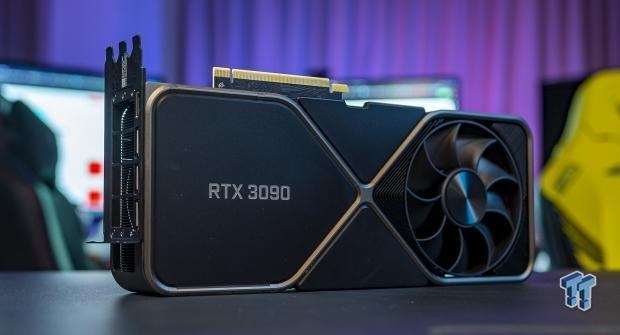
It's a 24GB GDDR6X card with 936 GB/s of memory bandwidth, which is why a GPU from 2020 is still earning its place on this list in 2026.
I ran a 3090 in my development machine for years - DeBERTa scoring passes over article drafts, Granite embeddings, everything in the 7B-13B range that wanted fast responses. Before that I mined on three of them and repadded more 3090-class cards than I care to remember, so I know exactly how they behave at sustained load: hot, loud, and relentlessly dependable if you respect the VRAM temperatures. That machine has since been consolidated into the 4090 build, but nothing in the years I ran it changed the verdict: for a $700-1,000 used card, it does an unreasonable amount of work.
Used 3090s are the cleanest sub-$1000 path to 24GB. The 4080 (16GB) and 4070 Ti (12GB) get marketed as "AI-friendly" cards, but the VRAM ceiling hits fast on anything 13B and bigger. Once you have hit that ceiling, no amount of marketing copy puts you back under it.
Why it still beats newer mid-range cards
Four reasons, in the order they matter:
- 24GB is the practical minimum for meaningful work with 13-30B models
- 936 GB/s - only ~7% behind the 4090 for token generation
- Wide aftermarket: easy to source, easy to replace, easy to pair
- 350W TDP runs hot and wants a 1000W PSU, and that whole generation is extraordinary for heat as well as power. The fix is nvidia-smi: cap the power, lock the clock, or both. My own power and clock testing (on my 4090s, but the mechanism is the same) found decode flat across a 330W cap, stock 450W, and the cap with clocks unlocked, while unlocking the clocks cost 17% more electricity for a 1% change in speed.
Under $1000, this is the answer. There is no second place worth mentioning.
Dual RTX 3090 - the value play (~$1,500-1,900)
Two used 3090s give you 48GB combined and let you run 70B models at Q4. Cheapest path to the 70B tier, full stop, and the highest VRAM per pound on the market.
My multi-GPU miles come from adjacent rigs rather than a 3090 pair specifically: mining rigs with more cards than sense, and later the Threadripper workstation running multiple RTX 4500 Adas - so PCIe topology, PSU sizing and cooling-at-sustained-load are things I have lived with rather than read about. The specific 1.6-1.8x NVLink tensor-parallelism number below is a 3090-pair result from the practitioner reports, not something I have measured myself. The framing holds though: NVLink is the reason the dual-3090 configuration still works.
Why did NVIDIA strip NVLink out of the 4090 and 5090?
To protect datacentre sales. The 3090 supports it (a 112 GB/s bidirectional bridge between two cards), and that interconnect is what lets tensor parallelism on a two-card setup scale properly. Without it you fall back to splitting the model across the PCIe bus, which is roughly one-thirtieth the bandwidth of VRAM.
The scaling story depends on the parallelism strategy your inference engine uses:
- Tensor parallelism over NVLink (the right config for two 3090s) - close to linear on token generation, often 1.6-1.8x on a 2-card setup
- Tensor parallelism over bare PCIe (the no-NVLink fallback: 4090 or 5090 pairs) - the practitioner consensus said 0.6-0.75x scaling per card, and I repeated it here until I measured it. On my own pair, with the second card on a PCIe x4 slot, splitting a 27B across both decoded 42% faster than one card (the lanes section below has the numbers). On consumer boards you still disable peer-to-peer transfers (
NCCL_P2P_DISABLE=1) or the whole thing silently hangs; that part held. I have it wired into my own dual-card config from the day the second 4090 went in.
The rule I used to state here - never split a model across two cards if it fits on one - is one I have since measured and retired: tensor parallel over my x16/x4 pair beat a single card by 42% on a 27B, and pipeline parallel came in slower than not splitting at all. Two independent cards each serving their own model still beats one shared model for a delegation fleet, because both stay warm and nothing swaps, but the interconnect tax is smaller than the doctrine said. Bandwidth combines under tensor parallel; capacity combines either way, and 48GB at this price is the real value.
Other caveats:
- A 3-slot NVLink bridge runs ~$80-150 - factor it in; you cannot run NVLink without one
- A second full-length slot at x4 or x8 will do - my own second card sits on x4 - plus a 1300W+ PSU is the realistic minimum (see the power-cap note under Common Mistakes - it helps more than you'd think)
- Runs hot, runs loud, draws 700W under sustained load. Not a quiet build.
- Three-slot clearance per card; stacking two axial-cooler 3090s without space throttles the top card inside minutes
Two cards on a gaming board: the PCIe lanes nobody mentions
There is a difference between a gaming motherboard and a workstation one that only shows up when the second card goes in. A gaming CPU has 24 usable PCIe lanes on AMD's AM5 (28 in total) and 20 on an Intel i9-14900K , and the board spends them: sixteen to the first slot, four to an M.2 drive, and what is left to everything else. So slot 0 gets the full x16 and the second full-length slot is usually x4 or x8, often hung off the chipset rather than the CPU. A Threadripper PRO board like the ASUS Pro WS WRX80E-SAGE SE , which my old Hopper box ran on, gives every one of its seven slots x16, because the CPU has the lanes to feed them. Some gaming boards support bifurcation, which splits slot 0's sixteen lanes into x8/x8 across two slots; it is a BIOS option and a board-manual check, so do that research before you buy the second card.
What x4 costs, measured on my own pair (GPU 0 on x16, GPU 1 on x4): nothing you can see on single-card inference, because a model on one card never crosses the link. Loading is another matter - the whole checkpoint has to cross it - and a 26GB model took over twenty minutes to land on the x4 card where a 2GB one took two, and a 77GB model split across both took 42 minutes. Tensor parallel, where the doctrine said x4 would tank decode, came out faster: a 27B that fits one card decoded at 48.9 tok/s split across both against 34.4 on one, and loaded in 9.2 minutes against 14.6, because both cards pull shards at once. The topology study has the runs; single stream, one model, one context, and the concurrency test is still on the list.
Check what you have got before you build around it. This prints the PCIe generation and width each card is running at right now:
nvidia-smi --query-gpu=name,pcie.link.gen.current,pcie.link.width.current --format=csvRTX 4090 - the awkward middle (~$2,200-2,500 used)
It's a 24GB GDDR6X card with 1,008 GB/s of bandwidth, and I skipped the stock version entirely: by the time I outgrew 24GB, the modded 48GB versions of the same silicon existed, and doubling the VRAM for similar money was the obvious move. That is the 4090's problem in late 2026 in one sentence.
Used prices have not come down the way everyone expected - they have drifted up to $2,200-2,500 in the general GPU squeeze, which puts a used 24GB 4090 uncomfortably close to a modded 48GB one. Hardware Corner's ranking puts it at 77% of the 5090's throughput, which tracks the bandwidth ratio.
The remaining case: mature drivers, mature cooling, comfortable in a 750W PSU, and if one lands at a properly good price it is still a fine card. But at current prices, most buyers should either step down to a used 3090, or across to the modded 48GB tier.
Modded RTX 4090 48GB - the one I bought. Twice. (~$2,500-3,400)
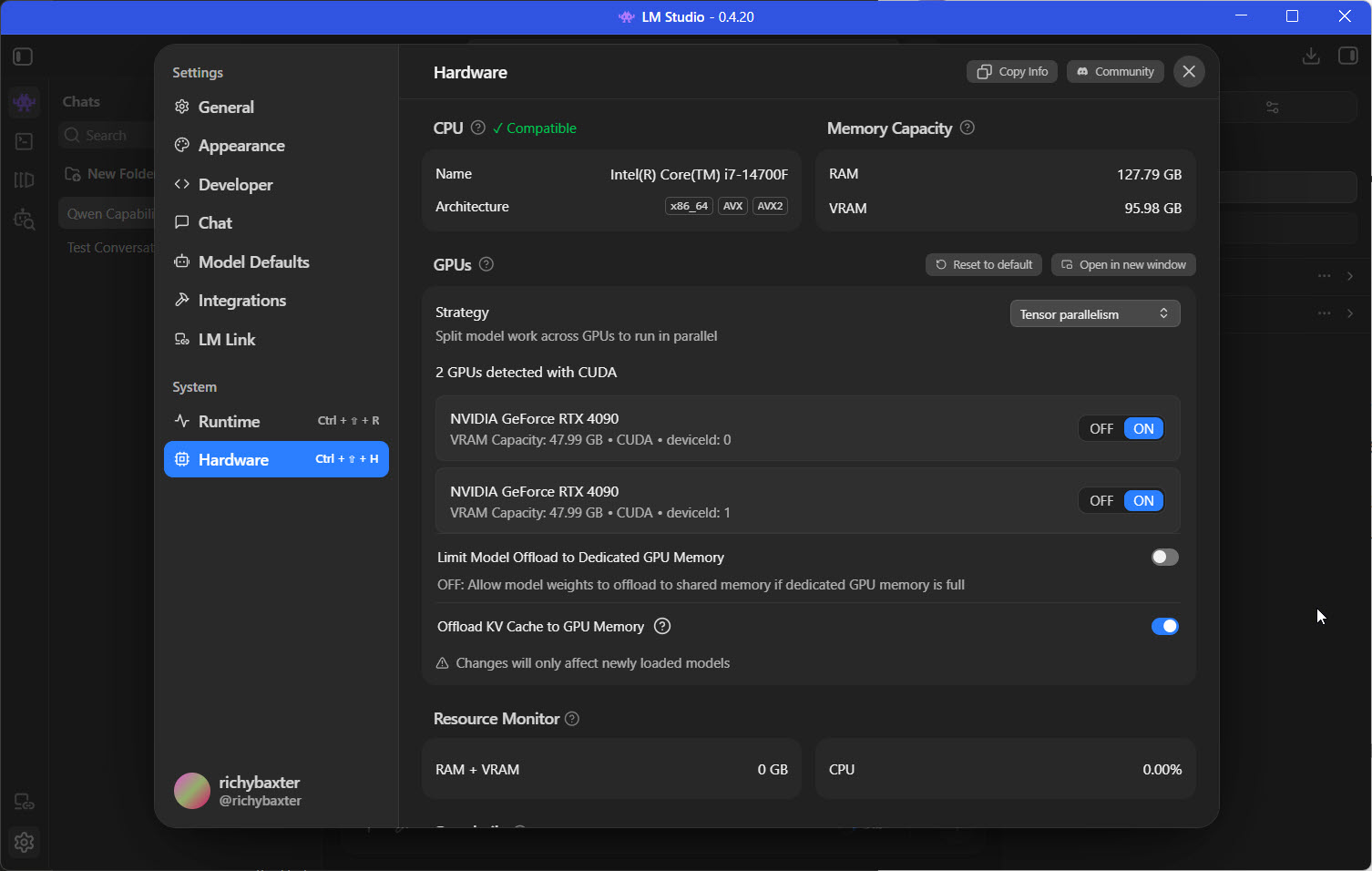
48GB GDDR6X on a single card at standard 4090 bandwidth. These are the Chinese-market rebuilds - the memory doubled by populating both sides of a longer PCB, dual-slot blower coolers, standard NVIDIA drivers via patched BIOS. When I last updated this article, I wrote that I'd love a pair but the workstation budget wasn't there. The budget got there: I now run two, and one of them has been through the most thorough benchmark programme I have ever inflicted on a piece of hardware .
For the record on price: I paid £3,100 a card - £6,200 for 96GB of fast VRAM across two GPUs. Set that against anything carrying a warranty and an official part number at that capacity and it is absurd value. Mine are 4090D silicon (the export-trimmed Chinese 4090) with the memory doubled by populating both sides of the board; unglamorous provenance and all, the compute per pound is high enough that I bought the second one without a second thought.
Why not a Pro 6000, or a pair of 5090s
The card I would love to own is the RTX Pro 6000 Blackwell: 96GB on Blackwell, so fast, and so expensive. You could run a pair of them in a normal PC with a big enough PSU, and it would not be long before you noticed you had spent close to £20,000 on two GPUs. That is why I went the 4090D route - the Chinese-market 4090 with the memory doubled to 48GB - and got the same 96GB across two cards for £6,200, which I still think is a very good trade. And when I see people buying 5090s I do think, that will be quick, but a pair only gets you 64GB; hence the 4090Ds, at half the price.
What I can tell you from living with them rather than reading the teardowns:
- The performance is real. ~1 TB/s of bandwidth behaves exactly as the spec suggests: my daily-driver 27B decodes at 61-66 tok/s (AWQ plus speculative decoding), a 35B MoE at 133, and the full 262k context window fits with room to spare. Every number, with methodology, lives on our model testing page .
- Thermals deserve respect but are manageable. Clamshell VRAM means double the memory chips in the same envelope. Mine run capped at 330W, and the cap costs the big models nothing measurable on decode - memory-bound workloads barely notice clock speed - while the card runs meaningfully cooler. Hardware Corner's teardown measured 86°C memory and a 65 dB blower at full tilt; capped, mine are far more civilised.
- The supply-chain risk is the honest price of entry. Refurbished dies, no NVIDIA warranty, the modder's reputation instead. I did my homework, accepted the risk profile, and would do it again - but I would not recommend it to anyone who needs warranty support or predictable replacement.
The market has moved in this card's favour: at $2,500-3,400 it now costs less than a street-priced 5090 while carrying 50% more VRAM. The nearest warrantied-lineage alternative is a used RTX A6000 48GB at $2,600-3,800 - ECC and official silicon, but 768 GB/s against the modded card's ~1 TB/s, so you trade roughly a quarter of your decode speed for the peace of mind. Both are defensible; I took the bandwidth.
For someone who needs 48GB on a single card and accepts the unofficial-supply risk profile, this is - by my own money, twice - the buy of the current market.
RTX 5090 - the fastest card you can't buy at MSRP (~$4,000+ street)
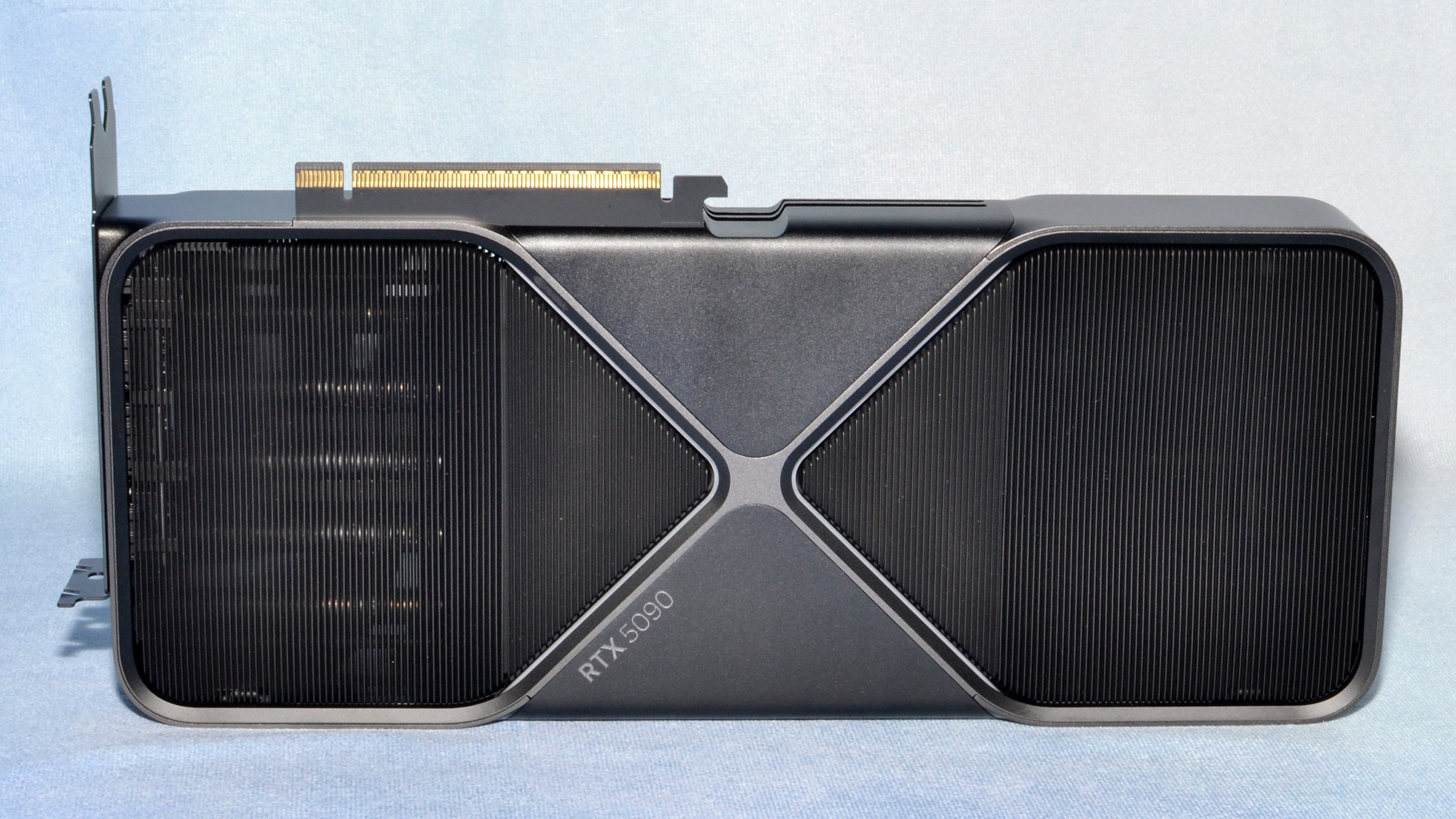
This is a 32GB GDDR7 card with 1,792 GB/s of bandwidth, the biggest jump NVIDIA has shipped in years, and it launched with a $1,999 MSRP that has since become fiction: as of September 2026, street prices sit well past $4,000, with partner cards pushing $5,000 in the ongoing memory squeeze.
I looked hard at the 5090 and went the modded-4090 route instead: for the same money I got 48GB rather than 32GB, and my workloads are VRAM-hungry more than they are latency-critical. That is a workload call, not a verdict - if your daily model fits in 32GB and you want maximum single-user speed, the 5090 is a different tier. Hardware Corner's tested benchmarks measure 102.7 tok/s on Qwen3 14B at Q4_K with 16k context, and their summary - "significantly higher performance and more usable context than its predecessors" - matches everything the bandwidth spec implies. It also carries Blackwell's kernel support, so the block-FP8 trap that bites Ada owners does not apply. One more thing: a partner card like the MSI Suprim changes the cooler and the boost clock, not the 1,792 GB/s, and decode speed is set by the memory. For local models, buy the cheapest 5090 with a cooler you can live with.
Why the 5090 lands for speed-first buyers:
- 78% more bandwidth than the 4090, and it shows up in tokens per second
- 32GB fits 30B-class models at Q6 (quality territory) instead of Q4
- GDDR7 and current-generation kernel support are where the ecosystem is heading
Caveats:
- Street pricing: budget $4,000+, not the MSRP you read at launch, and check on the day - it moves monthly
- 575W TDP wants a 1000W+ PSU and serious cooling (though see the power-cap note - inference rarely needs the full envelope)
- 32GB does not cover 70B at Q4, which pushes you back to multi-GPU or the 48GB tier
If the money is fixed and the choice is 5090 versus modded 48GB 4090, decide by workload: speed on models that fit 32GB → 5090; capacity for 70B-class → the modded card. I took capacity.
RTX Pro 6000 Blackwell - workstation tier (~$13,000-20,000)
That's the same bandwidth as the 5090 with three times the VRAM (96GB of GDDR7 with ECC, 1,792 GB/s) at a price that has climbed out of enthusiast reach entirely: $13,250-20,000 in the current market (£12,959.99 was the UK retail price when I checked in August), up from $8,500-10,000 as recently as June, and NVIDIA quietly moved its own list price to $16,000 in August.
I ran the workstation tier for a year - the RTX 4500 Ada generation, one rung down the ladder - so the case for ECC, blower density and sustained-load reliability is one I have lived rather than imagined. As Linus Tech Tips put it in their February 2026 hands-on : "the RTX Pro 6000 can fit much larger models in VRAM than the 5090 could ever dream of running efficiently." For LLM work, that sentence is the card's entire thesis. Hardware Corner puts it at 94% of the 5090's throughput - identical bandwidth, the difference is all VRAM ceiling:
- 70B at Q6 or Q8 instead of Q4 - meaningfully better output for coding and reasoning
- 120B-class models at Q4, and multi-user serving from a single card
- ECC memory for long-running work where bit-flips compound
Two workflow caveats from the LTT review that spec sheets will not tell you: the card ships DisplayPort-only (budget a quality active adapter if your monitor is HDMI), and Pro-line drivers update on a slower cadence than GeForce - fine for a dedicated inference box, an irritation for mixed use.
At the new price, though, the arithmetic has changed: two modded 48GB 4090s deliver the same 96GB total for well under half the money, if you can live with two cards, no warranty and no ECC. That is in fact the build I run. The Pro 6000 remains the answer for small-team serving where warranty and single-card simplicity are worth paying for - but for a solo practitioner the gap is now wide enough that I'd want a business reason, not an enthusiasm, to sign that invoice.
The name covers four different cards, and the split matters once you're spending Pro-6000 money. The Workstation Edition is the desktop one: 96GB, 600W, dual-fan, built for single-GPU throughput. The Max-Q Edition drops to 300W on a blower, so you can stack four in one workstation on a single PSU - peak clocks traded for density. The Server Edition goes passive, no fan at all, leaning on chassis airflow for rackmount boxes. And for the China market there is the RTX 6000D: 84GB rather than 96, and 1,568 GB/s rather than 1,792, trimmed to clear export limits but still sitting above the tier below it. Same silicon family, four answers to where the card has to live - the VRAM and bandwidth barely move across the first three, so choose on thermals and form factor, not the headline number.
What about workstation cards, AMD, Apple Silicon, or a unified-memory box?
The workstation line below the Pro 6000
NVIDIA's RTX 4500/5000/6000 Ada Generation is the tier I ran until this summer: multiple 4500 Adas (24GB ECC, 432 GB/s, 210W each) in a Threadripper box. The trade-offs are exactly as advertised: lower bandwidth per card, ECC, blower coolers made for stacking, low TDP, certified drivers. It served a 120k-context coding model reliably for a year, and I sold the machine only because two modded 4090s do the same job faster with less complexity. Buy this tier when ECC, density and sustained reliability matter more than raw single-user throughput; buy consumer cards when tokens per second per pound is the metric.
AMD RX 7900 XTX (24GB, ~$930 new, $800-1,000 used)
The 7900 XTX has earned its place here: with ROCm maturing and NVIDIA prices inflated, it is still the cheapest new 24GB card - around $930 at the cheapest in early September, with used cards at $800-1,000 - though the gap to NVIDIA has narrowed rather than closed as the memory squeeze reached AMD too. The catch is the software time-tax - quant-format support and day-one model compatibility still trail CUDA, and if the kernel-trap section above taught you anything, it is that format support decides your real speed. I have not run one; practitioners I trust describe the experience as "fine once you've paid the setup weekend." AMD MI300X/MI325X remain datacentre answers to a question home builders are not asking.
Intel Arc Pro B70 (32GB, ~$1,270-1,780 new)
The newest entry on this page, and the cheapest new 32GB card you can buy. Intel's Arc Pro B70 launched in March at $949 and, in the current memory squeeze, sits around $1,270 on average with Intel's own reference card listed at $1,779 ( Tom's Hardware, August ); UK partner cards are around £1,300. The number that matters is 608 GB/s, a third less bandwidth than a five-year-old 3090, so it buys capacity rather than speed, and Intel's software stack sits behind CUDA and ROCm for day-one model support. I have not run one. If the workload is a 30B at Q6 on one card and tokens per second are not the point, it answers a question NVIDIA will not at that price; if speed matters, the used 3090 still wins.
Apple Silicon and the new M5 Macs
Apple Silicon is the interesting outsider I still have not tested personally - and it just raised the stakes considerably. Apple announced the M5 generation on 25 August: the Mac Studio M5 Ultra ships on 22 September with up to 512GB of unified memory at around 1.2TB/s - 4090-class bandwidth with a memory ceiling more than five times anything else on this page - and the M5 Max below it carries 128GB. MLX keeps improving; it remains behind CUDA for depth. Already own a Mac? Get productive on it before buying a rig. Buying specifically for LLM work? NVIDIA still prices better per unit of fast memory and supports everything first - but if your ambition is the 200B-plus class, that half-terabyte Mac is now the only desk-side way to load it, and I cover where the trade-off bites in the best PCs guide .
Unified-memory boxes
Unified memory is the new fourth option. NVIDIA's DGX Spark (128GB unified, ~$4,699) and the AMD Strix Halo mini-PCs (Ryzen AI Max+ 395, up to 96GB allocatable as VRAM, from about $1,700 for the BOSGAME M5 with most 128GB boxes at $2,000-2,400) both run 70B-class models on the desk with no discrete GPU at all - slower per token than a big card, far bigger memory ceilings per pound. I have covered that whole category, including where the trade-offs bite, in the AI mini-PCs guide .
What I'd buy
| Budget | Buy | Why |
|---|---|---|
| Under $1,000 | Used RTX 3090 | Cheapest path to 24GB. Beats every newer sub-$1000 card on the specs that matter. I ran one for years. |
| $1,270-1,780 | Intel Arc Pro B70 32GB | Cheapest new 32GB. 608 GB/s, so capacity rather than speed, and the software is behind CUDA. Not run here. |
| $1,500-1,900 | Dual used RTX 3090 | Cheapest path to 48GB. Runs 70B at Q4 with NVLink scaling that 4090/5090 pairs can't match. |
| $2,500-3,400 | Modded RTX 4090 48GB | 48GB on one card for less than a street 5090. The one I bought - twice. Accept the supply-chain risk knowingly. |
| $2,600-3,800 | Used RTX A6000 48GB | The warrantied-lineage 48GB alternative: ECC and official silicon for ~25% less decode speed. |
| $4,000+ | RTX 5090 | Fastest single card if your models fit 32GB. Budget street price, not MSRP. |
| $13,000+ | RTX Pro 6000 Blackwell | 96GB, ECC, warranty, one card. Small-team serving territory - needs a business case at current pricing. |
If you want the one-line answer to which GPU for a local LLM, here it is. Three I'd steer away from:
- Any current-generation card under 24GB. Excellent gaming cards; the 16GB ceiling hits fast on anything 13B and bigger.
- A used 4090 at near-modded-48GB prices. Same silicon, half the VRAM, similar money. The market has made this card hard to justify.
- A workstation card you do not need. If your largest workload is 30B at Q4, spend the difference on RAM, NVMe, and a faster consumer card.
And one more, since people ask it: running several models at the same time is a VRAM sum, not a speed problem. Two independent cards each holding its own model, always warm, is how my fleet runs; one 96GB card does the same on one slot; a single 24GB card swaps models in and out, and the swap is the slow part.
Common mistakes
- Spending on TFLOPS instead of bandwidth. The TFLOPS column gets the marketing real estate. The GB/s column governs your experience.
- Ignoring quantisation-format kernel support. The same card can be 3x faster on the same model depending on the checkpoint format - see the quant-format section above. Ada wants AWQ/Marlin; block-FP8 belongs to Hopper and Blackwell. Check what you plan to run before you pick the silicon.
- Buying for the model you run today. Models keep growing, faster than most people expect. 16GB because "Mistral 7B fits" is a one-year decision. 24GB minimum is a three-year decision. I bought my 3090 in 2022 when 13B was the sensible target; it carried me to 30B-class workloads four years later.
- Forgetting the rest of the rig - and overestimating the power you need. A 5090 in a 750W PSU browns out under load. But the flip side, from my own sweep: decode is memory-bound, so capping my 48GB 4090s at 330W from their 450W ceiling cost the big models nothing measurable while cutting heat and giving the PSU transient headroom for the second card. Lock the clock as well (
nvidia-smi -lgc 0,2200on mine) and the draw goes from spiky to dead consistent: less power, lower temps, little trade-off, a habit from the mining years that turned out to be the load-bearing setting on rebuilt cards. Both settings are volatile, so put them in a logon task or a reboot quietly undoes them. Cap your card, size the PSU for transients, plan three-slot clearance. - Assuming dual-GPU scales linearly - or that it barely scales at all. Two 3090s with NVLink get 1.6-1.8x on generation, per the practitioner reports. My own no-NVLink pair, second card on x4, split a 27B and decoded 42% faster than one card - the old 0.6-0.75x consensus was an inference from link speed, not a measurement. Keep
NCCL_P2P_DISABLE=1on consumer boards or it hangs. The capacity is the win either way.
Where to go from here
Pick the tier that matches your budget and your model-size goal. Stuck between two adjacent tiers? Almost always, buy the bigger one - the VRAM headroom pays back across the card's life.
A 24GB rig runs everything from 13B through 30-34B at usable Q4, which is where most practitioner work happens. A 48GB rig opens the 70B door - and in September 2026 it is cheaper to walk through than it has ever been. A 96GB rig opens everything currently shipping as open weights.
Everything measured on my own cards - the twelve-model table, the power and topology studies, the calculator above - lives on the research page and the benchmark runbook , and both keep updating as the rig produces new numbers.
Should you rent instead?
If your big-model needs are occasional - a monthly fine-tune, the odd batch job - renting a cloud GPU by the hour beats owning one, and the break-even sits somewhere around a few hundred hours of use a year. The rigs on this page earn their keep when the model runs every day, which is exactly how I use mine. If that's not your pattern yet, rent first, and buy when the meter tells you to.
For software: LM Studio remains the cleanest on-ramp - get a model running there first. When you outgrow it (for me that moment was tool-calling reliability), my vLLM tuning write-up documents exactly what the graduation looks like, measurement by measurement, on the same 48GB card this guide recommends. For everything around the GPU, the best PCs for local AI guide covers the build.
Get the bandwidth right, check the quant format, and the rest is configuration.
Continue reading.
- ExplainerWhat is a Marketing Engineer (and do you need one)?31 Aug 2026
- AI WorkflowsDynamically updating infographics and content (so you don't have to)28 Aug 2026
- Case StudiesThe parts Shopify Plus B2B doesn't do (and how we built them)28 Aug 2026
- Local AIvLLM settings for a pair of RTX 4090s: the flags I run for twelve local models, and why26 Aug 2026
- StrategyThe 26%: what the companies actually making money from AI do differently26 Aug 2026
- AI ToolsWhich AI model pitches the best content ideas?23 Aug 2026