A Self-Hosted AI Share Trading Agent: Built With Claude, Run Locally for Free
For fun, I built trayd, a trading-research tool, with Claude in about a day, then moved it onto the MSI box, where a local model ran its nightly research with nobody at the keyboard. Here's how that went, what it turned up, and what it tells you about the work a box with onboard AI can be left to run.
 Richard Baxter AI Ops & Marketing Engineer
On this page
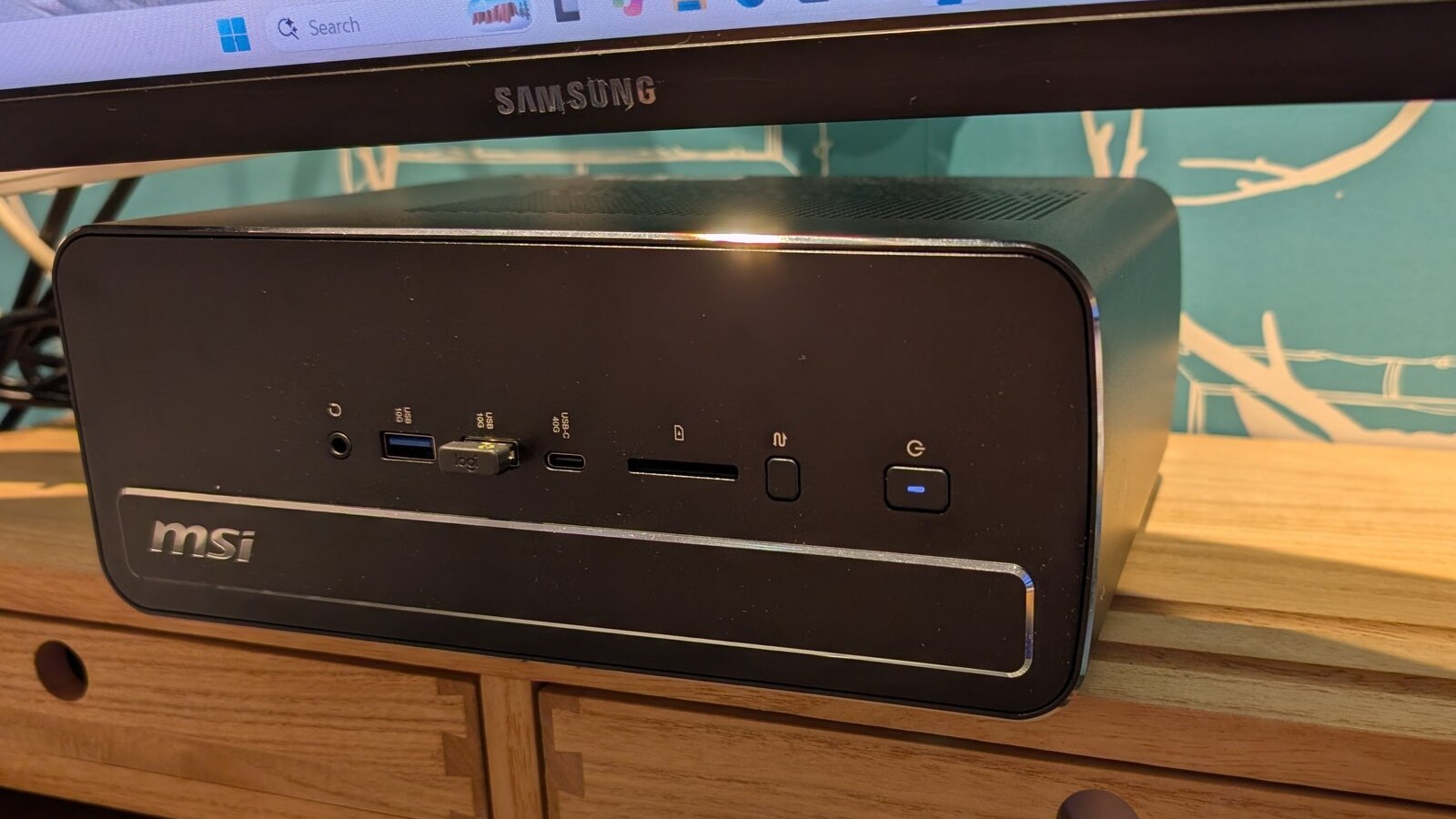
So, you've built something useful with Claude. Where does it run after that? My route is to build with the frontier models, refine what I've built, then move it onto a small box where a local model runs it for free. This is that route with a real tool: trayd, a trading-research tool on practice money that I built with Claude Code and then moved onto a box MSI lent me.
What I was after was a box I could leave running a good model on very little power. The nightly job ran on a local model with nobody at the keyboard, and both unattended nights finished on schedule. The move turned up a few things as well, which Claude Code changed on the box.
Building it at the frontier
I built trayd in the first place because I stumbled upon NVIDIA's open source engine and thought that would be exciting to plumb in some free data sources and FMP's free API too. FMP is easier to get started with. FMP discount code: houtini for a 10% discount on your subscription. I wanted it to become one of the ways I tested the MSI, simply by leaving it running for a few days to see what we could do.
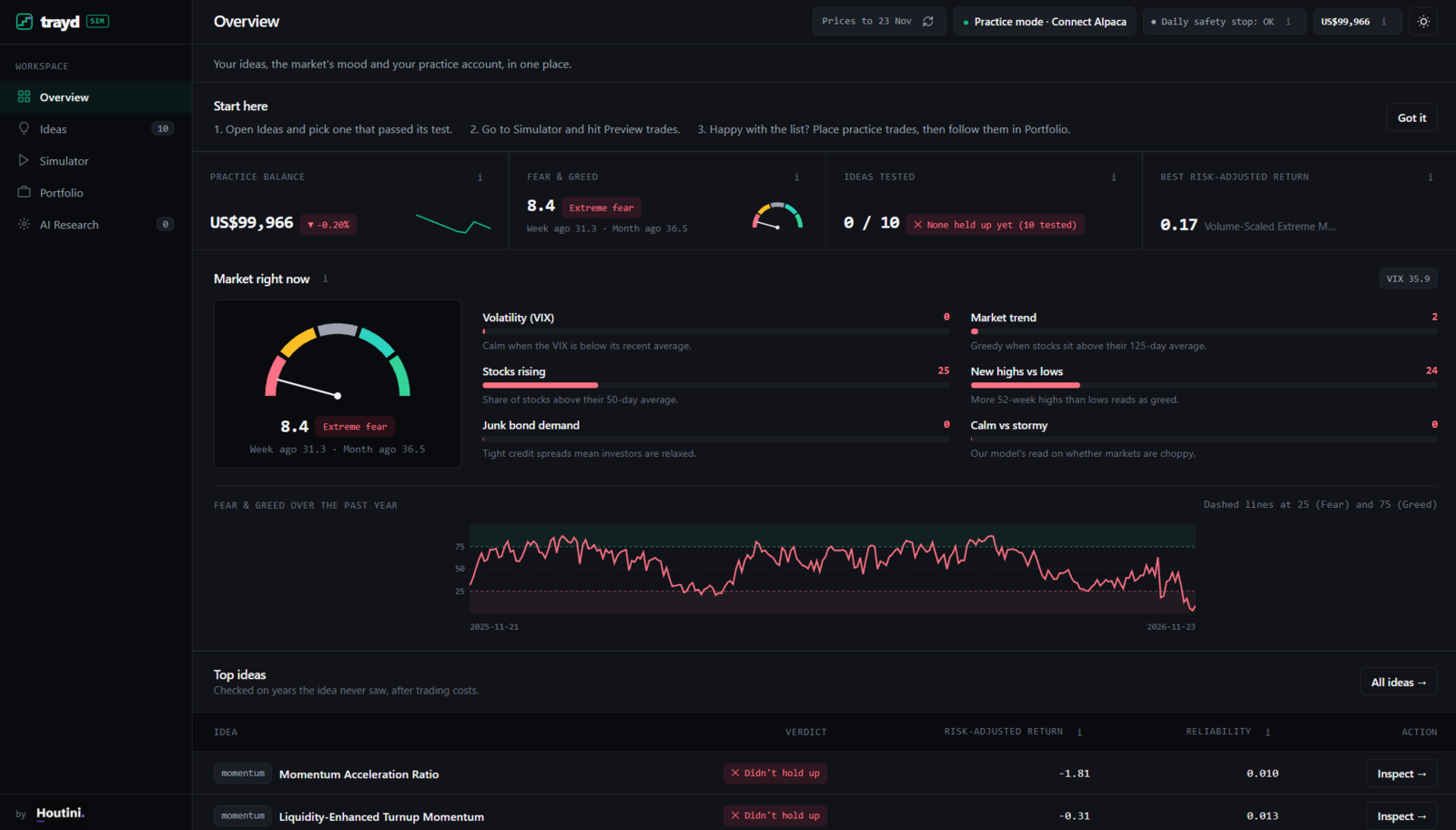
The screenshot below is trayd's Overview page on the first night. It shows the practice balance, which was US$99,966 at that point, and a Fear & Greed gauge for the mood of the market, reading 8.4, or "Extreme fear". The "None held up yet" line means none of the trading ideas the model had proposed so far had got through testing.
What trayd is
That engine is NVIDIA's Quantitative Signal Discovery Agent, and trayd is a fork of NVIDIA's repository. I made it deterministic, and I bolted a friendlier interface on top, for someone who isn't an expert trader. The S&P 500 price history comes from yfinance, which is free. FMP is short for Financial Modeling Prep. The model has one job in it, which is to propose ideas. Everything after that is ordinary Python: market-regime detection, strict testing on held-out data with costs charged, a ticker screener, and a paper-first broker that sits behind a risk guard. Held-out data is data the model never saw while it was proposing ideas. In trayd that holdout is left untouched and separated from the rest by an embargo, and costs are charged on the full value of every trade. Paper means practice money in a simulator. It's paper first, and live trading needs two separate switches to be set. The limits on position size, open positions and daily drawdown are enforced in code before any broker sees an order.
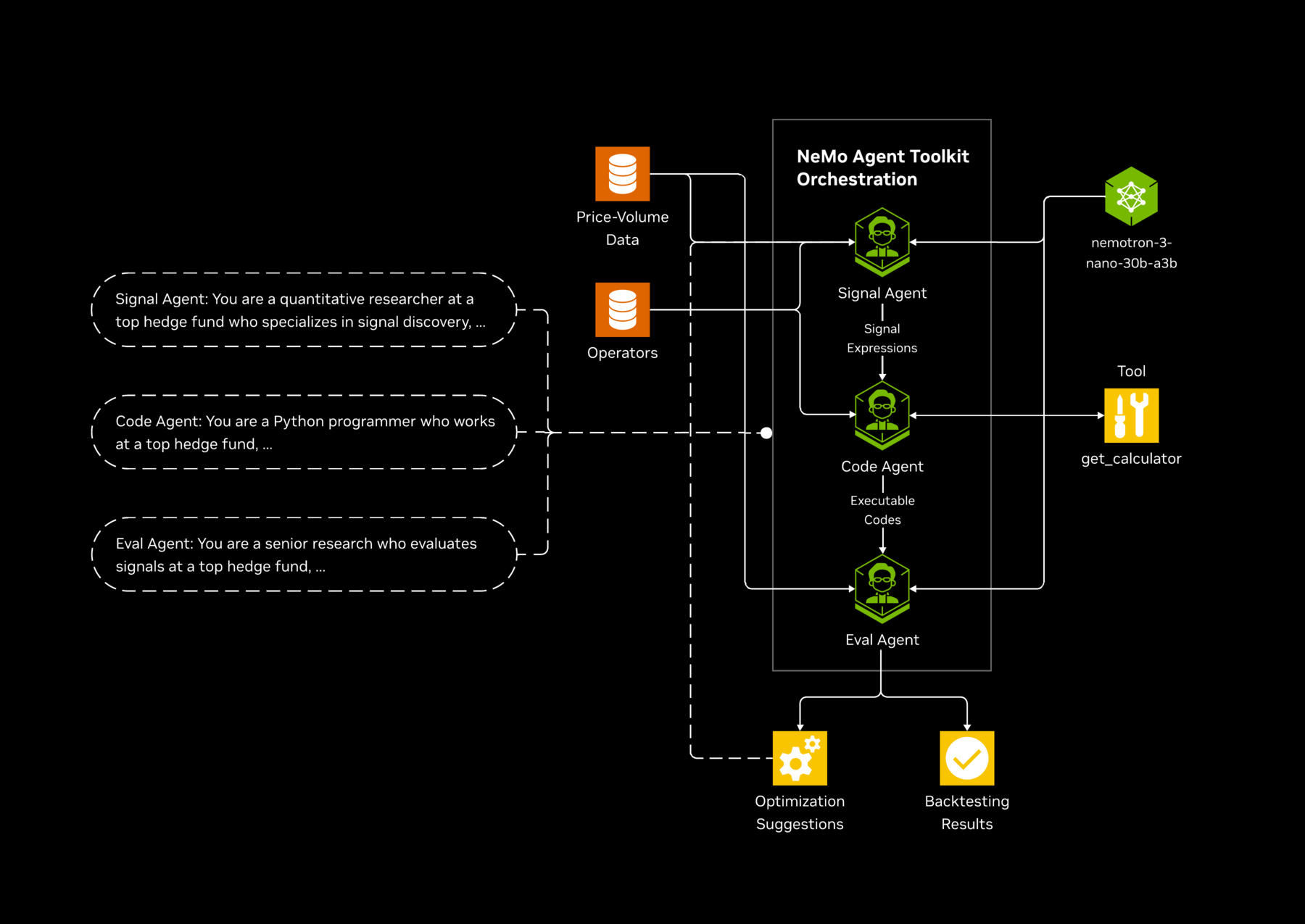
The diagram below is NVIDIA's own picture of the blueprint, which is kept in the fork. It shows three agents, where one proposes signals, one writes the code and one evaluates, and NVIDIA's NeMo Agent Toolkit orchestrates them.
I should say the split isn't mine alone. Several independent builders use the same pattern, where the model proposes and deterministic code decides.
It runs as an MCP server (a small program that gives Claude tools it can call) with a dashboard, and the same dashboard runs on its own as a local website.
Built with Claude in about a day
I built it with Claude Code, and it was really just about a day's worth of build. It started on the evening of 22 November. The dashboard design went through Gemini 4 Argon, which generated one version and then reviewed the UX for the next. Then a Fable review of the code came back with 24 findings. All 24 were fixed in one commit, before trayd moved anywhere. That commit went in the next morning, and the work after it happened on the box.
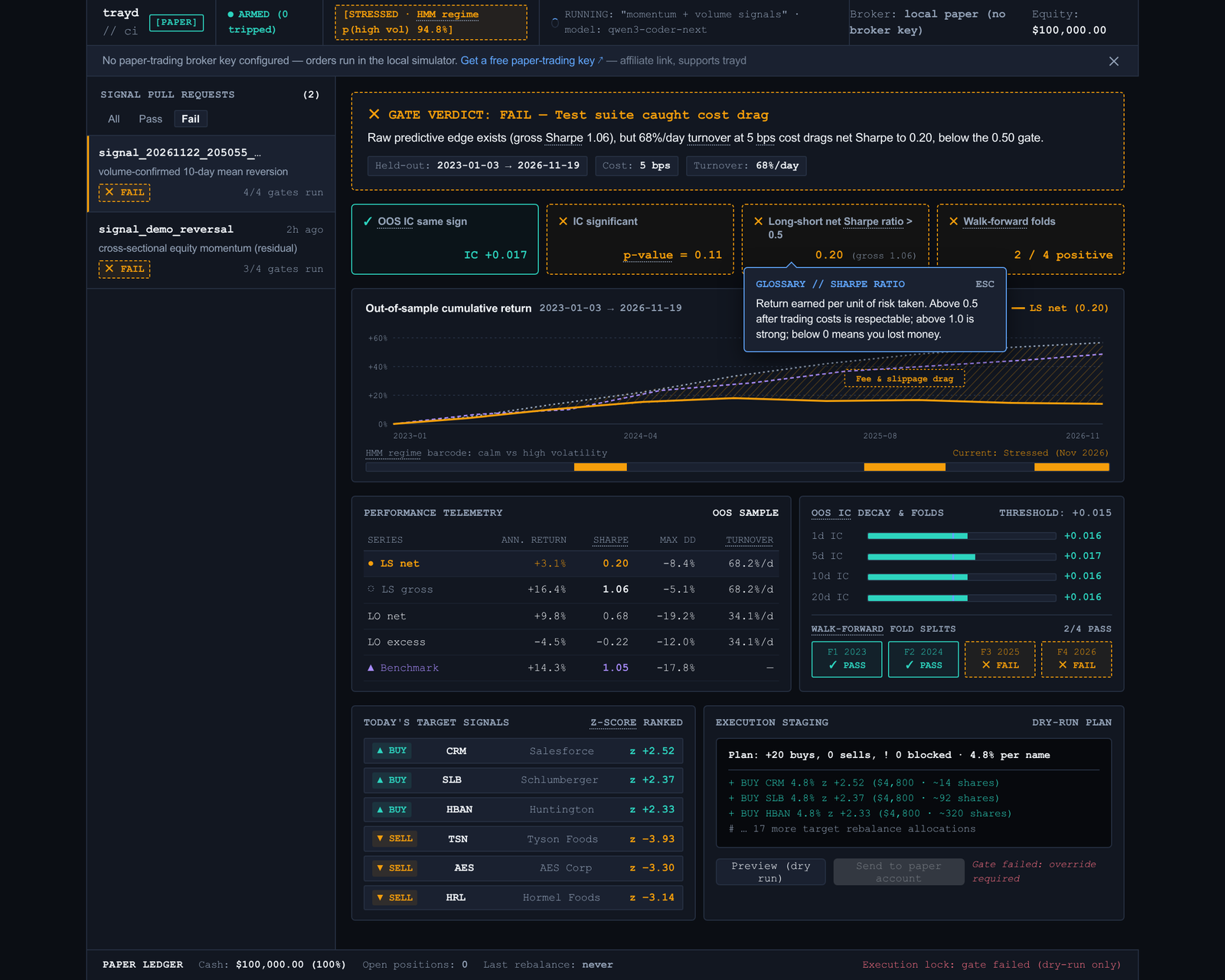
The screenshot below is the first dashboard design, which was made in Google Stitch. It's dark and dense, and it treats the model's ideas like code changes waiting for review, with a pass or fail verdict on each one and the statistics on show, which suits someone who reads Sharpe ratios (a measure of return for the risk taken). The friendlier simulator you see in the other screenshots replaced it the same evening.
So that's the part I mean by building at the frontier. The frontier models wrote it, designed it and reviewed it.
The first place it ran was the dual-4090 rig, which is two modded 48GB RTX 4090s. On there, Qwen3-Coder-Next in an 8-bit build ran 3 discovery rounds in 1 minute 14 seconds.
Moving it onto a box with its own model
The box is the MSI PRO MAX EDGE AI+. It has an AMD Ryzen AI Max+ 395, a Radeon 8060S integrated GPU and 128 GB of memory shared between the CPU and the GPU, with 96 GB given to the GPU. MSI lent it to me and it has gone back. I've reviewed it in full.
| Machine | Chip | Memory | Price at Overclockers UK, 27 Nov 2026 | Stock | Buy |
|---|---|---|---|---|---|
| MSI PRO MAX EDGE AI+ (the box in this article) | AMD Ryzen AI Max+ 395 | 128GB, up to 96GB for the GPU | £4,399.99 | In stock | Buy now at Overclockers |
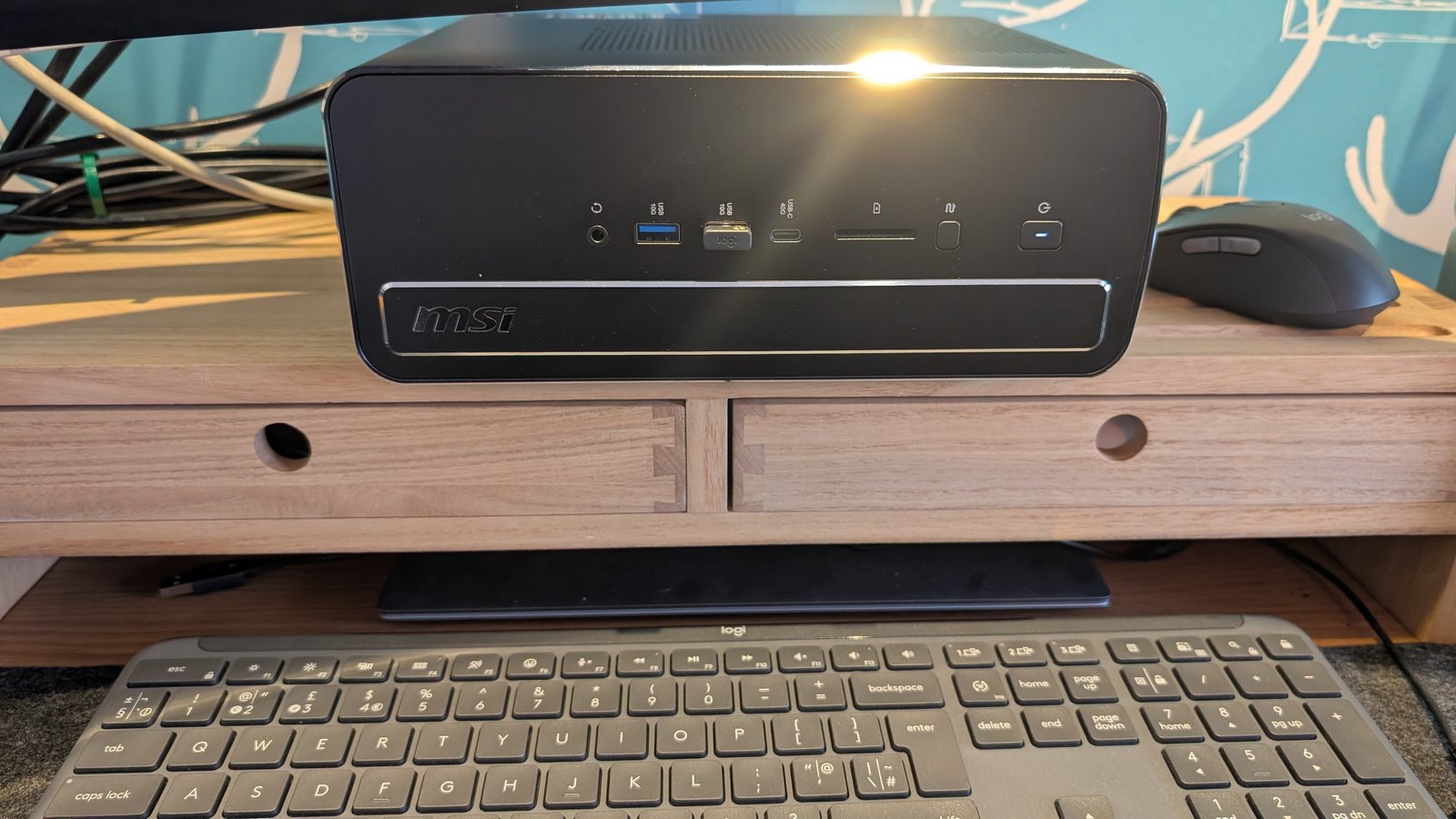
The photo below is the box on my desk, on the monitor shelf with the mouse beside it and the keyboard below.
Setting it up
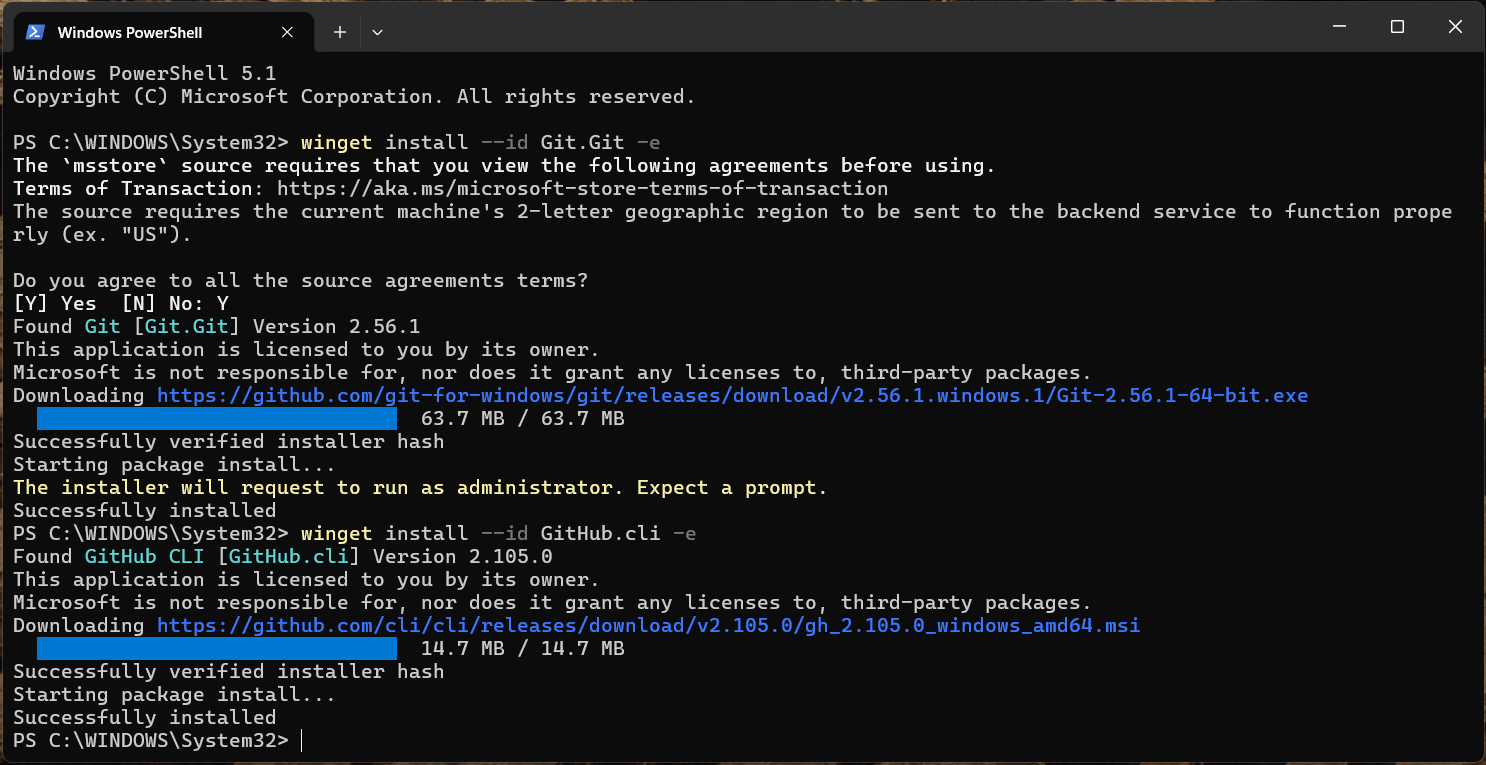
The screenshot below is the first step on the box, which was winget installing Git and the GitHub CLI in Windows PowerShell. With those two on, I cloned trayd, which took 7.3 seconds.
Before any model was involved, I ran the test suite on the box, and 192 tests passed in 39 seconds. Next came the Docker image. A Docker container is a packaged copy of an app that runs the same on any machine. I built the image natively for the box's x86-64 chip rather than loading images built for an ARM machine, which took 437 seconds and came out at 1.34 GB. trayd needs one API key, which went in by name through a small override file that git ignores, so it was never typed into a config or a command line. First start took 63.5 seconds, and that includes downloading S&P 500 price history back to 2012.
For the model I chose Qwen3-Coder-Next from Qwen's official GGUF repo, in Q8_0. Q8_0 is an 8-bit build of the model. It's 85 GB, and I picked it to match the 8-bit build the rig used. The download took just under three hours (166.2 minutes).
Serving the model
The model is served by llama.cpp, which is the program that loads the model and serves it on the box. Its server, llama-server, runs as an ordinary Windows process on the Radeon, outside Docker, because Docker on Windows can't reach this GPU. trayd's containers call it over HTTP. The model loaded in about 52 seconds and took 82 GB of GPU memory. It generates at about 40 tokens per second (tok/s) and reads a 9.7k-token prompt at 752 tok/s.
I didn't change any code for the model. trayd takes a model's behaviour from a profile matched on the served model's name, so serving it as qwen3-coder-next picked up the matching profile, which turns thinking off and uses the model's own sampling settings. It isn't tied to llama.cpp either. trayd only needs two endpoints from the model server, /v1/models and /v1/chat/completions, which means Ollama or LM Studio could serve it too.
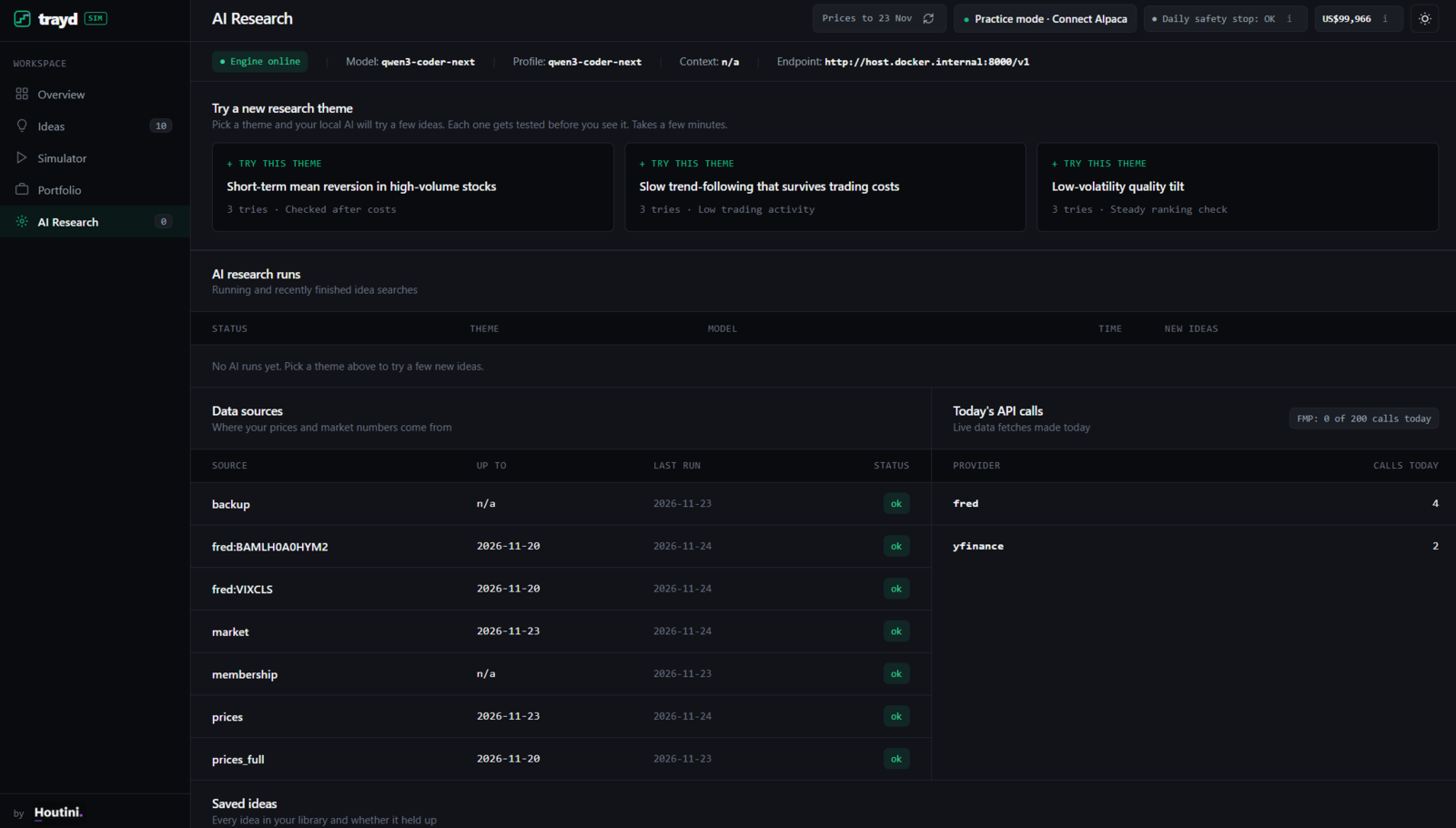
The screenshot below is trayd's AI Research page on the box. It shows the engine online, with the model and the profile both reading qwen3-coder-next, and the endpoint that the containers call, which is http://host.docker.internal:8000/v1. It was taken before a later change to the dashboard, which is why it says "Context n/a" and "No AI runs yet".
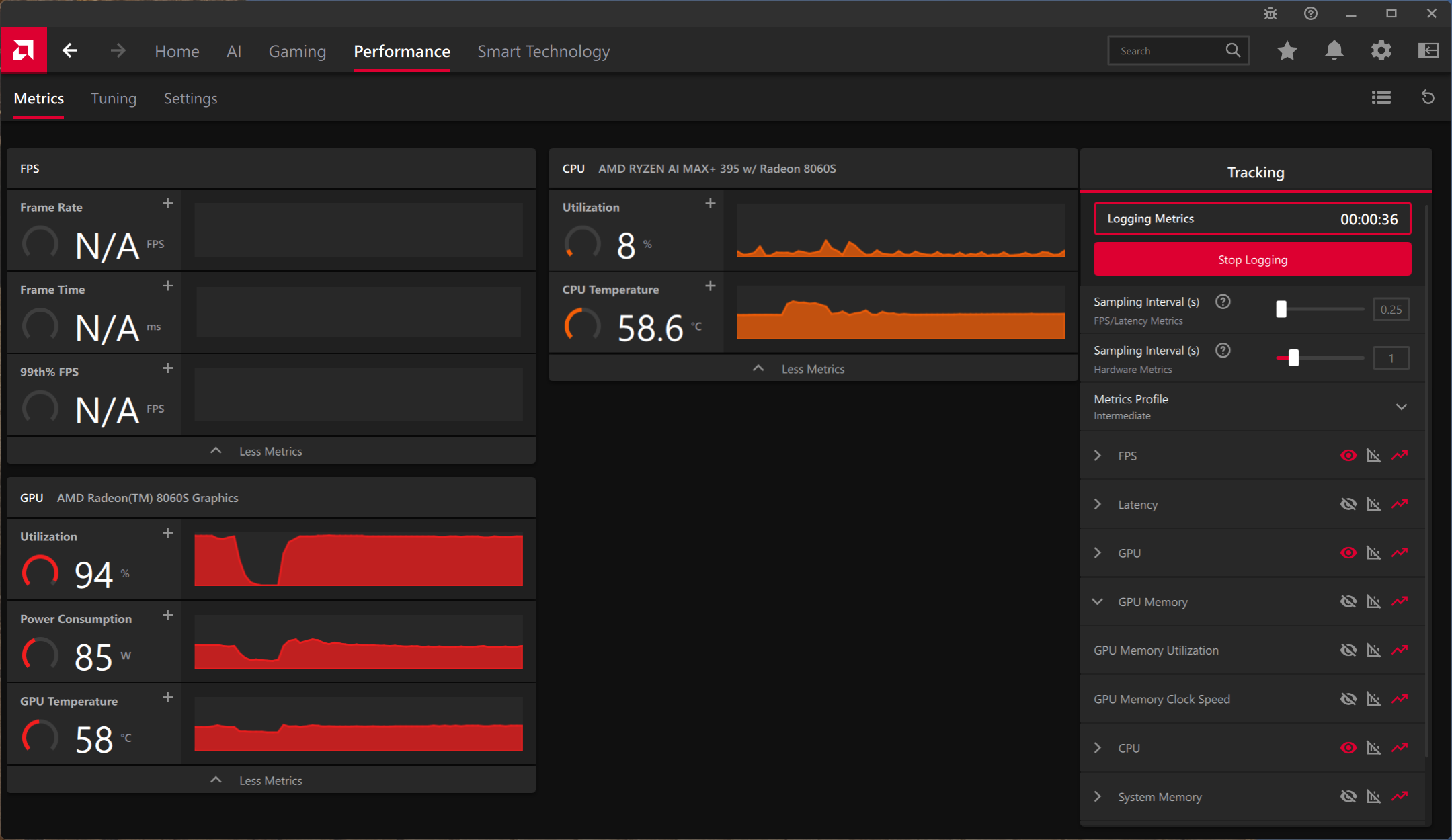
Below are AMD's own metrics from a research run, which showed the Radeon at 94% load drawing 85 W at 58 °C, with the CPU at 8%.
What running it locally turned up
The first discovery run on the box "succeeded" in 62 seconds and produced no idea at all. Why? Two files had their data and output folders hard-coded. That works from a source checkout, which is how the rig ran it, but not inside Docker. Claude Code changed both files on the box to use trayd's shared path settings, the tests passed and the change was pushed.
The second run worked: 3 rounds in 232 seconds, with one idea saved. The rig did 3 rounds in 74 seconds, although that was on a different theme. So the box took about three times as long, on a model generating at about 40 tok/s. Where does the time go? Scoring each round's ideas took about 4 to 7 seconds, and nearly all of the rest was the model writing.
In one round the model wrote 12,564 characters of prose instead of the JSON it was asked for, which meant that round had nothing to score.
The morning after the first night
The morning after the first night, the balance showed about $153 up. Then it fell back. The dashboard had valued the practice portfolio with an intraday price, cached before the close had settled. Three things changed so that it can't happen again. Everything that reads the prices now reloads them after any refresh. When a refresh pulls a day again and finds it changed, the market table is rebuilt. And the scheduler keeps its own record, so a manual refresh can't skip the night's run.
In the same commit, the dashboard's "Context" readout started reading llama.cpp's own figure, and its AI Research table began listing the last 7 nights of unattended runs, with 207 tests passing.
This is the refine step: moving trayd to a new box with a local model turned up things the rig never showed, and Claude Code changed them on the box.
Leaving it to run on its own
First, it had to start without me. The model's start command went into a script, and a Windows scheduled task runs that script at logon. After a reboot the model and trayd came back on their own, and the dashboard works with no Claude session open.
The diagram below shows how the pieces sit on the box. The data comes in from yfinance and FMP, the model runs in llama.cpp outside Docker, and trayd itself runs in Docker: the scheduler, discovery, the validator, the screener and risk guard, the paper broker and the dashboard.
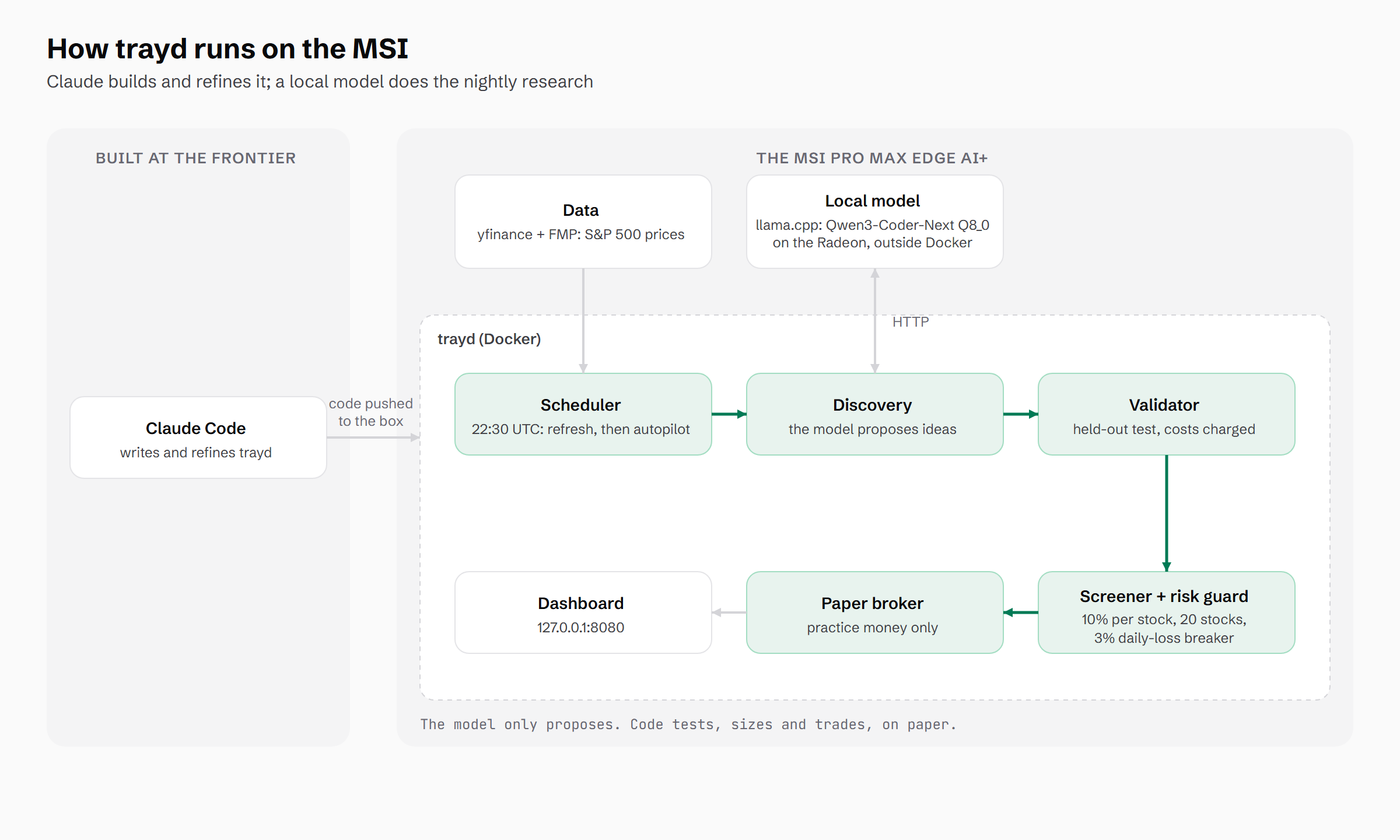
The autopilot is the nightly job: research, test, rebalance, with nobody at the keyboard. It's opt-in and off by default, and I switched it on for this box only. Every weekday, after the 22:30 UTC price refresh, it researches 3 themes from a rotation of 8 on the local model and tests every new idea on the years discovery never saw. Then it moves the paper $100,000 into the best idea that passed. Until one passes, it holds cash.
The model only proposes ideas. It never picks trades and it never sizes them. Orders go through the same risk guard, which is 10% per stock, 20 stocks and a 3% daily-loss breaker, and the autopilot refuses to run on anything but paper. Live trading was never enabled.
I wanted to see it trading, though. So a labelled fallback was added: until an idea passes, trade the best one so far, and mark it in every report as having failed its own test. I placed 19 practice trades from the dashboard to start the portfolio.
Two nights unattended
Two nights ran unattended, 23 and 24 November. A whole nightly cycle took about 10 minutes, at 130 to 255 seconds per theme.
The test was very interesting, because you're not sat worrying about the power an AI box is using when it only draws about 100 W at the wall. And you can wake up the next morning to see what it has done.
A notional profit
We made money! Pretend money. The practice account ended at US$100,313.42, which is up 0.31%, in trayd's own simulator. That's one day of market movement, which says nothing about whether an idea works. None of the ideas the model proposed passed the held-out test, and that's the test doing its job. NVIDIA's demo run of the blueprint didn't clear its own acceptance threshold either. The simulator is slightly optimistic too, because it fills at the latest daily close plus 5 basis points of slippage, where a real broker would fill at the next day's open. A notional profit doesn't tempt me into the stock market.
It was very pleasing, though, to see what was possible with about a day's build and then a very hands-off approach, with the AI orchestrating on its own.
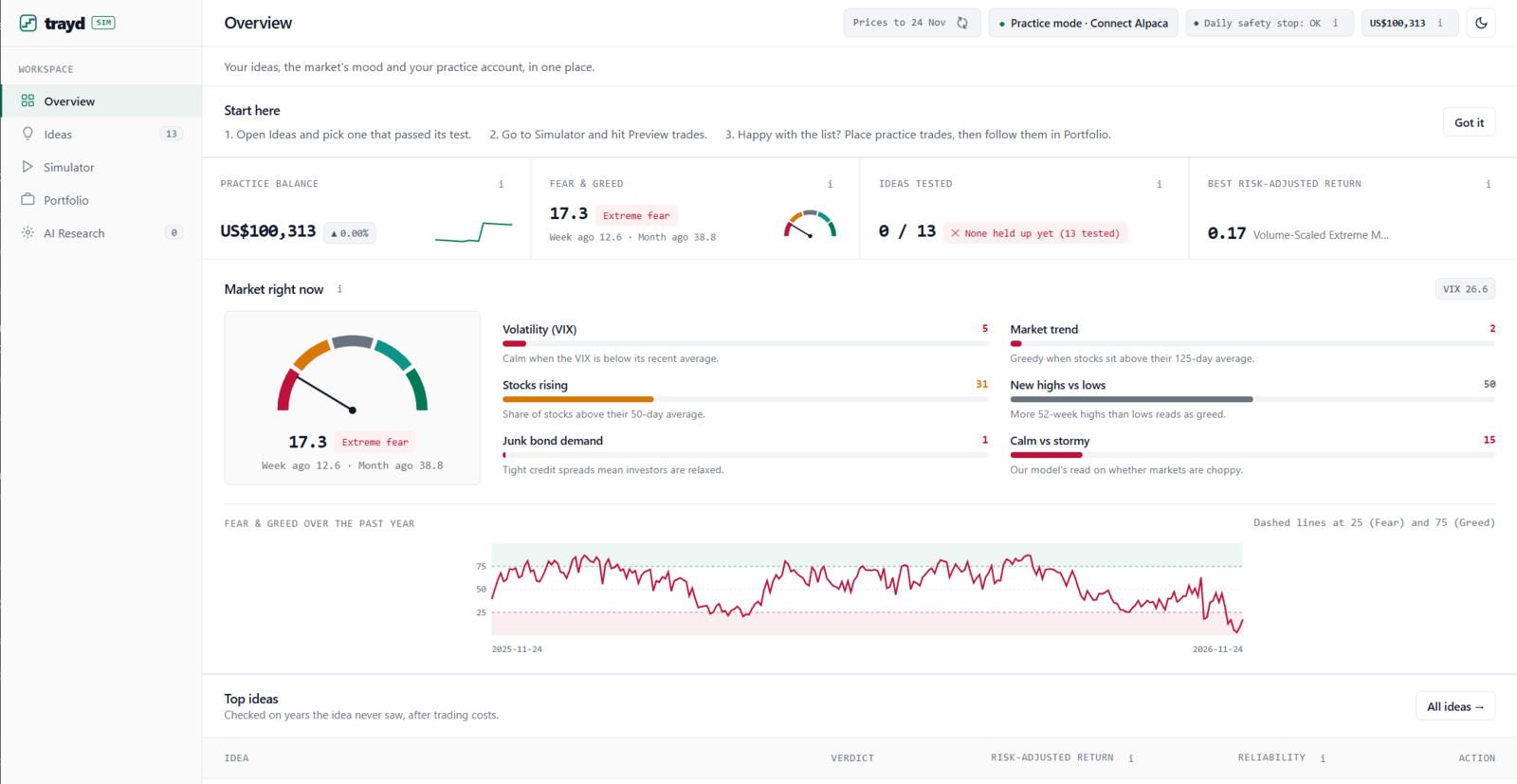
The screenshot below is the Overview page again, after the two unattended nights. The practice balance reads US$100,313, and the ideas line now reads "None held up yet (13 tested)".
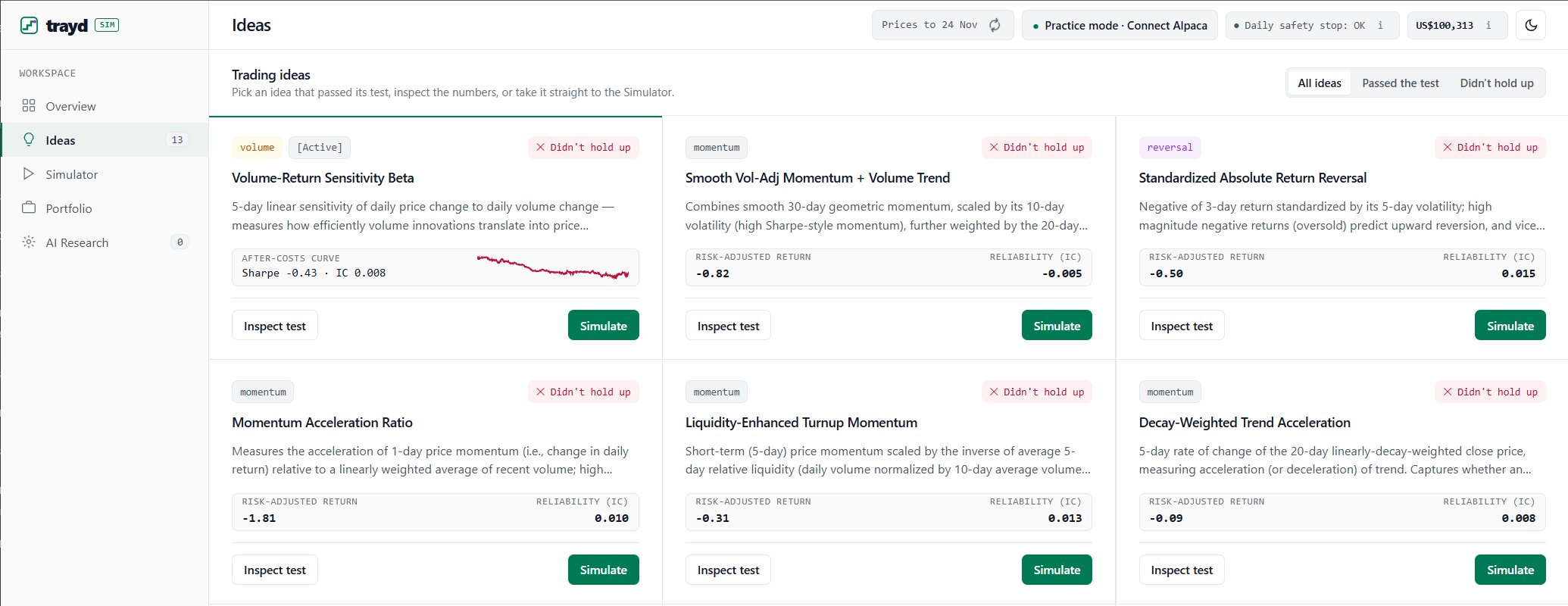
The screenshot below is the Ideas page after the second night. All 13 ideas are marked "Didn't hold up", and each card carries its risk-adjusted return and its reliability score.
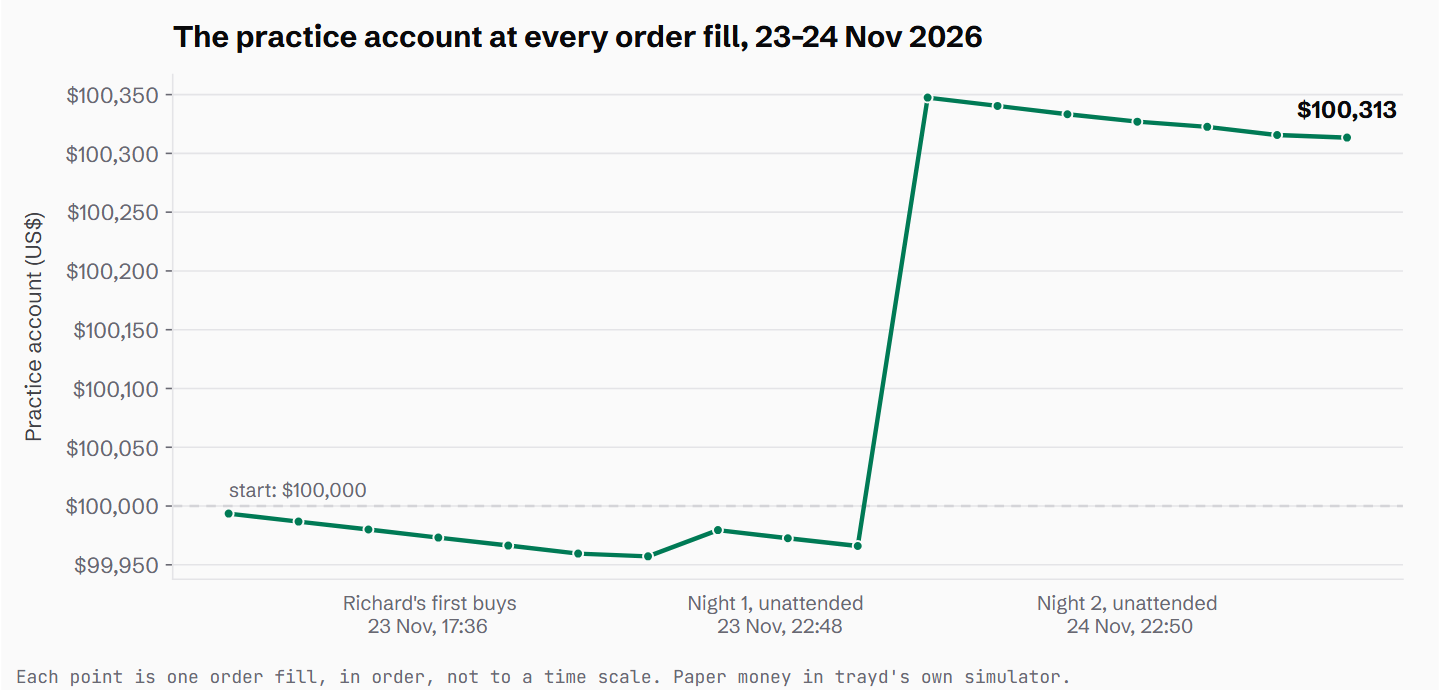
The chart below has one point for each order fill, 17 of them, drawn in the order they happened rather than to a time scale. There are three batches: my first buys on 23 November at 17:36, the first night at 22:48, and the second night on 24 November at 22:50. The account dips just under US$100,000 through the first two batches, steps up at the second night and ends at US$100,313.
How did the MSI do?
The question was never whether the MSI could out-run the rig. The point was to build something I could leave running on a good model with very little power. And it did that, with both unattended nights finishing on schedule in about 10 minutes each. Running this on a full GPU rig would cost a fortune in power, because on a big model the rig's two cards alone drew nearly three times what the whole box did flat out, and that's before you count the rest of the PC.
What you give up for that is speed. On the same model, Coder-Next, the MSI generates at 43.2 tok/s against 101.6 on the dual-4090 rig at its 330 W cap, which is a little under half the speed (0.43x). Reading a prompt is where it falls further behind, at about 0.14x, and you see that most on a long prompt. On a 16k-token prompt the first token took about 20 seconds on the box, against about 3 seconds on the rig.
For trayd, that shows up as time, not failure. Discovery took about three times as long as it did on the rig (on a different theme).
Steady under load, and quiet
I ran ten minutes of back-to-back generation with four streams at the same time, and the first fifth averaged 79.0 tok/s and the last fifth 79.2, with about 88 GB of GPU memory in use.
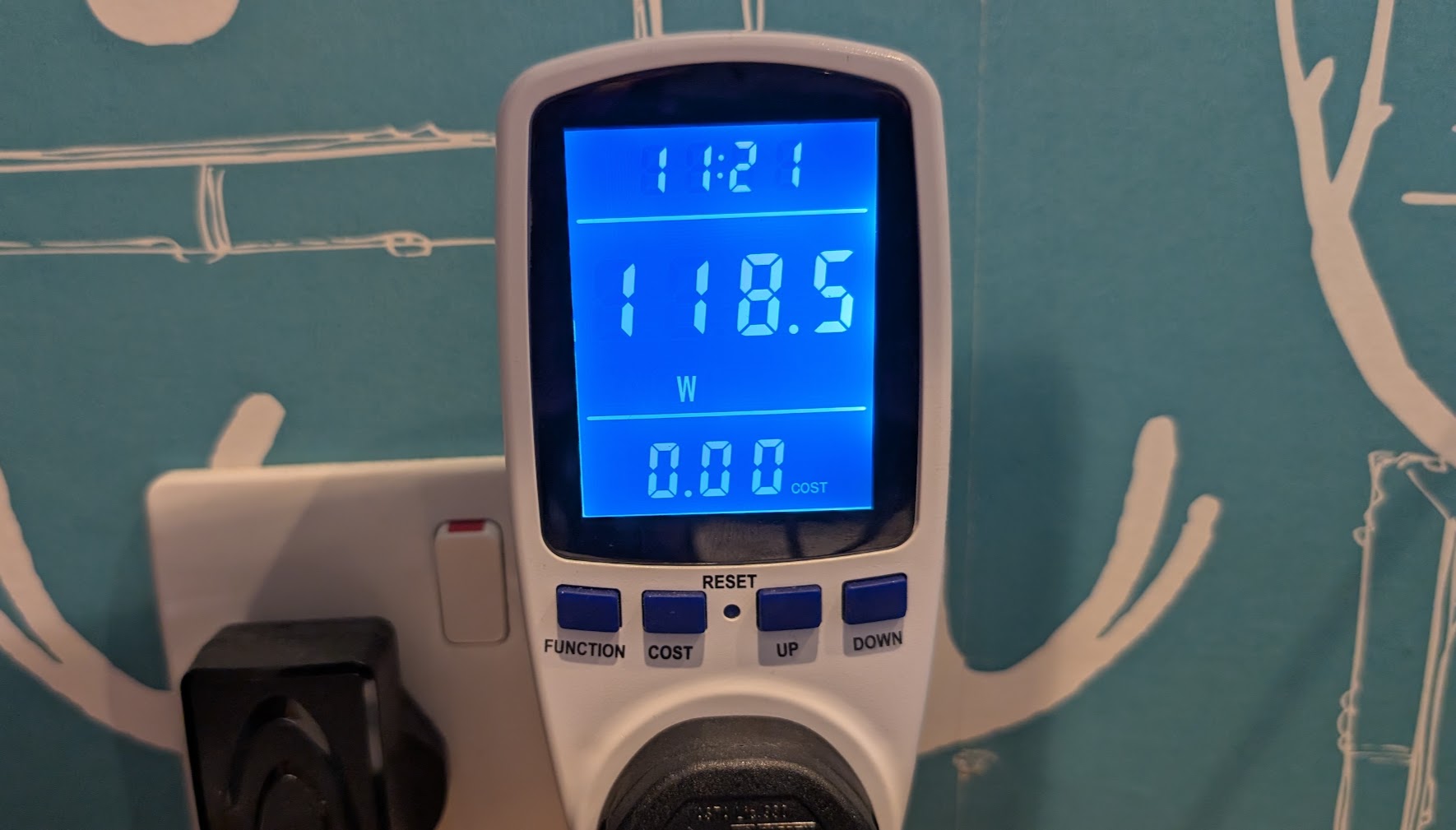
As for power, the whole box drew 118.5 W at the wall flat out, which is the reading on my meter in the photo below. And compared with the rig, the first task I gave a local model on the box brought no fan noise and no heat.
What would we improve?
There's more to refine, and these are the changes I'd make next.
Running it unattended
The model starts at logon, not at boot, which means that after a reboot someone has to sign in to Windows before anything comes back. I'd either move it to start at boot or set up auto-logon.
A price refresh during US market hours stores the live price as today's bar (the day's price record), so paper fills use an unsettled close until the nightly refresh replaces it. Whether to keep that, or hold the bar back until the close, is still to decide.
Trusting the numbers
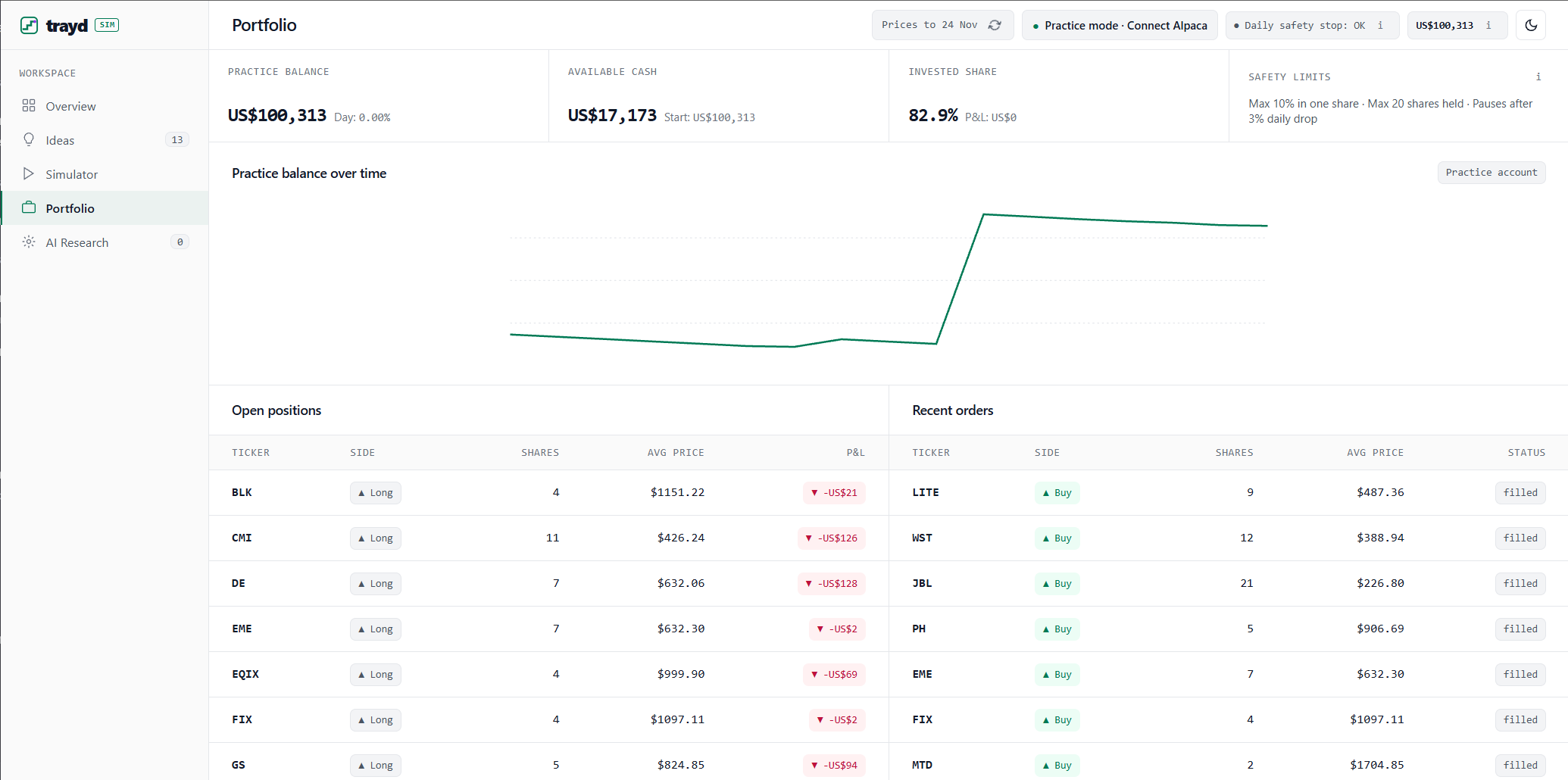
The paper trades run in trayd's own simulator, which fills at the latest daily close. Moving them to a paper account at Alpaca would remove the gap between fills at the close and fills at the next open, which is where a real broker would fill. Alpaca is a broker with an API, and anyone can open a paper-only account there with just an email address. The Alpaca adapter is already wired into trayd. Alpaca's paper account fills at live prices, so I'd expect its results to differ from the simulator's. The screenshot below is trayd's Portfolio page, still in practice mode, with its "Connect Alpaca" button at the top.
There's a gap in the data as well. Survivorship bias is what you get when you test only on companies that are still in the index, and it flatters the results. FMP's free tier can't fix it. The lists of past index members and the prices of delisted companies are paid-only on FMP, so trayd takes its point-in-time membership from Wikipedia. A paid FMP plan with both would close the remaining gap in coverage, which is about 13%.
The speed comparison needs settling as well. The 232-second run on the box and the 74-second run on the rig used different themes, so I'd run the same theme on both machines.
The open question is whether anything passes the held-out test over a few weeks of nightly research. I don't know yet.
What else a box like this could run
For me this is the payoff of the route: a small box doing a job like this every night, on its own model. trayd is one job. What else could it take?
SEO Audit Console is my first and most immediate idea. It's an MCP server that brings together the kinds of digital marketing data you'd need to manage the organic performance of your website. It pulls a site's Google Search Console history, crawls the site and joins the two, inside Claude. But you still have to use the tool. How interesting would it be to have it run on a box like this, keeping the data up to date, working out recommendations and looking for problems with the site from the data? This is the kind of thing that a low-power, inexpensive-to-run but highly capable AI box could do for you. It could go as far as emailing you when it sees something out of the ordinary.
The product-data pipeline behind simracingcockpit.gg is my second. n8n workflows fill a Postgres table of products from merchant sites, and it has a product categoriser and a data-enrichment flow alongside the scrapers. The categoriser and the enrichment flow are the kind of work I'd try on a local model overnight.
Other people's builds
In small always-on local jobs, deterministic filtering in front of the model does most of the work, and the model only sees what survives.
Price monitoring is a good example. sujayyy's price-tracker on GitHub is a competitor price monitor that runs deterministic rules on each listing and only calls the model when something has changed, and it supports Ollama as a provider. PriceGhost, a self-hosted price tracker from clucraft, uses a model only as a fallback when scraping fails, with local Qwen3 through Ollama as its recommended free option.
A box that's simply left on
We have a price monitor that we built for a client. Having a box simply left on is a really good way for it to keep updating, without the need for any Cloudflare infrastructure. So you could move quite a lot of the infrastructure you've been depending on the cloud for, and have it orchestrated or updated locally, on your own desktop machine.
Mario Spina runs a Framework Desktop, with the same chip and 128 GB, as a headless server that never sleeps. His summary after setup is that the running cost is electricity, and that it hasn't needed attention since. One of Spina's always-on jobs is n8n plus a local model on the Framework that tags every saved article, and the tagging never blocks the save.
Where this leaves me
So that's what this was. A use case scenario of once you've built it, run and maintain on a box like this.
Trying the same route
If you want to try the same route, I'd start with a job you already do by hand on a schedule. Build it with Claude and get the tests in place. Keep the deciding in code and let the model only propose. Then move it across, tests first, and expect the move to turn a few things up. It did for me.
Build something useful, build at the frontier, refine and run local for free.