CLAUDE.md: How to Write One That Stays Lean
In today's post, I'm taking a real CLAUDE.md from one of my projects down from 180 lines to 67. The review I ran on it came back with 23 findings, four of them serious, and I'm sharing the prompt so you can run it on your own repo.
 Richard Baxter AI Ops & Marketing Engineer
 On this page
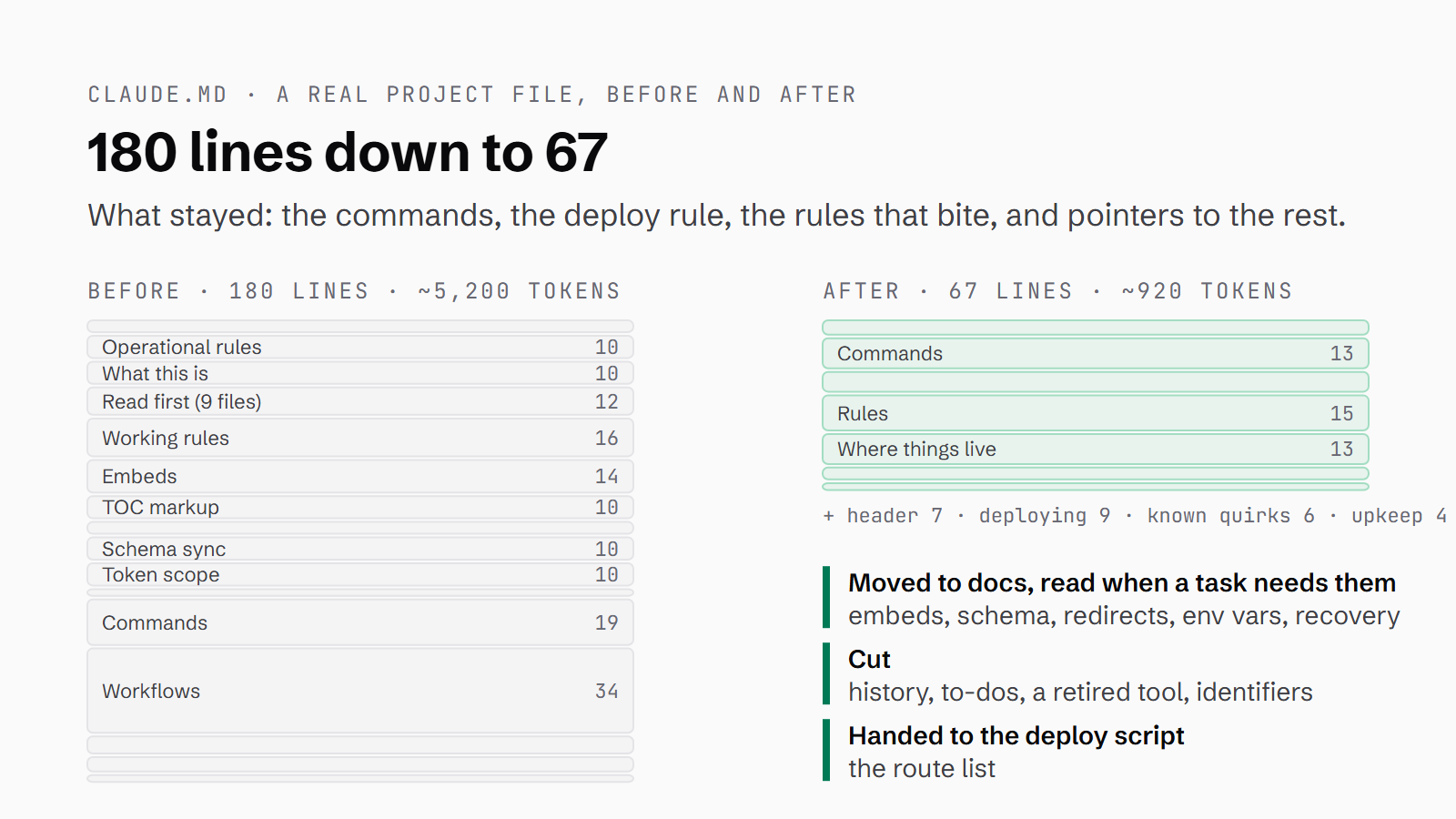
A CLAUDE.md file is read at the start of every Claude Code session, and it only ever seems to grow. Something goes wrong, so you add a rule, and when a tool gets replaced you add a note saying so. Nothing gets taken out, and after a few months the file disagrees with the code it's meant to describe and with the other files Claude reads alongside it.
So, in this post I'm going to take a real CLAUDE.md from one of my own projects and cut it from 180 lines to 67. I'll show you what was in it that didn't need to be there, the review prompt I run to catch files like this going stale, and the optimised file in full, so you can copy the shape of it for your own project.
Quick Navigation
What a CLAUDE.md file is for |
Where CLAUDE.md files live, and which ones load |
A real CLAUDE.md, cut from 180 lines to 67 |
What to leave out of CLAUDE.md |
CLAUDE.md and AGENTS.md |
Keeping it from going stale |
Checking what Claude loaded |
Where to go from here
What a CLAUDE.md file is for
CLAUDE.md is a markdown file of instructions that Claude Code loads into every session before you've typed anything. It's where you tell Claude how to build, test and deploy the project, which rules will bite if they're ignored, and where things live in the repo.
It isn't documentation, a changelog or a to-do list, although the file I cut down had drifted into being a bit of all three.
Everything in the file goes into Claude's context. Context is the working space for a session. It holds everything the model can see at the same time, your conversation included, and there's only so much of it. The Claude Code memory docs set a target of under 200 lines per CLAUDE.md file, because longer files consume more context and reduce adherence, which is the docs' way of saying Claude follows less of a long file.
Where CLAUDE.md files live, and which ones load
There's often more than one CLAUDE.md in play, and they stack. The docs list four scopes, from the broadest down to the most personal:
| Scope | Where the file lives | What it's for | Who it's shared with |
|---|---|---|---|
| Managed policy | macOS: `/Library/Application Support/ClaudeCode/CLAUDE.md`<br>Linux and WSL: `/etc/claude-code/CLAUDE.md`<br>Windows: `C:\Program Files\ClaudeCode\CLAUDE.md` | Organisation-wide instructions, set by IT | Everyone in the organisation |
| User | `~/.claude/CLAUDE.md` | Your own preferences, for every project | Just you, all projects |
| Project | `./CLAUDE.md` or `./.claude/CLAUDE.md` | The project's rules, committed with the code | The team, through source control |
| Local | `./CLAUDE.local.md` | Your own notes on this project | Just you, this project |
Files in the directories above the one you're working in load at launch. Files in subdirectories load later, when Claude starts working in that folder, which means folder-specific rules stay out of context until they're needed.
Some of my repos use a routed set, built on that loading rule: a root CLAUDE.md that just routes, and a CLAUDE.md in each folder below it that does the instructing.
The docs say to add CLAUDE.local.md to your .gitignore, so your own notes on a project stay out of the shared repo.
A real CLAUDE.md, cut from 180 lines to 67
The file I've used here is the CLAUDE.md from one of my own website repos. It's an Astro site on Cloudflare Workers with a headless CMS, and its CLAUDE.md had reached 180 lines and 2,776 words. That's roughly 5,200 tokens by the rule of thumb of four characters to a token, loaded into every session before any work starts. The file was under the docs' 200-line target, but still carrying a lot it didn't need.
It's on the large side for me, but far from the worst. I have more than 40 CLAUDE.md files across my repos. Plenty of them sit around 90 to 100 lines, and the biggest runs to 568 lines and nearly 5,900 words.
What was wrong with it
On a first read, a lot of it plainly didn't need to be there. Rules carried their own history: something was "hard-won" on a particular date, a section had been "removed from the homepage" on another, and there was a note about which branch was merged when. There was a to-do ("Follow-up: swap to ...") and a set of instructions for a tool that had since been retired, along with plenty of reference detail that only one task ever needs: how interactive embeds render, a schema kept in sync across three files, an API token's scope, a pattern for redirect Workers and a table of environment variables. It also had a public storage URL, some personal identifiers and a numbered "read first" list of nine files.
Then I ran my review on it. It's a fresh, read-only Claude session running my standing prompt, which you'll find further down. It marked about 40% of the file as dead weight and came back with 23 findings, four of them serious:
| What the review looked for | Found | Example from this repo |
|---|---|---|
| Conflicts (a document disagrees with another document or with the code) | 8 | An AGENTS.md giving a different dev command from `CLAUDE.md` |
| Logic collisions (two rules that can't both be followed, or a rule that can't be met) | 4 | The deploy check that could never pass |
| Stale facts (the code has moved on) | 11 | Design rules from before a redesign |
| **Total** | **23** | **4 of them serious** |
The four serious ones started with a deploy check that could never pass. CLAUDE.md said a list of 13 pages must all return 200 after every deploy, but two of those pages had since been turned into redirects, and the deploy script was already checking a different list. The second was a set of design rules for a design that no longer exists. The file sent Claude to a design doc describing fonts, weights and an accent colour from before a redesign, and the site's CSS had moved on. Then there was auto memory (the notes Claude saves for itself between sessions), where notes written months earlier said publishing and backups ran through a password-manager wrapper, while CLAUDE.md said that wrapper was retired. The last was a required backup with no working route, because it needed a token that another rule said to clear and never keep.
The optimised file
The optimised file is 67 lines and 578 words, which is roughly 920 tokens by the same rule and about 82% smaller. The new file also imports AGENTS.md, which never loaded on its own before, so that file's 38 lines now load at launch too. Counting them, what loads at the start of a session goes from about 5,200 tokens to about 1,500, roughly 70% less. The file itself came in under the 70 to 80 lines the review estimated a lean version would need.
These are the main changes to the file:
- There's now one deploy command, and that command owns the checks, so the file doesn't need to list any routes at all.
- The line telling Claude to read
AGENTS.mdbecame an@AGENTS.mdimport (more on that below). - The one-task reference goes into docs that Claude reads when that task comes up. Those are pointers rather than imports, because imports load at launch.
- The design pointer now says the CSS wins if the doc disagrees with it.
- The history went, because git keeps it, and the to-dos went to a backlog doc.
- A new section at the end covers upkeep: when a rule changes, change it in
CLAUDE.mdand anywhere else that says otherwise, in the same session.
I've renamed the project "example-site" and taken out the names, IDs and URLs:
# example-site

The company website: Astro 6 (server output) on Cloudflare Workers, with EmDash as the CMS (D1 for data, R2 for media).
This repo is production - main is the live branch.

@AGENTS.md

## Commands

```bash
pnpm install
pnpm run dev          # astro dev on http://localhost:4321 (CMS admin at /_emdash/admin)
pnpm typecheck        # astro check
pnpm build            # astro build
npm run ship          # the only deploy command - see Deploying
```

`pnpm run dev` is the dev command. AGENTS.md (from the CMS scaffold) gives `npx emdash dev`, which also seeds the
local database - use that only when you want a reseed.

## Deploying

- Deploy only when I ask, and only with `npm run ship`. It refuses to run with a dev server up or uncommitted changes,
  deploys, and runs the route health check. Don't run `npm run deploy` or `wrangler deploy` on their own - they skip
  the checks.
- Stop any running dev server before a build. Two Vite processes writing the same checkout ship a broken bundle.
- If a deploy fails with a Cloudflare auth error, check for a stray `CLOUDFLARE_API_TOKEN` in the shell and clear it.
  Deploys use wrangler's own login (`npx wrangler whoami`).

## Rules

- Back up before anything that writes to or deletes from the R2 bucket (CMS upgrades, bulk edits, deletions):
  `pnpm backup`. It needs a `CLOUDFLARE_API_TOKEN` in that shell only - ask me for one, and clear it afterwards.
  R2 has no versioning or trash; D1 has 30-day Time Travel, R2 doesn't.
- Don't read files listed in `.aiignore` (env files, `.dev.vars`, keys). Refer to secrets by variable name; if something
  needs a secret value checked, ask me.
- CMS-driven pages are server-rendered: no `getStaticPaths` on them, and call `Astro.cache.set(cacheHint)` on any page
  that queries content.
- EmDash specifics that bite: image fields are objects (`{ src, alt }`, render with `<Image>` from `emdash/ui`);
  `entry.id` is the slug and `entry.data.id` is the database ID; taxonomy names match `seed/seed.json` exactly.
- Don't upgrade EmDash without a compatibility review - the content publish pipeline depends on its current schema.
- No new top-level dependencies without asking. The stack is Astro, EmDash, Cloudflare, Tailwind v4 and React.
- UI copy: British English, no em dashes. Article copy is written in a separate content repo, never in this repo.

## Where things live

Read these when the task needs them - they are not loaded at the start:

- Design system and tokens: `docs/design.md`, `src/styles/global.css` (the CSS is the source of truth if they disagree)
- Content model: `docs/content-model.md` (ground truth: `seed/seed.json`)
- Embedding interactive components in articles: `docs/embeds.md`
- Structured data (Person and Organization schema appears in three files - change all three): `docs/schema.md`
- Legacy-domain redirects (separate Workers under `redirects/`): `redirects/README.md`
- Env vars and what uses each: `.dev.vars.example`
- CMS lockout recovery: `docs/cms-recovery.md` - read before touching auth state
- Backlog of site work: `docs/site-backlog.md`

## Known quirks

- Astro 6 on Cloudflare: `Astro.locals.runtime.env` is gone - use `import { env } from "cloudflare:workers"`.
- Blank CMS admin pages after a dependency change: EmDash packages must stay in `vite.optimizeDeps.exclude`.
- `/_emdash/admin/setup` renders blank when `EMDASH_AUTH_SECRET` is missing (`npx emdash doctor` confirms it).

## Keeping this file honest

- No history here - that's what git is for. No to-dos - they go in `docs/site-backlog.md`.
- When a rule changes, change it here and in any doc or memory note that says otherwise, in the same session.What to leave out of CLAUDE.md
History is the easiest thing to take out of a CLAUDE.md, because git already records what changed and when, so a rule only needs to say what's true now. Anything the code already states shouldn't be copied into the file either, because the copy goes out of date and the code doesn't. A list of routes to check is a good example, and so is a version number that changes. The deploy check that could never pass was exactly that kind of copy.
Secrets and personal identifiers don't go in at all.
Pointers, not imports
An import is a line like @docs/design.md in your CLAUDE.md. It's expanded and loaded at launch, so importing a long doc puts the bloat straight back into every session. Point to the doc by its path instead, and say when to read it.
According to the docs, block-level HTML comments are stripped before the file reaches Claude, so a note to whoever maintains the file can sit in a <!-- comment --> without costing any context.
CLAUDE.md and AGENTS.md
AGENTS.md is the instructions file other coding agents read, so it does the job for them that CLAUDE.md does for Claude. Claude Code can read it too, from version 2.1.277, but by default only when there's no CLAUDE.md or CLAUDE.local.md in the working directory or above it. To change that, open /config and go to Project instructions: the default, claude-md-or-agents-md, reads one file or the other, and claude-md-and-agents-md reads both.
My repo had both files, because the CMS scaffold ships with an AGENTS.md, and the review found Claude had never loaded it on its own. It was only read if Claude chose to open it from the "read first" list. I was running Claude Code 2.1.232, below the version that reads it, and there was a CLAUDE.md present anyway. The AGENTS.md also repeated five of the CLAUDE.md rules and gave a different dev command.
If you do want both, put an @AGENTS.md import in CLAUDE.md:
@AGENTS.mdThe docs also offer a symlink between the two files, but on Windows they say to use the import instead.
I don't use AGENTS.md myself.
Keeping it from going stale
A CLAUDE.md has to agree with the code, the docs it points at, any other CLAUDE.md files that load with it, and auto memory. Any one of those can move on without the file knowing about it.
I've written about Claude Code's auto memory as part of managing a repo, and memory is where one of this repo's serious findings turned up. Auto memory has an index file called MEMORY.md, which loads at the start of every session alongside CLAUDE.md. In this repo, the index still sent publishing through the wrapper that CLAUDE.md said was retired. So each session started with two instructions that couldn't both be true.
The review prompt I use
A prompt I use quite frequently is a document review. I ask Claude to review the documents in the repo against each other and against the source code, and to look for conflicts, disagreements and any logic collisions.
CLAUDE.md is always in scope. Occasionally I add the auto memory as well, which I did for this repo. The prompt asks for a read-only review, so nothing changes until you've been through the findings.
Written out, the prompt looks like this:
Review the documents in this repo against each other and against the source code.

Look for:
- conflicts and disagreements between documents, and between a document and the source
- logic collisions: two rules that can't both be followed, or a rule that can't be met
- stale facts: anything a document states that the code no longer does

Always include CLAUDE.md (and any CLAUDE.md files above this folder). This time, include the auto memory as well.

Quote the file and line for every finding, say which category it is and how serious, and propose the fix.
Read only - don't change anything, and don't open any file listed in .aiignore.
Claude Code now has a built-in check as well. Run /doctor prompt-audit in a session (it needs v2.1.283 or later) and Claude reads your instruction files and checks them for contradictions, for references to files or commands that don't exist, and for instructions written for older models. It then proposes edits, and changes nothing until you ask. Where my prompt differs is that it checks what the documents say against what the code does, and I add the auto memory, which the docs don't list among the files the audit reads. If you'd like to try the review on a repo of your own, you can run it with a free week of Claude Code.
Checking what Claude loaded
There are two commands that show you what Claude is working from. /memory lists the CLAUDE.md files, and selecting one opens it in your editor. /context shows which CLAUDE.md and rules files loaded into the current session. Rules files are the ones in .claude/rules/, and they can be set to load only when Claude works with matching files.
Run /context after you've cut a file down, to see what now loads. When an AGENTS.md sits next to your CLAUDE.md and you're not sure which one Claude has read, the docs say to run /memory and look for the AGENTS.md path in the list.
Where to go from here
When the review comes back, go through the findings and make the fixes you agree with, in CLAUDE.md and in whichever doc or memory note disagreed with it.
For everything else in the .claude folder, there's the project setup page. And if you haven't got Claude Code yet, the beginners guide is where I'd begin.
Continue reading.
- How-to GuidesHow to Make a PDF Report with Claude
- How-to GuidesHow to Make a Presentation with Claude
- How-to GuidesHow to Benchmark vLLM: Find the Best Model, Quant and Settings for Your GPU
- How-to GuidesClaude Code Memory: How to Keep It Useful
- How-to GuidesHow to set up an MCP gateway with Docker
- How-to GuidesHow to Use the Gemini API (and Why I Run It Next to Claude)