Complex ERP trade pricing on Shopify Plus B2B, native-first
We've put a global hardware distributor's ERP trade pricing live on Shopify Plus: about 70 hand-set price lists, with per-customer specials and volume breaks on top. In today's post we're taking a closer look at what native Shopify Plus carried, and the one gap in it we filled with a small first-party layer.
 Richard Baxter AI Ops & Marketing Engineer
 On this page

A lot of B2B businesses run their pricing out of an ERP (the back-office system that holds a business's orders, customers and accounts), and the pricing book in there has usually grown for years. There are hand-set lists for each trade tier and buying group, negotiated specials for the bigger customers, volume breaks on top of those, and products that only sell by the carton. So when you move all of that onto an ecommerce platform, the question is how much of it the platform can hold.
I set out to prove that a native-first, deeply complex bulk pricing model, with tens of thousands of permutations on quantity, and special trade pricing breaks per customer, could be executed within Shopify in a highly atypical ERP configuration. The client is a global hardware distributor, and the ERP is SAP Business One.
It can be done. Native Shopify Plus carried most of it as it comes. Where the platform stops, one first-party app and one nightly job fill the gap. The whole thing is live and trading, with orders coming in on account and online every day.
Quick Navigation
The pricing |
What native carried |
Volume breaks across catalogues |
Cartons, PO Boxes and terms |
Running it |
What's next |
What we've got
The pricing we had to make work
The distributor sells castors, materials handling, PPE and storage, and the job was to bring five brand websites into one Shopify Plus store, trade customers first. An ERP connector syncs orders, customers and base pricing from SAP Business One across to Shopify. There are about 70 price lists across the Shopify catalogues (in Shopify B2B, a catalogue is a set of prices and rules assigned to a company location), covering trade tiers, buying groups, reseller and end user. Every list is hand-set, with Shopify's percentage adjustment left at 0%, which means a list called "minus 60" doesn't take 60% off anything. The name is a label for the people who use it. Each list carries around 1,300 explicit prices, and a trade catalogue publishes about 1,700 products.
On top of those sit 44 negotiated catalogues, one per customer, and some of them carry their own volume breaks. A customer on one of those specials is still on a standard catalogue as well. Much of the product range only sells in whole cartons, for example a carton of 144 pairs of gloves. Companies on Net 30 or Net 60 terms pay on account (they're invoiced, and pay within 30 or 60 days) and never by card, while cash customers pay up front. About 1,180 trade-only products show "log in for price" to guests, while 80 retail-priced lines sell openly on the same storefront.
That's what makes this configuration atypical: none of the lists is worked out from another, every one is hand-set, and a customer with a special still sits on a standard list at the same time. In late August 2026 it came to 91 catalogues, 348 companies, 368 company locations (each site or branch a company buys for) and 591 trade customers. The tens of thousands of permutations is my estimate of the scale; I haven't computed a total.
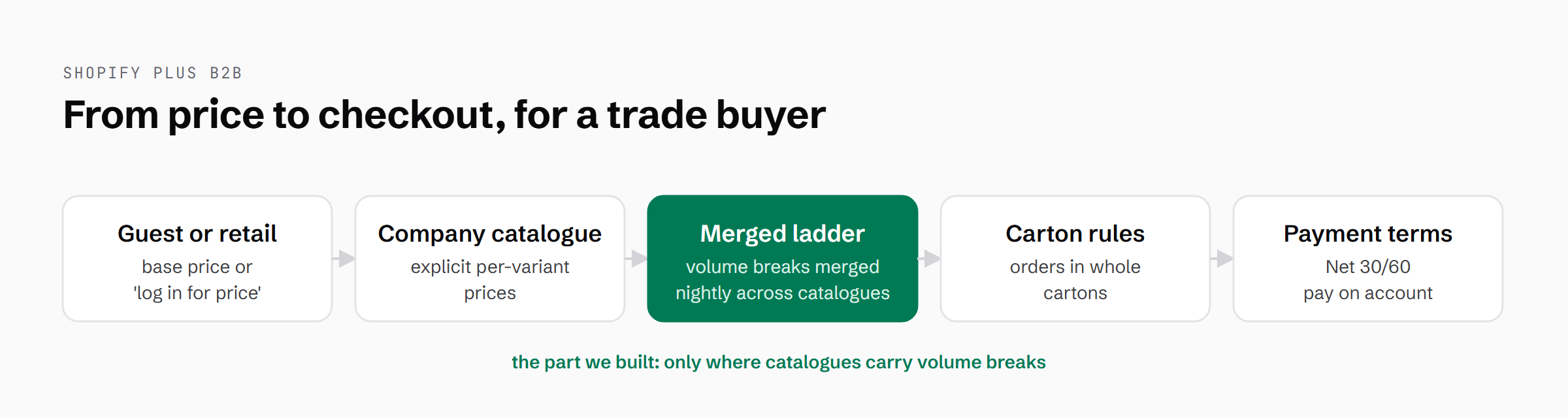
The merged volume ladder is the one pricing step Shopify doesn't do natively, and it applies where a company's catalogues carry volume breaks.
What native Shopify Plus carried
I argued in the first architecture discussions in October 2025 that price is a calculation, not storage. On the numbers we were sizing for at the time, pre-computing a price matrix for 1,000 trade customers across 4,000 products comes to about 4 million rows, or 12 million with volume tiers, and every one of them is stale the moment a rep renegotiates.
So the build is native-first. Shopify Plus's own B2B features do as much of the work as they can, and our own code only goes in where they stop. Companies and their locations map onto the ERP's business partners. Catalogues hold explicit per-variant prices, which means the hand-set lists import as exactly what they are. A quantity rule sets the minimum a buyer can order and the step they order in, and on each price list here both are set to the carton. With payment terms set, a Net 30 company checks out on account without any custom code. New Customer Accounts, Shopify's newer customer login, gave us an account area we could extend.
When we audited the special pricing on 25 June 2026, across 1,369 SKUs, native covered about 97% of it as it stood.
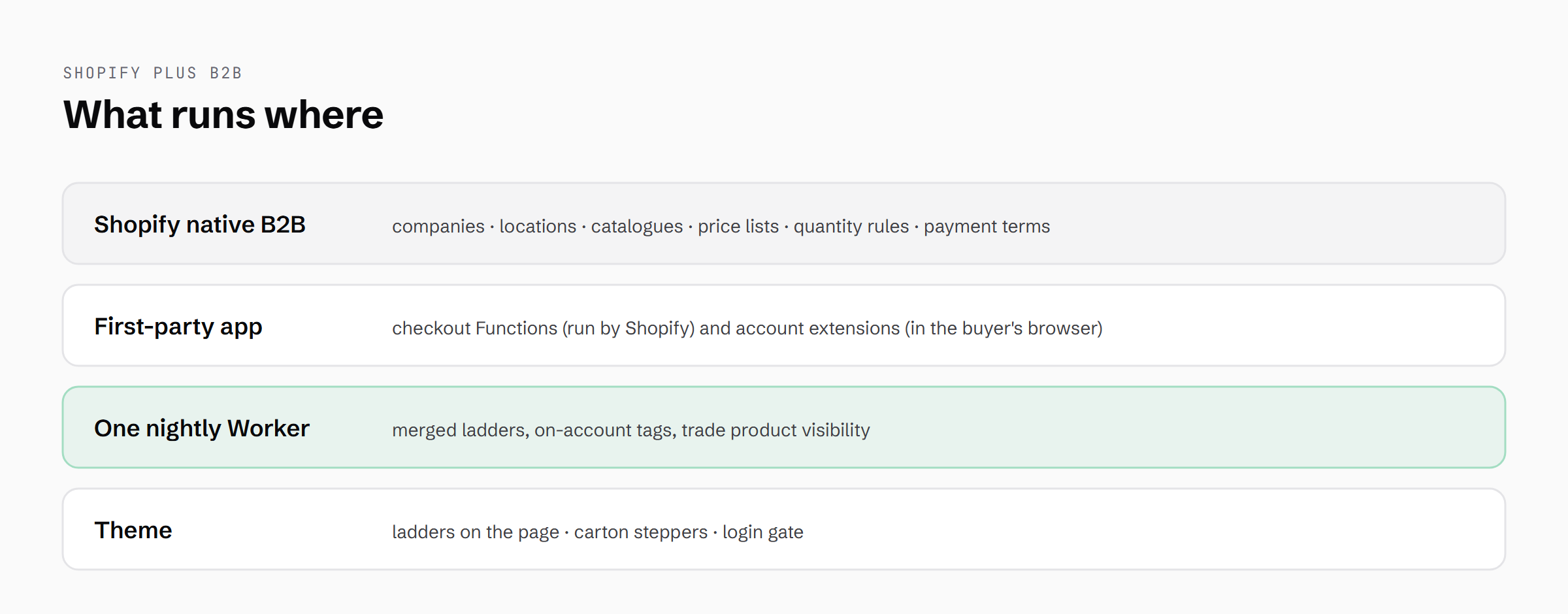
Shopify's native B2B does most of the work; our app, one nightly Worker and the theme sit on top of it.
This build needed Plus. Shopify B2B is available on all plans now, but Basic, Grow and Advanced get up to 3 active catalogues across their B2B markets. Plus lifts the cap (up to 25 catalogues per company location and 10,000 per store) and assigns catalogues directly to company locations, which a store with 91 catalogues and per-customer specials can't do without.
We looked at the well-known third-party B2B pricing apps in June 2026 and ruled them out. The rule that hides card payment from account customers runs in Shopify's own Checkout Blocks app, because Checkout Blocks already has permission to read protected customer data and our app deliberately doesn't ask for it.
Volume breaks across two catalogues
When two catalogues on the same company location both price a product, Shopify shows the lower price, and its help documentation says that comparison is made "not including quantity rules or volume pricing breaks". The volume breaks come from that cheapest catalogue alone, and the two catalogues' ladders of breaks aren't combined. So a customer on a standard list plus a negotiated special could miss the special's breaks whenever the standard list won on base price. Breaks are also counted per variant, which means five cartons of Small plus five of Large never reach a ten-carton break. The client needed customers on several catalogues to get the cheapest price at every quantity.
The fill starts with a Cloudflare Worker, which is a small program that runs on Cloudflare's network. Ours runs on a nightly schedule. For each company whose catalogues carry volume breaks, it reads every one of them, works out the cheapest price at each quantity, and writes that combined ladder to a metafield on the company (a custom field Shopify stores against a record).
At checkout we use a Shopify Function, which is code Shopify runs on its own infrastructure while the order goes through. Ours is a cart transform, the kind of Function that can change a line's price in the cart. It charges the merged ladder in cart and checkout while the theme shows the same ladder on the product page, so all three read the same numbers. The cart transform totals cartons across a product's sizes and only ever lowers a line price, and if it errors, checkout carries on at native pricing.
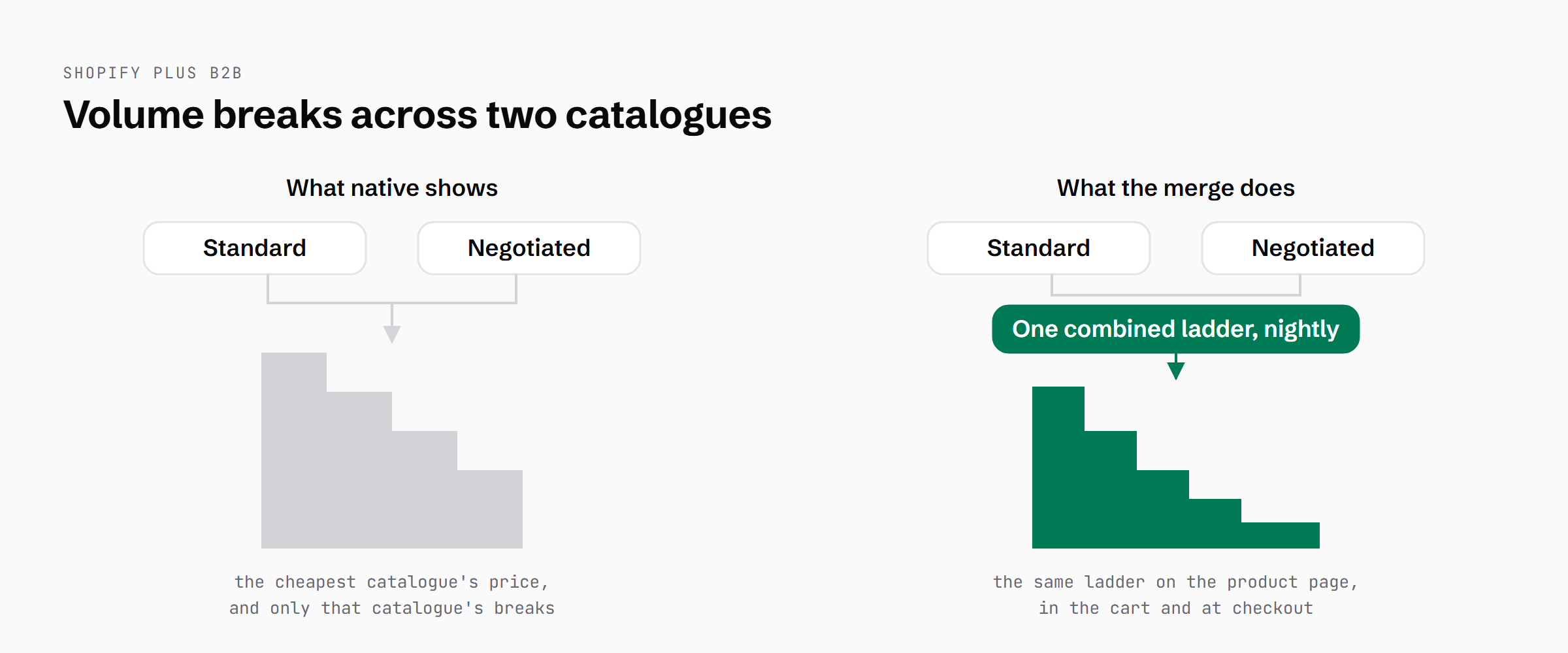
The same customer on the same two catalogues: natively they get one catalogue's breaks, and with the nightly merge they get the combined ladder.
Cross-variant volume pricing went from request to live in one day, on 16 June 2026. The client verified it on a real account: gloves at $134.99 for a single carton, $125 each at 20 cartons or more and $119 at 40 or more, with mixed sizes counting together. The pricing team works as it always has, with specials in the special catalogue and standard breaks in the standard one.
{
  "product": "nitrile-gloves",
  "tiers": [
    { "min_qty": 1,  "price": 134.99 },
    { "min_qty": 20, "price": 125.00 },
    { "min_qty": 40, "price": 119.00 }
  ]
}
The shape of a merged ladder in the company metafield, with the per-carton glove prices the client verified (the product handle is illustrative).
Where two catalogues are meant to carry the same price, we set the one that should win a cent lower. Shopify's documentation says an exact tie goes to whichever catalogue was created first, and you can't see that order anywhere in the admin, so the cent makes the winner explicit. The merge honours it.
Cartons, PO Boxes and account terms
We enforce cartons at three levels. The first is the quantity rules: 846 of them across 6 trade catalogues, generated by script from the ERP's pack-quantity data. The script can be re-run, and it ran through with no failures. The second is a checkout validation, which is a Function that checks the cart before the order goes through. It blocks any quantity that isn't a whole multiple of the carton, for every buyer, retail included. The third is in the theme, where the quantity buttons move in whole cartons. If the quantity is wrong, checkout tells the buyer:
This item is sold in cartons of 144. Please order in multiples of 144.The couriers don't deliver to PO Boxes. When the operations team asked for a block, we put a checkout validation live the same day, rejecting PO Box and the other mailbox-style addresses the couriers won't take. The matching is careful enough that a suburb like Box Hill and every "Post Office Lane" still pass.
The same nightly Worker keeps account terms in step. It derives an on-account tag from each company's live payment terms, so when terms are added, card is hidden for that company's buyers, and when they're removed, card comes back. Nobody has to keep the tags up to date by hand. One more thing to watch out for if you build something similar: payment customisations match the payment provider's registered name, not the label buyers see. This store's gateway registers as "Cybersource" and displays as "Credit card".
We keep freight separate too, so trade and retail buyers each see only their own shipping options.
Running it
There's no backend server. The Functions run on Shopify's infrastructure, the account extensions run in the buyer's browser, and the one piece of scheduled compute is the nightly Worker on Cloudflare's free tier. What it costs to keep running is close to zero.
Every Function is fail-open, which means that if one errors, the buyer still checks out. That was a commercial decision, made function by function.
On Shopify, a deployed Function does nothing until it's bound (attached) to a checkout rule, a cart transform or a delivery customisation. So we run a liveness checker that confirms each Function is both deployed and bound to its store object. A 40-test suite pins every Function's inputs and outputs. A register records each customisation, with the steps to verify it and a recipe to roll it back.
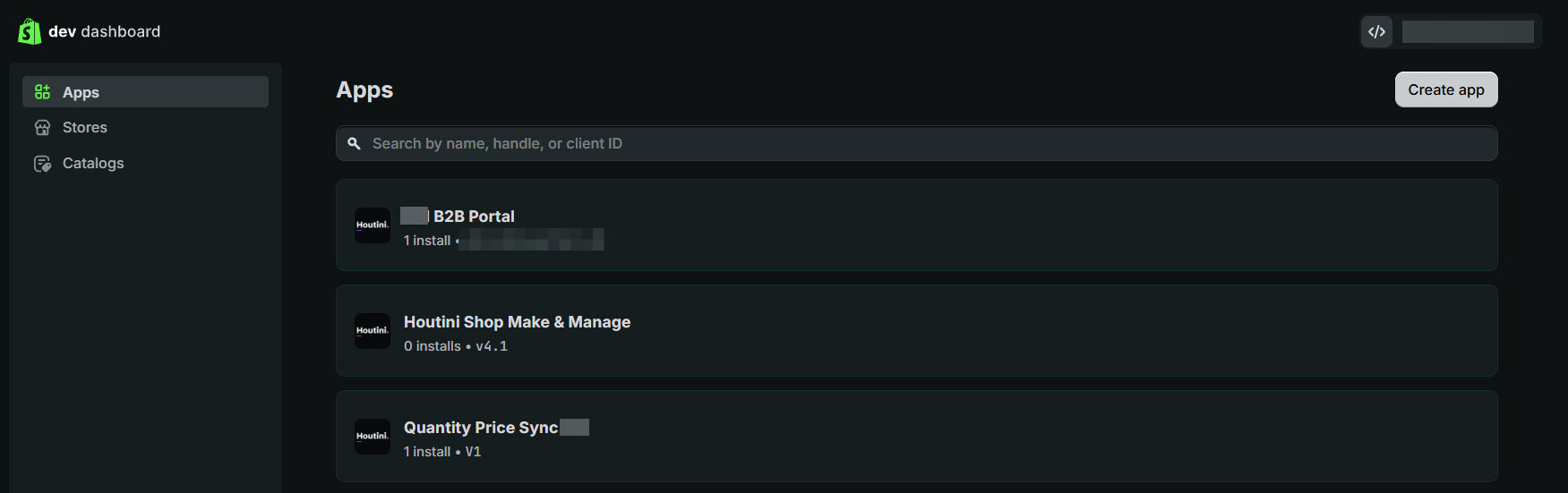
Our B2B app in Shopify's dev dashboard (top), with client names blurred. The middle app is an unrelated build on the same partner account.
Where it stands, and what's next
As of September 2026 it's live and trading, with 384 company locations on the store by 7 September. The app already had the "My Trade Account" dashboard, showing company, location, catalogue and payment terms, and on 19-20 September a branded accounts dashboard, a help footer and a brands strip went in alongside it. The nightly Worker now runs a third job, guarding which products trade customers can see.
Next is blocking checkout for 429 remote postcodes the couriers can't reach. It extends the PO Box validation that's already running, so a buyer at one of those postcodes gets a clear message at checkout. Longer term, the plan is to bring payment state across from the ERP into the trade account, so customers can see and settle what they owe.
What we've got
I set out to prove that a pricing book this dense could run on Shopify, native-first, and it does. Platform gap filled successfully. Native Shopify Plus carries the lists, the specials, the carton quantities and the payment terms. The gap it leaves is that volume breaks don't combine across catalogues, and a small first-party layer fills that.
The pattern is reusable, too: a nightly merge into a metafield, a Function that charges it and a theme that shows it will work for other pricing books where customers sit on several catalogues and expect the cheapest price at every quantity.
If you're sitting on an ERP full of negotiated price lists and wondering whether Shopify Plus can hold them, start by counting which of your customers sit on more than one list with volume breaks, because that's the one piece native pricing won't combine for you.
Continue reading.
- AI at WorkAI isn't taking the jobs, it's taking the boring bits
- How-to GuidesHow to Connect Claude to Shopify with MCP (Dev MCP and Storefront Catalog)
- Beginner's GuidesWhat is n8n? A Beginner's Guide to Workflows, Pricing and Self-Hosting
- How-to GuidesHow to Use AI for Market Research with Claude
- How-to Guidesn8n MCP: How to Connect Claude Code to n8n and Use Its API Safely
- How-to GuidesHow to Run Qwen3-Coder-Next Locally: My vLLM Settings for Two 48GB RTX 4090s