Claude Code Skills: What They Do and Which Ones to Use
A skill isn't an extension to the system prompt, and it doesn't do the job of an MCP server. It shapes what Claude produces without you spelling out what you want every time, and in this post I go through where a skill sits in a call, the skills worth using (my two included) and a template to build your own.
 Richard Baxter AI Ops & Marketing Engineer
 On this page
- Where a skill sits in a Claude Code call
- Skills vs MCP, CLAUDE.md, slash commands and subagents
- A skill that shapes the output: my house style
- Hallmark, for design review
- The skills that come with Claude Code
- Popular skills worth installing
- When a skill doesn't trigger
- Don't let skills go stale
- A SKILL.md template for your own skill
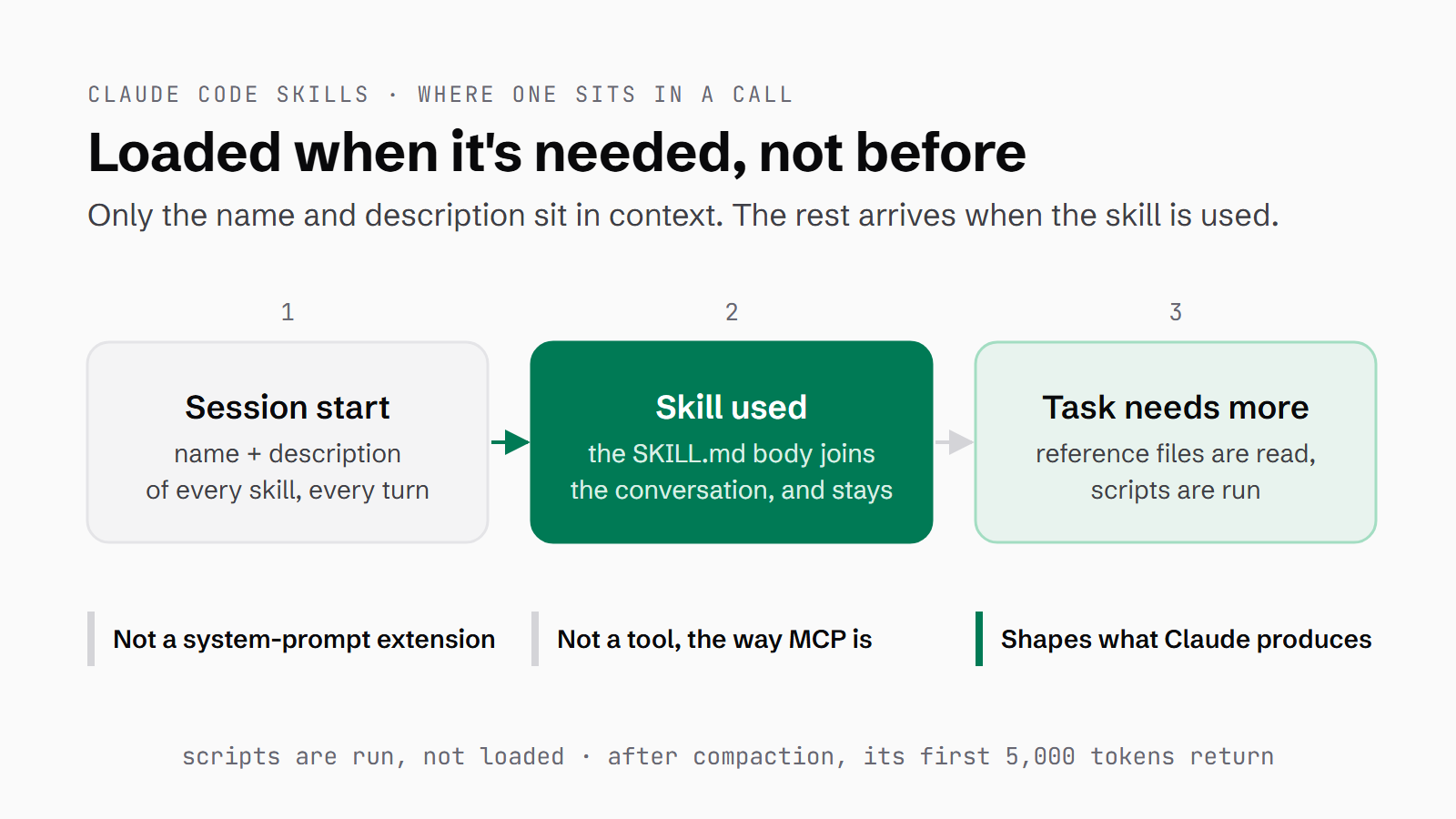
What is a Claude Code skill, and at what point does it come into play when you send Claude a request? I think the easiest way in is with three questions. Is a skill an extension to the system prompt? No. Is it doing the same type of work as an MCP server (a program that gives Claude tools it can call, like a search or a database lookup)? No. Is it a framework that shapes what Claude produces, without you having to be verbose about what you want every time you ask? Yes.
That yes is why we built a house style skill in a recent post, so every presentation, PDF and piece of work we output matches the Houtini branding without anybody describing the branding in the prompt. I also like Hallmark a lot, which is a skill for design review.
In this post I'll go through where a skill sits in a Claude Code call and how it differs from the things it gets mixed up with. Then I'll get to my house style skill and Hallmark, followed by the ones that ship with Claude Code and the popular ones worth installing. After that I'll cover how to stop skills going stale, and finish with a template to build your own.
Quick Navigation
Where a skill sits in a Claude Code call |
Skills vs MCP, CLAUDE.md, slash commands and subagents |
A skill that shapes the output: my house style |
Hallmark, for design review |
The skills that come with Claude Code |
Popular skills worth installing |
When a skill doesn't trigger |
Don't let skills go stale |
A SKILL.md template for your own skill
Where a skill sits in a Claude Code call
A skill is a folder of instructions that Claude opens when a task calls for it. Inside the folder is a file called SKILL.md, and at the top of that file sits a short block of frontmatter (a few labelled fields written before the main text) holding the skill's name and a description of when to use it. Those two fields matter more than anything else in the file, because they're the only part Claude sees until the skill is used.
Here's what loads, and when, according to the Claude Code docs:
- At the start of a session Claude gets the skill listing, which is every skill's name and description, fitted into a budget of 1% of the model's context window (Claude's working memory for the conversation).
- That listing is there on every turn, and when space runs short the least-used skills lose their descriptions first.
- The full body of
SKILL.mdonly loads when the skill is invoked, either because you typed/skill-nameor because Claude picked it from the description. Once it's in, it stays in the conversation for the rest of the session, and Claude Code doesn't re-read the file on later turns. - Supporting files in the folder are read only when the task needs them, and scripts are run, not loaded, so running one doesn't put its code into the context.
- When a long session is compacted (summarised to free up room), the most recent use of each skill is re-attached, keeping up to its first 5,000 tokens.
So the answer to that first question is still no: the skill isn't part of the system prompt, and its instructions aren't there until it's used. The only thing present up front is its entry in the listing: the name and the description.
Anthropic's own video, What are skills?, describes the matching step like this: "Claude reads your request, compares it to all available skill descriptions, and activates the ones that match."
Skills vs MCP, CLAUDE.md, slash commands and subagents
The second question comes up because skills and MCP servers both get described as ways to extend Claude. The docs draw the line between them: an MCP server gives Claude tools and resources, which it calls like functions, and a skill gives Claude knowledge and instructions, which load as prompt content. So they aren't competing for the same job.
CLAUDE.md is the other one people confuse with skills. It's a file Claude Code reads at the start of every session, meant for the facts and conventions of your project. A skill holds a procedure or reference material, and it loads only when it's used. There's a test in the docs for when to move something out of `CLAUDE.md` and into a skill: you keep pasting the same instructions into the chat, or a section of CLAUDE.md has grown into a procedure rather than a fact.
Slash commands have been folded in altogether. In the docs' words, "Custom commands have been merged into skills", so a file at .claude/commands/deploy.md and a skill at .claude/skills/deploy/SKILL.md both give you /deploy. The skill version adds supporting files, frontmatter and automatic invocation. A subagent is different again: it's a separate Claude worker that runs in its own context. A skill can run inside one, and a subagent can preload skills.
| What it is | When it's in context | What it's for | |
|---|---|---|---|
| Skill | A folder with a SKILL.md, plus any files it points to | Name and description always; the rest when it's used | Shaping how Claude does a kind of task |
| CLAUDE.md | A markdown file of project instructions | The whole file, every session | Facts and rules that apply to all work in the project |
| MCP server | A program that gives Claude tools and data, which Claude calls like functions | While the server is connected | Reaching systems Claude can't otherwise touch |
| Slash command | A file in `.claude/commands/` (now merged into skills) | When you type it | A prompt you run on demand |
| Subagent | A separate Claude with its own context | When it's delegated to | Work you want kept out of the main conversation |
A skill that shapes the output: my house style
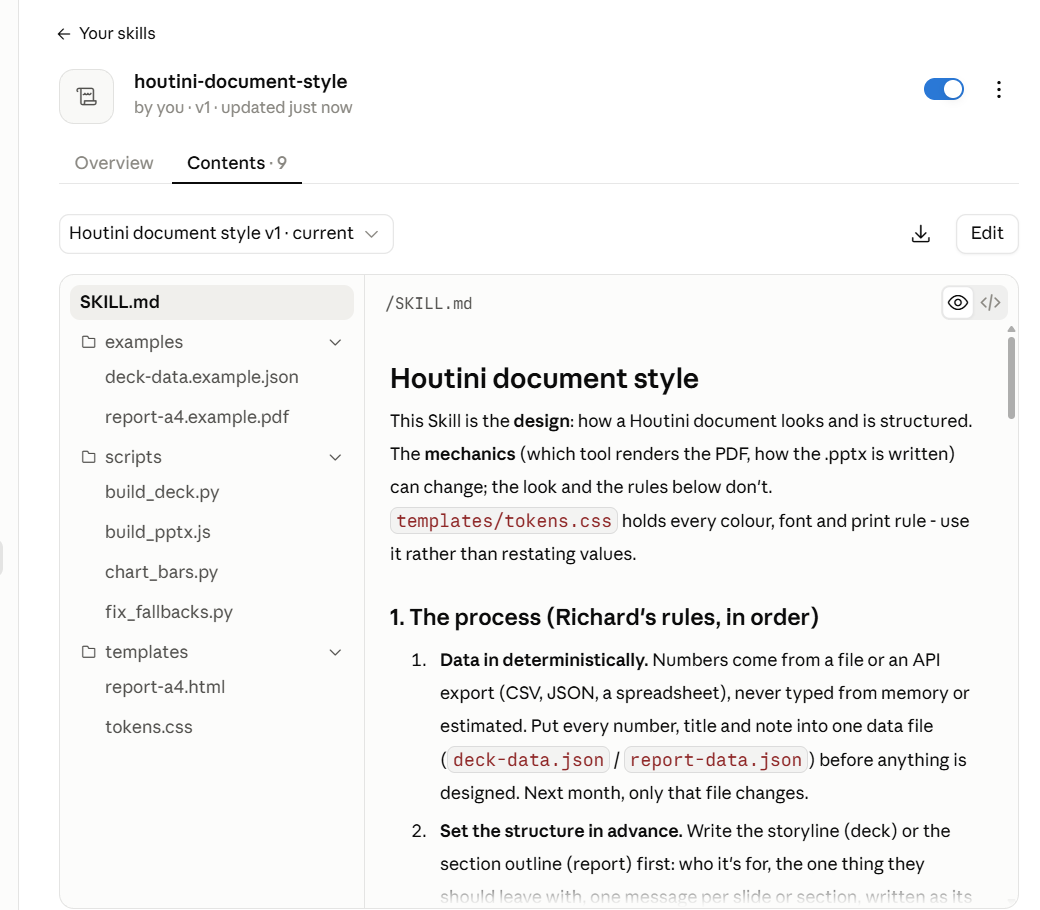
The house style skill I mentioned at the top is called houtini-document-style, and I think it's a really good use of a skill.
It holds the design for reports (A4 PDF) and presentations (16:9 PDF and an editable .pptx): the colours, fonts, page and slide rules, and chart rules. There's one accent colour, Houtini green #0F7A5C, with Schibsted Grotesk and JetBrains Mono for type, no gradients, shadows or emoji, and UK English throughout. In the file I kept the design apart from the mechanics: "This Skill is the design: how a Houtini document looks and is structured. The mechanics (which tool renders the PDF, how the .pptx is written) can change; the look and the rules below don't."
It also carries my process for data-driven documents, in order:
- Numbers come in from a file, never typed from memory.
- The structure is shown and approved before anything is built.
- Layout rules are set up front, so each section heading starts a new page and no table is split across one.
- Every number is sense-checked against the data file, and last month's document is the template for this month's.
The last of those process rules is "The narrative is the author's."
The frontmatter only has a name and a description, which is why the same folder works in Claude Code and on claude.ai. In Claude Code it's linked into ~/.claude/skills. On claude.ai it went up as a 95.2 kB zip through Customize > Skills > Upload skill, where a security scan runs on upload.
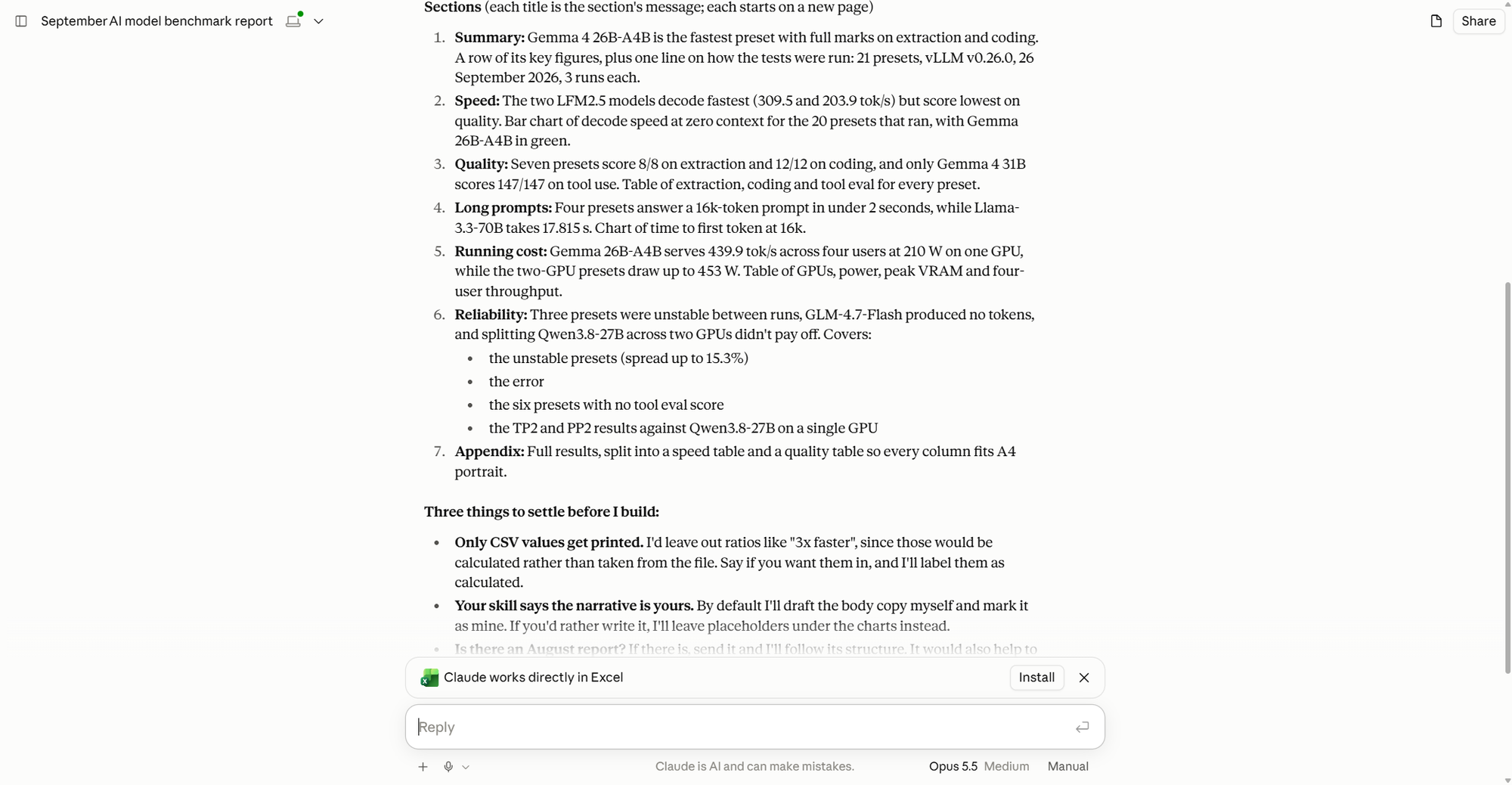
When I made a PDF report with it, Claude's first reply followed the skill as well as the prompt. It gave an outline, said "Nothing is built yet", then listed "Three things to settle before I build". One of them was "Your skill says the narrative is yours." My prompt had asked for the outline and the checks, but it said nothing about who writes the narrative; that rule came from the skill. The progress panel listed houtini-document-style as a skill used in the session.
Hallmark, for design review
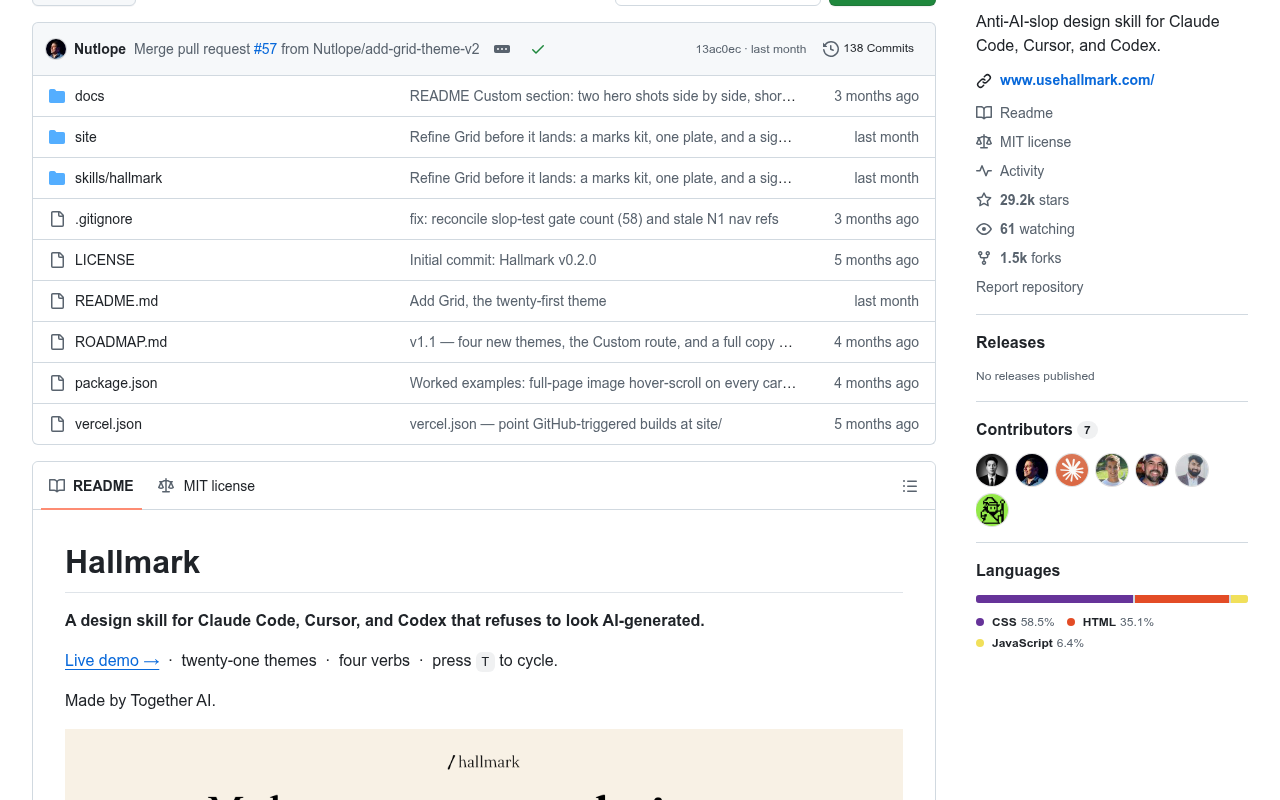
The other skill I like a lot is Hallmark, from Together AI. It's a good review and recommendations engine for design review. The README calls it "a design skill for Claude Code, Cursor, and Codex that refuses to look AI-generated", and it comes with 21 themes and 57 "slop-test" gates. There are four verbs: build (the default), audit, redesign and study. Audit is the one for review, as it scores a page against its list of anti-patterns and hands back a ranked punch list without editing anything.
It's MIT licensed, with 29,239 stars on GitHub as of 28 September 2026. It has had 138 commits: 18 in April and 99 in May, then 16 in June, one in July, four in August and none so far in September. The last was on 6 August, adding Grid as the twenty-first theme, and there are no releases published on GitHub. My installed copy is v1.1.0, which matches the current upstream file.
To install it, run npx skills add nutlope/hallmark. The README says to "Re-run any time to update".
If you're only here to decide whether skills are worth having, the short answer is yes, for any work you repeat. The rest of this is practical - what to install, what to do when a skill doesn't load or goes stale, and how to write your own.
The skills that come with Claude Code
Claude Code ships with 16 bundled skills. Some of them Claude invokes by itself when a request matches, and others, like /verify, only run when you type them. If you'd rather not have them, the disableBundledSkills setting turns them off.
They're useful because each one does a job you'd otherwise have to describe in a long prompt, every time. /code-review looks for bugs in a change, and /simplify tidies the change without looking for bugs. You'll sometimes see frontend-design listed as bundled, but it isn't. It comes from Anthropic's skills repo, which is in the next section.
| Bundled skill | What it does | When it earns its place |
|---|---|---|
| `/code-review` | Reviews the current diff, a PR, branch or path for correctness bugs; `--fix` applies the findings | Before you commit or merge |
| `/simplify` | Four review agents in parallel look for reuse, simplification, efficiency and the right level of abstraction, then apply the fixes | After a feature works, before it's tidy |
| `/verify` and `/run` | Build and run your app to see a change working, not just passing tests | UI and behaviour changes a test won't show |
| `/run-skill-generator` | Records how your project builds and launches as a project skill that `/run` and `/verify` follow | Once per project, and again when the launch changes |
| `/fewer-permission-prompts` | Scans your transcripts for read-only commands and adds an allowlist to `.claude/settings.json` | When permission prompts slow you down |
| `/dataviz` | Chart design guidance: chart form, colour by role, a colour-blind and contrast check | Any chart or dashboard |
| `/doctor` | A setup checkup, including unused skills, MCP servers and plugins against their context cost | Now and then, and after installing a batch of skills |
Popular skills worth installing
Anthropic's own repo is the place to start. anthropics/skills has 178,754 stars, and its two main plugins are document-skills, which covers docx, pdf, pptx and xlsx files, and example-skills, a set of 12 that includes frontend-design, skill-creator, mcp-builder and webapp-testing. You add the marketplace with /plugin marketplace add anthropics/skills, then install document-skills with /plugin install document-skills@anthropic-agent-skills, or example-skills with /plugin install example-skills@anthropic-agent-skills if you want frontend-design and skill-creator. On skills.sh, frontend-design has 930,607 installs and skill-creator has 392,812.
The two most-starred practitioner sets are about how you work rather than what you make. obra/superpowers (292,366 stars) is a development method, covering brainstorming, writing plans, TDD (test-driven development, where the test is written before the code), systematic debugging and subagent-driven development. Matt Pocock's mattpocock/skills (271,077 stars) includes grill-me, which is three sentences long and the second most-installed skill on skills.sh, at 1,238,761. It asks Claude to "Interview me relentlessly about every aspect of this plan until we reach a shared understanding." His tdd skill has 977,150 installs, and in his video he says "Doing really, really good TDD has been the most consistent way that I've improved agents outputs."
If you build on Vercel, Supabase, Cloudflare or Stripe, each has its own skill set, and those carry the platform's current practice. One thing to watch out for with the install figures: skills.sh only counts installs made with npx skills add, so they're a floor.
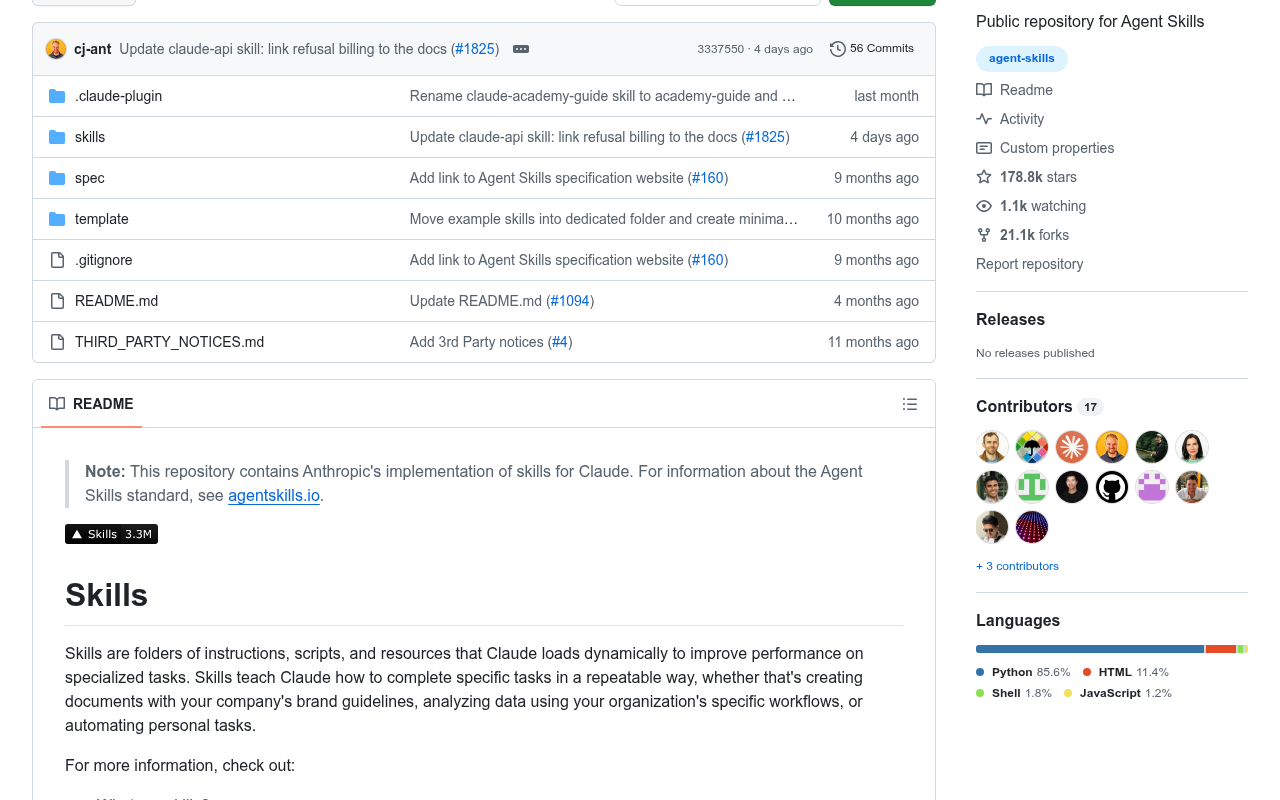
| Skill set | Publisher | Stars (28 Sep 2026) | What it's for | Install in Claude Code |
|---|---|---|---|---|
| [anthropics/skills](https://github.com/anthropics/skills) | Anthropic | 178,754 | Document skills (docx, pdf, pptx, xlsx), frontend-design, skill-creator, mcp-builder, webapp-testing | `/plugin marketplace add anthropics/skills` then `/plugin install document-skills@anthropic-agent-skills` or `/plugin install example-skills@anthropic-agent-skills` |
| [obra/superpowers](https://github.com/obra/superpowers) | Jesse Vincent | 292,366 | A development method: brainstorming, writing plans, TDD, systematic debugging | `/plugin install superpowers@claude-plugins-official` |
| [mattpocock/skills](https://github.com/mattpocock/skills) | Matt Pocock | 271,077 | Engineering workflow: grill-me, tdd, improve-codebase-architecture | `/plugin install mattpocock-skills` |
| [vercel-labs/agent-skills](https://github.com/vercel-labs/agent-skills) | Vercel | 31,656 | React and Next.js performance, web design guidelines, deploying | `npx skills add vercel-labs/agent-skills` |
| [cloudflare/skills](https://github.com/cloudflare/skills) | Cloudflare | 2,926 | Workers, Wrangler, Durable Objects, the Agents SDK | `/plugin marketplace add cloudflare/skills` then `/plugin install cloudflare@cloudflare` |
| [Nutlope/hallmark](https://github.com/Nutlope/hallmark) | Together AI | 29,239 | Design builds and design audits | `npx skills add nutlope/hallmark` |
When a skill doesn't trigger
A skill only helps if it loads, and the description is the only thing Claude matches on. The docs list the usual causes when it doesn't: the description doesn't include the words you'd naturally use when you ask, or you have so many skills that some descriptions get dropped from the listing to stay inside that 1% budget. Nate Herk's advice is short: "If the skill isn't triggering, then check the YAML and make sure it is specific enough." By the YAML he means the frontmatter, and the description in particular.
I hit a version of this with my local-model fleet, before its playbook was a skill. The rule was to hand bounded work, like writing a new file, to the local models through houtini-lm (my MCP server for calling them), and it lived in CLAUDE.md and a memory file, both read once at session start. By the time I was about to write a file myself, often forty turns later, the rule was long out of mind: there had been 202 houtini-lm calls in all, but only 4 against coder-next, the local coding model (Qwen3-Coder-Next).
So the fix went in three layers. A three-line pointer in CLAUDE.md is there every session. The skill holds the playbook and loads on demand. And a hook (a script Claude Code runs automatically at a set point) fires on Write, the moment a new file is about to be created, and asks, once per file, whether the work should go to the local models; if Claude tries the same write again, it goes through. The hook is the layer that doesn't depend on anything remembering. As my README puts it, "a skill alone would inherit the original problem - it only loads if something thinks to load it". The Claude Code docs send you to hooks as well when a skill stops steering Claude, to "enforce behavior deterministically".
| Layer | Where it lives | When it loads | Its job |
|---|---|---|---|
| Pointer | `CLAUDE.md` | Every session | Three lines: the pipeline, and "load the skill" |
| Skill | `houtini-lm/SKILL.md` | When it's used | The playbook: the models, the tools, the calling rules |
| Hook | A script on the `Write` tool | New files over 1,500 characters, of the file types it watches | Asks the routing question at the moment of the decision |
Don't let skills go stale
I don't think skills should just be left installed and allowed to go stale. As the models evolve they may not need those skills at all, and the skill you've been depending on with Opus 4.8 might make matters worse with Opus 5.5.
Writing about Opus 4.5 and 4.6, Anthropic's prompting best practices say: "If your prompts were designed to reduce undertriggering on tools or skills, these models may now overtrigger. The fix is to dial back any aggressive language." So a skill written forcefully, to get an older model to use it, can over-steer a newer one. Eric Tech goes further in his video, arguing that stronger models need less scaffolding and that heavily guarded skill frameworks may hold frontier models back while still helping weaker ones.
Leaving skills installed costs you context too: the Claude Code docs say every skill in the listing "adds to your context on every turn, whether or not Claude ever uses it". To check yours, run /skill-doctor (v2.1.252 and later), which shows each skill's context cost and how often it's used, and flags any that have never been invoked. /skills lists them all, and pressing t sorts them by token count. /doctor prompt-audit (v2.1.283 and later) looks for instructions written for older models. When you find a skill you don't need, skillOverrides in your settings can set it to name-only, user-invocable-only or off without you editing the skill's own file (plugin skills are the exception, and you manage those through /plugin):
{
  "skillOverrides": {
    "legacy-context": "name-only",
    "deploy": "off"
  }
}
For a skill you want to keep, retest it with skill-creator from Anthropic's repo. Its description says it can "run evals to test a skill, benchmark skill performance with variance analysis, or optimize a skill's description for better triggering accuracy".
A SKILL.md template for your own skill
Anthropic's video gives the simplest test for when to write one: "If you find yourself explaining the same thing to Claude repeatedly, that's a skill waiting to be written." If you haven't got Claude Code yet, there's a free week of Claude Code to try it with.
A skill's folder only has to contain one file, SKILL.md. Put the folder in ~/.claude/skills/<name>/ to use it across all your projects, or in .claude/skills/<name>/ inside a repo for that project only. With the optional extras in, the folder looks like this:
my-skill/
├── SKILL.md          required: the frontmatter and the instructions
├── reference.md      read only when the task needs it
├── templates/        starting files to copy
└── scripts/          run by Claude, not loaded into the conversation
Give it a name and a description in the frontmatter. Those two are all the Agent Skills open standard asks for (it's the SKILL.md format that Codex, Cursor and Gemini CLI read as well), and Claude Code falls back to the folder name if you leave the name out. Put the key use case first in the description, because the listing cuts each description off at 1,536 characters. Keep SKILL.md under 500 lines and point to other files for the detail, rather than pasting it in. For anything with side effects, like a deploy or a send, add disable-model-invocation: true so it only runs when you type it. Eric Tech, describing Matt Pocock's skill for writing skills, warns that "every extra word that you put in the skill is going to be distractions".
---
name: my-skill
description: What this skill produces and when to use it, key use case first. Use when [the requests, files or
  situations that should trigger it].
# Optional - delete what you don't need:
# disable-model-invocation: true    # only you can run it, as /my-skill (deploys, sends, anything with side effects)
# allowed-tools: Bash(git status *)  # tools it may use without asking, for that turn
# paths: "reports/**"                # only load it when Claude works with matching files
---

# My skill

One or two sentences: what this skill is for, and what it doesn't cover.

## The process

1. The first thing Claude does, in order. Say what to confirm with the user before building.
2. The next step.
3. The check before handing over.

## The rules

- The requirements you'd otherwise type into every prompt: format, tone, naming, what never to do.
- Point to a file instead of pasting its contents here, for example: every colour and font is in `templates/tokens.css`.

## Before handing over

- What to verify, and how to report anything that doesn't match.

## Files

- `reference.md` - detail Claude reads only when the task needs it.
- `templates/` - starting files to copy.
- `scripts/` - scripts Claude runs rather than loads into the conversation.
You won't get it right first time, and Nate Herk says as much: "You're never ever ever going to write a perfect skill the first try." If you're new to Claude Code, the complete beginners guide covers getting set up. And when the next model arrives, run /doctor prompt-audit over your skills before you trust them again.
Continue reading.
- ExplainerWhat is a Marketing Engineer (and do you need one)?
- ExplainerAI for the CFO: How to Get AI Spend Under Control
- ExplainerAI hallucination, and the boring discipline that stops it being a problem
- How-to GuidesCLAUDE.md: How to Write One That Stays Lean
- How-to GuidesHow to Make a PDF Report with Claude
- How-to GuidesHow to Make a Presentation with Claude