The Best MCP Servers for Claude Code (2026)
The MCP servers I run in Claude Code every day. Rebuilt for the agentic-coding-as-default era - native /agents, the Desktop/Code binary merger, and the local-model offload pattern that keeps long sessions from burning your Anthropic quota.
Quick Navigation
Claude Code in 2026 |
Context and docs |
Agent economics |
Version control |
Databases |
Browser automation |
Debugging |
Cloud and DevOps |
Sandboxes |
Memory |
Multi-agent |
Install order |
Claude Desktop MCPs
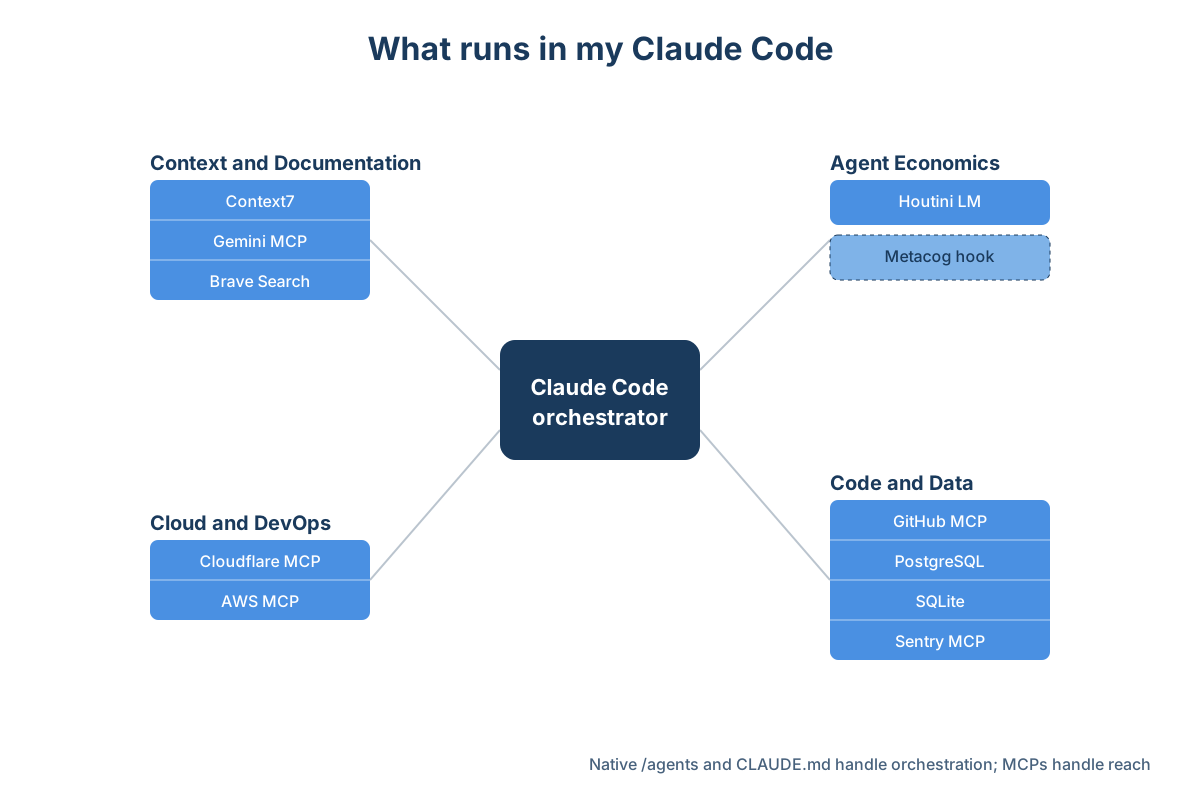
What I run in Claude Code
Claude Code has been my main coding tool since around October last year. It reads codebases properly, refactors solidly, and is reliable as an overnight test-and-iterate copilot. Left to itself though, it works partially blind - no live web access, no view into your database, no idea whether your production app fell over at 3am while you were asleep. MCP servers are what close that gap.
Since I first wrote this article a few things have shifted under it. Claude Code now ships in the same binary as Claude Desktop and Cowork - the terminal is still where it runs, but it is no longer a separate install. Native /agents has replaced most of what I used to reach for Claude Squad for. And a handful of MCPs I now lean on every day did not exist back then - notably the local-model offload pattern that keeps long agentic runs from eating your Anthropic quota.
Here are the MCPs I run in Claude Code right now, organised by what they are for.
What Claude Code looks like in 2026
A couple of things to set up before the recommendations make full sense.
Claude Code and Claude Desktop are the same binary now. The terminal is still where Claude Code runs, but it is no longer a separate install from the chat app. Both modes (plus Cowork) live inside the unified Claude Desktop binary as of early 2026. Setup paths cross over - most of the MCPs you wire into Claude Desktop work in Claude Code too, which is why the install priority order at the bottom of this article looks fairly similar to the one in the Desktop article. The Claude Desktop System Requirements piece has the dates and the underlying architecture changes if you want them.
Subagents are now native. You define them as Markdown files with YAML frontmatter in .claude/agents/ and launch them with the /agents slash command. The frontmatter supports model, tools, permissionMode, and isolation: worktree - that last one spins each subagent up inside its own git worktree so two subagents cannot collide on the same files. For most parallel-agent work this is now the obvious default.
The MCP install pattern itself stays simple. Per-project servers go in .mcp.json at the project root. User-global servers go in ~/.claude/settings.json. The claude mcp add CLI is the less error-prone way to write the JSON and gives you a quick check that the server starts cleanly the first time.
Context and documentation
The single biggest frustration with any model for coding is stale training data. You ask about a library's API and you get the syntax from eighteen months ago. These three close that gap from different directions.
Context7 ( upstash/context7 ) fetches live documentation for any library or framework. Give it a name, it resolves the docs, you query them. Before Context7 I lost ten minutes per session double-checking whether Claude's suggestions matched current APIs; now I just ask, it pulls the real docs, and the answer comes back grounded in what the library does today. The query interface lets you ask pointed questions rather than wading through entire docs sites. If you write code that touches third-party packages (so, all of it) install this first.
Gemini MCP (@houtini/gemini-mcp) is the one I built and the one that is missing from the original version of this article. Where Context7 answers "what does this library's documented surface look like", Gemini MCP answers "what is the community currently saying about it, including the bug reports that have not made it into the docs yet". Grounded Gemini search, fed back into the Claude Code conversation, with the model version pinned to gemini-3.1-pro-preview. The two together: Context7 for the static API shape, Gemini MCP for the live community truth. The full guide is at /articles/gemini-mcp .
Concrete prompts I run:
Before we write the migration for Next.js 15, use the Gemini MCP to search
for "Next.js 15 auth token caching issues". Verify if the community has
reported any breaking changes in the last 30 days that are not yet in the
official docs.
Sentry caught this database race condition. Before proposing a fix, use
the Gemini MCP to search the exact error string alongside "PostgreSQL 16".
Find out if this is a known engine bug or a configuration issue, and
summarise the most common community workarounds.Brave Search MCP is the third layer for general web search inside Claude Code. Brave now gives you $5 of free credits a month - about 1,000 queries at the standard rate, which I have never come close to hitting. The killer use case is error-message lookups: hit something unfamiliar, Claude searches it, reads the Stack Overflow thread or GitHub issue, summarises. Saves about five minutes per stuck moment, which across a day adds up. The official server now lives at brave/brave-search-mcp-server - the old modelcontextprotocol/servers copy is archived.
Agent economics and reliability
For anyone running long agentic Claude Code sessions, this is the most important section on the list.
Houtini LM (@houtini/lm, currently v3.2.0 on npm) is an MCP server that routes bounded grunt-work to a local or self-hosted LLM. I run it daily against vLLM in Docker on my main rig, but it works with LM Studio, Ollama, DeepSeek, Groq, or any OpenAI-compatible endpoint.
The pattern is simple. Heavy reasoning, hard decisions, and the code that ends up shipping stay on Claude. Format conversion, test stub generation, commit messages, the boring parts of code review, and translation tasks go to the local model. The local model is slower per token than Claude but it costs nothing per token. Over a long agentic run that delegation can save a meaningful share of your Anthropic quota.
You need a workstation with serious VRAM for the local pattern to work; an integrated GPU is not going to run the 30B-class models worth offloading to. If you do not have the hardware, point it at Groq or Cerebras and you get most of the same benefit at low cost per call. The setup block looks like this:
"houtini-lm": {
  "command": "npx",
  "args": ["-y", "@houtini/lm"],
  "env": {
    "HOUTINI_LM_ENDPOINT_URL": "http://localhost:1234",
    "HOUTINI_LM_FILE_ROOTS": "C:/your-projects,C:/your-code"
  }
}
Metacog is a Claude Code hook, not an MCP server, and I am including it here on purpose. It is the proprioceptive layer for long sessions: zero dependencies, zero tokens when everything is normal, but it watches the orchestrator and flags loop conditions or stuck states before they burn through context. Cross-session reinforcement is the other half - what worked in the last session gets carried forward as deterministic signal, not probabilistic recall.
The distinction matters because hooks and MCPs solve different problems. MCPs are how Claude reaches outward (to a database, an API, a search index). Hooks are how Claude reaches inward (to its own session state, to your project conventions in CLAUDE.md, to deterministic rules you want enforced before every tool call). When the gap analysis driving this rewrite suggested adding Metacog as an MCP, that was the easy mistake to make. The right framing is: install both layers, because they are not substitutes.
I cover the hooks-vs-MCP split in more depth in the Claude Code hooks guide .
Code and version control
Claude Code already has solid git built in. The MCPs in this section handle the parts that live on GitHub.com rather than in your local .git directory.
GitHub MCP (GitHub's official server, now at github/github-mcp-server) handles repos, pull requests, issues, CI/CD status, and code reviews. The built-in git commands handle commits and branches fine. GitHub MCP earns its keep on the inbound side: PR reviews where Claude reads the diff, pulls the CI results, and gives a proper code review without you opening a browser. I also use it to file issues directly from bugs I find mid-session, which sounds minor and saves a surprising amount of context-switching across a day.
If your team lives on GitHub (whose does not), the install pays for itself in the first week.
Database access
Claude Code with no view into your database is debugging blind. These two fix that.
PostgreSQL MCP connects Claude Code to your Postgres database to run queries and inspect schema. The killer feature is the schema access: Claude reads the real columns, the real types, the real constraints, and writes queries that work against your data on the first try. Not the imagined version of your schema from training data. The query workflow is good (one round-trip instead of psql + paste + ask) but the schema-grounding is what changes the experience.
Obviously, point it at dev and staging, not production. Read-only credentials on staging if your local dev DB is not representative.
SQLite MCP does the same for embedded databases. I reach for it when I am building MCP servers that use SQLite for local storage (which is most of them). Claude reads the schema, spots migration problems, and fixes them without me firing up the sqlite3 CLI.
Both started in the official modelcontextprotocol/servers collection; the reference copies are archived now, but they still work.
Browser automation: Playwright over Puppeteer
For end-to-end testing my main tool used to be Puppeteer MCP, but I have moved the production work to Playwright. The reason is architectural. Puppeteer wraps the Chrome DevTools Protocol, which was built for one-tab developer-tools work. Playwright was built for production load - headless, multi-tab, retry-on-failure baked in. When you are running browser automation as part of a long Claude Code session, the Playwright surface is the one that holds up under load.
Microsoft maintains @playwright/mcp as the official server (github.com/microsoft/playwright-mcp). Install in Claude Code with claude mcp add playwright npx @playwright/mcp@latest. The end-to-end testing loop becomes write-the-test, run-it, read-the-output, debug - all inside the same Claude Code conversation. Screenshots through Playwright catch CSS regressions you would not have spotted because you did not bother refreshing the page after a deploy.
Puppeteer MCP still works, though the reference server has been archived from the official collection. I keep it around for one-off debugging where I want the DevTools inspector output specifically. For everything else, Playwright.
Debugging and observability: Sentry MCP
Sentry's official MCP at @sentry/mcp-server (current at v0.37.0; install with npx @sentry/mcp-server@latest and a SENTRY_AUTH_TOKEN env) changed my debugging workflow more than any other MCP on this list. The old loop: open Sentry in a browser, find the error, copy the stack trace, paste into Claude, ask what went wrong. The new loop: "check Sentry for recent errors", and Claude reads the trace, finds the relevant file in the project, suggests what is broken. The fifteen-minute exercise that used to be is closer to two.
Pair it with the Gemini MCP grounded search pattern (paste the error, then verify against current community knowledge) and you have a debugging workflow that no IDE-integrated AI matches yet.
Cloud and DevOps
Claude Code has become a useful place to manage cloud infrastructure from inside the same session as your code. Two MCPs cover most of what I reach for here.
Cloudflare MCP is the one I use heaviest. I ship YubHub , my AI jobs board, through Cloudflare Workers, with KV for state, D1 for relational data, and R2 for files. Cloudflare maintains official MCP endpoints at bindings.mcp.cloudflare.com/mcp (for Workers, KV, D1, R2 operations) and observability.mcp.cloudflare.com/mcp (for logs and runtime metrics). They are remote MCPs - wire them in with mcp-remote:
"cloudflare-bindings": {
  "command": "npx",
  "args": ["mcp-remote", "https://bindings.mcp.cloudflare.com/mcp"]
}
Once they are wired in, you can ask Claude things like "list the Workers in this account, find the one running the jobs feed, show me its current routes". For a small team or a solo developer who already lives in the Cloudflare ecosystem, this is the closest the agentic-coding workflow gets to a deployable-from-conversation experience.
AWS MCP (the official servers from AWS itself at github.com/awslabs/mcp) launched as generally available in 2026 and covers CloudFormation, Cloud Control API, Infrastructure-as-Code (CDK and CloudFormation assistance), and the Bedrock AgentCore stack. Install per-server via claude mcp add with uvx awslabs.<server-name>@latest. I do not ship to AWS day-to-day myself, but the practitioner community has converged on the awslabs servers as the production stack; the AWS blog announcement is the authoritative source for which sub-server fits which use case.
Execution sandboxes: E2B
E2B Code Sandbox MCP (@e2b/mcp-server, repo at github.com/e2b-dev/mcp-server) gives Claude Code the ability to execute code in secure cloud sandboxes. Useful for two specific patterns: running untrusted code (anything generated for review where you do not want it touching your machine), and running complex test suites that need a clean environment per run. One caveat before you install: the standalone @e2b/mcp-server package is now deprecated on npm and the repo is archived, so check E2B's current docs for the supported install path.
I have not built it into my daily setup yet, but it is the canonical option when you need sandbox execution that is more isolated than what Desktop Commander gives you. Mode B citation here - cite E2B's docs and the canonical install pattern, decide whether the use case fits.
Memory and project context
There are three different layers worth thinking about here, each suited to a different problem. The thing I see people get wrong most often is reaching for a Memory MCP when what they needed was deterministic project rules.
CLAUDE.md files are the deterministic layer for project conventions. Anything that should be true every session - "this project uses Tailwind v4", "linter is Biome not ESLint", "never edit migrations after they ship" - belongs in CLAUDE.md at the project root, with optional ~/.claude/CLAUDE.md for user-level defaults. Claude reads them every session, deterministically. No probabilistic retrieval, no missed lookups.
Native hooks are the deterministic layer for actions. Pre-session injection, post-tool-call validation, async background tasks - all hook territory. The hooks documentation at code.claude.com/docs/en/hooks-guide covers the schema, but the practical rule is: if it should fire every time, write a hook. Metacog (above) is an example.
Memory MCP is the probabilistic layer for cross-session entity recall. Where it shines: "remember that the YubHub.co customer Acme Corp has three sub-accounts and the contract renewal is in April." Where it does not: replacing the deterministic layers above. Honest scope: it is useful for entity relationships that do not fit into structured config, and it is fiddly to tune. I run it. I would not lead with it on a fresh setup.
mcp-vector-search (bobmatnyc/mcp-vector-search) is worth knowing about as an alternative pattern for codebase recall specifically. Index the codebase with ChromaDB + AST parsing; query semantically; get grounded answers about your actual implementation. I have not run it long enough to recommend over native Claude Code search, but for very large codebases where keyword search runs into precision problems it is the standard answer.
Multi-agent orchestration
These days the default for parallel work is native subagents, with Claude Squad reserved for the more specific case of running multi-engine workflows.
Native /agents and subagents are documented at code.claude.com/docs/en/sub-agents. Define them as Markdown files in .claude/agents/ with YAML frontmatter. Launch from anywhere with /agents. The frontmatter fields that matter most:
model: pin a subagent to a specific tier (Opus for hard reasoning, Sonnet for default, Haiku for short cheap work).tools: restrict which tools the subagent can use. A subagent with write permissions and a subagent that is read-only.permissionMode:default,acceptEdits,auto,dontAsk,plan. Match the mode to how much trust the work needs.isolation: worktree: spin the subagent up in a fresh git worktree, so it cannot collide with other parallel subagents working on the same files.
For most "I have three independent jobs that can run in parallel" workflows this is now the default. Big refactoring jobs where one subagent rewrites the auth module while another writes API tests while a third updates docs - all native, all coordinated from a single orchestrator session.
Claude Squad ( smtg-ai/claude-squad ) still has a place. The case where it earns its keep is multi-engine workflows: running Claude alongside a local LLM (via Houtini LM), or running Claude alongside a different frontier model. The use case is narrower than it used to be, but real.
My Claude Code install order
If someone asked "just tell me what to install", this is the order I would do it in for a new Claude Code setup.
Hour one (install these before anything else):
- Context7 - accurate library docs, no hallucinated APIs
- Brave Search - web search and error-message lookups
- Gemini MCP - grounded second opinions for any current-state question
- GitHub MCP - PRs, issues, CI from inside the session
- Houtini LM - local-model offload to save Anthropic quota on long runs
Hour two (when you are building real applications):
- PostgreSQL MCP (or SQLite MCP) - let Claude see your data
- Sentry MCP - debug production errors in seconds
- Playwright MCP - browser automation for testing and screenshots
- Cloudflare MCP - if you ship on Workers / KV / D1 / R2
- AWS MCP (awslabs) - if you ship on AWS
When you need them:
- E2B Code Sandbox - untrusted-code execution or per-test-clean environments
- Memory MCP - cross-session entity recall (with the honest caveats above)
- mcp-vector-search - very large codebases where semantic search wins
- Metacog hook - long agentic sessions where reliability matters more than the install effort
- Claude Squad - multi-engine orchestration (Claude + local model in the same workflow)
That is the stack. Fifteen entries feels like a lot, but native subagents handle the orchestration so you rarely have more than a few active at once. Context-window cost stays minimal because Claude Code only loads the MCPs it needs for the current prompt.
If you are new to Claude and you do not already have an account, you can start with a free week of Claude Code before you commit to a subscription. Most of the MCPs here work across Claude Desktop, Cowork, and Claude Code identically.
Looking for the Claude Desktop MCPs?
If you spend more of your day in chat than in the terminal, the Best MCPs for Claude Desktop guide covers the non-coding side of the stack: research, content workflows, the SEO and finance verticals. Context7, Gemini MCP, Houtini LM, Brave Search, Cloudflare MCP, AWS MCP, and Sentry all work in both modes, so the install effort transfers.
Continue reading.
How to Do a Technical SEO Audit with Claude
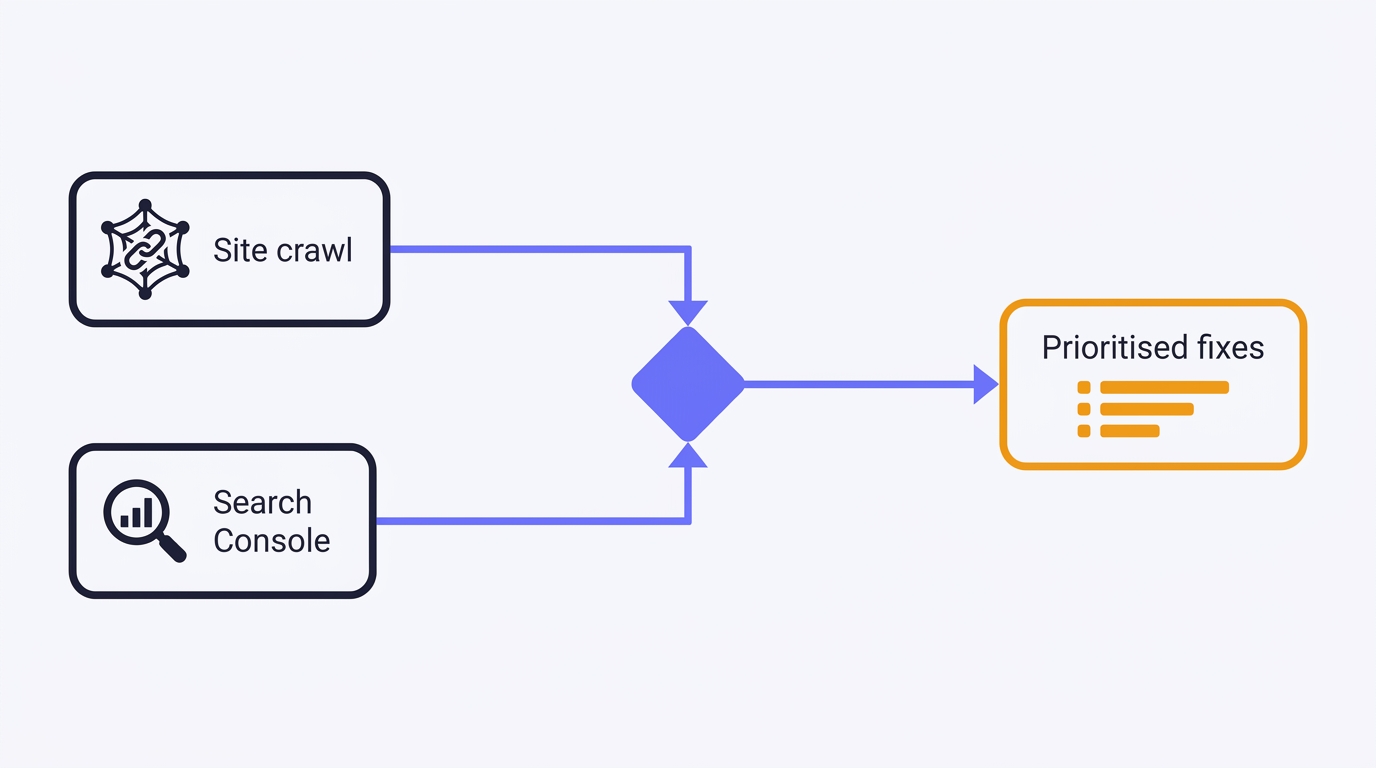
A full technical SEO audit run by conversation in Claude Desktop: Search Console history and a first-party crawl merged into one prioritised, fix-writing report. The setup, the twelve prompts, the priority model, and the honest limits - walked through on a real site.
How to Plan and Begin Your First AI-Assisted Coding Session
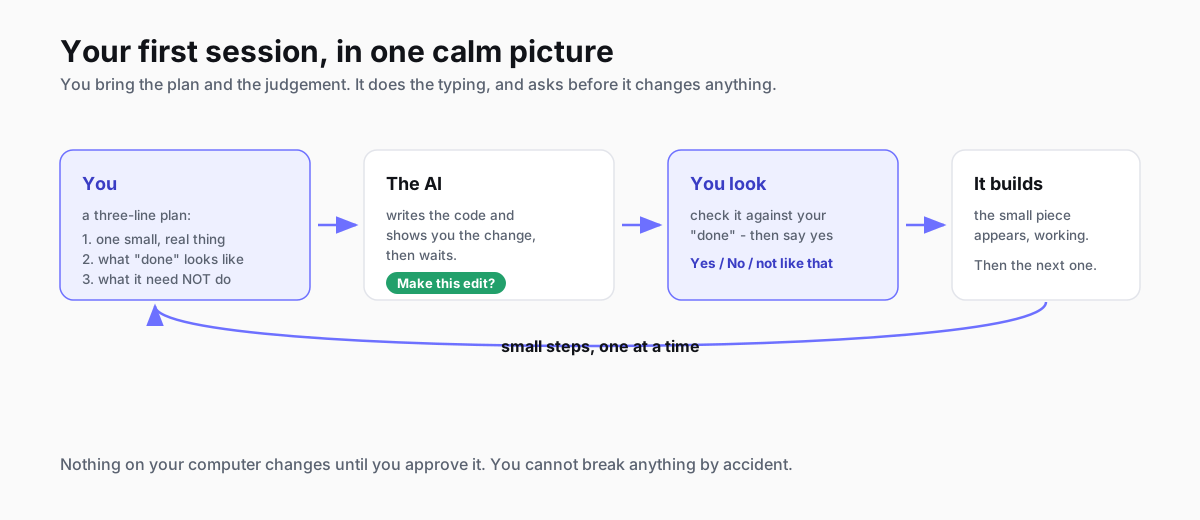
You don't need to know how to code to build something with AI - but the calm ten minutes you spend planning before you start is what keeps your first session from spiralling. Here's the whole thing, gently: what the tools are in 2026, how to plan, and exactly what your first session looks like.
How to Write a PRD an AI Can Build From (with a template)
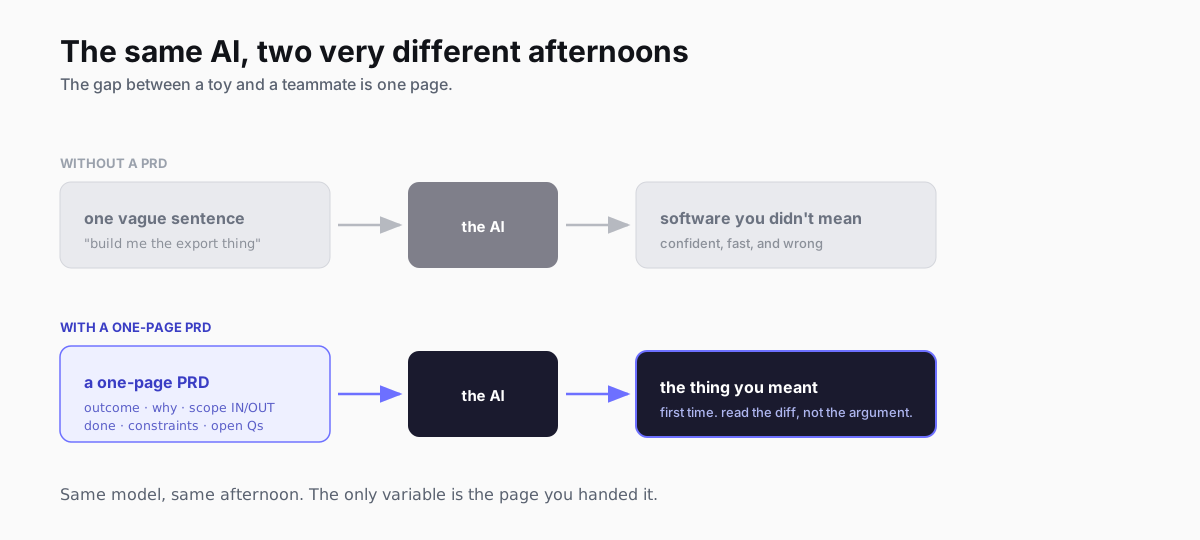
A PRD is the difference between an AI coding tool that guesses and one that builds the thing you meant. Here's what a PRD is, a copyable seven-part template, a worked example, and the two lines that do most of the work - written for the era where the thing reading your spec is an agent, not just your engineering team.
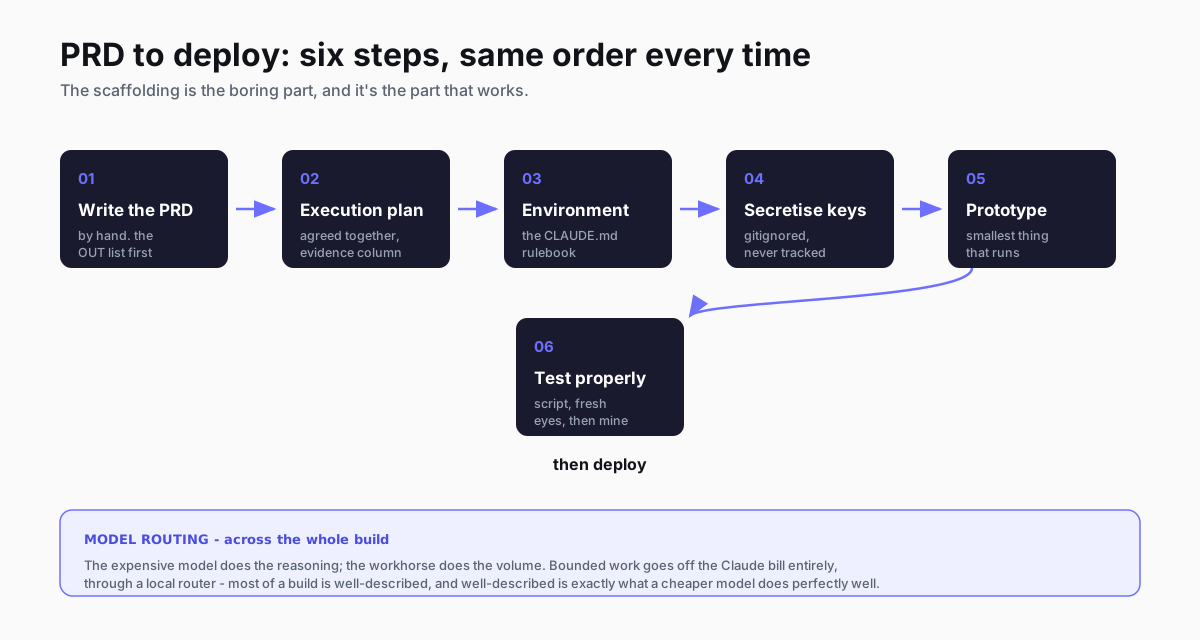
How I work with Claude Code: PRD to deploy
I write the PRD, we agree an execution plan, pick the environment, get the keys out of the way, prototype, then test. Six steps, same order every time. Here's the real workflow with the files from two things I've shipped, and which model I hand each job to.
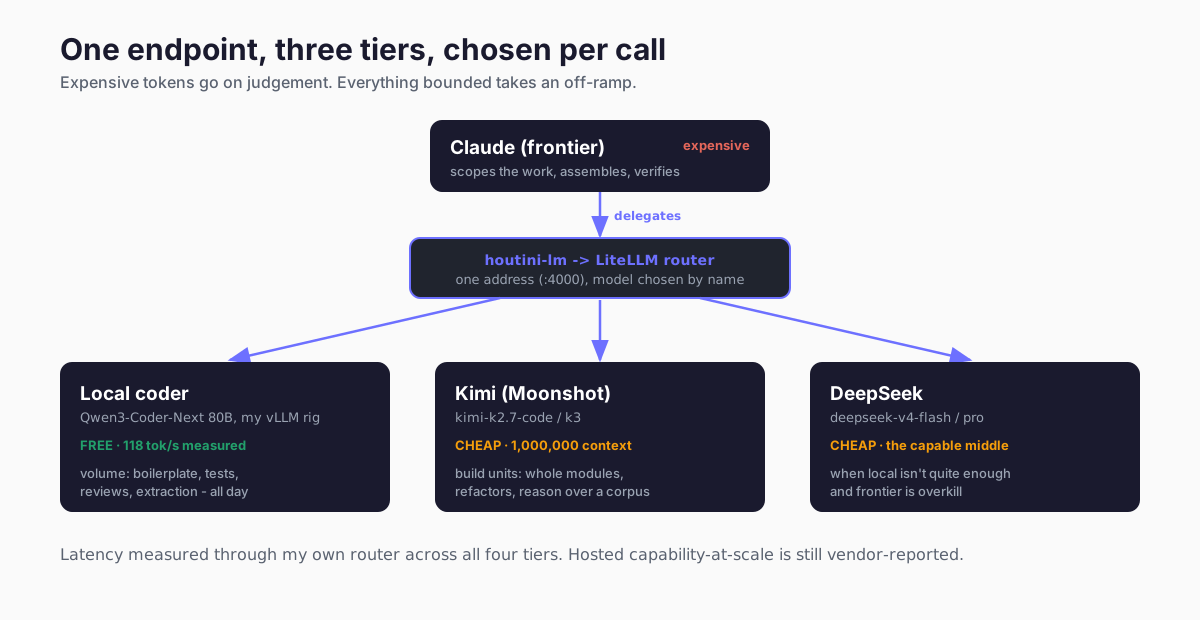
The best local coding setup isn't one model: how I route across Claude, Kimi and my own rig
The question I get asked is which local model is best for coding. Wrong question. The setup that works routes three tiers - Claude reasons, Kimi builds, and a Qwen coder on my own rig does the volume for nothing. Here's the whole thing, wired up.
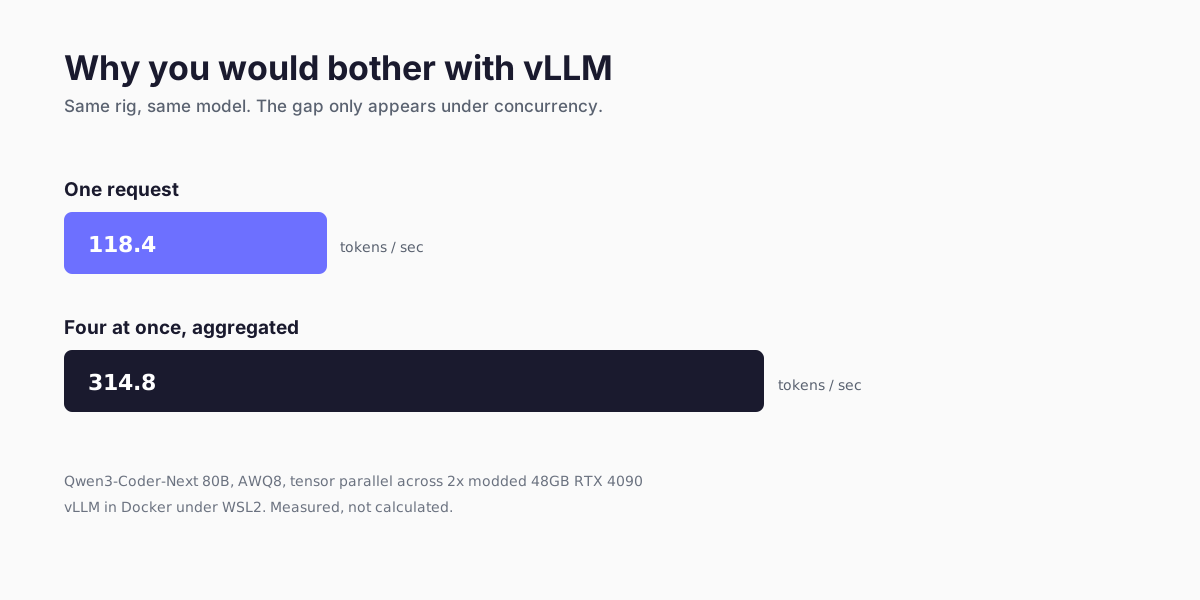
How to set up vLLM: Docker, compose, and the flags that earn their keep
vLLM from nothing to a working OpenAI-compatible server: WSL2 or Linux, Docker, the compose file we actually run, a preset per model, and the flags that measurably changed things on a dual-4090 bench.