AI for CFOs: Control Token Spend, Then Put AI to Work in Finance
If you're a CFO, you have two AI hurdles: a token bill that moves with usage, and a finance team that wants to use AI on the books. Today I'm looking at how a gateway with hard budgets turns the first into a fixed cost, and at the SaaS tools and MCP servers for the second, including how I run my own company's books through Xero and Claude.
 Richard Baxter AI Ops & Marketing Engineer
 On this page
In April, four months into the year, Uber had spent its entire 2026 AI budget. Anthropic's Claude Code had spread across roughly 5,000 of its engineers faster than the finance models expected, at an average of $150 to $250 per engineer a month, and $500 to $2,000 for the power users. Forbes reported the story in May, and the CTO, Praveen Neppalli Naga, confirmed the overrun to The Information and said the company was "back to the drawing board" on its assumptions. The AI bill moves with use, which makes it hard to forecast: Mavvrik and BenchmarkIT's 2025 State of AI Cost Management found 80% of enterprises miss their AI infrastructure forecasts by more than 25%.
Token cost is a growing issue at a large electronics manufacturer I work with, too (a token is the small chunk of text an AI model reads or writes, and the unit you're billed in). And I run my own company's books in Xero with Claude doing the legwork, so I've had to work out what AI can do for a finance team myself.
So, if you're a CFO you have two AI hurdles. The first is how to manage token spend as a fixed cost, and the answer is a gateway with hard budgets that finance sets as a requirement. The second is which tools your team can use for daily finance work, and there are plenty already, both SaaS and MCP.
Hurdle one: make AI spend behave like a fixed cost
You can't fix how much your teams use AI, and you probably wouldn't want to. What you can fix is the ceiling: give each team a monthly budget that refuses requests once it's spent, and you know the most the AI line can cost before the month starts.
Start with the caps your providers already give you
My standing advice is to set the provider's own spend limits on day one, then put a gateway in front of everyone. On Anthropic's Console these are hard stops. There's an organisation spend cap set by your usage tier, you can set your own organisation limit below it, and you can set spend limits per workspace. Once a limit is reached, requests are refused, and the tier cap pauses you until midnight UTC on the 1st of the month. The catch is that you can't set a limit on the default workspace, which means each team needs a workspace of its own.
OpenAI lets you set a monthly budget for the organisation, and its own FAQ says requests stop once you reach it. There may be a delay in enforcing the limit, though, and any overage is yours. Threads on OpenAI's Developer Community report that project-level budgets act more like warnings, with calls carrying on after the budget is hit.
Each provider's caps only see that provider. Every one has to be set up separately, and nothing adds up what a team has spent across all of them, which is the job a gateway does.
Make an AI gateway a requirement
An AI gateway (sometimes called a router) is one checkpoint that every AI request in the business passes through on its way to the model. Because everything goes through it, it can count spend per key and per team. When a team's budget is gone, it can refuse the request or send it to a cheaper model instead.
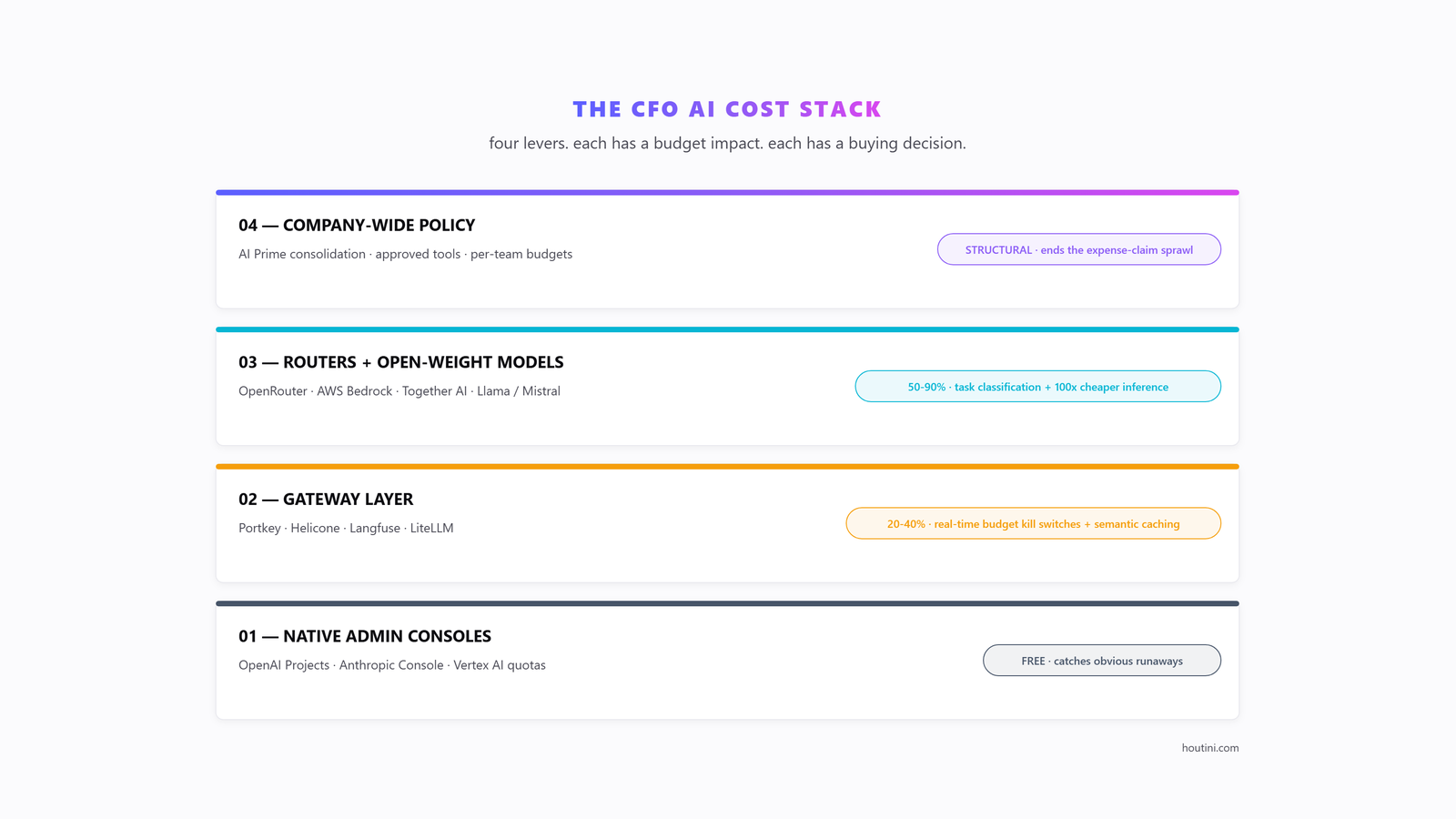
As the CFO, you make the gateway a requirement. Every AI call goes through one gateway, and every team gets a budget.
Only a hard budget, one that refuses requests once the money is spent, turns AI spend into a fixed cost; a soft cap warns you and lets spend run over. Most of the popular gateways have hard budgets, and a few of those let the request that crosses the line finish before they stop, which is why Vercel's documentation calls its budget a soft cap. The table below covers the popular gateways, starting with LiteLLM, the open-source one I use.
| Gateway | What it is | Stops spending at a dollar budget? | Good to know |
|---|---|---|---|
| LiteLLM | Open-source proxy you host yourself | Yes - requests fail once a key's budget is spent | Budgets per key, user, team or customer, with a reset period |
| OpenRouter | Hosted router across many model providers | Yes - per-key spending limit with a daily, weekly or monthly reset | No markup on model prices; 5.5% fee on card top-ups |
| Cloudflare AI Gateway | Hosted gateway on Cloudflare's network | Yes, in open beta - can switch to a cheaper model instead of blocking | Bursts can overshoot briefly; core features free |
| Vercel AI Gateway | Hosted gateway | Yes, slightly late - the request that crosses the budget still completes, so Vercel's docs call it a soft cap | Spend on your own provider keys isn't counted |
| Kong AI Gateway | Enterprise API gateway | Yes, on the Enterprise plan | Cost is counted after each response, so it blocks the next request |
| Portkey (now Prisma AIRS, Palo Alto Networks) | Hosted gateway, open-source core | Not stated - its pricing page lists budgets on virtual keys, with finer limits on Enterprise | Paid plans from $49 a month |
| Azure API Management | Microsoft's API gateway | Caps tokens, not dollars | Works on every API Management tier; fronts OpenAI, Vertex and Bedrock models, and Anthropic on the v2 tiers |
If you're the finance lead, the requirement is written out at the end of the page, ready to send. The next two sections are the engineering detail, so forward them to whoever runs your platform. Hurdle two, further down, is back with you.
Why your engineers will want to build it
I think of the gateway as an engineering challenge your engineering team will embrace, because it's good infrastructure work. The gateway keeps the keys in one place instead of scattered across teams, and when a provider is down it falls back to another model. It caches repeated requests, and it keeps a log of every call, which is where your cost reporting comes from.
I've built one for myself, with a LiteLLM router in front of three tiers: a free local model (Qwen, running on my own pair of modded 48GB RTX 4090s, where the only cost is hardware and power), DeepSeek V4.1 Flash as a cheap API for builds, and Claude for the judgement. Claude reaches the other two through houtini-lm, my open-source MCP server. Anything sensitive stays on the local model. My working rule for the whole thing is "Frontier scopes > DeepSeek builds > Qwen evaluates > frontier assembles." The expensive tokens go on judgement, not typing.
At the electronics manufacturer I mentioned, the work has been to develop alternative routes via a managed MCP gateway.
Send routine work to cheaper models
On 24 September 2026 I ran a small test. I gave the same spec, a little Python tool that checks an article draft before it's published, to Claude Opus 5.5 and to DeepSeek V4.1 Flash through houtini-lm. Both scripts worked. Claude's cost about $0.04 with its context read from cache, or about $0.31 uncached. DeepSeek's came to about $0.011 at peak rates and $0.0055 off-peak, even though it used about 7x the output tokens, most of them hidden reasoning. So DeepSeek did the same job for about a quarter of Claude's cheapest case. That's one task, one run each, worked out from list prices rather than an invoice.
At list prices on 9 October 2026, Opus 5.5's output costs 40 times what Haiku 5.5 or GPT-6 Luna charge, and about 17 times DeepSeek V4.1 Flash at peak.
| Model | Input, per million tokens | Output, per million tokens |
|---|---|---|
| Claude Fable 5.1 | $10 | $50 |
| Claude Opus 5.5 | $4 | $20 |
| DeepSeek V4.1 Flash (peak) | $0.30 | $1.20 |
| Claude Haiku 5.5 (prompts up to 100k tokens) | $0.10 | $0.50 |
| GPT-6 Luna | $0.10 | $0.50 |
There are two more discounts engineering can switch on. Prompt caching means the provider keeps a copy of text you send over and over, and charges far less to read it again; cache reads are 90-95% off the input price at Anthropic and OpenAI. Batch processing is for work that can wait (OpenAI gives batch jobs a 24-hour window), and it's 50% off at both.
Hurdle two: AI tools for daily finance operations
Your finance team has two routes to using AI on the books day to day: finance software with AI built in, or an AI model like Claude connected to your accounting system through an MCP server. MCP (Model Context Protocol) is the standard way an AI model connects to other software, in this case the ledger. I use the second route for my own company, so I'll start there.
How I run my own books through Xero and Claude
Since June 2026, Claude has worked on my company's books in Xero, using 33 scripts for the bulk jobs and my own private copy of Xero's official MCP server for day-to-day questions and one-off changes. I made the copy because Xero's server could create and list things but had no way to void or delete an invoice, or archive a contact. I added those three tools, and the two invoice tools re-read the invoice before they act and refuse anything unsafe. Void only works on an authorised invoice with nothing paid or credited against it, and delete only works on drafts and submitted invoices.
So far Claude and those scripts have built the year-end pack my accountant needed when the business moved from sole trader to limited company. About 1,300 Gmail attachments were sorted for receipts, and 1,067 of them were thrown out as image noise. On a bank-statement catch-up, the plan covered 96 lines, found 12 already in Xero and sent 12 back to me as questions; the final run took in 81 tasks, and every one went through. It also cleaned up the director's loan account, with the receipt attached to every entry.
The bank-statement catch-up ran in four steps, and that order is what I'd hand a finance team:
- The plan comes first, and it writes nothing.
- I answer the questions the plan can't.
- A pilot runs one task of each kind, and I check the results in Xero.
- The full run follows, with a ledger of finished tasks, so nothing gets posted twice.
Claude and I make the judgement calls, and the MCP server's tools are deterministic, which means they do exactly the same thing every time they're run.
There are two things that will catch your engineers out if they try this, both of them on Xero's side. New Xero Custom Connections get granular scopes (the individual permissions a connection is granted), and asking for one scope the connection doesn't have makes Xero reject the whole token. And Xero's API has no bank-reconciliation endpoint, so the scripts post the payments and the reconciliation stays a one-click match inside Xero.
Finance MCP servers you can connect today
Xero isn't the only finance system with an official MCP server. Intuit has one for QuickBooks in early preview, and Stripe, NetSuite, Ramp and Mercury (in beta) have their own; most of them can write as well as read. The Xero and QuickBooks servers need a developer to set them up on a machine, while the hosted ones sign in with OAuth (the same "sign in with your account" step as any app), which a finance person can do.
Write access is a permissions decision, so start read-only. The vendors' own guard rails, listed in the table below, point the same way as the plan-and-pilot order of my bank-statement catch-up.
For a UK business that leaves Xero, QuickBooks, NetSuite and Stripe, since Ramp and Mercury are US-focused. A search in October 2026 found no official server for Sage, FreshBooks or Brex, only community and third-party builds.
| System | Server | Can it write? | Setup |
|---|---|---|---|
| Xero | Xero's MCP server (official, XeroAPI on GitHub) | Yes - invoices, contacts, payments, bank transactions, journals | Runs on your machine; a developer sets up a Custom Connection |
| QuickBooks Online | Intuit's MCP server (early preview) | Yes, with switches to turn writing off | Runs on your machine |
| Stripe | Stripe MCP (official, hosted) | Yes - a person confirms refunds and outbound payments | Hosted, sign in with OAuth |
| NetSuite | Oracle's AI Connector Service | Yes, within the user's NetSuite role; never as an admin | Hosted on your NetSuite account; free SuiteApp |
| Ramp | Ramp MCP (official, hosted) | Some actions, within the user's role | Hosted; US-focused |
| Mercury | Mercury MCP (beta) | Can request payments, approved in Mercury | Hosted; US business banking |
Finance software with AI built in
If you'd rather skip the setup, plenty of the tools your team uses have AI built in now, and the place to start is the system they already live in. Claude for Excel, for example, reads, explains and edits models on all paid Claude plans.
| Job | Tools with AI built in |
|---|---|
| Spreadsheet models | Claude for Excel; Copilot in Excel |
| Close and reconciliation | Xero JAX (automatic bank reconciliation in beta); QuickBooks AI agents (Finance agent on Advanced); Sage Copilot; Numeric; Rillet |
| Bills, cards and expenses | Ramp agents; Brex; Vic.ai |
| Planning and reporting | Datarails AI; Vena AI; Pigment |
Where to start
This week, send your engineering lead the requirement below. For the books, connect one MCP server read-only, or switch on the AI in the accounting software you already pay for, and run one month-end task through it. When you do give it write access, a person approves every change.
Once the gateway and its budgets are in, the AI bill becomes a budget line you set rather than a surprise in April.
AI: requirements from finance

1. Every AI call goes through one gateway. No provider keys in apps or on laptops.
2. Each team gets its own key with a monthly dollar budget that stops spending when it runs out.
3. Provider console limits stay on as a backstop.
4. Routine work (summaries, extraction, classification, checks) is routed to a cheaper model by default.
5. Prompt caching on wherever the same context is sent repeatedly; batch processing for anything that can wait a day.
6. A monthly report to finance: spend by team, by model and per task, against budget.
7. Any AI tool with write access to the ledger runs a dry run first and a person approves the changes.Continue reading.
- ExplainerClaude Code Skills: What They Do and Which Ones to Use
- ExplainerWhat is a Marketing Engineer (and do you need one)?
- AI at WorkAI isn't taking the jobs, it's taking the boring bits
- How-to GuidesHow to Connect Claude to Shopify with MCP (Dev MCP and Storefront Catalog)
- Beginner's GuidesWhat is n8n? A Beginner's Guide to Workflows, Pricing and Self-Hosting
- How-to GuidesHow to Use AI for Market Research with Claude