Best GPUs for Running Local LLMs (2026): Memory Bandwidth, VRAM and the Cards Worth Buying
What to buy in 2026 for running local LLMs seriously. Why memory bandwidth matters more than FLOPS, how much VRAM each model tier needs, and the five GPUs worth your money - from the used 3090 floor to the RTX Pro 6000 Blackwell 96GB workstation tier.
A used RTX 3090 is the floor for serious local LLM work in 2026. I run one in my development machine for the small-model work - DeBERTa scoring, Granite embeddings, anything that needs fast inference at smaller sizes - and four years on, it still earns its place. Below 24GB of VRAM you are stuck on smaller models. Below roughly 900 GB/s of bandwidth, token generation drags on anything past a 7B, and it's the kind of drag you notice ten seconds into the first prompt.
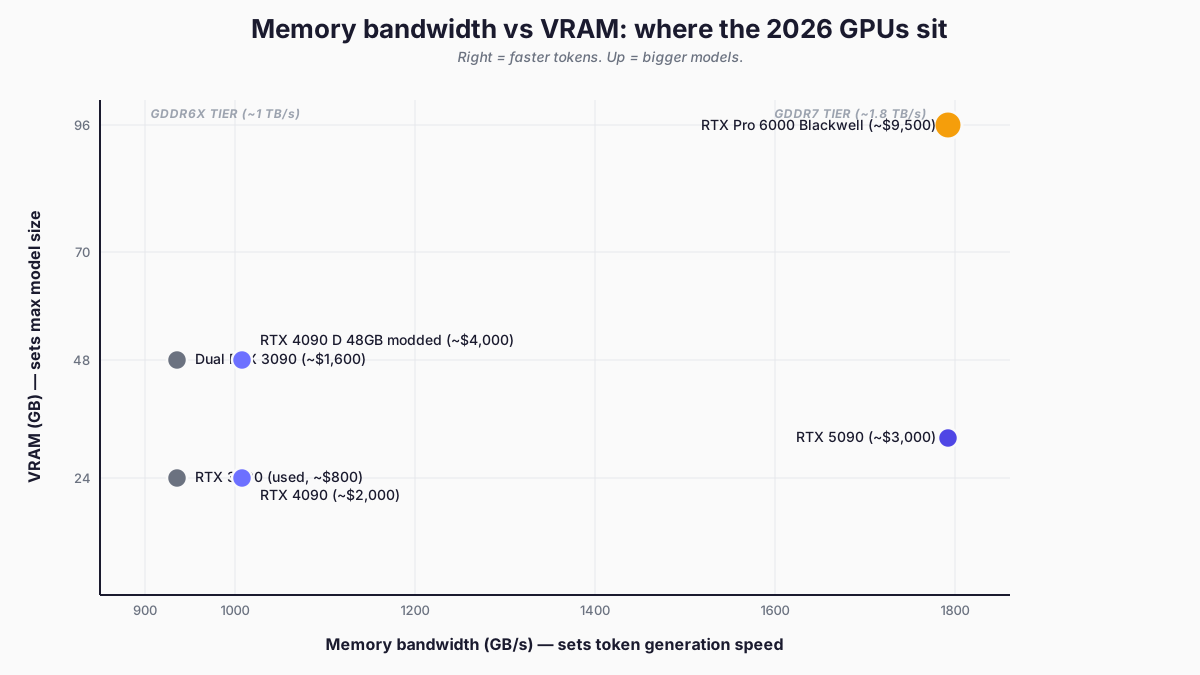
Two specs decide a local-LLM GPU purchase: memory bandwidth (GB/s) and VRAM capacity (GB). Bandwidth governs how fast tokens come out. VRAM governs how big a model fits. Three years ago the answer was simpler - buy the most VRAM you could afford and live with whatever else came with it. The 2026 market has matured though, and the right card now turns on which of those two specs you need more of.
Why memory bandwidth matters more than compute (mostly)
LLM token generation is memory-bandwidth bound, not compute bound. During the decode phase - every token after the first - the GPU spends most of its time waiting on memory reads, not doing arithmetic. A card with 60% more TFLOPS and the same bandwidth generates tokens at very nearly the same speed as the slower card. A card with 78% more bandwidth and similar compute generates them close to 78% faster. The TFLOPS column is mostly a vanity stat for this workload.
The caveat: prefill is compute-bound. Prefill is what happens before any tokens come back - the model reads and embeds your prompt to build the KV cache. On a short chat prompt it is invisible. On a 16k-token context with a big RAG document it absolutely is not, and it scales with TFLOPS rather than GB/s. A 4090 beats a 3090 noticeably on time-to-first-token despite their generation speeds being almost identical. Interactive chat rarely cares; agentic workflows that re-process long contexts every turn very much do.
Bandwidth governs how fast tokens come out. Compute governs how fast they start. Most local LLM work I do is decode-heavy, so bandwidth is the primary lens - but if you live in long-context territory (large RAG, agentic loops over big codebases), do not ignore TFLOPS just because the marketing copy oversells them. I notice the bandwidth ceiling daily on hopper, where the RTX 4500 Ada workstation cards top out at 432 GB/s per card - well below the 3090's 936 GB/s. The workstation card tier trades raw bandwidth for ECC, density, blower cooling, and sustained-load reliability, and you feel it on every long generation.
The spec sheet that matters:
| GPU | VRAM | Memory bandwidth | Why it matters |
|---|---|---|---|
| RTX 3090 | 24GB GDDR6X | ~936 GB/s | The floor. Still beats current sub-$1000 cards. |
| RTX 4090 | 24GB GDDR6X | ~1,008 GB/s | Solid mainstream. 8% faster than 3090 on token gen. |
| Modded RTX 4090 D 48GB | 48GB GDDR6X | ~1,008 GB/s | Same speed as 4090, double the VRAM. Chinese aftermarket. |
| RTX 5090 | 32GB GDDR7 | **~1,792 GB/s** | 78% bandwidth jump over 4090. New flagship for single-user inference. |
| RTX Pro 6000 Blackwell | **96GB GDDR7 ECC** | ~1,792 GB/s | Same bandwidth as 5090. Three times the VRAM. Workstation tier. |
| Dual RTX 3090 | 48GB combined | 936 GB/s per card | Cheap path to 48GB. Bandwidth doesn't combine; throughput does. |
The TFLOPS columns in vendor decks are real numbers - they just are not the numbers that govern token-per-second on a single user. They matter for prefill, training, and batched serving. They do not move single-user generation, which is what most local LLM users care about.
Hardware Corner's RTX 5090 LLM benchmarks measure 102.7 tokens per second on Qwen3 14B at Q4_K and 16k context. The RTX 4090 on similar workloads lands in the 55-65 tok/s range. The ratio tracks the bandwidth ratio (1,792 / 1,008 = 1.78) but doesn't hit it cleanly - expect somewhere in the 70-90% band of theoretical scaling once kernel launch overhead, framework efficiency, and PCIe transfers eat into the maximum. Pure bandwidth math is the upper bound, not the number you will see on a meter.
Prioritise GB/s for decode speed, TFLOPS for prefill speed, GB for model size. If a card's spec sheet leads with RT cores or gaming benchmarks, that's a marketing document, not a buying guide for this workload.
How much VRAM you need
VRAM decides which models you can run and at what quality. Practical tiers in 2026 at 4-bit quantization (the practitioner default), with some context budget kept aside:
| VRAM | What runs comfortably (Q4) | What runs with room (Q6/Q8) | Practical use |
|---|---|---|---|
| 24GB | 7B, 13B, 30-34B with tight context | 7B, 13B at high quality | Daily-driver dev work, coding, RAG |
| 32GB | 30-34B comfortably; 70B Q3 squeezing | 13B at top quality with long context | Slightly bigger headroom + GDDR7 speed |
| 48GB | 70B Q4 comfortably | 30B at Q8 quality | The serious local-LLM tier |
| 96GB | 120B class at Q4; multi-model serving | 70B at Q6/Q8 (significantly better quality than Q4) | Workstation / small-team-serving territory |
Q4KM (the 4-bit quantization most practitioners reach for) is the practical floor. It compresses model weights to roughly 4 bits each with minimal quality loss. Q6 and Q8 keep more precision and produce noticeably better output for coding and reasoning - the difference is worth chasing if your work depends on the model. 96GB matters not because you suddenly run bigger models, but because you run the same 70B at Q6 instead of Q4, and that quality bump is what justifies the price.
The question to ask when sizing up is not "what model do I want to run today" but "what model do I want to keep running comfortably in 18 months." Models keep growing. 13B was the daily driver in 2024. 30-34B is the daily driver in 2026. Plan for the next jump, because the one after that is already in training.
The cards worth buying in 2026
Five GPUs cover the practical range. Anything else is either worth waiting a generation on, or has been superseded enough that the secondhand market is the better route in.
Used RTX 3090 - the floor (~$700-900)
24GB GDDR6X. 936 GB/s. From 2020 and, honestly, still earning its place in 2026.
This is the card I use day-to-day. It lives in my development machine and handles the small-model workload I run all the time: DeBERTa-v3-large for the AI-detection scoring pass I run on draft articles, Granite for embeddings, anything in the 7B-13B range that I want fast responses from without going across the network to my dedicated LLM workstation. For a $700-900 used card, it does an unreasonable amount of work.
Used 3090s are the cleanest sub-$1000 path to 24GB. The 4080 (16GB) and 4070 Ti (12GB) get marketed as "AI-friendly" cards, but the VRAM ceiling hits fast on anything 13B and bigger. Once you have hit that ceiling, no amount of marketing copy puts you back under it. The 3090's extra capacity is what makes it the better starting point for LLM work, even though it is older and noisier.
Why a 3090 still beats most newer mid-range cards for LLM inference:
- 24GB is the practical minimum for meaningful work with 13-30B models
- 936 GB/s - only ~7% behind the 4090 for token generation
- Wide aftermarket: easy to source, easy to replace, easy to pair
- 350W TDP runs hot and wants a 1000W PSU, which is the tradeoff
Under $1000, this is the answer. There is no second place worth mentioning.
Dual RTX 3090 - the value play (~$1,400-1,800)
Two used 3090s give you 48GB combined and let you run 70B models at Q4. Cheapest path to the 70B tier, full stop. Highest VRAM per pound on the market, and the gap to the next-cheapest option (the modded 4090 D) is not small.
My own multi-GPU experience lives on a different card tier: hopper runs multiple RTX 4500 Ada Generation cards on a Threadripper with 256GB of system memory, hosting Qwen Coder Next at 120k context via LM Studio. Different cards, different bandwidth profile (the 4500 Ada is 432 GB/s ECC per card versus the 3090's 936 GB/s consumer-grade), but the multi-GPU experience itself - work-tree provisioning, PCIe topology constraints, PSU sizing, cooling at sustained load - is something I live with daily. The scaling math below tracks what I see on that rig, with the caveat that the specific 1.6-1.8x NVLink tensor-parallelism number is a 3090-pair-specific result from the practitioner reports, not a number I have personally measured. The framing holds though: NVLink is the reason the dual-3090 configuration still works.
Why did NVIDIA strip NVLink out of the 4090 and 5090? To protect datacenter sales. The 3090 supports it (a 112 GB/s bidirectional bridge between two cards), and that interconnect is what lets tensor parallelism on a two-card setup scale properly. Without it - a 4090 pair, a 5090 pair - you fall back to splitting layers across the PCIe bus, which is roughly one-thirtieth the bandwidth of VRAM and becomes a brutal chokepoint inside about a minute of real work.
The scaling story depends on the parallelism strategy your inference engine uses:
- Tensor parallelism over NVLink (the right config for two 3090s) - close to linear on token generation, often 1.6-1.8x on a 2-card setup
- Pipeline parallelism over PCIe (the fallback when you do not have NVLink, e.g. dual 4090) - typically 0.5-0.7x of a single card on generation speed because the PCIe Gen4 x16 bus (~32 GB/s) becomes the chokepoint against the VRAM (~1 TB/s)
Bandwidth does not combine in either case - 936 GB/s per card, not 1,872. What combines is capacity: 48GB of usable VRAM at the cheapest possible price, which is the real value here.
Other caveats:
- A 3-slot NVLink bridge runs ~$80-150 - factor it into the budget; you cannot retrofit two 3090s with NVLink without one
- Two physical x16 slots and a 1300W+ PSU is the realistic minimum, with headroom
- Runs hot, runs loud, draws 700W under sustained load. Not a quiet build.
- Three-slot physical clearance per card; stacking two axial-cooler 3090s without space throttles the top card inside a few minutes
Two 3090s with an NVLink bridge for ~$1,700 total give you 48GB at decent scaling. A single new card that matches that costs four times as much, which is the maths that has kept the 3090's used price stubbornly high for the entire life of the 4090.
RTX 4090 - solid mainstream (~$1,800-2,500)
24GB GDDR6X. 1,008 GB/s. I haven't owned a 4090 personally - by the time I needed to step up from the 3090's 24GB ceiling, the 5090 had landed and the math changed. The Hardware Corner comparative ranking puts the 4090 at 77% of the 5090's token-generation throughput across their test set, which tracks the bandwidth ratio almost exactly.
The case for the 4090 in 2026 is mostly about used prices coming down. If you find one at the right price you are not making a mistake. The 5090 exists though, and the bandwidth difference is real enough to change the recommendation for most new buyers.
Case for the 4090 over the 5090 in 2026:
- Available used at meaningfully lower prices than the 5090
- Mature drivers, mature aftermarket cooling, no early-adopter friction
- Sits in a 750W PSU comfortably (the 5090 wants 1000W+ and a serious cooling loop)
- Same VRAM as the 3090, 7% more bandwidth - a real but modest step up
Case against:
- 32GB on the 5090 fits 30-34B at Q6; the 4090 is stuck at Q4 for those same models
- The bandwidth gap (1,008 vs 1,792) is the largest generation-on-generation jump NVIDIA has shipped in years
- For inference, the 5090 sits in a different speed tier - not a gaming-spec difference, a real working difference
New today, skip to the 5090. Used at the right price, for a build that will be retired in 18 months, the 4090 is fine.
Modded RTX 4090 D 48GB - the dark horse (~$4,000+)
I'd love a pair of these on hopper but the workstation budget isn't there yet, so what follows is my read of the published coverage rather than a card I have lived with.
What if you'd rather have 48GB on a single card? That's where this gets interesting and a bit weird. Hardware Corner's teardown of the 48GB modification is the cleanest write-up I have seen on what is happening inside these things. The modders are using a longer PCB with memory pads on both sides, populating 24 GDDR6X chips in total (12 front, 12 back) - what Hardware Corner calls "a PCB design philosophy reminiscent of the older RTX 3090." That's the right reference. The 3090 used the same dual-sided memory layout to hit 24GB on smaller-density chips. Grafting that approach onto the modern AD102 core is clever, and the fact that the cards work with standard NVIDIA drivers - thanks to leaked internal tools (MATS and Mods) that can patch the BIOS without breaking the driver's signature checks - explains why these have shipped at scale rather than dying as one-off prototypes.
Memory bandwidth stays at the standard 4090's ~1 TB/s. Hardware Corner's review measured GPU temp at ~70°C under sustained load, hotspot at 78°C, memory at 86°C, with the dual-slot blower cooler hitting 65 dB. Those thermal numbers match what I'd expect from a 24-chip layout drawing 350W, and the 65 dB matters because that's industrial-acoustic territory, not desktop. If you're building a quiet study rig, this is the wrong card.
The longevity question I'd want clarity on before committing $4,000 is the GPU die itself. Hardware Corner's reviewer describes the silicon as "slightly well done" - refurbished from used cards, which is industry-standard practice in this market but worth knowing. I agree with their read on the core trade-off these cards force: you get a single-card 48GB at roughly half the price of an RTX Pro 6000 Blackwell, but you're trusting an unofficial supply chain and a refurbished GPU core. The Pro 6000 carries NVIDIA's warranty. This carries the modder's reputation.
Where the modded 4090 D wins, paraphrasing Hardware Corner's comparison framing:
- vs. dual RTX 3090 - single-card simplicity, no NVLink bridge to source, a blower cooler that fits in tighter cases ("physically easier to stack than two gaming 3090s/4090s")
- vs. used datacenter L40/A40 (also 48GB, passively cooled for server chassis) - comparable bandwidth at ~900-1000 GB/s, but used prices that "can be very expensive, potentially exceeding the modded 4090's cost". For a desktop build, the modded card is meaningfully easier to live with
- vs. RTX Pro 6000 Blackwell - half the price for two-thirds the bandwidth, no warranty, supply uncertainty in return for one-card-not-two
For someone who needs 48GB on a single card now, has done their homework on the modding scene, and accepts the unofficial-modification risk profile, this is a real option. For anyone needing warranty support or stable supply, I'd point them at the Pro 6000 (or twin 3090s with NVLink) instead.
RTX 5090 - the new flagship (~$2,200-3,500)
32GB GDDR7. 1,792 GB/s. The biggest bandwidth jump NVIDIA has shipped in years, and for single-user local LLM inference the best new card at consumer pricing in 2026.
I have not put a 5090 in my own machine yet (the workstation budget keeps pointing me at other things first), so the numbers below come from Hardware Corner's tested LLM benchmarks rather than my own measurements. Their summary calls it "a strong contender, offering significantly higher performance and more usable context than its predecessors in our tests" - particularly for "running the latest Qwen 3.5 models in agentic workflows, where that extra speed and context handling make a tangible difference." Their measured throughput: 102.7 tokens per second on Qwen3 14B at Q4K, 16k context. The card handles Qwen3 32B at Q4K fully in VRAM and the gpt-oss 120B model in MXFP4 at full 128K context.
Why the 5090 lands for most serious buyers:
- 78% more bandwidth than the 4090 translates to roughly 78% more tokens per second on the same model
- 32GB fits 30B at Q6 (quality territory) instead of Q4, which is where the output quality starts to feel different
- GDDR7 is the architecture story for the rest of this generation - GDDR6X is now the previous era
- Drivers and aftermarket support are mature enough to be uneventful
Caveats:
- 575W TDP wants a 1000W+ PSU and serious cooling - not a small card to live with
- Street price still varies widely with availability, so the headline number above is a moving target
- 32GB does not cover 70B at Q4, which pushes you into multi-GPU or modded-4090-D territory
$2,500-3,500 on a single card, not running 70B+: this is the card to buy.
RTX Pro 6000 Blackwell - workstation tier (~$8,500-10,000)
I'd love a Pro 6000 Blackwell on hopper, both to consolidate the multi-4500-Ada setup into single-card simplicity and to step up from the workstation tier's 432 GB/s per card to the 1,792 GB/s GDDR7 tier. The workstation budget isn't there yet. So this is the section where I'm reading other people's measurements carefully and applying what I know about the bandwidth/VRAM trade-offs from running the workstation tier myself, just one rung down on the bandwidth ladder.
96GB GDDR7 ECC. 1,792 GB/s. Same bandwidth as the 5090, three times the VRAM. As Linus Tech Tips put it in their February 2026 hands-on review - which they only got to do at all because Falcon Northwest lent them a Talon workstation with the card pre-fitted, since NVIDIA never submitted the Pro 6000 for review - "the RTX Pro 6000 can fit much larger models in VRAM than the 5090 could ever dream of running efficiently." For LLM work specifically, that one sentence is the entire thesis of this card.
Hardware Corner's relative-performance ranking puts the Pro 6000 at 94% of the 5090's token-generation throughput - within shouting distance, because the bandwidth is identical and the only meaningful spec difference for inference is the VRAM ceiling. The capability that matters lives in that extra VRAM:
- 70B at Q6 or Q8 instead of Q4 - meaningfully better output for coding and reasoning, and the difference is audible the first time you use it
- 120B-class models at Q4 ( GPT-OSS , Qwen3-VL-235B, etc.)
- Multiple users from a single card with batched inference - the small-team story
- 240+ tokens per second on 120B MXFP4 quantization, per practitioner reports on r/LocalLLaMA - which is properly fast for a model that big
- ECC memory matters for long-running tasks where bit-flips compound and you don't want to chase a phantom
Economics:
- $8,500-10,000 retail puts this firmly in workstation territory, not enthusiast territory
- Lower TDP than the 5090 in practice - inference draws well below the rated TDP ) because the workload is bandwidth-bound, not compute-bound. That matches the broader pattern at the 5090 tier where the cards rarely hit their advertised draw under inference workloads
- Workstation pricing comes with workstation reliability - the difference matters for sustained agentic work that runs for hours
- Resale value holds better than consumer cards, which softens the price tag a bit if not by much
Two non-obvious workflow caveats LTT surfaced in that same review that you can't get from spec sheets:
- No HDMI output. The Pro 6000 ships DisplayPort-only. LTT had to source a no-name DisplayPort-to-HDMI adapter to drive their test display, which they suspect introduced colour shifts in their 8K Cyberpunk run. If your monitor is HDMI-only, factor a quality active adapter into the budget before the card arrives.
- Driver cadence is different. As Linus puts it, "Quadro and RTX Pro cards use a different installer and separate drivers that are not updated as regularly" than the GeForce Game Ready / Studio drivers most people are used to. For a card that's going to spend its life serving inference, that's largely fine. For mixed pro-plus-gaming workloads, it's the thing that catches people.
LTT's verdict line is the cleanest framing I've read on who this card is for: "It's the fastest card you can put in a PCIe slot, and it won't make sense for everyone." I agree with that read. For small-team serving, coding-quality agentic workflows, or outgrowing 48GB single-card - this is the answer. For solo enthusiast work it is overkill, and the difference is better spent on RAM, NVMe, and a 5090. The honest read: if my dev workflow ever justifies the spend, this is the card I'd point hopper at. But the math has to add up for the work it would do.
What about workstation-tier NVIDIA cards (RTX 4500/5000/6000 Ada), AMD or Apple Silicon?
NVIDIA RTX 4500/5000/6000 Ada Generation is the workstation card line that sits below the Pro 6000 Blackwell at price points the article above hasn't covered, and it's the rig I run on hopper. The 4500 Ada is 24GB ECC at 432 GB/s (200W TDP), the 5000 Ada is 32GB ECC at 576 GB/s, the 6000 Ada is 48GB ECC at 960 GB/s. The trade-offs versus consumer cards: lower bandwidth per card, ECC memory, blower coolers for stacking, certified drivers, and significantly lower TDP. If you want a multi-GPU workstation that runs quiet and reliable at sustained load, the Ada workstation line is the route. If you want maximum tokens per second per dollar, the consumer 3090/5090 stack is faster. Buy the workstation tier when ECC, density and sustained reliability matter more than raw single-user throughput.
AMD MI300X / MI325X is the datacenter card with 5,300 GB/s of bandwidth - faster, on paper, than anything from NVIDIA's consumer line. It is also $20,000+, ships in rackmount form factors, and has a less mature inference ecosystem (vLLM and TGI work fine; Day-1 support for new model releases is consistently behind CUDA). Enterprise hardware, not a "best GPUs for local LLMs" answer.
Apple M3 Max / M4 Max / M4 Ultra is the interesting outsider, and I have not personally tested any of them for LLM work. Apple's unified memory architecture means a Mac Studio with 64GB or 128GB unified memory fits large models, and unlike NVIDIA the memory is shared between CPU and GPU rather than partitioned to VRAM. That's a real architectural advantage if your workflow can use it. The bandwidth story:
- M3 Max: ~400 GB/s
- M4 Max: ~546 GB/s
- M4 Ultra: ~1,024 GB/s
An M4 Ultra Mac Studio sits in the same bandwidth ballpark as a 4090, with up to 256GB of unified memory available. The catches are real though: MLX (the Apple Silicon inference framework) is improving fast but still not at CUDA's depth, and running 70B+ on Apple Silicon is meaningfully slower than running it on a 5090. Different bandwidth, different software stack, different working experience.
Already own a Mac Studio? Get productive on it without buying a separate rig - that's a sensible move. Buying new hardware specifically for LLM work? NVIDIA is faster, better supported, and prices better per GB of capable VRAM. The maths just lands there.
What I'd buy
| Budget | Buy | Why |
|---|---|---|
| Under $1,000 | Used RTX 3090 | Cheapest path to 24GB. Beats every newer sub-$1000 card on the specs that matter. The card I run today. |
| $1,500-1,800 | Dual used RTX 3090 | Cheapest path to 48GB. Runs 70B at Q4 with NVLink scaling that 4090 pairs can't match. |
| $2,500-3,500 | RTX 5090 | 78% bandwidth jump over the 4090. New flagship for single-user inference. |
| $4,000-5,000 | Modded RTX 4090 D 48GB | Single-card 48GB at half the price of the workstation tier - if you can stomach the unofficial-supply risk profile. |
| $8,500-10,000 | RTX Pro 6000 Blackwell | 96GB at 1,792 GB/s. Run 120B class and stop thinking about memory. The card I'd love to put on hopper. |
Three I'd steer away from:
- Any current-generation card under 24GB. The 5070, 5070 Ti and 5080 are excellent gaming cards, but the 16GB ceiling hits fast on anything 13B and bigger.
- An older 4090 at near-5090 prices. Pay the small premium and get the bandwidth.
- A workstation card you do not need. RTX Pro 6000 Blackwell is overkill if your largest workload is 30B at Q4. Spend the difference on RAM, NVMe, and a 5090.
Common mistakes
1. Spending on TFLOPS instead of bandwidth. The TFLOPS column gets the marketing real estate. The GB/s column governs your actual experience. Pricing usually reflects this, but it's worth checking before you commit.
2. Buying for the model you run today. Models keep growing, and faster than most people expect. The 7B you run now is the 30B you will run in 18 months. 16GB because "Mistral 7B fits" is a one-year decision. 24GB minimum is a three-year decision, and three years is what you should be planning for. I bought my 3090 in 2022 when 13B was the sensible target; it has carried me to 30B-class workloads four years later, which is the kind of longevity to plan for.
3. Forgetting the rest of the rig. A 5090 in a 750W PSU browns out under load, and a brownout mid-inference is not a quiet failure mode. A modded 4090 D 48GB in a case with no airflow throttles inside minutes. Budget 200W headroom in your PSU above the GPU's TDP. Plan three-slot clearance. The card is not the whole rig.
4. Assuming dual-GPU scales linearly. Two 3090s with NVLink and tensor parallelism do scale close to 2x on token generation. Two 4090s without NVLink, falling back to pipeline parallelism over PCIe, drop to roughly half a single card's generation speed - because PCIe is one-thirtieth the bandwidth of VRAM and becomes the bottleneck immediately. The capacity (48GB) is the genuine win either way. The speed depends entirely on which interconnect you have and which inference engine you use.
Where to go from here
Pick the tier that matches your budget and your model size goal. Stuck between two adjacent tiers? Almost always, buy the bigger one. The bandwidth and VRAM headroom pays back across the life of the card, and you'll thank yourself in 18 months when the next model jump lands.
A 24GB rig runs every interesting open-weights model from Llama-class 13B through to 30-34B at usable Q4 - it's where my dev machine lives and where most practitioner work happens. A 48GB rig opens the 70B door. A 96GB rig opens everything currently shipping as open weights, plus the multi-user serving story.
For the software side, LM Studio is the cleanest non-technical on-ramp. Get the model running there first, then layer the rest on top. It's what I run on hopper as the LLM server behind my Claude Code + MCP workflow, and it just works. For the build itself, the best PCs for local AI guide covers what goes around the GPU.
Get the bandwidth right. The rest is configuration.