Cut Your Claude Code Token Use by Offloading Work to Cheaper Models with Houtini-LM
I built houtini-lm for people worried that their Anthropic bill might be getting out of hand. I'd leave Claude Code running overnight on big refactors, wake up, and wince at the token count. A huge chunk of that spend was going on tasks…
I built houtini-lm for people worried that their Anthropic bill might be getting out of hand. I'd leave Claude Code running overnight on big refactors, wake up, and wince at the token count. A huge chunk of that spend was going on tasks any decent coding model handles fine - boilerplate generation, code review, commit messages, format conversion.
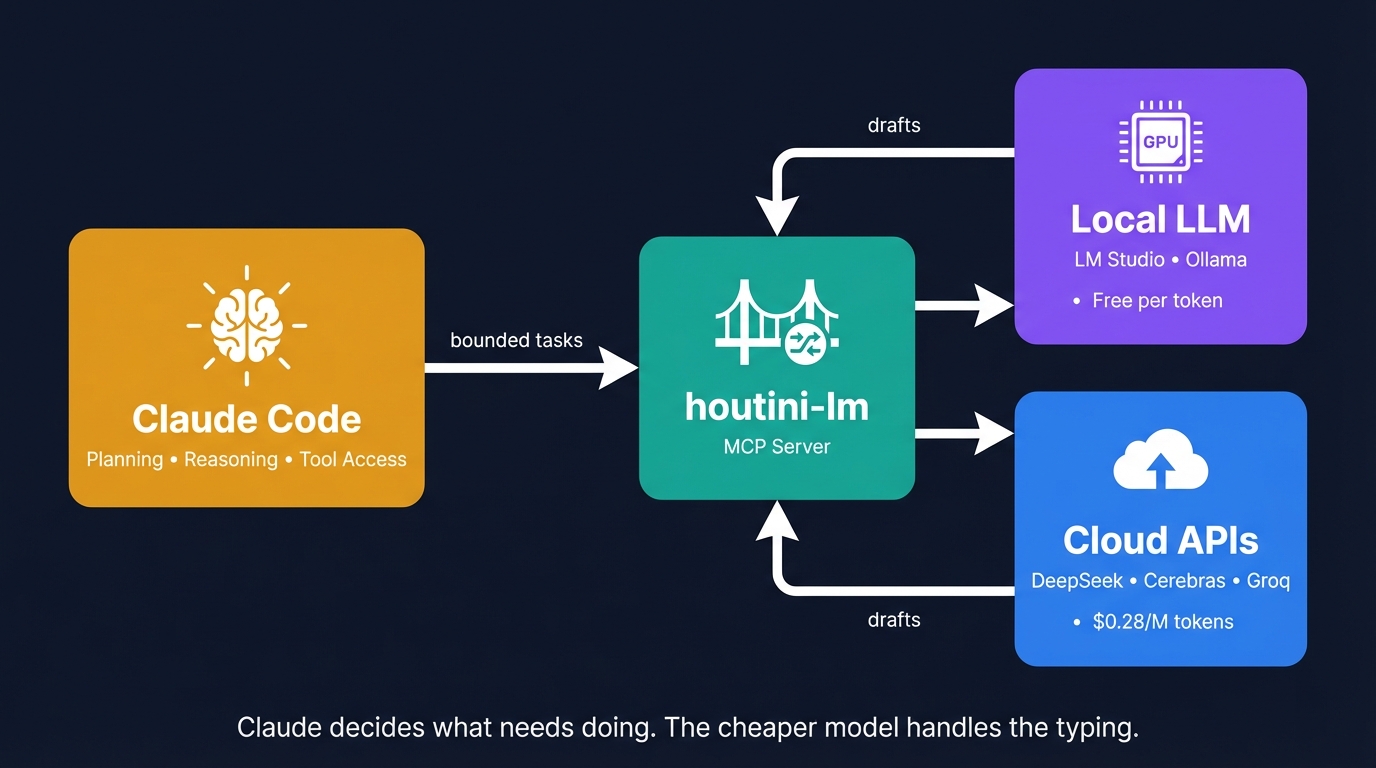
So I built an MCP server that routes the volume stuff - the boilerplate, the commit messages, the "reformat this as YAML" requests, large code reviews - to whatever cheaper model I've got running locally. Claude still handles the thinking - the planning, the tool calls and the reasoning. The local model handles the typing - which, it turns out, was where most of the token use goes.
Why? I'm certain they'll be a day when Anthropic have to add a few zeros to the token cost - if I'm right, houtini-lm will be the bridge to cross to save some tokens.
The token problem
There's a whole genre of YouTube content right now - and I mean a lot of it - telling you to ditch Claude Code and replace it with a local model. Run everything for "free" - that sort of thing.
Last time I checked, Alex Ziskind's "I Ran Claude Code for FREE" had clocked 159,000 views. Ankita Kulkarni's Ollama walkthrough? Even more than that. And they're not wrong that it works - technically, at least, you can get code out the other end. But Ziskind's own video shows the 20 billion parameter model failing where the 120 billion one succeeded. That's the catch. You can swap Claude for a local model, but you lose the reasoning that makes Claude Code worth paying for in the first place.
So the interesting question isn't "can I replace Claude?" It's "what can I take off Claude's plate without losing the good stuff?"
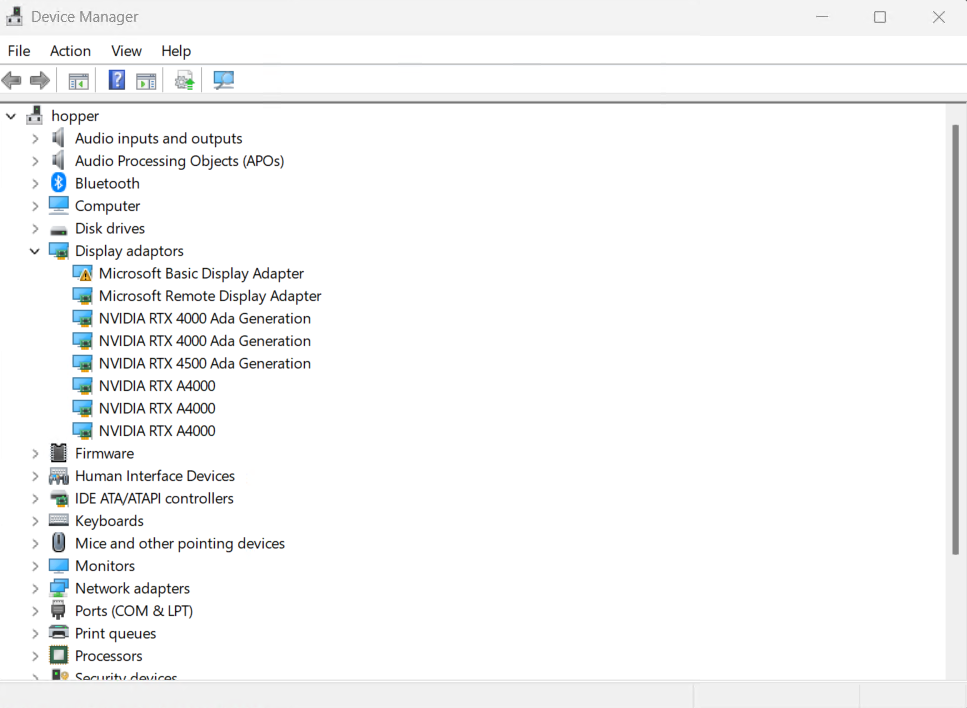
Qwen 3 Coder Next has been running on a GPU box (hopper) on my local network for about two months now - 80 billion parameters, MoE architecture, decent context window. It's absolutely brilliant at churning out code when you point it at the right tasks.
Ask it to reason across three files at once, though, and you'll see the wheels come off pretty fast. Multi-file reasoning, architectural decisions, tool orchestration - those need Claude's brain. But test stubs? Commit messages? Code explanations? Format conversion? Monolith reviews? My local Qwen model crushes all of that, and it costs me nothing per token.
That's exactly the gap I built houtini-lm to fill.
What's houtini-lm?
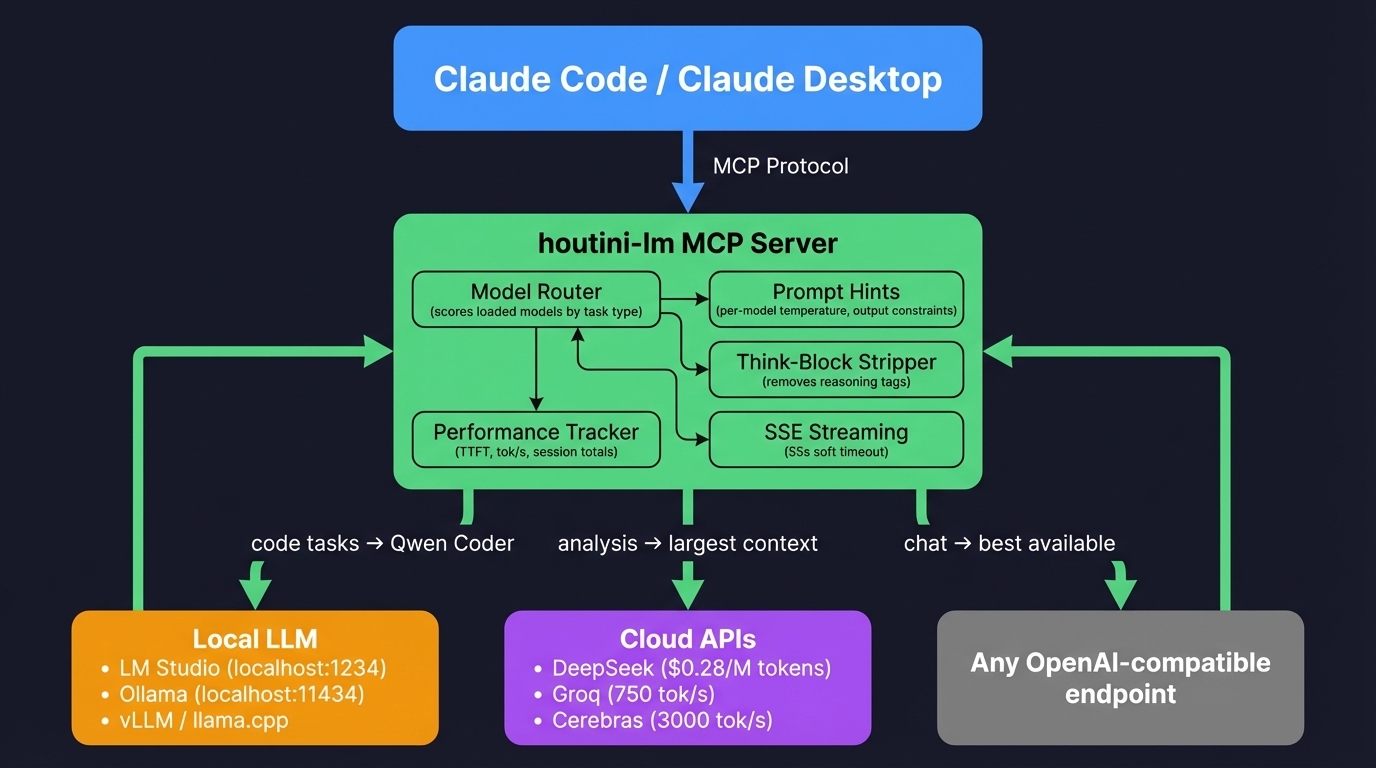
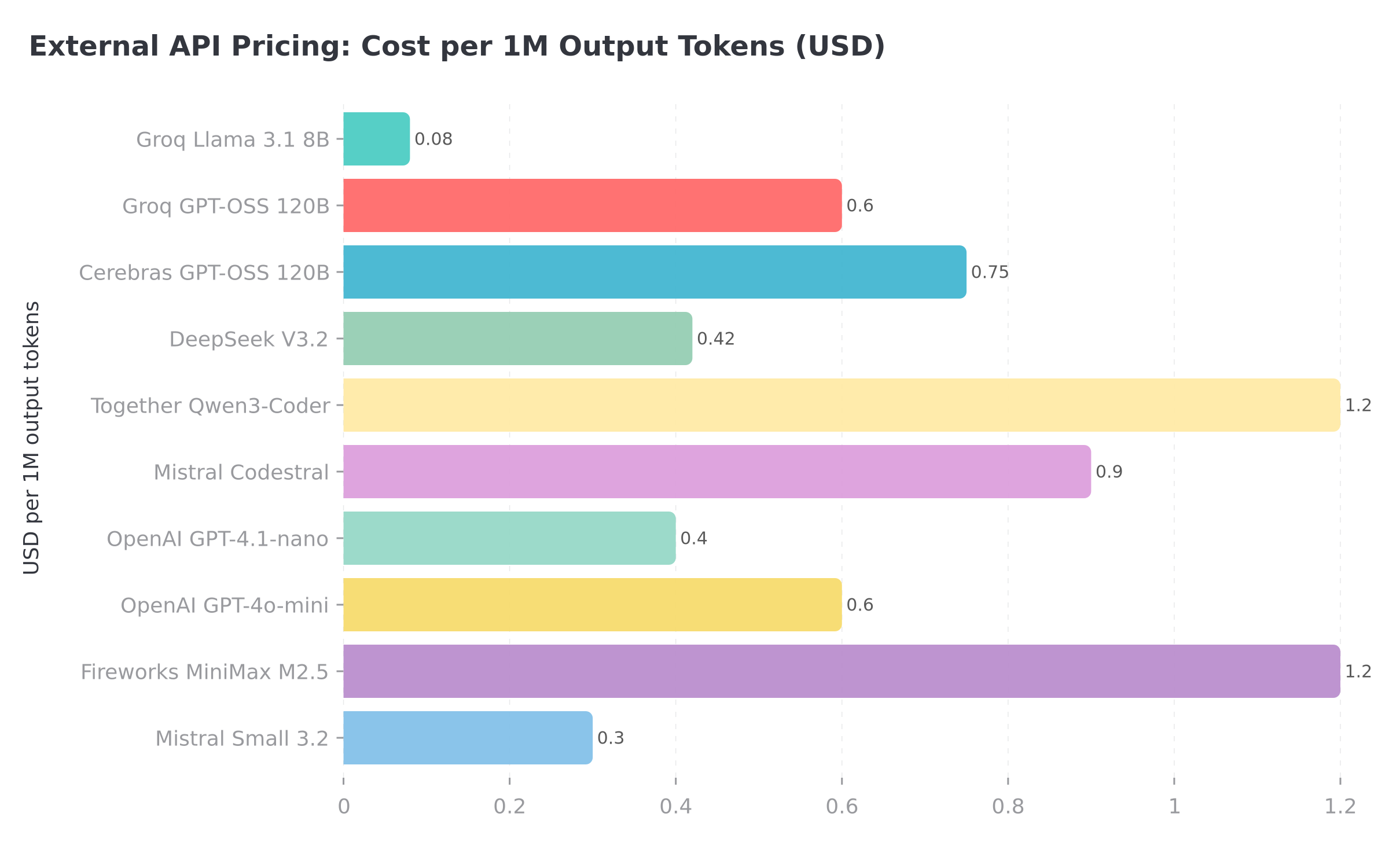
An MCP server - a bridge - that connects Claude Code (or Claude Desktop) to any OpenAI-compatible endpoint. LM Studio running on the machine next to you, Ollama on whatever spare hardware you've got lying around, or DeepSeek's API if you'd rather pay twenty-eight cents per million input tokens and skip the hardware entirely. Anything that speaks /v1/chat/completions works - which is pretty much all of it.
Think of it like giving Claude a phone line to a colleague down the hall who's decent at specific tasks but you wouldn't trust with architecture. Claude decides what needs doing, keeps the hard thinking for itself, and sends the grunt work down the line. Colleague drafts. Claude checks. You save tokens.
What separates this from the "replace Claude entirely" approach is the architect/drafter split. Claude keeps the planning role - it calls the tools, makes the decisions, orchestrates the work. The cheaper model only sees the specific bounded tasks Claude sends it. Not the whole conversation. Not the file system. Just "here's some code, write me tests for it" or "here's a diff, draft a commit message."
What's changed since launch (v2.8)
v1 went out in February. Within a fortnight I'd hit enough friction that I rewrote half of it. The original version was dead simple - one model, one endpoint, fire and forget. Three weeks of daily use and I'd rewritten most of it. Same idea, better plumbing.
Model routing
If you've got two or three models loaded in LM Studio - say, Qwen 3 Coder Next for code and GLM-4 for general chat - houtini-lm now picks the right one automatically. It scores each loaded model against the task type: code tasks route to whatever has "coder" in the name, analysis tasks favour the model with the largest context window, and everything else goes to the best available general-purpose model.
If your best model for a task isn't loaded, it'll suggest you load it rather than silently using the wrong one.
This is the same pattern behind our gemini-mcp server, actually. Route bounded tasks to the right backend, keep the expensive reasoning where it matters. Different models, same architecture.
Think-block stripping
Some models - GLM-4, Qwen3, Nemotron - always emit internal reasoning wrapped in tags before their actual response. Running one of those through houtini-lm used to mean getting pages of the model arguing with itself before the useful output showed up. Now the server strips those blocks automatically. Closed tags, orphaned opening tags, the lot. Claude gets the actual answer, not three paragraphs of the model talking to itself. As a single example, GLM-4 was generating 400 tokens of reasoning before every 50-token response which isn;t helpful; Claude has done the thinking.
Structured JSON output
You can now pass a json_schema parameter and get back grammar-constrained JSON - guaranteed valid against your schema. "Give me the API response shape for this endpoint" used to require a follow-up where I'd fix the invalid JSON the model spat out. With the schema parameter, the model's output is constrained at generation time - no more patching broken brackets. I've been generating TypeScript interfaces from API docs with this, and pulling structured data out of unstructured text. Both cases where the cheap model is absolutely fine but you need the output format nailed down.
Per-model tuning
Each model family now gets its own prompt hints - temperature, output constraints, whether to inject "no preamble" instructions. Qwen Coder runs at a lower temperature for focused code output. GLM-4 gets told to skip the preamble because otherwise it writes a paragraph of introduction before every response. A tuned version using model specific hints produced usable output on 18/10 tests the first try.
Performance visibility
Every response now shows time to first token and tokens per second alongside the usage numbers. The session footer looks different:
Model: qwen/qwen3-coder-next | 145→248 tokens (38 tok/s, 340ms TTFT) | Session: 12,450 offloaded across 23 callsTurned out my Qwen model was running at 12 tok/s on certain prompt shapes - the TTFT metric made it obvious the model was spending most of its time thinking before generating. Adjusting the temperature fixes that.
Getting started
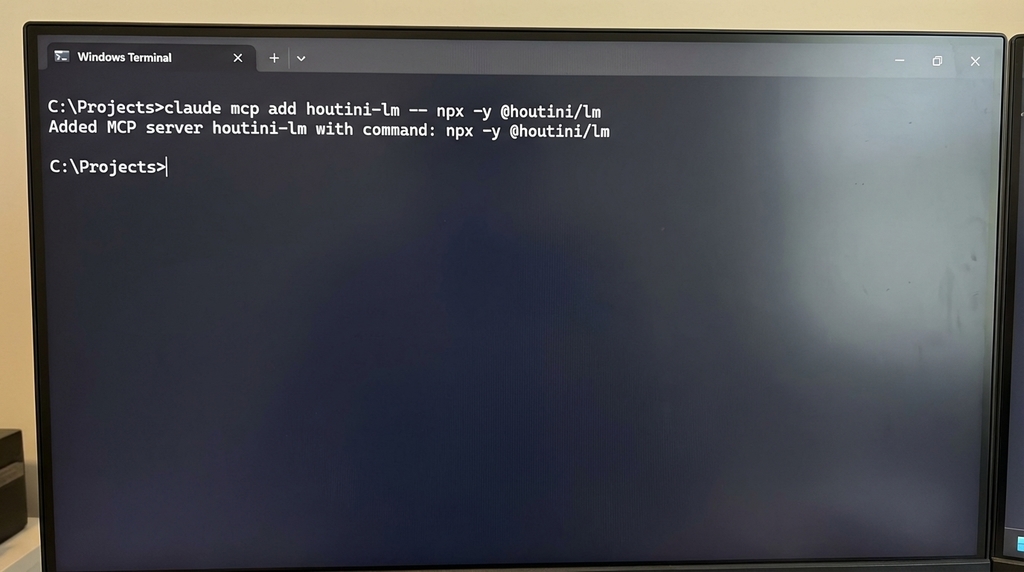
One command:
claude mcp add houtini-lm -- npx -y @houtini/lmIf you've got LM Studio running on localhost:1234 (the default), Claude can start delegating straight away. No .env, no API keys, no fiddling about.
Running your LLM on a different box? I've got a dedicated GPU machine on my local network - it lives in the cupboard under the stairs, which probably says something about me - so I point houtini-lm at that instead:
claude mcp add houtini-lm -e LM_STUDIO_URL=http://192.168.1.50:1234 -- npx -y @houtini/lmDon't have local hardware? Works just as well with cloud APIs - literally the same setup, different URL. Point it at DeepSeek, Groq, Cerebras - whatever you fancy:
claude mcp add houtini-lm -e LM_STUDIO_URL=https://api.deepseek.com -e LM_STUDIO_API_KEY=your-key-here -- npx -y @houtini/lmFor Claude Desktop, drop this into your claude_desktop_config.json (I've written a full guide to adding MCP servers if you haven't done this before):
{
  "mcpServers": {
    "houtini-lm": {
      "command": "npx",
      "args": ["-y", "@houtini/lm"],
      "env": {
        "LM_STUDIO_URL": "http://localhost:1234"
      }
    }
  }
}
What gets delegated (and what doesn't)
I wrote the tool descriptions to nudge Claude into thinking about delegation proactively - not just when it happens to remember the tool exists, but right at the start when it's planning the work.
Boilerplate and test stubs
Clear input, clear output. You hand it a function, it hands you tests. The cheaper model doesn't need context about the wider codebase here - just the function signature, the types, maybe expected behaviour. Qwen 3 Coder Next has been solid for this, and DeepSeek V3.2 handles it just as well over the wire - which was a pleasant surprise, to be fair.
Code review and walkthroughs
You supply the full source - and I mean the whole thing, not a snippet with half the imports chopped off - then tell it what's bugging you about the code. Or if you're staring at some legacy function at 2am and can't work out what the hell it does, just ask. The custom_prompt tool is brilliant for this kind of thing - you separate the system prompt, the context (your code), and the instruction (what to look for). It keeps the model focused. I actually tested this properly one weekend - took the same batch of review tasks and ran them both ways, once as a single wall of text and once broken into system/context/instruction. Splitting things into three parts won every round - and on some of the trickier reviews, the gap was embarrassing. On the 14B Qwen model the difference was almost comical: fed it one long unstructured message once and it started reviewing a completely different function to the one I'd asked about.
Commit messages and documentation
Give it a diff, get back a commit message. Probably the lowest-hanging fruit of the lot. Claude reads the diff, sends it to the cheaper model, gets back a commit message. Saves you from burning Anthropic tokens on pure text generation - which is a bit daft when you think about it, paying Claude's rates for something a 7B model does fine.
Format conversion and structured output
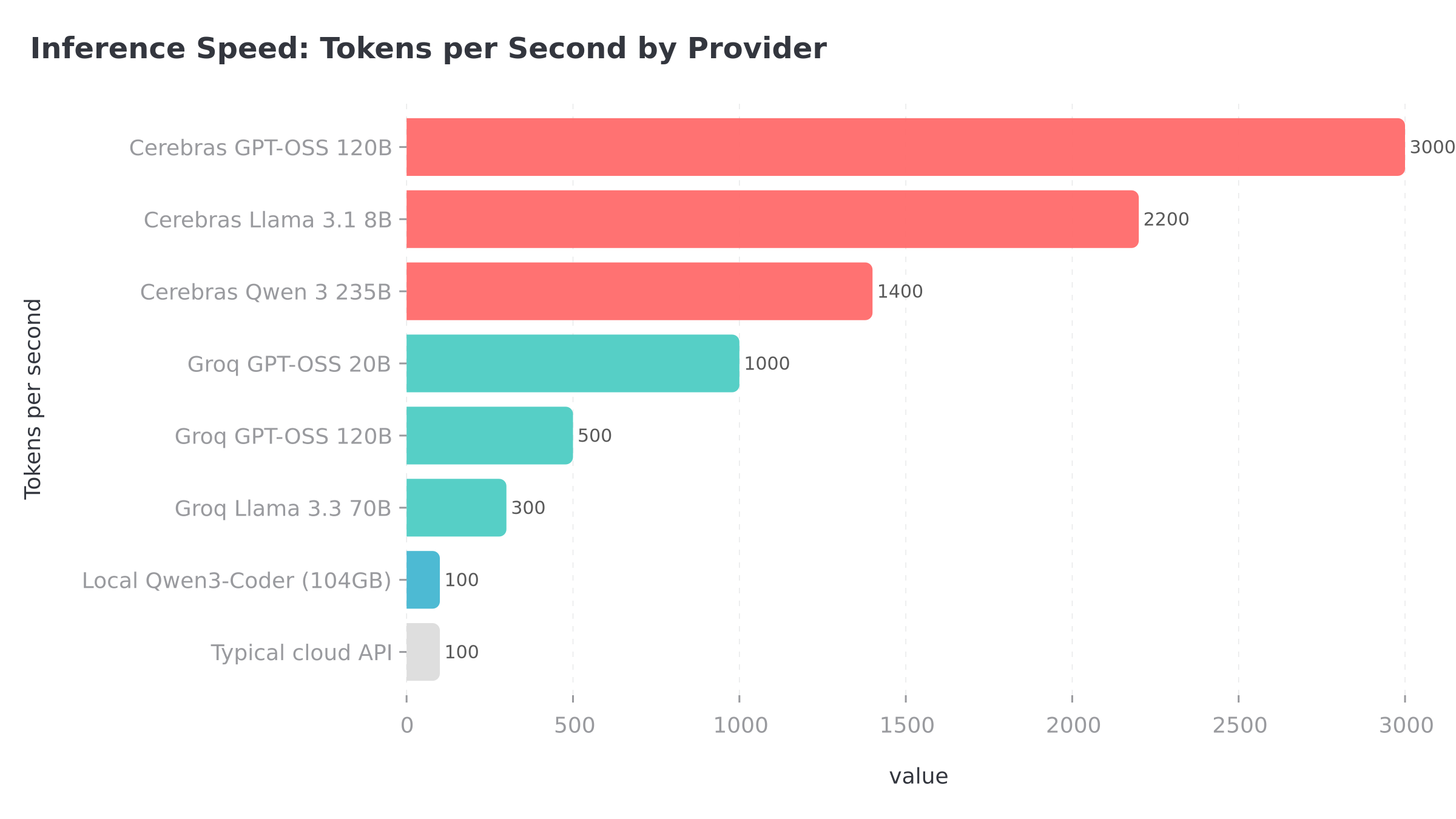
JSON to YAML, snake_case to camelCase, TypeScript types from a JSON schema. Mechanical stuff where reasoning adds nothing and a cheap model at 3,000 tokens per second - looking at you, Cerebras - gets it done before you've finished reading the status bar. Since v2.6 you can also pass a json_schema and get back grammar-constrained output - valid JSON on the first try, every time. I've been using this for pulling structured metadata out of API docs, and it's removed an entire class of "fix the broken JSON" follow-up calls.
What stays on Claude
Anything requiring tool access stays on Claude - reading files, writing files, running the test suite, parsing why something failed. Same goes for multi-step orchestration and the kind of architectural reasoning where missing one edge case ruins the whole design. Multi-file refactoring plans? Claude. The cheap model would botch it. I learned that one the hard way (more on that in the mistakes section).
Not just for local models
Took me about three weeks to realise this, but houtini-lm isn't really a "local model" tool. It connects to any OpenAI-compatible endpoint - and that includes a whole market of cloud APIs charging fractions of a penny per thousand tokens for bounded coding work. No GPU needed! External cloud APIs are where the inference speed drastically outperforms my bootstrapped local models...
The aggregator approach
OpenRouter isn't a model host - it's an aggregator. One API key, 300+ models, automatic routing. I've been using it to experiment: point houtini-lm at OpenRouter, set the model in the request, try different backends without changing your config. Brilliant for experimentation - I pointed houtini-lm at OpenRouter and A/B tested five different models against the exact same delegation tasks over a weekend before committing to my current Qwen + DeepSeek combo.
What doesn't work (yet)
MiniMax uses an Anthropic-style format, not OpenAI's /v1/chat/completions. Minimax won't work with houtini-lm out of the box, yet. You can access MiniMax models through Together AI or Fireworks as a workaround. Also, forget running MiniMax locally - the 456B parameter model needs about 101GB just for the weights at Q4 quantisation, so even with my 104GB of VRAM there's no room left for KV cache. That isn't happening.
Picking a local model (by GPU)
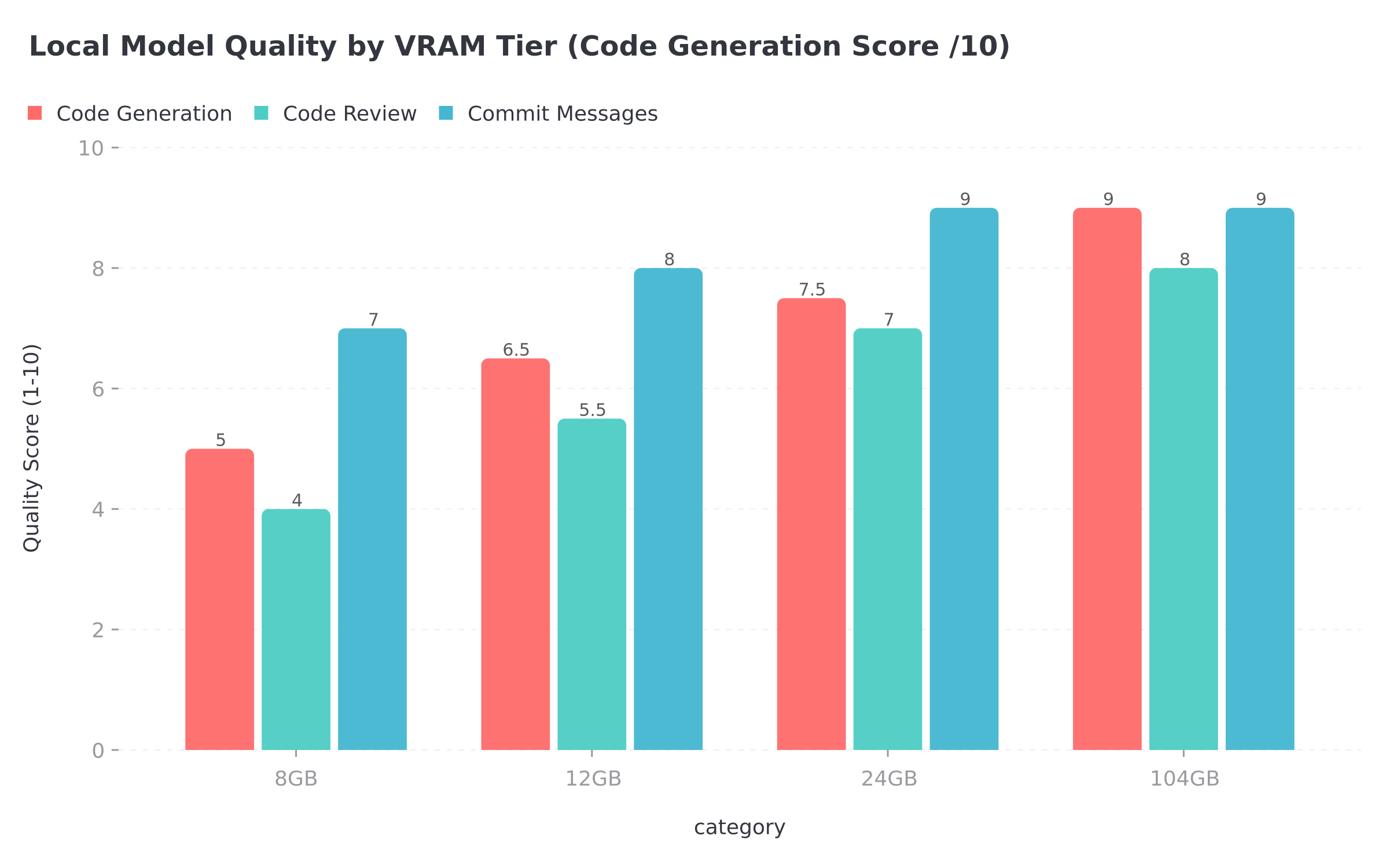
Got a GPU sitting around? Running models locally wipes out the per-token cost entirely - every delegation call is free after the initial hardware spend. What you can actually run depends almost entirely on how much VRAM you've got, though, and the quality gaps between tiers are frankly brutal.
My own rig runs Qwen 3 Coder Next at Q6 quantisation spread across 104GB of VRAM - a multi-GPU box living under my stairs that I assembled specifically for local inference work (my friends think I'm mad). It's an 80 billion parameter MoE model, but the clever bit is that only 3 billion parameters are active on any given inference pass, which is the only reason it fits at all. The 256K context window is generous for delegation work and the code quality is about as good as I've seen from anything running locally. If you're in the market for a local inference rig, I've put together a full guide to picking hardware for local AI that covers the GPU, RAM and motherboard decisions in more detail than I probably should have.
Drop down to an RTX 3090 or RTX 4090 with 24GB and Qwen 2.5 Coder 32B at Q4_K_M becomes your best bet. On the Aider benchmark it scored 72.9%, which puts it comfortably clear of the smaller models in the Qwen family. Context caps out around 32K - plenty for delegation - and honestly, most people reading this probably fall into this tier. It's genuinely capable kit for the money.
Token tracking
Next, I bolted on a session footer that shows up after every response. It's grown a bit since the first version:
Model: qwen/qwen3-coder-next | 145→248 tokens (38 tok/s, 340ms TTFT) | Session: 12,450 offloaded across 23 callsThe tokens per second and time-to-first-token numbers were a later addition - I kept wondering why some calls felt sluggish and had no way to diagnose it without these. The discover tool reports cumulative session stats too, including per-model breakdowns if you're running multiple models. In practice, Claude delegates more aggressively the longer a session runs. After about 5,000 offloaded tokens, it starts hunting for more work to push over. Reinforcing loop.
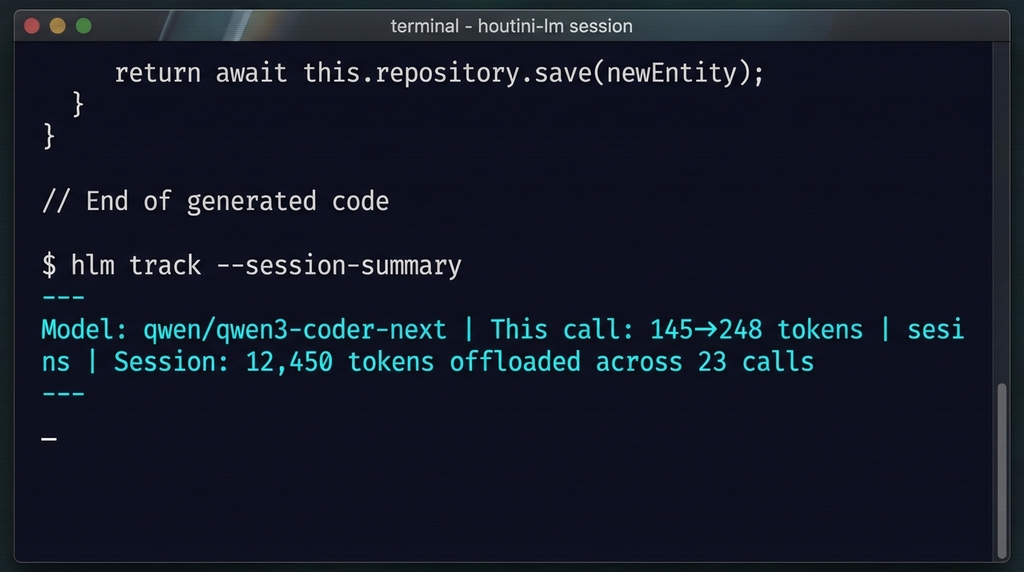
That example shows twelve thousand tokens across 23 calls - not one of them hitting your Anthropic invoice. Leave Claude running overnight on a big refactor and check the footer the next morning - on a typical heavy day, I'm offloading somewhere between 20,000 and 50,000 tokens, give or take.
How I use this day to day
It's worth describing my setup because the hardware side really matters. I'm running Qwen 3 Coder Next in LM Studio on a separate machine - a GPU box I built specifically for local inference . Claude Code lives on my daily driver - the one with three monitors and considerably more coffee stains than I'd like to admit. All the delegation routing goes through houtini-lm - I barely think about it at this point, it just works in the background.
When I kick off a big task, Claude does what it's best at - plans the work, reads through the affected files, figures out the approach and the order of operations. Then the farming out starts rolling. "Review each file in /src", "Generate test stubs for this module." Or "walk me through what this function actually does, because I've been staring at it for twenty minutes." Or just "draft a commit message for these changes." Each of those requests gets routed straight to the local Qwen model.
Current limitations
Your average LLM server - whether that's LM Studio, Ollama, or whatever you're running - processes one request at a time, so if Claude fires off three delegation calls in parallel (which it absolutely will try to do), they queue up and the timeouts compound in a way that gets messy. I've baked warnings into the tool descriptions and Claude mostly behaves now. Mostly.
The MCP SDK has a hard ~60-second timeout on the client side. Before I added streaming, any response that overran 60 seconds just disappeared - I lost count of how many perfectly good generations vanished because of that. So houtini-lm now streams via SSE and returns a partial result at 55 seconds if generation isn't done. The footer shows [TRUNCATED] when that kicks in, so you'll know what happened. Getting back ninety percent of a perfectly good generation is annoying, sure, but it's infinitely better than watching the whole thing disappear into the void - which is exactly what happened before I added the streaming layer.
Running Qwen 3 Coder Next with its 256K context window and 80 billion parameters is a completely different experience from squeezing a 7B model into 16K context on an old GPU. The drop-off in output quality between those two extremes is genuinely steep - which is exactly why I spent a whole section above walking through the GPU tiers.
I've put guidance directly in the MCP tool descriptions - "send complete code, never truncate", "be explicit about output format", "set a specific persona." Local and cheap cloud models need clearer instructions than Claude does. Mediocre results? Nine times out of ten, it's the prompt that's letting you down, not the model itself.
The local model never touches your filesystem - can't read your project directory, can't see your config files, can't browse your codebase. Everything it needs has to arrive in the message Claude sends across. That was a deliberate call on my part - partly because it keeps the architecture dead simple, and partly because, frankly, I wasn't thrilled about giving a random model free rein over my filesystem. Trade-off is that Claude has to bundle up every scrap of relevant context before each delegation call, which can get verbose.
If Claude Code's already installed, you're about ten seconds from cutting your token spend in half. Local models, cloud APIs, anything speaking the OpenAI format. Grab it from npm (@houtini/lm) or poke around the source on GitHub if you want to see how the routing works. Point it at whatever you've got running - Qwen on your local box, DeepSeek's API, Cerebras if you want ridiculous speed - and then just keep an eye on that session footer after your next big coding session. The offloaded token count climbs faster than you'd think, and every one of those tokens is one fewer on your Anthropic bill.
Related Articles
Continue reading.
Claude Code API Key Security: A Guide to Token Hygiene
The simplest possible setup that keeps your production tokens out of AI chat windows. 1Password CLI, op run, and the conversational discipline that makes the rest of it work.
Agentic Interoperability for Website Owners: AI User Experience (AI UX)
I've been keeping a close eye on the emerging subject of "agentic interoperability" across all my recent build projects. In layman's terms, that's the ability for AI agents to do things for you on your behalf - particularly inside SaaS…
Implementing WebMCP on a Recruitment Website
Thinking about what, exactly, the future of a website "looks" like in the agentic era is a challenging proposition. It might be that in most cases, our future viewers/readers/customers can do everything, from their chatbot of preference…