

This weekend’s project started with a simple need: collect the transcripts from around 20 YouTube videos from my client’s Youtube channel, for a research corpus. The goal was to accurately use the Youtube data to reference in the content we’re building.
For grabbing transcripts from YouTube, TikTok, or Instagram, Supadata is genuinely the service to use. It just works, which is more than I can say for most transcript APIs I’ve tried.
For those of you now familiar with setting up an MCP server, here’s the easiest setup:
{
  "mcpServers": {
    "@supadata/mcp": {
      "command": "npx",
      "args": ["-y", "@supadata/mcp"],
      "env": {
        "SUPADATA_API_KEY": "YOUR-API-KEY"
      }
    }
  }
}
Anyway. You may have read recent research on how RAG accuracy collapses depending on corpus size. And in any case, most individual projects are far too small for RAG infrastructure! This is why I built a “RAG-free RAG” solution instead.
Whilst building the research corpus for an article series, I documented the work. Here we go!
Why Not Just Use RAG?
Aside from the fact we’re talking about a 100,000 word corpus, I’d come across the Stanford research by accident whilst looking into whether I was missing something obvious. Turns out, RAG isn’t the silver bullet the vendors claim.
The paper: “Hallucination-Free? Assessing the Reliability of Leading AI Legal Research Tools” by Magesh et al. (Stanford, March 2025) tested RAG-based systems from LexisNexis and Thomson Reuters. These are “enterprise-grade” implementations with massive legal databases behind them.
The paper found that the RAG systems in the paper hallucinated 17-33% of the time. Westlaw’s AI-Assisted Research was accurate just 42% of the time, hallucinating nearly twice as often as other tools tested. For legal in particular this is a bad look.
This chart sums it up nicely:
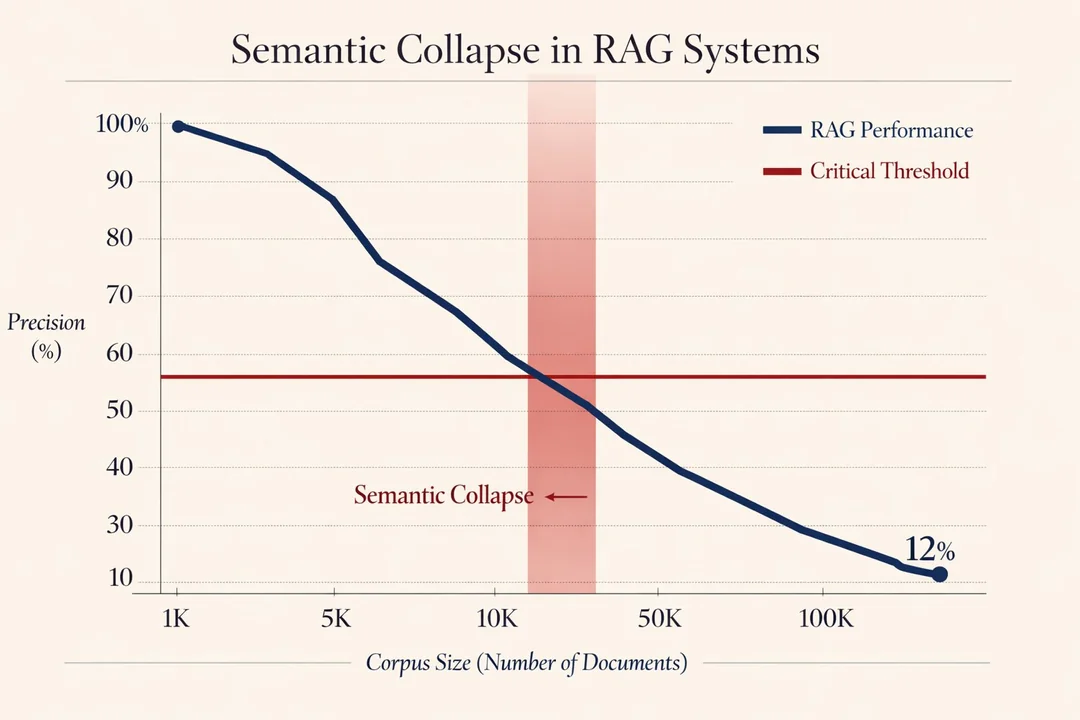
RAG adds complexity that only pays off at massive scale with professionally maintained vector databases. If you’re a vendor like Hubspot, and you’ve got the engineering resources to eval the output, OK – but I suspect Hubspot’s documentation sits in the 1-5k documents range anyway. For a local Claude Desktop project with 20 or so transcripts? It’s engineering overkill that introduces failures without getting to deliver on the actual problem.
If you’re building production systems with thousands of documents and need semantic similarity across dynamic content, RAG absolutely makes sense, and I’ll be covering RAG basics soon. Today’s article is specifically about the simpler case static research collections where you know the structure, or can at least set the context around it.
Prerequisites: Basic understanding of JSON structure and Claude Desktop projects with document collections. Understanding how to setup an MCP (today’s MCPs are Desktop Commander and Supadata – the Desktop Commander article will tell you how to install an MCP.)
Problematic, Yet Simple Indexes
Obviously, you need to download each transcript and save in a set working directory. As part of the prompt (which needed repeating several times to fetch all transcripts) I started with a basic index.md file listing transcript filenames and topics. It looked like this:
# Research Index

- yt-001-trail-braking.txt - Trail braking technique
- yt-002-throttle-control.txt - Balancing throttle in slow corners
- yt-003-slip-angle.txt - Slip angle theory
- And so on...
This doesn’t work well.
- Can’t query relationships – Which transcripts complement each other? No idea.
- No insights stored – Have to re-read entire files to extract key points
- No technical depth – Can’t filter beginner vs advanced content
- Token waste persists – Still have to load multiple files to find what you need
A simple index is just a table of contents. It doesn’t capture the structure of your knowledge base. The really big problem is if you cite the index.md file in your prompt there’s such a strong chance the AI will set out to read all 100,000 words which will put you in the context window sinbin.
Solution: A Two-Tier Metadata System
So, after downloading the entire transcript folder, I built two files that work together:
- research-index.json – Machine-readable metadata with searchable fields
- research-guide.md – Human-readable clusters, examples, and strategies
The prompt was really simple, but it’s a bit long to paste into WordPress – here it is.
Why JSON and an MD file? Machines seem to work far better with JSON for queries, humans need Markdown for understanding. Trying to serve both audiences with one big file and it creates a mess.
The JSON Structure
Here’s the example from my transcript collection:
{
  "research_base": "simracing-driving-technique",
  "created": "2025-01-05",
  "total_transcripts": 19,
  "transcripts": [
    {
      "id": "yt-001",
      "filename": "youtube-insights-trail-braking-technique.txt",
      "path": "articles/simracing-driving-technique/research/youtube-insights-trail-braking-technique.txt",
      "title": "Trail Braking Technique",
      "source_url": "[youtube_url]",
      "duration_mins": 10,
      "topics": ["trail_braking", "weight_transfer", "corner_entry"],
      "key_insights": [
        "Trail braking overlaps braking with turning for efficiency",
        "80% braking in straight line for hairpins, 20% trail braking",
        "Smoothness is vital - any bumpiness disturbs weight transfer",
        "Load cell brake pedals measure pressure making trail braking easier"
      ],
      "relevant_to": ["cornering_fundamentals", "advanced_braking", "slip_angle"],
      "technical_depth": "intermediate",
      "equipment_mentioned": ["load_cell_brake_pedal", "force_feedback_wheel"]
    }
  ]
}
The critical fields:
- topics – Tags for filtering (“trail_braking”, “throttle_control”)
- key_insights – Pre-extracted gold nuggets (never re-read full file)
- relevant_to – Cross-reference network mapping relationships
- technical_depth – Audience targeting (beginner/intermediate/advanced)
This structure enables queries like:
// Find all advanced trail braking content
const advanced = index.transcripts.filter(t =>
  t.topics.includes('trail_braking') &&
  t.technical_depth === 'advanced'
);

// What's related to corner exit speed?
const related = index.transcripts.filter(t =>
  t.relevant_to.includes('corner_exit_speed')
);
The Markdown Strategy Guide
The JSON is queryable but not all that friendly for people. My companion Markdown file provides:
Topic clusters organised by use case:
## Fundamentals Cluster (Load Together)

**Core theory that works together:**
- yt-001: Trail Braking Technique (how)
- yt-003: Slip Angle Theory (why)
- yt-011: Racing Line Fundamentals (where)

**Why these three:** Trail braking is the technique, slip angle explains why it works, racing line shows where to apply it. Loading all three gives complete mental model.
Search strategy examples:
## Query Pattern: "Find all X content"

**Advanced braking techniques:**
topics.includes('trail_braking') && technical_depth === 'advanced'
Returns: yt-001, yt-005

**Wet weather driving:**
topics.includes('wet_weather')
Returns: yt-015, yt-016
The guide makes the system discoverable. You skim the clusters, identify relevant IDs, then load only those specific files.
Real Token Savings?
I think so – the old way was grinding to a halt after just 3 transcripts!
- Load all 20 transcripts
- Token cost: ~100,000+ tokens
- Claude tries to process everything at once
- Slow, expensive, prone to missing details, probably loses the thread
After this system:
- Query research-index.json for relevant transcript IDs
- Load only those 3-5 files
- Token cost: ~20,000 tokens
- Focused extraction from pre-identified insights
Result: ~80% token reduction.
The savings compound because you’re not just reducing tokens you’re improving quality. Claude can actually focus on relevant content instead of trying to synthesise disparate transcripts simultaneously.
Here’s a prompt that would refer to the correct files in teh correct order:
Load C:\dev\content-machine\articles\simracing-driving-technique\research\research-index.json
Find entries tagged with "trail braking"
Load the relevant doc_summary.md and index.md files from those folders
The Cool Bit: Pre-Extracted Insights
This is what makes the pattern work better than a simple index.
Look at the key_insights field:
"key_insights": [
  "Small throttle (10-50%) maintains speed through tight corners",
  "Rear diff grips track when throttle applied, balances car",
  "Mental trick: Keep engine note high to prevent imaginary bomb",
  "Most effective in first/second gear corners and chicanes"
]
These are counter-intuitive findings extracted during the initial transcript analysis, so, you never have to re-read the full transcript to get these insights. They’re stored as metadata.
When we’re operating in research mode, it:
- Queries the index for relevant transcripts
- Reads the
key_insightsarrays - Loads only the 3-5 full transcripts that need deeper detail
- References insights during article drafting
This is fundamentally different from RAG because there’s no semantic search or vector similarity. It’s pure metadata filtering with human-curated relationships.
Building Your Own Research Index
Here’s how to replicate this pattern for any document collection. I’m assuming you’ve commlected teh documents in a single working directory!
Step 1: Analyse Your Corpus
For each document, extract:
- Topics (lowercase_underscore format: “api_design”, “error_handling”)
- Key insights (5-7 counter-intuitive or non-obvious points)
- Related concepts (what other topics does this connect to?)
- Technical depth (beginner/intermediate/advanced)
- Prerequisites (what should readers know first?)
Create a JSON entry:
{
  "id": "doc-001",
  "filename": "api-rate-limiting.md",
  "path": "research/api-rate-limiting.md",
  "title": "API Rate Limiting Best Practices",
  "topics": ["api_design", "rate_limiting", "redis"],
  "key_insights": [
    "Token bucket allows bursts whilst maintaining average rate",
    "Sliding window more accurate than fixed window",
    "Redis INCR with EXPIRE creates race conditions - use Lua script"
  ],
  "relevant_to": ["caching_strategies", "redis_patterns", "api_security"],
  "technical_depth": "intermediate",
  "tools_mentioned": ["redis", "nginx"]
}
Step 2: Map Relationships
This is the bit that takes time but creates the real value.
For each document, ask:
- What topics does this explain?
- What concepts does it assume you already know?
- What should you read next after this?
- Which other documents complement this one?
Fill in the relevant_to array with related topic tags. This creates a cross-reference network that enables discovery.
Step 3: Create Topic Clusters
Group related documents into coherent sets:
## API Design Fundamentals

**Core concepts (read together):**
- doc-001: Rate Limiting
- doc-003: Authentication Patterns
- doc-007: Error Response Design

**Why together:** Understanding rate limits requires knowing auth context, and error responses need to communicate limit violations.
Step 4: Write Query Examples
Document the common queries you use in your research work:
## Finding Advanced Redis Content

Filter:
topics.includes('redis') && technical_depth === 'advanced'

Returns: doc-001, doc-012, doc-019
This makes the system self-documenting. Six months later, you remember how to query it.
When This Pattern Works
Fits well:
- Research transcripts or interview notes
- Technical documentation collections
- Blog post archives
- Code snippet libraries
- Meeting notes with action items
Bad fits:
- Frequently updated content (index goes stale – this method would requier an agent running to continually refresh the content of the index files *assuming* new files were being addded and removed from teh documents directory)
- Unstructured brainstorming notes
- Single-use documents
- Content that requires full-text search
But for stable knowledge bases, legacy documentation where you need targeted access, not comprehensive search, it seems to be working really well.
Lessons Learned
- Pre-extraction is everything – Storing insights as metadata means never re-reading source files
- Relationships matter more than categories – The
relevant_tofield creates discovery paths that rigid categorisation can’t - Technical depth filtering is critical – Matching source sophistication to article audience prevents tone mismatches
- Examples make systems usable – The query pattern examples in research-guide.md are what make the JSON queryable in practice
- Two interfaces, one truth – JSON for machines, Markdown for humans, but they reference the same underlying structure
- Token economics change behaviour (in Claude which is occasionally problematic) – When research costs 80% fewer tokens, you can afford to be more thorough
Real-World Usage
Here’s how I use this in Content Machine Phase 2:
"Produce the research I need to author "Advanced Braking Guide" - refere to research-index.json"
- Claude will open Open research-index.json
- Scan “Braking Techniques Cluster”
- Note: yt-001 (trail braking), yt-005 (brake bias), yt-006 (dashboard data)
- Load only those 3 transcripts (~15k tokens)
- Extract insights using pre-stored
key_insightsas starting points - Cross-check with yt-003 (slip angle theory) for validation
Links & References
- Stanford RAG Hallucination Study – Magesh et al., March 2025
- Supadata – collect transcripts from TikTok, Youtube and Instagram
Related Posts
Using a Local LLM to Audit Your Codebase – What Qwen3 Coder Next Catches (and Misses)
I run a local copy of Qwen3 Coder Next on a machine under my desk. It pinned down a race condition in my production code that I’d missed. It also told me, with complete confidence, that crypto.randomUUID() doesn’t work in Cloudflare Workers. It does. That tension – real bugs mixed with confident nonsense – is … <a title="RAG Without RAG: How to Make a Content Research Index for Claude" class="read-more" href="https://houtini.com/rag-without-rag-how-to-make-a-content-research-index-for-claude/" aria-label="Read more about RAG Without RAG: How to Make a Content Research Index for Claude">Read more</a>
How to Make SVGs with Claude and Gemini MCP
SVG is having a moment. Over 63% of websites use it, developers are obsessed with keeping files lean and human-readable, and the community has turned against bloated AI-generated “node soup” that looks fine but falls apart the moment you try to edit it. The @houtini/gemini-mcp generate_svg tool takes a different approach – Gemini writes the … <a title="RAG Without RAG: How to Make a Content Research Index for Claude" class="read-more" href="https://houtini.com/rag-without-rag-how-to-make-a-content-research-index-for-claude/" aria-label="Read more about RAG Without RAG: How to Make a Content Research Index for Claude">Read more</a>

How to Make Images with Claude and (our) Gemini MCP
My latest version of @houtini/gemini-mcp (Gemini MCP) now generates images, video, SVG and html mockups in the Claude Desktop UI with the latest version of MCP apps. But – in case you missed, you can generate images, svgs and video from claude. Just with a Google AI studio API key. Here’s how: Quick Navigation Jump … <a title="RAG Without RAG: How to Make a Content Research Index for Claude" class="read-more" href="https://houtini.com/rag-without-rag-how-to-make-a-content-research-index-for-claude/" aria-label="Read more about RAG Without RAG: How to Make a Content Research Index for Claude">Read more</a>

Yet Another Memory MCP? That’s Not the Memory You’re Looking For
I was considering building my own memory system for Claude Code after some early, failed affairs with memory MCPs. In therapy we’re encouraged to think about how we think. A discussion about metacognition in a completely unrelated world sparked an idea in my working one. The Claude Code ecosystem is flooded with memory solutions. Claude-Mem, … <a title="RAG Without RAG: How to Make a Content Research Index for Claude" class="read-more" href="https://houtini.com/rag-without-rag-how-to-make-a-content-research-index-for-claude/" aria-label="Read more about RAG Without RAG: How to Make a Content Research Index for Claude">Read more</a>

The Best MCPs for Content Marketing (Research, Publish, Measure)
Most front line content marketing workflow follows the same loop. Find something worth writing about, dig into what’s already ranking on your site, update or write it, run it through SEO checks, shove it into WordPress, then wait to see if anyone reads it. Just six months ago that loop was tedious tab-switching and copy-pasting. … <a title="RAG Without RAG: How to Make a Content Research Index for Claude" class="read-more" href="https://houtini.com/rag-without-rag-how-to-make-a-content-research-index-for-claude/" aria-label="Read more about RAG Without RAG: How to Make a Content Research Index for Claude">Read more</a>
How to Set Up LM Studio: Running AI Models on Your Own Hardware
How does anyone end up running their own AI models locally? For me, it started because of a deep interest in GPUs and powerful computers. I’ve got a machine on my network called “hopper” with six NVIDIA GPUs and 256GB of RAM, and I’d been using it for various tasks already, so the idea of … <a title="RAG Without RAG: How to Make a Content Research Index for Claude" class="read-more" href="https://houtini.com/rag-without-rag-how-to-make-a-content-research-index-for-claude/" aria-label="Read more about RAG Without RAG: How to Make a Content Research Index for Claude">Read more</a>