I’ve been curious about AI content detection for a while. Not how to beat it – but how it works under the hood. Did you know “the best” model in the world is completely free, runs on any PC, and nobody seems to know about it?
Everyone’s paying fifteen quid a month for Originality.ai when they could run the top-ranked detector locally on their PC in about ten minutes. So that’s what today’s post is all about.
Why I Wanted This
I publish a lot. Some of it I write myself, some gets an assist from Claude, and I want to see what the detectors were picking up. Not a vague “this looks AI-generated” badge from a website. The sentence-by-sentence breakdown.
Commercial tools? Same story every time. Paste text in, wait, get a percentage back. Originality.ai charges about fifteen quid a month. GPTZero’s similar. Winston AI wants eighteen. But subscriptions leave unanswered questions.
Like: which specific sentences are getting flagged? What patterns is the model reacting to? And can I do a bulk AI copy scan for my client with recommendations and page references?
Answer to all of that’s yes. Just definitely not through a website.
The Model
The one I’m running is desklib/ai-text-detector-v1.01. It’s a fine-tuned DeBERTa-v3-large that sits at number one on the RAID benchmark – the big independent test suite.
Ten million generated texts, twelve different LLMs, eleven writing domains. The metric that matters? True positive rate at 1% false positive rate. Basically: how many AI texts can it catch while only wrongly flagging one in a hundred human ones?
DeBERTa’s at the top.
It pulls from HuggingFace the first time you run it. Size wise it’s about 1.5GB, give or take. After that first download it’s saved on your disk and works offline.
How Detection Works
It’s worth spending the time on this, because once you see how these models think, the whole “why did my rewrite not help?” thing answers itself.
Two concepts matter. Perplexity and burstiness.
Perplexity is about predictability in your prose. AI like GPT-4 picks the statistically likeliest next word, every time. The output reads smoothly but so predictably. Humans are all over the place in writing and not easily predicted – odd phrasing, half-finished thoughts, words that aren’t quite right but somehow land, grammar errors. That messiness registers as high perplexity. Detectors love it as a human signal.
Burstiness is about rhythm. Read something a person wrote and you’ll notice the sentence lengths jump around. A few short ones, then one so long it ought to be edited. Finally something that winds along picking up three tangents before finding its way back. AI doesn’t do that. AI produces sentences that are roughly the same length, same structure, same plodding cadence. Plot the coefficient of variation and you’ll see it straight away.
DeBERTa goes deeper than basic perplexity. It’s been fed millions of labelled samples, so it’s picked up subtler tells – token distributions, positional entropy, the way paragraphs repeat themselves structurally. But really it’s still asking one question: did a language model write this?
Shall we? You just need python installed!
What You’ll Need
- Python 3.11+ (I’m on 3.13 – python.org)
- pip (comes with Python)
- About 3GB of disk space for the model on first download
- An NVIDIA GPU if you want speed (optional – CPU works, just slower)
No API keys. No accounts. Nothing gets sent anywhere.
Install (CPU First)
Start here even if you’ve got a GPU. Get it working on CPU first, worry about CUDA later.
pip install torch transformers safetensorsThat’s the CPU-only PyTorch. Windows, Mac, Linux, doesn’t matter.
If you’ve got two or three Python versions cluttering up Windows:
C:\Python313\python.exe -m pip install torch transformers safetensorsThe Detection Script
I wrote a wrapper called detect.py that adds the bits I wanted: per-sentence scoring, pattern diagnostics, and a comparison mode for before/after testing. Here’s what it does:
- Loads DeBERTa (downloads ~1.5GB first time)
- Splits your text into sentences and classifies each one
- Gives you an overall AI percentage plus per-sentence scores
The model loading is the interesting bit, because this is what changes when you add a GPU:
def load_model():
    global _model, _tokenizer, _device
    if _model is None:
        _tokenizer = AutoTokenizer.from_pretrained(MODEL_NAME)
        _device = torch.device("cuda" if torch.cuda.is_available() else "cpu")
        dtype = torch.float32
        if _device.type == "cuda" and torch.cuda.is_bf16_supported():
            dtype = torch.bfloat16
        _model = DesklibAIDetectionModel.from_pretrained(MODEL_NAME, dtype=dtype)
        _model.to(_device).eval()
CUDA detection’s automatic. Got a GPU and the right PyTorch build? It’ll use it. Don’t have one? CPU. No config to fiddle with.
First Scan
Save some text to a file and point the script at it (side note if you’ve set Claude up with Desktop Commander it can do all of this in your workflow)
python detect.py --file article.txtOutput looks like this:
Loading model...
Model loaded on cpu (desklib/ai-text-detector-v1.01)

--- Per-sentence results ---
[AI  0.9731] The NVIDIA RTX 3080 represents a significant advancement in GPU technology.
[AI  0.9845] This graphics card utilizes the Ampere architecture to deliver exceptional performance.
[HUM 0.2103] I bought mine off eBay for about 250 quid.
...

=== OVERALL ===
Model AI %: 73.2%
AI: 8 | Human: 3 | Total: 11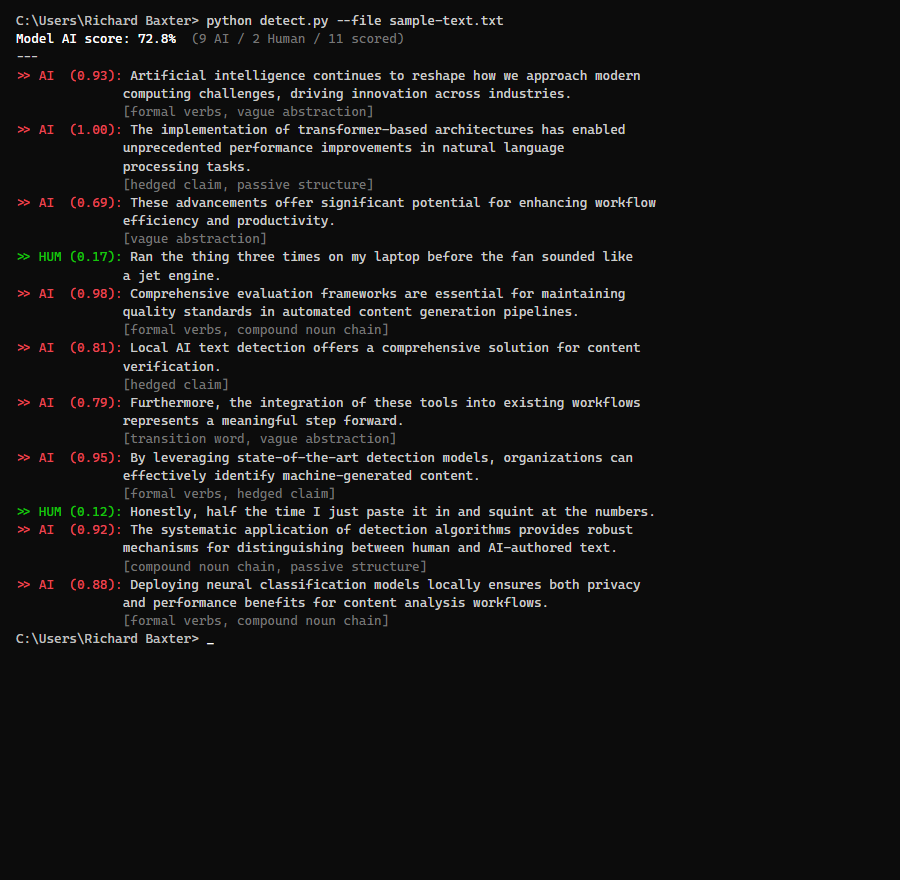
On CPU, a 1,500-word article takes about four to six minutes. Most of that’s the initial model load.
There’s a comparison mode too:
python detect.py --compare original.txt rewritten.txtHandy when you’re iterating on a piece.
Adding a GPU
This is where it gets good.
Ran everything on CPU for weeks. Fine for what it was, just slow. Then I stuck an RTX 3080 in my workstation. Picked one up off eBay for about 250 quid – bit of a gamble buying second-hand, but it’s been faultless.
GPU was in, drivers were installed, nvidia-smi showed the card. But PyTorch had no idea it was there. torch.cuda.is_available() just kept returning False.
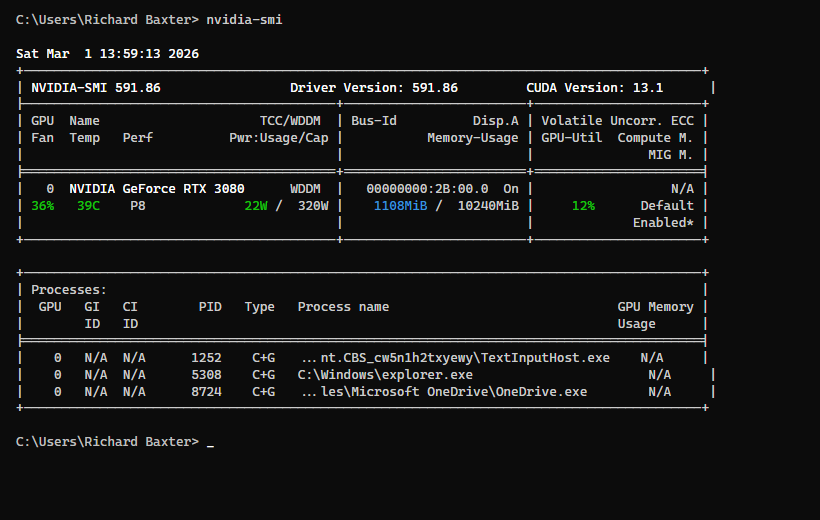
Here’s the gotcha: PyTorch ships a CPU-only build by default. When you pip install torch, you get a version with zero CUDA support. Meanwhile your GPU’s warming itself up for absolutely no reason. Took me a solid hour to realise what was going on, which was embarrassing.
Check your current build
import torch
print(f"torch {torch.__version__}")
print(f"CUDA available: {torch.cuda.is_available()}")
print(f"torch CUDA build: {torch.version.cuda}")
If torch.version.cuda says None, that’s your problem.
Swap to the CUDA build
Uninstall first:
pip uninstall torch torchvision -yThen install with the CUDA index:
pip install torch torchvision --index-url https://download.pytorch.org/whl/cu126That cu126 means CUDA 12.6. Check what your driver supports with nvidia-smi – the CUDA version’s in the top right. Match the highest one your driver supports.
Fair warning: about 2.5GB download. Kettle time.
Verify
import torch
print(f"torch {torch.__version__}")
print(f"CUDA available: {torch.cuda.is_available()}")
if torch.cuda.is_available():
    print(f"Device: {torch.cuda.get_device_name(0)}")
    print(f"VRAM: {torch.cuda.get_device_properties(0).total_mem / 1024**3:.1f} GB")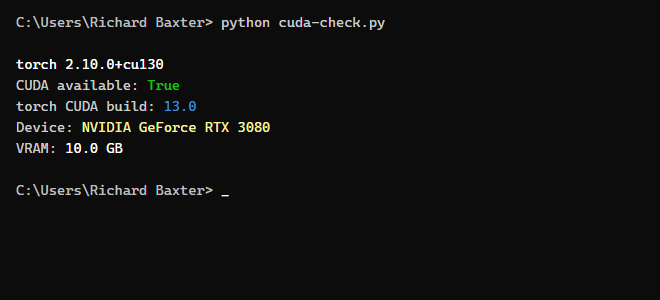
The dtype bug I hit
Model loaded fine on CUDA, then crashed on the first sentence:
RuntimeError: mat1 and mat2 must have the same dtype, but got Float and BFloat16The model’s classifier loaded in bfloat16, but the mean pooling step had .float() hardcoded. Mixed dtypes. One-line fix in detect.py:
# Before:
input_mask_expanded = attention_mask.unsqueeze(-1).expand(last_hidden_state.size()).float()

# After:
input_mask_expanded = attention_mask.unsqueeze(-1).expand(last_hidden_state.size()).to(last_hidden_state.dtype)
Matches the mask to whatever dtype the model’s running. CPU ends up with float32, GPU with bfloat16. Sorted.
The speed difference
Same command, same article. Under a minute total. Remember that 1,500-word piece? Six minutes on CPU. On the GPU? Forty seconds. Forty.
Night and day. At six minutes a go, you’d only ever scan once, right at the end. Forty seconds though? I run it after every editing pass now.
Integrating With Claude Code
Didn’t plan this bit. Turned out to be my favourite part of the whole setup.
I use Claude Code (Anthropic’s CLI agent) for most of my writing workflow. Runs shell commands, reads files, edits text – the lot. So I pointed it at my detection script and now it scans articles as part of the editing process.
The pattern: I write something (or Claude writes a first draft), save it to a file, and Claude runs detect.py against it. It reads back the per-sentence scores, identifies which sentences flagged as AI, and rewrites just those – shorter, messier, more contractions, more fragments.
Then it scans again. Rinse and repeat.
Same deal with Claude Desktop if you’ve given it file access. Drop your article into a folder, tell it to run the detector, and it’ll have a crack at the flagged sentences.
Biggest thing I’ve learnt from staring at scores: the detector couldn’t care less about vocabulary. Swapping words around does almost nothing. What shifts the score is structure. Sentence length variation, fragments, contractions, trailing asides, first-person specifics. The patterns a human uses without thinking about it but an LLM almost never produces.
What Moves the Score
I tested this myself. Wrote three versions of the same paragraph, each one progressively messier.
Version 1 – Pure AI voice (97% AI):
The NVIDIA RTX 3080 represents a significant advancement in GPU technology, offering substantial improvements over its predecessor. This graphics card utilizes the Ampere architecture to deliver exceptional performance across a wide range of applications.
Every sentence flagged. Uniform length, formal verbs (“utilizes”, “provides”), no contractions, same Subject-Verb-Adjective-Object pattern all the way through.
Version 2 – First rewrite (58% AI):
I bought an RTX 3080 off eBay for about 250 quid. Bit of a gamble, but it’s been faultless. Brilliant for running local AI models. Dropped it into my workstation and PyTorch picked it up straight away.
Better. First-person, contractions, colloquial phrasing. Still 58% though.
Version 3 – Second pass (51% AI):
Picked up an RTX 3080 off eBay. Cost me about 250 quid, which felt like a steal. Stuck it in my workstation and PyTorch saw it immediately. No messing about. And here’s the kicker: same detection scan, six minutes on CPU, done in forty seconds on the GPU. Forty.
More fragments. More variation. The repeated “Forty.” on its own is the kind of thing that reliably flips a sentence from AI to human.
Patterns that work
| What to do | Example |
|---|---|
| Sentence fragments | “No messing about.” / “Forty.” |
| Contractions everywhere | “it’s” not “it is”, “doesn’t” not “does not” |
| Colloquial verbs | “stuck it in” not “installed it into” |
| First-person specifics | “cost me about 250 quid” not “priced at approximately $300” |
| Trailing asides | “which felt like a steal” |
| Break long sentences | Two punchy 10-word sentences instead of one 25-word formal one |
What doesn’t work: swapping individual words, chucking in more adjectives, rearranging clauses inside the same sentence shape. Vocabulary? Couldn’t care less about vocabulary. It’s watching how you build sentences, not which words you pick.
Things I’ve Learnt
First run grabs the model. About 1.5GB from HuggingFace. Needs an internet connection once, then it’s cached locally. Works offline after that.
Short sentences get skipped. Under five words isn’t enough context to classify. Fragments, one-word sentences – none of them get scored.
Don’t chase zero. Anything under 20% is solid. I’ve seen writers agonise over the last few sentences and end up with copy that reads like it was written by a concussed toddler. Just… don’t worry about it.
It gets things wrong. Short factual sentences flag as AI even when a human wrote them. Long rambling sentences stuffed with asides and contractions almost always pass. Says more about what DeBERTa’s measuring than about your writing, to be fair.
Scores don’t drift. The model weights are frozen on your disk, so you get identical results every single time. Scan something today, scan it in six months, same number. Try that with Originality.ai – they update whenever they fancy, so tracking anything over time’s a waste of effort.
The comparison mode’s brilliant. --compare before.txt after.txt shows you exactly what your rewrite did to each sentence’s score. Way better than running two scans and squinting at the numbers yourself.
Adding the cheap GPU made this practical – forty seconds instead of six minutes is the difference between something you’ll bother doing and something you won’t.
Free model, a bit of Python, and your words never leave your hard drive. Can’t believe more people aren’t doing this. Enjoy!

I’m a Marketing Technologist working with clients on automation, API design, content marketing workflow and data augmentation / retrieval. Here for people with interesting problems to solve.