How to connect Google Search Console to Claude with an MCP server
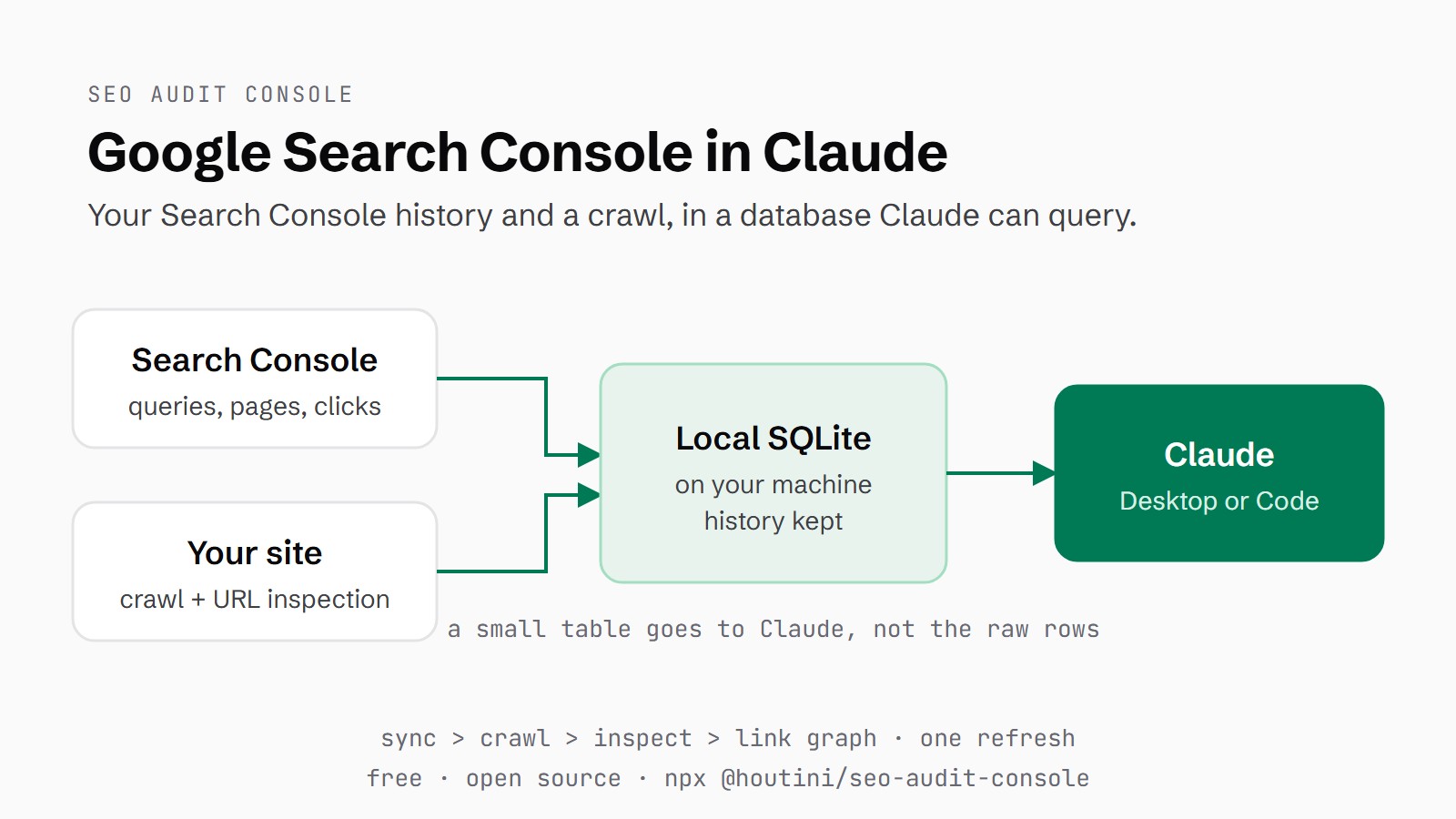
SEO Audit Console is a free MCP server that pulls your Search Console history into a database on your own machine, joins it to a crawl of your site, and lets Claude query both. In today's guide we're taking a closer look at how to set it up in Claude Desktop or Claude Code, run the first sync and crawl, and ask your first SEO questions.
 Richard Baxter AI Ops & Marketing Engineer
 On this page
Almost every technical SEO audit I've been handed in twenty years is a crawler's opinion, and a crawler only ever sees half the picture. It tells you what your site says. It has nothing to say about what Google did about it: which queries you rank for, which pages earn the impressions, where the clicks land.
With SEO Audit Console, your Google Search Console history sits in a local database on your machine, a crawl of your site is joined to it, and Claude answers from both, in Claude Desktop or Claude Code. It's an MCP server (a small program that gives Claude extra tools). Setup takes about ten minutes, and it's free, like Search Console, with the code on GitHub. Paid services such as DataForSEO and Majestic can plug in for competitor and backlink work; nothing here needs them.
I use it every day to measure and monitor the performance of all of my own properties. I crawl for broken links and mismatched canonicals, and recently I've used it to find Discover Open Graph preview images that weren't compliant. It works, it's powerful, and it's saving me days of data collection, so I can get on with the analysis and have Claude make the recommendations.
Quick Navigation
Why local |
What you need |
Install |
Connect Search Console |
First sync and crawl |
First questions |
Troubleshooting |
Next
Why keep Search Console data locally
Most Search Console MCP servers query the API live on every question and drop the raw rows straight into Claude's context window (the working memory Claude reads for each answer). Several cap the results too: AminForou's mcp-gsc stops at 500 rows, and saurabhsharma2u's server caps at 1,000 whatever you set rowLimit to (its issue #107).
SEO Audit Console does the opposite: it crawls your site and pulls all of your data from Google Search Console into SQLite (a database that lives in a single file on your machine), and that does two things. It's a backup and a store Claude can execute queries on, and it also means we avoid context bloat: rather than filling up Claude's million-token context window with a half-a-million-row CSV export, it's all done from the database.
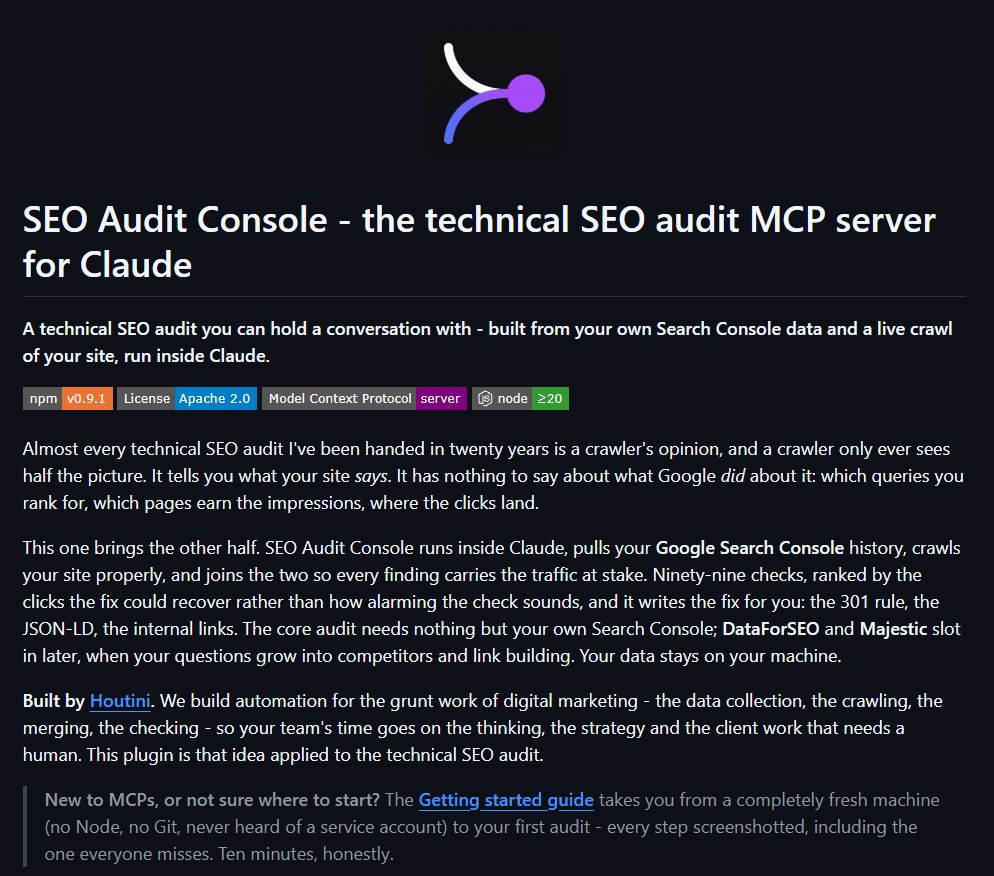
The SEO Audit Console README on GitHub, with its Apache 2.0 licence badge.
Google keeps 16 months of Search Console data, according to its help pages, and anything you've synced stays in your database after Google drops it. The first sync takes 90 days unless you ask for more, which is covered further down.
The crawl is the other half. Your pages, status codes and internal links sit in the same database as your queries and clicks, which means Claude can tell you which pages still earning impressions have no internal links pointing at them.
What you need
You'll need four things in place before you start.
- Node.js 20 or newer. The LTS installer from nodejs.org is fine, and you can check what you have with
node --version. - Claude Desktop or Claude Code.
- A Google Search Console property that you own and have verified. A property is a site or a domain as Search Console tracks it.
- A Google Cloud project, which is free.
Install SEO Audit Console
There are three ways to install it.
For Claude Desktop, the quickest route is npx (Node's way of running a package without installing it). Go to Settings > Developer and click Edit Config, which takes you to claude_desktop_config.json; open it in a text editor and add the block below. The one environment variable it needs is the path to the JSON key for your service account, a robot Google login you'll create in the next section. Leave the placeholder path in for now and swap it once you've downloaded the key. After editing, fully restart Claude Desktop by quitting it from the system tray, or the menu bar on a Mac, not just closing the window. If you're new to Claude, signing up through claude.ai gets you a free week of Claude Code.
{
  "mcpServers": {
    "seo-audit-console": {
      "command": "npx",
      "args": ["-y", "@houtini/seo-audit-console"],
      "env": {
        "GOOGLE_APPLICATION_CREDENTIALS": "C:/path/to/service-account.json"
      }
    }
  }
}
The second route is the Claude Desktop extension. Download the .mcpb bundle for your operating system from the GitHub releases page and double-click it; Claude Desktop asks for the key file with a file picker.
Claude Code is, in my view, the best home for this tool - the audit finds the issue, and the same session has your site's repo, a terminal and git to apply the fix. Adding it there is one command:
claude mcp add seo-audit-console --env GOOGLE_APPLICATION_CREDENTIALS=C:/path/to/service-account.json -- npx -y @houtini/seo-audit-consoleA project .mcp.json in the site's repo works too, but never commit the key file. Your databases live in ~/Documents/seo-audit-console unless you set the SAC_DATA_DIR environment variable.
Connect Search Console with a service account
SEO Audit Console reads Search Console through a service account. A service account is a robot login you create once in Google Cloud, instead of signing in with your Google account (OAuth) every session. Setting one up takes three steps.
Step 1: Enable the Search Console API
Go to Google Cloud Console, click the project picker at the top and choose New project. Then type "search console" into the search bar at the top, choose the Google Search Console API and click Enable.
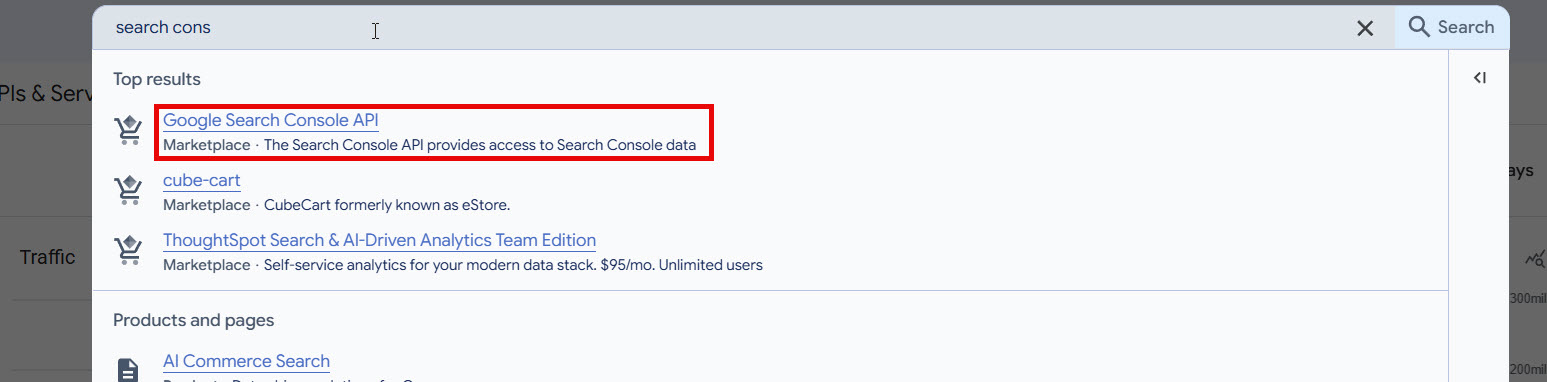
Searching Google Cloud Console for the Search Console API.
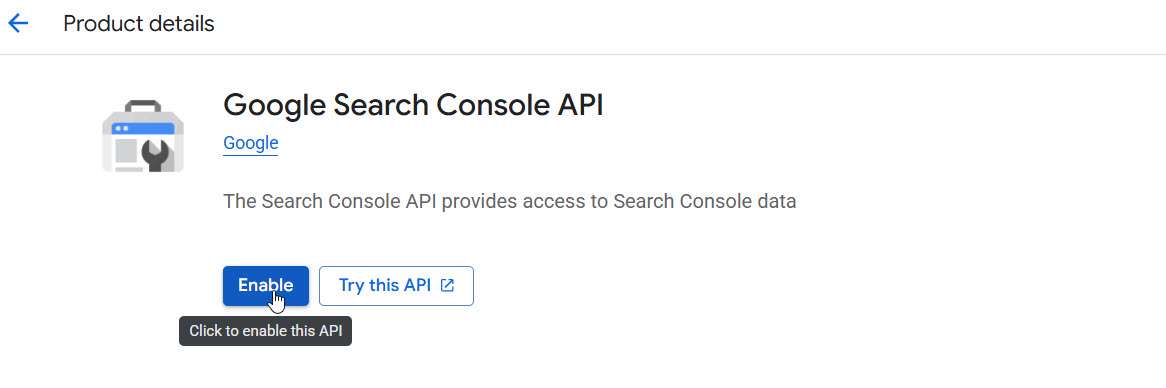
The Google Search Console API page, with the Enable button.
Step 2: Create the service account and download the JSON key
Next, create the service account. The API page links straight there, or you'll find it under IAM & Admin > Service Accounts. The name doesn't matter. Open the new account, go to the Keys tab, click Add key > Create new key, leave Key type on JSON and click Create. A JSON key file downloads, and that file is the account's credential. Keep it somewhere sensible, because its path is what goes in your config.
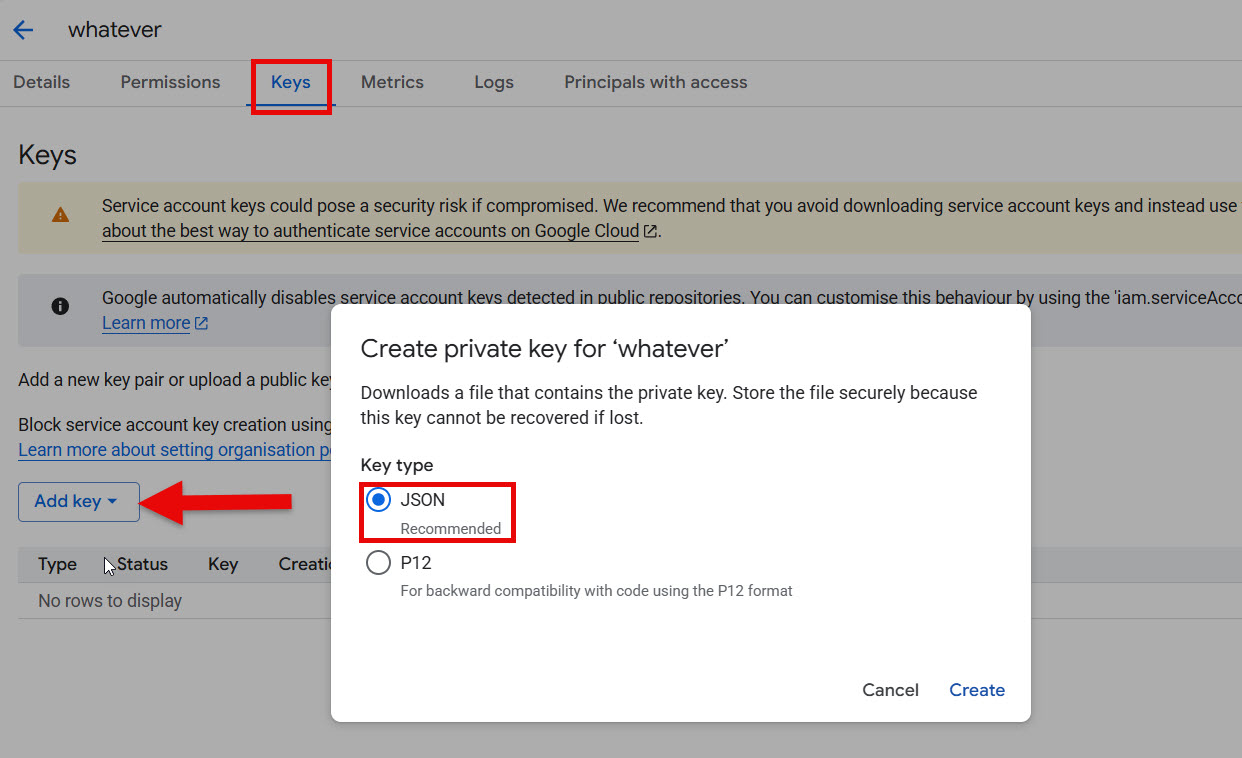
The Keys tab, with the Create private key dialog set to JSON.
Step 3: Add the service account to Search Console
Step 3 is the one everyone misses. The service account is its own "person", and it sees nothing in Search Console until you add it. Copy its email address from the service account's Details tab; it ends .iam.gserviceaccount.com. In Search Console, go to Settings > Users and permissions, click Add user, paste the address and choose Full as the permission, on each property you want Claude to read. Owner works too.
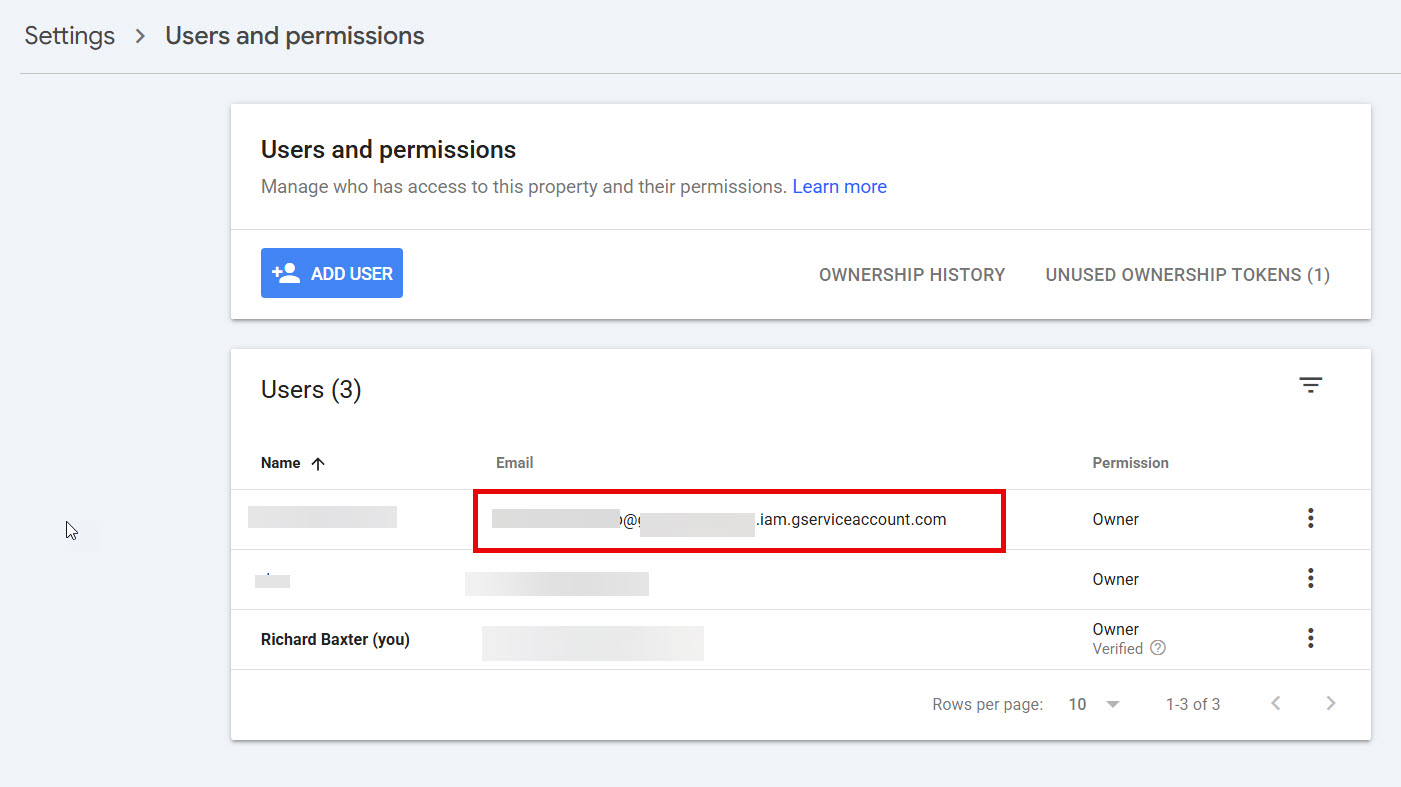
The service account in the Search Console users list, added as Owner here (Full is enough), with the addresses blurred.
Run the first sync and crawl
Back in Claude, start with a connectivity check: "List my Search Console properties". Claude runs list_properties and returns every property the service account has been added to. If yours is in the list, the connection works.
Then ask for a refresh: "Refresh sc-domain:mysite.com". The sc-domain: prefix marks a domain property. refresh_property starts one background job that syncs your Search Console history, crawls the site, inspects your top URLs in Google's index and computes the internal link graph. URL inspection is Google's report on whether a page is indexed, and it's limited to 2,000 a day per site, so the step samples your top pages by clicks.
houtini.com.db  (data_storage, 24 Sep 2026)
search_analytics  82,337 rows   last synced 16:51
pages                208        last crawl  17:48
links             13,297
The first sync pulls the last 90 days by default. Google only keeps 16 months, so if you want more, ask for an earlier start date early on, for example "Sync Search Console data for mysite.com back to 2025-06-01". Later refreshes only fetch the new days, usually in seconds.
The crawl respects robots.txt, never downloads image bytes and skips search, cart and login pages. On a large site it's the slow part, and it carries on in the background; "check the crawl status" tells you where it's up to.
When we ran it on houtini.com, the sync stored 82,337 rows, one for each combination of date, query and page. The crawl covered 208 pages in about three minutes and mapped 13,297 internal links.
Ask your first questions
Start with questions that need both halves, the crawl and the Search Console data. My usual crawl checks go in as one question: "Do any of my pages link to a broken URL, point a canonical at a broken or redirecting page, or miss what Google Discover needs?" For Discover, that means an og:image tag and max-image-preview:large on article pages. On houtini.com, all four checks came back at zero.
broken-internal-links: showing 0-0 of 0 findings
broken-canonical-target: showing 0-0 of 0 findings
discover-missing-og: showing 0-0 of 0 findings
discover-max-image-preview: showing 0-0 of 0 findings
orphan-with-impressions: showing 1-2 of 2 findings
Then try "Which pages earn search impressions but have no internal links pointing to them?" On houtini.com that found two, /yubhub and /tools/voice-analyser, both retired tools.
Search Console questions work on their own too. "What were my top search queries over the last four weeks?" returned 3,074 queries for houtini.com. The top one was "claude code system requirements mac windows linux", with 7,204 impressions at an average position of 4.7, then "npx @wonderwhy-er/desktop-commander@latest remote" (3,197 at 8.4) and "dgx spark alternative" (1,496 at 8.6). "Which queries are sitting just off page one, positions 8 to 20, and which page ranks for each?" found 1,400 query-page pairs. At the top was the Desktop Commander npx query, 2,617 impressions at 8.7 on the Desktop Commander article, followed by "claude code system requirements mac windows linux" again, 1,304 at 9.1. Claude answers these with query_data, which aggregates inside the database and returns a small table instead of the raw rows. The 82,337 rows stay on disk, and a ten-line answer is all that reaches Claude.
There are a few more worth trying. Ask "How do status codes break down by folder on mysite.com?" or "Top 10 pages by total clicks". "Content opportunities for mysite.com" sorts pages into write next, refresh now, rewrite snippets and strengthen, with no paid calls. And "Show me the dashboard for mysite.com" opens the eight-tab dashboard in the chat.
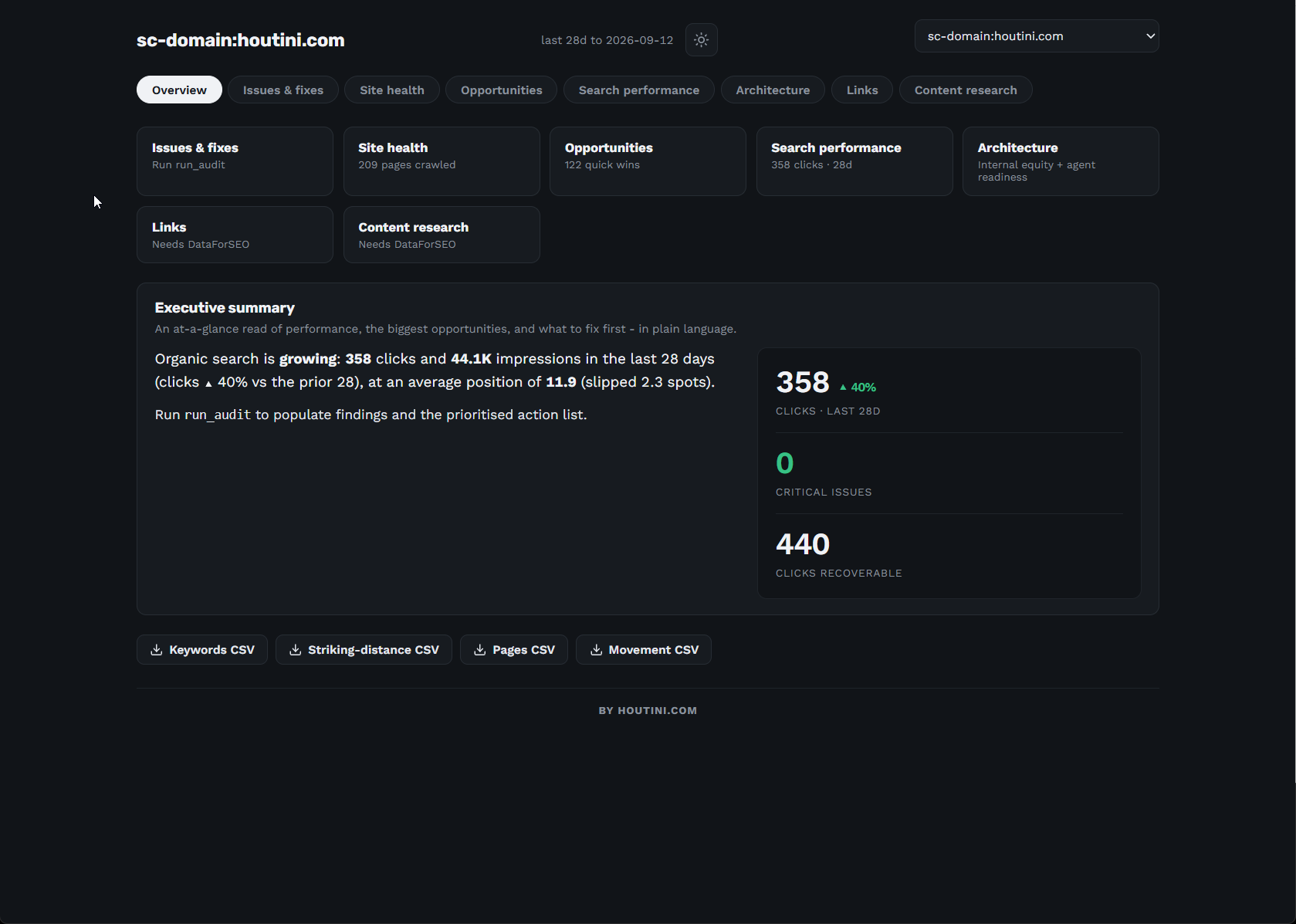
The SEO Audit Console dashboard for houtini.com, from an earlier refresh (the 28 days to 12 September).
Troubleshooting
Each of these is a setup snag on the Google or Claude side, and each takes a minute to fix.
The property list comes back empty
If list_properties returns nothing, or your site is missing from it, the service account hasn't been added to that property. Go back to Search Console > Settings > Users and permissions and add the service account's email address as a user; Full is enough.
The server doesn't show up in Claude Desktop
Claude Desktop only reads its config when it starts, so quit it from the system tray and open it again rather than just closing the window. If the tools still aren't there, run node --version and check it's 20 or newer. Then check that the path in the config points at the JSON key file you downloaded.
Your property isn't found
Search Console writes the two kinds of property differently. Domain properties are written sc-domain:yoursite.com, and URL-prefix properties are the full URL with the protocol, such as https://www.yoursite.com/. Use exactly the form list_properties shows you.
Running it behind a container gateway
Some container gateways, the Docker MCP gateway among them, keep one worker per client connection, and the crawl's job list lives in memory inside that worker, so anything that cycles the worker, such as a disconnect, a forced recreate or a Docker restart, ends long background jobs like the crawl. Run the server directly instead, through npx, the Claude Desktop extension or claude mcp add.
Where to go from here
After that it's a weekly habit: refresh each property, then ask Claude to "detect changes" straight after. It compares the two latest crawls and flags things like a new noindex, or a page that returned a 200 last time and a 404 now. Once a month, run the full audit, which ranks every issue by expected clicks per developer-hour. That has its own guide: how to do a technical SEO audit with Claude.
Continue reading.
- How-to GuidesHow to Connect Claude to Shopify with MCP (Dev MCP and Storefront Catalog)
- How-to GuidesHow to Use AI for Market Research with Claude
- How-to Guidesn8n MCP: How to Connect Claude Code to n8n and Use Its API Safely
- How-to GuidesHow to Run Qwen3-Coder-Next Locally: My vLLM Settings for Two 48GB RTX 4090s
- How-to GuidesHow to Build a Competitor Price Monitoring Pipeline with n8n
- How-to GuidesOpenCode vs Claude Code: Setting Up OpenCode Desktop on Windows