Implementing WebMCP on a Recruitment Website
Thinking about what, exactly, the future of a website "looks" like in the agentic era is a challenging proposition. It might be that in most cases, our future viewers/readers/customers can do everything, from their chatbot of preference…
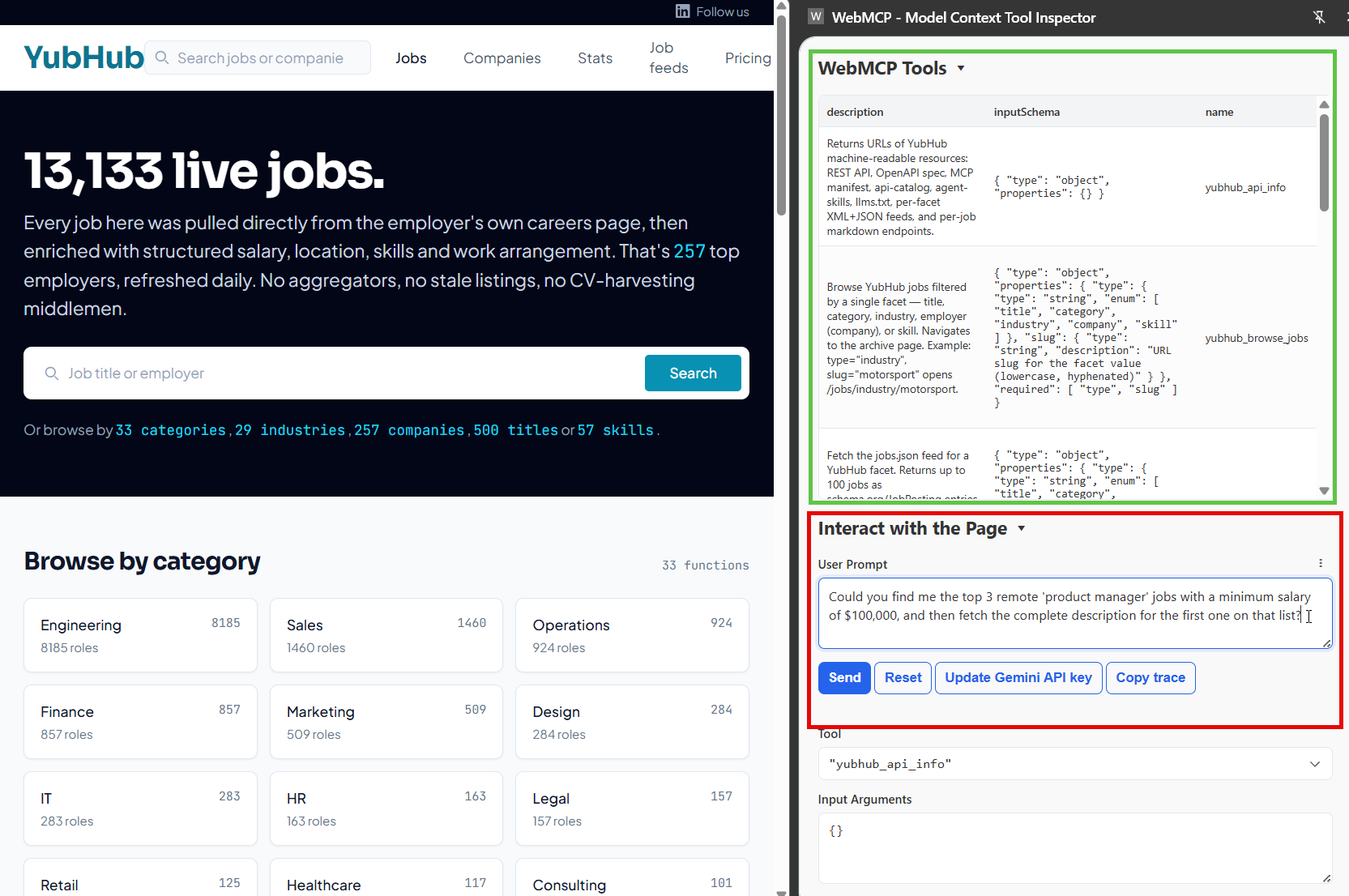
Thinking about what, exactly, the future of a website "looks" like in the agentic era is a challenging proposition. It might be that in most cases, our future viewers/readers/customers can do everything, from their chatbot of preference while never visiting your site.
WebMCP is a part of this puzzle. The protocol directs an agent to stop guessing what a button does, and starts calling tools with typed inputs with a fundamentally simple tool registration protocol.
So, what's WebMCP? WebMCP is "an emerging W3C standard developed by Google and Microsoft that acts as a browser API to turn websites into interactive tools for AI agents".
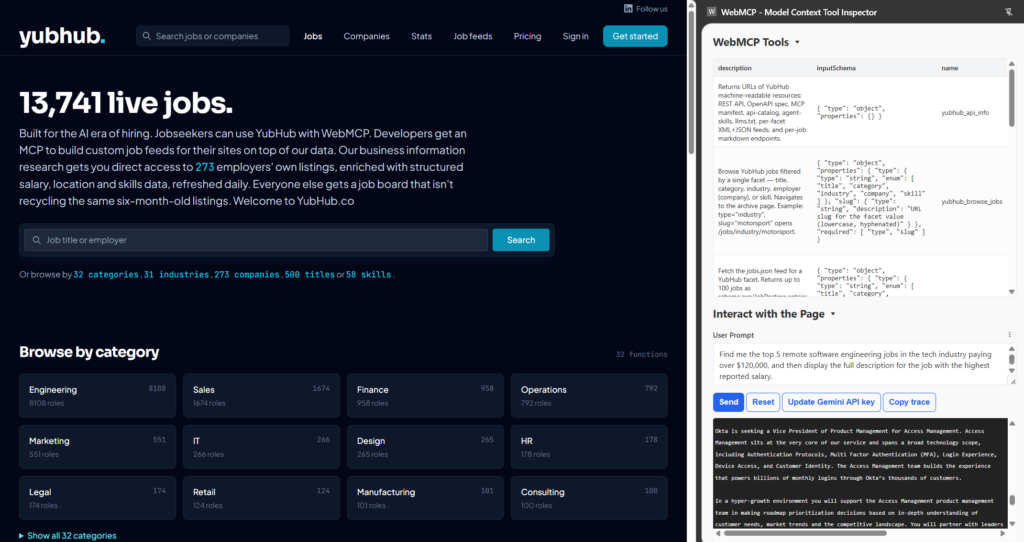
This is the future and I think it's very exciting. For fun, I added WebMCP support to YubHub , (my recruitment site).
Today, I'm going to talk about what I learned building, the design choices we made that worked, an agent trace that caught a hallucination in a production system (fixed), and why (in my opinion!) a recruitment site turned out to be an unusually good fit for this protocol.
Why a Recruitment Site?
Because websites new and old are going to have to change rather quickly (and, I really enjoy starting online business from scratch - the test of a true martech marketer!).
Most of the WebMCP explainers I read while researching this use a checkout flow, a to-do list, or a colour picker. Toys. They work for illustrating the API surface (what can this new thing do?), but without implementing and playing with the protocol yourself I fear the penny simply does not drop.
WebMCP is interesting to me because throughout my career I've observed the emergence of structured data from Microformats to JSON-LD schema (over some 20 years!). When you consider structured data on the web, WebMCP feels like a logical step forward.
The real value with WebMCP emerges when an agent needs to reason about a lot of structured data that's already behind a nice URL structure - and recruitment sites are built around exactly that shape: job details, salary ranges, skills required or employment locations.
YubHub already served clean data at predictable URLs (/jobs/skill/figma, /jobs/at/anthropic) and emits schema.org JobPosting markup. What it didn't have was a "contract". Any agent browsing the site could see the HTML and JSON-LD I'm sure, but getting an agent to browse your website for an answer via Chrome is just the craziest waste of time when ideas as fundamental as an API have been around for decades.
WebMCP fixes that by publishing the interface explicitly, with typed inputs and structured responses. Prompt in > "find me an X for a Y in Z". So, for a site whose whole job is "be discoverable", WebMCP is a big deal.
What's WebMCP?
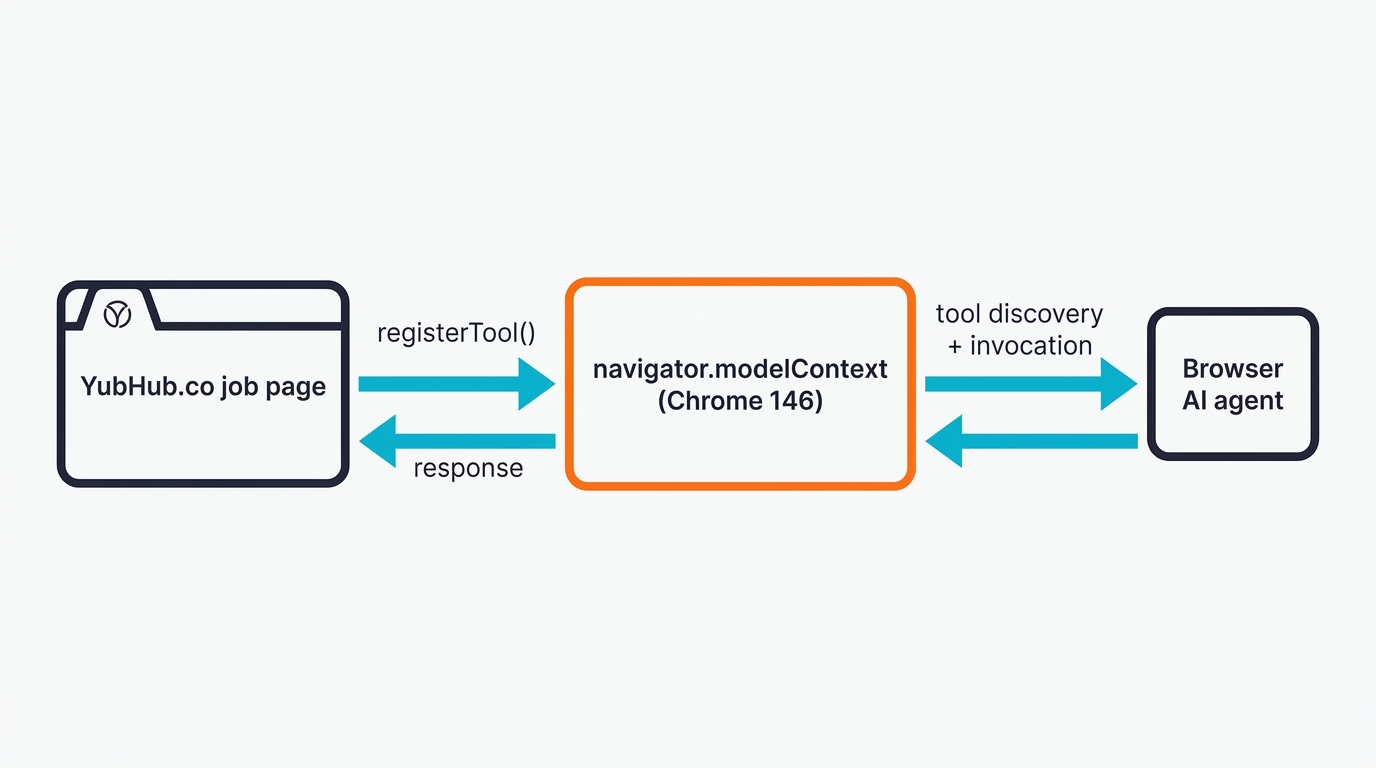
WebMCP is a proposed web standard, co-authored by engineers at Google and Microsoft under the W3C Web Machine Learning community group , that lets a site expose a set of callable tools to an AI agent running in the browser. There are two APIs: imperative (navigator.modelContext.registerTool() called from JavaScript), and declarative.
Think of it as a contract the site publishes to any agent that lands on it. Instead of the agent guessing that a div with class="btn-primary" means "checkout", the page says: here's a checkout tool, here's what it needs, here's what you'll get back.
That's a welcome leap from screen-scraping and MCP based browser control. The Chrome DevTools MCP quickstart benchmarked a simple "set counter to 42" task at 3,801 tokens using screenshots and 433 tokens using WebMCP. That's an 89% reduction in token use!
The current spec lives on the W3C community group site ( webmachinelearning.github.io/webmcp ), with Chrome's early-preview announcement and detailed posts on developer.chrome.com/blog/webmcp-epp . It ships behind a flag in Chrome Canary 146. Google Chrome Labs maintain a reference extension - the Model Context Tool Inspector - that lists the tools any page has registered and lets you call them manually. If you're planning to build anything with this, you'll want both installed.
How WebMCP Differs From MCP
The names don't help much, do they! Model Context Protocol (MCP) is server-side - you deploy an MCP server that an agent connects to, it runs in its own process, exposes tools to your AI assistant over JSON-RPC. We have a growing library of our own MCP connectors like my favourites Gemini MCP and Houtini-LM .
WebMCP is the browser-side sibling. Your tool code runs in the page's JavaScript context, so it has the user's cookies, their session, their permissions - everything the user already has access to. There's no deployment, no auth bridge, no server to pay for. Well, mostly - you still have to maintain the page, obviously, but there's nothing extra. If your site already authenticates the user, your WebMCP tools inherit that authentication for free.
The practical consequence: MCP is the right fit for agents that need third-party data (GitHub, Gmail, a database). WebMCP is the right fit for agents that need to interact with a specific site the user has requested.
Getting Set Up
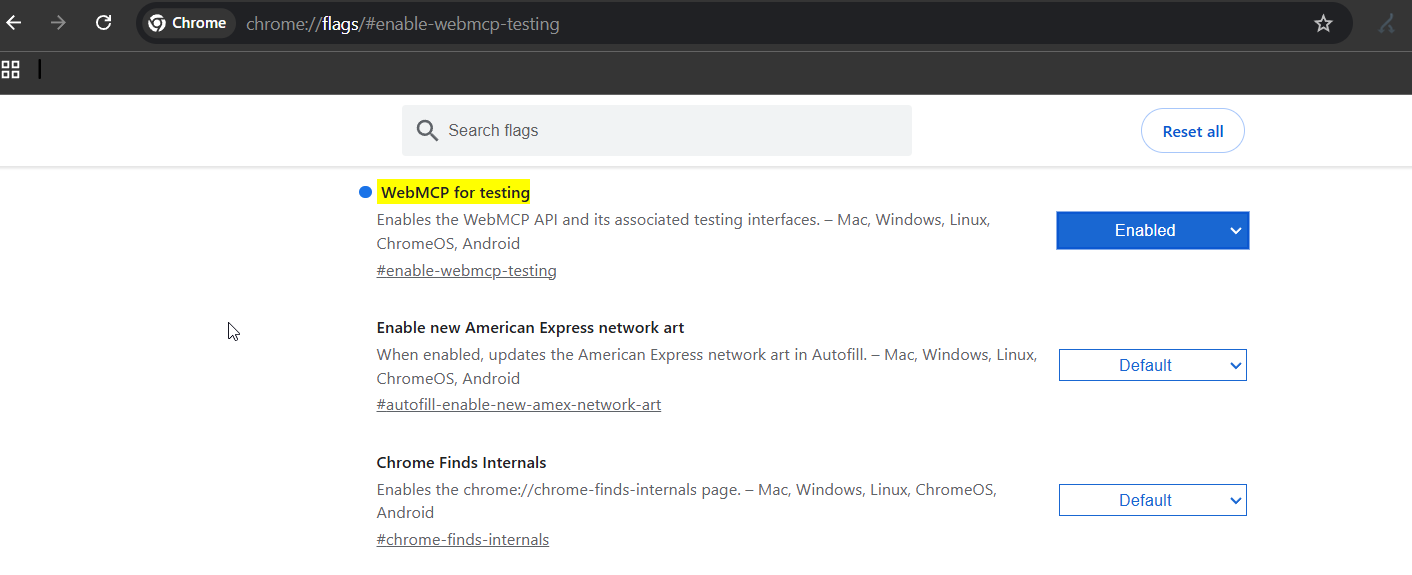
If you have Chrome Canary 146 or higher, you are already setup. The stable, Beta, and Dev channels of Chrome do not ship with the WebMCP flag - so you have to enable it:
Open a new tab to chrome://flags/#enable-webmcp-testing and set "WebMCP for testing" to Enabled. Click Relaunch.
Third, install the Model Context Tool Inspector extension from the Chrome Web Store. This is currently the only way to test anything before you've wired an agent in. It lists every tool the current page has registered, shows you their JSON schemas, and lets you execute them manually with whatever input you want. The extension requires a Gemini API key as the extension uses Gemini as a natural-language test harness, which is useful for checking whether your tool descriptions are clear enough for a real LLM to pick the right tool. This is much like tool context set in tool descriptions in the MCP protocol.
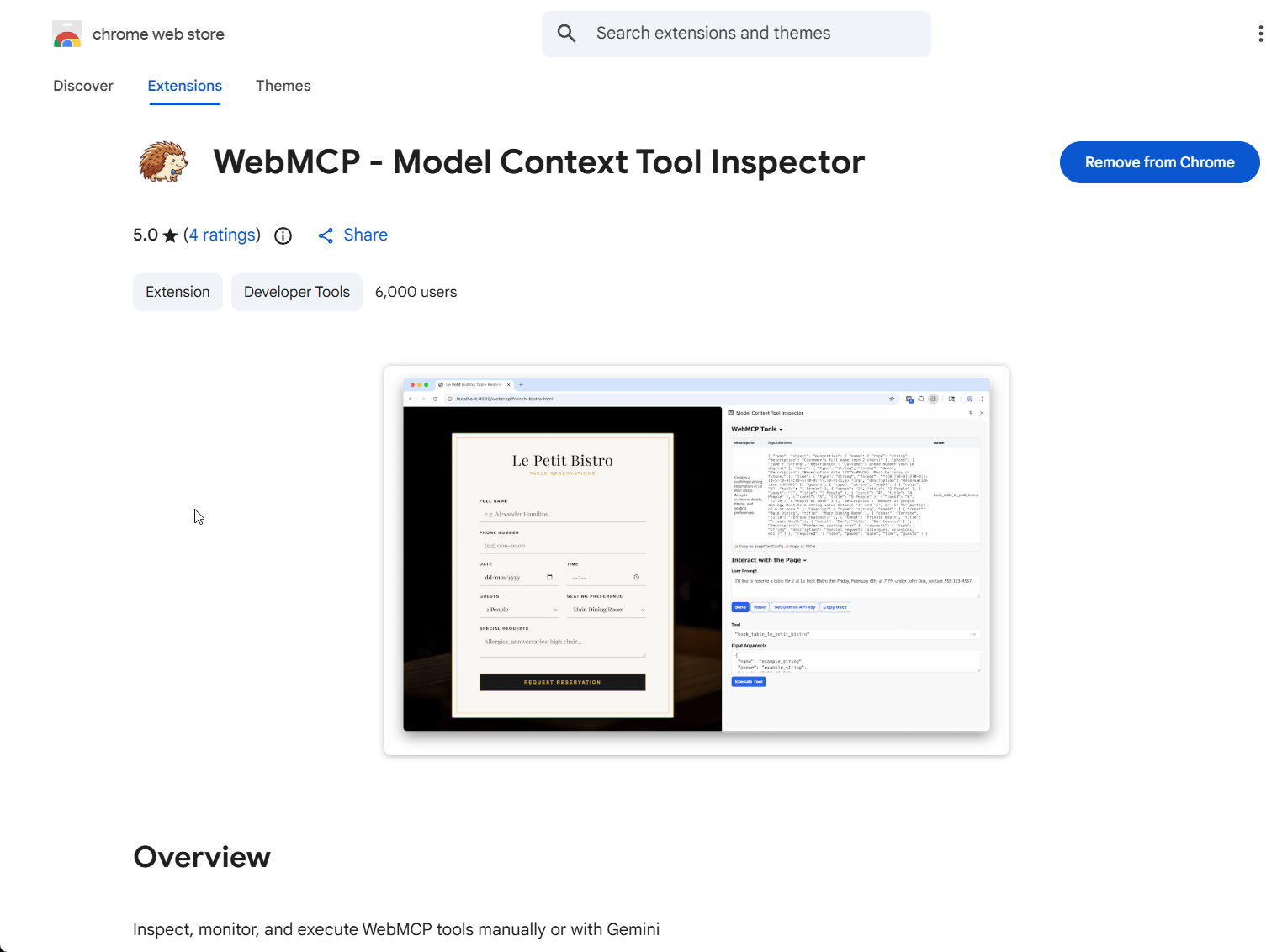
To verify the whole thing is working, open DevTools and run console.log(navigator.modelContext). If you see an object come back rather than undefined, you're in business. If it's undefined, either your flag isn't set or you're on the wrong Chrome channel.
Setting Up the Imperative API
Here's the minimum viable tool registration from YubHub's live scaffold:
if (!navigator.modelContext) return;

var pageController = new AbortController();
addEventListener('pagehide', () => pageController.abort(), { once: true });

navigator.modelContext.registerTool({
  name: 'yubhub_fetch_job',
  description: 'Fetch a single YubHub job as clean markdown (company, location, salary, work arrangement, full description, apply URL, skills). More token-efficient than the HTML page.',
  inputSchema: {
    type: 'object',
    properties: {
      id: { type: 'string', pattern: '^job_[a-z0-9_-]+$' },
    },
    required: ['id'],
  },
  execute: async (params) => {
    const r = await fetch('/jobs/' + params.id + '.md',
      { headers: { Accept: 'text/markdown' } });
    return { id: params.id, markdown: await r.text() };
  },
}, { signal: pageController.signal });
There are 4 things to look at here - firstly, the feature-detection guard - navigator.modelContext only exists in Chrome 146 with the flag on, so every public-facing scaffold needs to short-circuit gracefully elsewhere or you'll throw on every other browser your users visit from.
The pattern constraint on id - the spec treats JSON Schema loosely in the browser, so validating in code catches the cases the schema doesn't. And the return value is a structured object, not a string - the agent reads it as data rather than trying to parse text/html.
The Declarative API Is Free Engineering
I think this is the cleverest part of the WebMCP spec. If you've got an HTML form - and of course, you do, you can annotate it and get a tool registration for free.
YubHub's nav already had a GET form submitting to /jobs/search. All I did was add three attributes:
<form action="/jobs/search" method="GET"
      toolname="yubhub_search"
      tooldescription="Search YubHub's enriched job board by free-text query - title, company, or keyword. Submits a GET to /jobs/search and renders the results page."
      toolautosubmit>
  <input type="search" name="q"
         toolparamdescription="Job title, company name, or any keyword (2-100 chars)"
         minlength="2" maxlength="100" />
</form>
The browser reads the form, builds a JSON Schema from the input fields, and registers it as a tool. When an agent calls it with {q: "python"}, the browser focuses the form, populates the input, and - because of toolautosubmit - submits it automatically. Zero JavaScript. Your form already works for humans; now it works for agents.
One thing worth flagging: toolautosubmit is only really safe on read-only operations. Search queries, availability lookups, status checks - fine, let the agent submit. Anything that creates, modifies, or deletes data should leave the flag off, so the human has to click Submit after the agent fills the form.
And that, I reckon, is how WebMCP adoption will probably start to emerge - by adding it to their internal site search forms and results pages. But I hope to see people agreeing that this idea undersells what WebMCP can do in the longer term.
Context-Scoped Tool Registration
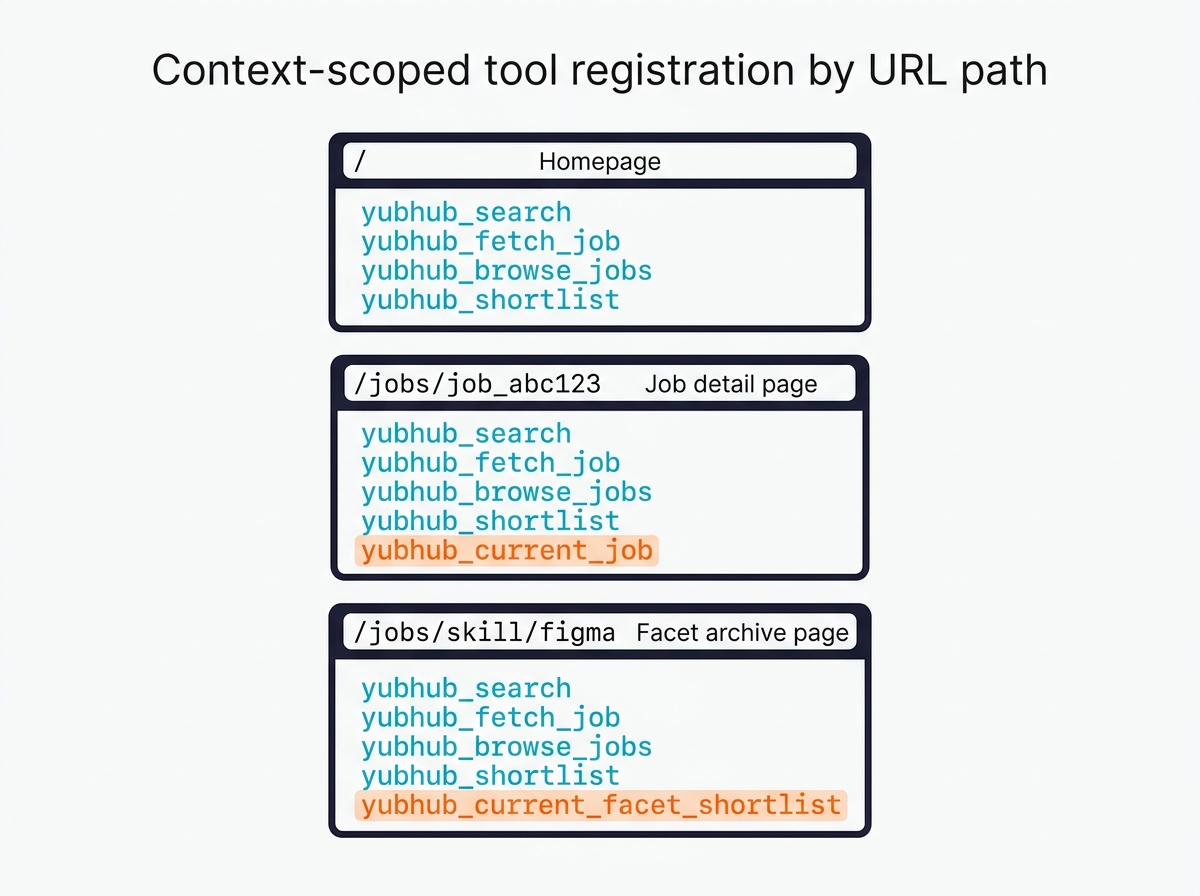
I've got a tool called yubhub_current_job. It takes no arguments, and it just returns the current job's markdown. Obviously, that only makes sense on my job listing pages, so anywhere else on the site it would be meaningless (worse, it'd be confusing). The scaffold pattern-matches the URL and registers conditionally:
const jobMatch = location.pathname.match(/^\/jobs\/(job_[a-z0-9_-]+)$/i);
if (jobMatch) {
  const currentJobId = jobMatch[1];
  navigator.modelContext.registerTool({
    name: 'yubhub_current_job',
    description: 'Return clean markdown for the job the user is currently viewing ('
      + currentJobId + '). Zero-arg shortcut.',
    inputSchema: { type: 'object', properties: {} },
    execute: async () => {
      const r = await fetch('/jobs/' + currentJobId + '.md');
      return { id: currentJobId, markdown: await r.text() };
    },
  }, { signal: pageController.signal });
}
The AbortController ties it to the page lifecycle - when the user navigates away, pagehide fires, the controller aborts, and all tools registered with its signal drop off the agent's radar. Importantly this leaves no leftover closures holding references to the previous page's state.
Navigation Tools vs Data-Retrieval Tools
There are two kinds of tools you can give an agent, and they create completely different user experiences.
Navigation tools change the URL on the user's behalf. They're the right call when the user actually wants to end up somewhere else - looking at a specific job, browsing a facet, running a search. So the agent calls yubhub_browse_jobs({type: 'skill', slug: 'figma'}), the tab navigates, the user sees the archive page. The return value is basically a receipt ("I took you here, here's what's on the page").
The real power, IMO, is this: Data-retrieval tools return parsed data and leave the URL alone. The agent calls them to reason, compare, filter, summarise - and the user stays on whatever page they were already on, quite unaware that the agent just read a hundred jobs to answer a question. yubhub_fetch_facet returns up to 100 schema.org JobPosting entries; yubhub_shortlist filters them by salary floor, remote status, title keyword, and hands back a ranked list.
Data-retrieval is what I'm bullish on - it's a mind-bendingly powerful solution to the current state of play with AI based webcrawl / actions for users and so on.
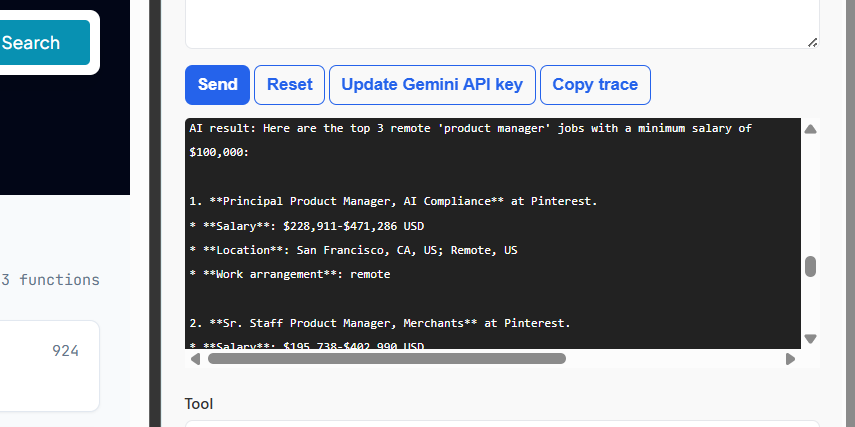
Only shipping navigation tools is the mistake I'd warn you off. It just makes the agent a fancy URL-rewriter - it can answer "take me to X", but it can't answer "summarise the options and recommend one" without hauling the whole user along.
What WebMCP Can't Do (Yet)
A browsing context is required. There's no headless mode - if a tab isn't open, the tools don't exist. That rules out batch or scheduled agentic work against a WebMCP site, for now.
Discoverability is thin. An agent has to visit your page to see your tools. There's no global registry, no "hey agent, here's a list of sites with useful WebMCP tools" index. A .well-known/webmcp manifest has been proposed - and I think it'll be necessary eventually - but nothing's shipped yet. Someone is going to come up with an authority directory of WebMCP supportive brands any minute now.
The spec moves weekly. Between my first discovery of the docs and shipping, my implementation, provideContext and clearContext got removed entirely, unregisterTool came back after being briefly deprecated, and the AbortSignal handling in registerTool's second argument settled into the form above. Track the spec repo and expect to rewrite things. I'm in the preview group which is very easy to register for.
If you run a site that has structured data behind predictable URLs - a product catalogue, a job board, a docs site, a media library - WebMCP is worth shipping now, even though browser adoption is near zero. It's cheap to add, it forces you to think about your tool contracts before agents try to guess them, and it positions the site for when Chrome lifts the flag and Edge follows. When that happens I think there will be quite a fuss about it.
The consulting work I do around MCP servers maps to the same set of decisions. The protocols differ; the tool-design thinking doesn't.
Related Articles
Continue reading.
- ExplainerWhat is a Marketing Engineer (and do you need one)?31 Aug 2026
- AI WorkflowsDynamically updating infographics and content (so you don't have to)28 Aug 2026
- Case StudiesThe parts Shopify Plus B2B doesn't do (and how we built them)28 Aug 2026
- Local AIvLLM settings for a pair of RTX 4090s: the flags I run for twelve local models, and why26 Aug 2026
- StrategyThe 26%: what the companies actually making money from AI do differently26 Aug 2026
- AI ToolsWhich AI model pitches the best content ideas?23 Aug 2026