Yet Another Memory MCP? That's Not the Memory You're Looking For
I was considering building my own memory system for Claude Code after some early, failed affairs with memory MCPs. In therapy we're encouraged to think about how we think. A discussion about metacognition in a completely unrelated world…
 Richard Baxter AI Ops & Marketing Engineer
 On this page

I was considering building my own memory system for Claude Code after some early, failed affairs with memory MCPs. In therapy we're encouraged to think about how we think. A discussion about metacognition in a completely unrelated world sparked an idea in my working one.
Metacog is built for Claude Code, so this all assumes you're already running it. New to Claude Code? New accounts get a free week of Claude Code to start with.
The Claude Code ecosystem is flooded with memory solutions. Claude-Mem, Memsearch, Agent Memory MCP, Cognee, SuperMemory - there's a new one every week. They all do roughly the same thing: capture what the agent did during a session, compress it, store it in a SQLite database or a vector store, then dump the relevant bits back into the context window next time around.
Quick Navigation
Jump directly to what you're looking for:
The trend is memory |
What's wrong with memory plugins? |
What I really needed |
What are Claude Code hooks? |
How it works |
The seesaw problem |
Reinforcement tracking |
Getting started |
What to watch out for
The trend is memory. But is it that simple?
Whenever I'm working, I distil the session into a summarised document architecture - the obvious stuff like claude.md - but then extensive documents on architecture, data schema, logic - a carefully managed documentation area that keeps the current version of the project thoroughly detailed for llm consumption. For a new branch of work you could just instruct to familiarise itself from the documentation. A bit like giving it a diary to read before starting work.
If memory was the real problem, the AI companies would've solved it already. Anthropic, OpenAI, Google - they're not exactly short on engineers, are they? Models already learn from our inputs, collectively, across millions of conversations. But we've got to wait for the next model release to benefit from that. And even then, it's generic. Everyone's patterns averaged together, not yours.
So what's wrong with memory plugins?
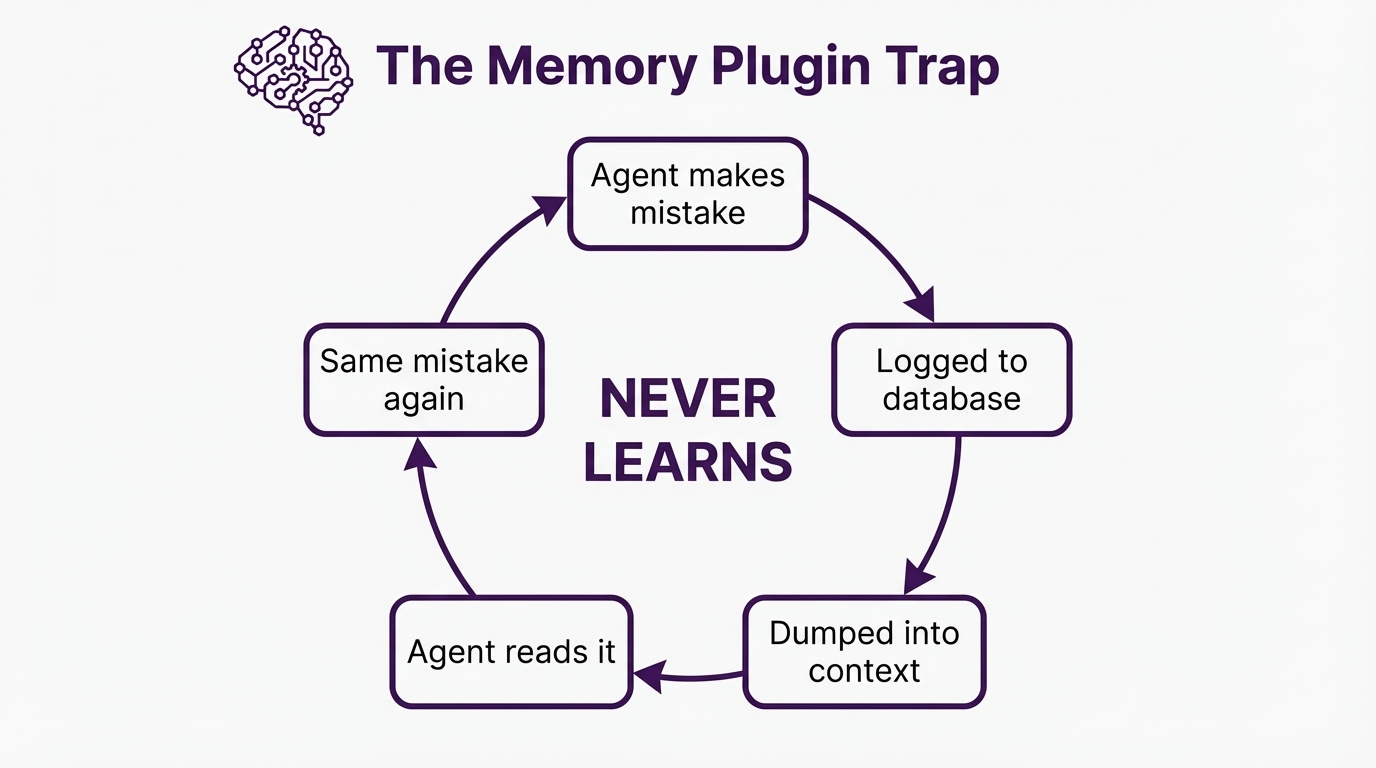
The fundamental problem with memory plugins isn't stale data or bloating token cost (though those are real problems). It's that they treat the agent's context window like a filing cabinet. When a new session starts, they dump a stack of past context into the prompt that might not be up to date anymore.
It's that genre of issue that means I've always found memory a bit unreliable for the habitual errors - syntax when running a .py script - that sort of thing. You'd have to instruct to update or read something from memory. Claude would read it, acknowledge it, and then do the exact same thing again three tool calls later. Not because the memory was bad. Because the agent doesn't feel that information the way it feels, say, a syntax error in its face.
There's a term for this in the research literature - the "Passive Librarian Problem". The memory system waits for the agent to choose to search, pulls a bunch of text, and dumps it into the context. But the agent has to know what it forgot in order to ask for it. Which is, obviously, a bit of a paradox.
What I needed
I needed metacognition. Claude needed to think about how it was thinking and Proprioception - something closer to a nervous system - a real-time, low-level awareness of operational state. Not "here's what you did wrong last Tuesday" but "you're going in circles" or "I've made a syntax error".
You don't avoid walking into walls because some "Collision Detection Module" writes a report about a recent impact. You avoid them because your nervous system gives you immediate, low-latency, non-verbal feedback about where your body is and what's around it. There's a name for this in philosophy - the Extended Mind Thesis (Clark and Chalmers, 1998) - the idea that cognition doesn't just happen in the brain, it happens in the loop between a system and its environment. You're not going to walk into a wall, and in the context of walking down the street, you don't need to know why.
So I built Metacog. It's a Claude Code plugin that runs as a pair of hooks. No dependencies and about 2,700 lines of JavaScript.
What are Claude Code hooks?
If you're not familiar with Claude Code's hook system (I wasn't for ages), here's the short version. Hooks are shell commands that Claude Code runs automatically at specific moments during a session. They're not MCP servers and they don't need to be running all the time. They fire, do their thing, and that's that. Think of them as event listeners for the agent's behaviour.
There are several hook events, but the two that make Metacog work are:
PostToolUse fires after the agent uses any tool - Read, Write, Bash, Grep, whatever. If you want to monitor what the agent is doing in real time, this is your hook. Metacog uses it to run all five proprioceptive senses after every single tool call.
UserPromptSubmit fires when you send a message. Metacog uses it to inject learned behavioural rules at the start of each session - the reinforcement digest that carries lessons forward from previous sessions.
The handy bit about hooks is the output format. A hook communicates back to Claude by writing JSON to stdout:
{
  "continue": true,
  "suppressOutput": false,
  "systemMessage": "This message appears in the agent's context"
}
If a hook outputs nothing and exits cleanly, it's completely invisible. Zero token cost. Zero latency. This is what makes hooks fundamentally different from MCP servers for this kind of work - they can be totally silent when there's nothing to report, which is most of the time.
Metacog installs via npx as a pair of Claude Code hooks. The installer handles everything - registers both hooks, resolves the script paths, updates your settings. One command: npx @houtini/metacog --install
How it works
Two hooks. One fires after every tool call (that's the nervous system), the other fires once per session (the reinforcement injector). When everything's normal, both produce zero output and cost zero tokens. When something's off, a short signal gets injected into the agent's context. Not a command - just awareness. The agent's own reasoning decides what to do with it.
The five senses
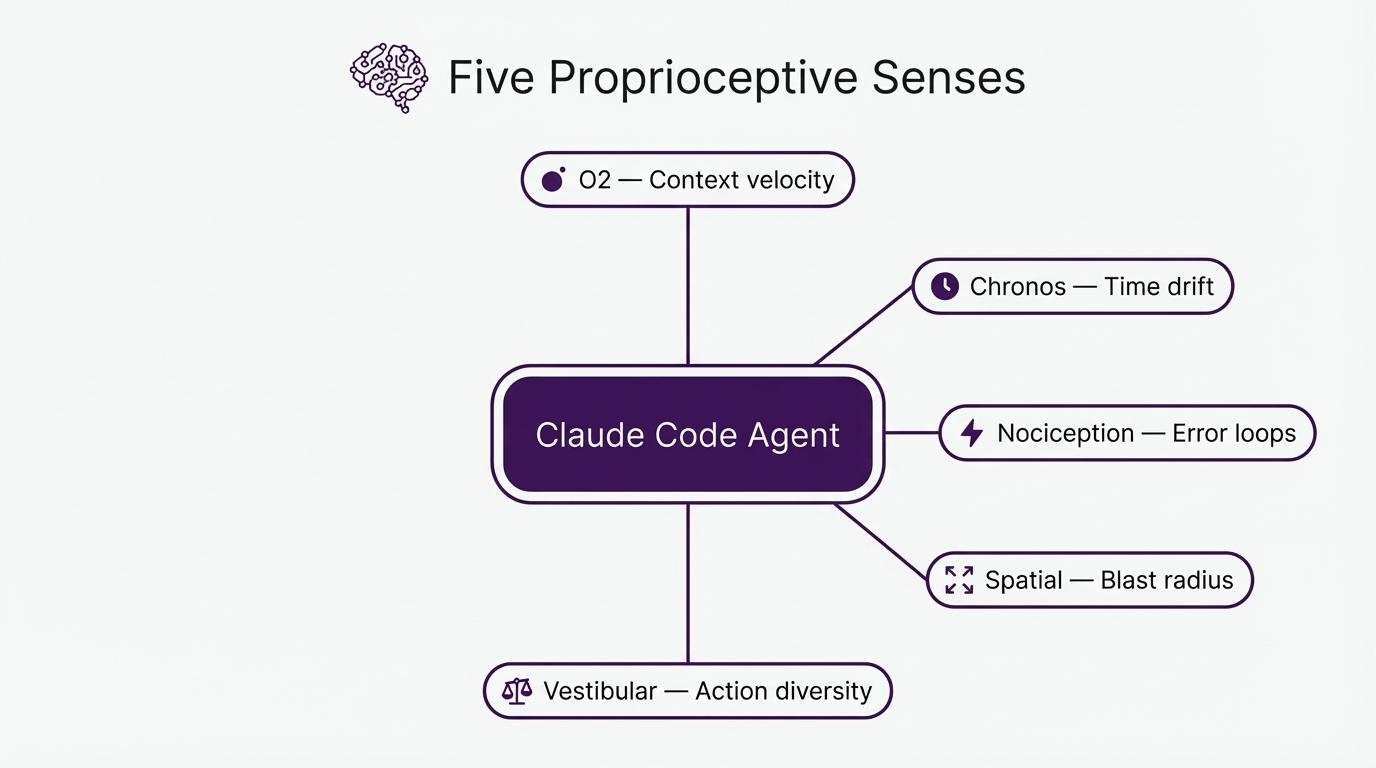
I ended up building five proprioceptive sensors, each targeting a specific blindspot that I kept running into with coding agents:
O2 - Context Trend. The agent can't see its own context window filling up. This is its most critical blindspot - context overflow triggers compaction, which erases in-progress work and causes those maddening infinite retry loops. O2 tracks token velocity - how fast the context is being consumed compared to baseline. When it spikes (three large file reads in a row, for example), the agent gets a signal.
Chronos - Temporal Awareness. Agents have no sense of time. None at all. A 45-minute task feels identical to a 2-minute one. Chronos tracks wall-clock time and step count since the last user interaction. After 15 minutes or 25 tool calls without a user message, the agent gets a nudge.
Nociception - Error Friction. Individual errors are visible to the agent, but the pattern of repeated failure isn't - and that's the killer. Three consecutive similar errors triggers a signal. Same error repeated means stuck. Different errors means exploring. That distinction matters a lot.
Spatial - Blast Radius. The agent only sees the file it's editing right now. It's got no peripheral vision of how changes propagate through the rest of the codebase. After a file write, Metacog counts how many other files import the modified module. If it's 14 files, the agent should probably know about that before it starts refactoring.
Vestibular - Action Diversity. The agent can enter silent loops - repeating the same searches, reading the same files, running the same commands - without realising it's going in circles. Vestibular detects this and breaks the loop.
Three layers of response
Layer 1: Proprioception - always on, near-zero cost. Calculates all five senses after every tool call. Most turns: completely silent. Only fires when values deviate from baseline.
[Proprioception]
Context filling rapidly - 3 large file reads in last 5 actions.
Consider summarising findings before proceeding.
Layer 2: Nociception - triggered when Layer 1 thresholds get critical. This is the pain response. It forces a cognitive shift with escalating interventions. First time: Socratic questioning ("State the assumption you're operating on. What would falsify it?"). Second time: directive instructions. Third time: it flags the user directly.
[NOCICEPTIVE INTERRUPT]
You have attempted 4 similar fixes with consecutive similar errors.
Before taking another action:
1. State the assumption you are currently operating on
2. Describe what read-only action would falsify that assumption
3. Execute that investigation before writing any more code
Layer 3: Reinforcement tracking - the cross-session piece. This is the bit I'm most pleased with, and it came out of a failure that took me ages to diagnose.
The seesaw problem
So, I ran into this really frustrating problem when I tried to bolt on cross-session learning using standard time-decay.
There's an Experiential RL paper (arxiv 2602.13949) that shows how reflecting on failures at training time improves agent performance by up to 81%. So I built a system that detected failure patterns, recorded rules to prevent them, and injected those rules into the next session. And it worked. For a while.
But then the rules started disappearing.
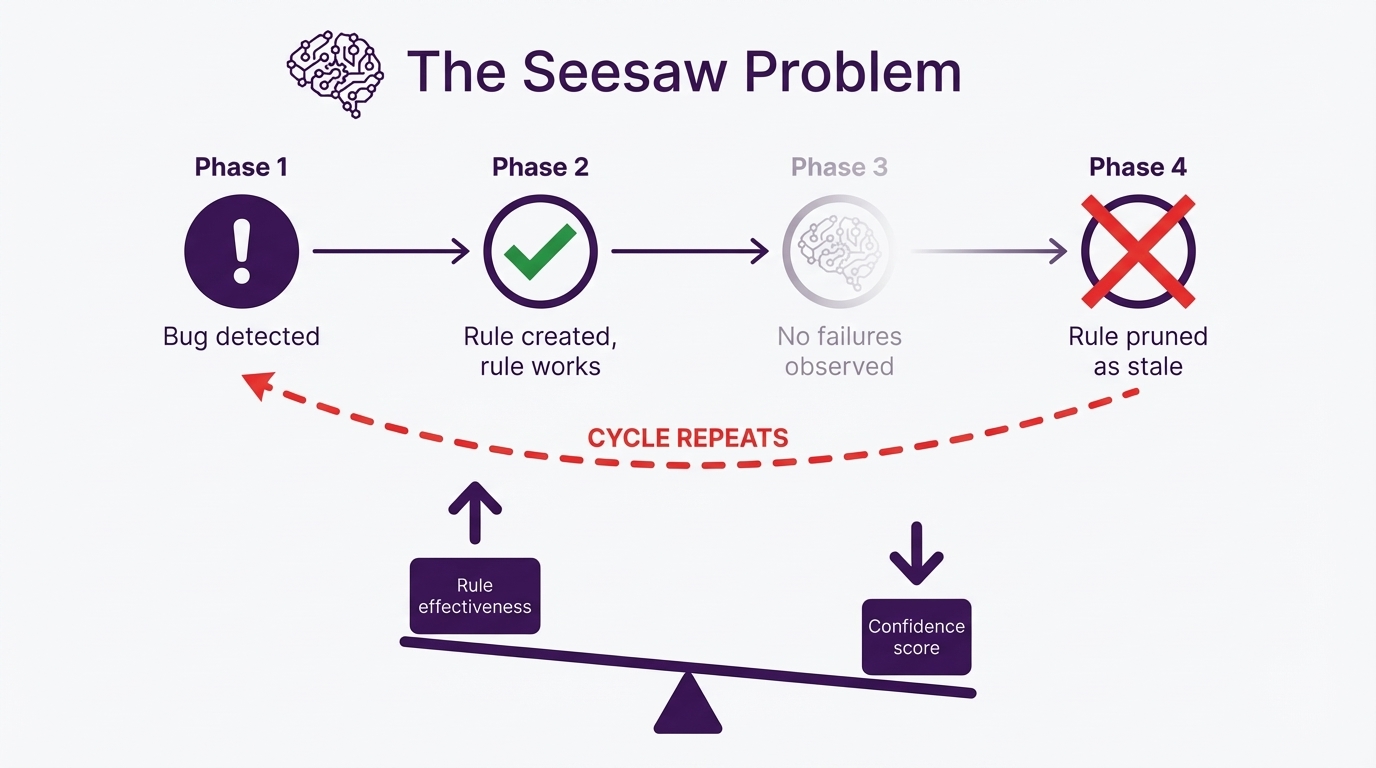
The problem is that naive time-decay actively punishes success. If the agent learns "don't retry the same error three times" and then it stops retrying the same error, the decay system sees the rule going stale - no recent detections, must be irrelevant - and prunes it. So the agent forgets the rule. And then the behaviour regresses, the rule fires again, confidence climbs, the behaviour improves, the rule decays again. Seesaw.
The better the rule works, the faster the system kills it. That's not learning. That's an oscillation.
Reinforcement tracking - fixing the seesaw
To fix the seesaw, I had to invert the decay model entirely.
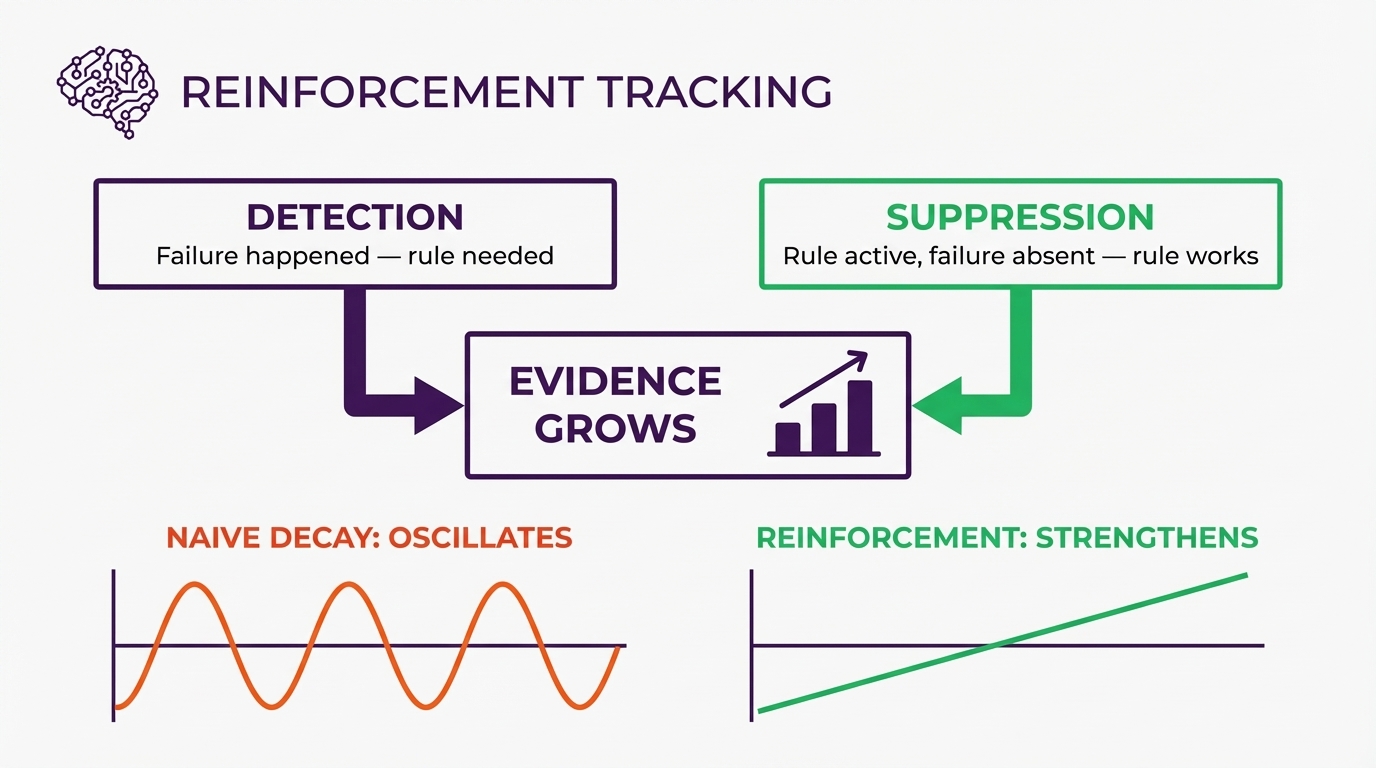
When the nervous system detects a failure pattern, it records a detection - the problem happened. But when a known pattern doesn't fire during a session where its rule was active, that's not nothing. That's evidence the rule is working. The system records a suppression alongside the original detection. Both count as evidence. Both increase confidence.
Rules that successfully suppress their target failure get reinforced by their own success. Only truly dormant rules - patterns that haven't been active at all for 60+ days - decay. And even then, slowly.
And that's what makes this different from a memory plugin. It's not replaying what happened last week. It's tracking what works, what doesn't, and building confidence over time about rules that actually prevent the failures you've hit. Your patterns. Your failure modes. Your projects. Not everyone else's averaged together.
How the data flows in practice
When a new session starts, the UserPromptSubmit hook compiles all learnings (global and project-scoped) into a short digest and injects it as a system message. It also writes a marker file with the pattern IDs that were injected - that's how the system knows which rules were "active" during the session.
During the session itself, the PostToolUse hook fires after every tool call, recording actions into a rolling 20-item window. Silent when normal. Signals when abnormal. No learning happens here - this is pure proprioception.
When the next session starts, the system reads the active patterns marker from last time, runs the detectors against the previous session state, and records what happened. Patterns that fired get logged as detections. Patterns that didn't fire but were in the active set get logged as suppressions. Both persisted to a JSONL file.
Per-project scoping
Learnings live at two levels. Global (~/.claude/metacog-learnings.jsonl) covers patterns that show up everywhere. Project-scoped (<project>/.claude/metacog-learnings.jsonl) covers patterns specific to one codebase. At compilation, both get merged - project-scoped entries take precedence. So a pattern that only shows up in one repo builds evidence for that repo specifically, without polluting the global set.
Getting started
One command:
npx @houtini/metacog --installThat's it. The installer registers both hooks into your Claude Code settings. No manual config editing, no hardcoded file paths. For a project-scoped install (patterns specific to one codebase), add --project.
Metacog runs silently from that point on. You'll only see output when something is abnormal.
What to watch out for
1. Don't expect immediate results. Reinforcement tracking needs a few sessions to build evidence. The proprioceptive layer works from the first tool call, but the cross-session learning takes time to calibrate.
2. The spatial sense can be slow on very large codebases. It runs grep-based import detection, which is fast on most projects but might add latency on monorepos with thousands of files. You can disable it in config if needed.
3. It's Claude Code only. Metacog uses Claude Code's hook and plugin system, so it won't work with Claude Desktop, Cursor, or other clients. That's by design - the plugin hook system is what makes zero-token-cost silence possible. When there's nothing to report, the hooks exit cleanly and cost nothing.
4. The nociceptive interrupt can feel aggressive. When it fires, it literally tells the agent to stop and reflect. Some people find this jarring. But if the agent has hit four consecutive similar errors, being polite about it isn't helping anyone.
Metacog is open source under Apache 2.0. Zero dependencies. The source is the distribution.
Related Articles
Continue reading.
- How-to GuidesHow to Connect Claude to Shopify with MCP (Dev MCP and Storefront Catalog)
- AI at WorkAI isn't taking the jobs, it's taking the boring bits
- Beginner's GuidesWhat is n8n? A Beginner's Guide to Workflows, Pricing and Self-Hosting
- How-to GuidesHow to Use AI for Market Research with Claude
- How-to Guidesn8n MCP: How to Connect Claude Code to n8n and Use Its API Safely
- How-to GuidesHow to Run Qwen3-Coder-Next Locally: My vLLM Settings for Two 48GB RTX 4090s