

Every MCP server that connects to Google Search Console has the same fundamental limitation. The API returns a maximum of 1,000 rows per request. One or two requests in, and you’ve consumed your context window. This problem is quite universal with MCP tool use for Desktop users, so, I’ve been working on fixing it.
Remember my SEO site crawler? I was excited about that project becuase it uses SQlite to store the data that Crawlee outputs. It was essentially an app with MCP protocol support. The MCP simply made it convenient to excute crawls via teh AI assistant – you could actually also use it in command line or analyse the saved SQL output in a later session. Very cool.
Better Search Console is the next iteration on that approach. BSC downloads your entire Search Console dataset (the last 16 months) into its SQLite database, then, it gives Claude pre-built SQL queries in the tool description for the analysis bit.
Claude never sees the raw data, so it’s a massive context widow saver. It’s also hard to be wrong when you’re simply executing SQL queries and analysing the output.
Another really nice to have; I got a chance to play with MCP’s ext-apps framework which makes rendered interactive UIs directly inside Claude Desktop as embedded iframes available. The beginning, in my opnion of the MCP only saas.
Take a look:
What Better Search Console does and how it works
The server syncs every property your service account can access into one SQLite database per property. Full pagination, no row limits. It syncs in the background – for bigger sites it can take a while, and I haven;t got the ability in the MCP app to show something like a progress bar. I recomend you try it out on a smaller website forst, so that you can get a sense of how it works.
Once synced, you get 16 pre-built insight queries covering the things I find myself checking repeatedly: top queries, declining pages, opportunities (queries ranking 5-20 with high impressions), insight into device breakdown, new and lost queries, branded vs non-branded traffic. There’s also a custom SQL tool if you want to write your own queries against the raw data – if you;re that way inclined I’d pull the repo locally so that you can modify it. I’m open to sugegstions if you need a change, make a pull request.
The cool bit, your data stays on your machine. No cloud services or questionalble saas foudner insights garnered from your data. The database indexes so queries run reasonably quickly (depending on your site size). And, there’s automatic data retention that prunes zero-click noise from countries you don’t target, so your databases don’t grow exponentially.
Remember – if Claude has access to your entire search console in a SQL driven framework, think about how combining that with DataforSEO would make grabbing growth insights an awful lot easier. What about using the SEO Crawler too?
Setting it up from scratch
You can get going in these 3 steps. The Google credentials bit takes the longest, but you only have to do it once.
Get your Google credentials
You’ll need a Google service account with a JSON key file. Here’s what to do:
- Go to the Google Cloud Console and create a new project (or use an existing one)
- Navigate to APIs and Services > Library, search for Google Search Console API – enable it
- Go to APIs and Services > Credentials, click Create Credentials > Service account
- Name it something sensible like
search-console-mcpand click through the creation steps - Click on the service account you just created, go to the Keys tab
- Click Add Key > Create new key > JSON and save the file somewhere safe
Google’s credential creation guide covers this in more detail if you get stuck.
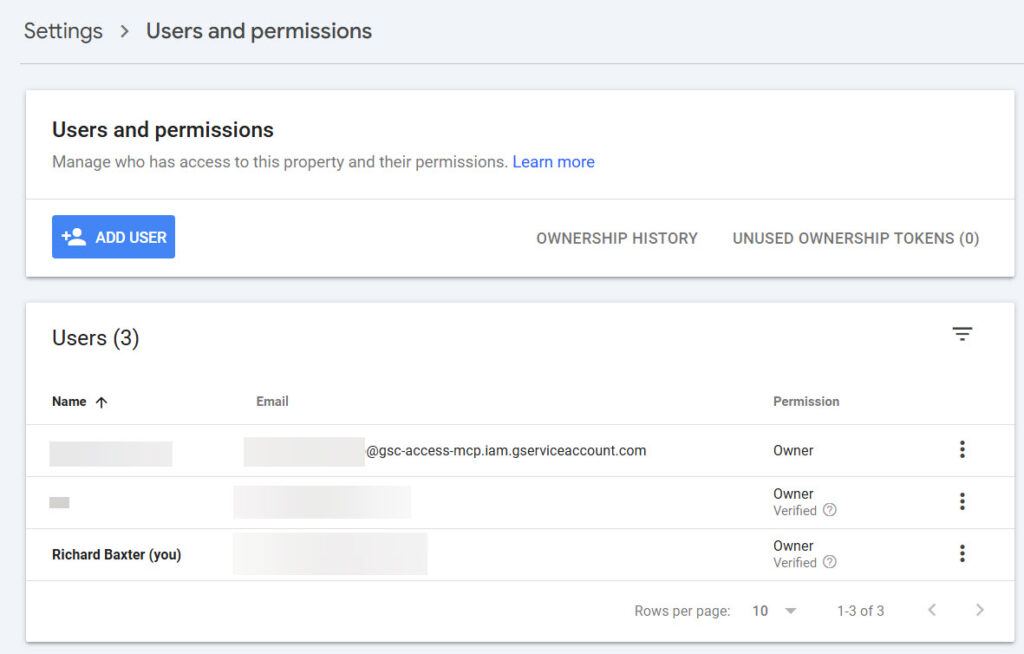
Now the important bit that people miss: the service account needs explicit access to each Search Console property. Open the JSON key file, copy the client_email value (looks like name@project.iam.gserviceaccount.com), then go to Google Search Console and for each property:
Settings > Users and permissions > Add user, paste the email, and set permission to Full.
Skip this step and you’ll get “No properties found” errors. The service account is a separate Google identity. It can’t see anything until you grant it access.
Add to Claude Desktop
Open your Claude Desktop config file:
- Windows:
%APPDATA%\Claude\claude_desktop_config.json - macOS:
~/Library/Application Support/Claude/claude_desktop_config.json
Add this block inside mcpServers:
"better-search-console": {
  "command": "npx",
  "args": ["-y", "@houtini/better-search-console"],
  "env": {
    "GOOGLE_APPLICATION_CREDENTIALS": "/path/to/your-service-account.json"
  }
}
Replace the path with wherever you saved that JSON key file. On Windows, use double backslashes: C:\\Users\\you\\credentials\\gsc-key.json.
Restart and go
Restart Claude Desktop. When you’ve restarted try a prompt like: “Show me my search console data with better search console mcp” – let it sync, and you;re ready to ask questions!
The setup tool discovers your properties, syncs them all in the background, and returns an overview grid with sparkline trends. You might need to ask for an overview dashboard explicitely, but it’s in there and it’s cool. The initial sync time just depends on data volume. 30 seconds for a small site, a few minutes for one with millions of rows. Subsequent syncs are incremental and take seconds.
The tools you get
The server exposes twelve tools:
get_overview shows all your properties at a glance. Clicks, impressions, CTR, average position, percentage changes, and sparkline trends. It’s the “how are things looking” view.
get_dashboard goes deep on a single property. Hero metrics with comparison periods, a trend chart, top queries and pages, country breakdown, ranking distribution buckets, new and lost queries, and a branded/non-branded split if you pass your brand terms.
get_insights runs sixteen pre-built analytical queries. The one I use most is opportunities, which surfaces queries ranking between positions 5 and 20 with high impressions. These are your quick wins: you’re visible but not clicking. The declining_pages and growing_queries reports catch content decay and emerging topics.
compare_periods lets you compare any two date ranges across any dimension. Before and after a site migration. This quarter versus last quarter. Whatever you need.
query_gsc_data accepts any SELECT query against the search_analytics table. Write operations are blocked. Queries without a LIMIT are automatically capped at 10,000 rows so you don’t accidentally flood the context window.
Custom SQL examples
The query_gsc_data tool is the one technical SEOs will spend the most time with. The schema is simple:
search_analytics: date, query, page, device, country, clicks, impressions, ctr, position
Find cannibalisation (multiple pages ranking for the same query):
SELECT query, COUNT(DISTINCT page) as pages, SUM(clicks) as clicks
FROM search_analytics
WHERE date >= '2025-01-01'
GROUP BY query HAVING pages > 1
ORDER BY clicks DESC LIMIT 20
Content decay detection (pages losing traffic):
SELECT page,
  SUM(CASE WHEN date >= date('now', '-28 days') THEN clicks END) as recent,
  SUM(CASE WHEN date BETWEEN date('now', '-56 days') AND date('now', '-29 days') THEN clicks END) as prior
FROM search_analytics
GROUP BY page HAVING prior > 10
ORDER BY (recent * 1.0 / NULLIF(prior, 0)) ASC LIMIT 20
You can write any query you’d normally run against Search Console data, but against the complete dataset rather than a 1,000-row sample.
Troubleshooting
“No properties found”: the service account needs to be added as a user on each property in Search Console. This is the most common setup issue. The email is in the JSON key file under client_email.
Initial sync is slow: expected for large properties. A site with 10 million rows takes 5-10 minutes on first sync. After that, syncs are incremental and finish in seconds. Claude can check in periodically to assess how the sync is progressing, so don;t panic – let it timeout and then ask claude to check in every few minutes to get a status update. Once this is done, you’ve got your data.
Database files are large: run the prune_database tool with preview=true to see how much can be cleaned up. The default retention policy typically removes 50-70% of rows from properties with international traffic.
Overall this has been an interesting exercise – there’s a great deal of scope to develop apps in teh MCP SDK – more so than I think a lot of people realise. Adding depedencies in the Node package is a gamechanger. I hope it catches on!
Links
- npm: @houtini/better-search-console
- GitHub: houtini-ai/better-search-console
- Licence: Apache-2.0
Related Posts
How to Make SVGs with Claude and Gemini MCP
SVG is having a moment. Over 63% of websites use it, developers are obsessed with keeping files lean and human-readable, and the community has turned against bloated AI-generated “node soup” that looks fine but falls apart the moment you try to edit it. The @houtini/gemini-mcp generate_svg tool takes a different approach – Gemini writes the … <a title="Better Search Console: Analyse Your Google Search Console Data with Interactive Dashboards" class="read-more" href="https://houtini.com/better-search-console/" aria-label="Read more about Better Search Console: Analyse Your Google Search Console Data with Interactive Dashboards">Read more</a>

How to Make Images with Claude and (our) Gemini MCP
My latest version of @houtini/gemini-mcp (Gemini MCP) now generates images, video, SVG and html mockups in the Claude Desktop UI with the latest version of MCP apps. But – in case you missed, you can generate images, svgs and video from claude. Just with a Google AI studio API key. Here’s how: Quick Navigation Jump … <a title="Better Search Console: Analyse Your Google Search Console Data with Interactive Dashboards" class="read-more" href="https://houtini.com/better-search-console/" aria-label="Read more about Better Search Console: Analyse Your Google Search Console Data with Interactive Dashboards">Read more</a>

Yet Another Memory MCP? That’s Not the Memory You’re Looking For
I was considering building my own memory system for Claude Code after some early, failed affairs with memory MCPs. In therapy we’re encouraged to think about how we think. A discussion about metacognition in a completely unrelated world sparked an idea in my working one. The Claude Code ecosystem is flooded with memory solutions. Claude-Mem, … <a title="Better Search Console: Analyse Your Google Search Console Data with Interactive Dashboards" class="read-more" href="https://houtini.com/better-search-console/" aria-label="Read more about Better Search Console: Analyse Your Google Search Console Data with Interactive Dashboards">Read more</a>

The Best MCPs for Content Marketing (Research, Publish, Measure)
Most front line content marketing workflow follows the same loop. Find something worth writing about, dig into what’s already ranking on your site, update or write it, run it through SEO checks, shove it into WordPress, then wait to see if anyone reads it. Just six months ago that loop was tedious tab-switching and copy-pasting. … <a title="Better Search Console: Analyse Your Google Search Console Data with Interactive Dashboards" class="read-more" href="https://houtini.com/better-search-console/" aria-label="Read more about Better Search Console: Analyse Your Google Search Console Data with Interactive Dashboards">Read more</a>
How to Set Up LM Studio: Running AI Models on Your Own Hardware
How does anyone end up running their own AI models locally? For me, it started because of a deep interest in GPUs and powerful computers. I’ve got a machine on my network called “hopper” with six NVIDIA GPUs and 256GB of RAM, and I’d been using it for various tasks already, so the idea of … <a title="Better Search Console: Analyse Your Google Search Console Data with Interactive Dashboards" class="read-more" href="https://houtini.com/better-search-console/" aria-label="Read more about Better Search Console: Analyse Your Google Search Console Data with Interactive Dashboards">Read more</a>
Cut Your Claude Code Token Use by Offloading Work to Cheaper Models with Houtini-LM
I built houtini-lm for people worried that their Anthropic bill might be getting out of hand. I’d leave Claude Code running overnight on big refactors, wake up, and wince at the token count. A huge chunk of that spend was going on tasks any decent coding model handles fine – boilerplate generation, code review, commit … <a title="Better Search Console: Analyse Your Google Search Console Data with Interactive Dashboards" class="read-more" href="https://houtini.com/better-search-console/" aria-label="Read more about Better Search Console: Analyse Your Google Search Console Data with Interactive Dashboards">Read more</a>